Email Deliverability Solutions: What Actually Fixes Inbox Placement
Most deliverability tools fix symptoms, not causes. Here's a stack-by-stack breakdown of authentication, list hygiene, warmup, and monitoring — plus what to buy and what to skip in 2026.

TL;DR
- Deliverability is not one product. It's four layers — authentication, list hygiene, sending behavior, and monitoring — and buying a tool for layer 3 while layer 2 is broken wastes money.
- The single highest-ROI fix for most senders is list quality. Bounce rate above 3% and spam complaints above 0.3% will sink you regardless of how good your warmup app is.
- Google and Yahoo's bulk-sender rules (5,000+ messages/day) made SPF, DKIM, DMARC, and one-click unsubscribe non-negotiable. Free tools cover this layer entirely.
- Warmup tools help a brand-new domain. They do not rescue a domain with a bad reputation and they can create artificial engagement signals mailbox providers increasingly discount.
- Budget order: verification first ($20–$100/mo), monitoring second (free–$50/mo), warmup third (bundled with your sender), managed consulting last (only above ~500k sends/month).
What are email deliverability solutions, actually?#
"Email deliverability solutions" is a category label that covers at least five different product types, and vendors deliberately blur the lines between them. Understanding which layer a tool operates on tells you whether it can possibly solve your problem.
Here's the honest breakdown of what exists and what each layer does:
- Authentication tooling — SPF, DKIM, DMARC record generation, validation, and reporting. This proves you are who you claim to be. Mostly free or cheap; often bundled with your DNS provider.
- List hygiene and verification — Removes invalid, role-based, disposable, and spam-trap addresses before you send. This is where hard bounces get killed at the source.
- Reputation warmup and sending controls — Gradual volume ramping, IP/domain rotation, send-time throttling. Prevents the "0 to 5,000 sends overnight" pattern that triggers filters.
- Monitoring and diagnostics — Seed testing, blacklist checks, Google Postmaster Tools, DMARC aggregate report parsing. Tells you what's already broken.
- Managed deliverability services — Humans who audit your setup, negotiate with ISPs, and manage sunset policies. Expensive, and worth it only at real volume.
Most teams shopping for "deliverability solutions" have a layer-2 problem and buy a layer-3 product. The result is a $99/month warmup subscription pointed at a list that's 22% invalid.

Why do your emails land in spam in the first place?#
Mailbox providers score you on a handful of signals, and none of them care about your copy as much as you think.
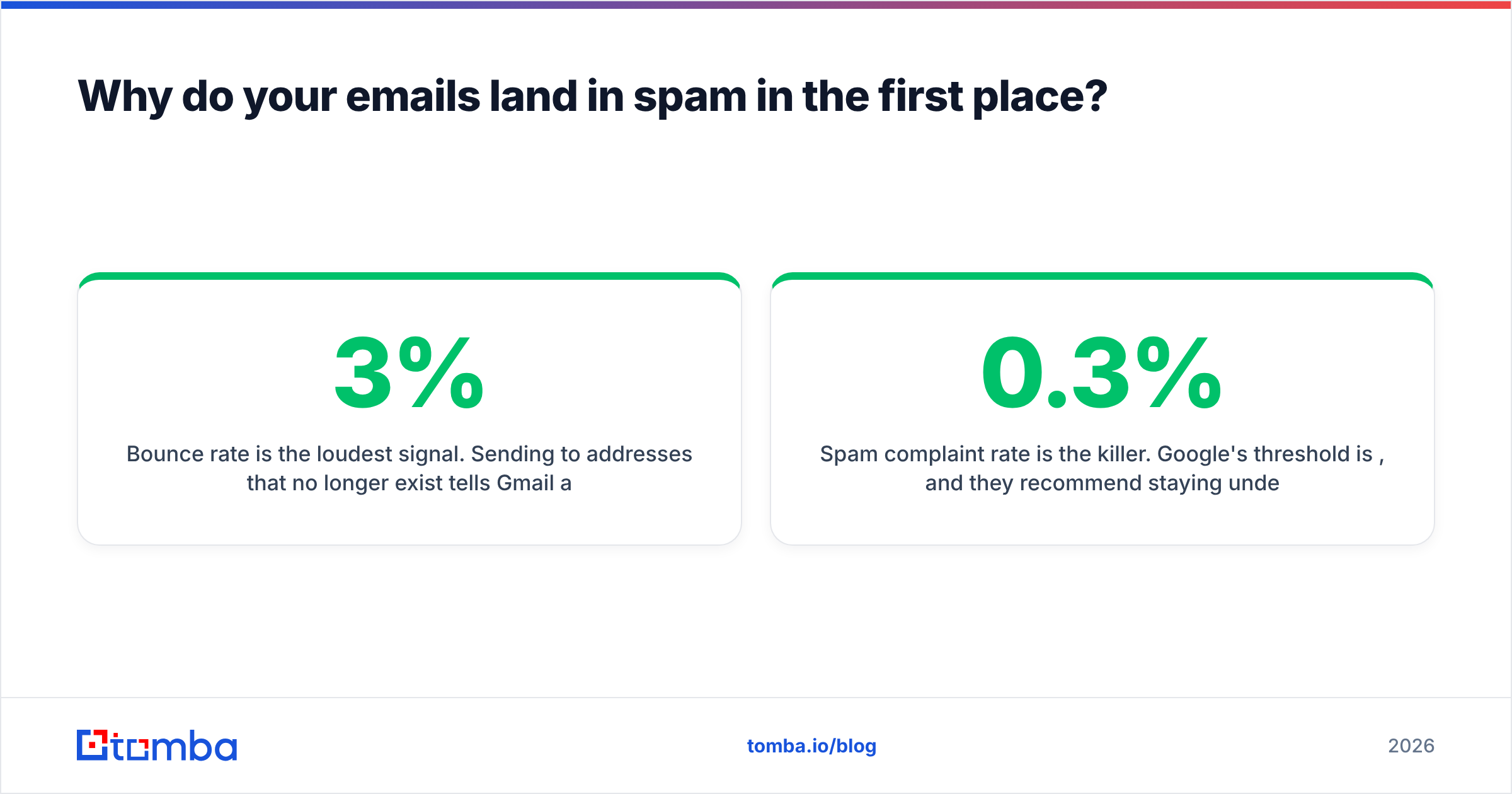
Bounce rate is the loudest signal. Sending to addresses that no longer exist tells Gmail and Outlook you acquired your list carelessly, or scraped it. Once your hard bounce rate crosses roughly 2–3%, filtering tightens fast. Google's own bulk sender guidelines are explicit about keeping invalid recipients low.
Spam complaint rate is the killer. Google's threshold is 0.3%, and they recommend staying under 0.1%. That's three complaints per thousand sends. A single bad campaign to a cold, poorly targeted segment can blow past it.
Authentication failures get you rejected before content is even evaluated. If your SPF record doesn't include the sending service, or your DKIM key rotated without your DNS being updated, you're not fighting a filter — you're failing a gate.
Engagement matters more each year. Opens, replies, and "not spam" clicks push you toward the inbox. Deletes without reading, and long stretches of zero interaction, push you toward the promotions tab and then to spam.
Infrastructure signals round it out: shared IP neighbors, domain age, whether your sending domain has a live website, whether your unsubscribe link is one-click compliant.
Notice that four of five signals trace back to who you're sending to, not how you're sending. That's the core reason email deliverability problems usually start upstream, in your data.
How do the main email deliverability solutions compare?#
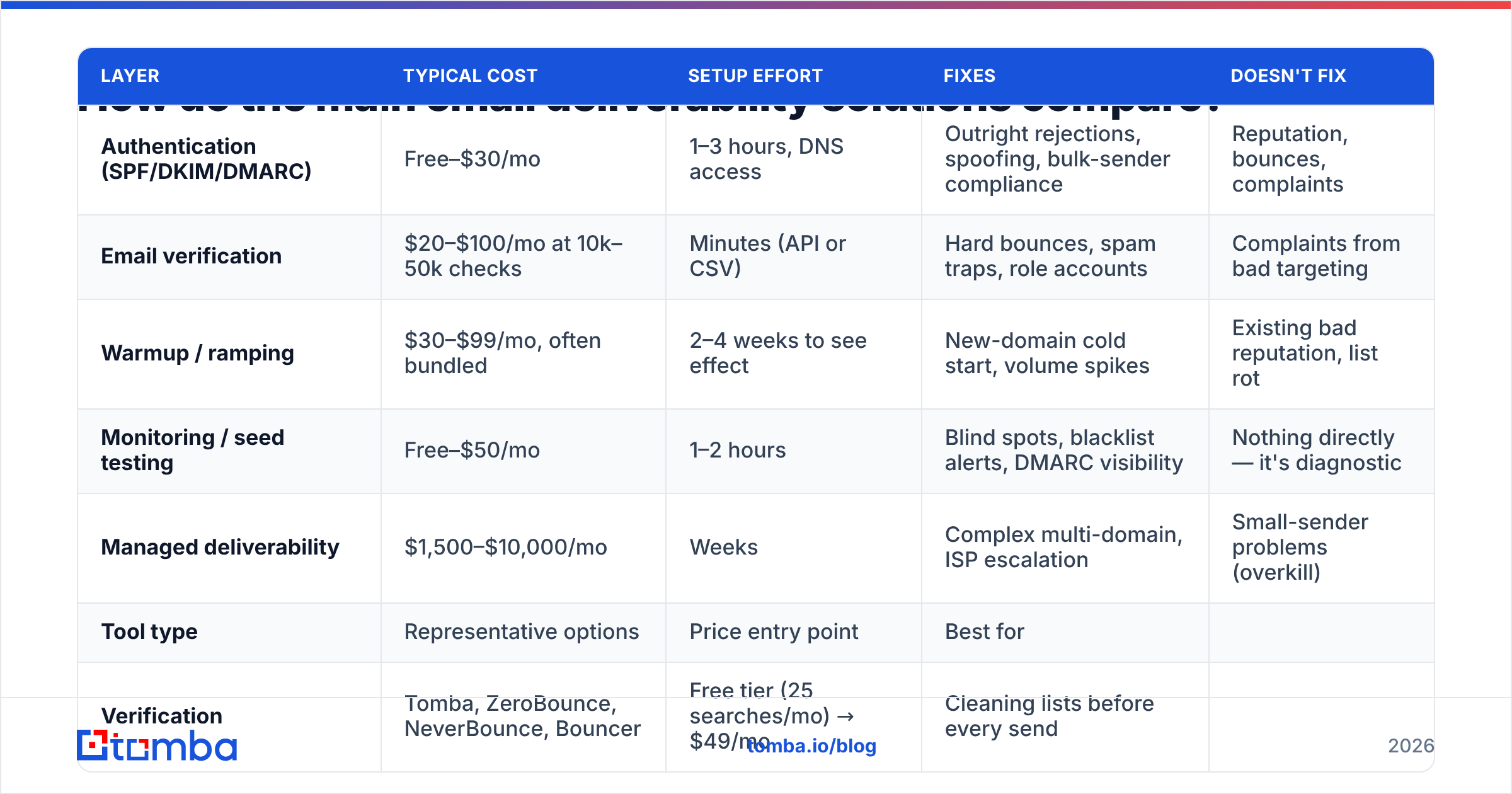
Here's how the major categories stack up on cost, effort, and what they actually fix.
| Layer | Typical cost | Setup effort | Fixes | Doesn't fix |
|---|---|---|---|---|
| Authentication (SPF/DKIM/DMARC) | Free–$30/mo | 1–3 hours, DNS access | Outright rejections, spoofing, bulk-sender compliance | Reputation, bounces, complaints |
| Email verification | $20–$100/mo at 10k–50k checks | Minutes (API or CSV) | Hard bounces, spam traps, role accounts | Complaints from bad targeting |
| Warmup / ramping | $30–$99/mo, often bundled | 2–4 weeks to see effect | New-domain cold start, volume spikes | Existing bad reputation, list rot |
| Monitoring / seed testing | Free–$50/mo | 1–2 hours | Blind spots, blacklist alerts, DMARC visibility | Nothing directly — it's diagnostic |
| Managed deliverability | $1,500–$10,000/mo | Weeks | Complex multi-domain, ISP escalation | Small-sender problems (overkill) |
The pattern is clear once it's laid out: the cheapest layers fix the most damaging problems. Authentication and verification together run under $150/month for most teams and address the two signals mailbox providers weight hardest.
Which tools sit in each layer?#
| Tool type | Representative options | Price entry point | Best for |
|---|---|---|---|
| Verification | Tomba, ZeroBounce, NeverBounce, Bouncer | Free tier (25 searches/mo) → $49/mo | Cleaning lists before every send |
| Data + verification combined | Tomba, BookYourData, Apollo | $49/mo | Teams sourcing and cleaning in one flow |
| Warmup | Instantly, Lemwarm, Warmup Inbox | $30–$97/mo | New domains, cold outbound |
| Monitoring | Google Postmaster Tools, MXToolbox, GlockApps | Free → $79/mo | Any sender above 1k/day |
| DMARC reporting | Postmark DMARC, Dmarcian, EasyDMARC | Free → $30/mo | Anyone with a DMARC record |
Note that verification and data sourcing overlap heavily. If you're building lists rather than importing them, a combined email finder and email verifier removes a handoff step and a second vendor bill. Tomba pricing starts free at 25 searches per month, with Starter at $49/mo, Growth at $99/mo, and Pro at $249/mo — and every found address runs through verification before it reaches you.
BookYourData takes a different approach worth knowing about: prebuilt, human-verified B2B lists with a bounce guarantee, sold by the record rather than by subscription. If you'd rather buy a clean segment than build one, that model saves the sourcing step entirely. It's a genuinely different purchase from an on-demand finder, and which fits depends on whether your ICP is stable enough to buy in bulk.
Do you need a warmup tool, or is it a distraction?#
Warmup tools are the most over-purchased product in this category, and it's easy to see why — they promise a passive fix.
When warmup genuinely helps:
- Brand-new sending domain. A domain registered last week with zero sending history needs to establish a pattern. Ramping from 20 to 200 emails a day over three weeks is real, useful behavior.
- Returning after dormancy. A domain that sent nothing for eight months and suddenly pushes 3,000 messages looks compromised. Ramp back up.
- New ESP or IP migration. Moving from one sending platform to another resets some reputation signals. A gradual cutover beats a hard switch.
- Volume increases above 2x. Doubling your daily send needs a ramp, not a jump.
When warmup does nothing:
- Your domain already has a poor reputation from real complaints. Warmup traffic won't overwrite that history.
- Your list is stale and bouncing. You're warming a pipe that's about to be clogged again.
- Your content triggers filters on its own. Run a spam checker before blaming infrastructure.
There's also a growing caveat: warmup networks generate synthetic engagement by having pooled inboxes open and reply to each other. Mailbox providers have gotten noticeably better at identifying these pools and discounting the signal. Warmup remains useful as a volume ramp; treating it as a reputation manufacturing machine is increasingly a bet against the filters.
Use a warmup calculator to plan the ramp schedule before you subscribe to anything. Often the schedule is all you needed.

What's the correct order to fix deliverability?#
Fix in this sequence. Skipping ahead wastes money on tools that can't help until the earlier layer is solid.
Step 1 — Authenticate completely (day 1). Publish SPF, DKIM, and DMARC. Verify with an SPF checker that your record includes every sending service and stays under the 10-lookup limit. Set DMARC to p=none first, read the reports for two weeks, then move to p=quarantine. Add one-click unsubscribe headers (RFC 8058) if you send bulk.
Step 2 — Clean the list (day 1–2). Run every address through verification. Remove hard bounces, role accounts (info@, sales@, admin@), disposables, and anything flagged as a trap. For domains that accept everything, use a catch-all verifier rather than guessing — catch-all domains are where most "verified" lists quietly hide their invalid addresses.
Step 3 — Check your current standing (day 2). Register the domain in Google Postmaster Tools. Run a blacklist check. Pull a sender reputation baseline before you change sending behavior, so you can tell whether your changes worked.
Step 4 — Fix targeting, then content (week 1). Complaints come from irrelevance more than from words. Tighten the segment before you rewrite the copy. Then check the copy: no link shorteners, no single-image emails, plain-text alternative present, sending domain matching the brand in the signature.
Step 5 — Ramp and monitor (week 2–8). Now warmup makes sense. Increase volume gradually, watch Postmaster daily, and set a rule: if complaint rate crosses 0.1%, stop and re-segment before continuing.
Step 6 — Set a sunset policy (ongoing). Any contact with zero engagement across 90 days of sends gets suppressed. This one policy does more for long-term reputation than any tool, and it costs nothing.
How do you measure whether it's working?#
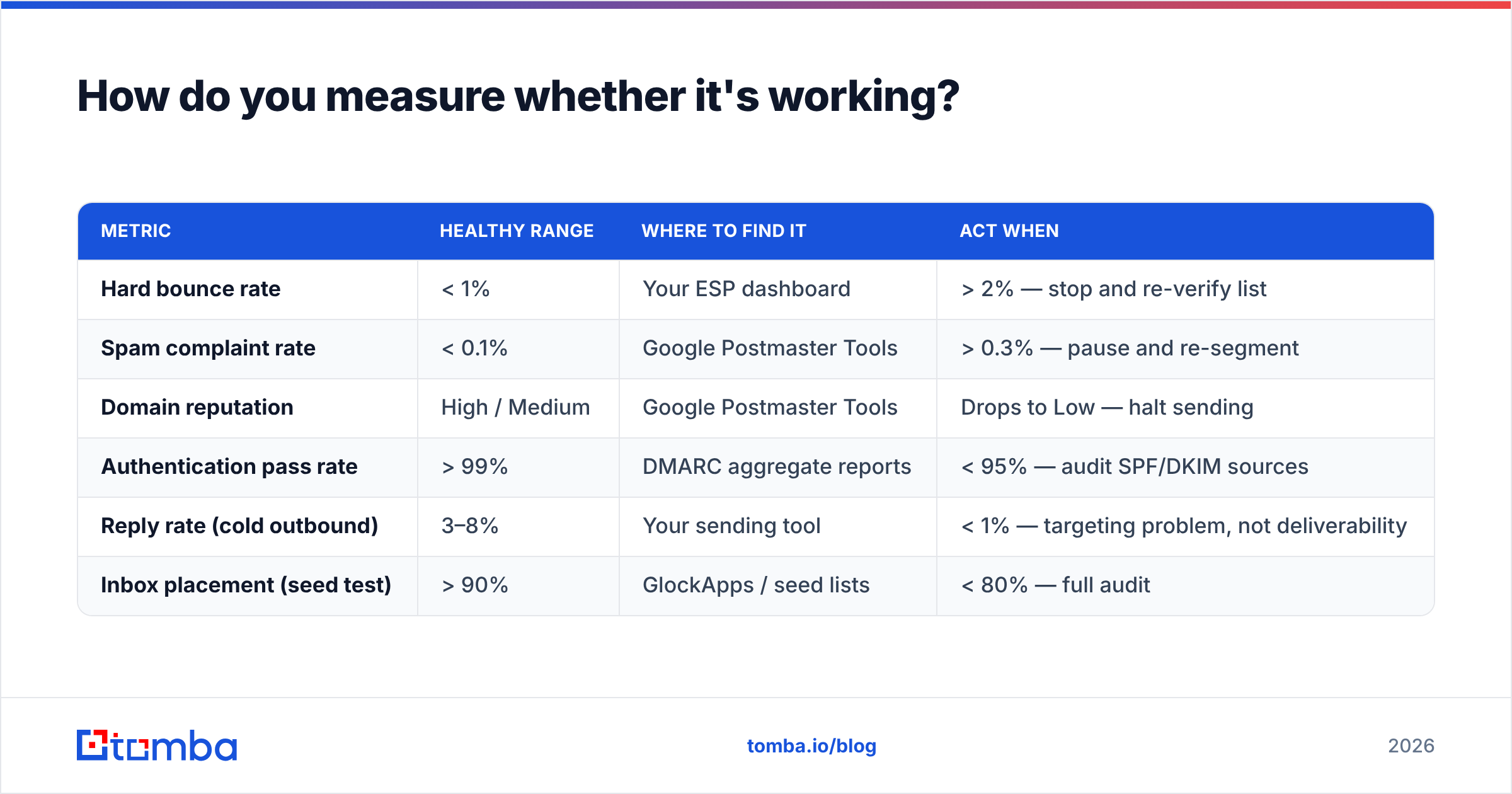
Vanity metrics will mislead you here. Open rate has been unreliable since Apple Mail Privacy Protection started pre-fetching images in 2021 — treat it as directional at best.
Track these instead:
| Metric | Healthy range | Where to find it | Act when |
|---|---|---|---|
| Hard bounce rate | < 1% | Your ESP dashboard | > 2% — stop and re-verify list |
| Spam complaint rate | < 0.1% | Google Postmaster Tools | > 0.3% — pause and re-segment |
| Domain reputation | High / Medium | Google Postmaster Tools | Drops to Low — halt sending |
| Authentication pass rate | > 99% | DMARC aggregate reports | < 95% — audit SPF/DKIM sources |
| Reply rate (cold outbound) | 3–8% | Your sending tool | < 1% — targeting problem, not deliverability |
| Inbox placement (seed test) | > 90% | GlockApps / seed lists | < 80% — full audit |
That last row deserves a caveat: seed tests measure placement for a synthetic panel of inboxes, not your actual recipients. They're useful for detecting a sudden change and useless as an absolute score. If a seed test says 78% and your reply rate is healthy, trust the reply rate.
The reply-rate row is the one people ignore. If your emails are landing in the inbox and nobody replies, that's a response rate problem — a message and targeting issue that no deliverability vendor can solve. Buying more infrastructure to fix a positioning problem is the most expensive mistake in this category.
What about shared vs. dedicated infrastructure?#
A quick decision rule, because this question comes up constantly:
- Under 50,000 emails/month: Use shared IPs from a reputable ESP. You don't send enough volume to establish a dedicated IP's reputation, and an under-used dedicated IP looks suspicious.
- 50,000–200,000/month: Shared is still usually fine. Consider dedicated if your content is unusual (transactional at odd hours, high-volume bursts) or your ESP's shared pool has noisy neighbors.
- Above 200,000/month: Dedicated IP, and a subdomain strategy —
mail.yourbrand.comfor marketing,notify.yourbrand.comfor transactional. Never mix cold outbound with transactional on the same domain.
Cold outbound deserves its own paragraph. If you're doing cold email at any volume, use a separate domain — not a subdomain — from your primary business domain. A yourbrand-hq.com sending domain that gets burned doesn't take yourbrand.com down with it. This is standard practice among high-volume outbound teams and it costs $12/year.
Which deliverability solution should you actually buy?#
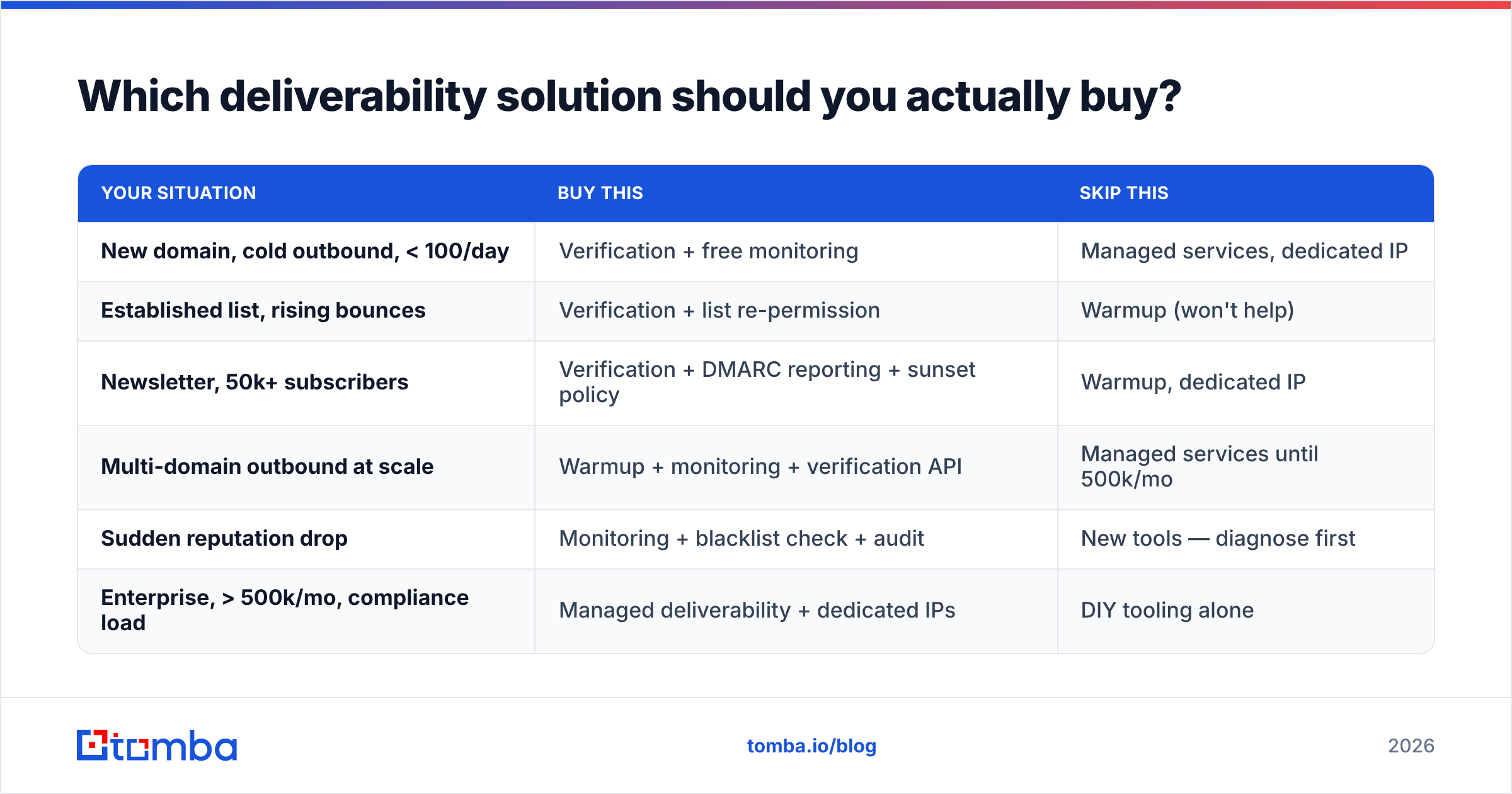
Match the spend to the failure mode:
| Your situation | Buy this | Skip this |
|---|---|---|
| New domain, cold outbound, < 100/day | Verification + free monitoring | Managed services, dedicated IP |
| Established list, rising bounces | Verification + list re-permission | Warmup (won't help) |
| Newsletter, 50k+ subscribers | Verification + DMARC reporting + sunset policy | Warmup, dedicated IP |
| Multi-domain outbound at scale | Warmup + monitoring + verification API | Managed services until 500k/mo |
| Sudden reputation drop | Monitoring + blacklist check + audit | New tools — diagnose first |
| Enterprise, > 500k/mo, compliance load | Managed deliverability + dedicated IPs | DIY tooling alone |
The consistent answer across five of six rows is verification. It's the cheapest line item and it addresses the signal with the highest weight. Everything else is situational.
If you're sourcing contacts as part of the same workflow, doing it with a tool that verifies at the point of discovery saves you from importing problems you then pay to remove. That's the practical argument for combining the steps rather than stitching two vendors together — and for using the Tomba API to run find-and-verify inside your existing pipeline instead of as a manual batch job. For teams working from existing spreadsheets, bulk verify handles the cleanup pass on lists you already own.
Where should you start this week?#
Do this in order, and most of it is free:
- Publish or fix SPF, DKIM, and DMARC. Verify with a checker, not by eye.
- Register in Google Postmaster Tools and note your current domain reputation.
- Verify your entire active list. Remove everything that isn't deliverable.
- Suppress anyone with zero engagement in 90 days.
- Re-check reputation in two weeks. If it moved, keep going. If it didn't, audit targeting before buying anything.
Steps 1, 2, 4, and 5 cost nothing but time. Step 3 is where a paid tool earns its keep — and it's the step with the largest effect on the metric mailbox providers weight most.
If your list quality is the bottleneck — and for most senders it is — start by fixing the data at the source. Tomba's Email Finder returns professional email addresses with verification built into the lookup, so contacts land in your CRM already checked rather than getting cleaned after the damage is done. The free tier gives you 25 searches a month to test accuracy against addresses you can independently confirm, and paid plans start at $49/mo. Test it on a segment you already know the answers for — that's the only benchmark that matters.
Further reading on the standards themselves: G2's deliverability software category for peer reviews across vendors, and the DMARC specification overview if you want to understand what your reports are actually telling you.
Related guides#
Ready to find emails that actually work?
Join 150,000+ professionals who stopped guessing and started sending. Free credits on signup — no credit card required.
Get the Tomba newsletter
Practical outbound tactics and product updates — once every two weeks.
About the author