Email Deliverability Tools in 2026: What Actually Works
Most deliverability tools measure the same three things and charge wildly different prices for it. Here's what each category actually fixes, what it can't, and the stack that keeps cold email landing in 2026.

TL;DR
- Most "email deliverability tools" fall into four categories: seed/placement testers, warmup networks, DNS and authentication monitors, and list hygiene. They solve different problems and buying the wrong one wastes budget.
- No tool fixes deliverability. Tools measure it. The fixes are authentication, list quality, sending volume discipline, and content that earns replies.
- Bounce rate is the single biggest lever you control before you send. A list at 2% bounce behaves completely differently from one at 12%.
- Google and Yahoo's bulk sender rules (5,000+ messages/day) made SPF, DKIM, DMARC, one-click unsubscribe, and a sub-0.3% spam complaint rate non-negotiable.
- The practical 2026 stack: a verifier at the data layer, a DNS monitor for authentication, one placement tester for spot checks, and Google Postmaster Tools for ground truth. Total cost can stay under $150/month.
What are email deliverability tools?#
Email deliverability tools are software that measures, monitors, or improves whether your messages reach the inbox instead of spam or the void. That is the whole category. The confusion comes from vendors in four very different buckets all using the same phrase in their marketing.
Think of it like car maintenance. A diagnostic scanner tells you the check-engine light means a misfire on cylinder three. It does not fix the misfire. Most deliverability tools are scanners. A few — verifiers, warmup services — are actual repairs, and even then they only address one specific failure mode.
Here is what each bucket actually does:
- Seed and placement testers (GlockApps, MailReach, Mail-Tester, Inbox Insight). You send a campaign to a panel of seed accounts across Gmail, Outlook, Yahoo, and corporate domains. The tool reports where each copy landed. Diagnostic only.
- Warmup networks (Instantly, Warmbox, Lemwarm, Mailreach). Your mailbox joins a pool that exchanges and positively engages with each other's messages, building a positive-engagement history on a new domain. Partial repair, with real caveats.
- Authentication and DNS monitors (Valimail, EasyDMARC, dmarcian, Postmark's free tools). They watch SPF, DKIM, DMARC alignment, blacklist status, and parse DMARC aggregate reports. Diagnostic plus configuration help.
- List hygiene and verification (Tomba, ZeroBounce, NeverBounce, Bouncer). They validate that an address exists and accepts mail before you send. This is the only category that reliably removes the largest single cause of reputation damage.
There is a fifth bucket that markets itself as deliverability but is really infrastructure: dedicated IP providers, mailbox providers like Google Workspace and Microsoft 365, and sending platforms. Those matter, but "buy a dedicated IP" is bad advice for anyone sending under roughly 100,000 messages per month — you will never generate enough volume to build reputation on it.
Why do most deliverability tools not fix anything?#
Because inbox placement is decided by the receiving mailbox provider, and none of these tools have any influence there. Gmail's filter looks at your domain and IP reputation, authentication results, message content, and — above all — how recipients behave. Opens, replies, "not spam" clicks, deletes without reading, and spam complaints. A dashboard cannot change any of that.
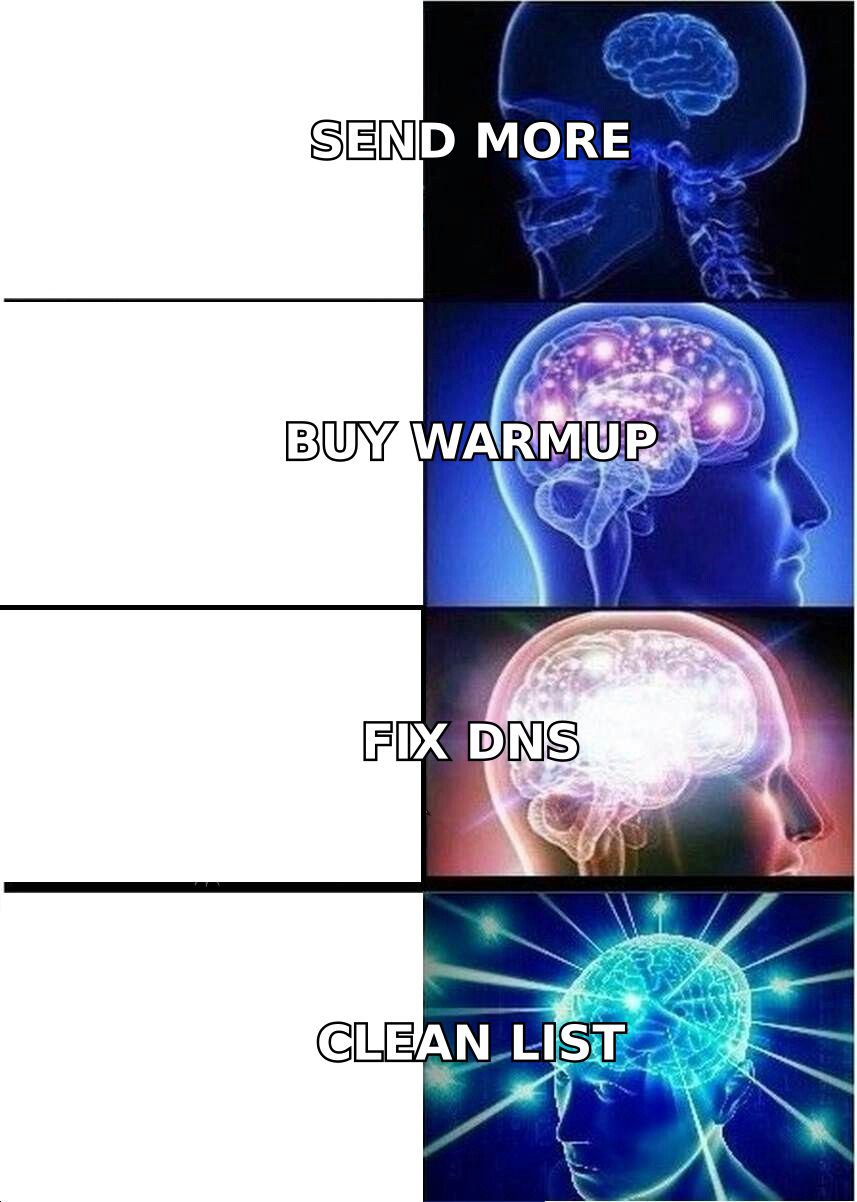
The practical consequence: if your placement test comes back 40% spam, the tool has told you something you could have guessed. What you do next is where the actual work is, and it is almost never something you buy.
Run through this order of operations before you renew any deliverability subscription:
- Authentication. SPF, DKIM, and DMARC published and aligned. Google's bulk sender requirements have required this for all high-volume senders since 2024. Check yours with an SPF checker — it takes 30 seconds and costs nothing.
- List quality. Bounces above 3% signal to Gmail that you are working from purchased or stale data. This is the biggest single lever and the cheapest to pull.
- Volume ramp. A brand-new domain sending 500 messages on day one gets filtered regardless of how clean the list is. Ramp over 4–6 weeks.
- Content and reply rate. If nobody replies, engagement signals decay and placement slides even on a well-authenticated domain.
- Complaint rate. Keep it under 0.3%, which is Google's stated threshold. One bad segment can blow past it in a single send.
Notice that three of those five are process, not product. That is why teams who buy a $200/month monitoring suite and change nothing else see no improvement — they bought a thermometer and expected it to lower the fever.
Which email deliverability tools are worth paying for?#
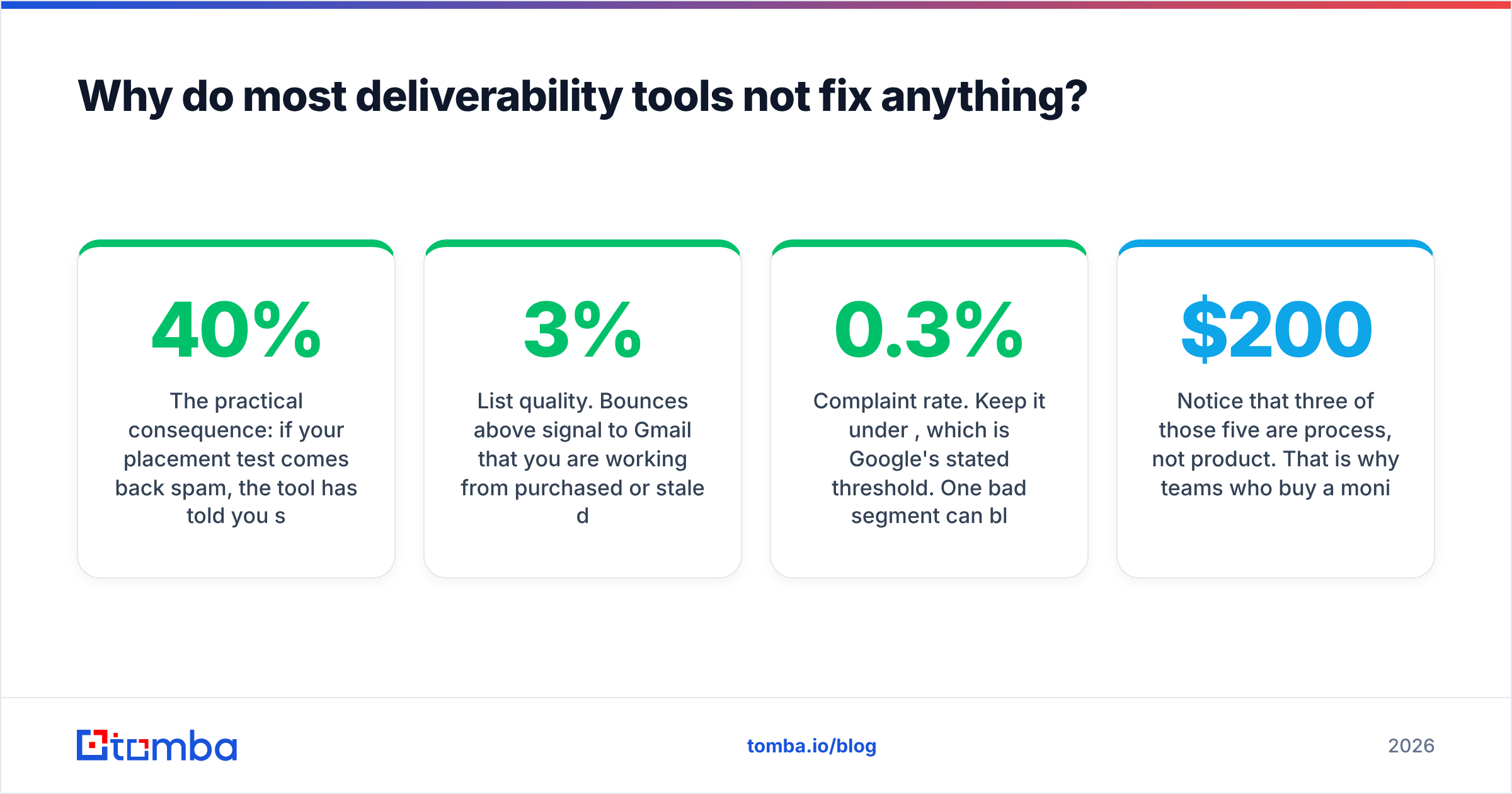
Here is an honest side-by-side of the four categories, with what you actually get and where each one fails.
| Category | Representative tools | Typical price | What it actually does | Where it fails |
|---|---|---|---|---|
| Seed / placement testing | GlockApps, MailReach, Mail-Tester | Free–$79/mo | Shows inbox vs spam vs missing across providers | Seed accounts have no real engagement history; results skew optimistic vs. real recipients |
| Warmup networks | Instantly, Warmbox, Lemwarm | $20–$99/mo | Builds engagement history on new mailboxes | Providers increasingly detect reciprocal warmup pools; not a fix for bad lists |
| DNS / auth monitoring | EasyDMARC, dmarcian, Valimail | Free–$150/mo | Parses DMARC reports, flags SPF/DKIM breakage, blacklist alerts | Tells you nothing about content or engagement filtering |
| List verification | Tomba, ZeroBounce, Bouncer | $49/mo (Tomba Starter) | Removes invalid, role, and risky addresses pre-send | Cannot validate catch-all domains with certainty (nobody can) |
| Postmaster dashboards | Google Postmaster Tools, Microsoft SNDS | Free | Ground-truth domain reputation and spam rate from the provider itself | Requires 100+ daily messages to a provider before data appears |
The last row is the one most teams skip and shouldn't. Google Postmaster Tools is free, comes directly from the entity making the filtering decision, and reports your actual spam complaint rate and domain reputation. Every paid placement tester is an approximation of what Postmaster tells you for nothing.
The tradeoff with Postmaster is the volume threshold: you need roughly 100+ messages per day to a given provider before it populates. Below that, seed testing is your only visibility, which is exactly the market that placement testers serve.
What about warmup tools specifically?#
Warmup deserves a caveat that vendors do not print on the box. Reciprocal warmup networks work by having thousands of mailboxes send each other short, generic messages and mark them as important. Mailbox providers have gotten measurably better at spotting these patterns — near-identical message structure, unnatural reply timing, clusters of domains that only ever mail each other.
Warmup is still worth running on a genuinely new domain for the first 3–4 weeks. It is not worth running forever as a reputation crutch on a domain that keeps sending to bad addresses. Use the warmup calculator to set a sane ramp schedule, then let real campaign engagement take over.

How much does list quality actually affect deliverability?#
More than every other tool in this list combined, and it is measurable in a way the others are not.
Every hard bounce is a direct negative signal. Gmail and Microsoft both treat elevated bounce rates as evidence that a sender is not managing a permission-based list. Spam traps — recycled addresses that were once real and are now repurposed as filter bait — are worse: a single hit on a pristine trap can drop domain reputation for weeks.
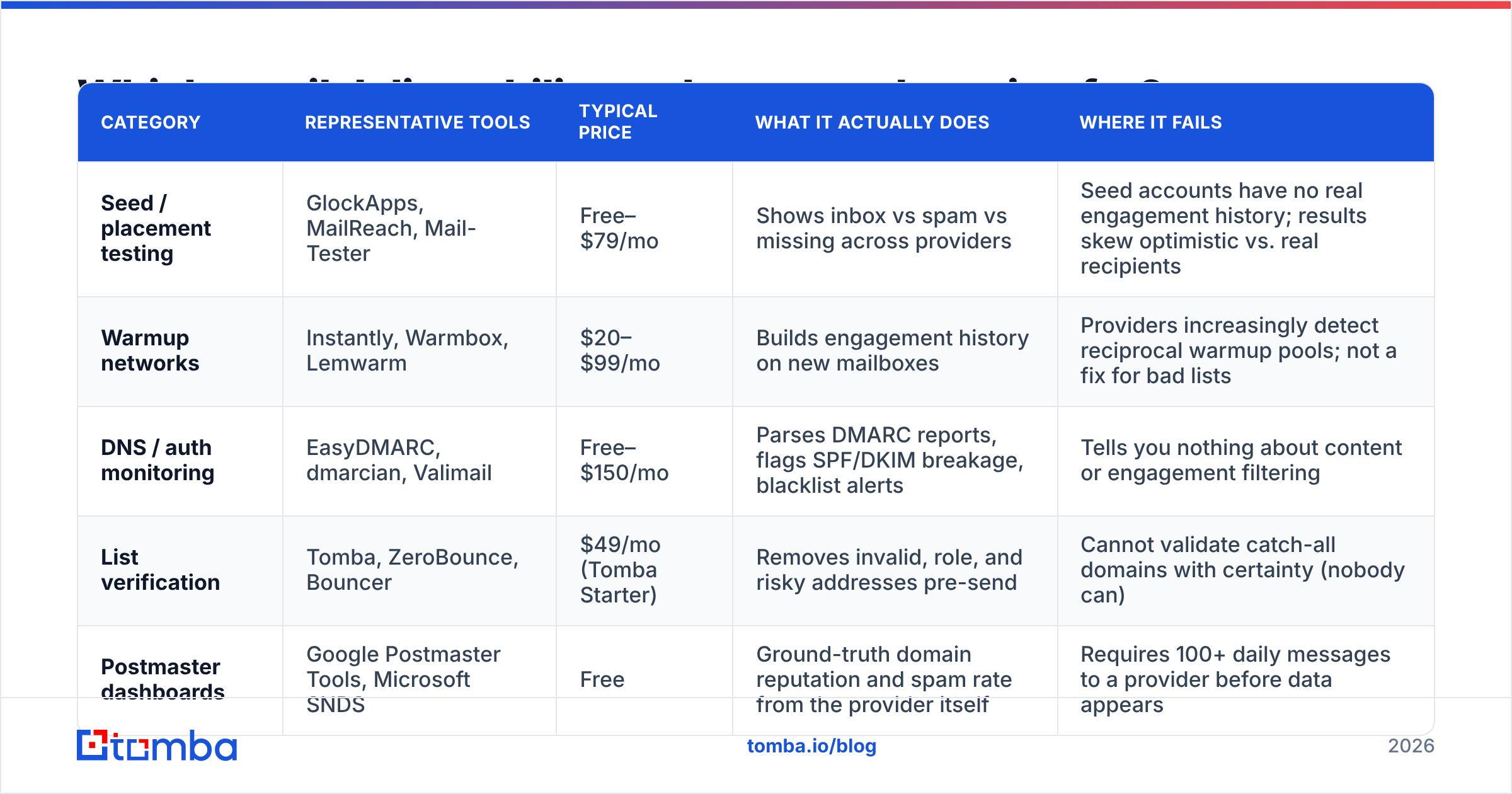
The math is unforgiving. Take a 10,000-address list:
- At 2% bounce: 200 bounces. Well within tolerance for most providers. Reputation holds.
- At 8% bounce: 800 bounces. You are in the range where Gmail begins throttling and Outlook starts routing to Junk by default.
- At 15% bounce: 1,500 bounces. Expect hard blocks from at least one major provider within two or three sends.
- Any spam-trap hit: disproportionate damage regardless of the surrounding bounce rate.
This is why verification sits upstream of every other tool. A placement tester run against a list with 12% invalid addresses is measuring a problem it cannot see the cause of.
Two practical moves fix most of it. First, verify at collection time rather than in a panicked batch the night before a campaign — an email verifier run through the API at form submission or CRM import keeps the list clean permanently. Second, handle catch-all domains explicitly. Roughly 15–20% of B2B domains accept all mail at the SMTP layer, which means standard verification returns "unknown." A dedicated catch-all verifier applies pattern confidence and secondary signals to sort those into likely-valid and likely-risky instead of leaving you to guess.
The upstream version of this is not verifying a bad list at all — it is sourcing addresses that were correct when you got them. Pulling contacts through an email finder that validates at discovery time means the verification step becomes a confirmation rather than a rescue operation.
What does a sensible 2026 deliverability stack look like?#
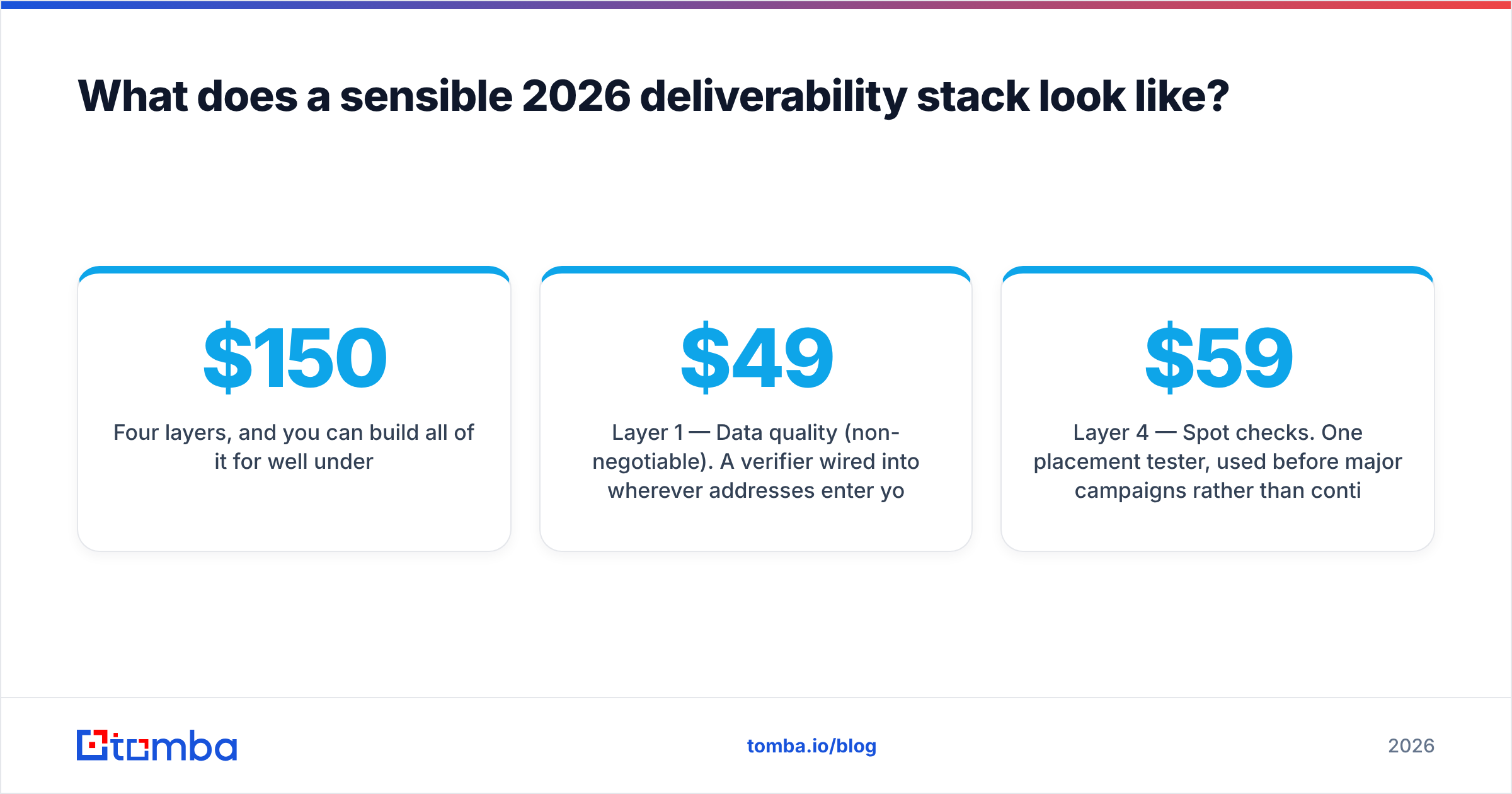
Four layers, and you can build all of it for well under $150/month.
Layer 1 — Data quality (non-negotiable). A verifier wired into wherever addresses enter your system. Tomba's pricing starts free at 25 searches/month for testing, then $49/mo Starter, $99/mo Growth, and $249/mo Pro for teams running bulk enrichment. ZeroBounce and Bouncer are credible alternatives if you only need verification and no discovery. If you need both finding and verifying in one place, consolidating saves a vendor relationship and a data handoff.
Layer 2 — Authentication monitoring. Publish SPF, DKIM, and DMARC. Then monitor them, because DNS changes made by a marketing team six months from now will silently break alignment. EasyDMARC and dmarcian both have usable free tiers for a single domain. Understanding email deliverability fundamentals and sender reputation mechanics matters more here than any specific vendor choice.
Layer 3 — Ground truth. Google Postmaster Tools plus Microsoft SNDS. Free. Check weekly. If domain reputation drops from High to Medium, something changed in the last 7 days and you have a narrow window to find it.
Layer 4 — Spot checks. One placement tester, used before major campaigns rather than continuously. Mail-Tester's free tier catches obvious content and authentication problems. GlockApps at around $59/mo makes sense if you send across many providers and need per-provider breakdowns. Running a spam checker on the actual copy before launch catches trigger phrases and structural issues that seed tests would otherwise attribute to reputation.
What is deliberately absent: dedicated IPs (wrong for most senders), enterprise deliverability consultancies (fix the free stuff first), and permanent warmup subscriptions (diminishing returns after the ramp period).
How do you diagnose a deliverability drop?#
When placement falls, work backward through the stack in this order. It takes about an hour and usually finds the cause.
- Check Postmaster first. Did domain reputation change? Did spam complaint rate spike? This dates the problem and narrows the cause immediately.
- Check authentication. Run SPF, DKIM, and DMARC lookups. A DNS record edited by another team is the single most common silent breakage.
- Check blacklists. Run your sending domain and IP through a blacklist checker. Listings on Spamhaus or Barracuda need direct delisting requests, not waiting.
- Check the list. What changed about your data source in the last month? A new scrape, a purchased list, or an unverified import from a partner is a frequent culprit.
- Check volume. Did you ramp too fast, or resume after a pause? Providers treat a dormant domain suddenly sending 5,000/day as suspicious.
- Check content and reply rate. If replies dropped before placement did, engagement decay is the cause and better copy is the fix.
Most drops resolve at step 2 or step 4. Very few require a new tool.
Are free deliverability tools good enough?#
For most teams sending under 20,000 messages a month, yes — with one exception.
Free covers authentication checking, blacklist monitoring, basic placement testing via Mail-Tester, and Postmaster/SNDS for ground truth. That is genuinely a functional stack. Vendors selling $300/month deliverability suites to a five-person sales team are selling dashboards, not outcomes.
The exception is verification. Free verifiers are either heavily rate-limited, cache stale results, or — worse — retain and resell the lists you upload. Read the data policy before you paste 5,000 prospect addresses into a free tool. Paid verification at $49–99/month is the one line item where the cost is clearly justified by what it prevents. Peers like BookYourData take a different route to the same goal by supplying pre-verified contact data at purchase time, which suits teams who would rather buy a clean list than build and maintain one; the underlying principle is identical — never send to an address nobody checked.
The other thing worth paying for, once volume justifies it, is bulk processing. Running 50,000 addresses through a UI one at a time is not a workflow. A bulk email finder or an API integration turns list hygiene into a scheduled job instead of a pre-campaign fire drill.
Where should you start this week?#
If you do nothing else, do these three things in order.
Publish and verify SPF, DKIM, and DMARC on your sending domain. Then enroll in Google Postmaster Tools and check your domain reputation. Then verify your existing list and see what percentage comes back invalid — if it is above 5%, you found your problem and no other tool was going to tell you anything more useful.
Deliverability is not a product you buy. It is the compound result of clean data, correct authentication, disciplined volume, and messages people actually want. Tools help you see where you stand. They do not stand there for you.
Start with the data layer. Tomba's Email Finder surfaces verified professional addresses by domain, name, or company — validated at the point of discovery rather than salvaged afterward — so your list starts clean instead of needing rescue. Try it free with 25 searches a month, no card, and see what your current bounce rate would have been.
Related guides#
Ready to find emails that actually work?
Join 150,000+ professionals who stopped guessing and started sending. Free credits on signup — no credit card required.
Get the Tomba newsletter
Practical outbound tactics and product updates — once every two weeks.
About the author