Email Deliverability Tracking: The 2026 Metrics Playbook
Open rates lie. Delivered rates lie harder. Here's the 2026 stack for email deliverability tracking that actually tells you whether your cold email reached the inbox or the spam folder.
TL;DR
- "Delivered" only means the receiving server accepted your message. It says nothing about whether the message landed in the inbox, Promotions, or spam. That gap is the entire problem.
- Real email deliverability tracking needs four data layers: SMTP-level acceptance, seed/placement testing, mailbox provider feedback (Google Postmaster Tools, Microsoft SNDS), and engagement signals segmented by provider.
- Apple Mail Privacy Protection inflates open rates by 30-60% depending on your audience, so open rate is a trend indicator at best and a lie at worst.
- Bounce rate above 3% and spam complaint rate above 0.30% are the two thresholds that trigger throttling at Gmail and Microsoft. Track them weekly, not monthly.
- The cheapest deliverability fix is upstream: verify the list before you send. A 2% bounce rate costs nothing to prevent and thousands to recover from.
What Is Email Deliverability Tracking, Exactly?#
Email deliverability tracking is the practice of measuring where your messages actually land — inbox, Promotions tab, spam folder, or nowhere — rather than just whether a server accepted them.
Think of it like shipping a package. The courier scanning "delivered" at the warehouse dock is not the same as the box sitting on your customer's desk. Most email dashboards only show you the dock scan. Everything after that — sorting, routing, the possibility that a mailroom clerk threw it in the bin — happens in a black box you have to instrument yourself.
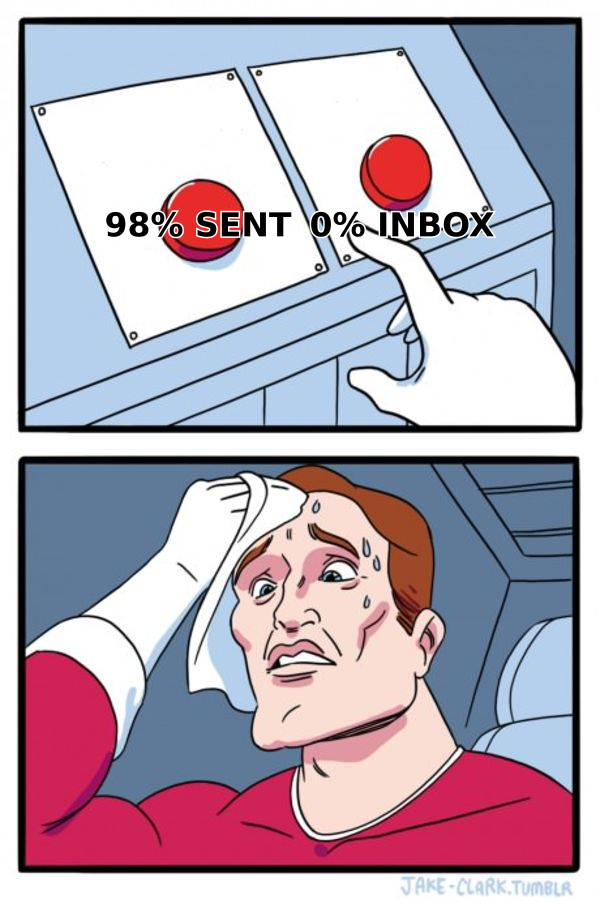
The distinction matters because the two numbers diverge badly. A campaign can show a 98.4% delivered rate and a 41% inbox placement rate simultaneously. The receiving MTA accepted every message with a 250 OK, then Gmail's classifier quietly filed most of them under spam. Your ESP dashboard has no visibility into that second step, and it never will, because mailbox providers do not report folder placement back to senders.
So email deliverability tracking is fundamentally an inference exercise. You assemble signals from four independent sources and triangulate.
Which Metrics Actually Matter in 2026?#
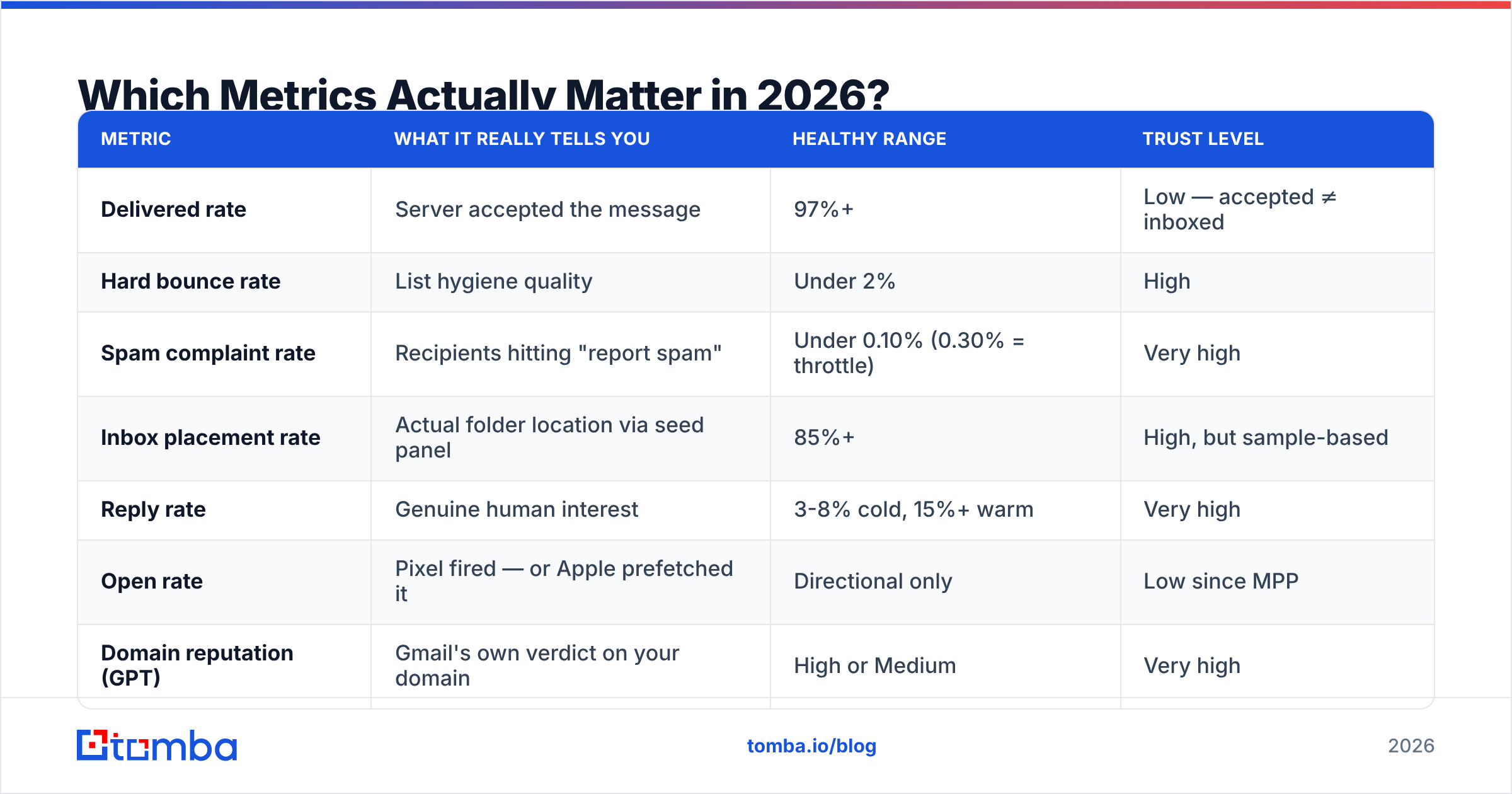
Here is the honest hierarchy. Not every metric deserves a dashboard tile.
| Metric | What it really tells you | Healthy range | Trust level |
|---|---|---|---|
| Delivered rate | Server accepted the message | 97%+ | Low — accepted ≠ inboxed |
| Hard bounce rate | List hygiene quality | Under 2% | High |
| Spam complaint rate | Recipients hitting "report spam" | Under 0.10% (0.30% = throttle) | Very high |
| Inbox placement rate | Actual folder location via seed panel | 85%+ | High, but sample-based |
| Reply rate | Genuine human interest | 3-8% cold, 15%+ warm | Very high |
| Open rate | Pixel fired — or Apple prefetched it | Directional only | Low since MPP |
| Domain reputation (GPT) | Gmail's own verdict on your domain | High or Medium | Very high |
Three notes on this table.
Spam complaint rate is the metric with teeth. Google and Yahoo formalized a 0.30% complaint threshold in their 2024 bulk sender requirements, and enforcement has only tightened since. Sustained complaints above 0.30% mean Gmail starts routing your mail to spam by default. The recommended operating target is 0.10%. If you send 10,000 emails a week, that is ten complaints — the difference between fine and throttled is smaller than most teams assume.
Reply rate is the only metric that cannot be faked by a bot or a privacy proxy. Security scanners click links. Apple prefetches images. Nothing but a human writes a reply. If you track one number for cold outbound, track response rate segmented by mailbox provider.
Domain reputation is free and most teams never check it. Google Postmaster Tools shows you Gmail's own verdict on your sending domain — High, Medium, Low, or Bad — plus spam rate, IP reputation, and authentication pass rates. It requires one DNS TXT record to set up and it is the single highest-signal free tool in the stack.
Why Is Your Open Rate Lying to You?#
Because Apple made it lie, on purpose, starting in 2021 — and the distortion compounds every year as Apple Mail's share grows.
Mail Privacy Protection prefetches and caches remote images for every message a user receives, whether or not they open it. Your tracking pixel fires from an Apple proxy server in a datacenter, not from the recipient's device. The result: an artificial open registered for a message nobody read, with a spoofed IP and a useless timestamp.
The practical impact depends on your audience mix. B2B lists skewing toward founders, designers, and startup operators run heavy on Apple Mail — inflation of 40-60% is common. Enterprise lists dominated by Outlook see less, maybe 15-25%. Either way you cannot compare open rates across campaigns unless the audience composition is identical.
What to do instead:
- Segment opens by mailbox provider. Gmail and Outlook opens are still roughly meaningful. Apple opens are noise. Track them separately or you are averaging signal with garbage.
- Watch open-to-reply ratio, not open rate. If opens climb while replies stay flat, you are collecting prefetches, not readers.
- Use link clicks with bot filtering. Corporate security scanners (Proofpoint, Mimecast, Barracuda) click every link within seconds of delivery. Filter clicks that happen under 10 seconds after send and clicks from known scanner user agents.
- Add a plaintext-friendly reply CTA. A question that invites a one-line answer converts pixel-blind readers into measurable signal.
- Run seed tests on a fixed cadence. Placement data does not depend on recipient behavior at all, which is exactly why it survives privacy changes.
How Do You Set Up a Deliverability Tracking Stack?#
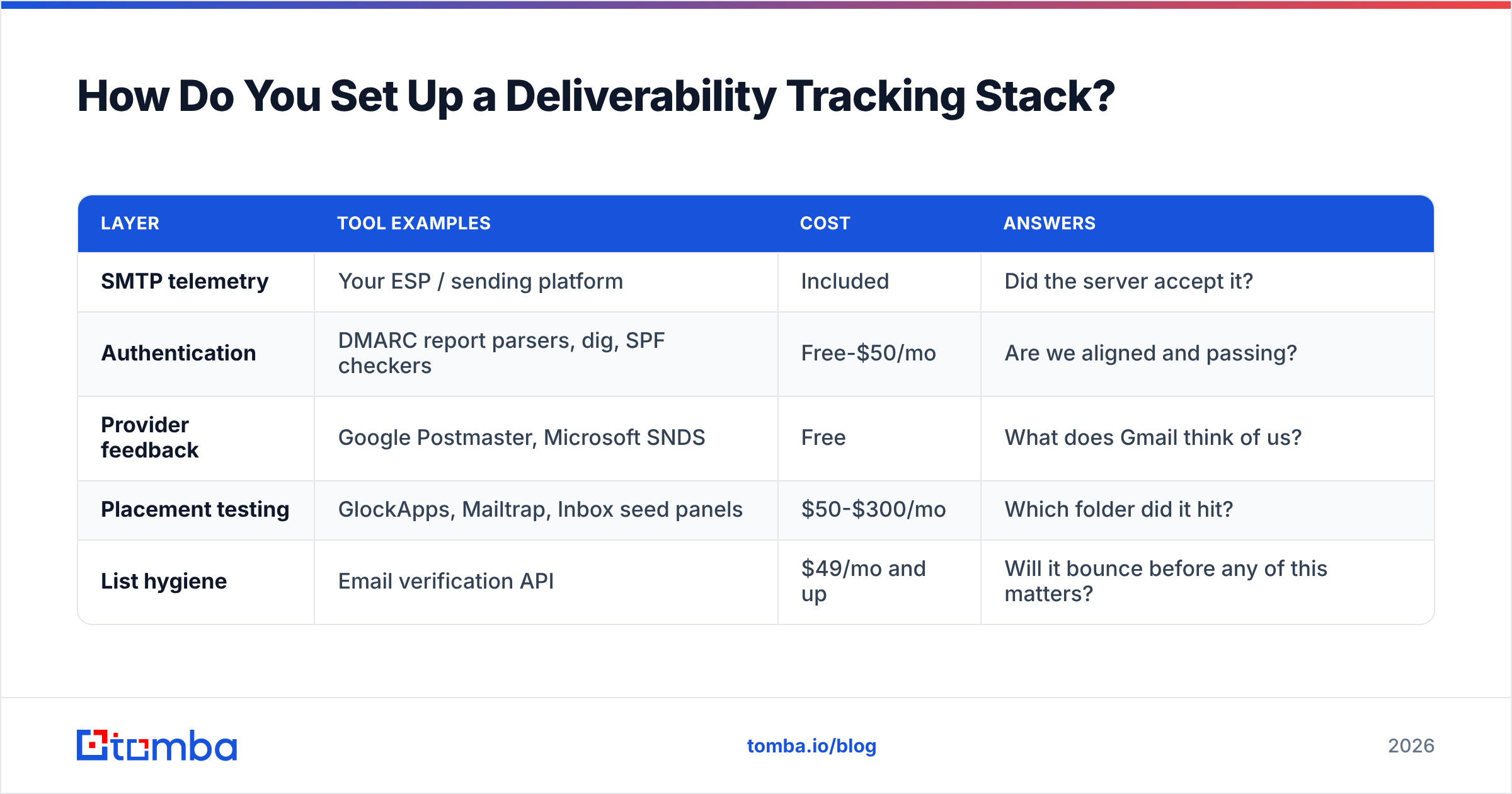
Four layers, each answering a question the layer above cannot.
Layer 1 — SMTP and bounce telemetry. Your sending platform already gives you this. What matters is parsing bounce codes properly rather than lumping everything into one number. A 550 5.1.1 (mailbox does not exist) is a list-quality problem. A 421 4.7.0 (temporary throttle) is a reputation problem. A 550 5.7.1 with "blocked using Spamhaus" is an emergency. Same category in most dashboards, three completely different responses.
Layer 2 — Authentication monitoring. SPF, DKIM, and DMARC are table stakes now, but the failure mode is silent. A forwarding rule or a new sending tool can break alignment without anyone noticing until volume drops. Set up DMARC aggregate reporting (rua=) and actually read the XML, or pipe it into a parser. Verify your SPF record whenever you add a new sending source — every new tool is a new chance to blow past the 10-lookup limit and fail SPF entirely.
Layer 3 — Provider feedback. Google Postmaster Tools for Gmail, Microsoft SNDS and JMRP for Outlook/Hotmail. Both are free. GPT gives you domain reputation, spam rate, and authentication pass rate over time. SNDS gives you complaint rates and filter results per IP. Neither is optional if Gmail and Outlook make up most of your list — and for B2B, they make up nearly all of it.
Layer 4 — Seed and placement testing. A seed list is a panel of real mailboxes across Gmail, Outlook, Yahoo, and corporate domains that you include in every send. After the send, an automated check reports which folder each message landed in. This is the only direct measurement of inbox placement that exists. It is sample-based and imperfect — seed accounts have no engagement history, which skews Gmail results optimistic — but a 30% drop in seed placement week over week is a real signal every time.
| Layer | Tool examples | Cost | Answers |
|---|---|---|---|
| SMTP telemetry | Your ESP / sending platform | Included | Did the server accept it? |
| Authentication | DMARC report parsers, dig, SPF checkers | Free-$50/mo | Are we aligned and passing? |
| Provider feedback | Google Postmaster, Microsoft SNDS | Free | What does Gmail think of us? |
| Placement testing | GlockApps, Mailtrap, Inbox seed panels | $50-$300/mo | Which folder did it hit? |
| List hygiene | Email verification API | $49/mo and up | Will it bounce before any of this matters? |
What Should You Fix Before You Track Anything?#
List quality. Every time. Tracking a bad list is like installing a fuel gauge on a car with a hole in the tank — accurate data about a problem you should have fixed first.
Bounce rate is the input variable that drives most of the downstream metrics. Gmail and Microsoft both weight invalid-recipient rate heavily in reputation scoring. Cross 3% and you are not just losing those specific sends — you are degrading placement for every message that follows, including to valid addresses that would have converted.
The math is unforgiving. Send 5,000 emails to a list with 8% dead addresses and you generate 400 hard bounces in a single campaign. That single campaign can push a previously healthy domain from High to Low reputation in Postmaster Tools, and recovery takes weeks of low-volume, high-engagement sending.
Prevention costs almost nothing by comparison. Running a list through an email verifier before send catches syntax errors, dead mailboxes, role accounts, disposable domains, and spam traps. For domains that accept everything, a dedicated catch-all verifier applies pattern confidence scoring instead of returning a useless "unknown."
Then there is where the addresses came from in the first place. Scraped lists and cheap bulk databases carry recycled spam traps — addresses that were once real, went dormant, and were reactivated by the provider specifically to catch senders using stale data. Hitting one is an instant reputation event with no bounce warning. Sourcing addresses through a verified email finder that checks each result at lookup time avoids the entire category.

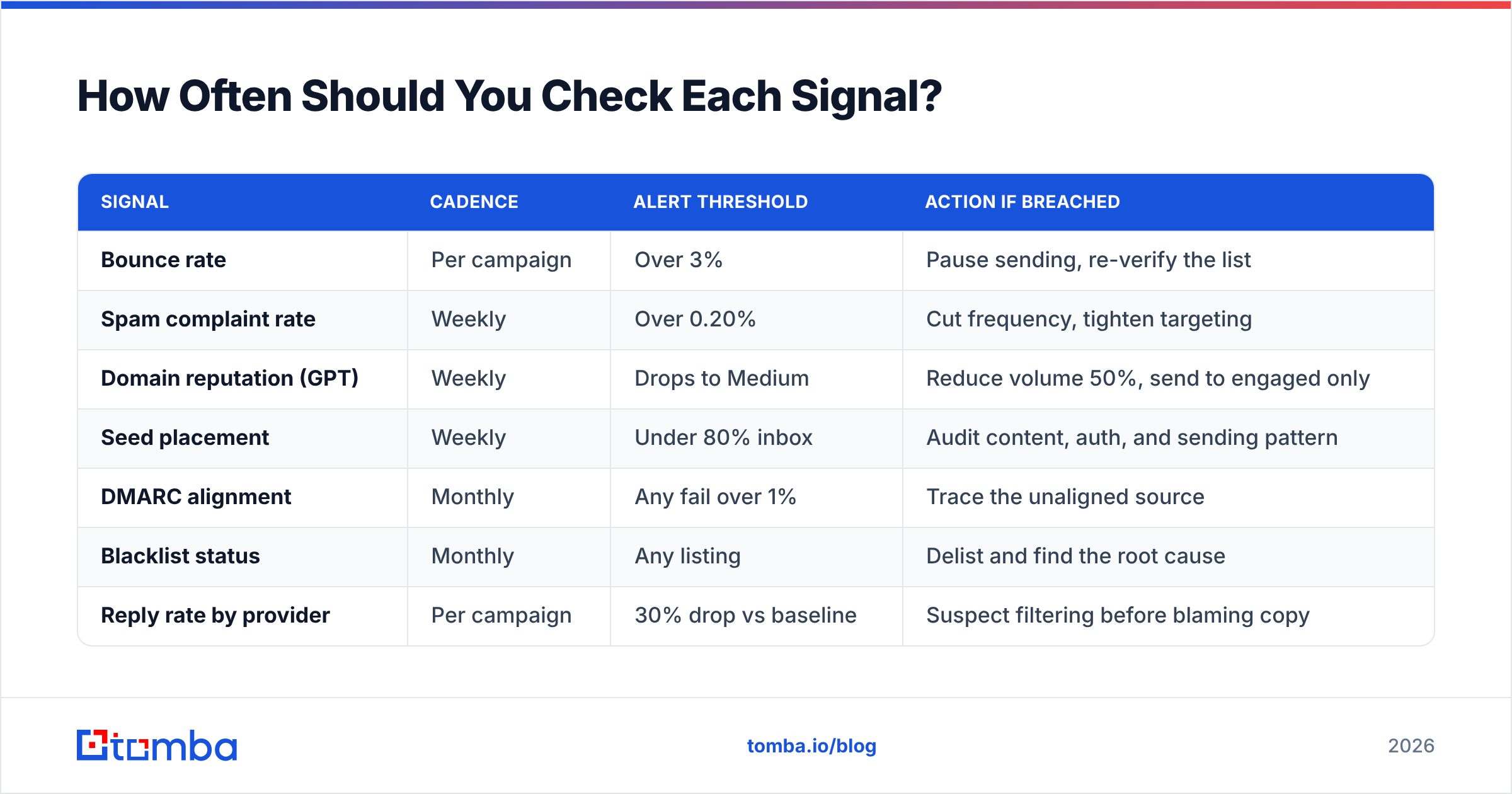
How Often Should You Check Each Signal?#
Deliverability degrades gradually and then collapses suddenly. The monitoring cadence should match how fast each signal moves.
| Signal | Cadence | Alert threshold | Action if breached |
|---|---|---|---|
| Bounce rate | Per campaign | Over 3% | Pause sending, re-verify the list |
| Spam complaint rate | Weekly | Over 0.20% | Cut frequency, tighten targeting |
| Domain reputation (GPT) | Weekly | Drops to Medium | Reduce volume 50%, send to engaged only |
| Seed placement | Weekly | Under 80% inbox | Audit content, auth, and sending pattern |
| DMARC alignment | Monthly | Any fail over 1% | Trace the unaligned source |
| Blacklist status | Monthly | Any listing | Delist and find the root cause |
| Reply rate by provider | Per campaign | 30% drop vs baseline | Suspect filtering before blaming copy |
The last row is the one experienced operators watch hardest. A sharp provider-specific reply drop — Gmail replies collapse while Outlook stays flat — is almost never a copy problem. Copy performs badly everywhere at once. Provider-specific collapse means filtering, and it usually shows up in reply data a week before it shows up anywhere else.
What About Warmup and Sending Volume?#
Warmup is the ramp, not the destination. New domains and new mailboxes need a graduated volume increase so providers can build a reputation profile gradually instead of seeing a cold domain fire 2,000 messages on day one.
A workable ramp for a fresh mailbox: 10-20 sends per day in week one, roughly doubling weekly until you hit 40-50 per mailbox per day. Do not exceed 50 per mailbox per day for cold outbound regardless of what your platform allows. Scale by adding mailboxes, not by raising per-mailbox volume — that is how the teams sending real volume do it without burning domains.
Two things a warmup schedule cannot fix:
- Bad content. Warmup builds tolerance, not immunity. Spam-triggering copy still gets filtered from a warm domain.
- Bad lists. A perfectly warmed domain sending to 10% dead addresses still tanks. Sequence matters: verify first, warm second, scale third.
Consistency beats volume. A domain sending 200/day every weekday builds a stronger profile than one sending 1,000 on Monday and nothing until Thursday. Providers read variance as a bot signal. Model your ramp with a warmup calculator before you commit to a schedule, and check your copy through a spam checker so you are not warming a domain just to send filtered messages from it.
What Do You Do When Placement Drops?#
Work the diagnosis in order of blast radius. Most teams start with content because it is the most fun to change; content is almost never the cause of a sudden drop.
- Check authentication first. SPF, DKIM, DMARC. A single misconfigured DNS record explains a cliff-edge drop better than any content theory. Confirm with an SPF checker and read your latest DMARC aggregate report.
- Check blacklists. Spamhaus, SURBL, Barracuda. Listings are usually resolvable within 24-72 hours once you fix the underlying cause. Verify your domain and sending IP with a blacklist checker.
- Check the list source. What changed in the last 14 days? A new data vendor, a scraped batch, an imported CSV from a colleague — new sources are the most common cause of sudden bounce and complaint spikes.
- Check volume and pattern. Did you scale up, add mailboxes, or change sending windows? Providers notice pattern breaks faster than content changes.
- Check complaint rate by segment. One badly targeted segment can drag the whole domain down. Isolate and cut it rather than reducing volume across the board.
- Then look at content. Link count, image-to-text ratio, tracking-domain reputation, spam-trigger phrases. Real, but last in line.
Recovery is slower than the fall. Once reputation drops, expect two to four weeks of reduced volume to engaged recipients only before placement normalizes. Some teams abandon the domain and start fresh, which works but costs you the reputation history you spent months building.
How Does Data Quality Change the Whole Equation?#
Everything above is downstream of one question: are these real addresses that real people check?
You can build a perfect four-layer monitoring stack and still fail if the list is bad. Conversely, teams with excellent data often coast on minimal monitoring for years, because there is nothing to detect. Deliverability tooling is mostly a way of finding out how bad your data is — after you have already sent to it.
That is why the verification step belongs before the send, not after the bounce report. Options in this space range from pure verification services to full contact databases. BookYourData sells pre-verified B2B contacts with a bounce guarantee, which suits teams that want a ready list rather than a lookup workflow. Tools like Tomba sit on the sourcing side: domain search pulls verified addresses for a company, bulk verify cleans lists you already have, and the email verification API puts the check inline at form submission or CRM import so bad data never enters the system.
The pattern that works: verify at the point of entry, re-verify anything older than 90 days, and treat every new data source as suspect until a campaign proves otherwise. Contact data decays roughly 22-30% per year as people change jobs, according to industry churn estimates widely cited by HubSpot and other CRM vendors. A list you cleaned last January is meaningfully worse today.
What Does a Practical Weekly Routine Look Like?#
Fifteen minutes, once a week, catches almost everything before it becomes a crisis.
- Monday: Open Google Postmaster Tools. Check domain reputation and spam rate. Anything below High gets investigated the same day.
- Monday: Pull last week's bounce and complaint rates per campaign. Flag anything over 2% bounce or 0.20% complaints.
- Wednesday: Review seed placement results. Compare against the prior two weeks, not just the prior one — you are looking for trend, not noise.
- Wednesday: Check reply rate by mailbox provider. Provider-specific drops mean filtering, not copy.
- Friday: Verify any new addresses added during the week before they enter next week's sends.
- Monthly: Blacklist scan, DMARC report review, and re-verification of any list segment older than 90 days.
That is the whole discipline. Not glamorous, but the teams whose cold email works are running some version of this loop, and the teams whose domains keep burning are not running any of it.
Start Where the Leverage Is#
Every deliverability problem traces back to two things: whether the address is real, and whether the person wanted the message. Monitoring tells you when you got those wrong. Verification stops you from getting the first one wrong in the first place.
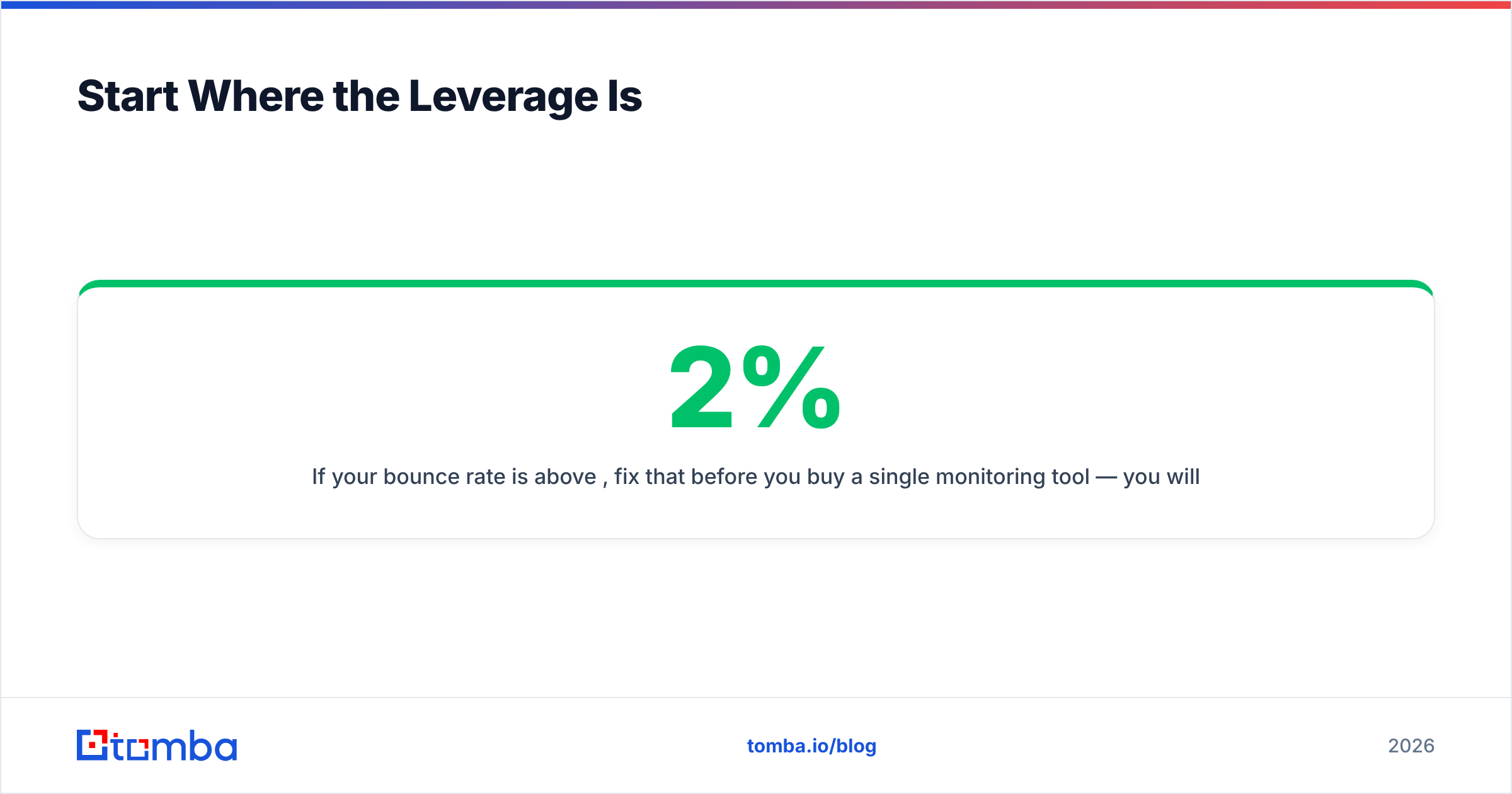
If your bounce rate is above 2%, fix that before you buy a single monitoring tool — you will get more placement improvement from one verification pass than from six months of dashboards. Tomba's Email Finder returns addresses with a confidence score and SMTP-level verification at lookup time, so bad data never reaches your sequencer. The free tier includes 25 searches a month to test accuracy against your own known-good contacts, and paid plans start at $49/mo on Starter with 5,000 credits, $99/mo on Growth, and $249/mo on Pro — full breakdown on the Tomba pricing page.
Verify first. Track second. Scale third. In that order, deliverability stops being a recurring emergency and starts being a number you glance at on Monday morning.
Related guides#
Ready to find emails that actually work?
Join 150,000+ professionals who stopped guessing and started sending. Free credits on signup — no credit card required.
Get the Tomba newsletter
Practical outbound tactics and product updates — once every two weeks.
About the author