Email Delivery Best Practices: 12 Rules That Fix Inbox Placement
Most deliverability advice stops at "set up SPF and DKIM." That gets you past the door, not into the inbox. Here are the 12 rules that actually move placement in 2026 — with the thresholds, the ramp numbers, and the mistakes that quietly kill domains.
TL;DR
- Authentication (SPF, DKIM, DMARC) is table stakes in 2026 — it gets you accepted, not delivered. Placement is decided by engagement and complaint rate.
- Keep spam complaints under 0.10% at Gmail and Microsoft. Above 0.30% you are effectively throttled, and recovery takes weeks, not days.
- Bounce rate is the single fastest way to burn a new domain. Verify every address before the first send; anything over 3% hard bounces reads as list-buying behavior.
- Ramp new sending domains over 4–6 weeks. Volume spikes are a stronger negative signal than bad copy.
- Reputation lives at the domain level, not the mailbox level. One bad subdomain can drag the whole root down if DMARC alignment is sloppy.
What do "email delivery best practices" actually mean in 2026?#
Delivery and deliverability are two different things, and conflating them is why most teams misdiagnose their problem.
Delivery is whether the receiving server accepted your message. If you sent 1,000 emails and 970 didn't bounce, your delivery rate is 97%. Deliverability — the thing you actually care about — is whether those 970 landed in the primary inbox or in spam. Most ESP dashboards report the first number and stay silent about the second, which is how teams end up celebrating a 98% "delivery rate" while their reply rate sits at 0.4%.
Since Google and Yahoo's bulk-sender rules took effect in February 2024, and Microsoft's equivalent enforcement rolled out for high-volume senders, the floor has moved. Authentication is no longer a differentiator. Every legitimate sender has SPF, DKIM, and DMARC. What separates inbox from spam now is behavioral: how recipients react, how consistently you send, and how clean your list was before you ever hit send.
Here is the honest hierarchy, in order of impact:
- List quality — invalid, stale, or scraped addresses generate bounces and spam-trap hits. This causes more damage than every other factor combined.
- Complaint rate — one person clicking "report spam" costs you roughly what 1,000 opens earn back. Mailbox providers weight it that heavily.
- Engagement signals — replies, forwards, and "move to inbox" actions are strong positives. Opens are weak and increasingly unreliable post-MPP.
- Sending consistency — a domain that sends 200/day for 90 days outperforms one that sends 6,000 in a single Tuesday burst.
- Authentication and alignment — required, but binary. You either pass or you don't; passing harder doesn't help.
- Content and links — matters at the margin. Bad copy on a clean, warm domain still lands. Great copy on a burned domain does not.
Notice where authentication sits. Most deliverability guides spend 80% of their word count on DNS records — the thing that takes an afternoon and then never changes again.
Which authentication records do the major providers actually require?#
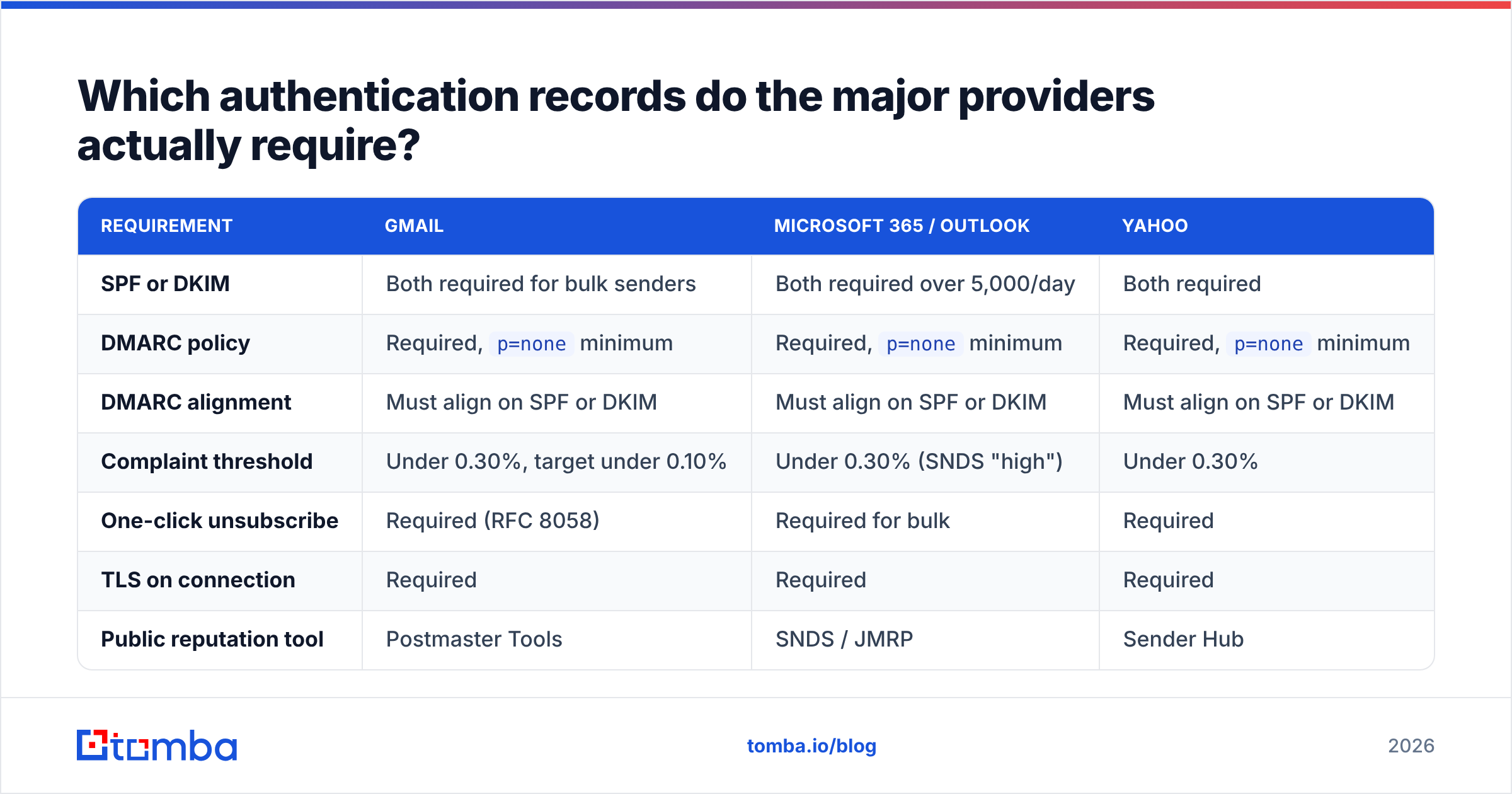
All three, aligned, no exceptions for bulk senders. But the enforcement thresholds and the failure behavior differ by provider, which matters when you are triaging a placement problem.
| Requirement | Gmail | Microsoft 365 / Outlook | Yahoo |
|---|---|---|---|
| SPF or DKIM | Both required for bulk senders | Both required over 5,000/day | Both required |
| DMARC policy | Required, p=none minimum |
Required, p=none minimum |
Required, p=none minimum |
| DMARC alignment | Must align on SPF or DKIM | Must align on SPF or DKIM | Must align on SPF or DKIM |
| Complaint threshold | Under 0.30%, target under 0.10% | Under 0.30% (SNDS "high") | Under 0.30% |
| One-click unsubscribe | Required (RFC 8058) | Required for bulk | Required |
| TLS on connection | Required | Required | Required |
| Public reputation tool | Postmaster Tools | SNDS / JMRP | Sender Hub |
A few practical notes on this table.
p=none is the minimum, not the goal. It tells receivers "report failures but do nothing." Moving to p=quarantine and then p=reject once your reports are clean is what actually stops spoofers from borrowing your domain's reputation. Read the DMARC specification overview if you want the mechanics; the short version is that alignment — the visible From domain matching the authenticated domain — is the part people get wrong, not the record syntax itself.
Verify your records before you trust them. A SPF checker will catch the two most common failures: more than 10 DNS lookups in the chain (which causes a permerror and silently fails everything), and a stale include: for an ESP you stopped using two years ago.
Google's own sender guidelines are the authoritative source and get updated quietly — worth re-reading each quarter rather than relying on a blog post from 2024.
How do you warm up a new domain without burning it?#
Slowly, consistently, and with replies — not just sends.
A cold domain has no reputation, which mailbox filters treat as mildly suspicious rather than neutral. The warmup period is where you build a history of "this sender emails people who want to hear from them." Sending 500 messages on day one from a domain registered last week is the clearest possible signal that you are not that sender.
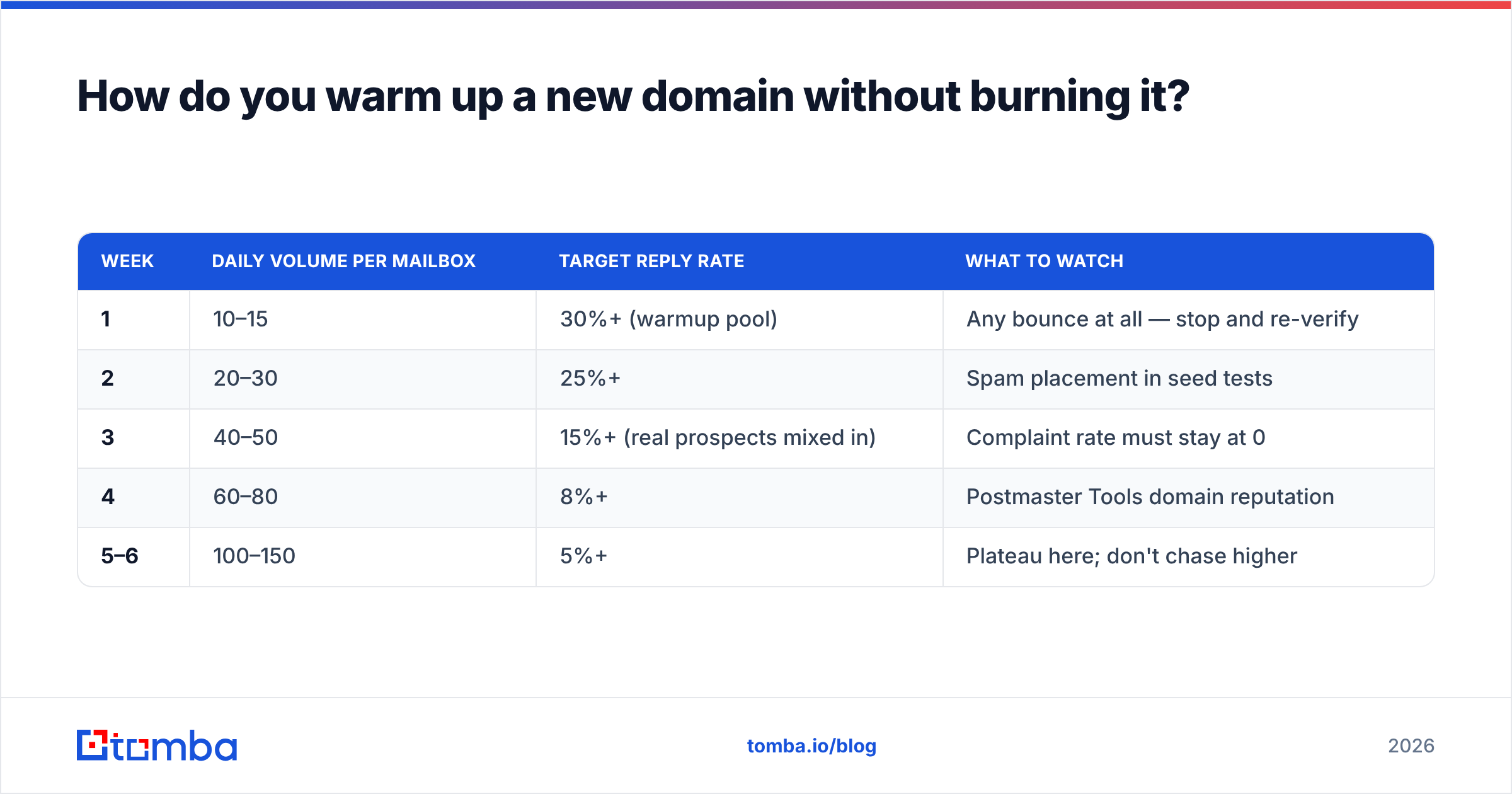
Here is a ramp that holds up across Google Workspace and Microsoft 365 mailboxes:
| Week | Daily volume per mailbox | Target reply rate | What to watch |
|---|---|---|---|
| 1 | 10–15 | 30%+ (warmup pool) | Any bounce at all — stop and re-verify |
| 2 | 20–30 | 25%+ | Spam placement in seed tests |
| 3 | 40–50 | 15%+ (real prospects mixed in) | Complaint rate must stay at 0 |
| 4 | 60–80 | 8%+ | Postmaster Tools domain reputation |
| 5–6 | 100–150 | 5%+ | Plateau here; don't chase higher |
Two rules that people break constantly:
Don't exceed 150/day per mailbox, ever. The instinct after a clean six-week ramp is to push to 300. Google's per-mailbox tolerance for cold-ish outbound sits well below that, and the penalty is not a warning — it's a silent placement drop you won't detect for a week. Add mailboxes instead of volume.
Don't pause and restart. A domain that sends 100/day for three weeks then goes dark for ten days has to partially re-warm. Consistency is itself a reputation signal. If your team takes a holiday break, taper down and taper back up rather than cliff-edging.
If you want to model the ramp against a specific target volume and start date, an email warmup calculator will do the arithmetic and show you when you can realistically hit full send.
Why does list hygiene matter more than everything else?#
Because bounces and spam traps are the only signals that get you blocked rather than filtered — and neither can be undone with better copy.
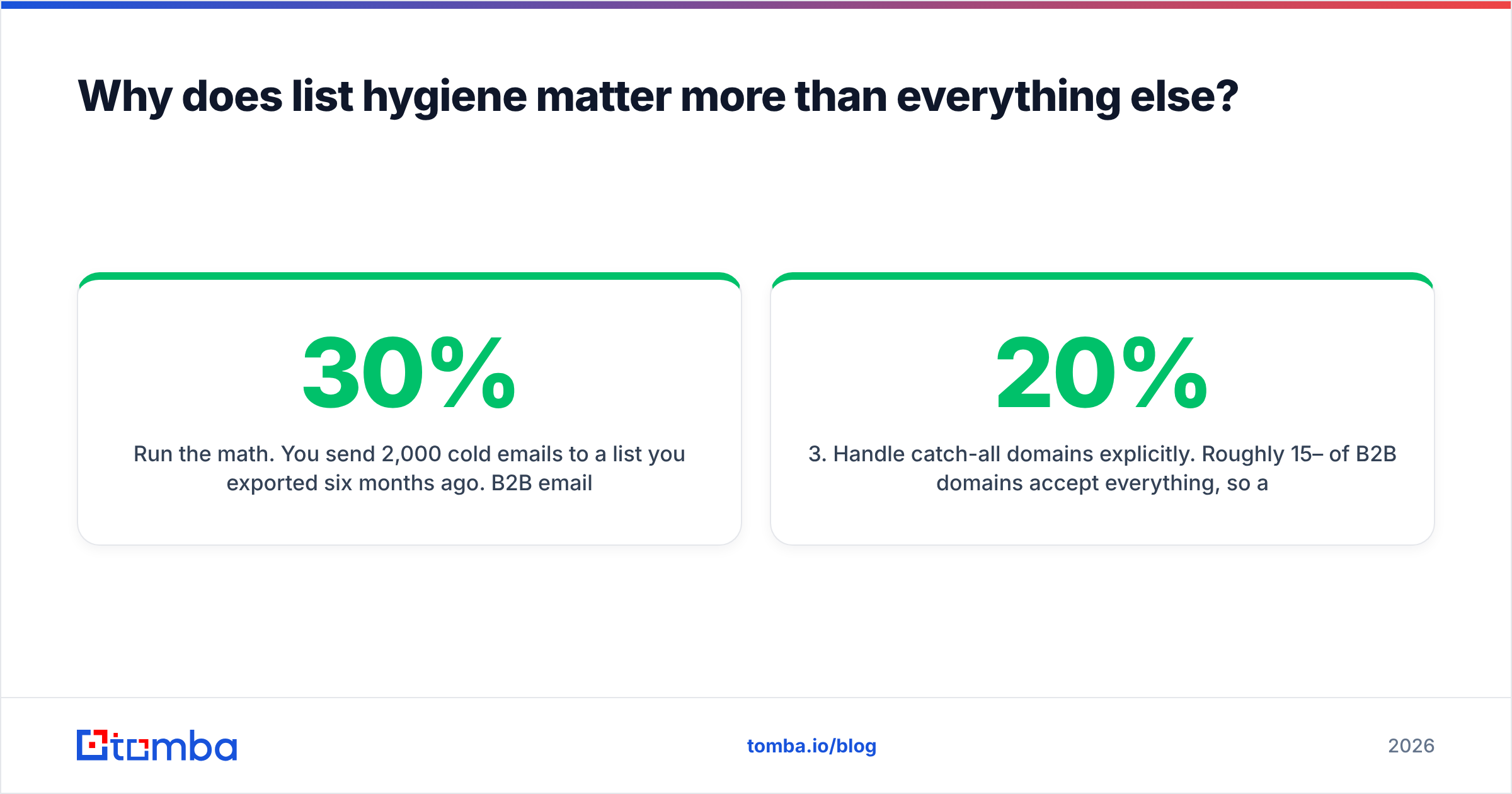
Run the math. You send 2,000 cold emails to a list you exported six months ago. B2B email data decays at roughly 22–30% per year as people change jobs, so around 300 of those addresses no longer exist. That's a 15% hard-bounce rate. Gmail's informal tolerance is around 2%. At 15%, you are not being filtered — you are being rejected at the connection level, and your domain gets flagged inside a single campaign.
Worse: recycled spam traps. When a company deletes an employee's mailbox, some providers and blocklist operators reactivate that address months later purely to catch senders who never clean their lists. Hitting one is a direct reputation hit with no bounce to warn you.
The fix is boring and unglamorous:
- Verify at collection time. Every form submission, every import, every scrape output — check syntax, MX records, and mailbox existence before the address touches your CRM. A free email checker handles one-offs; use an API for anything at volume.
- Re-verify before every send to any list older than 90 days. Cost of verification is fractions of a cent per record. Cost of a burned domain is four to six weeks of pipeline.
- Handle catch-all domains explicitly. Roughly 15–20% of B2B domains accept everything, so a standard SMTP check returns "unknown." Either use a dedicated catch-all verifier that scores them probabilistically, or segment them into a separate low-volume send so they can't damage your main domain.
- Suppress aggressively. Anyone who complained, hard-bounced, or has been unengaged across 3+ campaigns goes on a permanent suppression list. Not a "maybe re-engage in Q3" list.
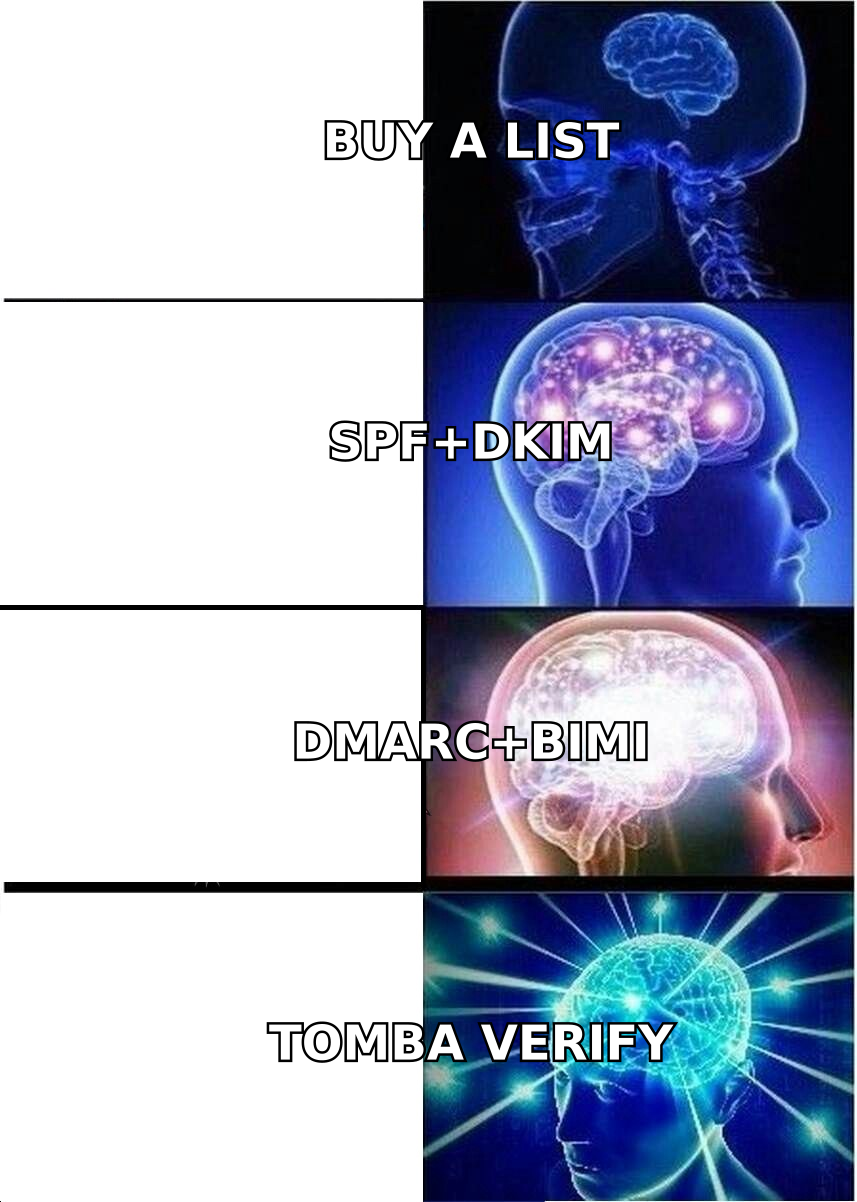
- Never buy a static list. The addresses that appear on resold lists have been mailed by hundreds of senders. Trap density is high and the complaint rate is guaranteed to exceed your budget. If you need scale, source from a provider that verifies at query time — BookYourData and Tomba both build records against live checks rather than serving from a frozen dump, which is the distinction that matters.

What content and sending patterns trigger spam filters?#
Fewer than folklore suggests, but the ones that do matter are unforgiving.
The old advice — avoid "free," don't use exclamation marks, never write in all caps — is mostly obsolete. Modern filters are behavioral and statistical, not keyword lists. What actually correlates with spam placement:
- Link mismatch. Anchor text saying one domain while the href points to another. Link shorteners (bit.ly, tinyurl) are heavily abused and carry inherited reputation you can't control. Use your own tracking domain or no tracking at all.
- Image-only emails. A single 600px image with 12 words of alt text is a classic spam pattern. Keep a real text-to-image ratio; plain text outperforms HTML for cold outbound anyway.
- New domains in links. Linking to a domain registered three weeks ago from a domain registered four weeks ago is a compounding signal.
- Attachments in cold email. Don't. Ever.
- Missing or broken unsubscribe. RFC 8058 one-click headers are required for bulk. For 1:1 cold outbound, a plain-text opt-out line does the job and cuts complaints measurably.
- Volume spikes. Going from 200/day to 2,000/day overnight is read as a compromised account.
Before a campaign goes out, run the message through a spam checker to catch structural issues, and check your sending IP and domain against major blocklists with a blacklist checker. Spamhaus and SORBS listings are recoverable, but only if you find them in hours rather than weeks.
One thing that reliably helps and almost nobody does: ask a question that requires a real answer. Replies are the strongest positive engagement signal available, far stronger than opens. HubSpot's own email marketing research consistently shows short, question-led messages outperforming polished templates — and the deliverability benefit compounds on top of the reply-rate benefit.
How should you monitor deliverability once you're sending?#
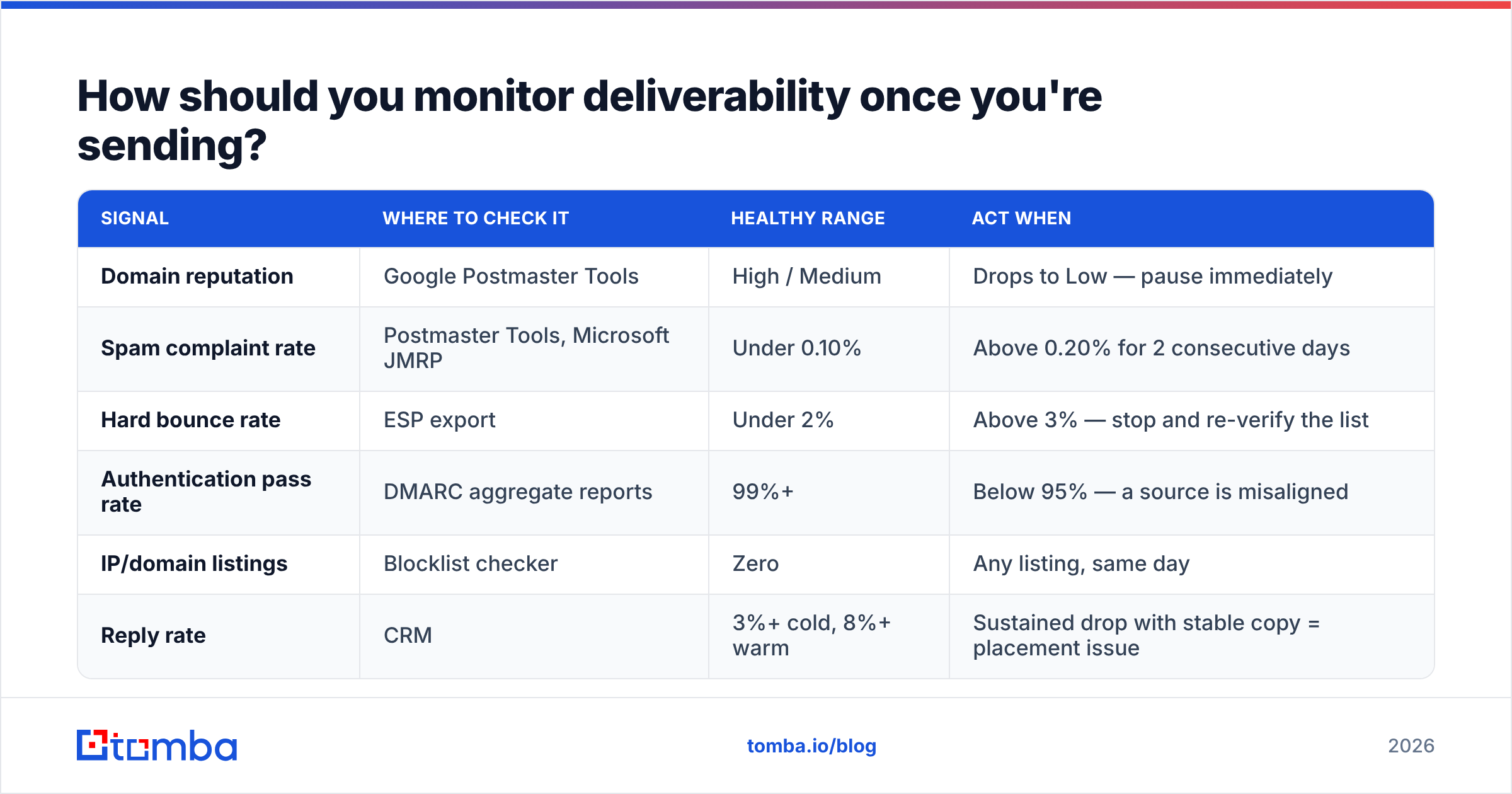
With provider-native tools, not your ESP's dashboard. Your ESP has an incentive to report delivery; the mailbox providers report reputation.
| Signal | Where to check it | Healthy range | Act when |
|---|---|---|---|
| Domain reputation | Google Postmaster Tools | High / Medium | Drops to Low — pause immediately |
| Spam complaint rate | Postmaster Tools, Microsoft JMRP | Under 0.10% | Above 0.20% for 2 consecutive days |
| Hard bounce rate | ESP export | Under 2% | Above 3% — stop and re-verify the list |
| Authentication pass rate | DMARC aggregate reports | 99%+ | Below 95% — a source is misaligned |
| IP/domain listings | Blocklist checker | Zero | Any listing, same day |
| Reply rate | CRM | 3%+ cold, 8%+ warm | Sustained drop with stable copy = placement issue |
Google Postmaster Tools is free, takes ten minutes to set up, and is the only window you get into how Gmail actually sees your domain. If you send meaningful volume to Gmail addresses and haven't verified your domain there, that's the highest-ROI hour available to you this week.
Add seed testing on top. Maintain a small set of real mailboxes across Gmail, Outlook, Yahoo, and one or two corporate Microsoft 365 tenants, and send every campaign to them first. Automated inbox-placement tools are fine but tend to over-report spam placement because seed accounts have no engagement history.
Set a hard rule for the team: any drop in domain reputation pauses sending within 24 hours. The teams that recover fast are the ones that stop early. The teams that lose a quarter are the ones that kept sending "just to finish the campaign."
What does a working deliverability stack look like end to end?#
Concretely: authenticated domains, verified data, controlled ramp, and monitoring that runs without anyone remembering to check it.
- Domains. Send cold outbound from secondary domains, never your primary. Configure SPF, DKIM, and DMARC on each, aligned, with the policy tightened to
p=quarantineonce reports are clean. Keep sender reputation isolated so a bad campaign can't touch the domain your invoices go out from. - Data. Source contacts from a provider that verifies at query time, then re-verify before each send with an email verifier. Route catch-all domains to a separate, lower-volume track.
- Ramp. Four to six weeks per mailbox, capped at 150/day, with real replies mixed in from week three.
- Content. Plain text, one link on your own domain, a question that invites a response, a visible opt-out.
- Monitoring. Postmaster Tools plus Microsoft SNDS, a weekly blocklist check, and a documented pause threshold everyone on the team knows.
None of this is clever. It is a checklist, and the reason email deliverability stays hard is that most teams do eight of the twelve things and assume the other four are optional. They aren't — list quality and ramp discipline are where nearly all of the failure happens.
If your bounce rate is the piece that's broken, start there, because it's the fastest fix with the largest effect. Run your list through the Tomba Email Finder to source and confirm addresses against live checks before they ever enter a sequence, and keep them verified on an ongoing basis. The free tier covers 25 searches a month if you want to test the accuracy against a sample of your existing data first; paid plans start at $49/mo — see Tomba pricing for the full breakdown. Clean data in, inbox placement out. Everything else in this guide is downstream of that.
Related guides#
Ready to find emails that actually work?
Join 150,000+ professionals who stopped guessing and started sending. Free credits on signup — no credit card required.
Get the Tomba newsletter
Practical outbound tactics and product updates — once every two weeks.
About the author