Email Domain Spam Score: How to Check and Fix Yours in 2026
Your domain's spam score decides whether cold email lands in the inbox or the junk folder. Here's how the score is actually calculated, which tools measure it honestly, and the fixes that move it fastest.
TL;DR
- There is no single official "email domain spam score." What people call a spam score is a blend of three separate things: content-level scores from SpamAssassin-style filters, blocklist status for your domain and sending IP, and mailbox-provider reputation signals like Google Postmaster Tools grades.
- Bounce rate and spam-complaint rate are the two inputs that move your score fastest — and both are downstream of list quality, not copy.
- Google and Yahoo enforce a spam-complaint ceiling of 0.3% (with 0.1% as the real target) and require SPF, DKIM, and DMARC on any domain sending bulk mail.
- A 10-minute audit — SPF/DKIM/DMARC check, blocklist lookup, SpamAssassin score, Postmaster grade — tells you which of the three layers is broken before you rewrite a single subject line.
- The cheapest permanent fix is verifying every address before it enters a sequence. Bounces you never send cost nothing to clean up.
What is an email domain spam score?#
An email domain spam score is a composite estimate of how likely mailbox providers are to route mail from your domain into spam. Think of it like a credit score: no single bank issues it, several bureaus keep their own version, and you only see the number when someone denies you.
Three independent layers get collapsed into that one phrase:
- Content score (SpamAssassin-style). A rules engine parses your message — headers, HTML-to-text ratio, link domains, trigger phrases — and adds points for each suspicious trait. Most self-hosted filters flag at 5.0 points. This score is per-message, not per-domain, but a consistently bad template drags the domain's reputation down over time.
- Blocklist status (RBL/DBL). Public lists like Spamhaus, SORBS, and Barracuda track sending IPs and domains. Being on Spamhaus DBL is binary and brutal — a single listing can cut delivery across dozens of providers at once.
- Provider reputation. Gmail, Outlook, and Yahoo each keep private per-domain reputation scores based on how real humans treat your mail: opens, replies, "not spam" clicks, deletes-without-reading, and complaints. Google exposes a coarse version of theirs (Bad / Low / Medium / High) in Postmaster Tools.
When a vendor sells you a "domain spam score," they are almost always estimating layers 2 and 3 from public data and inferring layer 1 from a sample message. Useful, but not authoritative. The authoritative signal lives inside the mailbox provider, and the only window into it is your own engagement data.
How is your email domain spam score calculated?#
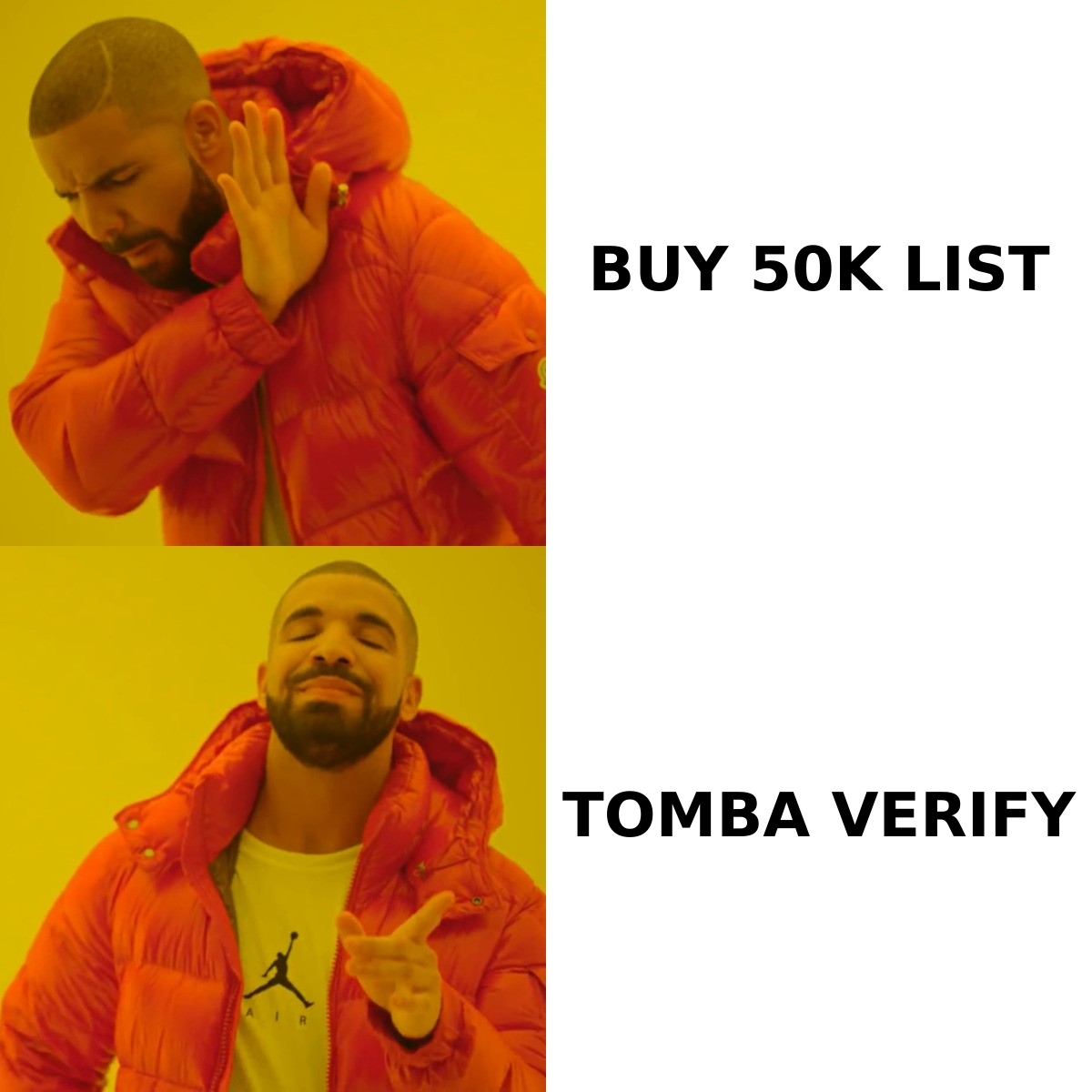
Different systems weight different things, but the inputs cluster into four buckets. Here's what each one actually measures and how much leverage you have over it.
| Signal | What it measures | Typical weight | How fast you can change it |
|---|---|---|---|
| Bounce rate | Invalid/nonexistent recipients | Very high | Immediately — verify before send |
| Spam-complaint rate | Recipients clicking "report spam" | Very high | 2-4 weeks of better targeting |
| Authentication (SPF/DKIM/DMARC) | Whether you can prove you sent it | Gate — pass/fail | Same day (DNS change) |
| Domain/IP blocklist status | Public reputation listings | High when listed | 1-14 days via delisting request |
| Engagement (opens, replies) | Whether humans want the mail | Medium-high | 4-8 weeks |
| Content score | Trigger words, link ratio, HTML | Low-medium | Same day |
| Domain age + volume ramp | Sudden spikes from a new domain | Medium | Weeks — warm up gradually |
The counterintuitive part: content is the least important input and the one everyone obsesses over. Removing the word "free" from your subject line moves a SpamAssassin score by fractions of a point. Sending to 400 dead addresses moves your Gmail reputation from High to Low in a single campaign.
Google's own sender guidelines make the hierarchy explicit: authenticate, keep complaints under 0.3%, honor one-click unsubscribe, and don't send unwanted mail. Content rules barely feature.
What is a good email domain spam score in 2026?#
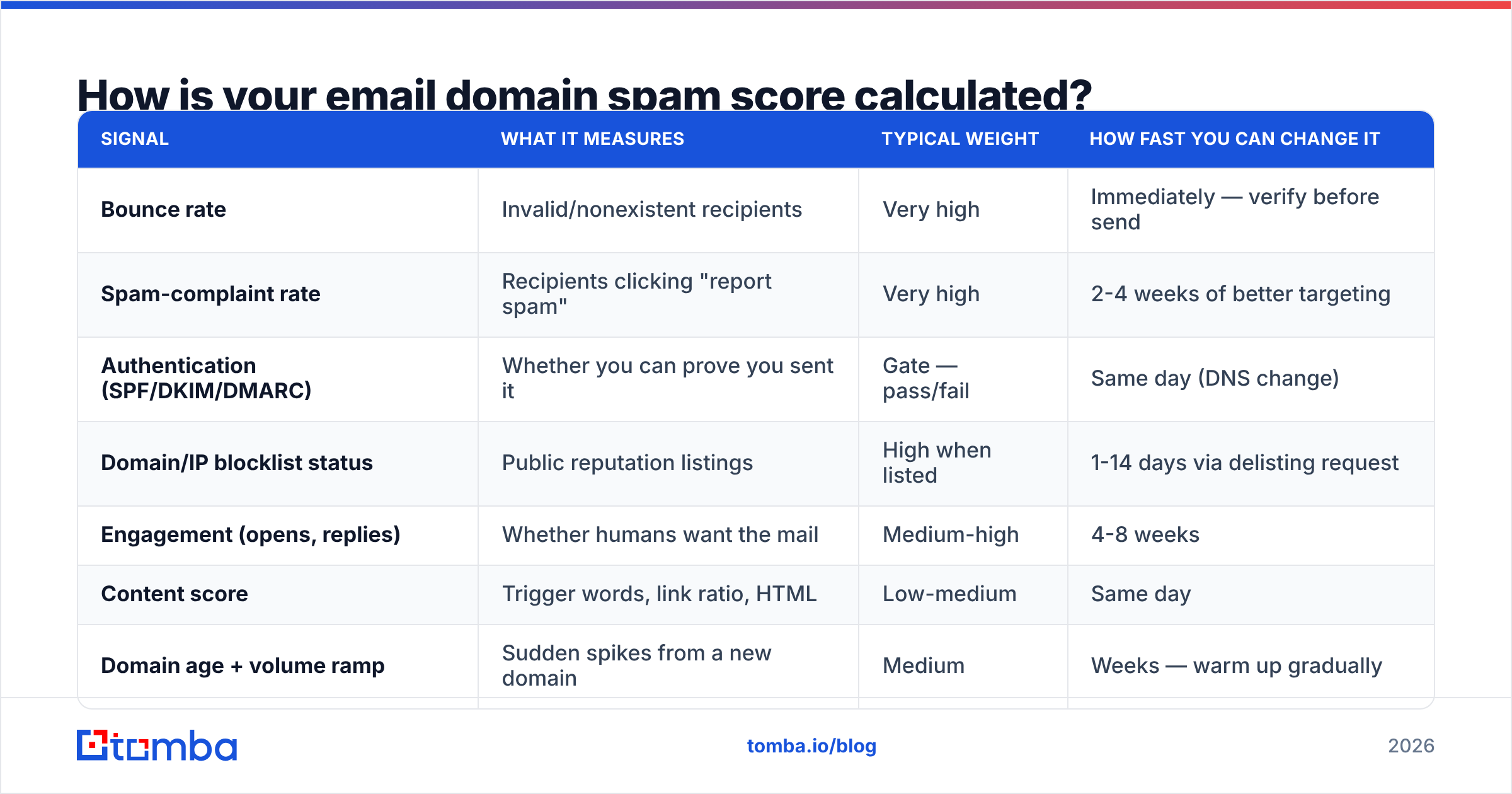
Targets depend on which layer you're measuring. Here are the thresholds worth memorizing:
- SpamAssassin content score: below 3.0. The default block threshold is 5.0, but leave headroom — receiving servers add their own points for things you can't see, like your IP's local history with that server.
- Hard bounce rate: below 2%. Above 3% and Gmail starts throttling. Above 5% and most ESPs will pause your account before Gmail even gets involved.
- Spam-complaint rate: below 0.1%. The enforced ceiling from Google and Yahoo is 0.3%, but that's the point where you get blocked, not the point where you're healthy. One complaint per thousand sends is the working target.
- Postmaster domain reputation: High. Medium is survivable. Low means a meaningful share of your mail is already in spam. Bad means nearly all of it is.
- Blocklist status: zero listings on Spamhaus, SURBL, and Barracuda. Smaller lists matter less; Spamhaus matters enormously.
- Unsubscribe rate: below 0.5%. High unsubscribes without complaints usually means bad targeting rather than bad reputation — but they're a leading indicator of complaints to come.
How do you check your email domain spam score?#
Run these five checks in order. The whole thing takes about ten minutes and tells you which layer is actually broken.
- Verify authentication records. Query your SPF, DKIM, and DMARC records. A missing DMARC policy is now a hard fail for bulk senders to Gmail and Yahoo. Use an SPF checker to confirm your record resolves, stays under the 10-lookup limit, and includes every service that sends on your behalf.
- Check blocklists. Run your sending domain and IP through a blacklist checker. Note which lists flag you — Spamhaus DBL is an emergency; a listing on an obscure regional RBL usually isn't.
- Score a real message. Take an actual campaign email — not a test with placeholder text — and run it through a spam checker to get the SpamAssassin breakdown. Look at which rules fired, not just the total.
- Read Postmaster Tools. If you send more than 100 messages a day to Gmail, Google Postmaster Tools shows domain reputation, spam rate, authentication pass rates, and delivery errors over time. It is the single most honest mirror you have.
- Audit your list. Pull a random sample of 200 addresses from your next send and verify them. If more than 3% come back invalid or risky, list hygiene is your problem and nothing else on this list will matter until you fix it.
Screenshot placeholder: Google Postmaster Tools domain reputation graph showing a drop from High to Low after a large unverified send.
Which tools actually measure domain spam score well?#
Most tools cover one or two layers well and guess at the rest. Here's how the common options stack up.
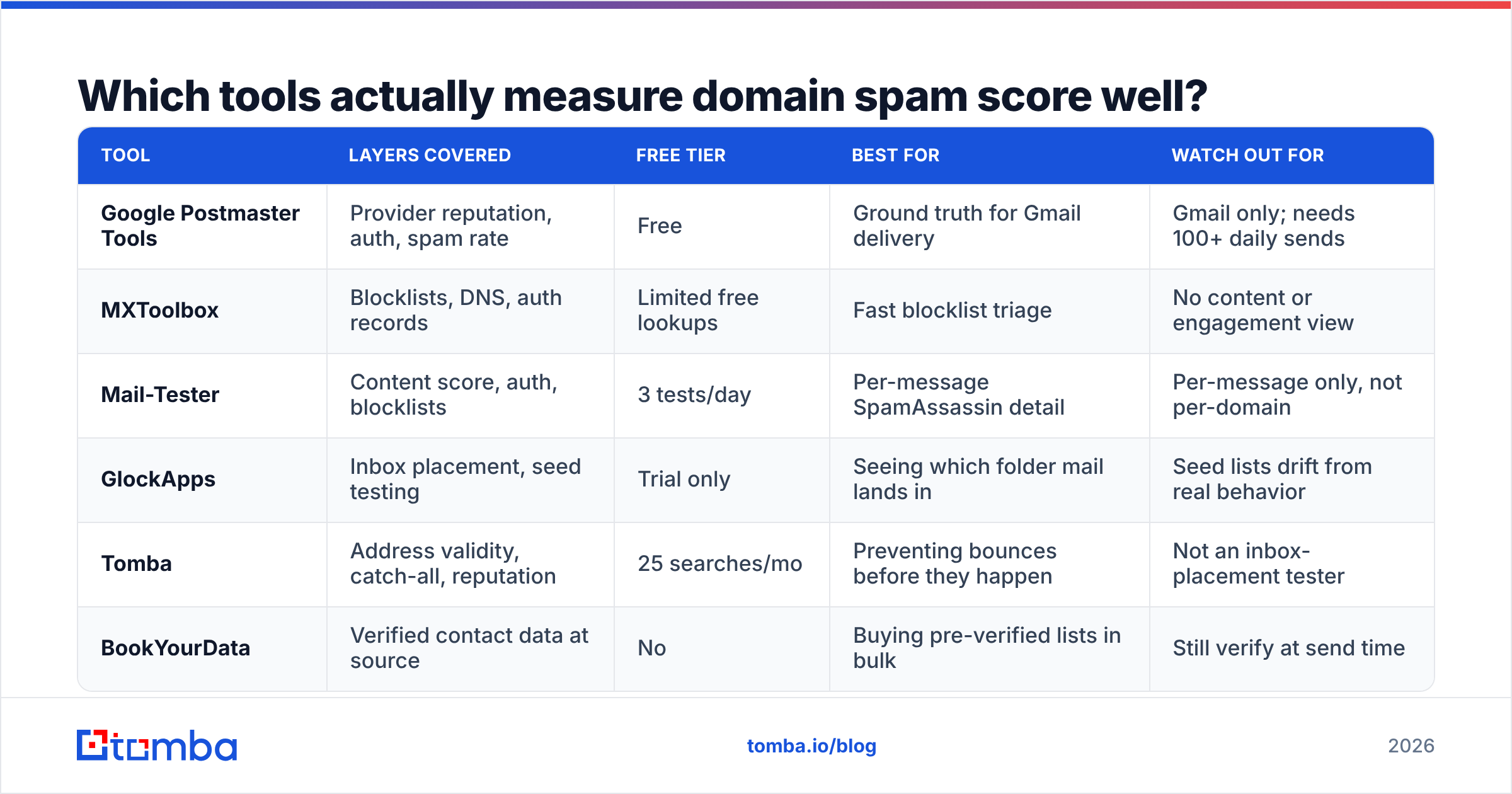
| Tool | Layers covered | Free tier | Best for | Watch out for |
|---|---|---|---|---|
| Google Postmaster Tools | Provider reputation, auth, spam rate | Free | Ground truth for Gmail delivery | Gmail only; needs 100+ daily sends |
| MXToolbox | Blocklists, DNS, auth records | Limited free lookups | Fast blocklist triage | No content or engagement view |
| Mail-Tester | Content score, auth, blocklists | 3 tests/day | Per-message SpamAssassin detail | Per-message only, not per-domain |
| GlockApps | Inbox placement, seed testing | Trial only | Seeing which folder mail lands in | Seed lists drift from real behavior |
| Tomba | Address validity, catch-all, reputation | 25 searches/mo | Preventing bounces before they happen | Not an inbox-placement tester |
| BookYourData | Verified contact data at source | No | Buying pre-verified lists in bulk | Still verify at send time |
The honest framing: these are complements, not substitutes. Postmaster tells you the score. MXToolbox and Mail-Tester tell you which mechanical thing is broken. A verification layer like the email verifier prevents the input that damages the score in the first place. BookYourData is a solid option if you'd rather buy data that arrives already validated than build lists yourself — either way, re-verification at send time is what protects the domain.

Why does list quality dominate your spam score?#
Because every other lever is capped and this one isn't.
You can fix authentication once and it stays fixed. You can trim your content score by two points and it stays trimmed. But list quality degrades continuously — B2B email data decays at roughly 22-30% per year as people change jobs, companies rebrand, and mailboxes get deprovisioned. A list you verified in January is measurably worse by July.
Here's the mechanism. When you send to a nonexistent address at a large provider, the receiving server returns a 5.x.x hard bounce. Providers treat a cluster of hard bounces as strong evidence that you didn't get these addresses from people who asked to hear from you — because legitimate opt-in lists don't contain many dead addresses. That inference is correct, which is why it's so heavily weighted.
Spam traps make it worse. A recycled trap is an abandoned address a provider reactivates specifically to catch senders mailing stale lists. Hitting one doesn't bounce — it silently marks you. A pristine trap, never used by a human, means you scraped or bought without validating.
The fix has three parts:
- Find addresses from live sources rather than static lists. A domain search queries current company data at the moment you need it, instead of handing you a snapshot from two years ago.
- Verify at send time, not at import time. Re-run validation on anything older than 90 days before it enters a sequence.
- Handle catch-all domains deliberately. Catch-all servers accept everything, so standard SMTP verification returns "unknown." A catch-all verifier applies pattern and source-confidence checks to separate real mailboxes from accept-anything black holes, instead of forcing you to gamble on the whole segment.
What fixes move the score fastest?#
Ordered by impact per hour of work:
- Publish or repair DMARC. If you have no DMARC record, add one at
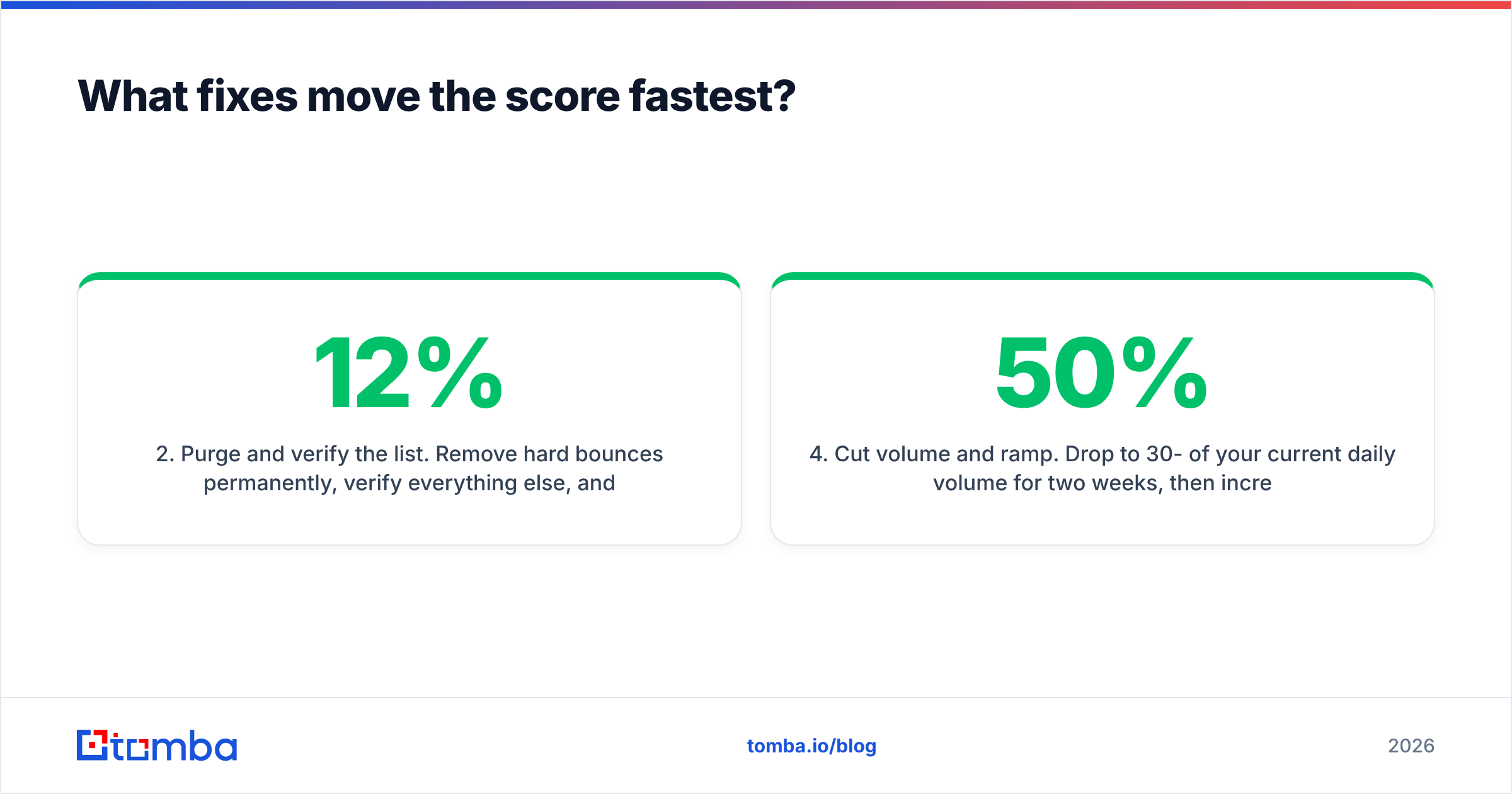
p=nonetoday to start collecting reports, then move top=quarantineonce your SPF and DKIM alignment is clean. This is a gate, not a gradient — failing it caps everything else. - Purge and verify the list. Remove hard bounces permanently, verify everything else, and drop risky/unknown addresses from cold sequences. Expect bounce rate to fall from 8-12% to under 1% on a typical unverified B2B list.
- Request delisting. If Spamhaus or Barracuda flagged you, fix the underlying cause first, then submit the delisting request. Delisting without fixing gets you relisted within days.
- Cut volume and ramp. Drop to 30-50% of your current daily volume for two weeks, then increase 20% weekly. Use a warmup calculator to set a realistic curve instead of guessing.
- Tighten targeting before touching copy. A message that's genuinely relevant to the recipient generates replies, and replies are the strongest positive engagement signal a mailbox provider can observe. Broad targeting generates complaints no subject-line rewrite will offset.
- Then fix content. Reduce link count to one or two, keep the text-to-HTML ratio high, drop image-only emails, and use a real reply-to address on your sending domain.
Notice that content is sixth. That ordering is the point.
How do you keep the score healthy long-term?#
Treat it as a monitored metric, not a project.
Weekly: Check Postmaster Tools for reputation changes and spam-rate spikes. A single day above 0.3% is a warning; three days is an incident.
Monthly: Re-run blocklist checks on all sending domains and IPs. Re-verify any list segment older than 90 days. Review unsubscribe and complaint rates by campaign to find the specific sequence causing damage.
Quarterly: Audit authentication across every service that sends as your domain — marketing platform, CRM, transactional provider, support desk. SPF records break silently when someone adds a new tool. Rotate DKIM keys.
Continuously: Keep verification in the pipeline rather than as a manual step. If you're pulling contacts into a CRM, run them through validation on the way in — the Tomba API or a HubSpot integration means nobody has to remember to do it. Bulk cleanup is a fine emergency response, but the durable version is a pipeline where invalid addresses never reach a sequence at all.
One structural decision worth making early: separate your domains by function. Send transactional mail from your primary domain, marketing from a subdomain, and cold outbound from a dedicated secondary domain. If cold outreach damages a reputation, you want it to be a domain your invoices don't depend on.
What's the realistic timeline for recovery?#
If your domain reputation is already Low or Bad, plan for four to eight weeks. There's no way to buy speed here — providers rebuild trust from observed behavior over time, and the observation window is measured in weeks of consistent sending.
Week 1: fix authentication, purge the list, cut volume by half. Week 2-3: send only to your most engaged segment to generate positive signals; expect reputation to stay flat. Week 4-6: reputation typically starts climbing if complaints stay under 0.1%. Week 6-8: resume normal volume with a gradual ramp.
The thing that breaks recovery most often is impatience — resuming full volume at week three, seeing reputation drop again, and concluding the fixes didn't work. They did. The clock just restarted.
Ready to stop bouncing?#
Your email domain spam score is mostly a lagging indicator of one decision: whether the addresses you send to are real. Fix authentication once, then put verification in front of every sequence and the rest largely takes care of itself.
Start with the Tomba Email Finder to source addresses from live company data rather than a stale purchased list, and pair it with verification so nothing invalid reaches your sending domain. The free tier gives you 25 searches a month to test the workflow on a real segment; paid plans start at $49/mo on Starter, with Growth at $99/mo for teams running continuous outbound — full Tomba pricing is public. Check your worst-performing list first. The bounce rate will tell you everything the spam score was trying to.
Related guides#
Ready to find emails that actually work?
Join 150,000+ professionals who stopped guessing and started sending. Free credits on signup — no credit card required.
Get the Tomba newsletter
Practical outbound tactics and product updates — once every two weeks.
About the author