Email Domain Warmup in 2026: The Complete 45-Day Playbook
Most warmup plans fail because they ramp volume faster than mailbox providers build trust. Here's the 45-day schedule, the metrics that actually predict inbox placement, and the mistakes that reset your progress to zero.
TL;DR
- Email domain warmup is the process of building sending reputation on a fresh domain and IP by starting at 5–10 emails a day and increasing volume slowly enough that mailbox providers see consistent, engaged sending.
- 45 days is the realistic floor for a domain that will send cold outreach. Thirty days works only if your reply rate is unusually high and your list is clean.
- Authentication (SPF, DKIM, DMARC) is a prerequisite, not warmup. Perfect DNS on a two-week-old domain still lands in spam.
- The single fastest way to burn a warmed domain is a dirty list. A 6% bounce rate can undo six weeks of ramping in two sends.
- Warmup never fully ends — it becomes volume discipline. Domains that idle for 30 days and then send 500 emails get filtered like new ones.
What is email domain warmup, exactly?#
Email domain warmup is the deliberate, gradual increase of sending volume from a new domain (and its associated mailboxes) so that Gmail, Outlook, and corporate spam filters build a positive reputation profile for it before you send at scale.
Think of it like credit history. A bank does not refuse you a mortgage because you have bad credit — it refuses you because you have no credit. There is no data to price the risk, so the default answer is no. Mailbox providers work the same way. A domain registered last Tuesday sending 400 emails on Thursday has no history, and the safest assumption a filter can make about a no-history sender pushing volume is "spam."
Warmup gives the filters data: consistent daily send patterns, replies, opens, low complaint rates, and near-zero bounces. That data becomes reputation. Reputation becomes inbox placement.
Two things warmup is not:
- It is not authentication. SPF, DKIM, and DMARC are entry requirements. Google's bulk sender guidelines made them mandatory for anyone sending meaningful volume to Gmail. Passing them gets you considered; it does not get you delivered.
- It is not a one-time task. Reputation decays. A domain that warms to 200/day, then sits idle for six weeks, has to re-ramp.

Why does a new domain get filtered even with perfect DNS?#
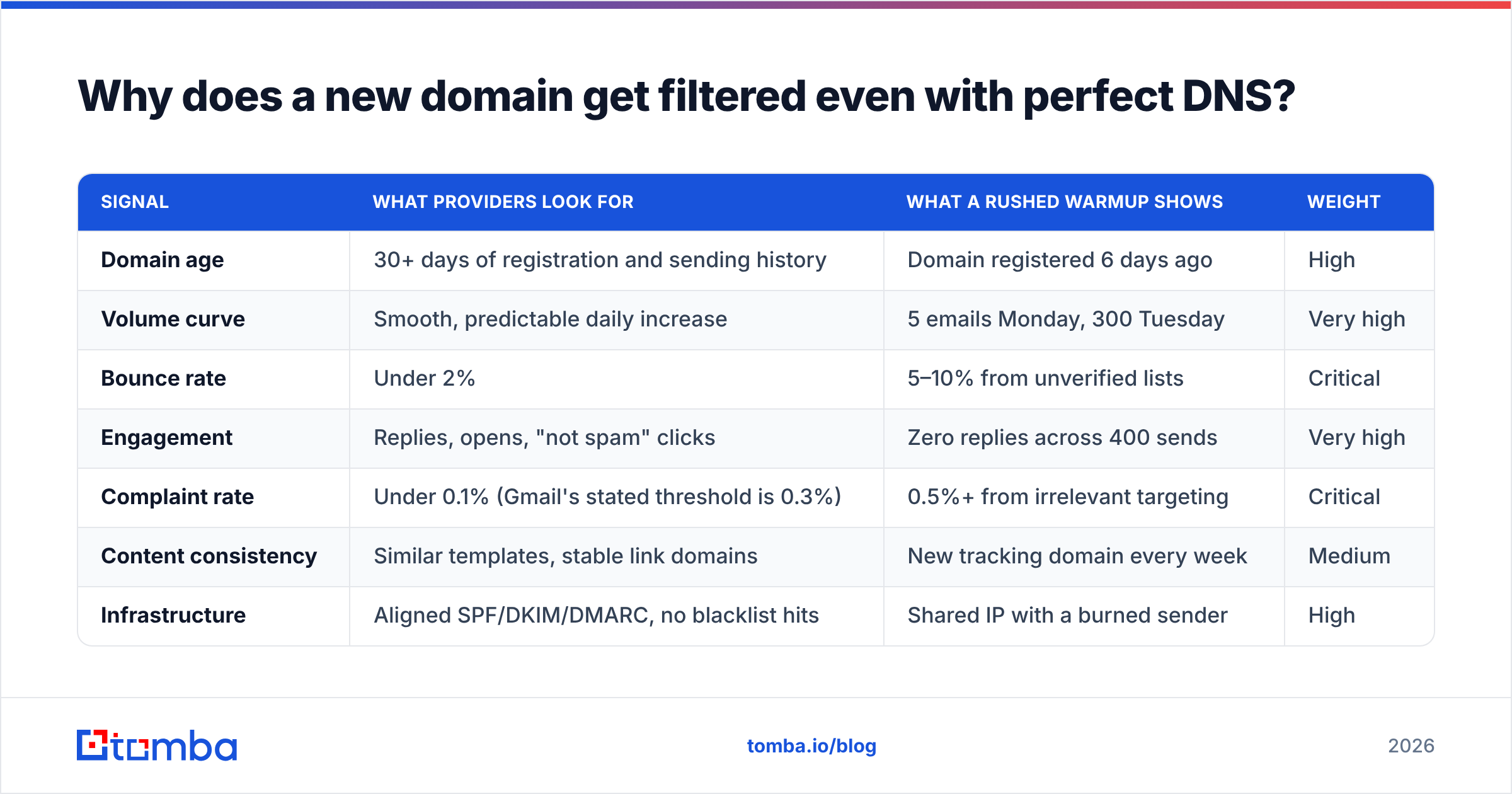
Because filters score senders on behavior, not paperwork. Here is what the major providers are actually weighing during your first 60 days.
| Signal | What providers look for | What a rushed warmup shows | Weight |
|---|---|---|---|
| Domain age | 30+ days of registration and sending history | Domain registered 6 days ago | High |
| Volume curve | Smooth, predictable daily increase | 5 emails Monday, 300 Tuesday | Very high |
| Bounce rate | Under 2% | 5–10% from unverified lists | Critical |
| Engagement | Replies, opens, "not spam" clicks | Zero replies across 400 sends | Very high |
| Complaint rate | Under 0.1% (Gmail's stated threshold is 0.3%) | 0.5%+ from irrelevant targeting | Critical |
| Content consistency | Similar templates, stable link domains | New tracking domain every week | Medium |
| Infrastructure | Aligned SPF/DKIM/DMARC, no blacklist hits | Shared IP with a burned sender | High |
The interaction between rows matters more than any single row. A 3% bounce rate on a two-year-old domain sending 50/day is survivable. The same 3% on a 12-day-old domain sending its first 200 emails is a hard reputation hit — and by the time you see it in your reply rate, you are already in the spam folder for that provider.
Check where you stand before you start: run your domain through an SPF checker and a blacklist checker. If either fails, fix that first. Warming a blacklisted domain is pouring water into a bucket with no bottom.
What does a realistic 45-day warmup schedule look like?#
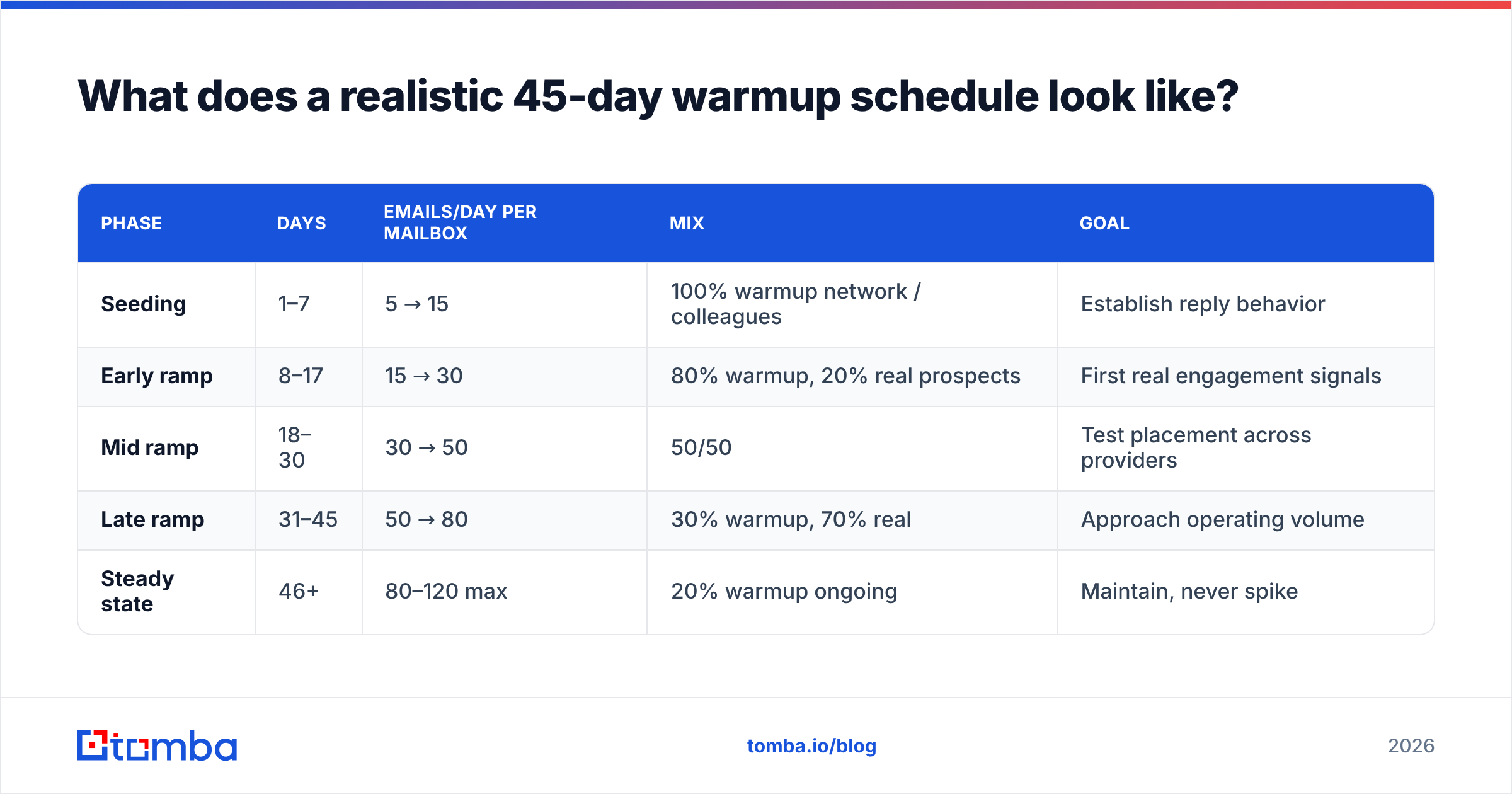
Here is a schedule that works for a standard cold outreach setup: one domain, two to three mailboxes, targeting a mix of Google Workspace and Microsoft 365 recipients.
| Phase | Days | Emails/day per mailbox | Mix | Goal |
|---|---|---|---|---|
| Seeding | 1–7 | 5 → 15 | 100% warmup network / colleagues | Establish reply behavior |
| Early ramp | 8–17 | 15 → 30 | 80% warmup, 20% real prospects | First real engagement signals |
| Mid ramp | 18–30 | 30 → 50 | 50/50 | Test placement across providers |
| Late ramp | 31–45 | 50 → 80 | 30% warmup, 70% real | Approach operating volume |
| Steady state | 46+ | 80–120 max | 20% warmup ongoing | Maintain, never spike |
Rules that make or break this schedule:
- Increase by roughly 30% per step, never double. Going 20 → 40 → 80 in three days is the most common self-inflicted wound in cold email. Providers read that curve as a compromised account.
- Send on a human clock. Weekdays, business hours in the recipient's timezone, randomized intervals. Forty emails fired in nine minutes at 3 a.m. is a bot signature.
- Cap per-mailbox volume at 80–120/day permanently. If you need 500 sends a day, you need five mailboxes across two or three domains — not one mailbox pushed to 500.
- Keep 20% warmup traffic running forever. It is cheap insurance against reputation decay during slow pipeline weeks.
- Change one variable at a time. New template, new sending tool, and a volume jump on the same day means you cannot diagnose the resulting drop.
- Watch Google Postmaster Tools from day one. Set it up before you send anything so you have baseline data. Postmaster Tools is the only place you see Gmail's own view of your domain reputation.
If you want a volume curve tailored to your target send rate, the email warmup calculator will generate the daily numbers instead of you eyeballing them.
Should you use an automated warmup tool or send manually?#
Automated warmup tools connect your mailbox to a network of other mailboxes that open, reply to, and mark each other's messages as important. They are efficient, and they are also increasingly detectable — Google has publicly deprioritized artificial engagement loops, and several networks have been fingerprinted.
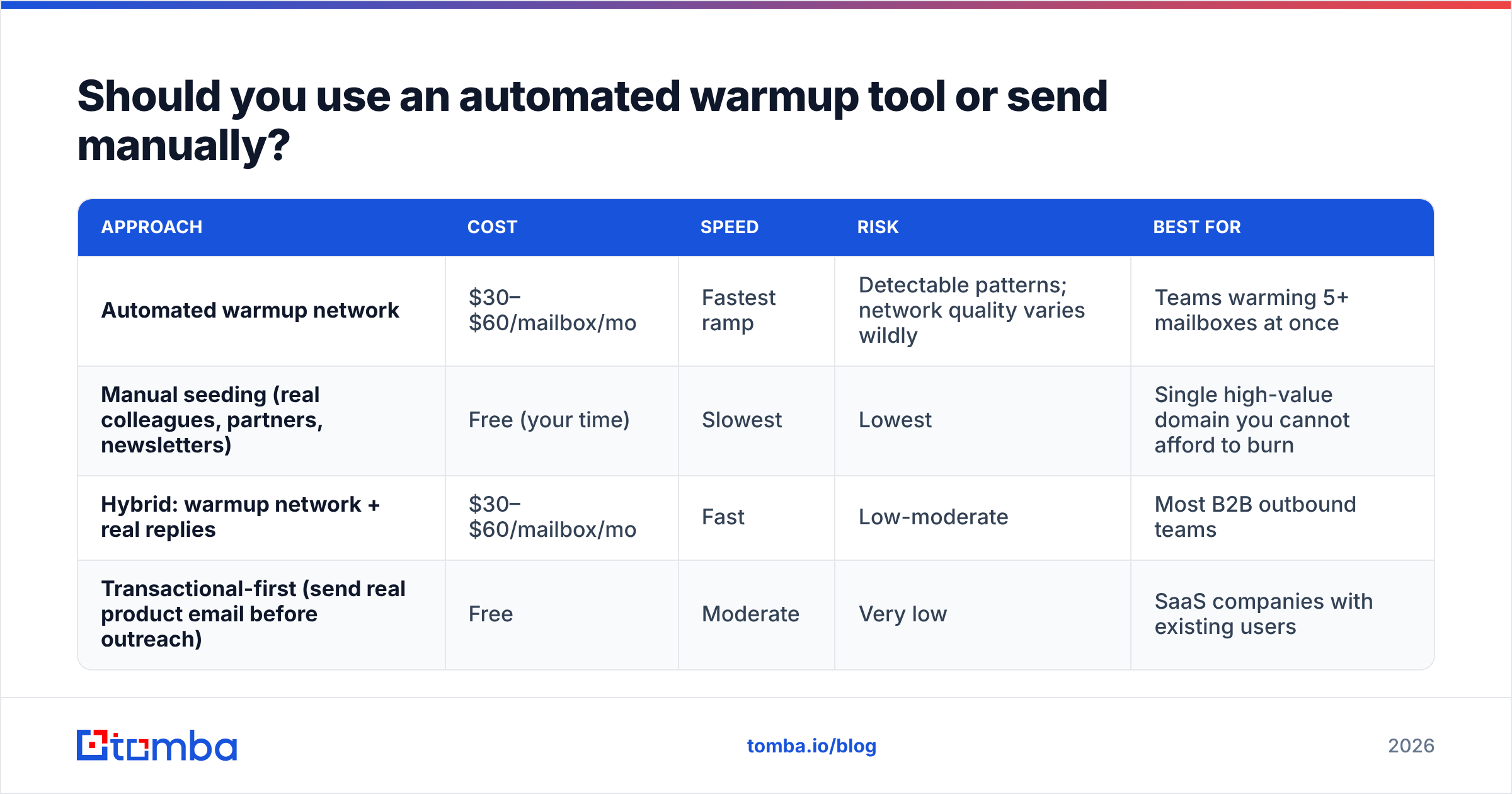
| Approach | Cost | Speed | Risk | Best for |
|---|---|---|---|---|
| Automated warmup network | $30–$60/mailbox/mo | Fastest ramp | Detectable patterns; network quality varies wildly | Teams warming 5+ mailboxes at once |
| Manual seeding (real colleagues, partners, newsletters) | Free (your time) | Slowest | Lowest | Single high-value domain you cannot afford to burn |
| Hybrid: warmup network + real replies | $30–$60/mailbox/mo | Fast | Low-moderate | Most B2B outbound teams |
| Transactional-first (send real product email before outreach) | Free | Moderate | Very low | SaaS companies with existing users |
The hybrid is what most teams should run. Use a warmup network for baseline volume and consistency, but make sure a meaningful share of your sends are real emails to real people who actually reply. Filters can tell the difference between a reply loop and a conversation; the second one is what moves your sender reputation.
One caveat on tooling: warmup networks with cheap, unvetted mailboxes can attach you to junk. If your warmup provider will not tell you how they vet participating domains, assume the worst.
How do you know the warmup is actually working?#
Check these four things weekly. If any one goes the wrong direction, pause the ramp — hold volume flat for five days rather than continuing to climb.
- Bounce rate. Target under 2%; investigate anything over 3%. Rising bounces almost always mean list quality, not warmup.
- Spam complaint rate in Postmaster Tools. Under 0.1% is healthy. At 0.3% Gmail starts throttling you. There is no gentle recovery from a sustained complaint problem — you change targeting or you change domains.
- Reply rate. Not a vanity metric here. During warmup, replies are the strongest positive signal you can generate. A domain at day 30 with a 0% reply rate on real sends is not warmed; it is quietly filtered.
- Placement tests across providers. Seed a list of Gmail, Outlook, and one corporate domain, and check placement weekly. Gmail and Microsoft can diverge sharply — a domain can be inboxing on Gmail and hard-foldered on Outlook.
- Open rate stability, not level. Apple Mail Privacy Protection makes absolute open rates meaningless. A sudden 40% drop week-over-week is still a real signal.

What actually kills a warmed domain?#
In order of how often it happens:
- Unverified lists. This is the number one cause, and it is completely avoidable. Scraped or aged lists routinely run 15–30% invalid. Two sends at that bounce rate will flag a young domain. Run every list through an email verifier before it touches a warmed mailbox — and treat catch-all domains as a separate risk bucket, because they accept everything and tell you nothing until you use a catch-all verifier.
- Volume spikes after a quiet period. Team goes on holiday, sending stops for three weeks, someone returns and fires the backlog. Ramp back up over a week instead.
- Link and image reputation. Using a shared tracking domain that another sender has already burned poisons your mail even if your own domain is clean. Use a custom tracking subdomain.
- Content that trips filters mechanically. Heavy HTML, multiple links in a first touch, attachments, spam-trigger phrasing. A quick pass through a spam checker catches most of it.
- Irrelevant targeting. No amount of warmup fixes sending a DevOps pitch to a dental practice. Complaints follow relevance, and complaints are the hardest signal to recover from.
- Sending from your primary domain. If your company domain gets burned by outbound, your invoices and support replies go to spam too.
Do you need separate domains for cold outreach?#
Yes — and this is the one structural decision that matters more than any warmup schedule.
Buy lookalike domains (yourcompany.co, getyourcompany.com, tryyourcompany.com), redirect them to your main site, and run outbound exclusively from those. Your primary domain never carries cold sending risk. If a secondary domain burns out, you replace it in a week instead of rebuilding a decade of corporate reputation.
Practical setup for a team sending ~1,000 cold emails a day:
- 3–4 secondary domains, each 30+ days old before first send
- 3 mailboxes per domain
- 80–100 emails/day per mailbox at steady state
- Each domain fully authenticated, with DMARC at
p=noneduring warmup and tightened toquarantineonce aligned - One shared suppression list across all of them, so nobody gets hit twice
Rotate domains out proactively. If placement on one starts drifting, retire it rather than trying to nurse it back.
How much does list quality change your warmup timeline?#
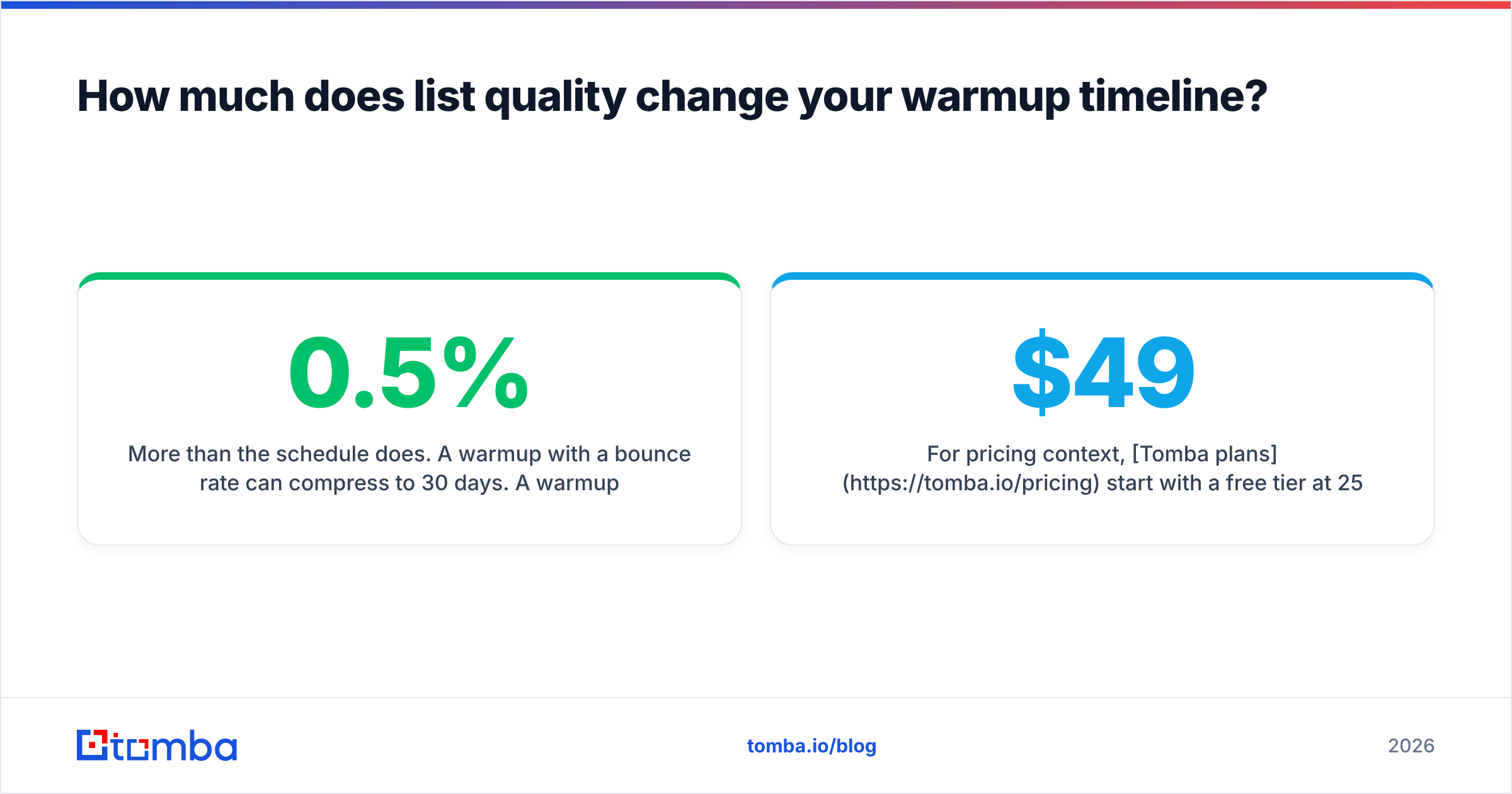
More than the schedule does. A warmup with a 0.5% bounce rate can compress to 30 days. A warmup with a 5% bounce rate will not finish at all — you will be re-ramping forever.
That means the sequencing is: build the clean list first, then warm the domain, then send. Not the reverse. Teams that start warming while sourcing contacts always end up under pressure to send before the ramp is done.
Source contacts from a provider that verifies at the point of discovery rather than handing you raw guesses. If you are building lists by company, a domain search that returns confidence-scored addresses saves you the bounce entirely; for one-off lookups, an email finder with SMTP-level validation does the same job. Providers like BookYourData and Tomba both take a verification-first approach here, which is the property that matters — not the brand name on the invoice.
For pricing context, Tomba plans start with a free tier at 25 searches/month, then Starter at $49/mo, Growth at $99/mo, and Pro at $249/mo, with verification included rather than billed as a separate product. Check whether your current stack charges twice for finding and verifying the same address — many do.
What should you do in your first week?#
A concrete checklist:
- Day 0: Register secondary domains. Set up Google Workspace or Microsoft 365 mailboxes.
- Day 0: Configure SPF, DKIM, DMARC. Verify with an SPF checker and a DMARC lookup.
- Day 0: Add all domains to Google Postmaster Tools.
- Day 1–3: Set up profile photos, full signatures, and real names on every mailbox. Empty profiles look automated.
- Day 1–7: Start warmup at 5/day, climb to 15. Send genuine emails to colleagues and ask for real replies.
- Day 3: Build and verify your first target list — completely, before you need it.
- Day 7: Review bounce and complaint data. Only then start the real ramp.
Warmup is boring, and that is the point. The teams with the best deliverability are not doing anything clever; they are doing something patient.
Start with a list that will not bounce#
The fastest warmup is the one you never have to restart. Before you ramp a single domain, build a contact list you can trust — verified at the source, deduplicated, and scored for confidence.
Tomba Email Finder finds professional email addresses by domain, name, or company and validates them before they reach your sequencer, so your warmed domain meets real inboxes instead of hard bounces. Start on the free tier at 25 searches a month, and move to a paid plan when your ramp is done and your volume is real.
Related guides#
Ready to find emails that actually work?
Join 150,000+ professionals who stopped guessing and started sending. Free credits on signup — no credit card required.
Get the Tomba newsletter
Practical outbound tactics and product updates — once every two weeks.
About the author