Email Domains Explained: How to Choose, Set Up, and Protect One
Your email domain decides whether messages land in the inbox or vanish. Here's how custom, free, and alias domains actually compare in 2026 — plus the setup steps most teams skip.
TL;DR
- An email domain is the part after the
@. It carries your identity, your authentication records, and your sending reputation — three things mailbox providers score before they decide where your message goes. - Free domains (
@gmail.com,@outlook.com) cost nothing but cannot be authenticated as your brand, cannot pass B2B credibility checks, and are now effectively unusable for bulk sending. - A custom domain costs $10–$15/year plus $1–$8 per mailbox per month. That is the cheapest deliverability upgrade available to you.
- Never send cold outreach from the domain that carries your billing, support, and contract email. Use a dedicated secondary domain or a subdomain instead.
- Before you email anyone at a domain, check what that domain actually accepts. Catch-all configurations, parked domains, and dead MX records are the top three causes of bounce spikes.
What is an email domain?#
An email domain is everything to the right of the @ in an address. In sara@acme.com, the email domain is acme.com.
Think of it like the street name on an envelope. The mailbox number (sara) tells the local post office which slot to drop the letter into. The street name tells the entire global system which city, which neighborhood, and which building it belongs to — and whether that building has a reputation for receiving legitimate mail or for being a front for scams.
Technically, three things live at the domain level:
- MX records — the DNS entries that tell the world which mail servers accept mail for this domain. No MX, no mail.
- Authentication records — SPF, DKIM, and DMARC, all published as DNS records on the domain, not on individual mailboxes.
- Reputation — Gmail, Outlook, and Yahoo score domains, not just IP addresses. One user blasting 5,000 unverified addresses can drag every colleague's replies into spam.
That third point is the one teams learn the expensive way. Your mailbox is personal; your domain is shared infrastructure. Treat it like production.
For the underlying mechanics of how those signals get scored, the email deliverability definition is a useful primer.
What are the different types of email domains?#
There are four practical categories, and choosing wrong is where most of the damage happens.
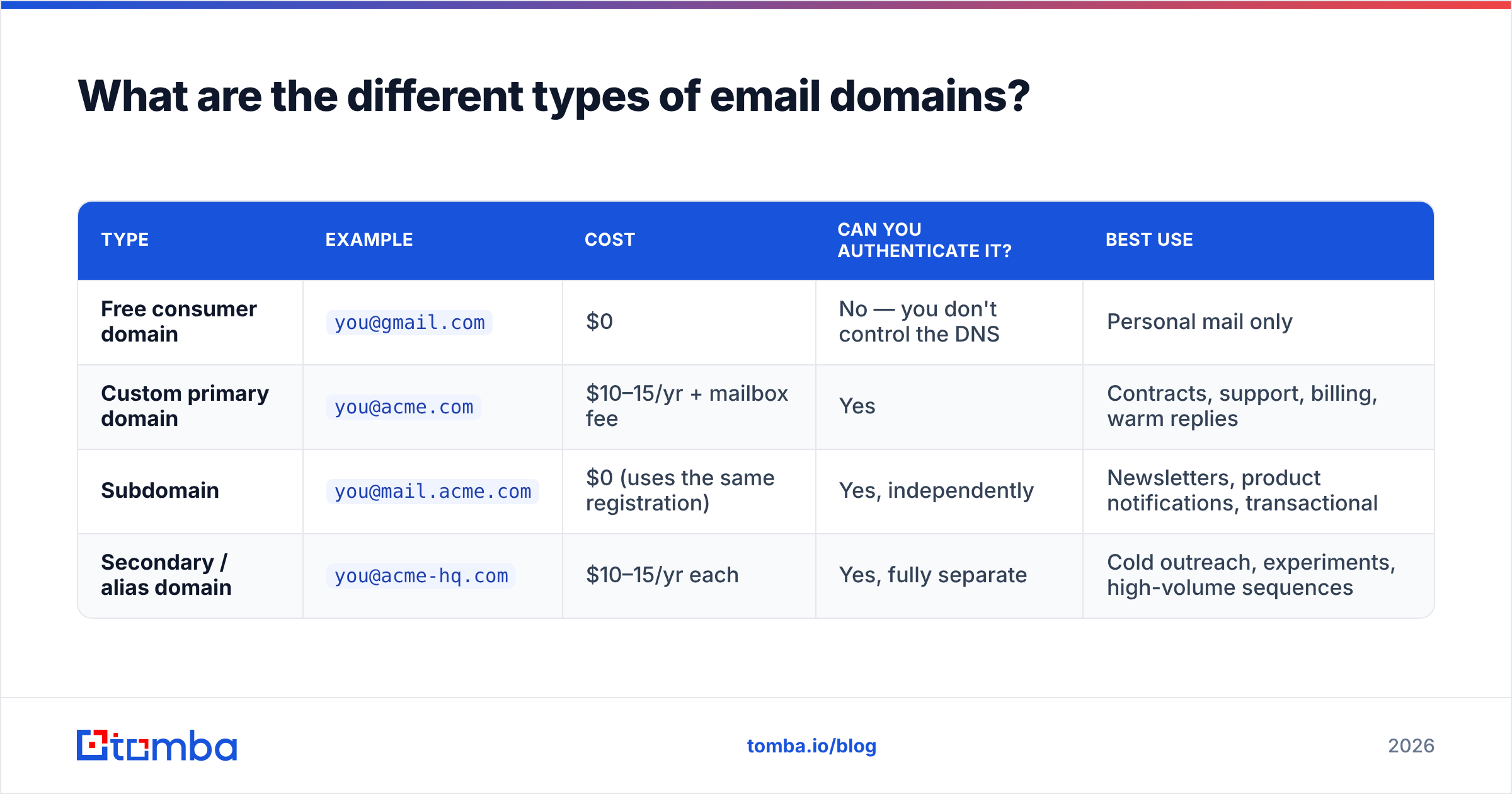
| Type | Example | Cost | Can you authenticate it? | Best use |
|---|---|---|---|---|
| Free consumer domain | you@gmail.com |
$0 | No — you don't control the DNS | Personal mail only |
| Custom primary domain | you@acme.com |
$10–15/yr + mailbox fee | Yes | Contracts, support, billing, warm replies |
| Subdomain | you@mail.acme.com |
$0 (uses the same registration) | Yes, independently | Newsletters, product notifications, transactional |
| Secondary / alias domain | you@acme-hq.com |
$10–15/yr each | Yes, fully separate | Cold outreach, experiments, high-volume sequences |
The distinction between the last two matters more than most people realize. A subdomain inherits some of the parent domain's trust signals but can carry its own DKIM keys and its own DMARC policy, so a bad newsletter week is partly firewalled from your main domain. A secondary domain is a completely separate registration — separate reputation, separate blast radius, and no spillover onto the domain that your invoices go out from.

The wrong pattern, which still shows up constantly: buying eight near-identical typo domains (acme-io.com, acmehq.net, getacme.co), pointing them all at the same mailbox provider, and sending from all of them at once. Mailbox providers cluster domains by registration date, registrar, DNS fingerprint, and content similarity. Eight brand-new lookalike domains sending identical copy is not eight reputations — it is one pattern, and it is a known one.
Which email domain provider should you choose in 2026?#
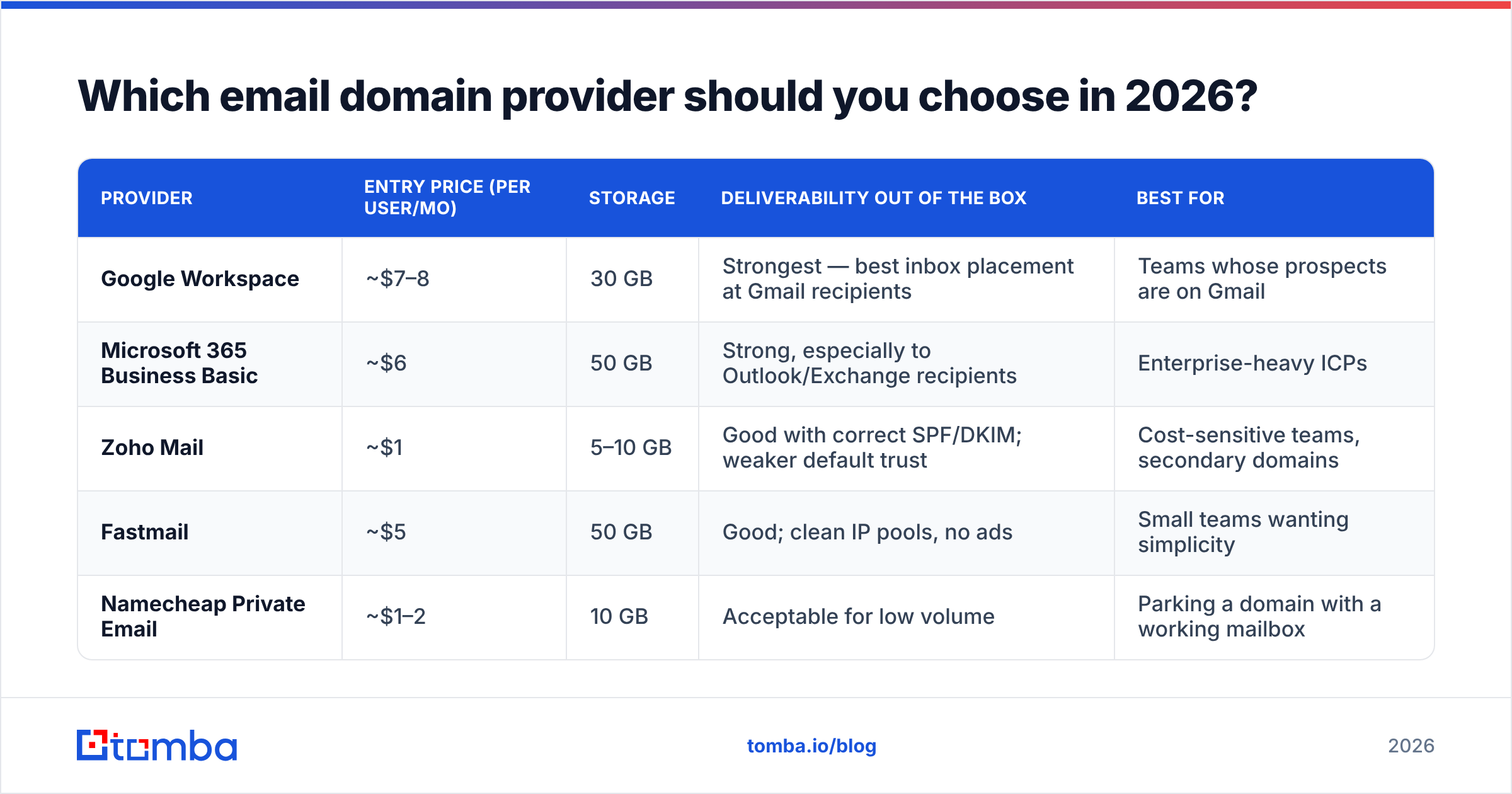
The domain registration and the mailbox hosting are two separate purchases. You can register at Cloudflare or Namecheap and host mailboxes anywhere. Here is how the mainstream hosting options compare for a small B2B team:
| Provider | Entry price (per user/mo) | Storage | Deliverability out of the box | Best for |
|---|---|---|---|---|
| Google Workspace | ~$7–8 | 30 GB | Strongest — best inbox placement at Gmail recipients | Teams whose prospects are on Gmail |
| Microsoft 365 Business Basic | ~$6 | 50 GB | Strong, especially to Outlook/Exchange recipients | Enterprise-heavy ICPs |
| Zoho Mail | ~$1 | 5–10 GB | Good with correct SPF/DKIM; weaker default trust | Cost-sensitive teams, secondary domains |
| Fastmail | ~$5 | 50 GB | Good; clean IP pools, no ads | Small teams wanting simplicity |
| Namecheap Private Email | ~$1–2 | 10 GB | Acceptable for low volume | Parking a domain with a working mailbox |
Prices drift, so confirm on the vendor page before you commit — Google Workspace pricing and the Microsoft 365 business comparison are the sources of truth.
Two rules cut through the comparison:
- Match your recipients' provider when you can. Gmail-to-Gmail and Microsoft-to-Microsoft both benefit from established trust paths. If 70% of your pipeline works at Microsoft shops, sending from Microsoft 365 is a small free edge.
- Don't cheap out on your primary. Use the $1/user provider for secondary outreach domains if you like. Keep contracts, password resets, and customer support on the provider with the best reputation and the best support SLA.
Should you send cold email from your main domain?#
No. Not because cold email is dirty, but because risk should be contained.
Your primary domain carries mail nobody can afford to lose: signed contracts, security alerts, customer support threads, payment confirmations. Cold outreach — by definition sent to people who never asked — produces spam complaints, hard bounces, and unsubscribe friction at rates that ordinary business mail never touches. Google's own sender guidelines put the spam complaint threshold at 0.10%, with 0.30% treated as a hard problem. That is one complaint per thousand messages. A single badly targeted 3,000-address send can blow past it.
The standard architecture in 2026 looks like this:
acme.com— primary. Human mail, support, contracts. Strict DMARC policy. No bulk sending, ever.mail.acme.com— subdomain for marketing and product email. Own DKIM, own reputation, unsubscribe headers on everything.acme-team.com/acmehq.com— one or two secondary domains for outbound sequences, each with a small number of warmed mailboxes.- Volume discipline — 20–40 cold sends per mailbox per day, not 200. Add mailboxes, not throughput per mailbox.
- A kill switch — if a secondary domain's reply rate collapses and bounce rate spikes, retire it. That is what secondary domains are for.
If you're sizing warmup ramps, the email warmup calculator will give you a day-by-day volume schedule rather than a guess.
How do you set up a new email domain correctly?#
Registering the domain takes four minutes. Making it send properly takes an afternoon. Do all six steps or don't bother:
- Register and let it age. Buy the domain, put a real one-page site on it (redirecting to your main site is fine and normal), and wait at least two weeks before sending anything. Brand-new domains sending cold email is the single loudest spam signal available.
- Set MX records to your mailbox host's values. Nothing else works until this resolves.
- Publish SPF — one record, one
v=spf1string, listing every service that sends on your behalf. Two SPF records is a permanent fail, and more than ten DNS lookups inside one record is also a fail. Confirm it with an SPF checker rather than trusting the copy-paste. - Enable DKIM in your mailbox provider and publish the public key. Use 2048-bit keys. Rotate them annually.
- Add DMARC, starting at
p=nonewith a reporting address so you can see what's actually sending as you. After two weeks of clean reports, move top=quarantine, thenp=reject. The dmarc.org overview explains the policy progression properly. - Warm up gradually. Day 1: five sends. Week 2: twenty per day. Week 4: forty. Send to people who reply — internal colleagues and existing customers count.
Skipping step 6 undoes steps 1 through 5. Authentication proves you are who you say you are; it does not prove you are welcome.
What does your email domain have to do with bounce rates?#
Everything, but from the other direction — the recipient's domain matters as much as yours.
Roughly four failure modes account for most bounce volume on a cold list:
- Dead domains. The company folded, the domain lapsed, and there are no MX records at all. Every send is an instant hard bounce.
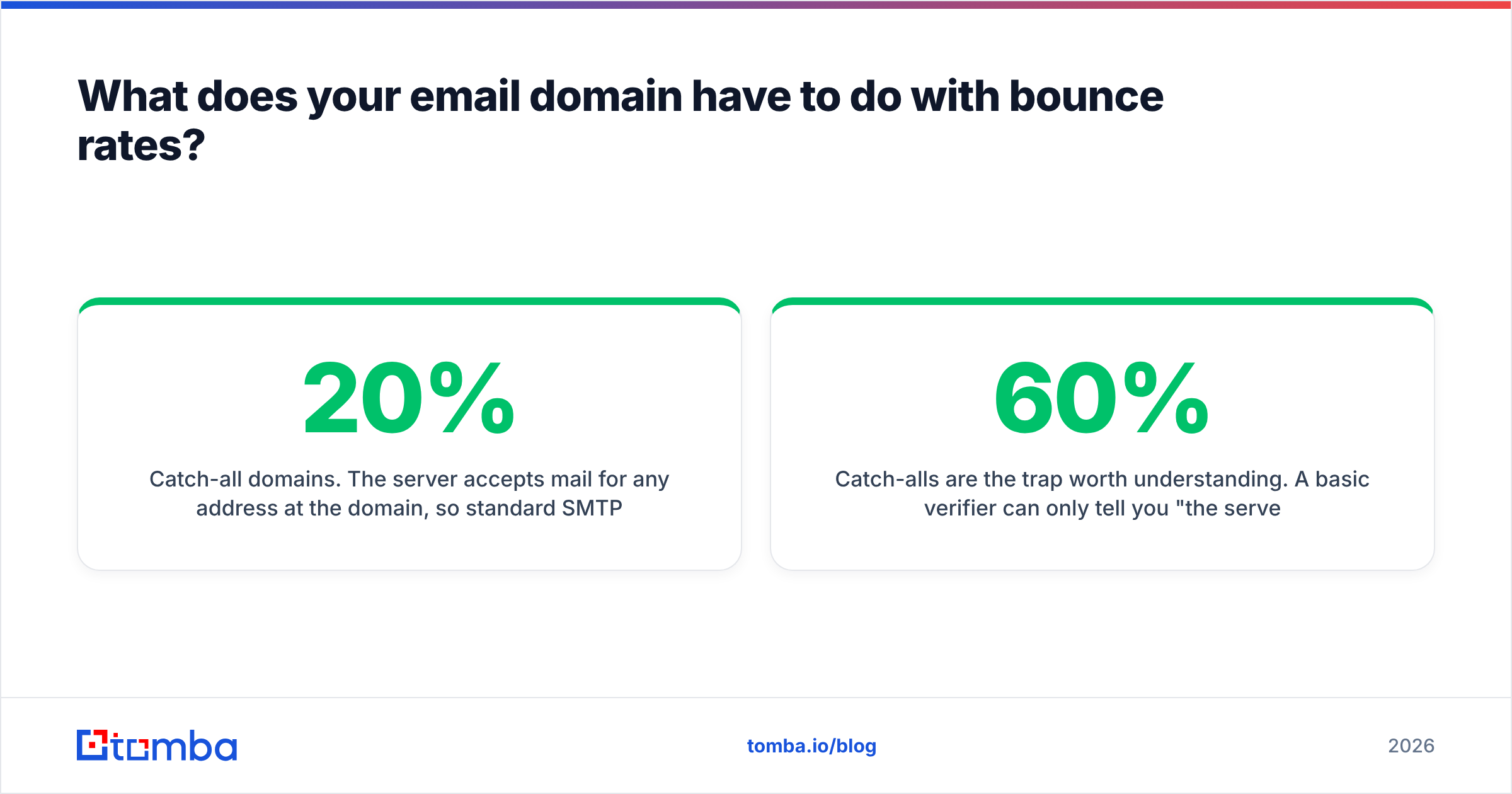
- Catch-all domains. The server accepts mail for any address at the domain, so standard SMTP verification returns "valid" for
asdfgh@company.com. Roughly 15–20% of B2B domains are configured this way, and they are the number one source of false-positive "verified" addresses. - Role addresses.
info@,sales@,support@. They resolve fine and get read by nobody who can buy. - Stale personal addresses. The person left. The mailbox is a redirect, or it bounces, or worse, it silently drops mail.

Catch-alls are the trap worth understanding. A basic verifier can only tell you "the server said yes to everything," which is not information. A dedicated catch-all verifier uses pattern confidence, historical signal, and secondary sources to score whether a specific mailbox at a catch-all domain is likely real — the difference between a 60% deliverable list and a 92% one.
How do you find and verify addresses at a specific email domain?#
Once you know the target company's domain, finding the right mailbox is mechanical.
The usual sequence:
- Identify the domain's email pattern. Most companies use one of about six formats (
first.last@,flast@,first@,firstl@,f.last@,last.first@). A domain search returns the known addresses at a domain plus the dominant pattern, which lets you predict the rest. - Generate candidates for the people you care about. Name plus pattern gives you the likely address without a single manual guess.
- Verify before sending. SMTP-level checks confirm the mailbox exists. An email verifier will separate deliverable, risky, and invalid, and flag catch-all domains explicitly instead of pretending they're clean.
- Suppress the junk. Role addresses, disposable domains, and duplicates come out of the list, not into your sequence.
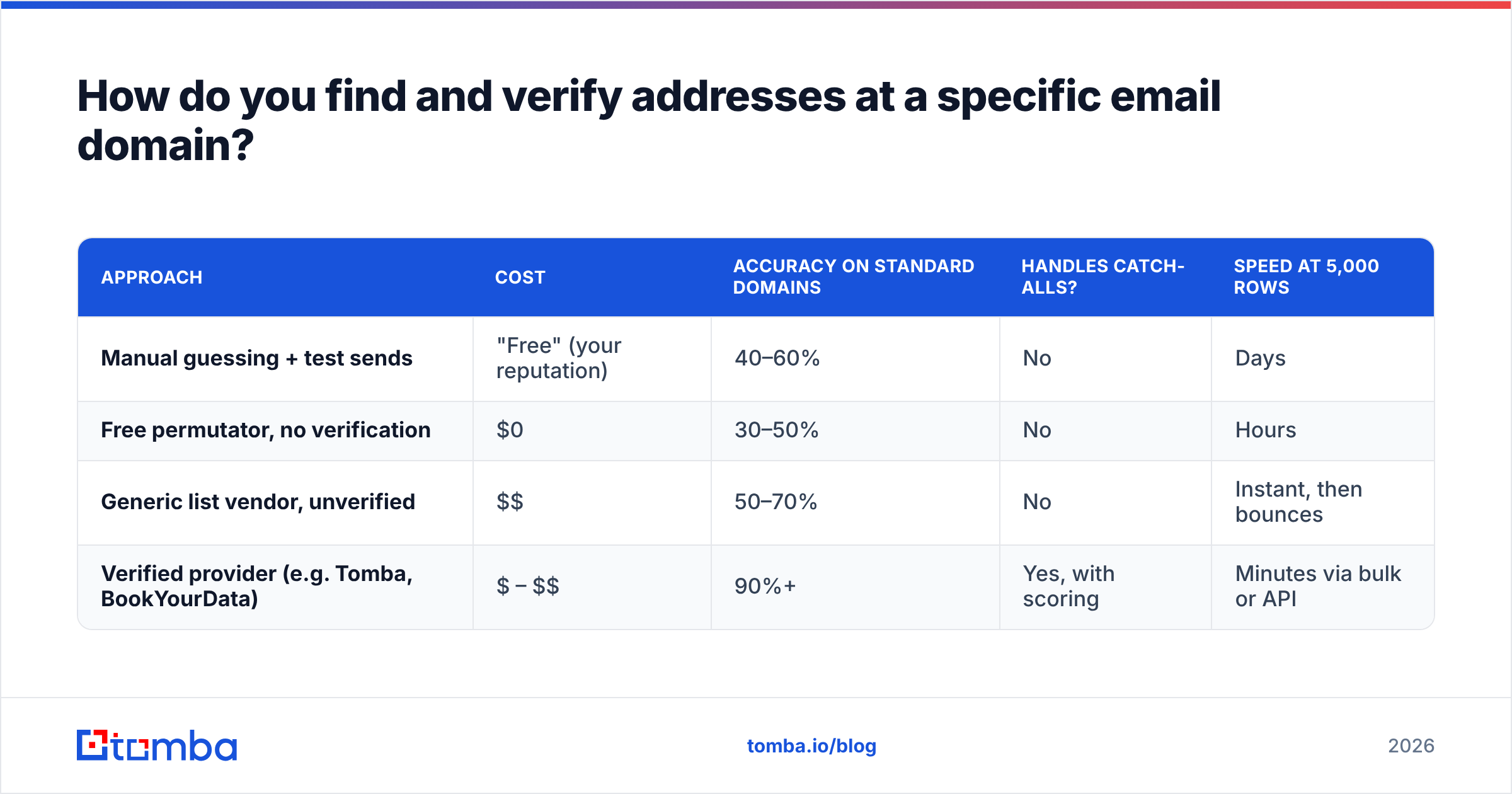
Here's the comparison that matters when picking a tool for this job:
| Approach | Cost | Accuracy on standard domains | Handles catch-alls? | Speed at 5,000 rows |
|---|---|---|---|---|
| Manual guessing + test sends | "Free" (your reputation) | 40–60% | No | Days |
| Free permutator, no verification | $0 | 30–50% | No | Hours |
| Generic list vendor, unverified | $$ | 50–70% | No | Instant, then bounces |
| Verified provider (e.g. Tomba, BookYourData) | $ – $$ | 90%+ | Yes, with scoring | Minutes via bulk or API |
BookYourData is a solid option if you want pre-built, pre-verified lists by industry and title and prefer to buy contacts outright. Tomba fits better when you already know the accounts you want and need to resolve specific people at specific domains on demand, or wire that into your own stack via API. Both beat guessing by a wide margin, and either one is cheaper than the reputation damage from a 20% bounce rate.
When is a free email domain actually fine?#
Three cases, and they're narrow:
- You're a solo consultant with no brand and fewer than twenty outbound emails a month. A Gmail address will not be your bottleneck.
- You're emailing people who already know you. Warm replies to existing relationships care about who you are, not what's after the
@. - Your recipients are themselves on free domains — sole traders, creators, local businesses. B2C-ish contexts are far less domain-sensitive.
Outside those, a free domain costs you three things you can't buy back: you cannot publish SPF, DKIM, or DMARC for gmail.com, so you cannot authenticate as yourself; bulk sending from consumer accounts violates the terms of service and gets accounts throttled or suspended; and enterprise buyers read @gmail.com in a vendor pitch as a signal to not reply. At $12 a year for the domain, the trade is not close.
What should you actually do next?#
Audit before you buy anything. Pull up your current sending setup and answer four questions: is SPF a single valid record, is DKIM signing on every outbound service, is DMARC published with a policy you've actually reviewed, and is any cold outreach going out from the same domain as your contracts? Fix in that order.
Then fix the other half of the equation — the domains you're sending to. Half of all deliverability firefighting is really list hygiene wearing a costume. Bounces from dead domains, catch-all guesses, and stale addresses hit your reputation exactly as hard as bad authentication does, and they're cheaper to prevent.
Start with the Tomba Email Finder. Give it a domain and a name, get a verified address back with a confidence score and an explicit catch-all flag, and stop shipping guesses into your sequencer. The free tier covers 25 searches a month so you can test accuracy on domains you already know the answers for; paid plans start at $49/mo, with Growth at $99/mo and Pro at $249/mo when you need bulk runs or API volume. Verify the domain, verify the mailbox, then send.
Related guides#
Ready to find emails that actually work?
Join 150,000+ professionals who stopped guessing and started sending. Free credits on signup — no credit card required.
Get the Tomba newsletter
Practical outbound tactics and product updates — once every two weeks.
About the author