Email Extractor Online: The 2026 Guide to Clean B2B Lists
Online email extractors are fast, free, and often useless on their own. Here's how extraction, verification, and enrichment fit together — plus a side-by-side look at the tools worth your budget in 2026.
TL;DR
- An email extractor online pulls email strings out of text, files, or web pages. It finds what is already published — it does not discover or validate anything.
- Raw extraction output typically runs 30–50% dead: role accounts, expired mailboxes, scraped junk, and honeypot traps.
- Extraction ≠ finding ≠ verification. You almost always need at least two of the three before a list is safe to send to.
- Free browser extractors are fine for a 20-contact one-off. Anything above a few hundred rows needs a verified pipeline with an API.
- Budget reality: a decent extract-verify-enrich stack starts around $49/mo. Free tools cost you in bounces, not dollars.
What is an email extractor online?#
An email extractor is a pattern matcher. Feed it a blob of text — a webpage, a PDF, a CSV export, a pile of LinkedIn profiles — and it scans for anything shaped like name@domain.tld, deduplicates the hits, and hands you a list.
Think of it like a metal detector on a public beach. It only beeps on metal that's already lying in the sand. It won't tell you whether the coin is real currency or a bottle cap, and it certainly won't dig up anything buried three feet down. That's the whole boundary of the category, and misunderstanding it is why so many teams end up with a 10,000-row list and a suspended sending domain.
The format itself is standardized — the local part, the @, the domain — which is exactly why regex-based extraction works so well and why it tells you so little. A perfectly valid email address can still be an abandoned mailbox from 2019, an alias that forwards nowhere, or a spam trap planted to catch scrapers.
Extraction answers "what strings exist here?" It does not answer "will this reach a human who can buy from me?"
How do online email extractors actually get their data?#
Not all extractors work the same way, and the method determines the quality ceiling. Here are the five approaches you'll run into:
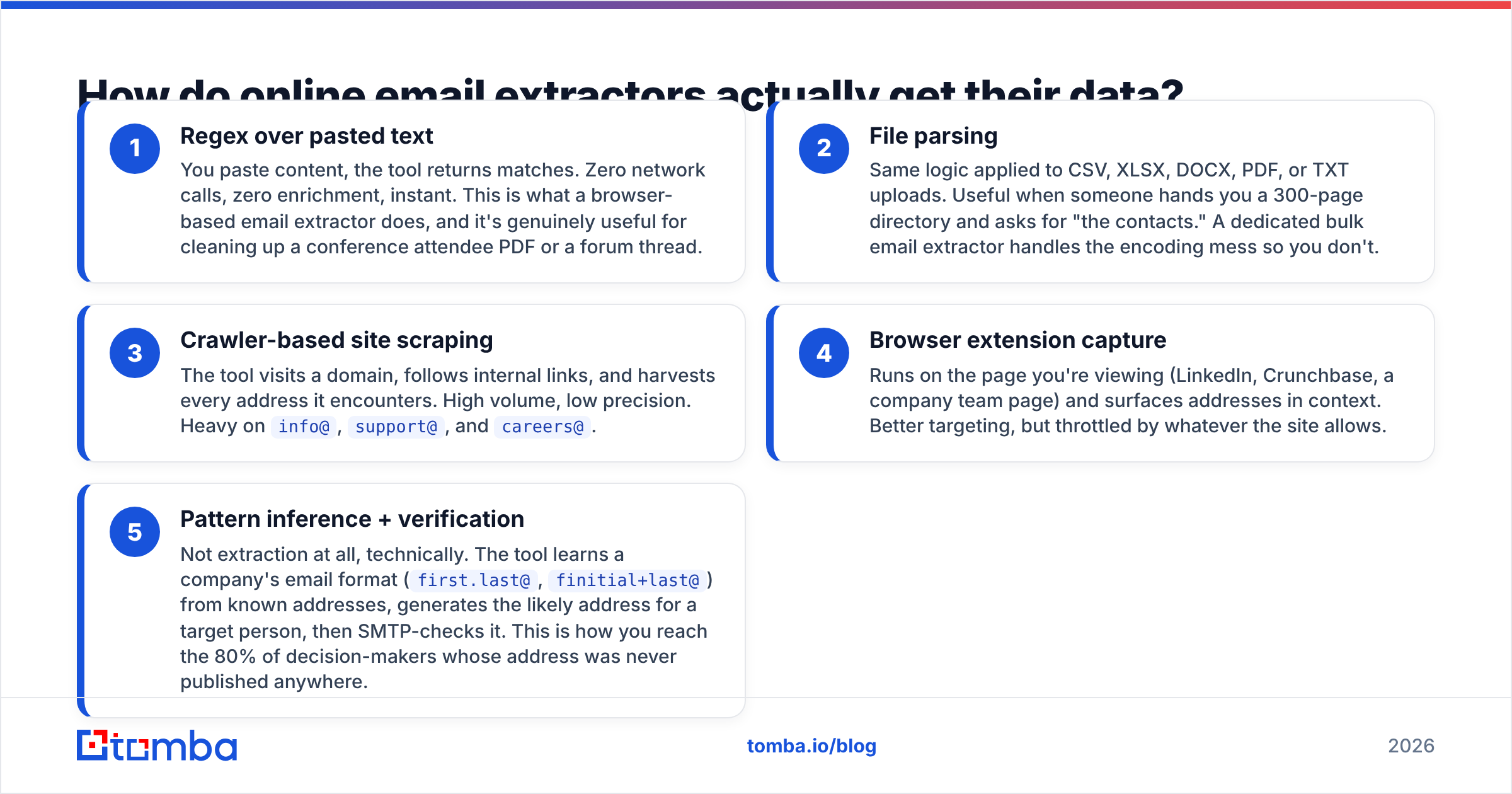
- Regex over pasted text — You paste content, the tool returns matches. Zero network calls, zero enrichment, instant. This is what a browser-based email extractor does, and it's genuinely useful for cleaning up a conference attendee PDF or a forum thread.
- File parsing — Same logic applied to CSV, XLSX, DOCX, PDF, or TXT uploads. Useful when someone hands you a 300-page directory and asks for "the contacts." A dedicated bulk email extractor handles the encoding mess so you don't.
- Crawler-based site scraping — The tool visits a domain, follows internal links, and harvests every address it encounters. High volume, low precision. Heavy on
info@,support@, andcareers@. - Browser extension capture — Runs on the page you're viewing (LinkedIn, Crunchbase, a company team page) and surfaces addresses in context. Better targeting, but throttled by whatever the site allows.
- Pattern inference + verification — Not extraction at all, technically. The tool learns a company's email format (
first.last@,finitial+last@) from known addresses, generates the likely address for a target person, then SMTP-checks it. This is how you reach the 80% of decision-makers whose address was never published anywhere.
The first four find published addresses. The fifth finds unpublished ones. That distinction is the entire difference between a marketing list and a sales list.

Why do extracted email lists bounce so hard?#
Because published addresses are the ones nobody protects.
When an address sits in plain text on a public page, it has been sitting there for years, harvested by every scraper on the internet, and routed to a shared inbox that a junior marketer checks on Fridays. The mailbox is often technically live — so a naive syntax check passes it — while the human response rate is near zero.
Then there are the actively dangerous rows:
- Spam traps. Recycled addresses that mailbox providers reactivate specifically to catch list scrapers. One hit can tank your domain reputation for weeks.
- Catch-all domains. The server accepts everything, so a standard SMTP ping returns "valid" for
asdfgh@company.com. You need a dedicated catch-all verifier to get a real signal here. - Role accounts.
info@,sales@,hello@. They accept mail, they rarely produce replies, and some ESPs weight them negatively. - Stale rows. B2B contact data decays roughly 2–3% per month through job changes alone. A list extracted 18 months ago is close to half wrong.
Run any raw extraction through an email verifier before it touches a sending tool. Not as a nice-to-have — as the step that decides whether the campaign runs at all. Providers now enforce bounce-rate thresholds in the low single digits, and you burn through that budget in the first 200 sends of a dirty list.

Which email extractor online should you use in 2026?#
Pick based on what you're actually starting from: raw text, a domain, a person's name, or nothing at all.
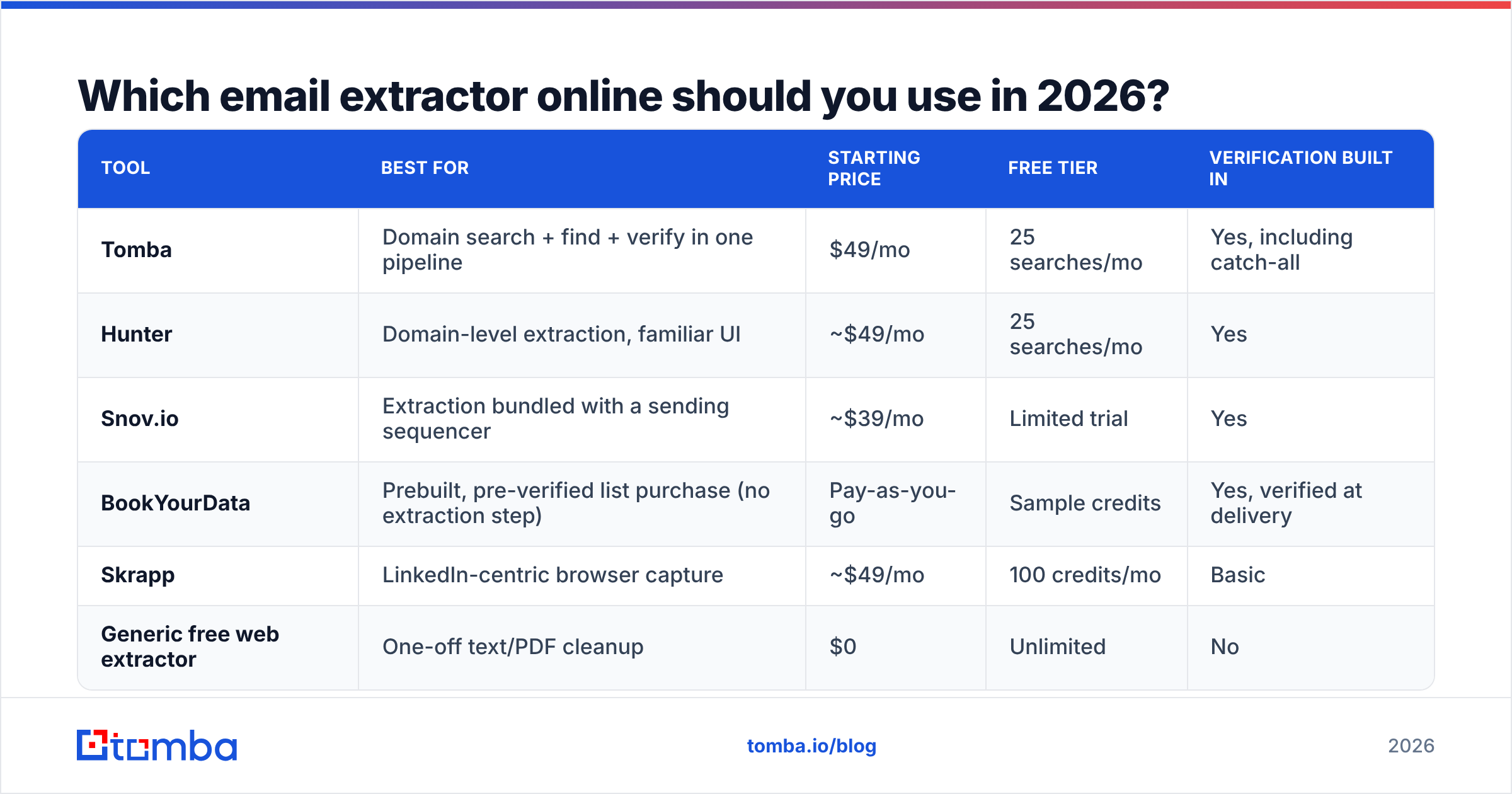
| Tool | Best for | Starting price | Free tier | Verification built in |
|---|---|---|---|---|
| Tomba | Domain search + find + verify in one pipeline | $49/mo | 25 searches/mo | Yes, including catch-all |
| Hunter | Domain-level extraction, familiar UI | ~$49/mo | 25 searches/mo | Yes |
| Snov.io | Extraction bundled with a sending sequencer | ~$39/mo | Limited trial | Yes |
| BookYourData | Prebuilt, pre-verified list purchase (no extraction step) | Pay-as-you-go | Sample credits | Yes, verified at delivery |
| Skrapp | LinkedIn-centric browser capture | ~$49/mo | 100 credits/mo | Basic |
| Generic free web extractor | One-off text/PDF cleanup | $0 | Unlimited | No |

Two honest notes on this table.
First, BookYourData isn't really competing in the same lane — it sells verified lists rather than extracting them. If your problem is "I don't have a source to extract from," buying a filtered, pre-verified segment is often faster and cheaper than building a scraping pipeline from zero. Different tool, different job, and a legitimate answer for teams without research bandwidth.
Second, the free extractors are not scams. They're just scoped narrowly. A regex tool that costs nothing and cleans a messy paste in two seconds is doing exactly what it promises. The failure mode is treating its output as a campaign-ready list.
If you want third-party signal beyond vendor marketing, the G2 email verification category aggregates enough reviews to spot the tools with chronic support or accuracy complaints.
Is extractor, email finder, or database the right tool for you?#
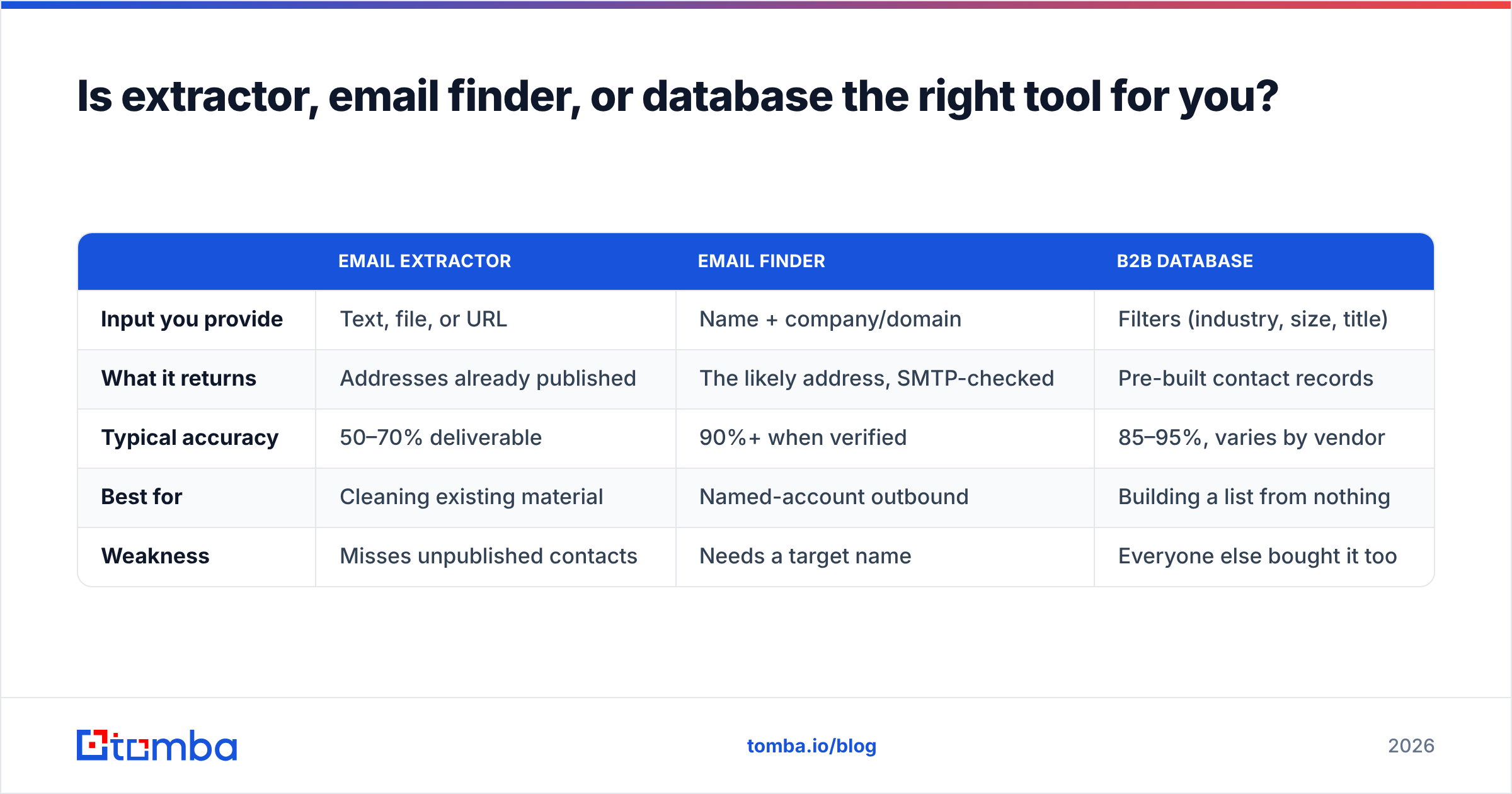
Most teams buy the wrong one because the marketing language overlaps. Here's the practical split:
| Email extractor | Email finder | B2B database | |
|---|---|---|---|
| Input you provide | Text, file, or URL | Name + company/domain | Filters (industry, size, title) |
| What it returns | Addresses already published | The likely address, SMTP-checked | Pre-built contact records |
| Typical accuracy | 50–70% deliverable | 90%+ when verified | 85–95%, varies by vendor |
| Best for | Cleaning existing material | Named-account outbound | Building a list from nothing |
| Weakness | Misses unpublished contacts | Needs a target name | Everyone else bought it too |
The strongest workflow uses more than one. Start with a domain search to map who's publicly listed at a company and learn its email pattern. Use a finder to construct addresses for the specific decision-makers who never appear on the team page. Verify everything. Then enrich with title, seniority, and location so your sequencing actually has variables to personalize on.
How do you turn a raw extraction into a list you can send to?#
Five steps. Skip any of them and the bounce rate tells on you.
- Extract and deduplicate. Same person appears as
j.smith@andjohn.smith@? Merge on domain plus normalized name before you count your list size. Most "10,000 leads" collapse to 6,000 unique humans. - Strip role accounts and free-mail domains. Unless you're targeting solopreneurs, drop
info@,admin@,noreply@, and anything on gmail/yahoo/outlook consumer domains. Typically 20–30% of a scrape. - Verify at the SMTP level. Syntax and MX checks are table stakes and prove almost nothing. You want mailbox-level confirmation plus an explicit catch-all classification. For large batches, run it through bulk verification rather than one-at-a-time API calls.
- Enrich what survived. An address alone gives you nothing to personalize with. Attach job title, company size, tech stack, and LinkedIn URL so your first line isn't "I came across your website."
- Segment before sending. Split by seniority and industry. A 500-contact list split into five segments with five distinct angles beats a 2,500-contact blast every single time, and it protects your domain while you learn what lands.
Run this and a 10,000-row scrape usually yields 2,000–3,000 genuinely sendable contacts. That feels like a loss until you compare reply rates.
Is it legal to extract emails from websites?#
Short answer: extraction is generally lawful; what you do next is what's regulated.
Under GDPR, a business email address tied to an identifiable person counts as personal data. You can process it under legitimate interest for B2B outreach in most EU jurisdictions, provided you disclose your source, offer a clear opt-out, and keep the message relevant to the recipient's professional role. Some member states are stricter — Germany and Austria in particular lean toward requiring prior consent for commercial email.
In the US, CAN-SPAM permits cold B2B email but requires accurate headers, a physical postal address, and a working unsubscribe honored within ten business days. Canada's CASL is materially tighter, with consent requirements and real financial penalties.
Practical guardrails that keep you out of trouble regardless of jurisdiction:
- Only contact people whose professional role plausibly connects to what you sell.
- Include a one-click opt-out in every message, including the first.
- Suppress opt-outs permanently and globally, not per-campaign.
- Record where each contact came from. If a regulator or a recipient asks, "we scraped it" is a much worse answer than "published on your company's team page on this date."
- Never extract from sites whose terms explicitly forbid it, and respect
robots.txt.
None of this is legal advice, and if you're operating at real volume across the EU, spend an hour with counsel who knows the local interpretation.
What should you actually pay for this?#
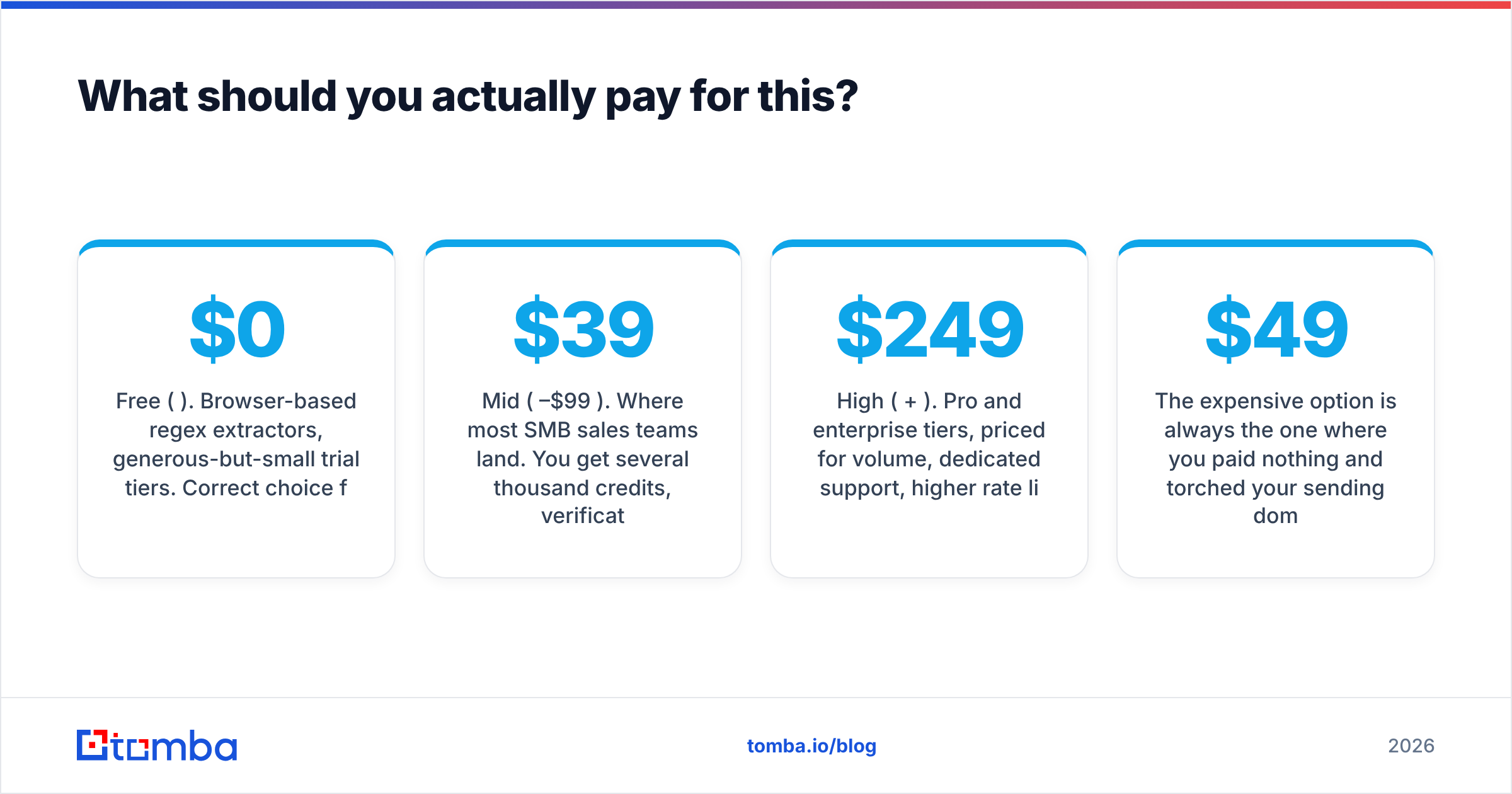
The market splits into three price bands.
Free ($0). Browser-based regex extractors, generous-but-small trial tiers. Correct choice for one-off cleanup and for testing whether a paid tool's data actually covers your target accounts. Tomba's free tier gives 25 searches a month, which is enough to sanity-check coverage in your niche before you spend anything.
Mid ($39–$99/mo). Where most SMB sales teams land. You get several thousand credits, verification included, an API, and integrations with your CRM and sequencer. Tomba's Starter sits at $49/mo and Growth at $99/mo; see Tomba pricing for exact credit allocations. Competitors cluster in the same band, so evaluate on data coverage for your target accounts, not on the sticker.
High ($249+/mo). Pro and enterprise tiers, priced for volume, dedicated support, higher rate limits, and team seats. Only worth it when you're running multi-rep outbound or building extraction into a product.
The expensive option is always the one where you paid nothing and torched your sending domain. Rebuilding sender reputation takes six to eight weeks of throttled volume — considerably more costly than a $49 subscription.
Where does this leave you?#
Use a free online extractor for what it's good at: fast, disposable cleanup of text and files you already have. The moment you're building a list you intend to send campaigns to, the extractor becomes step one of five, not the whole job.
Pair extraction with pattern-based discovery so you reach the people who were never published, then verify everything before it enters your sequencer. That's the difference between a list that gets you replies and a list that gets you blocked.
Ready to stop guessing at addresses? The Tomba Email Finder finds professional emails by domain, name, or company, verifies them at the mailbox level — including catch-all domains — and returns clean, enriched records through the UI, a Chrome extension, or the API. Start on the free tier with 25 searches a month, check the coverage on your own target accounts, and upgrade to Starter at $49/mo only when the data proves itself.
Related guides#
Ready to find emails that actually work?
Join 150,000+ professionals who stopped guessing and started sending. Free credits on signup — no credit card required.
Get the Tomba newsletter
Practical outbound tactics and product updates — once every two weeks.
About the author