Email Extractor Software in 2026: How to Pick One That Works
Most email extractor software hands you a list that looks impressive and bounces at 30%. Here's how extraction actually works, what accuracy to expect, and how the 2026 tools compare on price, compliance, and usable leads.
TL;DR
- "Email extractor software" covers two very different product categories: page scrapers that pull whatever
mailto:strings exist on a website, and data platforms that infer and verify business addresses from pattern databases plus SMTP checks. Only the second category produces sendable lists. - Raw scrapers typically deliver 20-40% dead addresses. That bounce rate is enough to damage your sending domain before you finish the first campaign.
- The metric that matters is cost per usable address, not cost per extracted row. A $29 scraper that yields 400 valid contacts is more expensive than a $49 tool that yields 900.
- Legality depends on jurisdiction and use, not on the tool. Under GDPR and CAN-SPAM, indiscriminate harvesting of personal addresses is the risky part — role and business contacts with a legitimate-interest basis are a different conversation.
- Pick based on where your input comes from: a domain list, a LinkedIn export, a pile of unstructured text, or a live CRM sync. Each has a different best-fit tool.
What is email extractor software?#
Email extractor software is any tool that takes an input — a website, a domain, a document, a search result page, a browser tab — and returns email addresses found or inferred from it. That definition is deliberately broad, because the market is broad, and most of the confusion buyers have comes from treating two unrelated things as one product.
Think of it like fishing. A page scraper is a net dragged across the surface: it catches whatever is floating there, including a lot of debris. A data platform is a sonar rig: it knows where the fish usually are, checks before it casts, and comes back with fewer but edible results.
Category one: literal extractors. These parse text and pull anything matching an email regex. They work on HTML pages, PDFs, CSV dumps, Slack exports, and pasted text. Tools like a simple email extractor or a bulk file extractor sit here. They're fast, cheap, and honest about what they do: they find addresses that are already published.
Category two: inference platforms. These don't need the address to be published. Given a company domain and a person's name, they determine the company's email pattern (first.last@, finitial+last@, etc.), generate the likely address, and then verify it against the receiving mail server before returning it. This is what most B2B teams actually need, and it's what an email finder does.
The two categories fail in opposite ways. Literal extractors miss the 80% of decision-makers who never publish their address anywhere. Inference platforms occasionally return a well-formed guess for a person who left the company two months ago. You need to know which failure mode you're buying.
How does email extractor software actually find addresses?#
Under the hood, every serious tool combines four or five of these mechanisms. Understanding them tells you why accuracy varies so much between vendors.
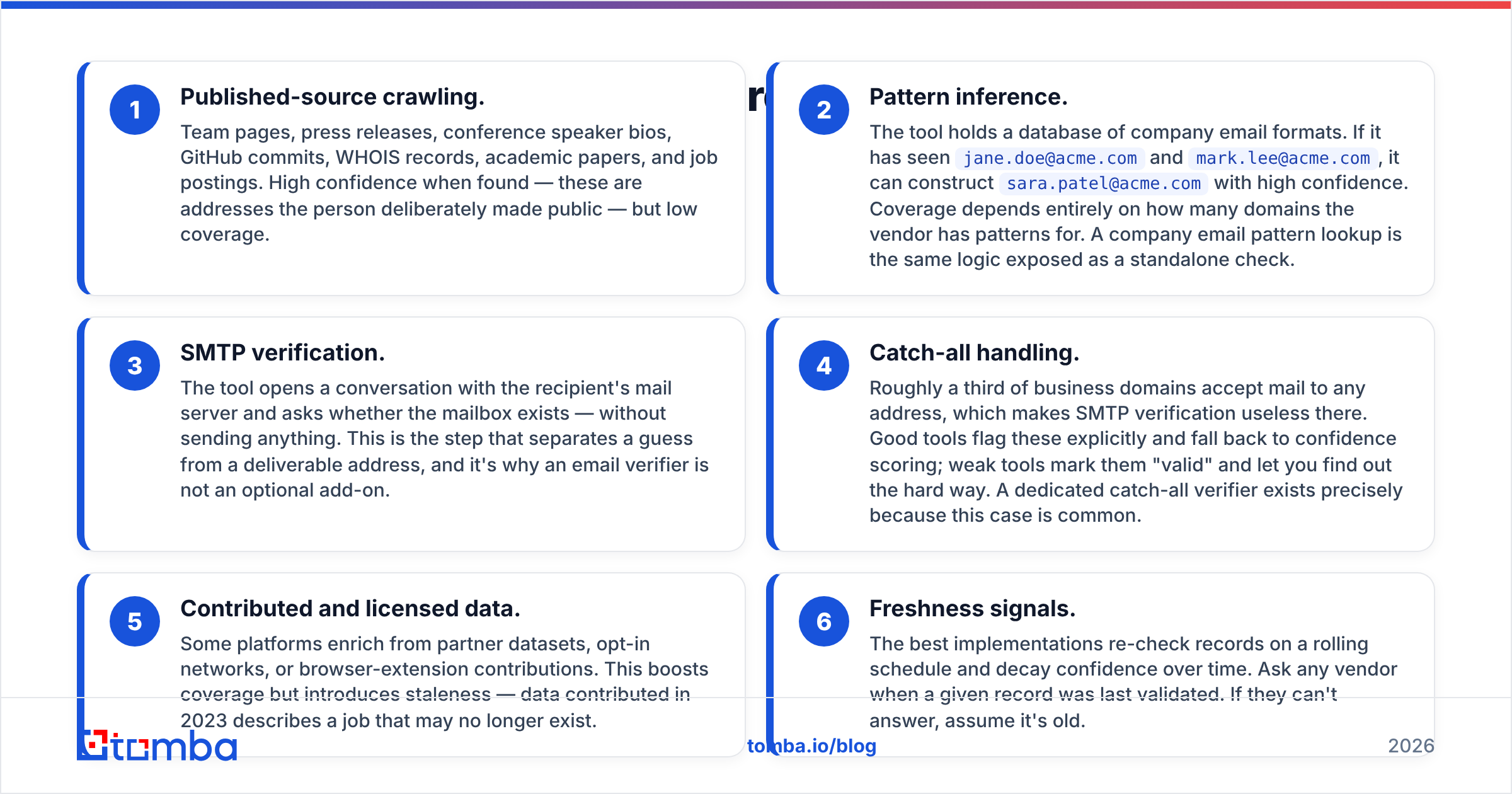
- Published-source crawling. Team pages, press releases, conference speaker bios, GitHub commits, WHOIS records, academic papers, and job postings. High confidence when found — these are addresses the person deliberately made public — but low coverage.
- Pattern inference. The tool holds a database of company email formats. If it has seen
jane.doe@acme.comandmark.lee@acme.com, it can constructsara.patel@acme.comwith high confidence. Coverage depends entirely on how many domains the vendor has patterns for. A company email pattern lookup is the same logic exposed as a standalone check. - SMTP verification. The tool opens a conversation with the recipient's mail server and asks whether the mailbox exists — without sending anything. This is the step that separates a guess from a deliverable address, and it's why an email verifier is not an optional add-on.
- Catch-all handling. Roughly a third of business domains accept mail to any address, which makes SMTP verification useless there. Good tools flag these explicitly and fall back to confidence scoring; weak tools mark them "valid" and let you find out the hard way. A dedicated catch-all verifier exists precisely because this case is common.
- Contributed and licensed data. Some platforms enrich from partner datasets, opt-in networks, or browser-extension contributions. This boosts coverage but introduces staleness — data contributed in 2023 describes a job that may no longer exist.
- Freshness signals. The best implementations re-check records on a rolling schedule and decay confidence over time. Ask any vendor when a given record was last validated. If they can't answer, assume it's old.

Are scraped email addresses legal to use?#
Short answer: the extraction is rarely the legal problem — the sending is.
Under the EU's GDPR, a business email address tied to a named individual (jane.doe@acme.com) is personal data. You can process it under legitimate interest for B2B outreach, but you need a documented basis, a genuine relevance to the recipient's role, and a working opt-out. Harvesting personal addresses en masse with no relevance filter is where regulators have historically pushed back — see the general background on email harvesting for how the practice has been treated over time.
In the US, CAN-SPAM is more permissive about acquisition but explicit about conduct: accurate headers, honest subject lines, a physical address, and a functioning unsubscribe processed within 10 business days. Notably, CAN-SPAM specifically penalizes messages sent to addresses obtained via automated harvesting of websites — so the "just scrape every page" approach carries statutory risk in the US that a targeted, pattern-based lookup does not.
Practical guardrails that keep you out of trouble regardless of jurisdiction:
- Prefer role-relevant business contacts over generic personal captures.
- Never scrape addresses from sites whose terms explicitly forbid it.
- Suppress anyone who unsubscribes, across every tool you own, permanently.
- Keep provenance: which source produced each address, and when. If you're ever asked, "we don't know" is the worst possible answer.
- Skip consumer domains entirely for B2B outreach. A
@gmail.comaddress in a B2B list is usually a signal that something in the pipeline went wrong.
What accuracy should you expect from email extractor software?#
Expect 90-97% deliverability from a good inference platform on non-catch-all domains, and 60-80% from a raw page scraper on the same input. Anyone advertising "99% accuracy" without defining the denominator is describing verification accuracy on addresses it chose to return — not coverage across your actual target list.

Two numbers matter and vendors love to blur them:
Coverage (hit rate). Of 1,000 target contacts you submit, how many come back with any address at all? Typical range for good tools: 55-75% for mid-market and enterprise targets, lower for small businesses and non-English-speaking regions.
Precision (deliverability). Of the addresses returned, how many actually accept mail? This is the number that protects your sender reputation.
Multiply them. A tool with 70% coverage and 95% precision gives you 665 usable contacts per 1,000 targets. A tool with 85% coverage and 72% precision gives you 612 — and burns your domain doing it. Higher coverage is worthless if it's padded with unverified guesses.
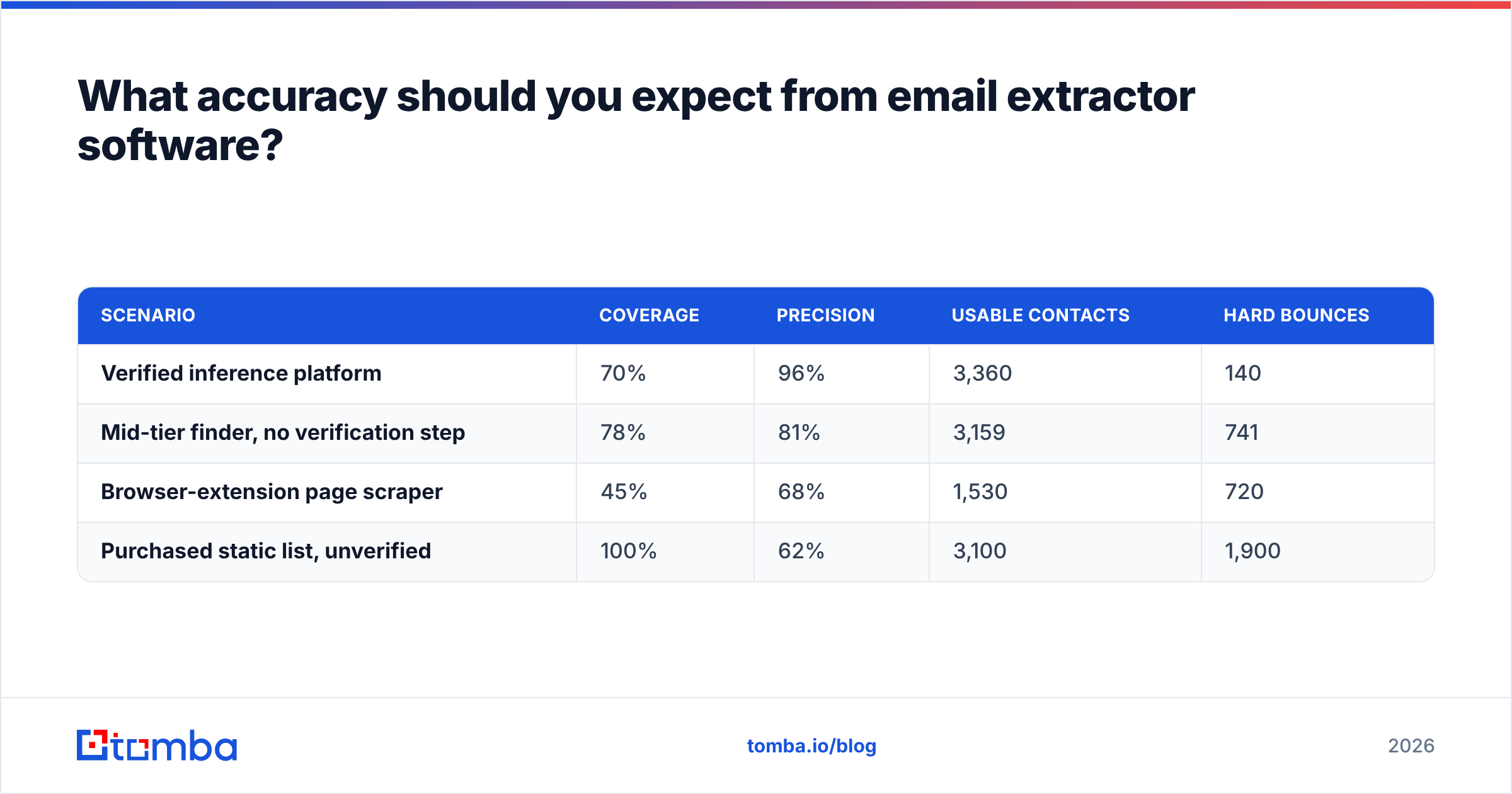
Here's the math laid out for a 5,000-contact target list:
| Scenario | Coverage | Precision | Usable contacts | Hard bounces |
|---|---|---|---|---|
| Verified inference platform | 70% | 96% | 3,360 | 140 |
| Mid-tier finder, no verification step | 78% | 81% | 3,159 | 741 |
| Browser-extension page scraper | 45% | 68% | 1,530 | 720 |
| Purchased static list, unverified | 100% | 62% | 3,100 | 1,900 |
The last row is the trap. It looks like the best deal until you notice you just sent 1,900 messages into the void, which is roughly the point at which mailbox providers stop trusting your domain.
Which email extractor software is worth paying for in 2026?#
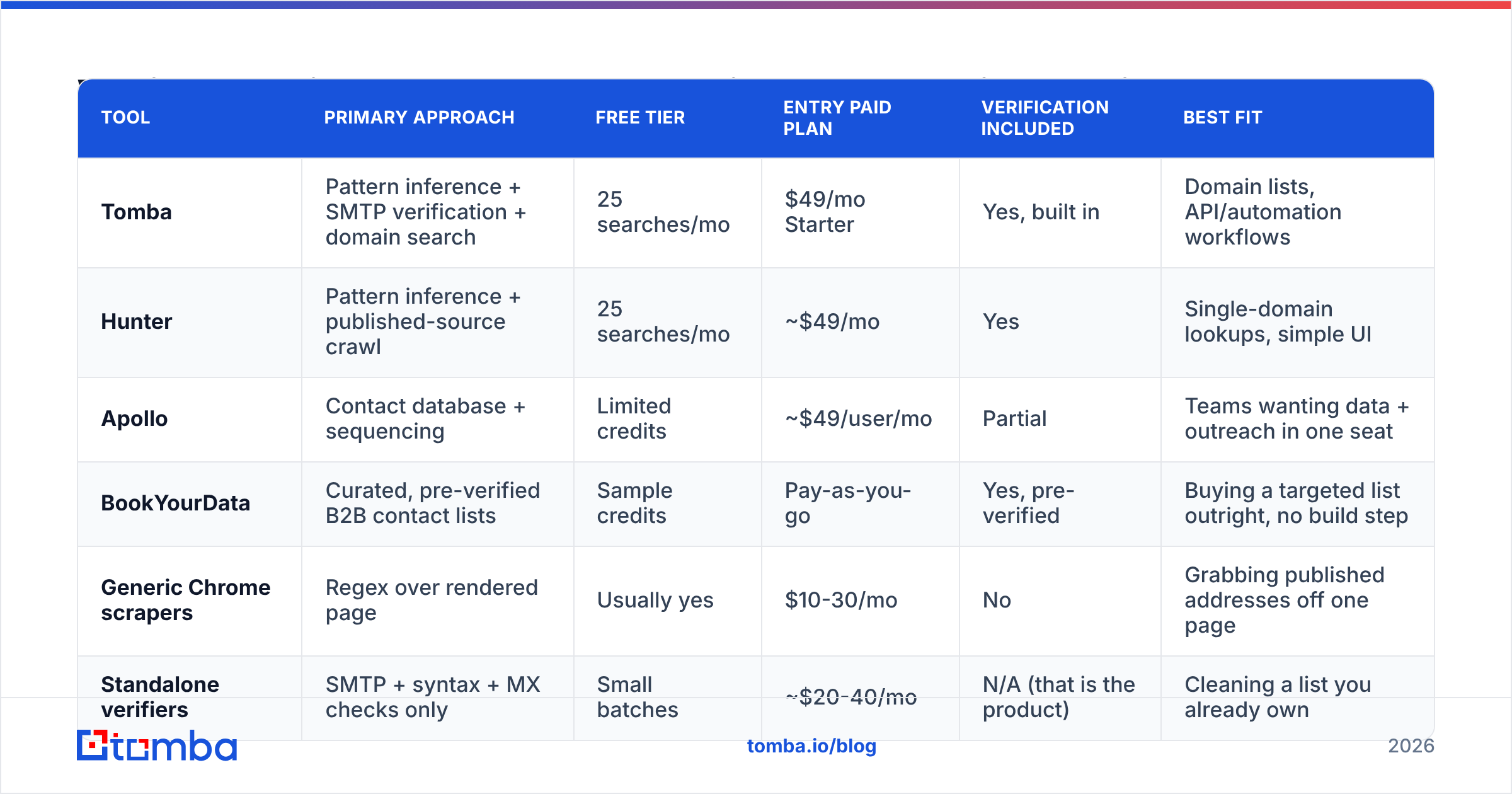
The honest answer depends on your input format. Below is how the main options compare on the attributes that change buying decisions. Prices are list rates observed in early 2026 and move often — check the vendor before you budget.

| Tool | Primary approach | Free tier | Entry paid plan | Verification included | Best fit |
|---|---|---|---|---|---|
| Tomba | Pattern inference + SMTP verification + domain search | 25 searches/mo | $49/mo Starter | Yes, built in | Domain lists, API/automation workflows |
| Hunter | Pattern inference + published-source crawl | 25 searches/mo | ~$49/mo | Yes | Single-domain lookups, simple UI |
| Apollo | Contact database + sequencing | Limited credits | ~$49/user/mo | Partial | Teams wanting data + outreach in one seat |
| BookYourData | Curated, pre-verified B2B contact lists | Sample credits | Pay-as-you-go | Yes, pre-verified | Buying a targeted list outright, no build step |
| Generic Chrome scrapers | Regex over rendered page | Usually yes | $10-30/mo | No | Grabbing published addresses off one page |
| Standalone verifiers | SMTP + syntax + MX checks only | Small batches | ~$20-40/mo | N/A (that is the product) | Cleaning a list you already own |
A few notes on where each genuinely wins:
If your input is a list of company domains, you want domain-level extraction. Feed 800 domains, get back every discoverable address plus role and confidence score. Domain search and bulk processing are the relevant features, and this is where per-lookup pricing beats per-seat pricing decisively.
If you don't want to build a list at all, buying a pre-verified one is legitimate. BookYourData is a solid option in that lane — you filter by industry, title, and geography and download contacts that have already been through verification. It solves a different problem than an extractor: you're trading control over targeting criteria for zero build time.
If you're already inside a workflow tool, use the extension. A Chrome extension that surfaces an address while you're looking at a company page saves more time than any batch job, provided the underlying data is verified rather than guessed.
If your input is unstructured text — a conference PDF, a scraped forum thread, a pile of signatures — a literal extractor is correct and an inference platform is overkill.
Independent user reviews on G2 are useful for spotting support and billing complaints, which no vendor page will tell you about. Ignore the star averages; read the 3-star reviews.

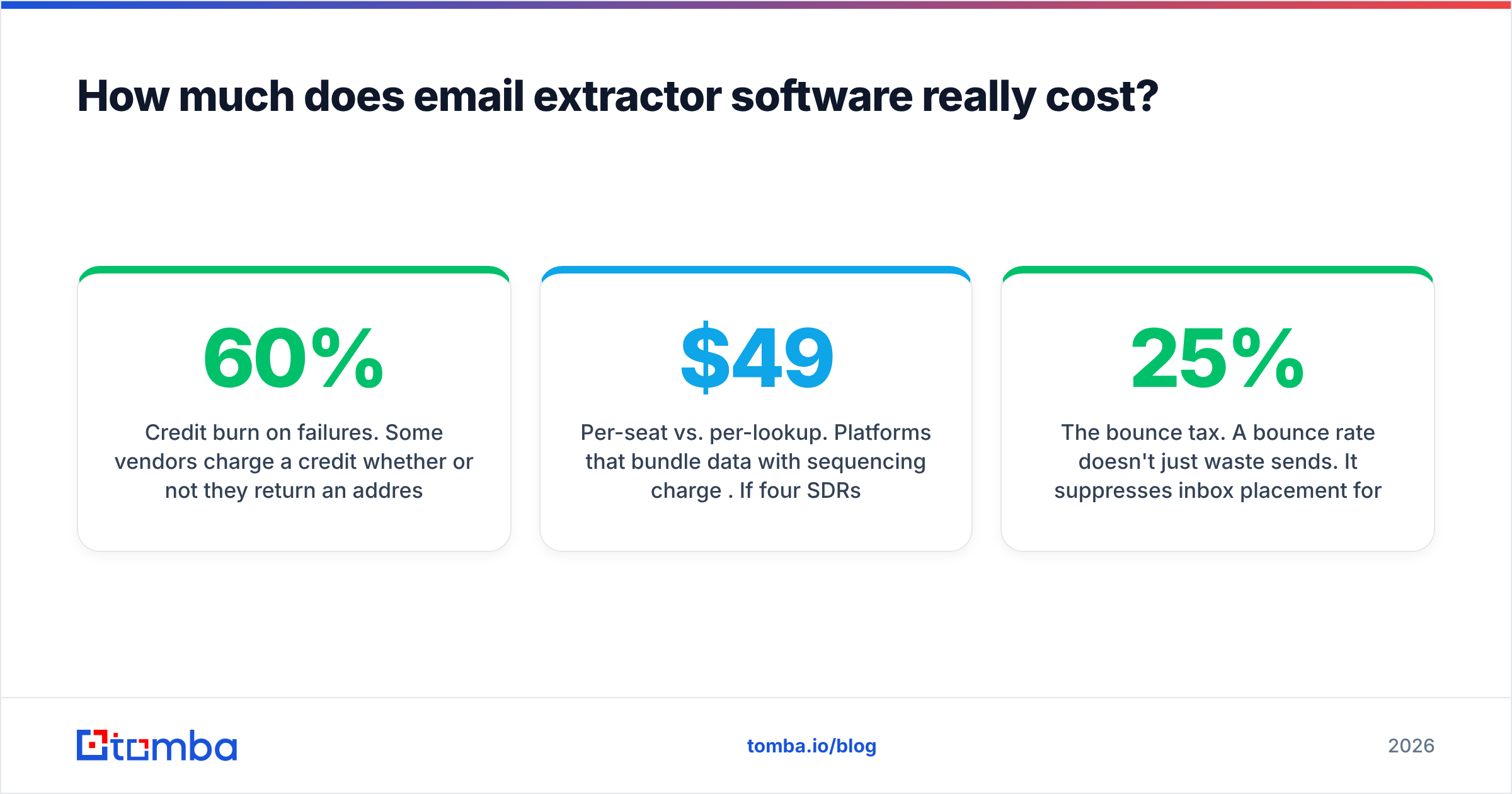
How much does email extractor software really cost?#
List price is the smallest part of the bill. Three costs hide behind it.
Credit burn on failures. Some vendors charge a credit whether or not they return an address. At 60% coverage, that silently raises your effective per-contact cost by 67%. Ask explicitly: "Do I pay for a search that returns nothing?" Tools that only charge on a successful, verified result are meaningfully cheaper than their sticker price suggests.
Per-seat vs. per-lookup. Platforms that bundle data with sequencing charge per user. If four SDRs need access, a $49/user plan is $196/month before you've extracted anything. A lookup-based model like Tomba pricing — Free at 25 searches, $49/mo Starter, $99/mo Growth, $249/mo Pro — decouples cost from headcount, which matters as soon as you have more than two people touching the data.
The bounce tax. A 25% bounce rate doesn't just waste sends. It suppresses inbox placement for the 75% that were valid, and recovering a damaged domain takes weeks. Price a cheap unverified tool at its list rate plus the cost of a month of degraded email deliverability and it stops looking cheap.
How do you build an extraction workflow that doesn't break?#
Six steps, in order. Skipping step 4 is the single most common failure.
- Define the target account list first. Firmographics, geography, tech stack, headcount band. Extraction quality is capped by targeting quality — a perfectly verified address at a company that will never buy is still a wasted send.
- Resolve domains, not company names. "Acme" is ambiguous;
acme.iois not. Normalize to root domains before anything else touches the list. - Run extraction in bulk, not one at a time. Batch or API access is where the time savings live. Manual lookups are fine for 20 contacts and indefensible for 2,000.
- Verify everything, including results from a tool that claims it already verified. Records go stale between extraction and send. If more than a week passes, re-verify.
- Segment catch-all domains into their own bucket. Send to them separately and at lower volume so their unknowable bounce behavior can't contaminate your main domain's reputation.
- Deduplicate against your CRM and suppression list before import. Emailing an existing customer a cold pitch is a worse outcome than a bounce.
Automate steps 2-5 and the whole pipeline becomes a scheduled job rather than a weekly chore. Most teams get there with the Tomba API or a no-code connector into their existing stack.
What mistakes kill extraction ROI?#
Chasing volume. 10,000 mediocre contacts convert worse than 800 well-targeted ones and cost far more in sender reputation. Volume is the vanity metric of prospecting.
Trusting a single confidence score. Confidence scores are vendor-specific and not comparable across tools. A "95" from one platform may mean "SMTP-confirmed" and from another "pattern matched two other employees." Read the definition.
Skipping role filtering. info@, support@, and sales@ addresses inflate your extracted count and almost never reach a decision-maker. Filter them out unless you're deliberately targeting a shared inbox.
Never re-checking. B2B contact data decays at roughly 2-3% per month through job changes alone. A list extracted a year ago is about a quarter wrong today. Re-verification is cheaper than re-extraction.
Testing on one domain. Every vendor performs well on microsoft.com. Run your free trial against 50 domains that look like your real ICP — including the small, obscure, non-US ones — and compare coverage and bounce rate side by side. That test takes an afternoon and prevents a year of paying for the wrong tool.
Where should you start?#
Run the comparison yourself on a real slice of your target list. Take 100 domains that match your ICP, push them through two or three candidate tools, verify the outputs independently, and compare usable-contact counts rather than raw row counts. The winner is usually not the one with the loudest accuracy claim.
If your inputs are company domains and names — the normal case for B2B outbound — start with the Tomba Email Finder. Pattern inference and SMTP verification run in the same call, so what comes back is already checked rather than merely generated, and the free tier gives you 25 searches to run the test above before you commit a dollar. Bring your own 100 domains, compare the results against whatever you're using now, and let the bounce rate decide.
Related guides#
Ready to find emails that actually work?
Join 150,000+ professionals who stopped guessing and started sending. Free credits on signup — no credit card required.
Get the Tomba newsletter
Practical outbound tactics and product updates — once every two weeks.
About the author