Email IP Reputation in 2026: The Complete No-Fluff Guide
Your IP reputation is scored before a single subject line gets read. Here's how mailbox providers calculate it, what quietly destroys it, and the repair sequence that actually works.
TL;DR
- Email IP reputation is a rolling, provider-specific score attached to the sending IP address your mail leaves from. Gmail, Outlook, and Yahoo each keep their own version — there is no single global number.
- Complaint rate and spam-trap hits move the needle hardest. Bounce rate and volume spikes are close behind. Content matters far less than most people assume at the IP layer.
- Dedicated IPs only pay off above roughly 50,000–100,000 emails per month. Below that, a well-run shared pool is usually safer.
- Repair is slower than damage: a bad week can take four to eight weeks of disciplined sending to undo.
- The cheapest insurance is list hygiene. Verifying before you send prevents the bounces and traps that cause reputation damage in the first place.
What is email IP reputation?#
Email IP reputation is the trust score a mailbox provider assigns to the IP address your mail is sent from. Think of it like a credit score for a street address: the mail carrier doesn't judge each envelope on its own merits, they judge the address that keeps producing complaints.
When your message hits Gmail's edge servers, the first thing evaluated isn't your subject line or your copy. It's the connecting IP. Within milliseconds the receiving system pulls historical signals tied to that IP — how many recipients marked mail from it as spam, how many addresses bounced, whether it hit a spam trap last Tuesday, whether the volume pattern looks like a human sales team or a botnet.
That score determines your ceiling. Great copy on a poisoned IP still lands in spam. Mediocre copy on a clean IP still reaches the inbox.
Two things make IP reputation confusing:
- It's provider-specific. Google, Microsoft, and Yahoo maintain separate internal scores. You can sit at "High" in Google Postmaster Tools and be filtered aggressively by Outlook the same day.
- It's rolling, not cumulative. Most providers weight the last 7–30 days far more heavily than your lifetime history. That cuts both ways: recent damage hurts fast, and recent good behavior heals faster than people expect.
Reputation is one half of a pair. The other half is sender reputation at the domain level, which travels with you even if you change IPs.
How do mailbox providers actually score your IP?#
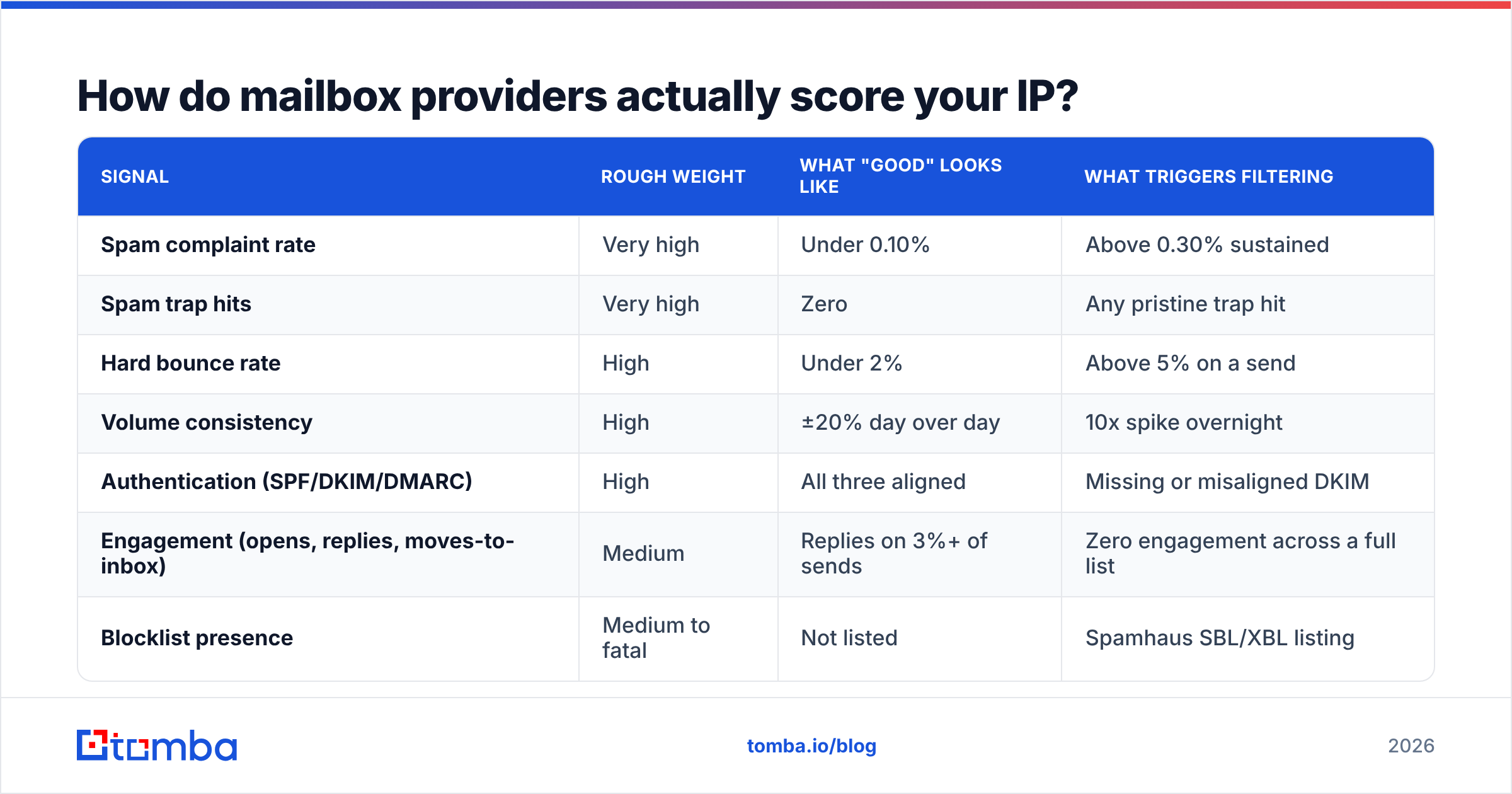
No provider publishes its formula. But the inputs are well documented through Google Postmaster Tools, Microsoft SNDS, and a decade of deliverability postmortems. Here's the practical weighting most deliverability teams work from:
| Signal | Rough weight | What "good" looks like | What triggers filtering |
|---|---|---|---|
| Spam complaint rate | Very high | Under 0.10% | Above 0.30% sustained |
| Spam trap hits | Very high | Zero | Any pristine trap hit |
| Hard bounce rate | High | Under 2% | Above 5% on a send |
| Volume consistency | High | ±20% day over day | 10x spike overnight |
| Authentication (SPF/DKIM/DMARC) | High | All three aligned | Missing or misaligned DKIM |
| Engagement (opens, replies, moves-to-inbox) | Medium | Replies on 3%+ of sends | Zero engagement across a full list |
| Blocklist presence | Medium to fatal | Not listed | Spamhaus SBL/XBL listing |
| Content and links | Low at IP layer | Clean, few redirects | Shortened links to flagged domains |
The two rows at the top of that table are the ones that end programs. Google's own guidance in Postmaster Tools draws a hard line at 0.3% complaints — and in practice, filtering tightens well before you reach it.
Spam traps deserve special attention because they're invisible until the damage is done. A pristine trap is an address that never belonged to a human and never opted in; hitting one is near-conclusive evidence you scraped or bought a list. A recycled trap is a real address that went dormant and was repurposed by the provider; hitting one proves your list hygiene is stale. Neither shows up as a bounce. You just quietly lose placement.

Is IP reputation more important than domain reputation?#
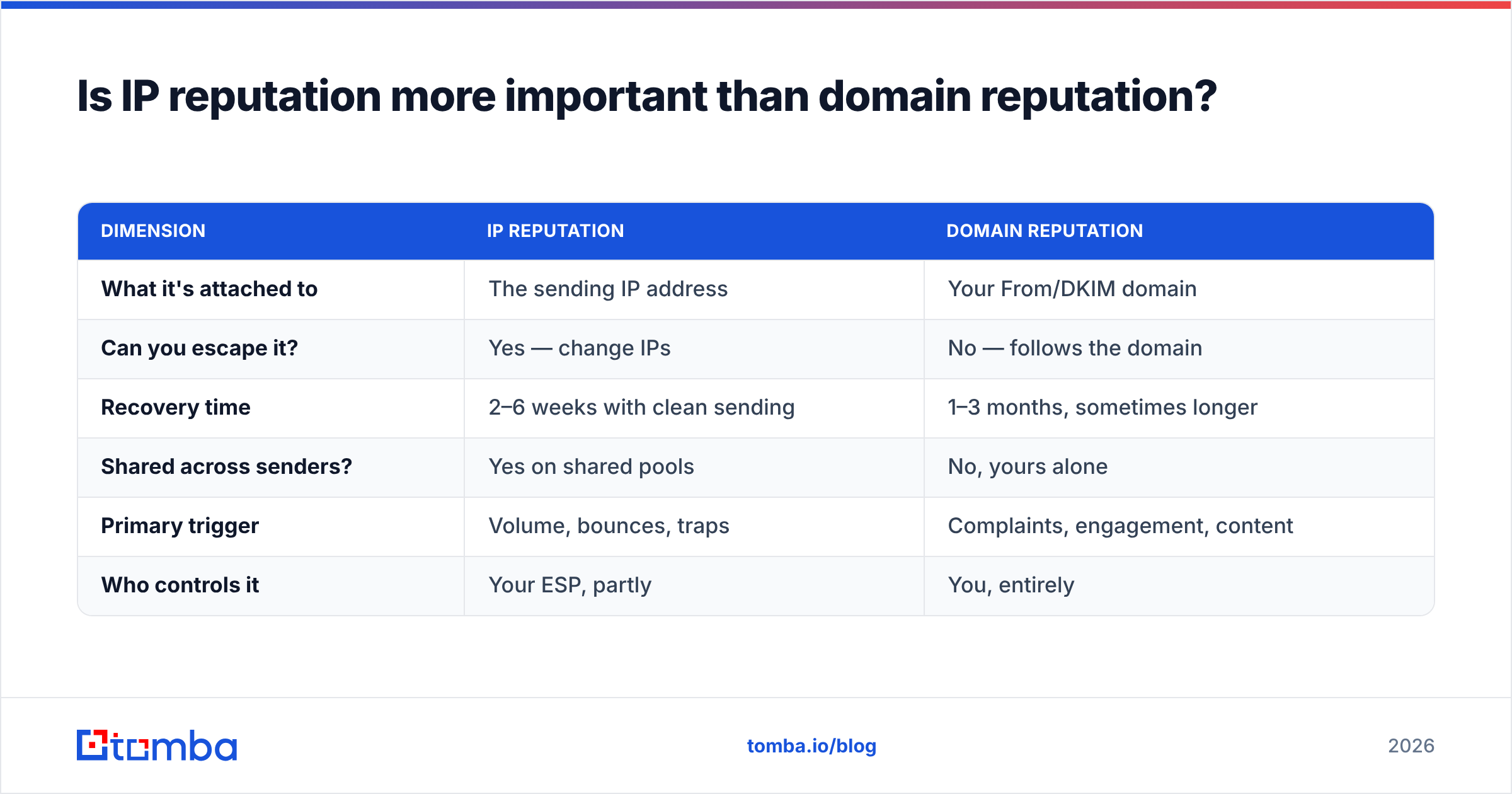
Short answer: domain reputation matters more in 2026, but IP reputation is what fails first.
Providers shifted weight toward domain-level signals over the last several years, largely because IP-hopping was too easy an escape hatch. Burn an IP, rent a new one, keep spamming. Tying reputation to the sending domain closed that loophole.
| Dimension | IP reputation | Domain reputation |
|---|---|---|
| What it's attached to | The sending IP address | Your From/DKIM domain |
| Can you escape it? | Yes — change IPs | No — follows the domain |
| Recovery time | 2–6 weeks with clean sending | 1–3 months, sometimes longer |
| Shared across senders? | Yes on shared pools | No, yours alone |
| Primary trigger | Volume, bounces, traps | Complaints, engagement, content |
| Who controls it | Your ESP, partly | You, entirely |
The practical takeaway: treat the IP as your throughput budget and the domain as your long-term asset. You can survive an IP problem. A scorched root domain is a business event.
This is why serious outbound teams send cold email from separate sending domains — variations of the brand domain, not the domain their invoices and support tickets ride on.
Shared or dedicated IP — which should you actually use?#
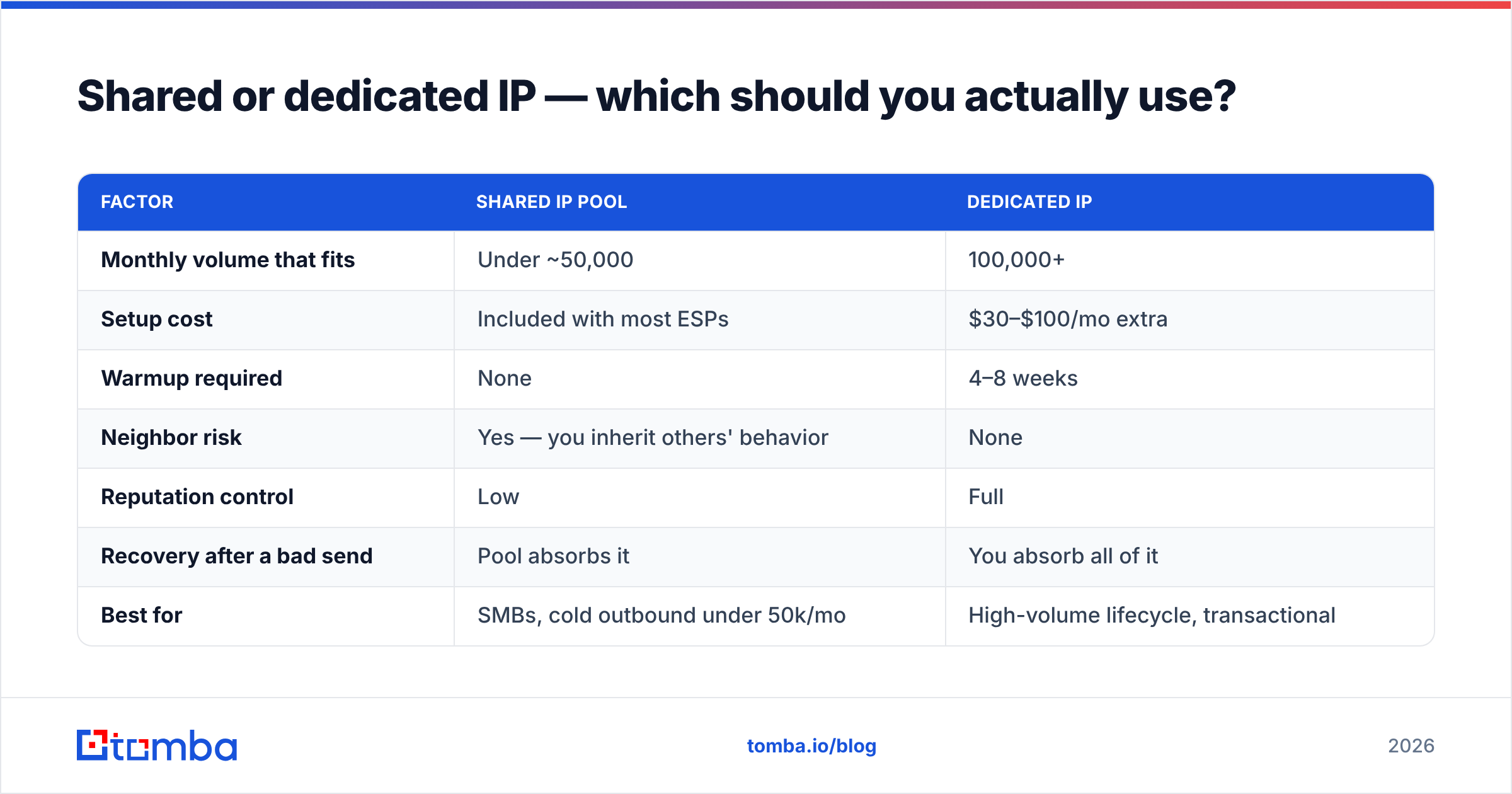
The instinct is "dedicated equals control equals better." That's wrong below a certain volume, and the reason is statistical.
Reputation systems need signal. A dedicated IP sending 400 emails a day produces so little data that providers can't build confidence in it, so they default to skepticism. A shared pool sending millions produces a stable, well-understood pattern that receiving servers already trust.
| Factor | Shared IP pool | Dedicated IP |
|---|---|---|
| Monthly volume that fits | Under ~50,000 | 100,000+ |
| Setup cost | Included with most ESPs | $30–$100/mo extra |
| Warmup required | None | 4–8 weeks |
| Neighbor risk | Yes — you inherit others' behavior | None |
| Reputation control | Low | Full |
| Recovery after a bad send | Pool absorbs it | You absorb all of it |
| Best for | SMBs, cold outbound under 50k/mo | High-volume lifecycle, transactional |
A middle path many teams land on: dedicated IPs for transactional mail (receipts, password resets, notifications — high engagement, predictable volume) and a reputable shared pool for marketing and outbound. Transactional mail is the best reputation-builder you have because open and click rates are enormous.
What actually destroys an email IP reputation?#
In roughly the order you'll encounter them:
- Sending to unverified lists. This is the number one cause, full stop. Every invalid address is a hard bounce, and a batch of hard bounces reads exactly like a purchased list to a filtering engine. Running your list through an email verifier before a campaign removes the majority of this risk for cents per record.
- Ramping volume too fast. Going from 200 to 5,000 emails a day overnight is the single loudest "this IP was just compromised" signal a provider can see. Ramp by no more than 30–50% per day and hold at each step until bounce and complaint rates stabilize.
- Ignoring catch-all domains. Catch-all servers accept everything, so verification returns "unknown" and teams send anyway. Those addresses often don't exist behind the accept, and the mail silently dies or lands in a trap. A catch-all verifier resolves a meaningful share of these before they cost you.
- Broken or missing authentication. No DKIM, an SPF record with too many DNS lookups, or a DMARC policy that doesn't align. Check yours with an SPF checker — misconfiguration here is common and entirely fixable in an afternoon.
- Burying or breaking unsubscribe. When opting out is hard, recipients hit "report spam" instead. That single behavioral substitution is responsible for a disproportionate share of complaint-rate damage.
- Mailing dormant segments to "reactivate" them. The 18-month-old list you're finally getting around to is full of recycled traps and dead mailboxes. Suppress anything with no engagement in 6+ months, or re-verify it first.
How do you check your email IP reputation for free?#
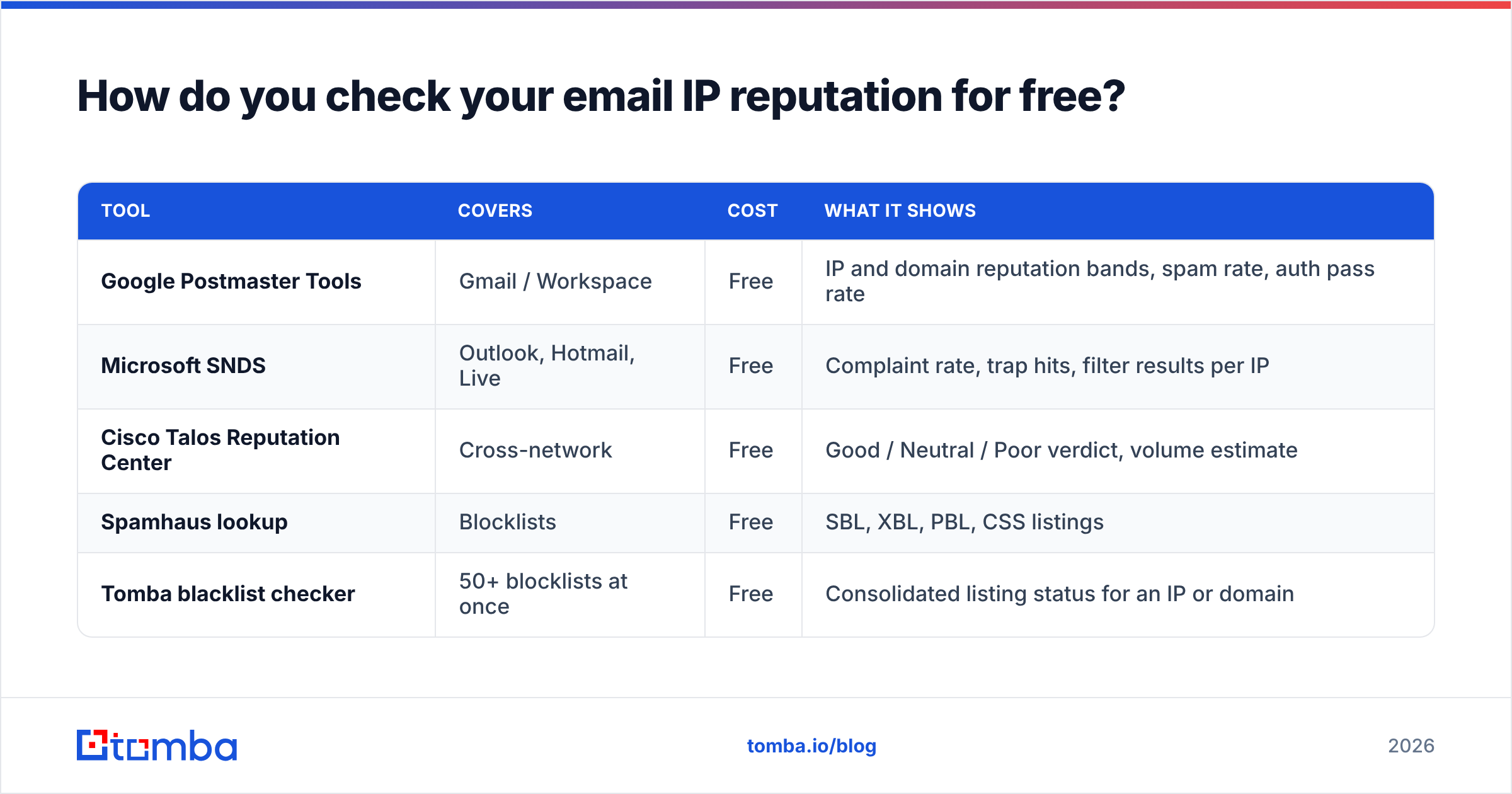
You need at least three data sources because each provider only sees its own mail. Checking only Google leaves you blind to roughly half the B2B inbox market.
| Tool | Covers | Cost | What it shows |
|---|---|---|---|
| Google Postmaster Tools | Gmail / Workspace | Free | IP and domain reputation bands, spam rate, auth pass rate |
| Microsoft SNDS | Outlook, Hotmail, Live | Free | Complaint rate, trap hits, filter results per IP |
| Cisco Talos Reputation Center | Cross-network | Free | Good / Neutral / Poor verdict, volume estimate |
| Spamhaus lookup | Blocklists | Free | SBL, XBL, PBL, CSS listings |
| Tomba blacklist checker | 50+ blocklists at once | Free | Consolidated listing status for an IP or domain |
Set up Postmaster Tools and SNDS before you need them — both require domain verification and neither backfills history. If you register them the day placement collapses, you'll be staring at an empty dashboard.
One caveat on public reputation checkers: they aggregate across networks and update slowly. A "Good" verdict from a third-party service while Gmail shows "Low" means Gmail wins. Provider dashboards are the source of truth.
How do you repair a damaged IP reputation?#
Repair is a sequence, not a switch. Skipping steps restarts the clock.
Step 1 — Stop sending to the affected segment immediately. Every additional bad send extends the recovery window. Pause the campaign, not just the sequence.
Step 2 — Find the actual cause. Pull the last 30 days of bounce logs and complaint data. In almost every case the pattern is obvious: one imported list, one segment, one date. If the damage started the day after an import, you have your answer.
Step 3 — Clean everything. Re-verify the full list, not just the suspect segment. Remove hard bounces, role accounts (info@, sales@, support@), and anything with zero engagement in six months. A bulk verification pass on a 50,000-record list typically removes 8–15% and prevents the next incident.
Step 4 — Fix authentication before resuming. SPF, DKIM, and DMARC all passing and aligned. This is table stakes for Gmail and Yahoo bulk-sender requirements and there is no negotiating around it.
Step 5 — Restart at 10% of prior volume, targeting only your most engaged contacts. People who replied in the last 90 days. Their engagement is the raw material of recovery — positive signals are what rebuild the score.
Step 6 — Ramp 20–30% per day, and stop the moment complaints exceed 0.1%. Model the curve first with a warmup calculator so you're following a plan instead of improvising.
Realistic timelines: a mild dip from one bad send recovers in 1–2 weeks. A sustained bad month takes 4–8 weeks. A Spamhaus SBL listing requires delisting plus a full rebuild, and 8–12 weeks is normal. If the domain itself is scorched, plan on a new sending domain and a fresh 6–8 week warmup.
What does a healthy sending profile look like?#
Use these as operating thresholds, not aspirations. Cross any of them and investigate the same day.
| Metric | Healthy | Warning | Stop sending |
|---|---|---|---|
| Hard bounce rate | Under 2% | 2–4% | Above 5% |
| Spam complaint rate | Under 0.10% | 0.10–0.25% | Above 0.30% |
| Google Postmaster IP reputation | High | Medium | Low or Bad |
| Reply rate (cold outbound) | 3–8% | 1–3% | Under 1% |
| Unsubscribe rate | Under 0.5% | 0.5–1% | Above 1% |
| Daily volume change | Under 30% | 30–100% | Above 100% |
Two operational habits separate teams that never think about IP reputation from teams that fight it constantly:
- Verify at capture, not at send. Validating an address the moment it enters your CRM costs one credit and prevents a bounce months later. Re-verifying a 40,000-record list under deadline pressure costs more and stresses everyone involved.
- Segment by engagement, always. Your most engaged 20% should carry disproportionate volume. They generate the positive signals that give the rest of your sending room to breathe.
Does IP reputation matter for cold outbound specifically?#
More than for any other channel — because cold outbound has structurally worse engagement than opt-in mail, so it has less margin for error on every other input.
An opt-in newsletter with a 40% open rate can absorb a rough send. A cold sequence with a 4% reply rate cannot. The buffer isn't there.
Which is why the highest-leverage work in cold email happens before the first send: source accurate contacts, verify them, and match the person to the message. Guessing at email patterns and hoping produces exactly the bounce profile that filtering engines are built to catch. Using a domain search to pull verified contacts from a target company — with confidence scores attached — replaces guesswork with data you can act on.
The teams that never have an IP reputation problem aren't running clever tricks. They're sending less mail to better addresses.
Where to start#
If your placement is slipping right now, do these three things in order: check Google Postmaster Tools and Microsoft SNDS for your actual scores, run your IP through a blacklist check, and re-verify your entire active list before the next send. That sequence resolves the majority of reputation problems without touching a single line of copy.
Then fix the input. Most IP reputation damage traces back to addresses that were never real to begin with. Tomba's Email Finder returns verified professional addresses with confidence scoring and source attribution, so the contacts entering your sequences are ones that actually accept mail. The free tier covers 25 searches a month to test accuracy against your own known-good list; paid plans start at $49/mo on Starter and $99/mo on Growth, with full pricing details published upfront. Clean input is the cheapest deliverability tool you will ever buy.
Related guides#
Ready to find emails that actually work?
Join 150,000+ professionals who stopped guessing and started sending. Free credits on signup — no credit card required.
Get the Tomba newsletter
Practical outbound tactics and product updates — once every two weeks.
About the author