Email Landing in Spam: Why It Happens and How to Fix It
Spam placement is almost never random. It traces back to authentication gaps, sender reputation damage, dirty lists, or content signals — and each one has a specific, testable fix. Here's the diagnostic order that works.
TL;DR
- Email landing in spam is a symptom, not a cause. The real culprit is almost always one of five things: broken authentication, damaged sender reputation, a dirty list, bad sending patterns, or content that trips filters.
- Fix them in that order. Authentication is a 30-minute config change. Reputation repair takes 2–6 weeks. Skipping the cheap fixes to rewrite subject lines is the most common wasted week in outbound.
- Bounce rate above 3% is the single fastest way to get filtered. Verifying your list before you send removes most of that risk in one step.
- Gmail and Microsoft filter on different signals. A campaign can sit in the Gmail inbox and the Outlook Junk folder at the same time — measure them separately.
- Seed-test every campaign before it goes out. Guessing at placement from open rates is unreliable, because spam-foldered mail rarely gets opened at all.
Why is your email landing in spam?#
Because a filter scored you as risky, and it had evidence. Mailbox providers do not flip a coin. They run your message through dozens of checks — who sent it, whether the domain vouches for the sender, how recipients have treated your mail before, how many addresses on your list do not exist, and whether the content pattern-matches known junk.
Think of it like airport security. Your passport (authentication) either matches or it doesn't. Your travel history (reputation) either looks normal or it looks like you've been flagged before. Your luggage (content and links) either scans clean or it doesn't. Fail any one badly enough and you get pulled aside — no matter how polite you were at the desk.
That's why "my copy must be too salesy" is usually the wrong first theory. In practice, the order of blame looks roughly like this across cold outreach programs:
- Authentication gaps (SPF, DKIM, DMARC). The highest-frequency, lowest-effort failure. Google and Yahoo have required authentication for bulk senders since 2024, and enforcement has only tightened.
- Dirty lists and high bounce rates. Sending to addresses that don't exist tells the receiving server you scraped rather than earned your list.
- Sender reputation damage. Prior complaints, spam-trap hits, or a cold domain ramped too fast.
- Sending patterns. Volume spikes, identical templates at scale, no reply traffic, mismatched sending infrastructure.
- Content signals. Spam-trigger phrasing, link shorteners, image-only emails, unfamiliar tracking domains.
Content matters — it's just last on the list, not first.

What actually decides inbox placement?#
Five inputs, weighted roughly in this order. Treat this as your checklist before you touch anything else.
- Domain and IP authentication — SPF publishes which servers may send for your domain, DKIM cryptographically signs the message, and DMARC tells receivers what to do when either fails. Missing DMARC alone is enough to get bulk mail filtered at Gmail.
- Sender reputation — a rolling score per domain and per IP, built from complaint rates, bounce rates, spam-trap hits, and engagement. It decays slowly and recovers slowly.
- List hygiene — the percentage of your recipients that exist and accept mail. Bounce rate is the visible proxy; anything above 3% is a red flag, and above 5% you are actively burning the domain.
- Engagement signals — opens are noisy post-MPP, but replies, forwards, "move to inbox," and "not spam" are strong positive signals. Deletes-without-reading and spam-button clicks are strong negative ones.
- Content and link profile — the message body, the tracking domain, link count, image-to-text ratio, attachment types, and whether the "from" name matches the domain.
The important nuance: these interact. Clean authentication buys you tolerance for a mediocre content profile. A damaged reputation means even a perfect message gets junked.
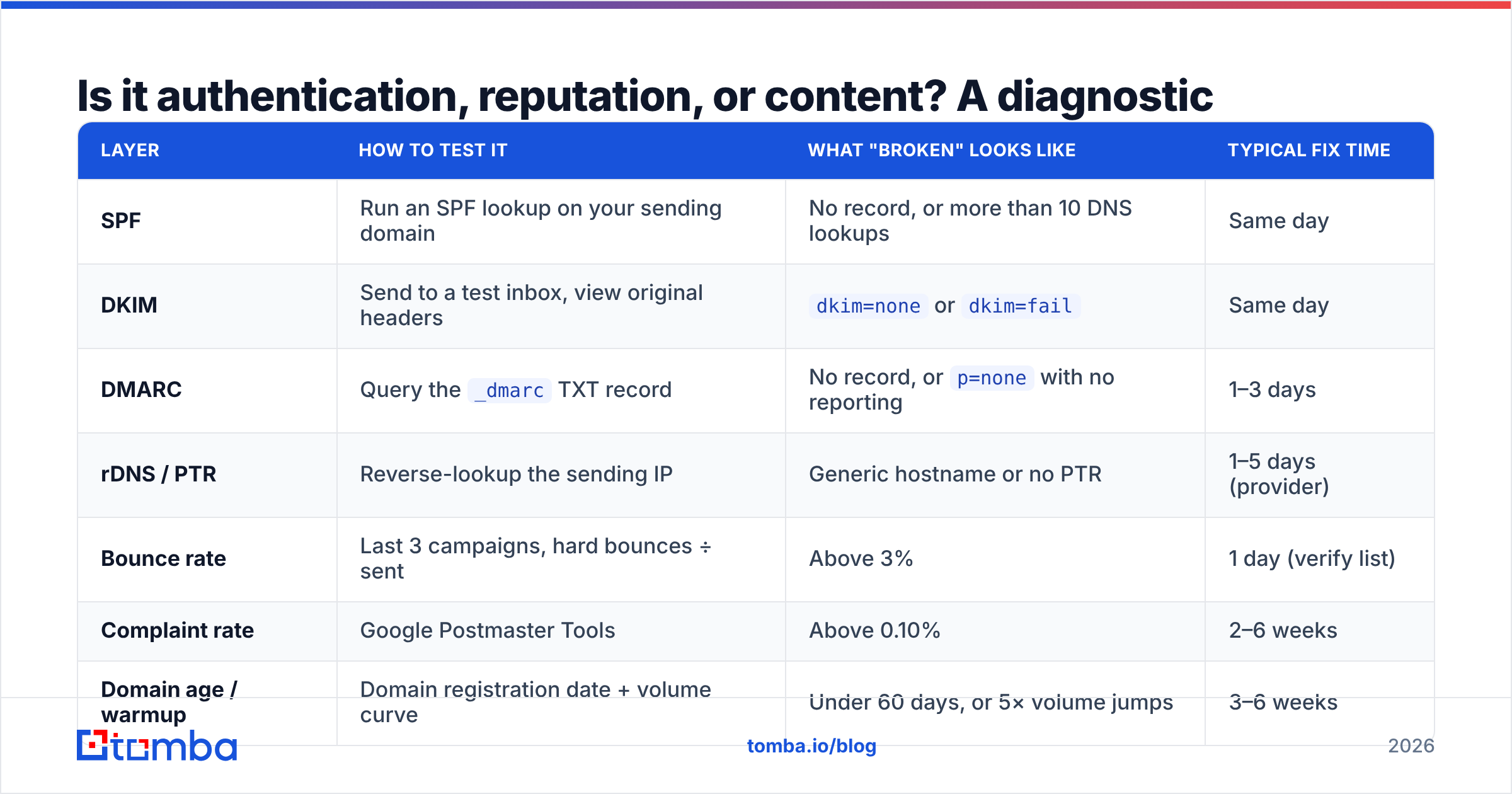
Is it authentication, reputation, or content? A diagnostic table#
Run this before changing a single word of copy. Each row tells you what to check, what "broken" looks like, and roughly how long the fix takes to show results.
| Layer | How to test it | What "broken" looks like | Typical fix time |
|---|---|---|---|
| SPF | Run an SPF lookup on your sending domain | No record, or more than 10 DNS lookups | Same day |
| DKIM | Send to a test inbox, view original headers | dkim=none or dkim=fail |
Same day |
| DMARC | Query the _dmarc TXT record |
No record, or p=none with no reporting |
1–3 days |
| rDNS / PTR | Reverse-lookup the sending IP | Generic hostname or no PTR | 1–5 days (provider) |
| Bounce rate | Last 3 campaigns, hard bounces ÷ sent | Above 3% | 1 day (verify list) |
| Complaint rate | Google Postmaster Tools | Above 0.10% | 2–6 weeks |
| Domain age / warmup | Domain registration date + volume curve | Under 60 days, or 5× volume jumps | 3–6 weeks |
| Content profile | Spam-score scan of the exact HTML | Score above 5, shortened links, image-only body | Same day |
Two habits make this table useful. First, test the exact message you plan to send, not a sanitized version. Second, test per provider. A campaign can pass every Gmail check and still hit Microsoft's Junk folder because Outlook weights IP reputation and content heuristics differently.
You can run the DNS side of this in a few minutes with a free SPF checker, then scan the message body itself with a spam checker before you queue the send.
Does list quality really cause spam placement?#
Yes — it is the most underrated cause of email landing in spam, and the easiest one to fix.
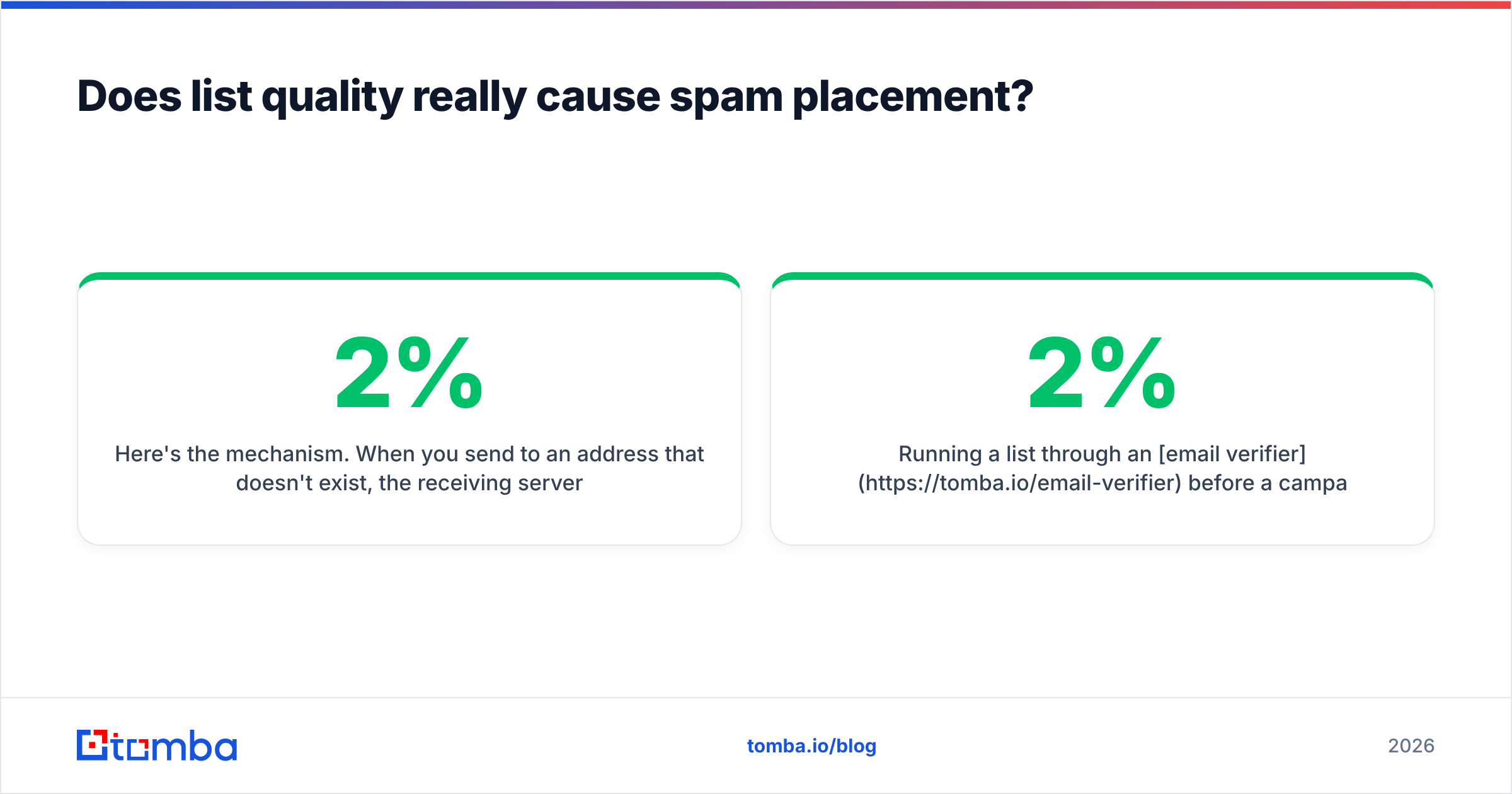
Here's the mechanism. When you send to an address that doesn't exist, the receiving server returns a hard bounce. Mailbox providers track your hard-bounce ratio as a proxy for how you built your list. Legitimate senders with permission-based lists bounce well under 2%. Scraped or stale lists bounce at 8–25%. Once you cross the threshold, filtering gets applied to your whole domain — including the addresses that are perfectly valid.
Worse, old lists accumulate spam traps: addresses that were once real, went dormant, and were recycled by the provider specifically to catch senders who never clean their data. One pristine trap hit can take weeks to recover from.
The fix is mechanical. Verify before you send, not after you bounce:
- Syntax and MX checks catch typos and dead domains instantly.
- SMTP-level validation confirms the mailbox actually accepts mail.
- Catch-all handling matters more than most people think — catch-all domains accept everything at the server level, so a naive verifier marks them "valid" and you find out the truth from the bounce. A dedicated catch-all verifier scores those addresses instead of guessing.
- Role-address filtering strips
info@,sales@, andsupport@, which draw disproportionate complaints. - Suppression sync removes anyone who previously bounced, unsubscribed, or complained — across every tool you send from.
Running a list through an email verifier before a campaign typically drops hard bounces from double digits to under 2%. That single change resolves a meaningful share of spam-placement complaints on its own.
How do you fix email landing in spam? 9 concrete steps#
Work top to bottom. Do not skip ahead to step 8 because it's the fun one.
- Publish SPF, DKIM, and DMARC on the sending domain. Start DMARC at
p=nonewith anruareporting address, read the reports for two weeks, then move top=quarantine. Google's sender guidelines spell out the current bulk-sender requirements. - Use a subdomain for cold outreach. Send from
mail.yourcompany.comor a separate outreach domain so a reputation hit never touches your primary corporate mail. - Verify the entire list before import. Target under 2% hard bounces. Re-verify anything older than 90 days.
- Warm the domain properly. Start at 10–20 sends per day per mailbox and increase roughly 20–30% weekly. Most domains need 3–4 weeks before they can safely carry 50+ daily sends per mailbox. A warmup calculator turns that into a dated ramp schedule.
- Cap volume per mailbox. More mailboxes at 40 sends each beats one mailbox at 400. Providers read the second pattern as bulk.
- Set up Google Postmaster Tools and Microsoft SNDS. You cannot manage a complaint rate you cannot see. Postmaster Tools shows domain reputation, spam rate, and authentication pass rates directly from Gmail.
- Fix the link and tracking profile. Use a branded, authenticated tracking domain — never a public shortener. Keep links to one or two per cold email. Skip attachments entirely on first touch.
- Rewrite for reply, not for click. Plain text, under 120 words, one specific ask, no images, no HTML signature block on the first email. Emails that generate replies build reputation faster than any other lever.
- Seed-test every campaign. Send to a seed set spanning Gmail, Outlook, Yahoo, and a corporate Microsoft 365 tenant. Check placement manually before the full send goes out.

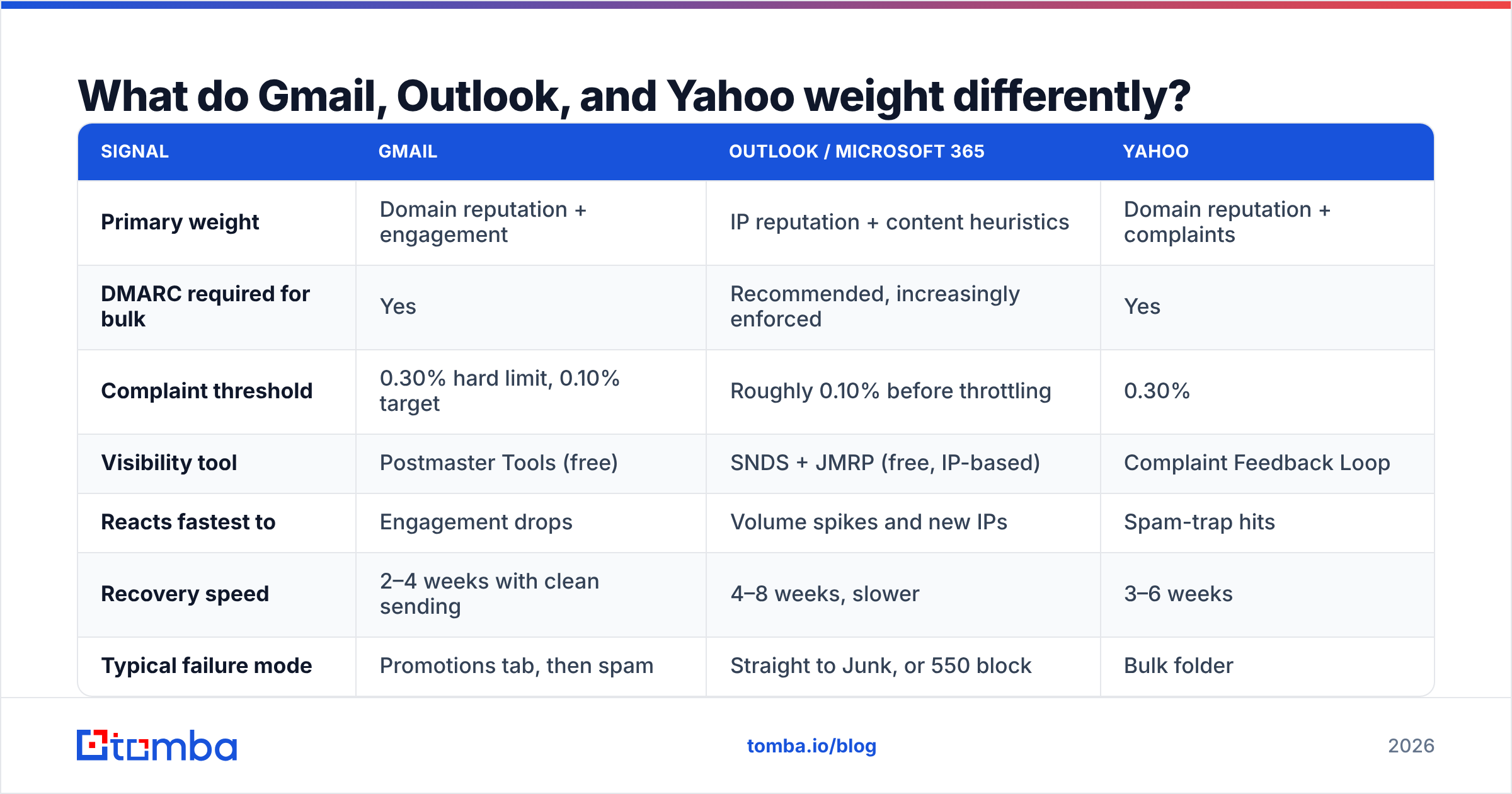
What do Gmail, Outlook, and Yahoo weight differently?#
Different filters, different failure modes. This is why "it works for my Gmail contacts" tells you almost nothing about your Outlook placement.
| Signal | Gmail | Outlook / Microsoft 365 | Yahoo |
|---|---|---|---|
| Primary weight | Domain reputation + engagement | IP reputation + content heuristics | Domain reputation + complaints |
| DMARC required for bulk | Yes | Recommended, increasingly enforced | Yes |
| Complaint threshold | 0.30% hard limit, 0.10% target | Roughly 0.10% before throttling | 0.30% |
| Visibility tool | Postmaster Tools (free) | SNDS + JMRP (free, IP-based) | Complaint Feedback Loop |
| Reacts fastest to | Engagement drops | Volume spikes and new IPs | Spam-trap hits |
| Recovery speed | 2–4 weeks with clean sending | 4–8 weeks, slower | 3–6 weeks |
| Typical failure mode | Promotions tab, then spam | Straight to Junk, or 550 block | Bulk folder |
Practical takeaway: if Gmail is fine and Outlook is junking you, look at IP reputation and content heuristics first — HTML weight, link count, and whether you're sending from shared infrastructure with noisy neighbors. If both are junking you, it's authentication or reputation, and no copy change will save you.
Which tools do you actually need to fix this?#
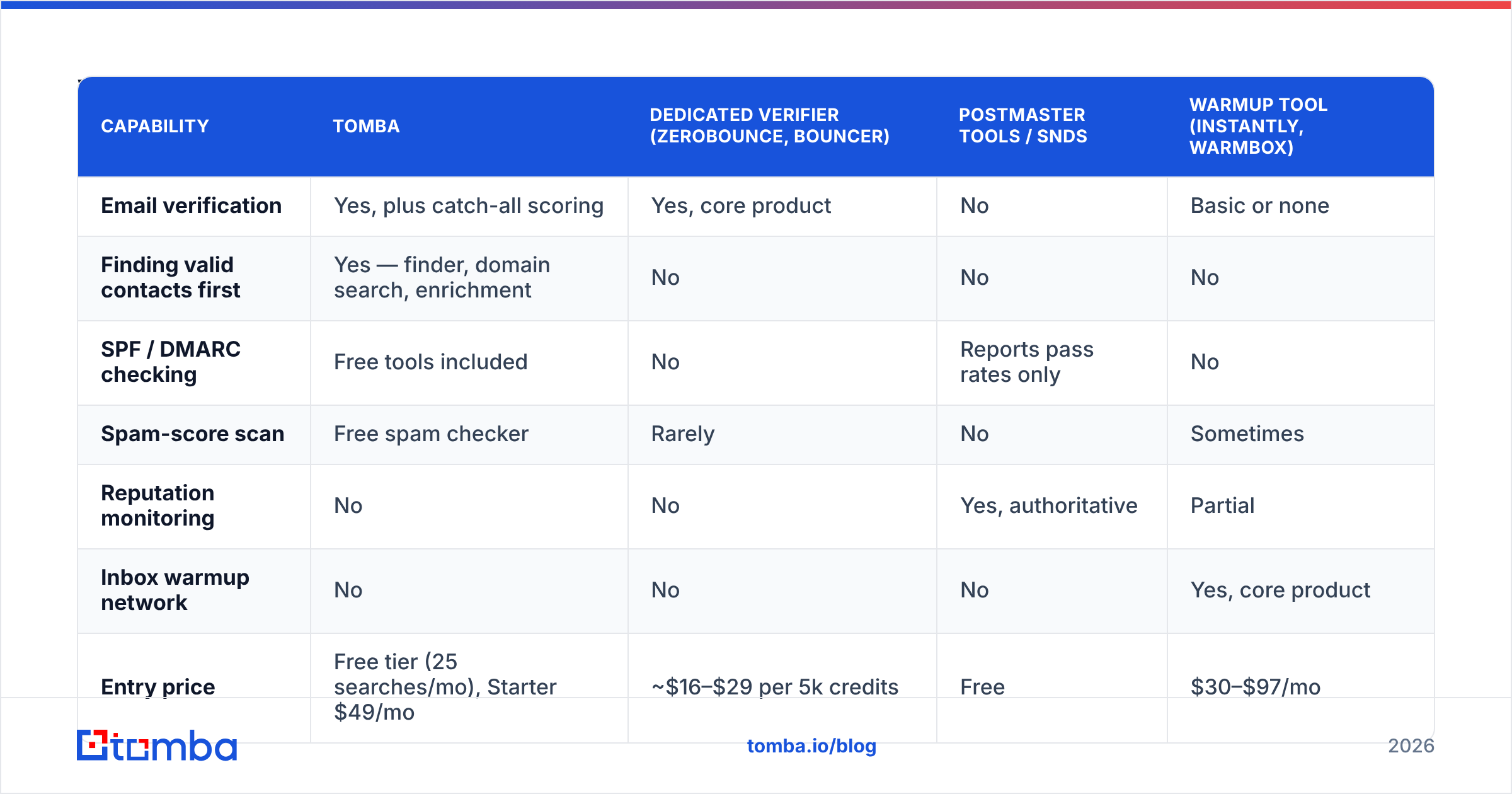
You need four capabilities: DNS/auth checking, list verification, reputation monitoring, and content scanning. Some tools cover several. Here's how the common options line up.
| Capability | Tomba | Dedicated verifier (ZeroBounce, Bouncer) | Postmaster Tools / SNDS | Warmup tool (Instantly, Warmbox) |
|---|---|---|---|---|
| Email verification | Yes, plus catch-all scoring | Yes, core product | No | Basic or none |
| Finding valid contacts first | Yes — finder, domain search, enrichment | No | No | No |
| SPF / DMARC checking | Free tools included | No | Reports pass rates only | No |
| Spam-score scan | Free spam checker | Rarely | No | Sometimes |
| Reputation monitoring | No | No | Yes, authoritative | Partial |
| Inbox warmup network | No | No | No | Yes, core product |
| Entry price | Free tier (25 searches/mo), Starter $49/mo | ~$16–$29 per 5k credits | Free | $30–$97/mo |
| Best for | Building and cleaning the list correctly | One-off list cleaning at volume | Diagnosing what providers see | Ramping new domains |
The honest read: no single tool fixes spam placement. Postmaster Tools and SNDS are free and non-negotiable — use them regardless of what else you buy. A warmup tool matters if your domain is new. And the list layer is where the compounding damage happens, which is why verification belongs upstream of everything else rather than as cleanup after a bad send.
If you're comparing verification vendors specifically, it's worth reading a ZeroBounce alternative breakdown and checking pricing per verified record rather than per credit — the two rarely match. G2's deliverability category is a reasonable place to sanity-check vendor claims against practitioner reviews.
How long does it take to get back to the inbox?#
Depends on which layer broke.
- Authentication only: 24–72 hours. Publish the records, wait for DNS propagation, re-test. Placement often recovers immediately because you weren't reputation-damaged, just unverifiable.
- List quality: 1–2 weeks. Verify, re-send at reduced volume, let the clean bounce rate register.
- Reputation damage from complaints: 4–8 weeks. Cut volume by 70%, send only to your most engaged segment, rebuild slowly. There is no shortcut and no service that "resets" reputation.
- Blacklisted IP or domain: 1–4 weeks after delisting, and delisting requires fixing the underlying cause first. Check your status with a blacklist checker before assuming it's something else.
- Spam-trap hits: 4–12 weeks, the slowest of all. Prevention is the only real strategy.
The pattern to internalize: reputation is asymmetric. You lose it in one bad send and rebuild it over a month of good ones. That asymmetry is exactly why the pre-send checks — verify, authenticate, seed-test — are worth the fifteen minutes they cost.
What should you do before your next campaign?#
Run this five-item pre-flight, every time:
- SPF, DKIM, and DMARC all pass on a test send to a Gmail address (check "Show original").
- List verified within the last 30 days, hard-bounce forecast under 2%, role addresses stripped.
- Volume per mailbox inside your warmup curve.
- Message scanned for spam score, one link, branded tracking domain, no attachments.
- Seed test placed and manually checked across Gmail, Outlook, and Yahoo.
Miss one and you're gambling. Hit all five and email landing in spam becomes a rare, diagnosable event rather than a permanent condition.
Fix the list layer first#
Most spam-placement problems start with contact data that was never validated. If you're building outbound lists by hand, scraping them, or inheriting a CSV from someone who left, you're carrying bounce risk you can't see until the damage is done.
Tomba Email Finder sources verified professional emails at the point of discovery rather than making you clean up afterward — with catch-all scoring, domain search for whole company rosters, and a free tier at 25 searches per month to test accuracy on your own target accounts before paying anything. Paid plans start at $49/mo on Starter; see Tomba pricing for the full breakdown. Start with a list you trust, and the rest of your deliverability work actually holds.
Related guides#
Ready to find emails that actually work?
Join 150,000+ professionals who stopped guessing and started sending. Free credits on signup — no credit card required.
Get the Tomba newsletter
Practical outbound tactics and product updates — once every two weeks.
About the author