Email List Cleaning Free: How to Clean Your List in 2026
Free email list cleaning can strip 80% of the risk from a cold list — but only if you know which checks are actually free and where the free tier quietly stops working. Here's the honest breakdown.
TL;DR
- Free email list cleaning gets you syntax checks, MX record lookups, duplicate removal, and role-account flagging — that covers roughly 60-80% of the bad addresses in a typical scraped list.
- What free tiers almost never cover at scale: SMTP mailbox-level verification, catch-all domain resolution, and disposable/spam-trap detection beyond a basic blocklist.
- Most "free email verifier" tools cap you at 25-500 credits per month, then charge $0.004-$0.01 per email after that.
- Cleaning a list you never should have built is the wrong fix. Sourcing verified emails at capture time costs less than scrubbing garbage later.
- A practical stack: free tools for dedupe + syntax + MX, then paid verification only on the addresses that survive.
What does "email list cleaning" actually mean?#
Email list cleaning is the process of removing addresses that will bounce, damage your sender reputation, or waste your send quota. Think of it like sorting a bin of secondhand keys before you walk to the door — some are obviously the wrong shape (syntax errors), some fit a lock that no longer exists (dead domains), and some will fit but trigger an alarm (spam traps).
The process breaks into five distinct layers, and they get progressively more expensive to run:
- Syntax and formatting validation — is
john@@companyeven a valid address? Pure regex plus RFC 5322 rules. Costs nothing, catches typos and paste artifacts. - Duplicate and normalization cleanup —
John.Smith@acme.comandjohnsmith@acme.comroute to the same Gmail inbox. Dedupe before you pay per-address. - Domain-level checks (MX records) — does the domain still exist and accept mail? A DNS lookup, effectively free, kills every address at a dead or parked domain.
- Mailbox-level verification (SMTP) — does this specific inbox exist on that server? This is where cost enters, because it requires distributed IPs, rate limiting, and retry logic.
- Risk classification — is this a role account (
info@), a disposable address, a known complainer, or a spam trap? This needs proprietary data, not just protocol checks.
Layers 1-3 are genuinely free. Layers 4-5 are where every "free" tool starts metering you.
Why does a dirty list hurt more in 2026 than it did in 2022?#
Because the mailbox providers changed the rules and then enforced them. Google and Yahoo's bulk-sender requirements — rolled out in 2024 and tightened since — put a hard spam-complaint threshold of 0.3% on senders pushing 5,000+ messages a day, with authentication (SPF, DKIM, DMARC) as a baseline entry ticket, not a bonus. You can read the current requirements straight from Google's sender guidelines.
The knock-on effect: bounce rate is no longer just wasted spend. A 5%+ hard bounce rate on a new sending domain reads to filtering systems as list-purchasing behavior, and the penalty lands on every message you send afterward — including to the good addresses.
Three numbers worth internalizing:
- 2% hard bounce is the informal ceiling most ESPs treat as acceptable. Past 5%, providers like Mailchimp and Klaviyo start suspending accounts.
- 0.3% spam complaints is Gmail's stated threshold. One spam trap hit can be worse than 100 bounces because it signals list source, not list age.
- ~22-30% annual list decay is the industry consensus for B2B contact data — people change jobs, companies restructure, domains get consolidated.
That last one is why cleaning is not a one-time chore. A list you verified in January is measurably worse by June.
What can you actually clean for free?#
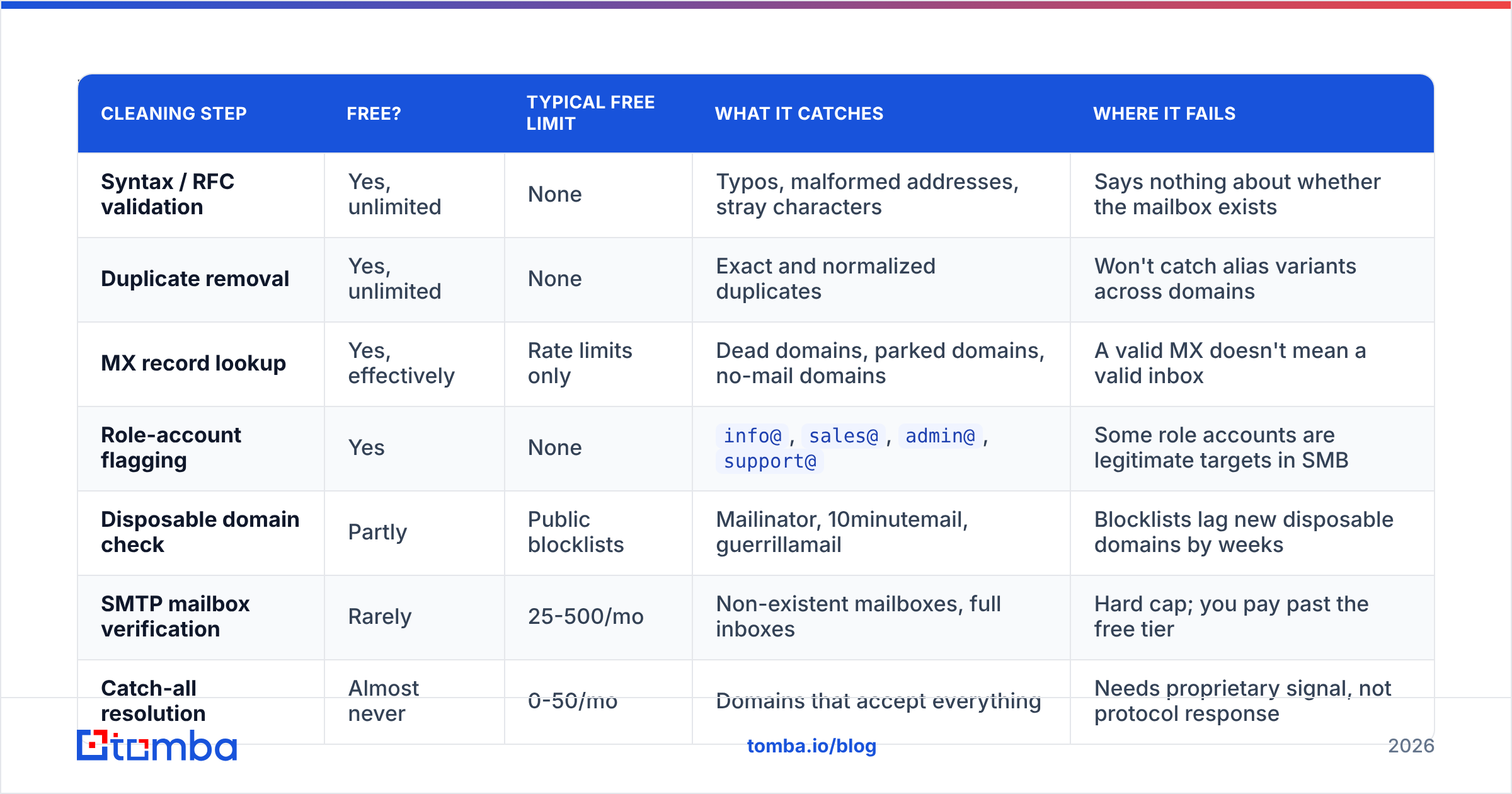
More than most vendors want to admit. Here is what a genuinely free workflow covers, and where each step runs out of road.
| Cleaning step | Free? | Typical free limit | What it catches | Where it fails |
|---|---|---|---|---|
| Syntax / RFC validation | Yes, unlimited | None | Typos, malformed addresses, stray characters | Says nothing about whether the mailbox exists |
| Duplicate removal | Yes, unlimited | None | Exact and normalized duplicates | Won't catch alias variants across domains |
| MX record lookup | Yes, effectively | Rate limits only | Dead domains, parked domains, no-mail domains | A valid MX doesn't mean a valid inbox |
| Role-account flagging | Yes | None | info@, sales@, admin@, support@ |
Some role accounts are legitimate targets in SMB |
| Disposable domain check | Partly | Public blocklists | Mailinator, 10minutemail, guerrillamail | Blocklists lag new disposable domains by weeks |
| SMTP mailbox verification | Rarely | 25-500/mo | Non-existent mailboxes, full inboxes | Hard cap; you pay past the free tier |
| Catch-all resolution | Almost never | 0-50/mo | Domains that accept everything | Needs proprietary signal, not protocol response |
| Spam-trap detection | No | 0 | Recycled and pristine traps | Requires honeypot network data |
You can run steps 1-4 with a spreadsheet, a free email checker, and a duplicate remover without spending a cent. On a typical scraped list of 10,000 addresses, that combination will remove 1,500-3,000 records. That's real value for zero dollars.
The problem is the remaining 7,000. Every one of them has valid syntax and a live MX record — and somewhere between 15% and 35% of them still won't deliver.
Which free email list cleaning tools are worth using?#
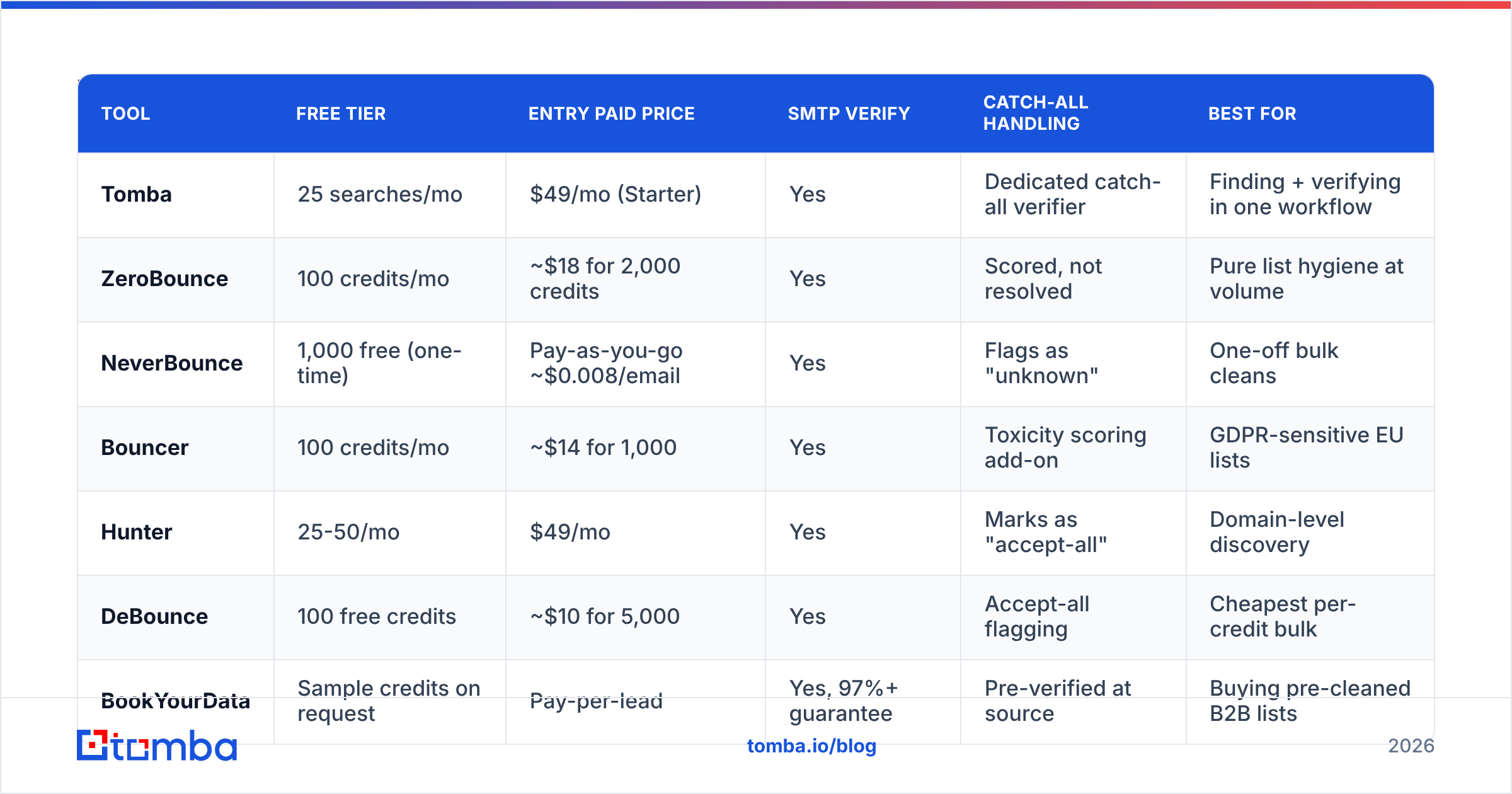
Here's how the main free-tier options compare on the checks that matter. Prices are the entry paid tier, since that's what you hit once the free credits run out.
| Tool | Free tier | Entry paid price | SMTP verify | Catch-all handling | Best for |
|---|---|---|---|---|---|
| Tomba | 25 searches/mo | $49/mo (Starter) | Yes | Dedicated catch-all verifier | Finding + verifying in one workflow |
| ZeroBounce | 100 credits/mo | ~$18 for 2,000 credits | Yes | Scored, not resolved | Pure list hygiene at volume |
| NeverBounce | 1,000 free (one-time) | Pay-as-you-go ~$0.008/email | Yes | Flags as "unknown" | One-off bulk cleans |
| Bouncer | 100 credits/mo | ~$14 for 1,000 | Yes | Toxicity scoring add-on | GDPR-sensitive EU lists |
| Hunter | 25-50/mo | $49/mo | Yes | Marks as "accept-all" | Domain-level discovery |
| DeBounce | 100 free credits | ~$10 for 5,000 | Yes | Accept-all flagging | Cheapest per-credit bulk |
| BookYourData | Sample credits on request | Pay-per-lead | Yes, 97%+ guarantee | Pre-verified at source | Buying pre-cleaned B2B lists |
Two honest observations from this table.
First: "free" almost always means a trial, not a tier. NeverBounce's 1,000 free credits are one-time. Bouncer and ZeroBounce refresh monthly but at volumes that only cover a small list. If you're cleaning 50,000 records, no free tier gets you there — you're choosing which paid tool to use, and the free credits are just a test drive.
Second: catch-all handling is the real differentiator. Roughly 15-20% of B2B domains are configured as catch-all, meaning the mail server accepts every address at that domain regardless of whether the mailbox exists. SMTP verification returns "valid" for all of them, which is useless. Most verifiers just label these "unknown" or "risky" and hand the decision back to you. Tools with a dedicated catch-all verifier use additional signals — engagement history, pattern matching against known-good addresses at the same domain — to give an actual verdict instead of a shrug.
If a third of your B2B list sits on catch-all domains, and your verifier marks all of them "unknown," you've paid to learn nothing about a third of your list.
How do you build a free-first cleaning workflow?#
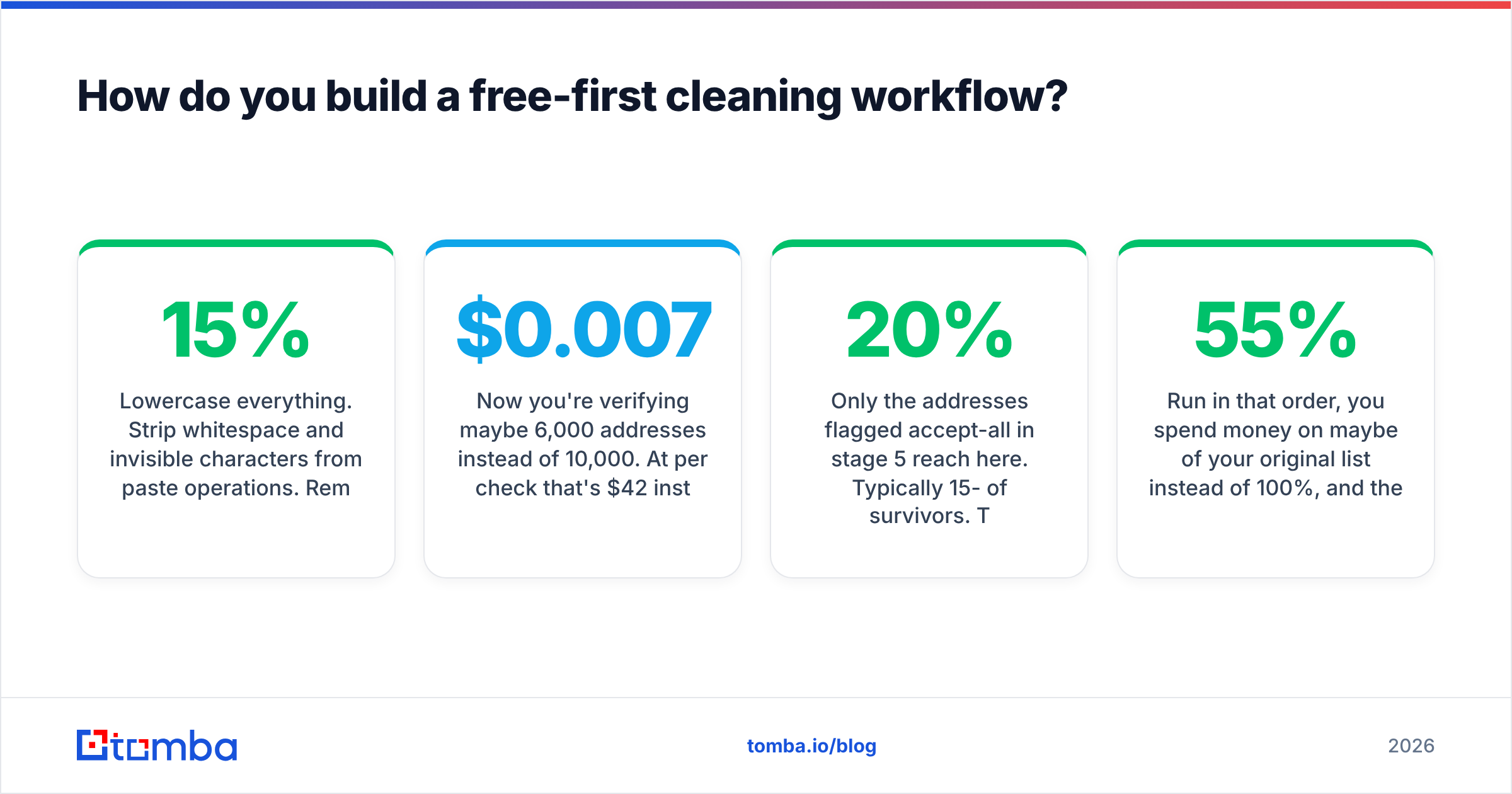
The efficient approach is a funnel: run the free checks first so you only pay for verification on addresses that have already survived cheaper filters. Each stage cuts the volume entering the next.
Stage 1 — Normalize and dedupe (free, unlimited).
Lowercase everything. Strip whitespace and invisible characters from paste operations. Remove Gmail dot-variants and +tag suffixes. Then dedupe. On messy scraped lists this alone removes 8-15% of rows.
Stage 2 — Syntax filter (free, unlimited).
Drop anything failing RFC validation. Also drop obvious junk that passes syntax: addresses containing test, example, noreply, donotreply, or your own domain. A free email extractor can help if your source data is unstructured text rather than a clean CSV.
Stage 3 — MX and domain check (free, rate-limited). Group by domain — a 10,000-row list usually has only 1,200-2,500 unique domains. Check each domain once instead of each address. Kill every address at a domain with no MX record. This is the single highest leverage free step, and grouping by domain is what makes it fast.
Stage 4 — Role and disposable flagging (free).
Segment rather than delete. info@ at a 12-person company is often the founder's inbox. info@ at a 4,000-person enterprise is a ticket queue. Tag them, don't purge them, and decide by company size.
Stage 5 — SMTP verification (paid, on survivors only). Now you're verifying maybe 6,000 addresses instead of 10,000. At $0.007 per check that's $42 instead of $70 — and the results are cleaner because the noise is gone. Use an email verifier that returns a status code, not just valid/invalid, so you can treat "risky" separately from "invalid."
Stage 6 — Catch-all resolution (paid, narrowest slice). Only the addresses flagged accept-all in stage 5 reach here. Typically 15-20% of survivors. This is the smallest and most expensive slice, which is exactly why it should be last.
Run in that order, you spend money on maybe 55% of your original list instead of 100%, and the per-address accuracy is higher because the cheap filters removed the records that would have produced ambiguous SMTP responses anyway.
Is cleaning a bought list ever worth it?#
Usually not, and this is the uncomfortable part of the conversation.
Cleaning tells you whether an address exists. It tells you nothing about whether the person opted in, whether they're still in the role, or whether they'll mark you as spam. A purchased list can be 98% deliverable and still torch your domain reputation, because deliverability and permission are different problems. Gartner and most B2B marketing analysts have been consistent on this for years: the acquisition source predicts complaint rate far better than the verification score does.
Two situations where cleaning a third-party list makes sense:
- The list came from a reputable, consent-documented provider. Vendors that document sourcing and offer accuracy guarantees are a different category from a $40 CSV of 500,000 "CEO emails." A provider like BookYourData that verifies at the point of sale and stands behind an accuracy figure is a legitimate input; you're re-verifying for decay, not rescuing garbage.
- It's your own historical data. A CRM export from 2023 is not a bought list — it's decayed first-party data. Cleaning it is exactly the right move, and the ROI is high because the permission basis is intact.
Everything else is spending money to make a bad list slightly less bad. The alternative is building the list correctly: find the person you actually want to reach, then verify that one address. An email finder that returns a confidence score at discovery time means you never accumulate the garbage in the first place. Reviews on G2 consistently show that teams sourcing at the contact level report lower bounce rates than teams buying and scrubbing, even when the scrubbing tools are identical.
How often should you re-clean?#
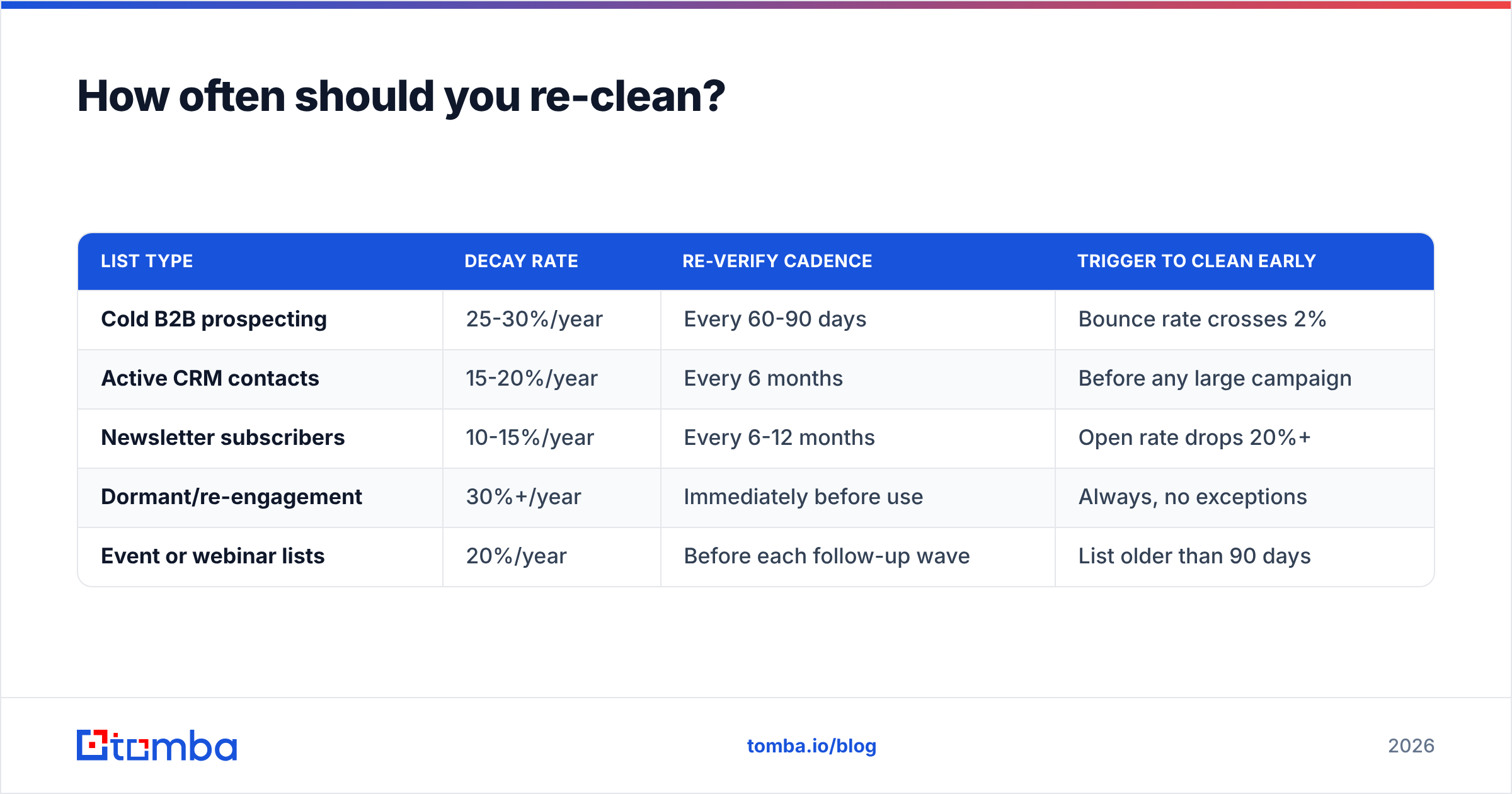
Match the cadence to your data's decay rate, not to a calendar habit.
| List type | Decay rate | Re-verify cadence | Trigger to clean early |
|---|---|---|---|
| Cold B2B prospecting | 25-30%/year | Every 60-90 days | Bounce rate crosses 2% |
| Active CRM contacts | 15-20%/year | Every 6 months | Before any large campaign |
| Newsletter subscribers | 10-15%/year | Every 6-12 months | Open rate drops 20%+ |
| Dormant/re-engagement | 30%+/year | Immediately before use | Always, no exceptions |
| Event or webinar lists | 20%/year | Before each follow-up wave | List older than 90 days |
The dormant-list row is the one people skip and regret. A list you haven't mailed in 18 months is the highest-risk send you can make, because recycled spam traps are built precisely from abandoned mailboxes. Providers turn a dead address into a trap after a dormancy window — mailing a two-year-old list is close to the definition of the behavior traps are designed to catch.
For lists you touch monthly, real-time verification at the point of send beats batch cleaning. Most modern verification services expose an API for exactly this; wiring an email verification API into your form submission or CRM sync means the list is never dirty in the first place.
What does a free tier realistically get you?#
Concretely, on a 10,000-address B2B list:
- Free tools alone: you remove roughly 2,000-2,800 addresses (dupes, syntax failures, dead domains, disposables). Remaining bounce rate on the survivors: 12-20%. Still too high to send safely.
- Free tools + 500 free verification credits: you can verify a 5% sample to estimate list quality, which is genuinely useful for deciding whether the list is worth paying to clean at all. Use the free tier as a diagnostic, not a solution.
- Free tools + paid verification on survivors: bounce rate drops to 1-3%. Cost: roughly $40-60 at typical per-credit pricing.
That middle option is the one most people miss. Before you spend $70 cleaning a list, spend zero verifying 500 random addresses from it. If 45% come back invalid, the list is not worth cleaning — it's worth deleting. That single free check has saved more budget than any discount code.
Compare current Tomba pricing against per-credit verifiers with your actual volume in hand. If you're finding and verifying, a bundled plan usually beats stitching a finder and a separate verifier together. If you're only cleaning an existing list and never sourcing new contacts, a pure pay-as-you-go verifier is cheaper.
The honest bottom line#
Free email list cleaning is real and worth doing — it just isn't complete. The free layers (dedupe, syntax, MX, role flagging) are the highest-ROI work in the entire process because they cost nothing and remove a quarter of a bad list. Run them first, always, on every list.
But no free tier resolves catch-all domains, detects spam traps, or verifies mailboxes at scale, because those require infrastructure and proprietary data that nobody gives away. The right mental model is free-first, paid-last: use free tools to shrink the problem, then pay for verification only on what survives.
And if you're building lists rather than inheriting them, skip the whole cycle. Source verified contacts at capture time with the Tomba Email Finder — it returns a confidence score with every address, so the list arrives clean instead of needing rescue. The free tier includes 25 searches a month to test the accuracy on your own target accounts before committing to a plan, and the catch-all finder handles the segment that every other free tool hands back as "unknown."
Related guides#
Ready to find emails that actually work?
Join 150,000+ professionals who stopped guessing and started sending. Free credits on signup — no credit card required.
Get the Tomba newsletter
Practical outbound tactics and product updates — once every two weeks.
About the author