Email List Hygiene in 2026: The Complete Cleanup Playbook
Most sending problems are list problems. Here's how email list hygiene actually works in 2026 — what to remove, how often, what it costs, and which signals matter after the Google and Yahoo rule changes.
TL;DR
- Email list hygiene is the ongoing process of removing invalid, inactive, and risky addresses so your sends reach real humans — it is not a one-time cleanup before a big campaign.
- Since Google and Yahoo tightened bulk-sender rules, a spam complaint rate above 0.3% and unmonitored bounce rates are the fastest ways to lose inbox placement, no matter how good your copy is.
- A workable cadence: verify at capture, suppress hard bounces immediately, run a sunset policy every 90 days, and re-verify any list segment older than six months before sending.
- Verification catches syntax, domain, and mailbox-level problems. Engagement pruning catches the addresses that are technically valid but actively hurting you. You need both.
- Budget roughly $0.001–$0.008 per verified address depending on volume and vendor; a 50,000-record clean typically runs $50–$300.
What Is Email List Hygiene, Exactly?#
Email list hygiene is the practice of continuously removing addresses from your sending list that are invalid, abandoned, hostile, or otherwise damaging to your sender reputation.
Think of it like a swimming pool. You do not clean a pool once and walk away. Leaves fall in daily, chemistry drifts, and if you ignore it for two months you are not skimming anymore — you are draining and starting over. Email lists decay the same way, at roughly 22–30% per year as people change jobs, companies rebrand, and domains get retired.
Hygiene covers four distinct categories of problem address, and most teams only handle the first:
- Invalid addresses — typos, dead mailboxes, domains that no longer resolve. These generate hard bounces, which mailbox providers count directly against you.
- Risky addresses — catch-all domains, disposable inboxes, and role accounts like
info@orsales@. Technically deliverable, statistically terrible. - Spam traps — recycled addresses that providers reactivate specifically to catch senders who never clean their lists. A single pristine trap hit can trigger a blocklist entry.
- Disengaged contacts — real people who have not opened anything in a year. They do not bounce; they quietly drag down your engagement ratios, which is now the strongest ranking signal in filtering.
The distinction matters because the tools differ. A verifier handles categories 1 and 2. A sunset policy handles category 4. Category 3 requires both plus discipline about where your addresses come from in the first place.
Why Did List Hygiene Suddenly Get Stricter?#
Because the rules changed and enforcement got automated.
Google and Yahoo's bulk-sender requirements set explicit thresholds that were previously informal guidelines. The headline numbers: keep spam complaints under 0.3% (with 0.1% as the real target), authenticate with SPF, DKIM, and DMARC, and support one-click unsubscribe. Microsoft followed with similar requirements for high-volume senders to Outlook and Hotmail domains.
What changed practically is that filtering moved from content-first to reputation-first. Ten years ago, a spammy subject line could sink an otherwise clean send. Now a clean subject line cannot rescue a domain with a 4% bounce rate. Your sender reputation is calculated from behavioral signals your list quality directly controls.
Wait — that got mangled. Here it is properly:

The other shift is that engagement windows shortened. Providers used to look at 90-day engagement. Several now weight 30-day signals heavily for domain-level reputation. A list that was "fine" under the old model can be underwater under the new one without a single thing changing on your end.
You can check the technical half of this equation quickly with an SPF checker and a blacklist checker before you go hunting for list problems.
What Do the Numbers Actually Look Like?#
Here is what happens to a representative 50,000-record B2B list that has not been touched in 18 months, compared to the same list after a full hygiene pass.
| Metric | Uncleaned list | After verification | After verification + sunset |
|---|---|---|---|
| Deliverable addresses | 50,000 (assumed) | 38,400 | 31,100 |
| Hard bounce rate | 8.2% | 0.6% | 0.4% |
| Spam complaint rate | 0.41% | 0.19% | 0.07% |
| Open rate | 14.3% | 21.8% | 34.2% |
| Reply rate | 0.9% | 1.6% | 2.9% |
| Inbox placement (Gmail) | 61% | 84% | 93% |
| Monthly ESP cost at $0.60/1k | $30 | $23 | $19 |
Two things stand out. First, the list got 38% smaller and every meaningful metric improved — including absolute reply count, not just rates. Second, the sunset step contributed more to complaint reduction than verification did, because disengaged-but-valid contacts are the ones who hit "report spam" out of irritation.
Nobody wants to delete 19,000 records. Everyone wants the 93% placement. Those are the same decision.
What Should You Remove, In What Order?#
Work in this sequence. Each step makes the next one cheaper.
- Deduplicate first. Same address in three rows means you pay to verify it three times and risk sending duplicates. Run a remove duplicates pass before anything else — it is free and typically cuts 3–8% of a merged list.
- Strip syntax and format failures. Missing @, trailing spaces,
.coninstead of.com, addresses that are actually phone numbers. Pure regex work, zero API cost. - Drop dead domains. If the domain has no MX record, every address on it is undeliverable. One DNS lookup kills hundreds of records at once.
- Verify remaining mailboxes. This is the SMTP-level check that confirms whether a specific inbox exists. Use a proper email verifier rather than a homegrown script — providers rate-limit and greylist aggressive probing, and a bad implementation can get your checking IP blocked.
- Segregate catch-alls, do not delete them. Catch-all domains accept everything, so standard verification returns "unknown." Many are legitimate enterprise mailservers. Route them through a catch-all verifier and send to them in a separate, lower-volume stream so a bad batch cannot poison your main domain.
- Apply the sunset policy. Anyone with zero opens, clicks, or replies across your last 8–12 sends over 90+ days gets a final re-permission email, then suppression.
The order matters financially. If you verify before deduplicating, you pay for the same address multiple times. If you verify before dropping dead domains, you burn credits on records a free DNS query would have killed.
How Often Should You Clean?#
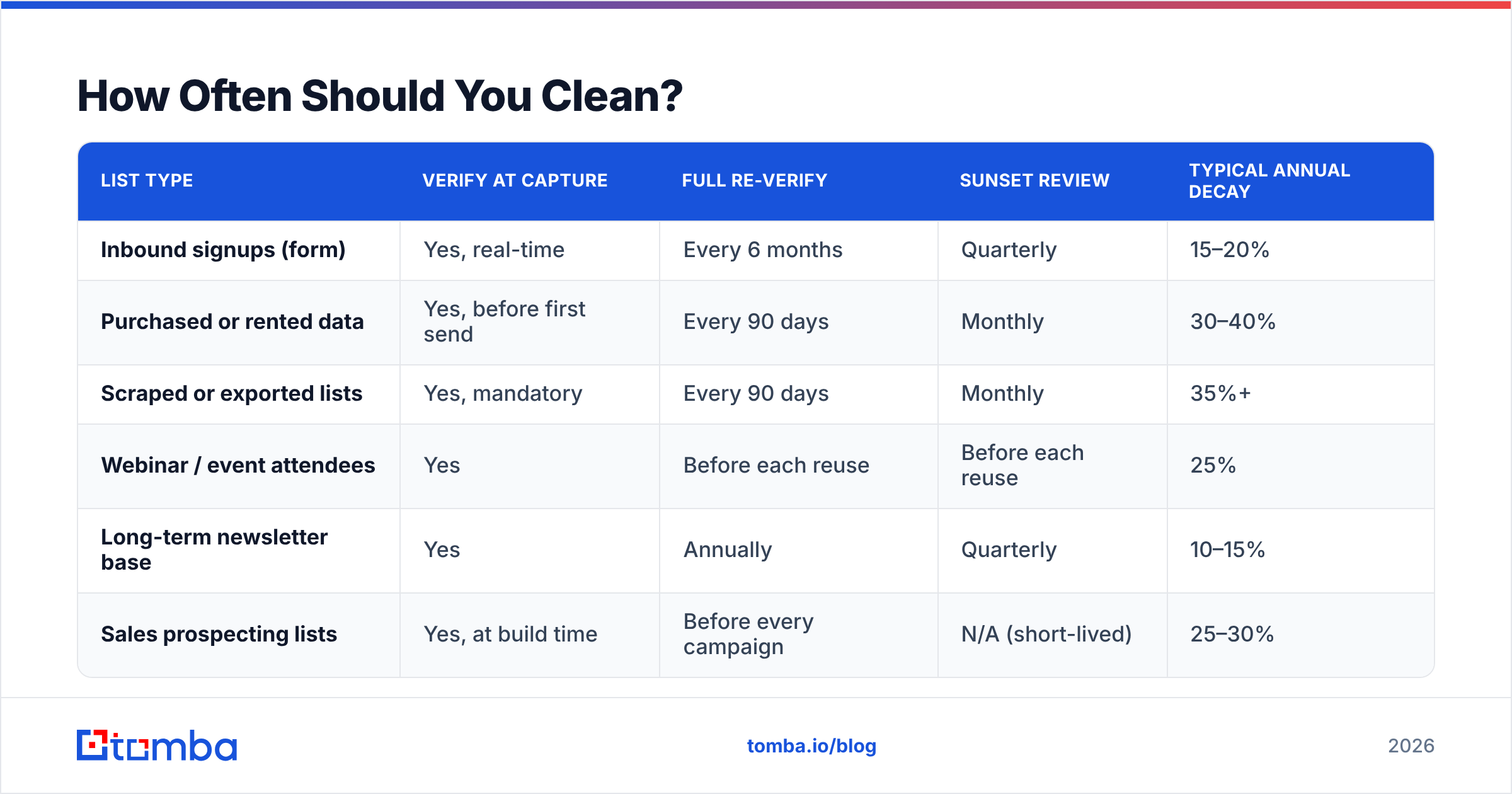
Depends on your source and cadence. Here is a practical matrix.
| List type | Verify at capture | Full re-verify | Sunset review | Typical annual decay |
|---|---|---|---|---|
| Inbound signups (form) | Yes, real-time | Every 6 months | Quarterly | 15–20% |
| Purchased or rented data | Yes, before first send | Every 90 days | Monthly | 30–40% |
| Scraped or exported lists | Yes, mandatory | Every 90 days | Monthly | 35%+ |
| Webinar / event attendees | Yes | Before each reuse | Before each reuse | 25% |
| Long-term newsletter base | Yes | Annually | Quarterly | 10–15% |
| Sales prospecting lists | Yes, at build time | Before every campaign | N/A (short-lived) | 25–30% |
The single highest-leverage habit is verification at capture. Catching a typo the moment someone submits a form costs a fraction of a cent and prevents a permanent bad record. Cleaning that same record 14 months later costs the same fraction of a cent plus every bounce it caused in between.
For outbound teams building lists rather than collecting them, hygiene starts one step earlier: source accuracy. Using a domain search to pull verified addresses from a company's actual mail infrastructure produces a fundamentally cleaner starting list than guessing patterns or scraping a directory.
Which Tools Handle Which Job?#
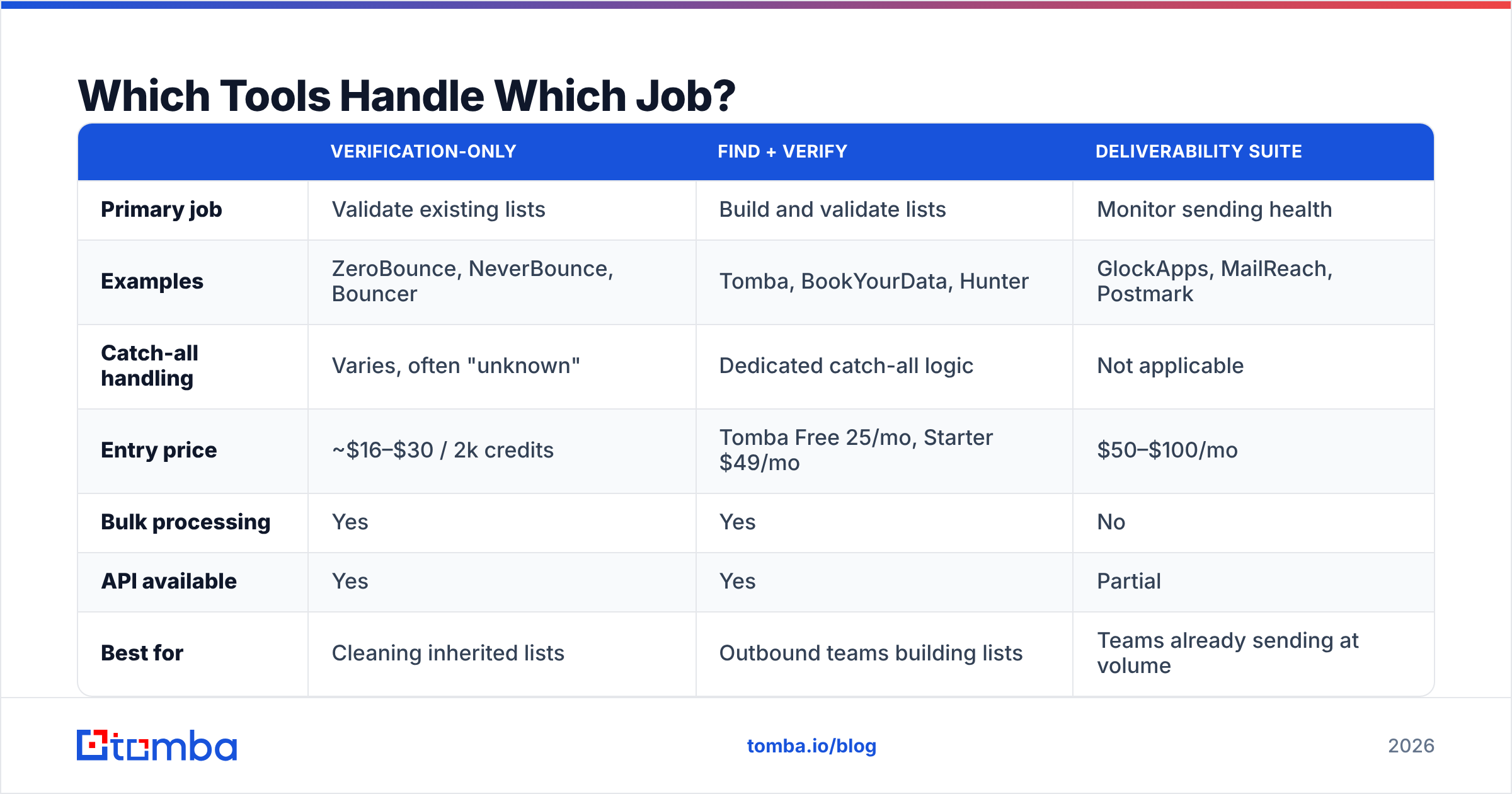
The market splits into three overlapping categories, and buying the wrong one is common.
| Verification-only | Find + verify | Deliverability suite | |
|---|---|---|---|
| Primary job | Validate existing lists | Build and validate lists | Monitor sending health |
| Examples | ZeroBounce, NeverBounce, Bouncer | Tomba, BookYourData, Hunter | GlockApps, MailReach, Postmark |
| Catch-all handling | Varies, often "unknown" | Dedicated catch-all logic | Not applicable |
| Entry price | ~$16–$30 / 2k credits | Tomba Free 25/mo, Starter $49/mo | $50–$100/mo |
| Bulk processing | Yes | Yes | No |
| API available | Yes | Yes | Partial |
| Best for | Cleaning inherited lists | Outbound teams building lists | Teams already sending at volume |
If you already have a list and just need it scrubbed, a verification-only vendor is the cheapest path. If you are building lists continuously — which most outbound teams are — a combined finder-verifier avoids the awkward two-vendor handoff where you export from one tool, upload to another, and reconcile results in a spreadsheet. BookYourData is a solid option when you want pre-verified purchased data with a guarantee attached rather than building from scratch.
Tomba sits in the middle column. Tomba pricing starts with a free tier at 25 searches per month, Starter at $49/mo, Growth at $99/mo, and Pro at $249/mo, with verification, bulk email finder processing, and catch-all handling in the same account. The practical advantage is not price — it is that the find step and the verify step share the same data layer, so a record never leaves the system unvalidated.
What Is a Sunset Policy and Do You Really Need One?#
A sunset policy is a written rule that automatically suppresses contacts after a defined period of non-engagement. Yes, you need one, and it is the step teams skip most.
Here is a workable default:
- Days 0–90: Normal sending cadence. No action.
- Days 91–120: Move to a reduced-frequency segment. Send at half your normal rate.
- Days 121–150: Trigger a two-email re-permission sequence. Plain text, direct: "You have not opened anything in four months — should I keep sending?"
- Day 151: Suppress. Not delete — suppress. Keep the record for attribution and to avoid re-importing it later.
The re-permission step recovers 2–6% of the segment on average, which is not nothing. But the real value is what happens to the other 94%: they stop being counted in your engagement denominator, and your domain reputation improves within two to three sending cycles.

The objection is always the same — "but those are still leads." They are not. A contact who has ignored 12 consecutive emails is not a lead in a state of suspended animation; they are a signal to Gmail that your mail is unwanted. Keeping them costs you delivery to the people who do want your emails.
If a segment is genuinely valuable, re-enrich it rather than re-mailing it. Running dormant records through contact enrichment often reveals the person changed companies, which means the old address is dead and a new one exists at a different domain. That is a recovered lead. Continuing to mail the dead address is not.
How Do You Handle Catch-All and Role Addresses?#
Separately from everything else, and with lower expectations.
Catch-all domains accept mail to any address at the domain, including addresses that do not exist. SMTP verification cannot distinguish real from fake, so verifiers return "unknown" or "accept-all." Roughly 15–25% of B2B domains are configured this way, so writing them all off means discarding a fifth of your addressable market. The right approach is probabilistic: check whether the address matches the company's known pattern, whether the person appears in other data sources, and whether the domain has a history of accepting-then-bouncing. A dedicated catch-all finder does this scoring for you.
Role addresses — info@, support@, admin@, sales@ — are almost always deliverable and almost never useful for outbound. They route to shared inboxes, get filtered aggressively, and are disproportionately likely to be reported as spam because nobody owns the decision to unsubscribe. Some are also spam traps. Suppress them from cold outbound entirely; keep them only for transactional or account-level communication where the recipient expects contact.
Disposable domains — mailinator, guerrillamail, and several hundred others — should be blocked at capture, not cleaned later. Any signup using one is telling you exactly how much they intend to engage.
What Does Good Hygiene Cost Versus Bad Hygiene?#
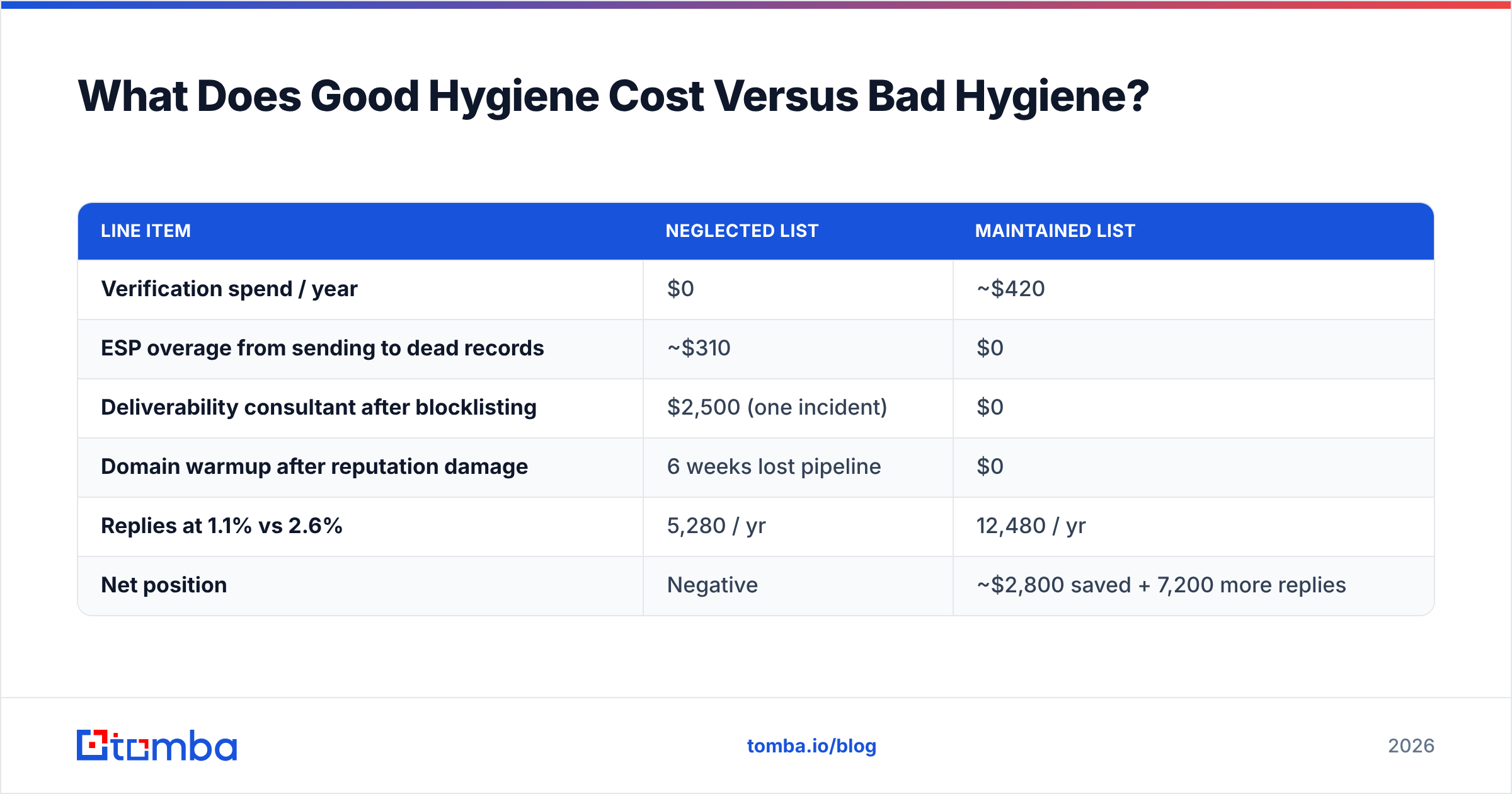
Run the arithmetic on a mid-sized sender doing 40,000 emails per month.
| Line item | Neglected list | Maintained list |
|---|---|---|
| Verification spend / year | $0 | ~$420 |
| ESP overage from sending to dead records | ~$310 | $0 |
| Deliverability consultant after blocklisting | $2,500 (one incident) | $0 |
| Domain warmup after reputation damage | 6 weeks lost pipeline | $0 |
| Replies at 1.1% vs 2.6% | 5,280 / yr | 12,480 / yr |
| Net position | Negative | ~$2,800 saved + 7,200 more replies |
The consultant line is the one people underestimate. Recovering from a blocklist entry or a poisoned domain reputation is not a matter of paying a fee — it is weeks of throttled sending on a warmed backup domain while your pipeline sits idle. G2's reviews of deliverability tooling are full of teams describing exactly this recovery cycle; it is worth reading a few before deciding hygiene is optional. Google's own sender guidelines are blunt about the fact that reputation recovery is slow by design.
What Does a Working Hygiene Workflow Look Like?#
Concretely, for a team of five running outbound:
At capture. Every form submission and every new prospect record hits the verification API before it lands in the CRM. Invalid records never enter the database. Cost: negligible. This is the single change with the best return.
Weekly. Pull the bounce report from your sending platform. Hard bounces go straight to suppression — no second attempt. Soft bounces get two more tries, then suppression. Complaint reports go to permanent suppression across every list you own, not just the one that triggered it.
Monthly. Review engagement segments. Move the 90-day non-openers into the reduced-frequency stream. Check your domain against blocklists. Confirm SPF, DKIM, and DMARC still pass — DNS changes break these silently more often than you would expect.
Quarterly. Full re-verification of any segment you plan to mail that has not been verified in 90 days. Run the sunset sequence on the 150-day cohort. Re-enrich the high-value dormant records instead of suppressing them blind.
Before any large campaign. Re-verify the target segment regardless of when it was last checked. A 20,000-record send to a six-month-old list is the classic way teams discover their email deliverability has quietly degraded — usually about four hours after the send starts.
Automate what you can. Most teams wire this through their existing stack: verification via API on record creation, suppression sync through a HubSpot integration or equivalent, and bounce handling as a webhook rather than a manual export. Manual hygiene gets skipped the first busy week; automated hygiene does not.
Where Should You Start This Week?#
Pick the cheapest high-impact action and do it now: pull your last 90 days of bounce data and suppress every hard bounce that is still active in your list. Most teams find records that have bounced four or five times and are still being mailed, because nobody wired the suppression loop.
Then verify your largest untouched segment. Not the whole database — the one segment you actually plan to mail next month. A 5,000-record verification costs less than a single hour of the meeting you would spend debating whether it is worth it.
Email list hygiene is unglamorous, and it competes for attention with subject-line tests and sequence rewrites that feel more like real work. But the ordering is not negotiable: filtering decides whether your email is seen before your copy decides whether it is read. No amount of A/B testing improves a message that lands in spam.
If you are building lists rather than just maintaining them, start upstream. The Tomba Email Finder returns addresses that are verified at the point of discovery, so hygiene stops being a quarterly cleanup project and becomes a property of how your list was assembled in the first place. Free tier gives you 25 searches a month to test the accuracy on your own target accounts before committing to anything.
Related guides#
Ready to find emails that actually work?
Join 150,000+ professionals who stopped guessing and started sending. Free credits on signup — no credit card required.
Get the Tomba newsletter
Practical outbound tactics and product updates — once every two weeks.
About the author