Email List Scrubbing: How to Clean Lists and Protect Deliverability
Bounce rates above 2% put your domain at risk. Here's how email list scrubbing actually works, what it costs, and the removal rules that decide whether your next campaign lands in the inbox.

TL;DR
- Email list scrubbing is the ongoing removal of invalid, risky, and disengaged addresses from your sending lists — not a one-time cleanup before a big campaign.
- Keep hard bounces under 2%. Above that, Google and Microsoft start throttling, and your domain reputation takes months to recover.
- Scrubbing has three layers: syntax and MX checks (free, instant), SMTP verification (paid, ~$0.001–$0.008 per address), and engagement pruning (free, requires ESP data).
- Catch-all domains are the hardest category — roughly 15–20% of B2B addresses sit behind them, and no verifier can return a clean binary answer without probabilistic scoring.
- A realistic cadence: verify at import, re-verify anything older than 90 days, and prune non-openers every quarter.
What is email list scrubbing?#
Email list scrubbing is the process of removing addresses from your list that will bounce, complain, or damage your sender reputation. Think of it like a restaurant reservation book: if half your bookings are wrong phone numbers, you don't just lose those tables — the host wastes the night calling dead lines instead of seating real guests. Mailbox providers treat your list the same way. Every dead address you send to is a signal that you don't know who your audience is.
Technically, scrubbing covers four distinct removals:
- Syntactically invalid addresses — typos, missing TLDs, illegal characters.
john@gmailandsarah@@acme.comnever had a chance. - Non-existent mailboxes — the domain resolves, but the mailbox was deleted or never existed. This is what causes hard bounces.
- Risky addresses — role accounts (
info@,sales@), spam traps, disposable domains, and known complainers. - Disengaged contacts — real, deliverable addresses belonging to people who haven't opened anything in 6–12 months. These are the ones most teams refuse to delete, and they're the ones quietly killing inbox placement.
The first three are mechanical. The fourth is a judgment call, and it's where most lists go wrong.
Why does list decay happen so fast?#
B2B email data decays at roughly 22–30% per year. That's not a vendor scare stat — it's job-change math. People switch companies, companies get acquired, IT consolidates domains after a merger, and employees leave without anyone updating your CRM.
A list you built in January is measurably worse by July. If you exported 10,000 contacts twelve months ago and haven't touched them, expect somewhere between 1,500 and 3,000 to be undeliverable today. Send to that list cold and you're looking at a 15–30% bounce rate — well past the threshold where email deliverability collapses.

The decay rate isn't uniform, either. Startup and SMB lists decay fastest (higher churn, more company deaths). Enterprise lists at stable firms decay slowest. Lists sourced from scrapers and public directories decay fastest of all, because a meaningful share of those addresses were guessed rather than confirmed in the first place.
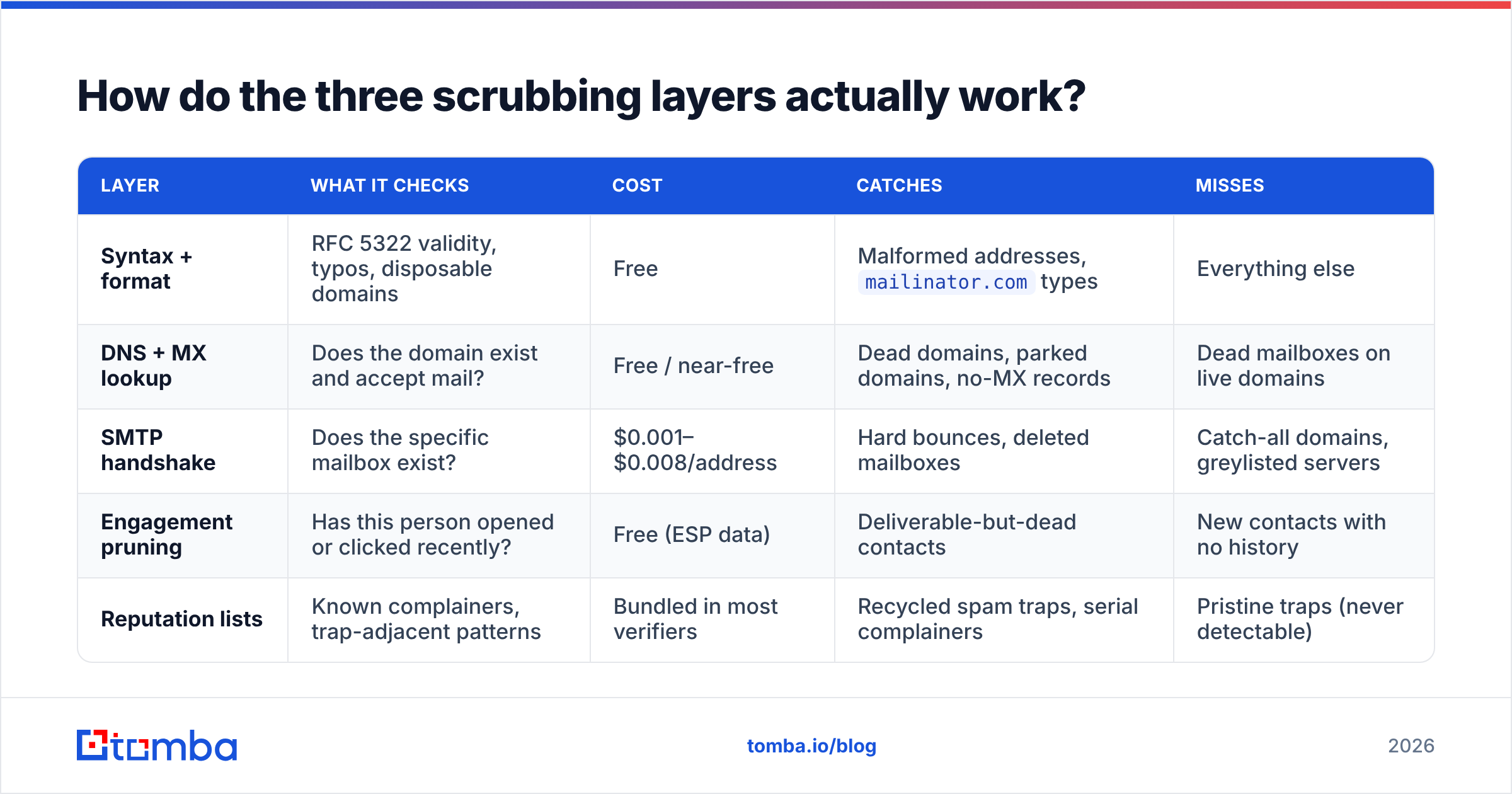
How do the three scrubbing layers actually work?#
Each layer catches a different class of bad address, at a different cost, with a different confidence level.
| Layer | What it checks | Cost | Catches | Misses |
|---|---|---|---|---|
| Syntax + format | RFC 5322 validity, typos, disposable domains | Free | Malformed addresses, mailinator.com types |
Everything else |
| DNS + MX lookup | Does the domain exist and accept mail? | Free / near-free | Dead domains, parked domains, no-MX records | Dead mailboxes on live domains |
| SMTP handshake | Does the specific mailbox exist? | $0.001–$0.008/address | Hard bounces, deleted mailboxes | Catch-all domains, greylisted servers |
| Engagement pruning | Has this person opened or clicked recently? | Free (ESP data) | Deliverable-but-dead contacts | New contacts with no history |
| Reputation lists | Known complainers, trap-adjacent patterns | Bundled in most verifiers | Recycled spam traps, serial complainers | Pristine traps (never detectable) |
The SMTP layer is the one people mean when they say "verification." It works by opening a connection to the receiving mail server and asking whether a mailbox exists — without actually delivering a message. Most verifiers, including Tomba's email verifier, run all layers in sequence and return a single status plus a confidence score.
Two things to understand about SMTP checks:
- Greylisting produces false negatives. Some servers deliberately reject the first connection from an unknown IP. A verifier that doesn't retry will mark a good address as unknown.
- Rate limits are real. Aggressively probing a single domain gets your verifier's IPs blocked. This is why verifying 100,000 addresses takes hours, not seconds, and why "instant" bulk results should make you suspicious.
What do you do about catch-all domains?#
Catch-all domains accept mail for any address at that domain, whether or not the mailbox exists. anything@catchalldomain.com returns a positive SMTP response. That's useful for the company (no lost mail from typos) and terrible for verification (no signal).
Between 15% and 20% of B2B domains run catch-all configurations, and the share is higher among enterprises using Microsoft 365 with default routing rules. You have three options:
- Drop them all. Safest for reputation, but you're deleting a fifth of your addressable market — including, disproportionately, large companies.
- Send them anyway, in isolation. Segment catch-alls into their own sending domain or subdomain so bounces don't contaminate your main reputation. Effective, but requires infrastructure discipline.
- Score them probabilistically. Use pattern confidence — does the address match the company's known format? Does the person exist on LinkedIn at that company? A catch-all verifier combines format matching, source corroboration, and historical bounce data from the same domain to produce a likelihood score instead of a binary answer.
Option 3 is what most serious B2B teams land on. A catch-all address that matches the company's dominant pattern (first.last@) and belongs to a person confirmed at that company today is a very different bet from a permutated guess.
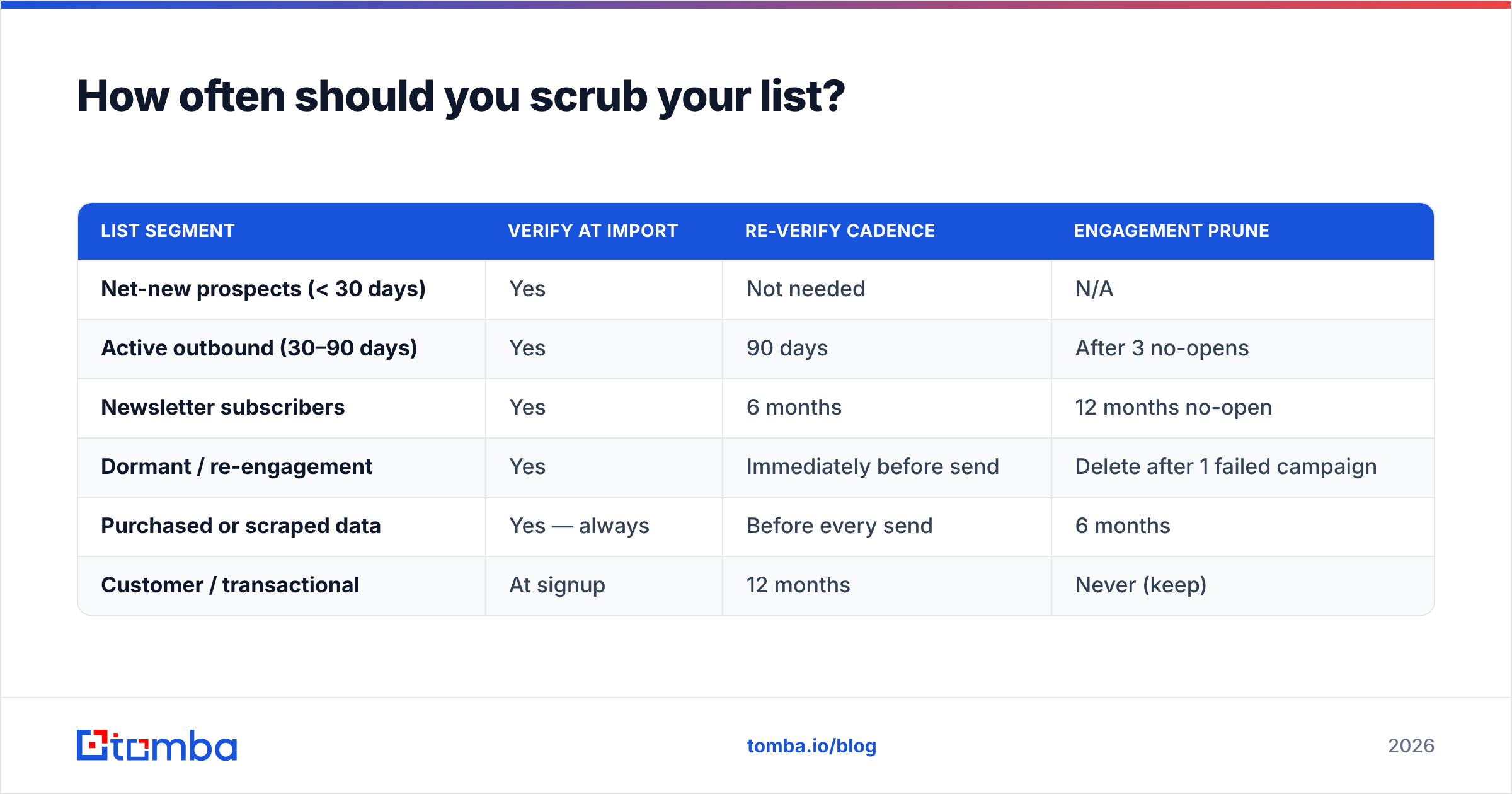
How often should you scrub your list?#
Not "before every campaign" — that's both too often and not often enough, depending on the segment.
| List segment | Verify at import | Re-verify cadence | Engagement prune |
|---|---|---|---|
| Net-new prospects (< 30 days) | Yes | Not needed | N/A |
| Active outbound (30–90 days) | Yes | 90 days | After 3 no-opens |
| Newsletter subscribers | Yes | 6 months | 12 months no-open |
| Dormant / re-engagement | Yes | Immediately before send | Delete after 1 failed campaign |
| Purchased or scraped data | Yes — always | Before every send | 6 months |
| Customer / transactional | At signup | 12 months | Never (keep) |
The rule underneath the table: re-verify anything you haven't emailed in 90 days, and always verify data you didn't collect yourself. Purchased lists — even from reputable providers like BookYourData, which sells pre-verified B2B contacts — should still be re-checked at the moment of send, because verification decays from the date it was run, not the date you bought it.
What are the real costs of skipping this?#
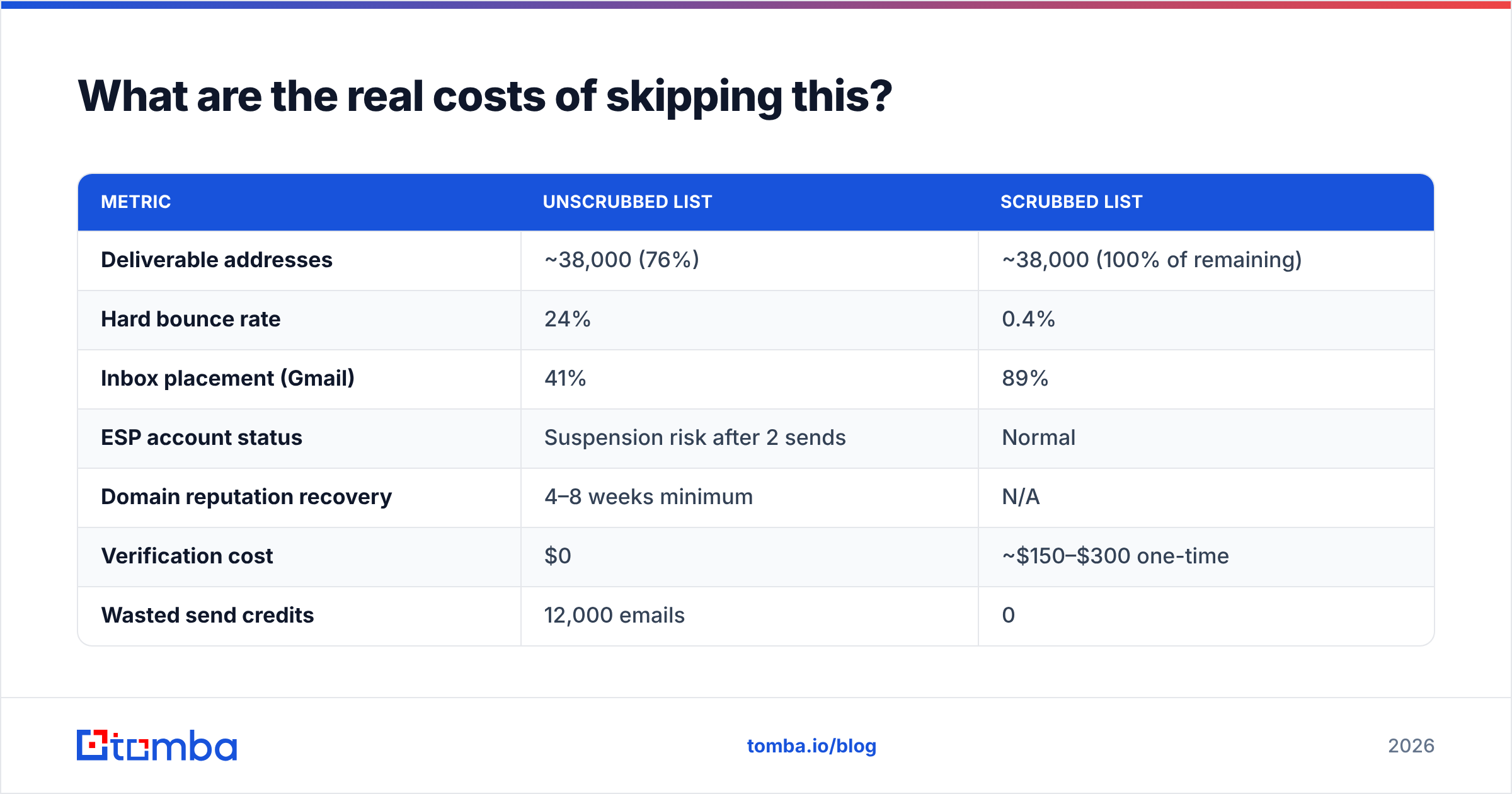
Here's the arithmetic most teams never run. Take a 50,000-contact list, unverified, 18 months old.
| Metric | Unscrubbed list | Scrubbed list |
|---|---|---|
| Deliverable addresses | ~38,000 (76%) | ~38,000 (100% of remaining) |
| Hard bounce rate | 24% | 0.4% |
| Inbox placement (Gmail) | 41% | 89% |
| ESP account status | Suspension risk after 2 sends | Normal |
| Domain reputation recovery | 4–8 weeks minimum | N/A |
| Verification cost | $0 | ~$150–$300 one-time |
| Wasted send credits | 12,000 emails | 0 |
The $150–$300 verification bill is trivially cheaper than the reputation damage. Google's Postmaster Tools documentation is explicit that high bounce and complaint rates directly affect domain reputation, and Google's bulk sender requirements cap spam complaint rates at 0.3%. Microsoft's throttling is less transparent but at least as aggressive — Outlook.com will silently defer mail from domains with elevated bounce patterns.

The second-order cost is worse: once your domain reputation drops, your good emails stop landing too. Customer onboarding, invoices, password resets — all of it degrades because someone imported a stale CSV.
How do you scrub without destroying your list size?#
The instinct when a verifier flags 30% of your list is to argue with the results. Don't. But you can recover a lot of that volume by replacing rather than deleting.
- Re-find, don't discard. When
sarah.chen@oldcompany.combounces, the person still exists. A domain search against her current employer, or a lookup by name, often recovers the contact at a new address. This turns a deletion into a data refresh. - Recover format from patterns. If a domain's dominant pattern is
first.last@, addresses in your list usingfinitial.last@are probably legacy or wrong. Correcting the format is cheaper than re-acquiring the lead. - Segment "unknown," don't delete it. Catch-all and greylisted results aren't failures. Park them, send to them separately, and let real bounce data classify them over two or three sends.
- Suppress instead of delete. Move hard bounces to a permanent suppression list rather than removing the row. This prevents re-importing the same dead address from a future export — the single most common way lists get re-poisoned.
- Enrich before you prune. Sometimes the address is fine and the record is just thin. Contact enrichment can add current title, company, and verified email in one pass, which tells you whether a non-opener is disengaged or simply mis-targeted.
What should you look for in a scrubbing tool?#
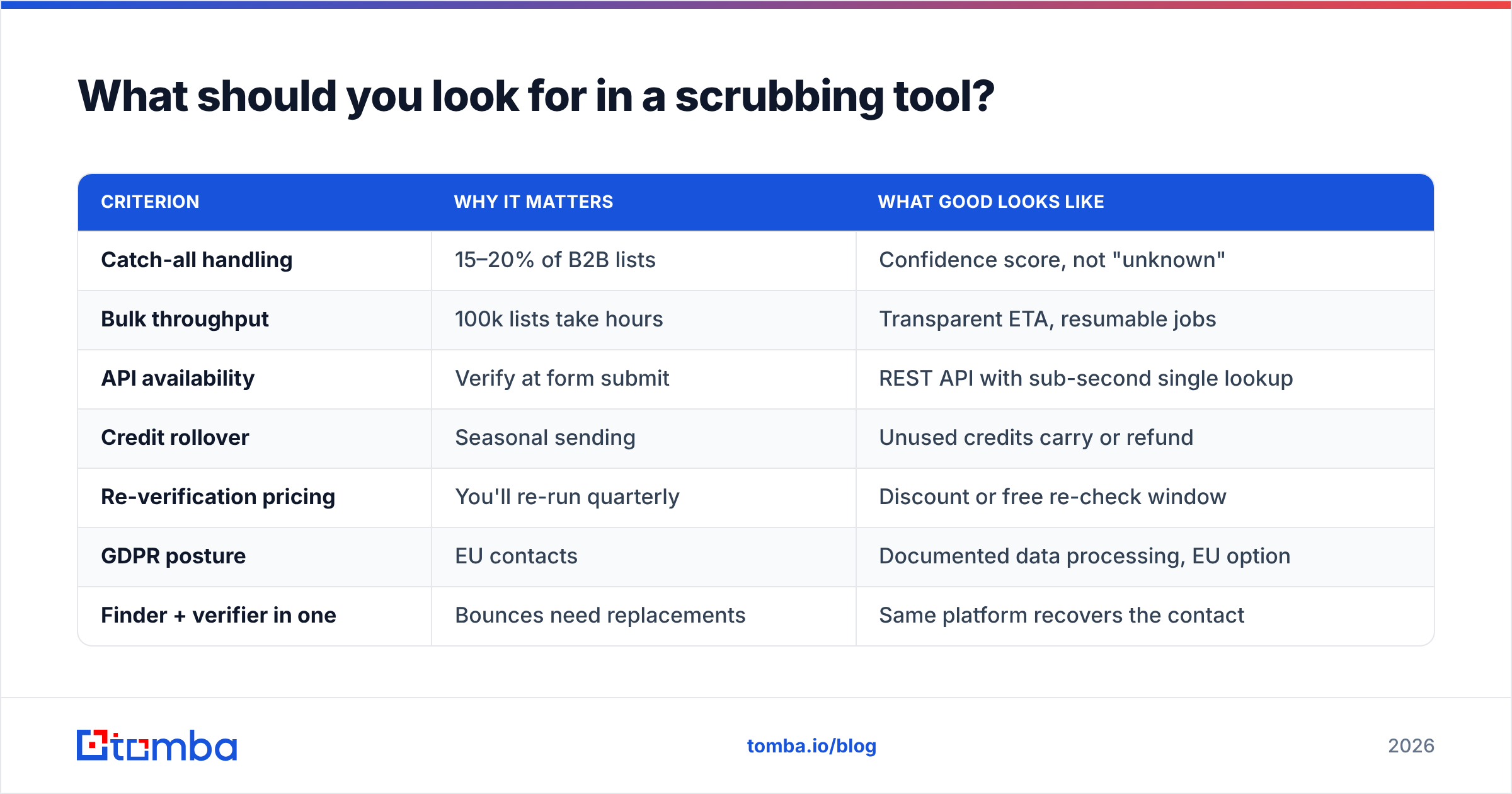
Most verification vendors show similar marketing accuracy claims (97–99%), which is nearly meaningless because they measure different things. What actually differentiates them:
| Criterion | Why it matters | What good looks like |
|---|---|---|
| Catch-all handling | 15–20% of B2B lists | Confidence score, not "unknown" |
| Bulk throughput | 100k lists take hours | Transparent ETA, resumable jobs |
| API availability | Verify at form submit | REST API with sub-second single lookup |
| Credit rollover | Seasonal sending | Unused credits carry or refund |
| Re-verification pricing | You'll re-run quarterly | Discount or free re-check window |
| GDPR posture | EU contacts | Documented data processing, EU option |
| Finder + verifier in one | Bounces need replacements | Same platform recovers the contact |
That last row is the one teams underweight. If your verifier only tells you an address is dead, you've bought half a solution. Pairing verification with an email finder means a bounce becomes a lookup instead of a lost lead.
On pricing, the market splits roughly into per-credit verifiers ($0.001–$0.004 at volume) and platform plans that bundle finding, verifying, and enrichment. Tomba pricing sits in the second group — a free tier at 25 searches/month, Starter at $49/mo, Growth at $99/mo, and Pro at $249/mo, with verification and finding drawing from the same pool. For teams doing both prospecting and hygiene, bundled beats stacking two subscriptions. For pure list hygiene on an existing 500k list, a dedicated per-credit verifier may cost less.
What does a working scrubbing process look like?#
Here's the process that survives contact with an actual sending calendar:
- Verify at the point of entry. Web form, CRM import, CSV upload — validate before the record is created. An API call at form submit costs a fraction of a cent and stops the problem at the source.
- Run a full-list verification quarterly. Schedule it. Don't wait for a bounce spike to trigger it, because by then the reputation damage is already logged.
- Set a 90-day freshness rule for outbound. Any address you're about to cold-email that was verified more than 90 days ago gets re-checked. Non-negotiable for cold campaigns.
- Maintain a permanent suppression list. Hard bounces, unsubscribes, and complainers go in and never come out — enforced at import, not just at send.
- Prune by engagement on a fixed schedule. Newsletter contacts with zero opens in 12 months get one re-engagement attempt, then removal. Yes, removal. A list of 8,000 engaged readers outperforms 25,000 mostly-dead ones on every metric that matters.
- Monitor bounce rate per campaign, not per quarter. If a single send crosses 2%, stop the sequence and investigate before the next batch goes out.
Steps 1 and 3 do most of the work. If you only implement two things, implement those.
One thing worth checking alongside your list hygiene: your authentication records. A clean list won't save you if SPF, DKIM, and DMARC are misconfigured — run an SPF checker and confirm your DMARC policy is at least p=none with reporting enabled. Deliverability is a two-variable problem, and list quality is only one of them. G2's email verification category is a reasonable place to compare vendor-reported accuracy claims side by side, though treat the self-reported percentages with skepticism.
Is scrubbing worth it for small lists?#
Yes, and the math is actually more favorable at small scale.
If you have 2,000 contacts and 400 are dead, you're not just wasting 400 sends — you're pushing a 20% bounce rate through a domain that has almost no positive sending history to offset it. New domains and low-volume senders have thin reputation buffers. A single bad send does proportionally more damage than the same send from a domain that mails 500,000 clean emails a month.
Verifying 2,000 addresses costs a few dollars. Recovering a burned domain costs weeks, a new domain purchase, and a fresh warmup cycle. Use a warmup calculator to see how long that ramp actually takes — it's rarely under three weeks — and the cost-benefit stops being a debate.
Getting started#
Start with the segment you're about to email, not your whole database. Export it, run it through verification, and look at three numbers: percentage invalid, percentage catch-all, and percentage of records older than 90 days. Those three tell you whether you have a hygiene problem or a sourcing problem — and they're different fixes.
If the invalid rate is high, you need better verification. If the catch-all rate is high, you need probabilistic scoring and segmented sending. If most records are stale, you need a re-acquisition workflow, not a delete key.
Tomba Email Finder handles the part most scrubbing tools skip: when an address bounces, it finds the current one. Search by domain, name, or company, verify in the same workflow, and turn a dead row into a live contact instead of a deletion. The free tier gives you 25 searches a month to test the accuracy on your own list before committing to a plan.
Related guides#
Ready to find emails that actually work?
Join 150,000+ professionals who stopped guessing and started sending. Free credits on signup — no credit card required.
Get the Tomba newsletter
Practical outbound tactics and product updates — once every two weeks.
About the author