Email Marketing IP Reputation: The 2026 Sender Guide
Your IP reputation decides whether your campaigns hit the inbox or the spam folder. Here's how mailbox providers actually score sending IPs in 2026 — and how to fix a damaged one.
TL;DR
- IP reputation is a per-IP trust score mailbox providers compute from complaint rate, bounce rate, spam-trap hits, and volume consistency. It is separate from domain reputation, and both must be healthy.
- Shared IPs hide your individual behavior in a pool — good if you send under ~50k/month, bad if a neighbor torches the pool.
- Dedicated IPs only pay off above roughly 100k emails/month with consistent cadence. Below that, you never generate enough signal to build trust.
- The single biggest lever on IP reputation is list quality. Bounces and spam traps do more damage than any subject line ever will.
- Recovering a burned IP takes 4–8 weeks of disciplined re-warming. There is no reset button, and buying a new IP without fixing the root cause just burns the next one.
What is email marketing IP reputation?#
IP reputation is a credit score for the mail server you send from. Just like a lender checks your payment history before approving a loan, Gmail and Microsoft check your sending IP's history before deciding whether your campaign lands in the inbox, the Promotions tab, or the spam folder.
Technically, every mailbox provider maintains its own internal score for every IP address that connects to it. There is no universal number. Gmail's view of your IP, Microsoft's view, and Yahoo's view can diverge sharply — which is why you often see a 40% open rate at Gmail and 6% at Outlook from the same send.
The inputs are consistent across providers even when the weightings are not:
- Complaint rate — how many recipients click "report spam." Above 0.3% you are in trouble; above 0.1% you are already being watched. This is the heaviest single input.
- Hard bounce rate — invalid recipients signal you are mailing a stale or purchased list. Keep it under 2%; under 1% is where healthy senders live.
- Spam-trap hits — pristine traps (addresses never opted in) and recycled traps (abandoned addresses reactivated as traps). One pristine trap hit can cost you weeks.
- Volume consistency — sending 200 emails on Monday and 80,000 on Tuesday looks like a compromised server. Providers punish volatility more than volume.
- Engagement signals — opens, replies, moves out of spam, and "not spam" clicks feed back into the score at Gmail especially.
- Authentication alignment — SPF, DKIM, and DMARC pass rates. Failures do not just hurt one message; they degrade the IP's standing over time.
Note what is missing from that list: your copy. Content filtering exists, but it operates downstream of reputation. A perfectly written email from a burned IP still lands in spam.
How is IP reputation different from domain reputation?#
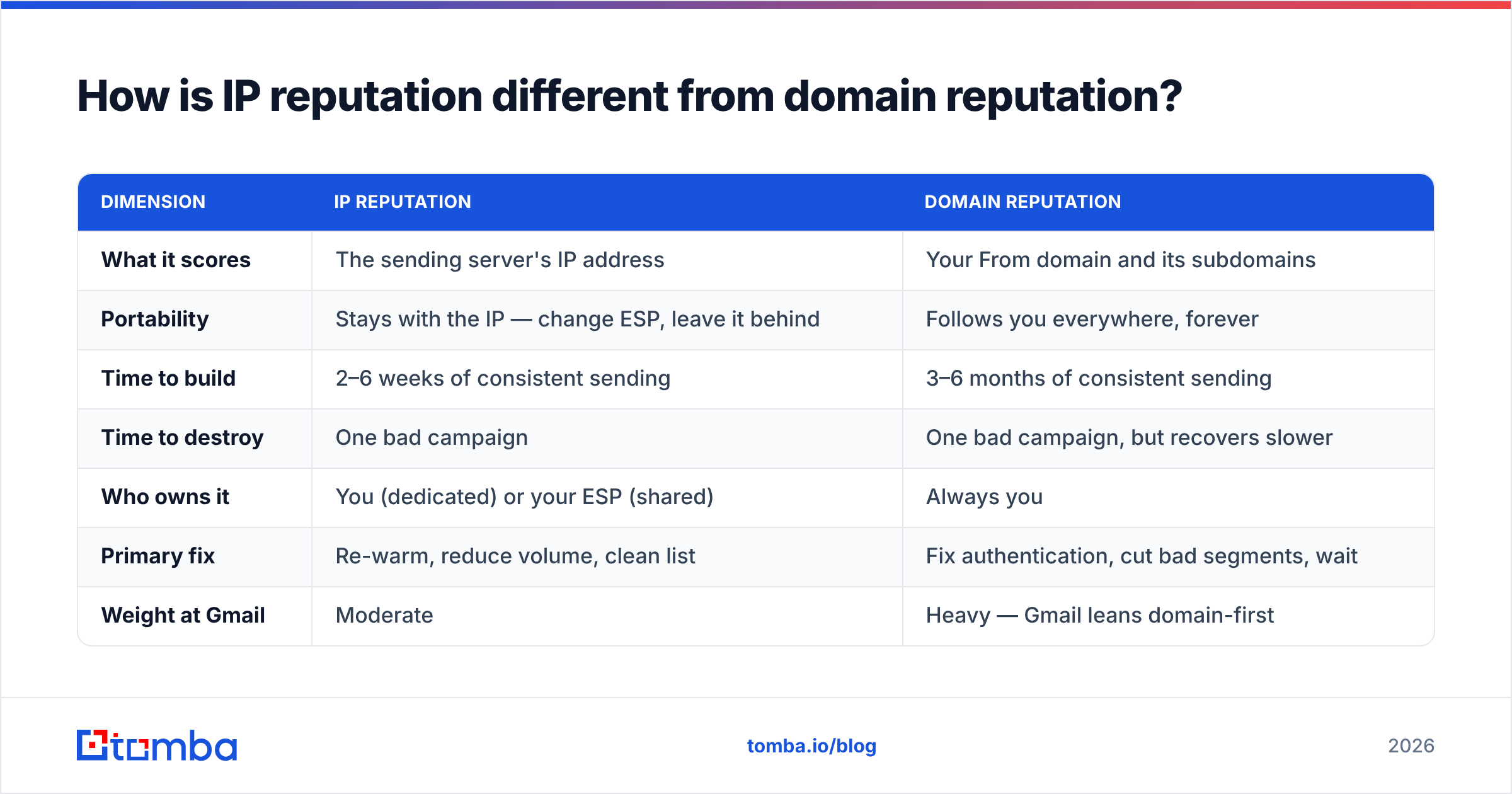
Both exist and both matter, but they behave differently — and confusing them is the most common diagnostic mistake in deliverability work.
| Dimension | IP reputation | Domain reputation |
|---|---|---|
| What it scores | The sending server's IP address | Your From domain and its subdomains |
| Portability | Stays with the IP — change ESP, leave it behind | Follows you everywhere, forever |
| Time to build | 2–6 weeks of consistent sending | 3–6 months of consistent sending |
| Time to destroy | One bad campaign | One bad campaign, but recovers slower |
| Who owns it | You (dedicated) or your ESP (shared) | Always you |
| Primary fix | Re-warm, reduce volume, clean list | Fix authentication, cut bad segments, wait |
| Weight at Gmail | Moderate | Heavy — Gmail leans domain-first |
The practical implication: Gmail has shifted steadily toward domain reputation since the 2024 bulk-sender requirements, while Microsoft still weights IP heavily. If your Outlook numbers collapsed but Gmail held steady, look at the IP. If both collapsed, look at the domain and your email deliverability fundamentals — authentication, list hygiene, and complaint rate.
Switching ESPs to escape a reputation problem only works for IP reputation. Your domain carries its history with it.
Should you use a shared IP or a dedicated IP?#
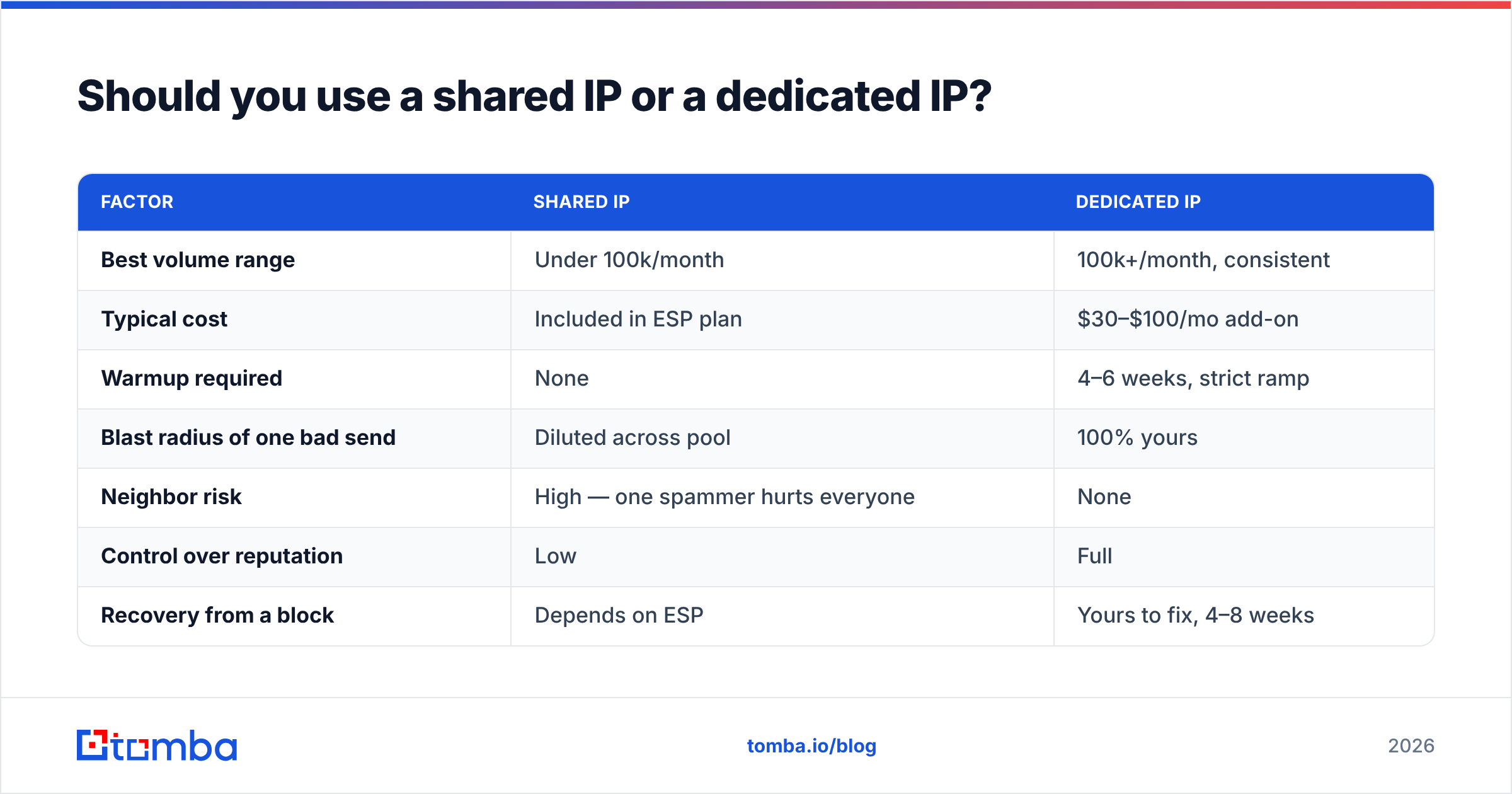
The honest answer: most B2B senders should stay on a shared IP longer than their ESP's sales team suggests.
A dedicated IP is only an asset if you can feed it. Mailbox providers build trust from repeated, predictable signal. If you send 15,000 emails a month on a dedicated IP, that is roughly 500 a day — barely enough for Gmail to form an opinion, and any single bad campaign represents a large share of your total history.
On a shared IP, your volume merges with hundreds of other senders. Your individual mistakes get diluted. So do your good behaviors, which is the trade-off.
| Factor | Shared IP | Dedicated IP |
|---|---|---|
| Best volume range | Under 100k/month | 100k+/month, consistent |
| Typical cost | Included in ESP plan | $30–$100/mo add-on |
| Warmup required | None | 4–6 weeks, strict ramp |
| Blast radius of one bad send | Diluted across pool | 100% yours |
| Neighbor risk | High — one spammer hurts everyone | None |
| Control over reputation | Low | Full |
| Recovery from a block | Depends on ESP | Yours to fix, 4–8 weeks |
| Good fit for | SMB, seed-stage outbound, newsletters | High-volume ecommerce, enterprise lifecycle |
The failure mode nobody mentions: a mid-sized sender buys a dedicated IP, never hits consistent volume, and ends up with worse deliverability than they had on the shared pool. Cold-outbound teams running 3,000 emails a month across a few inboxes are almost always better served by properly warmed mailboxes on shared infrastructure than by a dedicated IP they cannot feed.
Check what your ESP actually offers before committing. SendGrid's IP documentation and equivalent vendor pages spell out the volume thresholds they recommend — they are usually honest about the floor.
How do you check your current IP reputation?#
Four checks, in order, take about fifteen minutes.
1. Google Postmaster Tools. Free, and the only direct window into how Gmail sees you. Verify your sending domain, then read the IP Reputation and Domain Reputation dashboards. Anything below "High" on IP reputation deserves attention; "Bad" means you are already being filtered at scale.
[Screenshot placeholder: Google Postmaster Tools IP Reputation graph showing a drop from High to Medium over 30 days]
2. Microsoft SNDS. Register your IP ranges at Smart Network Data Services for complaint-rate and trap-hit data from Outlook, Hotmail, and Live. SNDS reports a red/yellow/green filter status per IP plus raw complaint numbers — more granular than anything Gmail exposes.
3. Blacklist status. Check the major DNSBLs — Spamhaus, SpamCop, Barracuda, SORBS. A single listing on a minor list is noise; a Spamhaus SBL or XBL listing is an emergency. Run a blacklist checker against every sending IP, not just the primary one.
4. Authentication records. Confirm SPF, DKIM, and DMARC all pass on live mail, not just in a DNS lookup. An SPF checker catches the classic failures: more than 10 DNS lookups, a missing include after an ESP migration, or a stale ~all you meant to tighten.
[Screenshot placeholder: Microsoft SNDS dashboard showing complaint rate and filter result per IP]
Do all four before changing anything. Half the "reputation problems" teams chase turn out to be a broken DKIM key from an infrastructure change three weeks earlier.
What actually damages IP reputation the fastest?#
Ranked by how much damage they cause per incident:
- Spam-trap hits. Pristine traps are addresses that never opted in anywhere — hitting one proves you did not collect the address legitimately. Recycled traps are old real addresses reactivated by the provider. Both come almost exclusively from purchased lists and unverified scraped data.
- Complaint spikes. A single campaign to a poorly-segmented list can push you past 0.3% and trigger throttling within hours. The damage persists for weeks after the complaint rate normalizes.
- Hard-bounce floods. Mailing a list that has sat untouched for a year typically produces 8–15% hard bounces. Providers read that as list purchase or scraping.
- Volume spikes. A 10x jump with no warmup ramp reads as a compromised account. Providers throttle first and ask questions never.
- Authentication breakage. DKIM key rotation without updating DNS, or an SPF record that silently exceeded the lookup limit, degrades every message you send until fixed.
- Sending to unengaged segments. Recipients who have not opened in 12 months are disproportionately likely to be inactive addresses, recycled traps, or complainers.
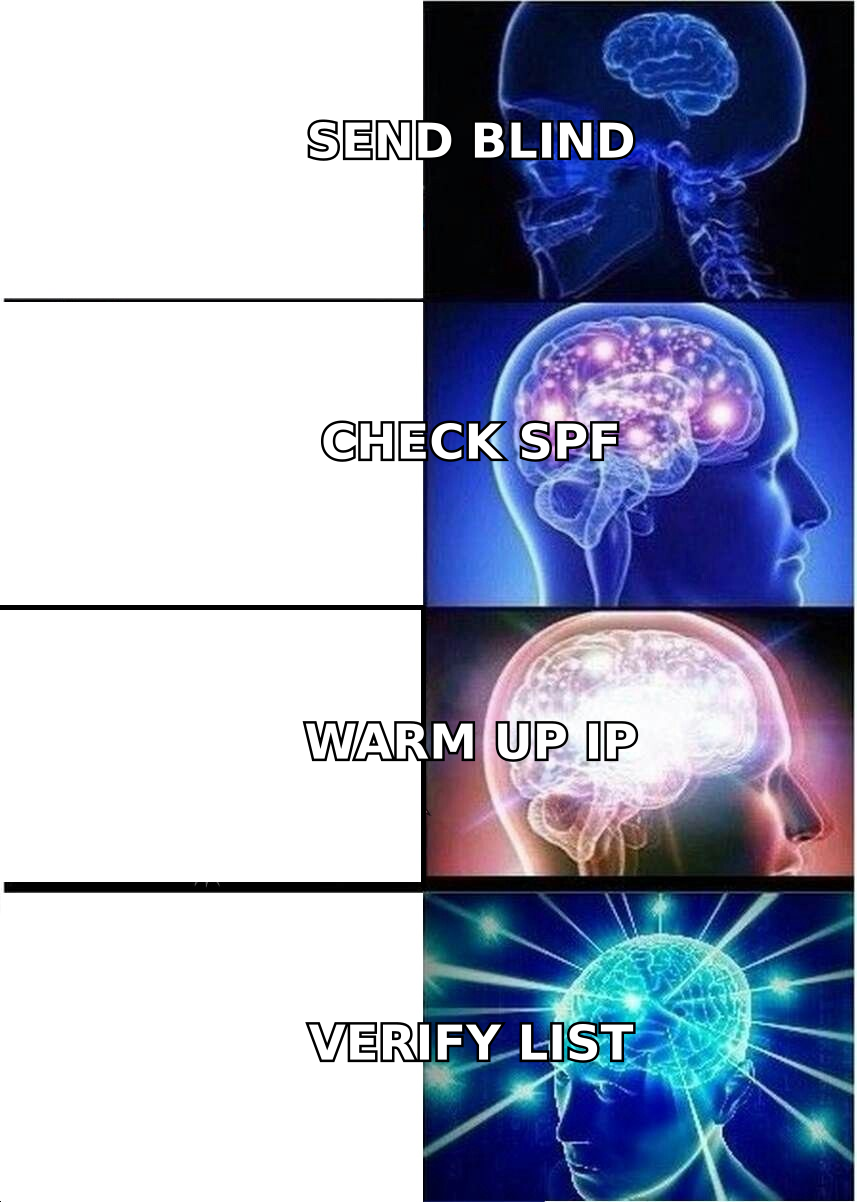
Notice the pattern: five of six are list-quality problems wearing different costumes. This is why verifying emails before a send is not a nice-to-have — it removes hard bounces and a meaningful share of trap risk before the message ever leaves your server. Catch-all domains deserve special handling; a catch-all verifier distinguishes domains that accept everything from genuinely valid mailboxes, which is exactly where naive verification tools produce false confidence.

How do you warm up a new IP correctly?#
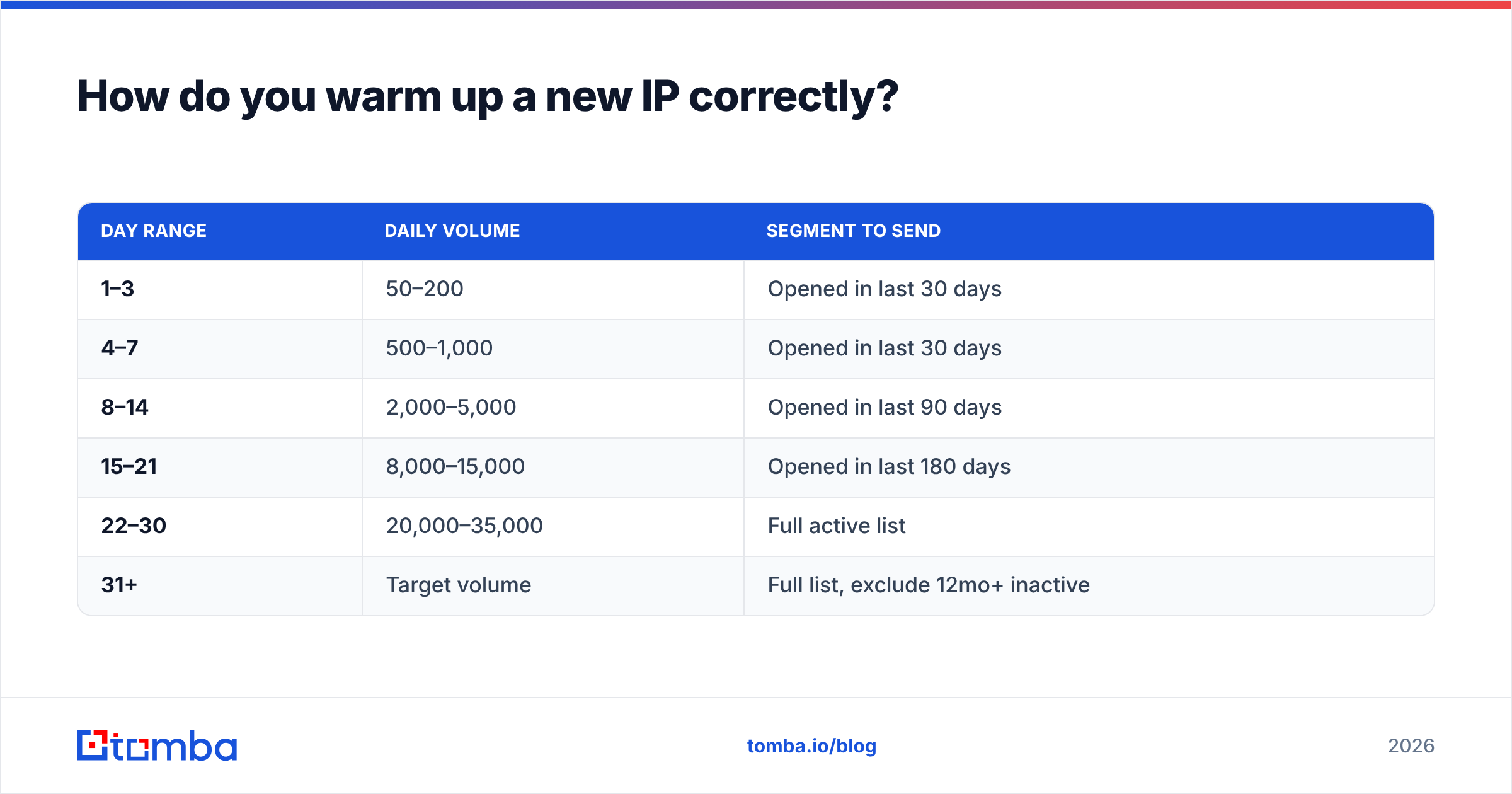
Warming is the process of teaching mailbox providers that a new IP belongs to a legitimate sender. You do it by starting small, growing predictably, and mailing only your most engaged recipients first.
A workable 30-day ramp for a dedicated IP targeting 100k/month:
| Day range | Daily volume | Segment to send |
|---|---|---|
| 1–3 | 50–200 | Opened in last 30 days |
| 4–7 | 500–1,000 | Opened in last 30 days |
| 8–14 | 2,000–5,000 | Opened in last 90 days |
| 15–21 | 8,000–15,000 | Opened in last 180 days |
| 22–30 | 20,000–35,000 | Full active list |
| 31+ | Target volume | Full list, exclude 12mo+ inactive |
Three rules that matter more than the exact numbers:
- Never double volume two days in a row. A 30–50% daily increase is the ceiling. If bounce or complaint rates rise, hold flat for 48 hours before increasing again.
- Front-load your best engagers. Early positive signal — opens, replies, moves to primary — is what builds the score. Sending to cold contacts on day 3 wastes the most valuable window you get.
- Send every weekday. Gaps reset progress. Consistency is a scored input, not a nice-to-have.
For cold outbound specifically, the math is different: you are warming mailboxes, not a shared corporate IP, and the ceiling per inbox is far lower — 30–50 sends a day is a realistic sustainable target. A warmup calculator will size the ramp against your actual target volume rather than a generic template.
How do you repair a damaged IP reputation?#
Four to eight weeks, in this order. Skipping steps just extends the timeline.
Week 1 — stop the bleeding. Pause all campaigns. Do not "send one more to test." Identify the campaign or segment that caused the drop by cross-referencing SNDS complaint spikes against your send log. If you are blacklisted, submit delisting requests only after fixing the cause — Spamhaus relists fast and repeat listings are harder to clear.
Week 2 — clean the list. Remove every hard bounce, every address that has not engaged in 12 months, every role account (info@, sales@, admin@) you cannot justify, and everything from any list you did not build yourself. Run full verification on what remains. Expect to delete 20–40% of a neglected list. That is the point.
Week 3–4 — restart small. Resume at roughly 10% of your prior volume, sending only to recipients who opened in the last 30 days. Watch complaint rate daily. If it stays under 0.1%, increase 30% every two days.
Week 5–8 — rebuild and prevent. Return to target volume gradually. Put permanent guardrails in place: verification on every new import, a sunset policy that auto-suppresses 6-month non-openers, and a complaint-rate alert at 0.08% so you catch the next problem before providers do.
The prevention layer is where most teams under-invest. If your prospecting workflow pulls addresses from scraping or an unverified B2B database, the reputation problem will recur no matter how well you execute the recovery. Sourcing verified addresses at acquisition time — via a real-time email finder with confidence scoring — costs less than the recovery it prevents.
Which tools should be in your deliverability stack?#
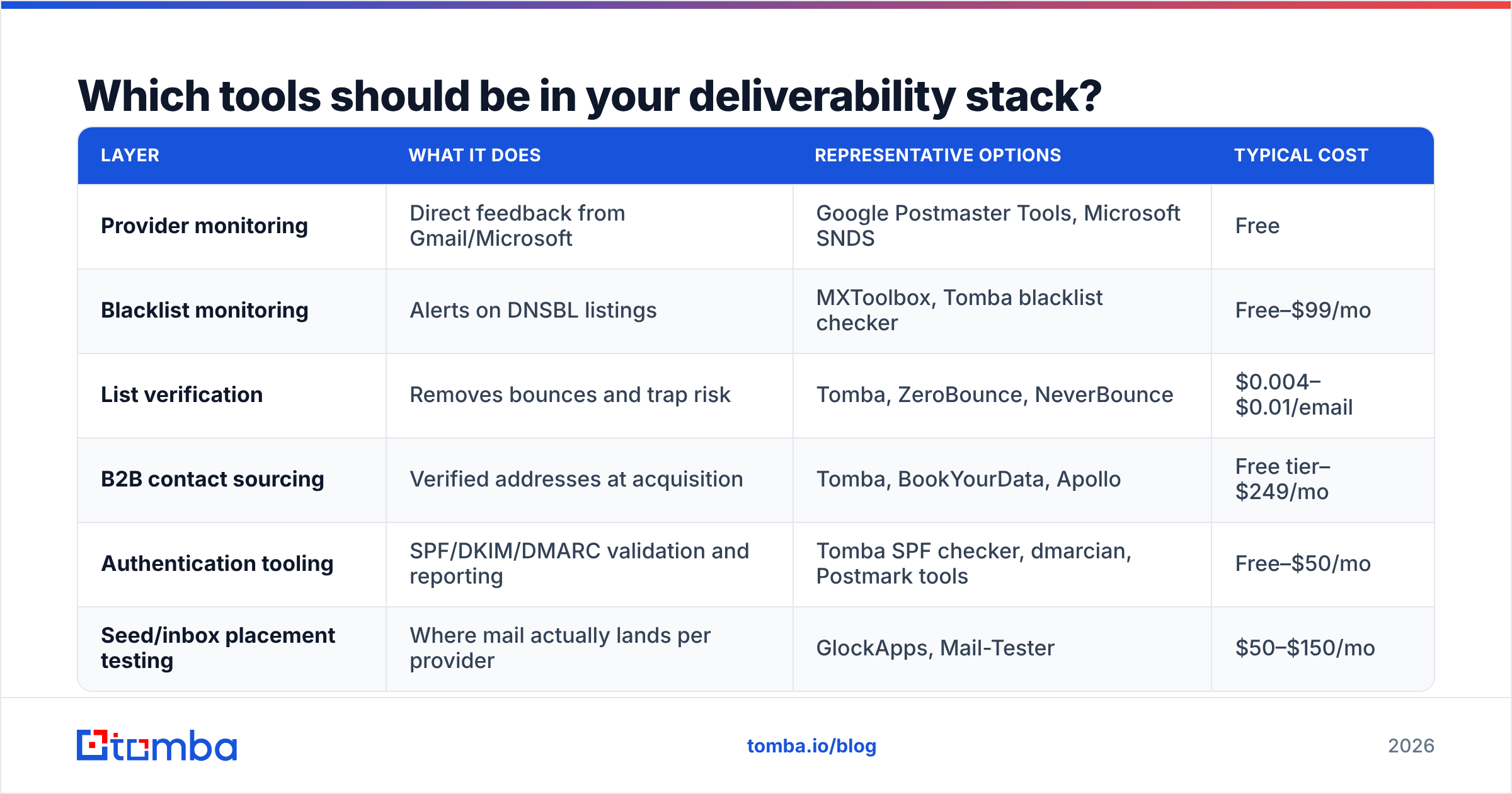
You need coverage in four areas: monitoring, verification, authentication, and sourcing. Most teams over-buy in one and ignore the rest.
| Layer | What it does | Representative options | Typical cost |
|---|---|---|---|
| Provider monitoring | Direct feedback from Gmail/Microsoft | Google Postmaster Tools, Microsoft SNDS | Free |
| Blacklist monitoring | Alerts on DNSBL listings | MXToolbox, Tomba blacklist checker | Free–$99/mo |
| List verification | Removes bounces and trap risk | Tomba, ZeroBounce, NeverBounce | $0.004–$0.01/email |
| B2B contact sourcing | Verified addresses at acquisition | Tomba, BookYourData, Apollo | Free tier–$249/mo |
| Authentication tooling | SPF/DKIM/DMARC validation and reporting | Tomba SPF checker, dmarcian, Postmark tools | Free–$50/mo |
| Seed/inbox placement testing | Where mail actually lands per provider | GlockApps, Mail-Tester | $50–$150/mo |
A note on cost framing: verification looks like an expense until you price the alternative. Cleaning a 50,000-address list at $0.006 each costs $300. Six weeks of degraded deliverability across a team of five SDRs costs considerably more in missed pipeline. On Tomba pricing, the Free tier covers 25 searches a month for testing, Starter runs $49/mo, Growth $99/mo, and Pro $249/mo — sized for teams that need verified sourcing and verification in the same workflow rather than stitched across two vendors.
If you buy purpose-built B2B lists, providers like BookYourData sell pre-verified data with bounce guarantees, which sidesteps a large share of trap risk at the source. Whatever the source, re-verify before the send — data decays at roughly 2% per month as people change jobs, and a list verified in January is measurably worse by April.
What does a healthy sender look like in 2026?#
Benchmarks worth holding yourself to, drawn from what mailbox providers publish and what G2 deliverability category data reflects across vendors:
- Complaint rate: under 0.1%. Gmail's stated threshold is 0.3%; treat that as the failure line, not the target.
- Hard bounce rate: under 1% per campaign. Above 2%, stop and verify.
- Authentication: SPF, DKIM, and DMARC all passing, with DMARC at
p=quarantineminimum.p=noneis a monitoring posture, not a policy. - List hygiene cadence: full verification quarterly, plus verification on every import.
- Sunset policy: auto-suppress after 6 months of no engagement for marketing, 90 days for high-frequency sends.
- One-click unsubscribe: required for bulk senders — a
List-Unsubscribeheader withList-Unsubscribe-Postsupport. Missing it now measurably suppresses delivery.
Hit those six and IP reputation largely takes care of itself. Miss the first two and no amount of warmup or dedicated infrastructure will save the send.
Where should you start?#
Start with the input, not the infrastructure. Almost every damaged IP traces back to addresses that should never have entered the list — scraped, purchased, guessed, or verified once and never rechecked.
Tomba's Email Finder returns professional email addresses with a confidence score and SMTP-level validation at the moment you source them, so bounces and trap hits are filtered out before they reach your sending IP. Pair it with the email verifier for periodic list re-checks, and you remove the root cause of most reputation damage instead of repeatedly recovering from it. The free tier is enough to test the accuracy against a sample of your existing list — run 25 addresses you believe are valid and see what comes back.
Related guides#
Ready to find emails that actually work?
Join 150,000+ professionals who stopped guessing and started sending. Free credits on signup — no credit card required.
Get the Tomba newsletter
Practical outbound tactics and product updates — once every two weeks.
About the author