Email Marketing Lead Generation: The 2026 Playbook That Converts
Most email lead gen programs fail on list quality, not copy. Here are the 2026 benchmarks, channel comparisons, and the exact stack that keeps replies coming and spam complaints near zero.
TL;DR
- Email marketing lead generation splits into two engines: inbound capture (people give you their address) and outbound sourcing (you find and verify addresses yourself). Most teams run one badly instead of both deliberately.
- Your bottleneck is almost never copy. It's list quality. A 6% bounce rate will torch a domain faster than any subject line can save it.
- Realistic 2026 benchmarks: 25–40% open rate on opted-in lists, 1.5–4% reply rate on well-targeted cold outbound, under 0.1% spam complaints, under 2% bounce.
- Verify every address before send, keep cold and marketing sends on separate domains, and treat catch-all domains as a distinct risk bucket.
- Budget roughly: $50–$150/month for data, $30–$100/month for sending, and the rest of your effort into segmentation and offer.
What is email marketing lead generation?#
Email marketing lead generation is the process of turning email into a repeatable source of qualified pipeline — either by capturing addresses from people who visit your properties, or by sourcing and verifying addresses for people who match your ICP and have never heard of you.
Those are two different machines with different failure modes:
- Inbound capture — forms, lead magnets, newsletter signups, webinar registrations, free tools. High intent, low volume, slow to scale. Fails when your offer is generic ("subscribe to our newsletter").
- Outbound sourcing — you build a target account list, find the right contacts, verify the addresses, then send a sequence. High volume, lower intent, fast to scale. Fails when your data is stale or your targeting is lazy.
- Reactivation — the list you already own. Cheapest pipeline in the building and the one everyone forgets. Fails when nobody segments by last engagement date.
- Partner and community lists — co-marketing, newsletter swaps, podcast audiences. Medium volume, high trust transfer. Fails when the audience overlap is assumed rather than measured.
Most teams pick one, run it at 40% quality, and conclude "email is dead." Email is not dead. According to HubSpot's marketing statistics, email remains among the highest-ROI channels marketers report — but the gap between the top quartile and the bottom quartile is enormous, and almost all of that gap comes from list hygiene and targeting rather than creative.
Why do most email lead generation programs stall?#
Because the failure is invisible until it's terminal. You send 5,000 emails, 400 bounce, 12 people mark you as spam, and your open rate looks "fine" at 22%. Three weeks later your open rate is 9% and you have no idea why.
Here's the sequence that kills programs, in order of how often it happens:
- Unverified addresses. Every hard bounce is a signal to mailbox providers that you don't know who you're emailing. Two or three percent is survivable. Six percent means you're being filtered.
- One domain doing everything. Cold outbound on the same domain as your billing notifications and your product emails. When outbound reputation tanks, your password resets go to spam.
- No segmentation by engagement. Emailing people who haven't opened anything in 18 months drags your engagement metrics down and tells Gmail your mail isn't wanted.
- Volume ramped too fast. New domain, 800 sends on day one. Instant throttling.
- Offer mismatch. A "book a 30-minute demo" CTA sent to someone who has never heard your company name. Ask for the appropriate next step, not the final one.
Fix the first two and you've solved most of what's wrong. The rest is optimization.
Which lead generation channel actually feeds email best?#
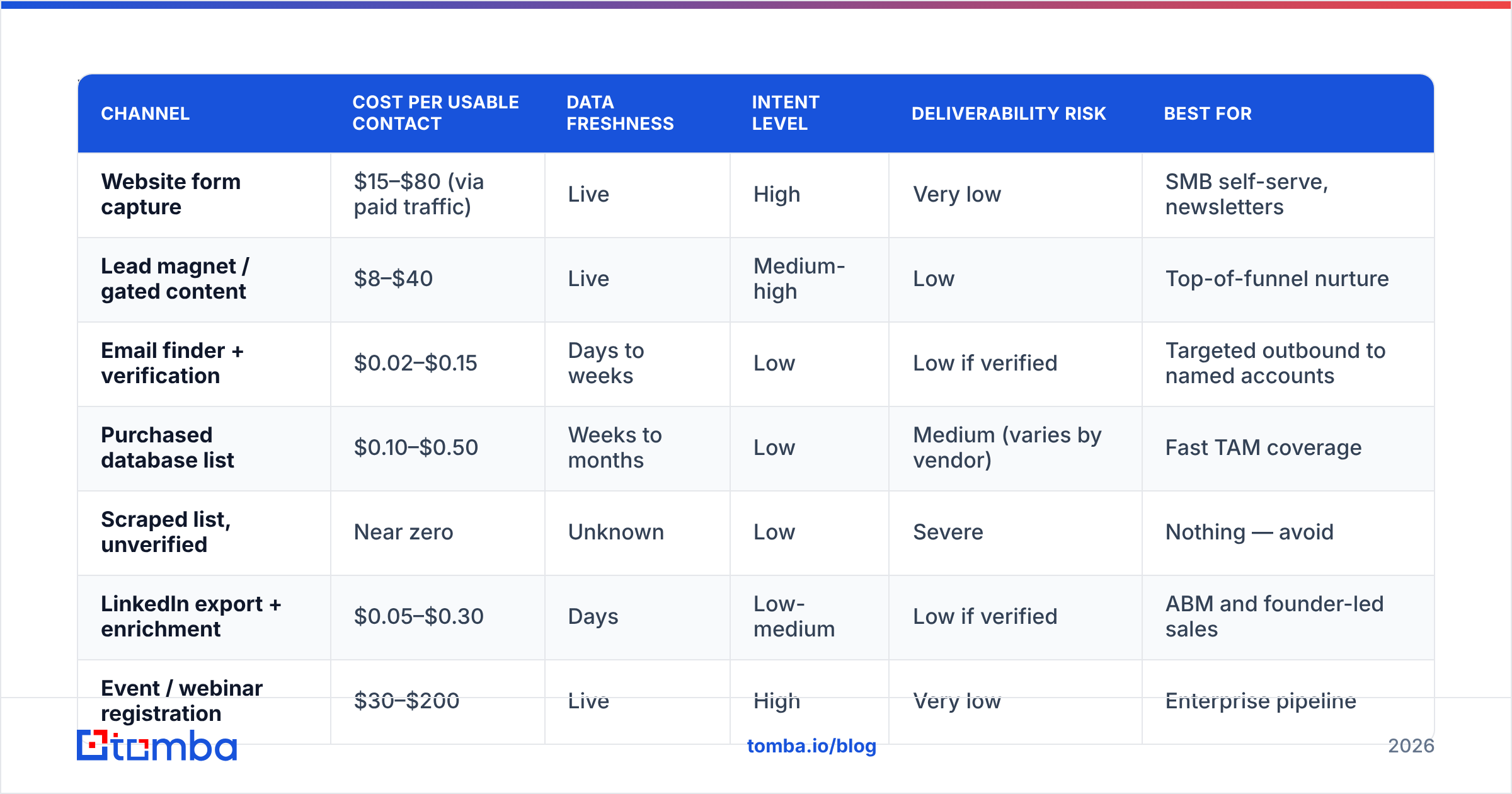
Not all sources produce equal addresses. Here's how the main options compare on the metrics that matter for an email program specifically.
| Channel | Cost per usable contact | Data freshness | Intent level | Deliverability risk | Best for |
|---|---|---|---|---|---|
| Website form capture | $15–$80 (via paid traffic) | Live | High | Very low | SMB self-serve, newsletters |
| Lead magnet / gated content | $8–$40 | Live | Medium-high | Low | Top-of-funnel nurture |
| Email finder + verification | $0.02–$0.15 | Days to weeks | Low | Low if verified | Targeted outbound to named accounts |
| Purchased database list | $0.10–$0.50 | Weeks to months | Low | Medium (varies by vendor) | Fast TAM coverage |
| Scraped list, unverified | Near zero | Unknown | Low | Severe | Nothing — avoid |
| LinkedIn export + enrichment | $0.05–$0.30 | Days | Low-medium | Low if verified | ABM and founder-led sales |
| Event / webinar registration | $30–$200 | Live | High | Very low | Enterprise pipeline |
Two notes on that table. First, purchased lists are not automatically bad — the variable is the vendor. Providers like BookYourData verify at the point of purchase and offer credit-back on bounces, which puts them in a very different category from a $29 CSV off a marketplace. The rule isn't "never buy data," it's "never buy unverified data."
Second, the cheapest usable contacts come from an email finder run against a list you built deliberately, because you control the targeting. You're not paying for 40,000 contacts you'll never email.
What does a working email lead generation stack look like?#
Six components, and you need all six. Skipping any one of them is where programs break.
- Target list builder — a defined ICP with firmographic filters, exported to a spreadsheet or CRM. Company size, industry, tech stack, hiring signals. This is thinking work, not tooling work.
- Contact discovery — turning "VP Marketing at Acme" into an actual mailbox. A domain search gets you the pattern and the department contacts; a name-based lookup gets you the individual.
- Verification layer — SMTP-level validation before anything sends. Non-negotiable. Run the email verifier over every import, including inbound form fills, which are typoed more often than you'd think.
- Sending infrastructure — separate domains for cold and marketing, SPF/DKIM/DMARC configured, warmup completed, per-mailbox daily caps.
- Sequencing and personalization — 3–5 touches, spaced 3–4 days apart, with a genuine reason for each follow-up. Not "just bumping this."
- Measurement loop — reply rate by segment, meeting rate by segment, and a weekly review of which ICP slices are actually converting. Kill the slices that aren't.
The order matters. Teams routinely buy the sequencing tool first and the data layer last, then wonder why a beautiful five-step sequence produces four replies from 2,000 sends.
Is inbound or outbound better for email lead generation?#
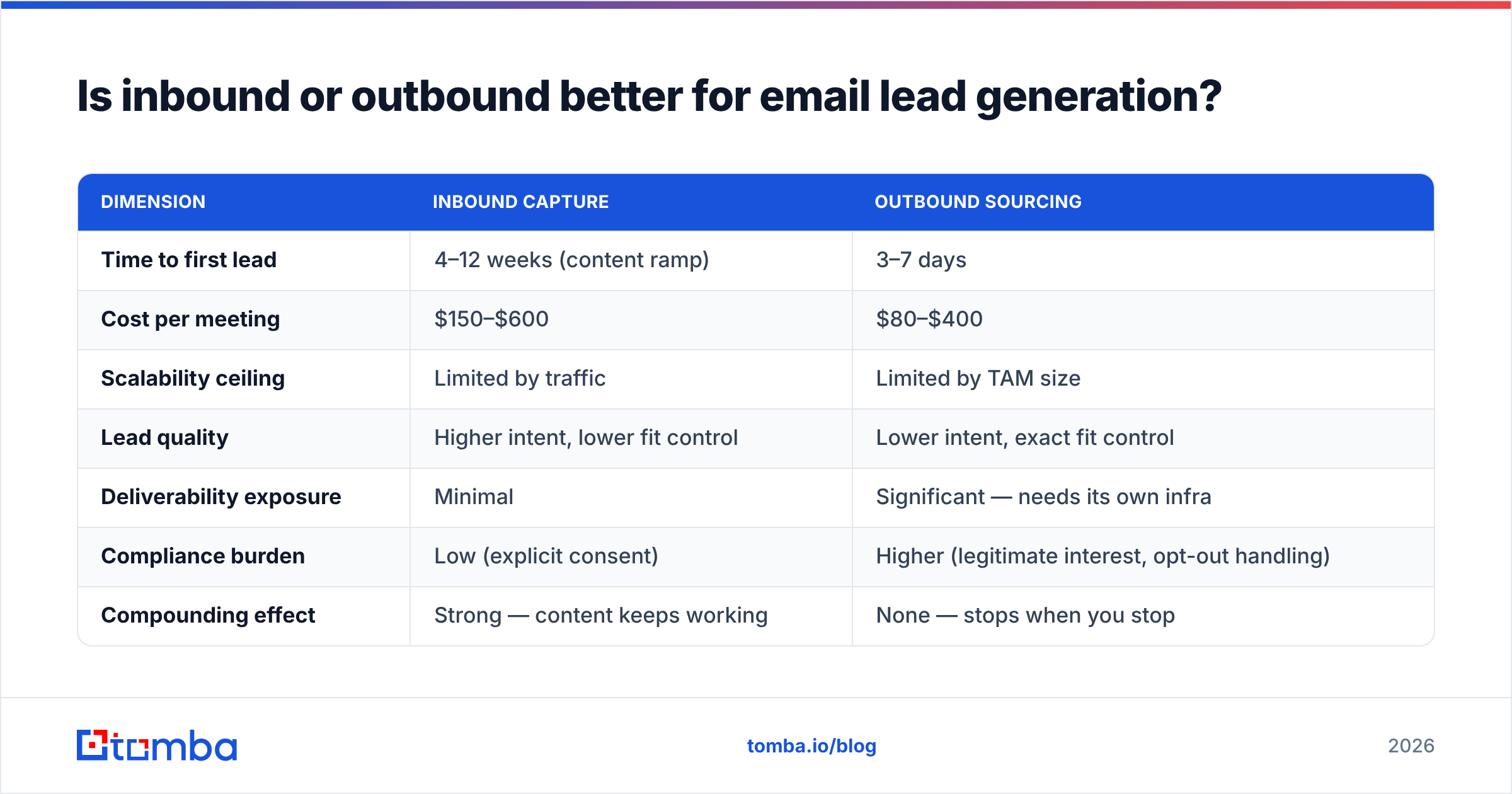
Neither wins outright — they solve different problems on different timelines. Run both, but resource them according to your sales cycle and ACV.
| Dimension | Inbound capture | Outbound sourcing |
|---|---|---|
| Time to first lead | 4–12 weeks (content ramp) | 3–7 days |
| Cost per meeting | $150–$600 | $80–$400 |
| Scalability ceiling | Limited by traffic | Limited by TAM size |
| Lead quality | Higher intent, lower fit control | Lower intent, exact fit control |
| Deliverability exposure | Minimal | Significant — needs its own infra |
| Compliance burden | Low (explicit consent) | Higher (legitimate interest, opt-out handling) |
| Compounding effect | Strong — content keeps working | None — stops when you stop |
| Best ACV range | Under $15k | $15k and up |
The practical answer for most B2B teams under $10M ARR: outbound funds the quarter, inbound funds the year. Start outbound to prove the ICP, then use what you learn about objections and language to write inbound content that actually ranks and converts.
How do you build a list without buying one?#
Start with accounts, not contacts. Pull 200–500 companies that match your best existing customers — same industry, similar headcount, similar trigger events. Then work each account down to people.
The mechanics:
- Get the domain, get the pattern. Run a company domain through a domain search to see the published addresses and the dominant format (first.last@, f.last@, first@). One accurate pattern unlocks the whole org.
- Name the humans. Pull the specific titles you need from LinkedIn, conference speaker lists, G2 review authors, GitHub contributors, or podcast guest lists. Titles without names are useless.
- Resolve and verify. Convert name + domain into an address, then verify it. Anything that comes back "risky" or "catch-all" goes into a separate bucket — you can still email catch-all domains, but keep them at a lower ratio and watch reply rates.
- Enrich for personalization. Company size, funding stage, current stack. Data enrichment is what makes the difference between "Hi {{firstName}}" and a first line that references something real.
- Deduplicate before import. Duplicates across sources produce double-sends, which produce complaints.
A team of two can build 800 verified, well-targeted contacts in a week this way. That's more than enough to run a proper test.
What benchmarks should you hold yourself to in 2026?#
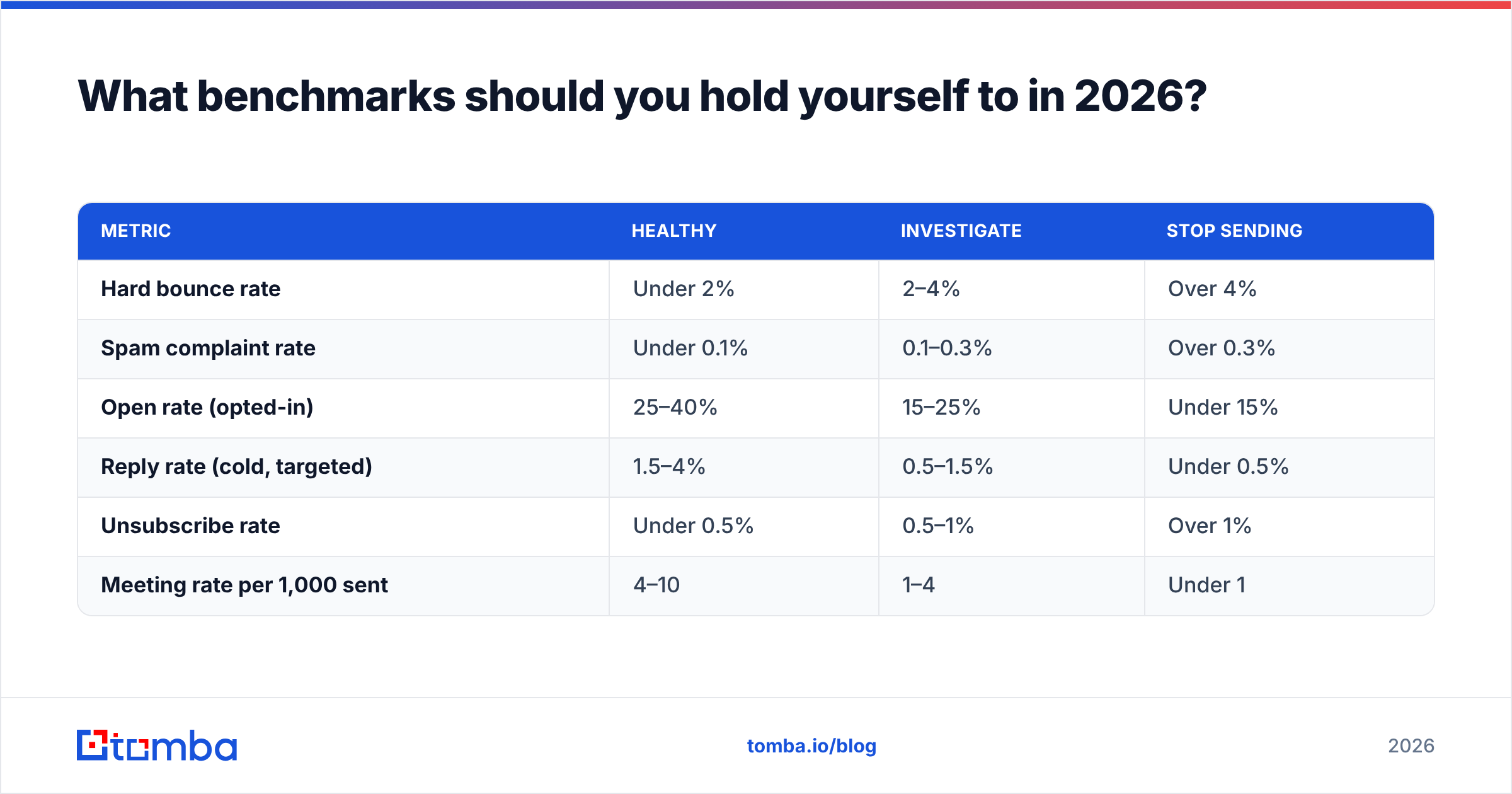
Use these as go/no-go thresholds, not vanity targets. If you're below the "investigate" column, stop sending and fix the input.
| Metric | Healthy | Investigate | Stop sending |
|---|---|---|---|
| Hard bounce rate | Under 2% | 2–4% | Over 4% |
| Spam complaint rate | Under 0.1% | 0.1–0.3% | Over 0.3% |
| Open rate (opted-in) | 25–40% | 15–25% | Under 15% |
| Reply rate (cold, targeted) | 1.5–4% | 0.5–1.5% | Under 0.5% |
| Unsubscribe rate | Under 0.5% | 0.5–1% | Over 1% |
| Meeting rate per 1,000 sent | 4–10 | 1–4 | Under 1 |
Two caveats on open rates. Apple Mail Privacy Protection inflates them, so treat opens as a directional signal and reply rate as the real one. And the mailbox provider requirements introduced by Google and Yahoo for bulk senders — one-click unsubscribe, authenticated sending, complaint rates under 0.3% — are now enforced rather than advisory. Complaint rate is the metric that gets you blocked.

How do you keep deliverability from killing the program?#
Deliverability is infrastructure, not a growth hack. Get the boring parts right once and you rarely think about them again.
- Separate your domains. Your primary domain sends product and billing mail. Buy two or three lookalike domains for cold outbound. If one gets burned, your core business email is untouched.
- Authenticate properly. SPF, DKIM, and DMARC on every sending domain. Check your records with an SPF checker before you send a single message, not after replies stop.
- Warm up on a schedule. Two to four weeks, ramping from 5–10 sends per mailbox per day to a ceiling of 30–50. An email warmup calculator will give you the daily curve.
- Verify continuously, not once. B2B data decays roughly 2–3% per month as people change jobs. A list verified in January is meaningfully worse by June. Re-verify anything older than 90 days before a send.
- Handle catch-alls deliberately. Catch-all domains accept everything at the SMTP layer, so standard verification can't confirm them. A dedicated catch-all verifier reduces the guesswork; failing that, cap catch-alls at 15–20% of any given send.
- Respect consent. For inbound, double opt-in costs you 20–30% of raw signups and buys you a list that actually engages. Worth it every time.
- Make unsubscribing trivial. A one-click unsubscribe is far cheaper than a spam complaint. Someone who leaves quietly costs you nothing; someone who hits "report spam" costs you every future inbox placement.
Which tools do you actually need — and what do they cost?#
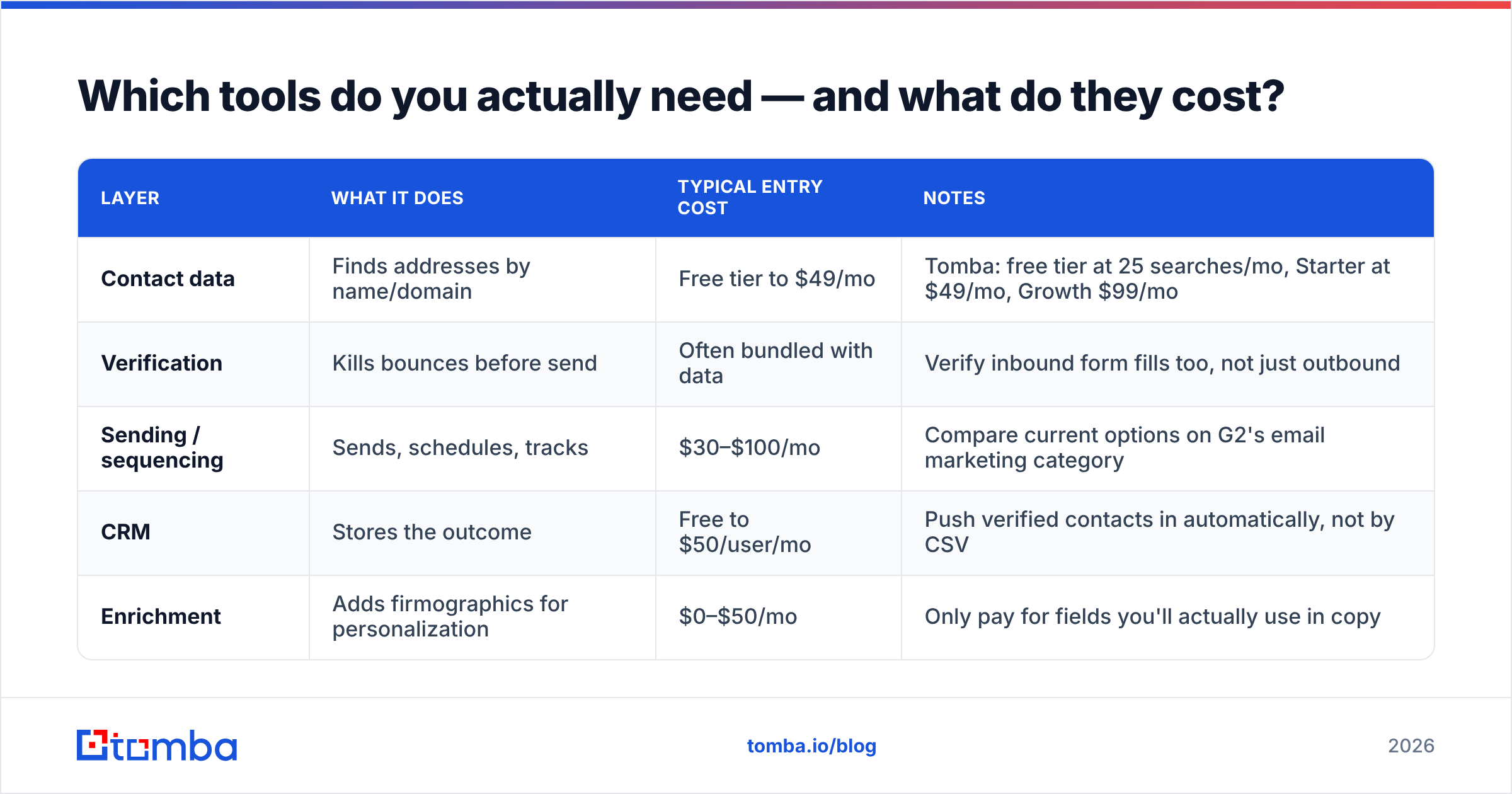
You need four categories: data, verification, sending, and CRM. Here's a realistic entry-level stack and what it runs.
| Layer | What it does | Typical entry cost | Notes |
|---|---|---|---|
| Contact data | Finds addresses by name/domain | Free tier to $49/mo | Tomba: free tier at 25 searches/mo, Starter at $49/mo, Growth $99/mo |
| Verification | Kills bounces before send | Often bundled with data | Verify inbound form fills too, not just outbound |
| Sending / sequencing | Sends, schedules, tracks | $30–$100/mo | Compare current options on G2's email marketing category |
| CRM | Stores the outcome | Free to $50/user/mo | Push verified contacts in automatically, not by CSV |
| Enrichment | Adds firmographics for personalization | $0–$50/mo | Only pay for fields you'll actually use in copy |
A two-person team can run a complete email marketing lead generation program for around $150–$250 per month in tooling. If you're spending more than that before you've booked your first ten meetings, you've over-bought.
For teams that need volume, the economics change shape: a bulk email finder run against a 5,000-row account list costs a fraction of a per-seat data platform, and an email finder API lets you verify addresses inside your own signup flow so bad data never enters the CRM at all.
Where should you start this week?#
Pick the smallest complete loop and run it end to end.
Build a list of 100 companies that look like your three best customers. Find one decision-maker at each. Verify all 100 addresses. Send a four-touch sequence with a genuinely specific first line. Measure reply rate, not open rate. If you get 3 or more replies, the ICP is right and you scale. If you get zero, the problem is targeting or offer — and you've learned that for the price of a week instead of a quarter.
Then repeat with a different segment. Email marketing lead generation is not a campaign you launch; it's a loop you tighten.
Start with clean data. Everything downstream — your sequences, your reply rates, your domain reputation — depends on whether the addresses in your CSV are real. The Tomba Email Finder finds professional addresses by name, domain, or company and verifies them before they reach your sender, with a free tier at 25 searches per month and Starter plans at $49/mo. Build the list right the first time, and the rest of the program gets a lot easier.
Related guides#
Ready to find emails that actually work?
Join 150,000+ professionals who stopped guessing and started sending. Free credits on signup — no credit card required.
Get the Tomba newsletter
Practical outbound tactics and product updates — once every two weeks.
About the author