How to Build an Email Marketing List That Actually Converts
Most email marketing lists decay 22.5% a year and half the names never opted in. Here's how to build, verify, segment, and maintain a list that survives Gmail's 2026 sender rules.
TL;DR
- An email marketing list is only an asset if it's permissioned, verified, and segmented. A raw CSV of 50,000 scraped addresses is a liability that will cost you your sending domain.
- B2B lists decay roughly 22.5% per year — about 2% of your contacts go stale every month through job changes, rebrands, and departures. Budget for re-verification, not just acquisition.
- Since Google and Yahoo tightened bulk-sender rules, spam complaints above 0.3% will throttle your delivery regardless of how good your copy is.
- Build order matters: source → verify → segment → warm → send. Skipping verification is the single most common reason first campaigns bounce over 5%.
- Cost per usable contact — not raw list size — is the metric that predicts revenue. A 2,000-contact verified list routinely outperforms a 40,000-contact unverified one.
What Is an Email Marketing List, Exactly?#
An email marketing list is the set of contact records you have permission (or a legitimate business interest) to email, along with the attributes that let you segment them. That second half is what separates a list from a spreadsheet.
Think of it like a restaurant reservation book versus a phone directory. The directory has more names. The reservation book has people who asked to be there, on a date, with a party size and a dietary note. One of them makes you money.
A usable list record has at minimum:
- A verified deliverable address — confirmed via SMTP or a verification provider, not just regex-checked for an
@sign. - A permission or legitimate-interest basis — opt-in timestamp and source for B2C, or a documented business rationale for B2B outreach under GDPR Article 6(1)(f).
- Firmographic context — company, domain, employee count, industry. Without this you can't segment, and without segmentation your open rates flatten.
- Role context — job title and seniority. "VP Marketing at a 200-person SaaS" is a segment. "info@" is noise.
- An engagement history — last open, last click, last reply. This is what you'll use to sunset dead contacts before they hurt your sender reputation.
- A suppression flag — unsubscribes, hard bounces, and complainers must be permanently excluded, not just skipped once.
If your CRM export is missing three or more of those fields, you don't have an email marketing list yet. You have raw material.
Wait — that's the wrong syntax. Here it is properly:

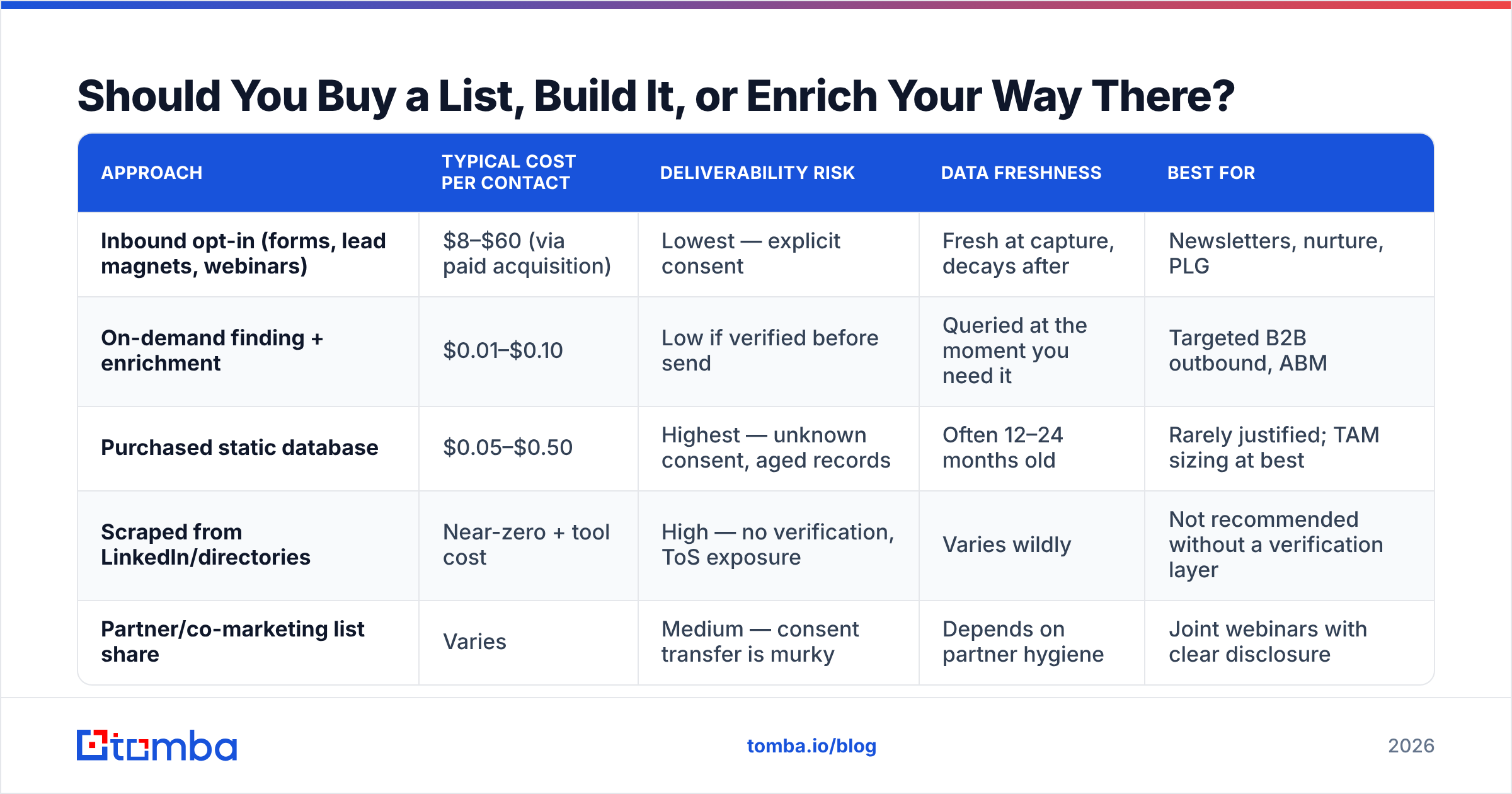
Should You Buy a List, Build It, or Enrich Your Way There?#
Short answer: build or enrich. Buying a static list is the highest-risk path, and in 2026 it's also the least efficient.
There are three real acquisition models, and most teams end up combining two of them.
| Approach | Typical cost per contact | Deliverability risk | Data freshness | Best for |
|---|---|---|---|---|
| Inbound opt-in (forms, lead magnets, webinars) | $8–$60 (via paid acquisition) | Lowest — explicit consent | Fresh at capture, decays after | Newsletters, nurture, PLG |
| On-demand finding + enrichment | $0.01–$0.10 | Low if verified before send | Queried at the moment you need it | Targeted B2B outbound, ABM |
| Purchased static database | $0.05–$0.50 | Highest — unknown consent, aged records | Often 12–24 months old | Rarely justified; TAM sizing at best |
| Scraped from LinkedIn/directories | Near-zero + tool cost | High — no verification, ToS exposure | Varies wildly | Not recommended without a verification layer |
| Partner/co-marketing list share | Varies | Medium — consent transfer is murky | Depends on partner hygiene | Joint webinars with clear disclosure |
The economics are the part people miss. A purchased list at $0.05 per contact looks cheap against a $0.08 verified lookup — until you account for the 20–35% of purchased records that bounce or belong to people who left the company. Your real cost per deliverable contact on a stale purchased list is often higher than a fresh lookup, and that's before you price in the reputation damage.
A note on the honest middle ground: some database vendors do this well. BookYourData sells pay-as-you-go B2B contacts with a bounce guarantee, which is a genuinely different product from the $99-for-a-million-records lists that flood LinkedIn ads. If you go the database route, that guarantee is the feature to look for.
How Do You Actually Build an Email Marketing List From Scratch?#
Work in this order. Each step is cheap to do in sequence and expensive to retrofit.
Step 1 — Define the segment before you collect anything. Write down the ICP in concrete filters: industry, headcount band, geography, tech stack, job titles. If you can't express it as filters, you can't build a list against it — you can only accumulate names.
Step 2 — Source the companies first, contacts second. Build a target-account list from a database, funding announcements, job boards, review sites, or your own website visitors. Company-first sourcing keeps your list coherent; person-first sourcing gets you 400 unrelated marketers.
Step 3 — Find the contacts. For each domain, pull the people matching your title filters. A domain search returns every discoverable address on a company domain with the pattern and confidence score attached, which is faster than guessing formats one name at a time. For inbound-sourced names where you already have first/last/company, an email finder resolves the address directly.
Step 4 — Verify before anything touches your ESP. Run every address through an email verifier. Catch-all domains need a separate pass — a catch-all accepts everything at the SMTP layer, so a standard check returns "valid" for addresses that don't exist. Use a catch-all verifier for those, and treat anything still unresolved as a risk-tier segment you send to last.
Step 5 — Enrich for segmentation. Attach company size, industry, funding stage, and role seniority. This is what makes the difference between one generic blast and six segmented sequences with real personalization tokens.
Step 6 — Suppress against everything you already have. Existing customers, open opportunities, past unsubscribes, competitor domains, and your own team. This deduplication step catches embarrassments before they happen.
Step 7 — Warm the sending infrastructure. A cold domain sending 2,000 emails on day one gets filtered no matter how clean the list is. Ramp over 3–4 weeks. A warmup calculator will give you a daily volume schedule.
What Does List Decay Cost You, and How Fast Is It?#
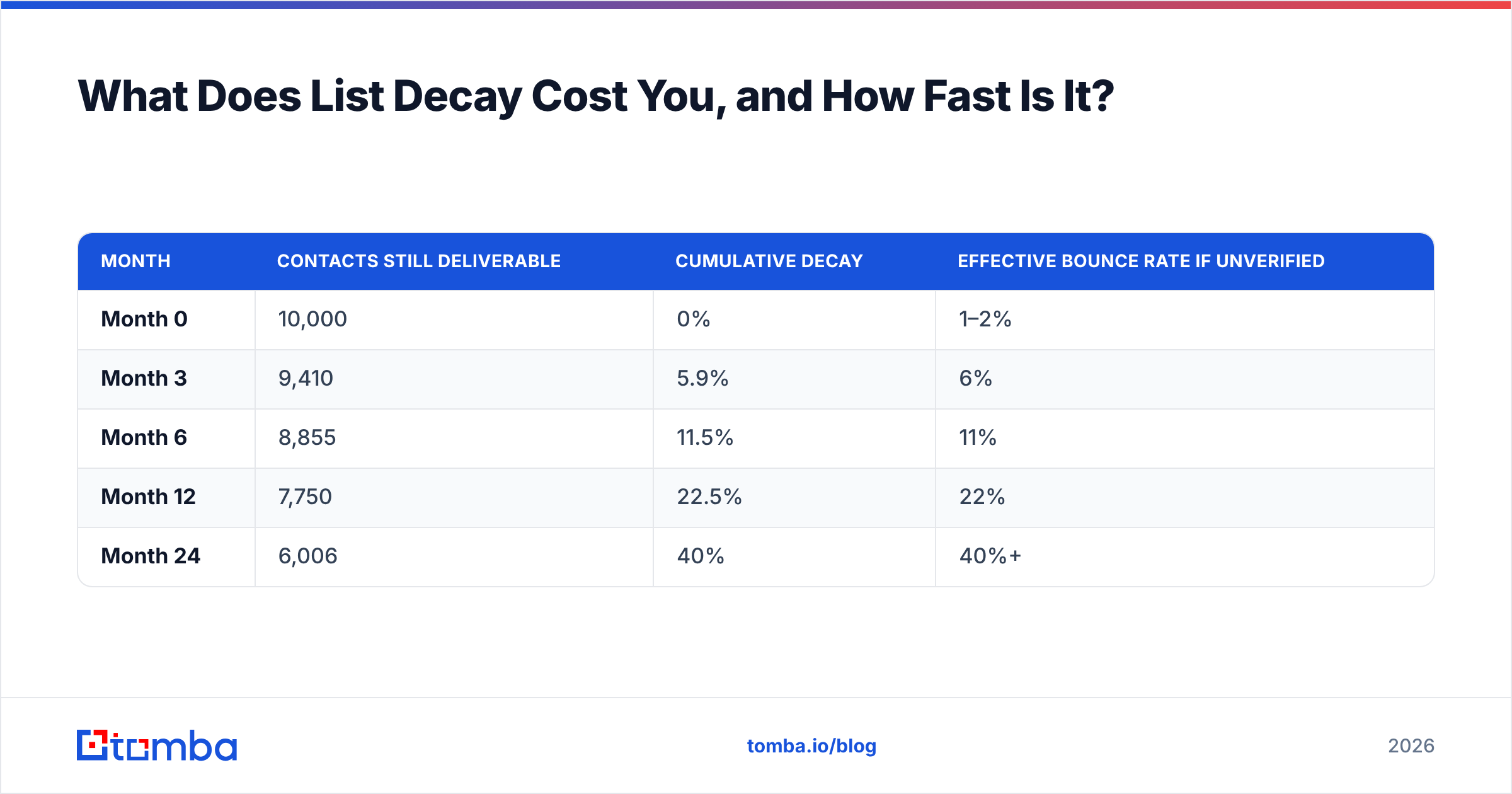
Roughly 22.5% of B2B email addresses go bad every year. That's the widely cited figure from marketing operations research, and it tracks with what you'll see in your own bounce logs: about 2% monthly attrition from job changes alone, plus domain migrations, acquisitions, and role eliminations.
Run the math on a 10,000-contact list you built in January:
| Month | Contacts still deliverable | Cumulative decay | Effective bounce rate if unverified |
|---|---|---|---|
| Month 0 | 10,000 | 0% | 1–2% |
| Month 3 | 9,410 | 5.9% | 6% |
| Month 6 | 8,855 | 11.5% | 11% |
| Month 12 | 7,750 | 22.5% | 22% |
| Month 24 | 6,006 | 40% | 40%+ |
That last row is why "we bought this list two years ago" is a deliverability incident waiting to happen. At a 40% bounce rate, mailbox providers stop asking whether you're a spammer and start assuming it.
The operational fix is a re-verification cadence, not a one-time cleanse:
- Active segments (mailed monthly or more): re-verify quarterly.
- Dormant segments (mailed 2–4x/year): re-verify immediately before each send.
- Anything older than 6 months: re-verify, full stop.
- Post-campaign: feed hard bounces straight into permanent suppression the same day.
Bulk re-verification through a bulk email finder or API endpoint costs a fraction of a cent per record and takes minutes. Skipping it costs you the domain.
What Do Gmail and Yahoo Actually Require in 2026?#
The bulk-sender requirements that Google and Yahoo rolled out have hardened into the baseline. If you send more than 5,000 messages a day to personal Gmail accounts, three things are non-negotiable:
- Authentication. SPF, DKIM, and DMARC must all be in place and aligned. Check your records with an SPF checker before you assume they're fine — a syntactically valid record that exceeds the 10-lookup limit fails silently.
- One-click unsubscribe. The
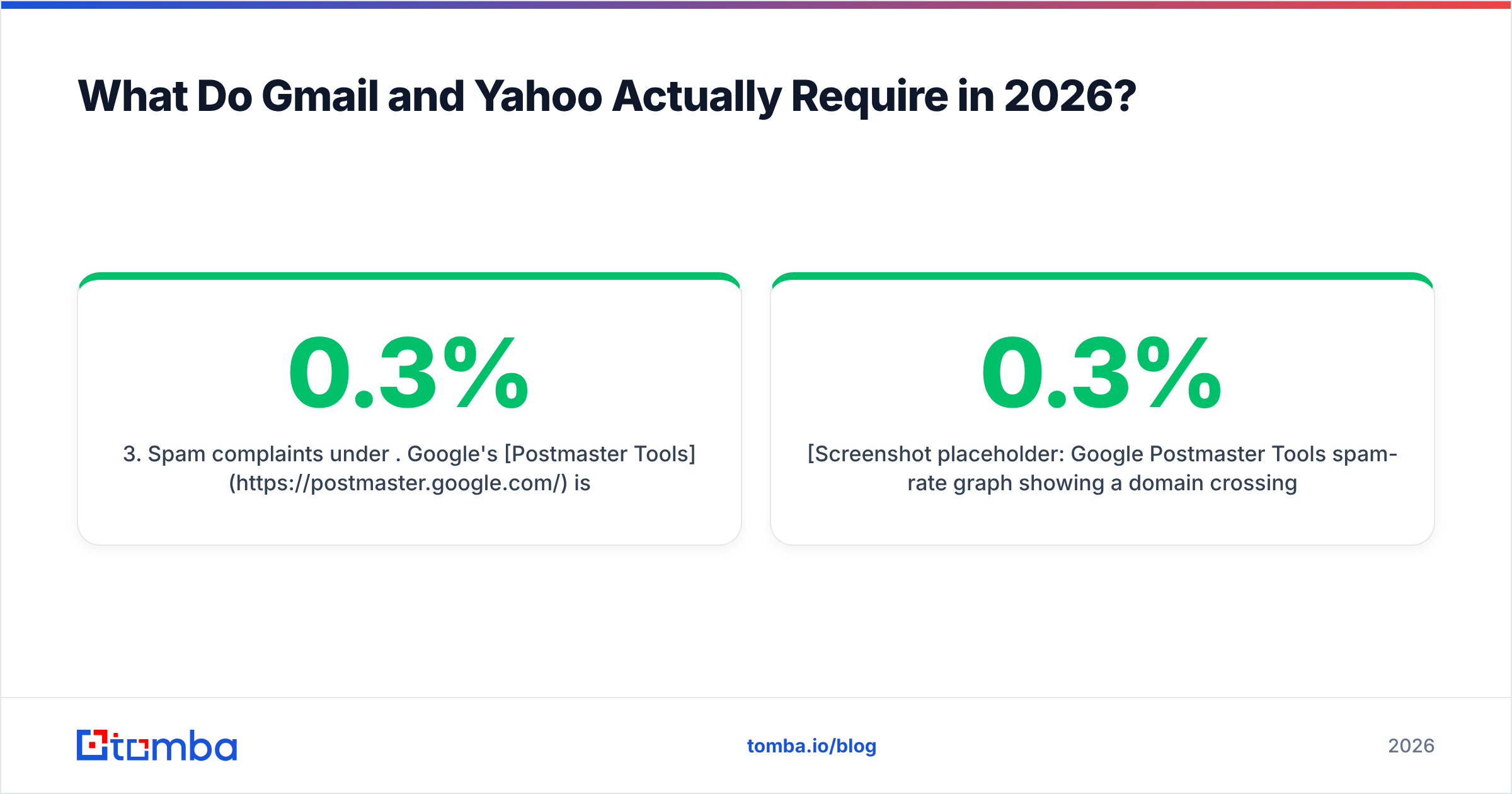
List-Unsubscribeheader withList-Unsubscribe-Postsupport, honored within two days. Not a link buried in the footer. - Spam complaints under 0.3%. Google's Postmaster Tools is the only place you can see your actual complaint rate as Gmail measures it. Above 0.1% you're in warning territory; above 0.3% you're being throttled.
None of those are list-building tasks per se — but all three are enforced against your list. A list with poor targeting generates complaints. A list with dead addresses generates bounces. Both feed the same reputation score.
[Screenshot placeholder: Google Postmaster Tools spam-rate graph showing a domain crossing the 0.3% threshold]
[Screenshot placeholder: DMARC aggregate report dashboard showing SPF/DKIM alignment pass rates by source]
Read up on email deliverability fundamentals if any of that is unfamiliar — it's the constraint your entire list strategy operates under.
How Should You Segment an Email Marketing List?#
Segmentation is where list value compounds. HubSpot's research and every ESP benchmark report say the same thing: segmented campaigns outperform batch-and-blast on open rate, click rate, and revenue per send, usually by a wide margin.
Four segmentation axes that pay for themselves immediately:
- Engagement tier. Split into 90-day openers, 90-day non-openers, and never-engaged. Mail the first group freely, the second sparingly, and sunset the third. This alone protects your sender reputation more than any copy change.
- Firmographic fit. Headcount and industry drive which case study and which price point you lead with. A 12-person agency and a 4,000-person manufacturer should not receive identical emails.
- Role and seniority. Practitioners want the how; VPs want the outcome; CFOs want the number. Same product, three different first lines.
- Lifecycle stage. Never-contacted, engaged-no-meeting, meeting-held, closed-lost, customer. Each needs a different ask — and closed-lost from 18 months ago is often your highest-converting "cold" segment.
Five to eight segments is the practical ceiling for most teams. Beyond that you're building sequences you'll never maintain.

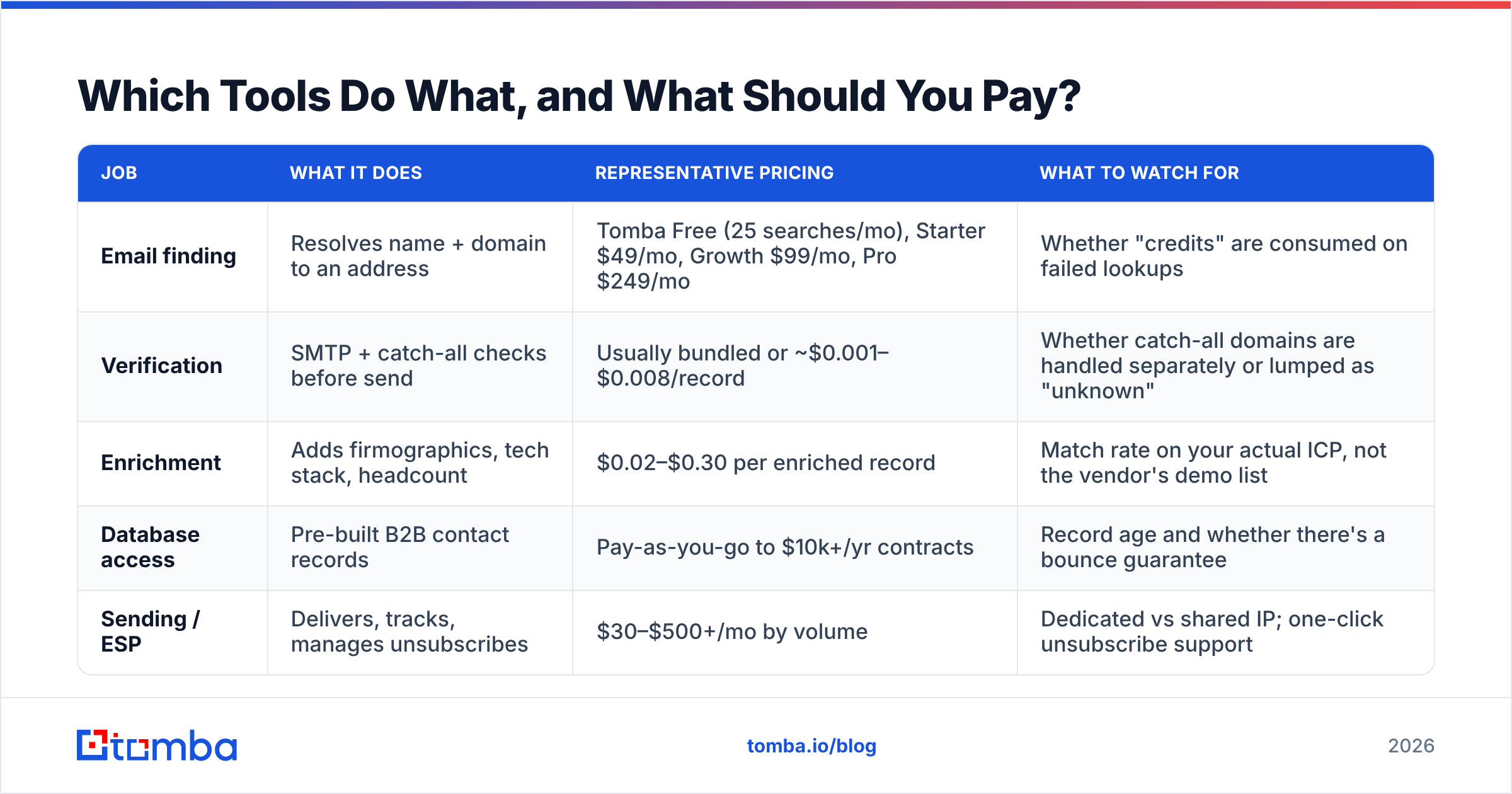
Which Tools Do What, and What Should You Pay?#
The stack splits into four jobs: finding addresses, verifying them, enriching records, and sending. Some tools span two; almost none do all four well.
| Job | What it does | Representative pricing | What to watch for |
|---|---|---|---|
| Email finding | Resolves name + domain to an address | Tomba Free (25 searches/mo), Starter $49/mo, Growth $99/mo, Pro $249/mo | Whether "credits" are consumed on failed lookups |
| Verification | SMTP + catch-all checks before send | Usually bundled or ~$0.001–$0.008/record | Whether catch-all domains are handled separately or lumped as "unknown" |
| Enrichment | Adds firmographics, tech stack, headcount | $0.02–$0.30 per enriched record | Match rate on your actual ICP, not the vendor's demo list |
| Database access | Pre-built B2B contact records | Pay-as-you-go to $10k+/yr contracts | Record age and whether there's a bounce guarantee |
| Sending / ESP | Delivers, tracks, manages unsubscribes | $30–$500+/mo by volume | Dedicated vs shared IP; one-click unsubscribe support |
Two practical notes on cost. First, compare on cost per verified deliverable contact, not headline price — a $49/mo plan that returns 90% verified addresses beats a $29/mo plan at 60%. Second, check whether the vendor charges for lookups that return nothing; the ones that don't are meaningfully cheaper in practice. Tomba's pricing details and per-plan credit allocations are worth modeling against your actual monthly volume before you commit annually.
If your list-building lives in a spreadsheet, skip the manual export loop — a Google Sheets add-on or the Tomba API lets you find and verify in place. For engineering-led workflows, the API handles find, verify, and enrich in a single pipeline.
What Are the Legal Rules You Can't Ignore?#
Not legal advice, but the shape of the rules is straightforward.
CAN-SPAM (US) doesn't require opt-in. It requires accurate headers, a non-deceptive subject line, a physical postal address, a working unsubscribe honored within 10 business days, and clear identification as an ad where applicable. Penalties run into five figures per violating message.
GDPR (EU/UK) requires a lawful basis. For B2B, "legitimate interest" can cover cold outreach if the message is relevant to the recipient's professional role and you've documented a Legitimate Interest Assessment. It does not cover buying a consumer list. You also need to honor deletion and access requests, which means knowing where every record came from.
CASL (Canada) is the strictest of the three — express or implied consent required before the first message, with implied consent expiring after 6 months for inquiries and 24 months for existing business relationships.
PECR, CCPA, and country-specific rules add wrinkles. The practical takeaway: record the source and timestamp of every contact at acquisition. If you can't answer "where did this address come from," you can't defend it.
The ICO's direct marketing guidance is the clearest free reference on the UK/EU side, and it's readable in an afternoon.
What Does a Healthy List Look Like in Numbers?#
Benchmarks to check yours against:
- Hard bounce rate: under 2%. Over 5% and your ESP will flag you.
- Spam complaint rate: under 0.1%. Google throttles at 0.3%.
- Unsubscribe rate: 0.2–0.5% per campaign is normal. A spike means targeting drift, not bad copy.
- List growth rate: net growth should exceed decay. If you're adding 15% a year against 22.5% decay, your list is shrinking.
- Engaged share: at least 25–30% of the list should have opened something in 90 days. Below 15%, you're mailing a graveyard.
- Catch-all share: typically 15–25% of B2B domains. Segment these; don't discard them, but don't lead with them either.
Track those six monthly. They'll tell you whether your list is an appreciating asset or a slowly failing one long before revenue does.
Common Mistakes That Kill Otherwise Good Lists#
- Mailing the whole list every time. Frequency without segmentation trains people to ignore you, then to report you.
- Never sunsetting. Contacts who haven't opened in 12 months are dragging your engagement signals down. Run a re-permission campaign, then remove.
- Treating role accounts as contacts.
info@,sales@, andsupport@are routing addresses. They inflate list size and depress every rate you measure. - One suppression list per tool. If your ESP, CRM, and outbound tool each have their own unsubscribe list, someone will get emailed after opting out. Centralize it.
- Verifying once at import. Decay doesn't wait. Re-verification is a recurring cost, like hosting.
- Confusing list size with pipeline. 50,000 contacts with a 0.2% reply rate produce fewer meetings than 3,000 well-matched contacts at 6%.
Where Should You Start This Week?#
Pick the smallest version of the loop and run it end to end: define 50 target accounts, find the 2–3 right contacts at each, verify every address, enrich for one segmentation variable, and send one sequence. You'll learn more from 150 clean contacts than from importing 20,000 you'll never trust.
When you're ready to scale that loop, the Tomba Email Finder handles the sourcing and verification half of it — domain search to pull every discoverable contact on a target account, real-time verification including catch-all handling, and enrichment attached to each record so your segments are usable the moment they land in your ESP. The free tier gives you 25 searches a month to test the match rate against your own ICP before you pay for anything, and Starter runs $49/mo when you're ready for volume. Build the list clean the first time; it's far cheaper than repairing a domain reputation later.
Related guides#
Ready to find emails that actually work?
Join 150,000+ professionals who stopped guessing and started sending. Free credits on signup — no credit card required.
Get the Tomba newsletter
Practical outbound tactics and product updates — once every two weeks.
About the author