Email Marketing Solutions in 2026: A Buyer's Field Guide
Most email marketing solutions look identical on a feature grid and behave nothing alike once your list crosses 50,000 contacts. Here's what actually separates them — pricing traps, deliverability, and the data layer nobody sells you.
TL;DR
- Email marketing solutions split into three buckets: broadcast/newsletter platforms (Mailchimp, Brevo), lifecycle automation platforms (Klaviyo, Customer.io, HubSpot), and cold outbound sequencers (Instantly, Smartlead, Saleshandy). Buying the wrong bucket is the most expensive mistake teams make.
- Contact-based pricing is where budgets die. A 25,000-contact list at $0.01–$0.03 per contact per month means the same "cheap" tool costs $250–$750/mo — before you send a single campaign.
- Deliverability is not a feature you buy. It's a function of list hygiene, authentication, and sending patterns. The best platform in the world can't rescue a list with 18% invalid addresses.
- Your data layer matters more than your send layer. Verified, enriched contacts move reply rates further than any subject-line A/B test.
- Run the 5-question buying test at the end of this post before you sign an annual contract.
What Are Email Marketing Solutions, Exactly?#
An email marketing solution is any platform that stores contacts, builds messages, sends them at scale, and reports on what happened. That definition is broad enough to be useless on its own — which is precisely why buyers end up with tools that don't fit.
Think of it like buying a vehicle. "Vehicle" covers a cargo van, a delivery bike, and a Formula 1 car. All three move things. Only one is right for your route. Email platforms are the same: a newsletter tool and a cold outbound sequencer both "send email," and they will fail catastrophically at each other's jobs.
Here's the honest taxonomy:
- Broadcast / newsletter platforms — Mailchimp, Brevo, MailerLite, Beehiiv. Built for one-to-many sends to an opted-in list. Strong templates, weak behavioral logic. Best when your primary motion is content or announcements.
- Lifecycle automation platforms — Klaviyo, Customer.io, HubSpot, ActiveCampaign. Built around event streams and user properties. You trigger on behavior, not calendar dates. Best when revenue depends on onboarding, retention, or repeat purchase.
- Cold outbound sequencers — Instantly, Smartlead, Saleshandy, Reply.io. Built for one-to-few sends from real mailboxes, with inbox rotation and warmup. Never use a broadcast ESP for cold email; you will get the account terminated.
- Transactional / API senders — Postmark, SendGrid, Amazon SES, Resend. Built for receipts, password resets, and notifications. Developer-first, near-zero marketing UI.
- All-in-one CRMs with email attached — HubSpot, Zoho, Salesforce Marketing Cloud. You're buying the CRM; email is the tax.
Most buying regret traces back to picking from bucket 1 when the job lived in bucket 2 or 3.

How Do the Main Email Marketing Solutions Compare on Price and Fit?#
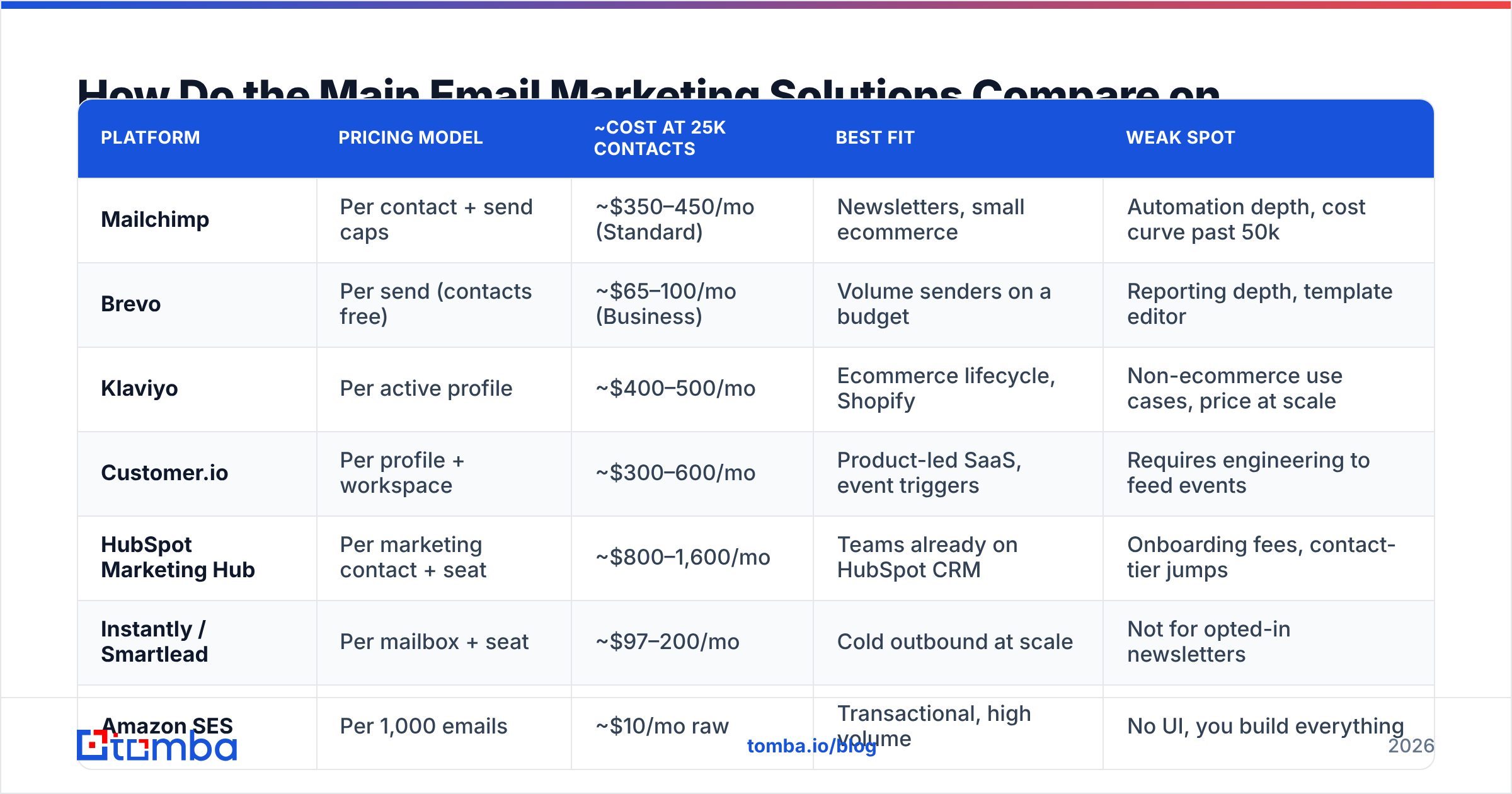
Pricing pages are designed to be non-comparable. Some charge per contact, some per send, some per seat, some per "active profile." Below is a normalized view at a realistic mid-market scale — 25,000 contacts, roughly 100,000 sends per month.
| Platform | Pricing model | ~Cost at 25k contacts | Best fit | Weak spot |
|---|---|---|---|---|
| Mailchimp | Per contact + send caps | ~$350–450/mo (Standard) | Newsletters, small ecommerce | Automation depth, cost curve past 50k |
| Brevo | Per send (contacts free) | ~$65–100/mo (Business) | Volume senders on a budget | Reporting depth, template editor |
| Klaviyo | Per active profile | ~$400–500/mo | Ecommerce lifecycle, Shopify | Non-ecommerce use cases, price at scale |
| Customer.io | Per profile + workspace | ~$300–600/mo | Product-led SaaS, event triggers | Requires engineering to feed events |
| HubSpot Marketing Hub | Per marketing contact + seat | ~$800–1,600/mo | Teams already on HubSpot CRM | Onboarding fees, contact-tier jumps |
| Instantly / Smartlead | Per mailbox + seat | ~$97–200/mo | Cold outbound at scale | Not for opted-in newsletters |
| Amazon SES | Per 1,000 emails | ~$10/mo raw | Transactional, high volume | No UI, you build everything |
Two things jump out of that table.
First, the cheapest line item is rarely the cheapest total. SES at $10/mo requires an engineer to build templates, suppression handling, and reporting. That's a $4,000/mo salary line disguised as a $10 invoice.
Second, per-contact pricing punishes list growth, not list quality. Mailchimp and HubSpot both bill on contacts stored. If 20% of your list is dead, you are paying rent on corpses. This is the single most common source of silent overspend, and it's why list hygiene is a budget decision, not a hygiene decision.
For a broader breakdown of how vendors structure tiers, Tomba pricing uses a credit model instead — you pay for lookups performed, not contacts warehoused, which behaves very differently as a list ages.
Why Does Deliverability Break Even on Good Platforms?#
Because deliverability is mostly upstream of the platform.
Analogy: your email platform is the postal truck. It does not decide whether the recipient's building accepts your mail. That decision belongs to Gmail, Outlook, and Yahoo — and they make it based on your sending history, authentication records, and how many nonexistent addresses you keep knocking on.
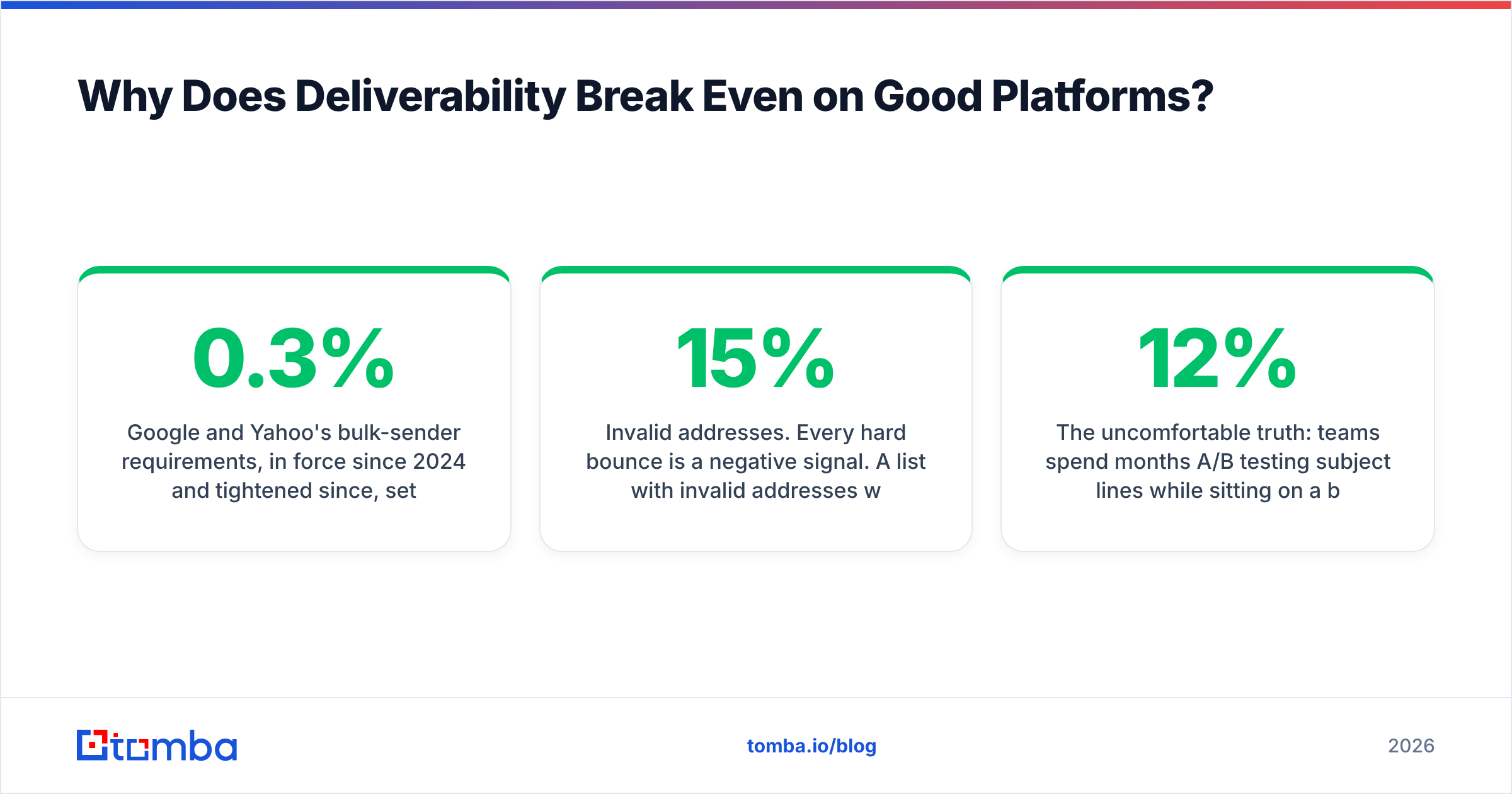
Google and Yahoo's bulk-sender requirements, in force since 2024 and tightened since, set the floor: authenticated sending (SPF, DKIM, DMARC), one-click unsubscribe, and a spam complaint rate under 0.3%. You can read Google's own sender guidelines — they are not vague, and no vendor exempts you from them.
Three failure modes account for most inbox placement problems:
- Invalid addresses. Every hard bounce is a negative signal. A list with 15% invalid addresses will suppress placement for the other 85%. Run a email verifier pass before any large send, not after the bounce report arrives.
- Authentication gaps. Missing or misaligned DMARC is the quiet killer. Check yours with an SPF checker and confirm DKIM signing is enabled on the sending domain, not just the root domain.
- Volume shocks. Going from 2,000 sends/week to 40,000 overnight reads as compromise-or-spam to filters. Ramp over weeks. An email warmup schedule is unglamorous and it works.
The uncomfortable truth: teams spend months A/B testing subject lines while sitting on a 12% bounce rate. Fixing the bounce rate moves more revenue than any copy test, and it takes an afternoon.
Suggested visual: screenshot of Google Postmaster Tools domain reputation graph showing a "Medium" → "High" recovery after list cleaning.
Which Features Actually Matter (and Which Are Demo Candy)?#
Feature grids are optimized for the demo, not for month six. Here's a sorted list based on what teams actually complain about after switching.
Matters a lot:
- Segmentation that reads live data. Static lists rot. You want segments that recompute — "opened in last 30 days AND not purchased" — without a manual export.
- Suppression handling across the account. One unsubscribe should suppress across every campaign, every workspace. Platforms that scope suppression per-list create compliance risk.
- Deliverability visibility. Per-domain inbox placement, bounce classification (hard vs soft vs block), and complaint feedback loops. If the platform only shows "delivered," you're flying blind.
- API and webhook quality. You will eventually need to push events in and pull results out. Check rate limits and retry semantics before you sign, not after.
- Export freedom. Can you get your contacts, engagement history, and templates out? Vendors that make export painful are betting on inertia.
Matters less than the demo implies:
- AI subject-line generators. Useful, commoditized, and available free — a subject line generator does the same job without a platform lock-in.
- Drag-and-drop template builders. Every platform has one. They are all fine. This is never the differentiator.
- "Predictive send time." The lift is real but small, usually 2–5% on opens, and open rates are now a degraded metric thanks to Apple Mail Privacy Protection.
- Built-in landing pages. Almost always worse than your actual website builder.
For a peer-review-based sanity check on any vendor's real-world reputation, G2's marketing automation category is more honest than the vendor's own case-study page — filter reviews by company size that matches yours.
Is a Standalone Email Platform Better Than an All-in-One Suite?#
It depends on how many teams touch the data.
Choose standalone (best-of-breed) when: email is owned by one team, you have a technical resource to wire integrations, and you care about depth in one motion — say, ecommerce lifecycle or cold outbound. You will get better tooling per dollar.
Choose all-in-one when: sales and marketing share a contact record daily, attribution across channels matters to your board, and the cost of two systems disagreeing exceeds the cost of a worse email tool. HubSpot's whole pitch is that the CRM and the email live on one object; that is genuinely worth something, and it's also why the pricing tiers escalate the way they do.
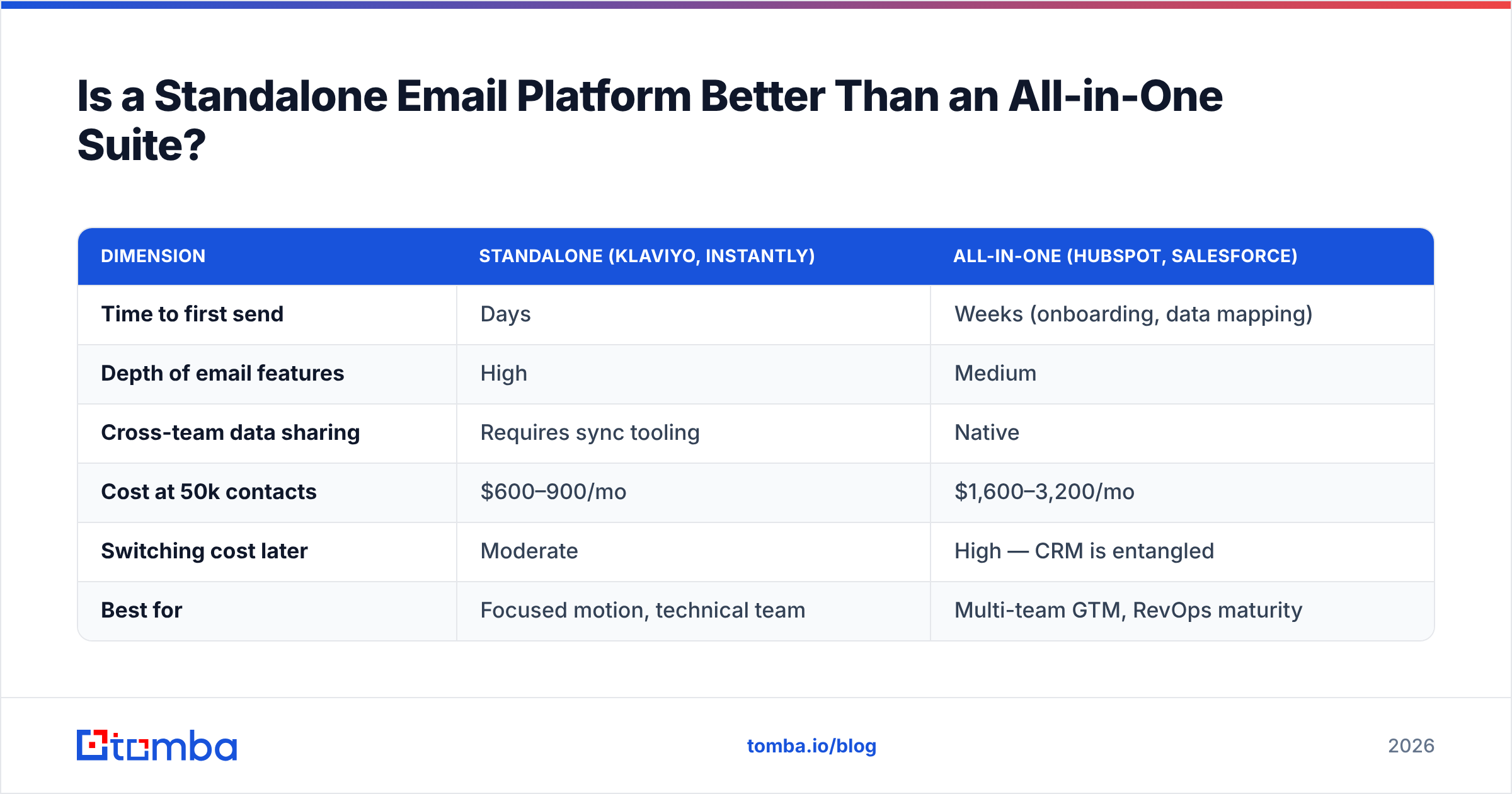
| Dimension | Standalone (Klaviyo, Instantly) | All-in-one (HubSpot, Salesforce) |
|---|---|---|
| Time to first send | Days | Weeks (onboarding, data mapping) |
| Depth of email features | High | Medium |
| Cross-team data sharing | Requires sync tooling | Native |
| Cost at 50k contacts | $600–900/mo | $1,600–3,200/mo |
| Switching cost later | Moderate | High — CRM is entangled |
| Best for | Focused motion, technical team | Multi-team GTM, RevOps maturity |
If you're running structured revenue operations with shared pipeline definitions, the all-in-one usually wins despite the price. If you're a five-person team sending campaigns, it's overkill you'll resent in month three.
How Does Your Contact Data Change the Answer?#
More than the platform choice does. Here's the part vendors don't put on the pricing page: every email marketing solution assumes you arrive with good addresses. None of them fix bad ones.
Consider two teams with identical Klaviyo setups and identical copy:
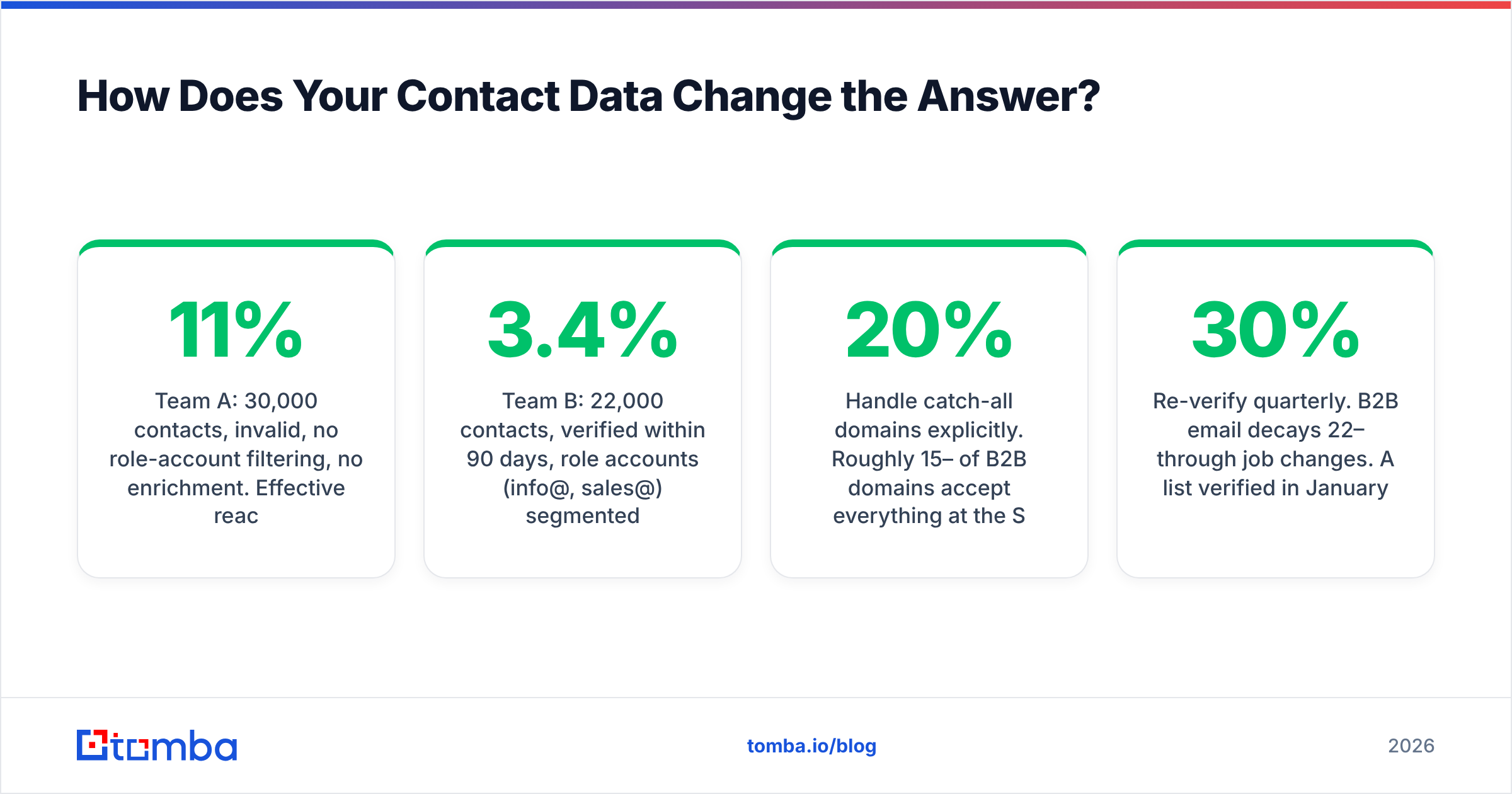
- Team A: 30,000 contacts, 11% invalid, no role-account filtering, no enrichment. Effective reach after bounces and suppressions: ~24,000. Reply rate on outbound: 1.1%.
- Team B: 22,000 contacts, verified within 90 days, role accounts (info@, sales@) segmented separately, job-title enrichment applied. Effective reach: ~21,400. Reply rate: 3.4%.
Team B has a smaller list, pays less on per-contact billing, and generates roughly three times the replies. The platform was identical. The data layer was not.
Practical steps that compound:
- Verify before import, not after bounce. Bounces are permanent reputation damage; verification is a pre-send cost. Bulk-check lists with a bulk verify pass.
- Handle catch-all domains explicitly. Roughly 15–20% of B2B domains accept everything at the SMTP layer, so standard verification returns "unknown." A catch-all verifier gives you a confidence signal instead of a coin flip.
- Enrich before you segment. Job title, company size, and tech stack turn a flat list into segments worth writing different copy for. Data enrichment is what makes personalization scalable rather than manual.
- Re-verify quarterly. B2B email decays 22–30% per year through job changes. A list verified in January is measurably worse by July.

What Should You Ask Before Signing an Annual Contract?#
Five questions. Ask them in the demo, in writing, before the discount expires.
- "What exactly counts as a billable contact?" Unsubscribed contacts? Bounced ones? Contacts in a suppression list? Some vendors bill for all three. Get the definition in the contract.
- "What's my cost at 2x and 5x my current list size?" Tier jumps are where the pain lives. A platform that's cheap at 10k can be brutal at 60k.
- "Can I see per-domain deliverability data, or only aggregate delivered rates?" If the answer is aggregate-only, you cannot diagnose a Gmail-specific problem.
- "What's the export path if we leave?" Contacts, engagement history, templates, automation logic. Ask for the format. "You can contact support" is a red flag.
- "What happens on overage?" Hard stop, auto-upgrade, or overage billing? Auto-upgrade with no cap has produced some memorable invoices.
Also worth checking: whether the vendor bills annually up front. Many "monthly" prices on pricing pages are annual-commitment prices, with the true month-to-month rate 20–35% higher. Capterra's comparison listings often surface this before the sales call does.
One more note on peers: platforms like BookYourData occupy a different slot in the stack — they sell verified B2B contact data rather than the sending layer — and pairing a solid data provider with a focused sending platform is a perfectly reasonable architecture. The mistake is assuming one product covers both jobs well.
What's the Fastest Path to a Decision?#
Work backwards from your motion, not from the feature grid.
- Newsletter or content-led? Start with Brevo or MailerLite. Cheap, adequate, and you can migrate later without much pain.
- Ecommerce with repeat purchase? Klaviyo, and accept the cost. The Shopify integration depth is real.
- Product-led SaaS with event data? Customer.io or Braze. You'll need engineering time; budget for it.
- Cold outbound to prospects? Instantly or Smartlead plus a separate sending domain, plus warmup, plus verification. Never your main domain.
- Sales and marketing on one record? HubSpot, eyes open on the contact-tier math.
Then, before you send anything: clean the list. Verify it. Enrich it. Segment it into groups small enough that you'd write different copy for each. That sequence — data first, platform second, copy third — is the one that consistently outperforms, and it's the reverse of how most teams do it.
Ready to fix the layer that actually moves your numbers? Before you renew another email marketing platform, run your target accounts through the Tomba Email Finder. Find verified professional addresses by domain, name, or company, confirm them before they ever hit your ESP, and stop paying per-contact rent on addresses that were never going to deliver. The free tier covers 25 searches a month so you can benchmark accuracy against your current list before committing — paid plans start at $49/mo when you're ready to scale.
Related guides#
Ready to find emails that actually work?
Join 150,000+ professionals who stopped guessing and started sending. Free credits on signup — no credit card required.
Get the Tomba newsletter
Practical outbound tactics and product updates — once every two weeks.
About the author