Email Outreach Campaigns: How to Build One That Converts
Most email outreach campaigns die from bad data and bad sequencing, not bad copy. Here's the full build — list, infrastructure, cadence, metrics — with benchmarks you can hold your team to in 2026.
TL;DR
- An email outreach campaign is a planned, multi-touch sequence sent to a defined segment — not a one-off blast. The structure is what produces replies.
- Data quality decides more outcomes than copy does. A list with 25% invalid addresses will tank your sender reputation before anyone reads your value prop.
- Four to six touches over 14–21 days is the range that consistently outperforms both single sends and 9-step machine-gun sequences.
- Budget roughly 50 sends per inbox per day, not 500. Volume comes from more inboxes and domains, never from pushing one mailbox harder.
- Benchmarks worth holding to in 2026: <2% bounce, 40–60% open, 5–12% reply on a tight ICP segment. Anything below that is a targeting or data problem, not a subject-line problem.
What is an email outreach campaign?#
An email outreach campaign is a sequence of emails sent to a specific, qualified list with one measurable goal — a reply, a booked meeting, a download, a backlink — executed on a schedule with rules for stopping when someone responds.
Think of it like a restaurant reservation system versus shouting into a crowded street. A blast is shouting. A campaign is knowing who's coming, when the table is ready, and what to do when they say yes.
Three things distinguish a campaign from everything else people call "cold email":
- A defined segment. Not "SaaS companies." Something like "Series A HR-tech companies in the US, 50–200 employees, hired a Head of RevOps in the last 90 days."
- A fixed touch plan. You know before you launch how many emails go out, on which days, and what each one is supposed to accomplish.
- Exit conditions. Reply, click, meeting booked, or unsubscribe — all of them stop the sequence immediately.
Everything else — the copy, the personalization tokens, the AI rewriter — is optimization on top of those three. Get them wrong and no amount of clever writing recovers the campaign.
What separates a campaign that converts from one that gets ignored?#
Here's the honest ranking of what moves reply rate, from most to least impactful. It is close to the inverse of where most teams spend their time.
- Segment tightness — A list of 200 people with a shared, current trigger event outperforms 5,000 loosely matched contacts by a wide margin. Narrow until the first line of your email could only have been written to that group.
- Data accuracy — Every invalid address is a bounce, and bounces compound into placement problems for the valid contacts on the same list. This is the single most expensive thing to get wrong.
- Offer relevance — What you're asking for has to be proportional to the relationship. "30 minutes to walk through our platform" from a stranger is a big ask. "Worth a look?" is not.
- Sequencing and timing — Follow-ups produce the majority of replies in most campaigns. Teams that send once and stop are leaving the bulk of their pipeline unopened.
- Infrastructure — Authentication, domain warmup, and per-inbox volume caps. Invisible when correct, fatal when wrong.
- Copy craft — It matters. It matters sixth. A great email to the wrong person is still a delete.
How many emails should a sequence contain?#
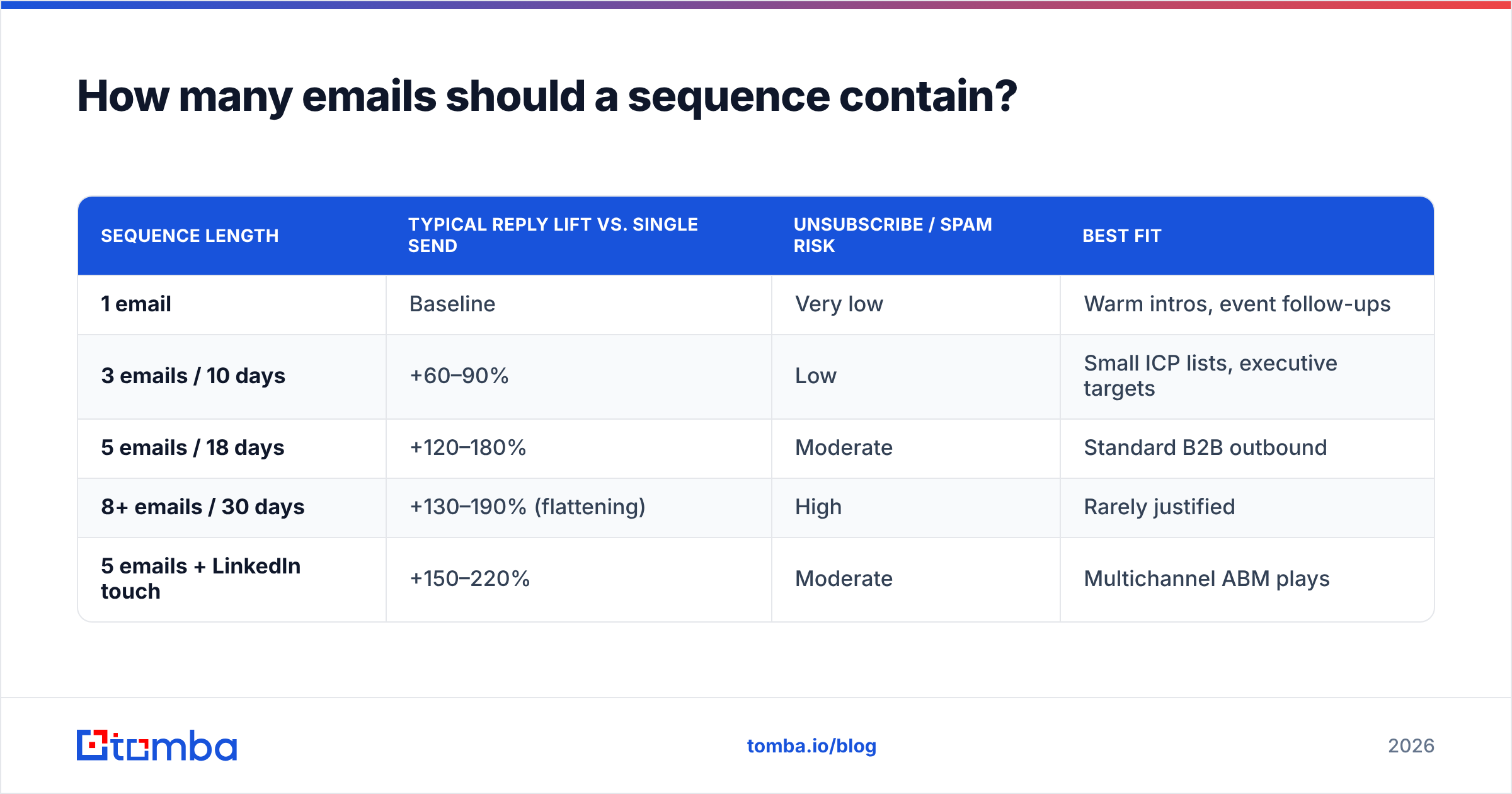
Between four and six, spread across two to three weeks. Beyond that you're trading long-term domain health for marginal replies.
| Sequence length | Typical reply lift vs. single send | Unsubscribe / spam risk | Best fit |
|---|---|---|---|
| 1 email | Baseline | Very low | Warm intros, event follow-ups |
| 3 emails / 10 days | +60–90% | Low | Small ICP lists, executive targets |
| 5 emails / 18 days | +120–180% | Moderate | Standard B2B outbound |
| 8+ emails / 30 days | +130–190% (flattening) | High | Rarely justified |
| 5 emails + LinkedIn touch | +150–220% | Moderate | Multichannel ABM plays |
The gain between five and eight touches is small; the reputation cost is not. If your five-touch sequence isn't working, the fix is a different list or a different offer — not touches six through nine.
A workable five-touch skeleton:
- Day 1 — the hypothesis. One observation about their business, one sentence on why you're reaching out, one low-friction question.
- Day 3 — the proof. A single concrete result from a comparable company. No case study PDF.
- Day 7 — the angle change. Same person, different problem. Maybe they don't care about cost; maybe they care about ramp time.
- Day 12 — the resource. Give something away with no ask attached. A teardown, a benchmark, a template.
- Day 18 — the close-the-loop. Short, polite, permanently closes the thread. "I'll assume the timing's off — I'll stop here."
Every email in that sequence should stand alone. Assume they never read the previous one, because usually they didn't.
What does the build process actually look like?#
Six stages, in order. Skipping any of them shows up in the metrics within a week.
1. Define the segment. Write it as a sentence with at least three filters. If you can't name a trigger event, you're not ready to write copy.
2. Build the list. Pull company domains first, then find the people. A domain search run against a target account list will surface the roles and email patterns at each company far faster than hand-searching LinkedIn. For named prospects, an email finder resolves first name + last name + domain into a deliverable address.
3. Verify before you import. Run the full list through an email verifier and drop everything that isn't a confirmed valid or a deliberately accepted catch-all. Treat this as non-negotiable, not a nice-to-have.
4. Prepare infrastructure. Separate sending domains from your primary domain. SPF, DKIM, and DMARC configured and passing. Two to four weeks of warmup per new inbox before real volume.
5. Write and load the sequence. Personalization at the segment level beats token-stuffing at the individual level. "Companies hiring three SDRs at once usually hit X problem" is more persuasive than "Hi {{first_name}}, I saw you work at {{company}}."
6. Launch small, then scale. First 100 contacts only. Read the bounce rate, the open rate, and the tone of the replies. Fix, then scale to the full list.
Which tools do you need to run outreach campaigns?#
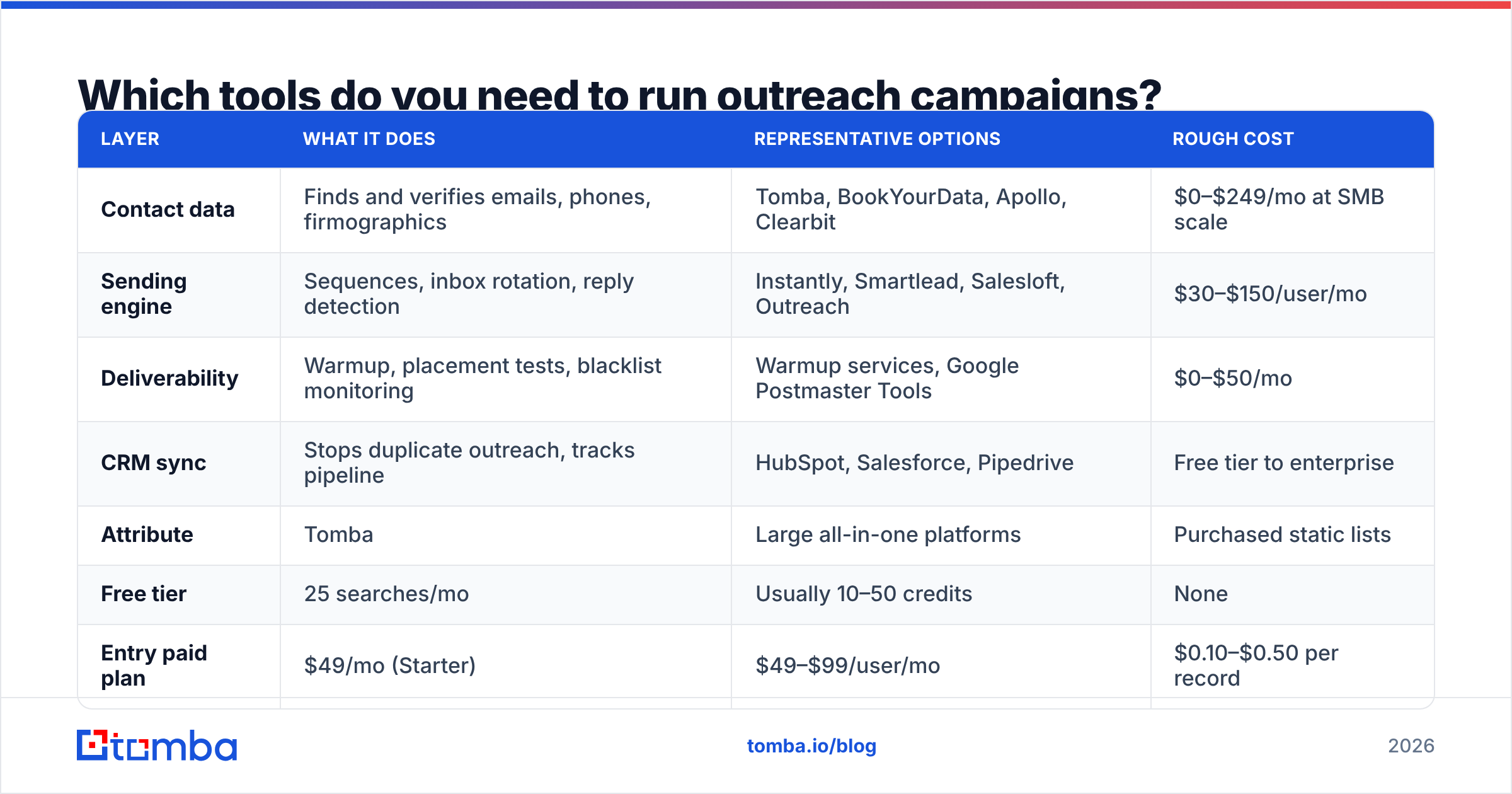
Three categories, and most teams over-buy in one while ignoring another. You need a data source, a sending engine, and a deliverability monitor. Some vendors span two; almost none do all three well.
| Layer | What it does | Representative options | Rough cost |
|---|---|---|---|
| Contact data | Finds and verifies emails, phones, firmographics | Tomba, BookYourData, Apollo, Clearbit | $0–$249/mo at SMB scale |
| Sending engine | Sequences, inbox rotation, reply detection | Instantly, Smartlead, Salesloft, Outreach | $30–$150/user/mo |
| Deliverability | Warmup, placement tests, blacklist monitoring | Warmup services, Google Postmaster Tools | $0–$50/mo |
| CRM sync | Stops duplicate outreach, tracks pipeline | HubSpot, Salesforce, Pipedrive | Free tier to enterprise |
On the data layer specifically, here's how the common approaches compare on the dimensions that affect campaign performance:
| Attribute | Tomba | Large all-in-one platforms | Purchased static lists |
|---|---|---|---|
| Free tier | 25 searches/mo | Usually 10–50 credits | None |
| Entry paid plan | $49/mo (Starter) | $49–$99/user/mo | $0.10–$0.50 per record |
| Verification included | Yes, built in | Varies by tier | Rarely |
| Catch-all handling | Dedicated catch-all verifier | Often flagged "unknown" | Not addressed |
| Data freshness | Continuously re-checked | Varies | Snapshot at purchase |
| API access | Yes, on all paid plans | Higher tiers only | No |
Tomba's Growth plan runs $99/mo and Pro is $249/mo; full Tomba pricing is public if you want to model cost per verified contact. BookYourData is a solid choice if you specifically want pre-built, pay-as-you-go lists with verification baked in rather than a search-and-enrich workflow — different shape, same goal.
If you're evaluating sending engines, G2's sales engagement category is a reasonable starting point for filtering by company size and integration needs.
How do you keep outreach campaigns out of spam?#
Volume discipline and authentication, in that order. Most deliverability disasters are self-inflicted through impatience.
The rules that matter in 2026:
- 50 emails per inbox per day, maximum. Want 500 sends a day? That's ten inboxes, ideally across two or three domains. Google and Microsoft both weight per-mailbox sending patterns heavily.
- SPF, DKIM, and DMARC all passing. Google's bulk sender requirements made these mandatory rather than advisory, and enforcement has only tightened. Check your SPF record before launch, not after your first bounce spike.
- Bounce rate under 2%. Above 3% and mailbox providers start throttling. Above 5% and you're rebuilding your domain reputation for a month. This is entirely a data-quality problem — verification prevents it.
- Warm every new inbox for 2–4 weeks. Gradual ramp, real conversational replies, no sequences during warmup. Use a warmup calculator to plan the ramp curve rather than guessing.
- Never send from your primary domain. Use lookalike domains (yourcompany-mail.com, get-yourcompany.com). If a sending domain burns, your corporate email and your customers' invoices are unaffected.
- Honor unsubscribes instantly. One-click list unsubscribe is now an expectation, not a courtesy.
Monitor sender reputation weekly. Google Postmaster Tools is free and shows domain reputation, spam rate, and authentication pass rates directly from the receiving side — which is the only view that actually counts.
What metrics tell you a campaign is working?#
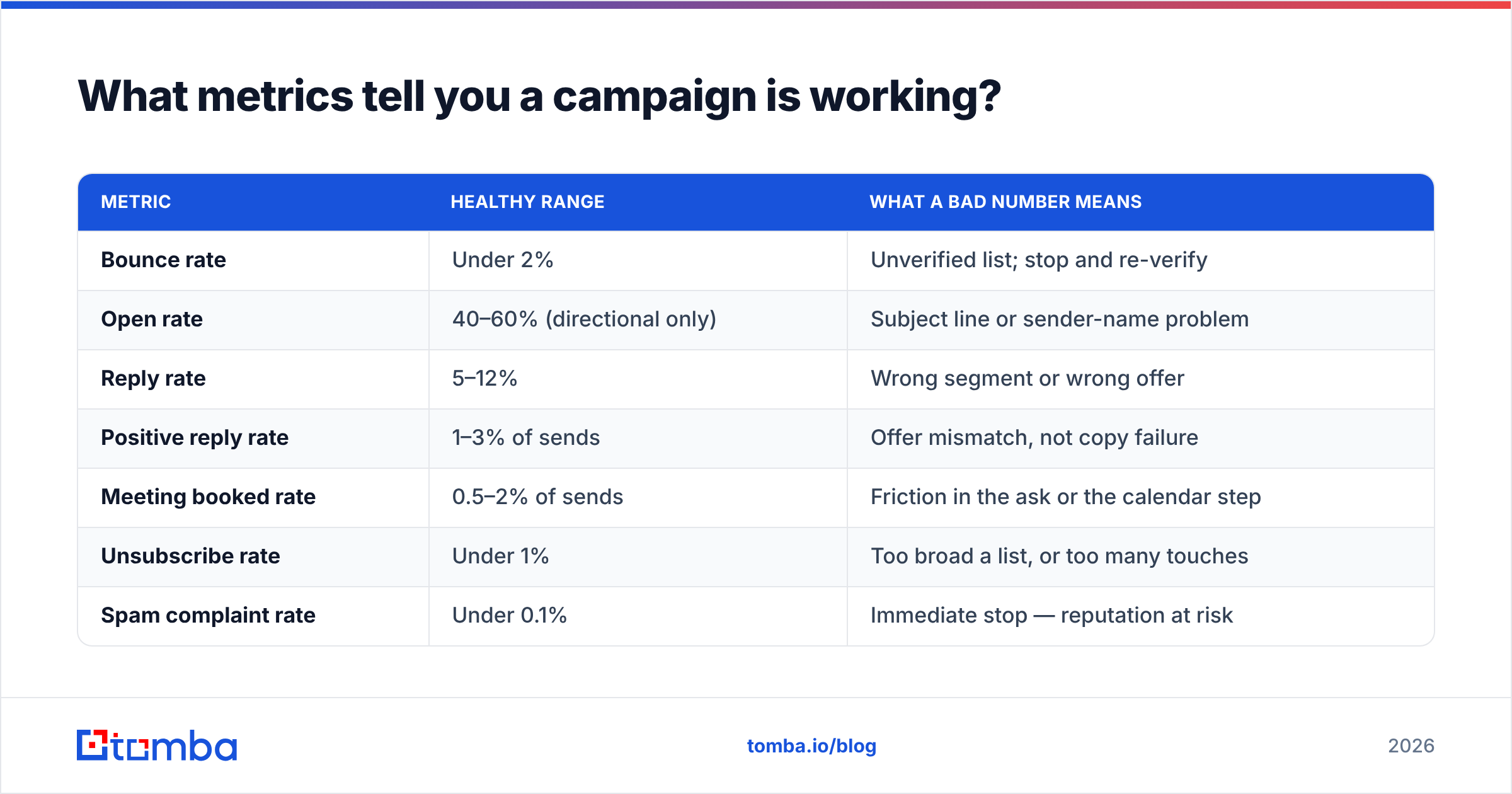
Reply rate and positive reply rate. Open rate is now unreliable enough — thanks to Apple Mail Privacy Protection and image proxying — that treating it as a primary KPI will mislead you.
| Metric | Healthy range | What a bad number means |
|---|---|---|
| Bounce rate | Under 2% | Unverified list; stop and re-verify |
| Open rate | 40–60% (directional only) | Subject line or sender-name problem |
| Reply rate | 5–12% | Wrong segment or wrong offer |
| Positive reply rate | 1–3% of sends | Offer mismatch, not copy failure |
| Meeting booked rate | 0.5–2% of sends | Friction in the ask or the calendar step |
| Unsubscribe rate | Under 1% | Too broad a list, or too many touches |
| Spam complaint rate | Under 0.1% | Immediate stop — reputation at risk |
Read them in sequence. A high bounce rate invalidates everything downstream — you can't judge a subject line when a quarter of the list never received the email. Fix bounces first, then opens, then replies.
Segment your reporting by persona and by list source. Aggregate numbers hide the fact that one segment is producing every reply while three others are burning domain reputation for nothing.
Which campaign types are worth running in 2026?#
| Campaign type | Best-fit list size | Typical reply rate | Effort per contact |
|---|---|---|---|
| Trigger-based (funding, hiring, tech change) | 100–500 | 8–15% | Medium |
| Account-based multichannel (email + LinkedIn) | 25–100 | 12–25% | High |
| Content-led (share a teardown or benchmark) | 200–1,000 | 5–10% | Low |
| Broad ICP outbound | 1,000+ | 2–5% | Low |
| Re-engagement of closed-lost | 100–400 | 10–20% | Low |
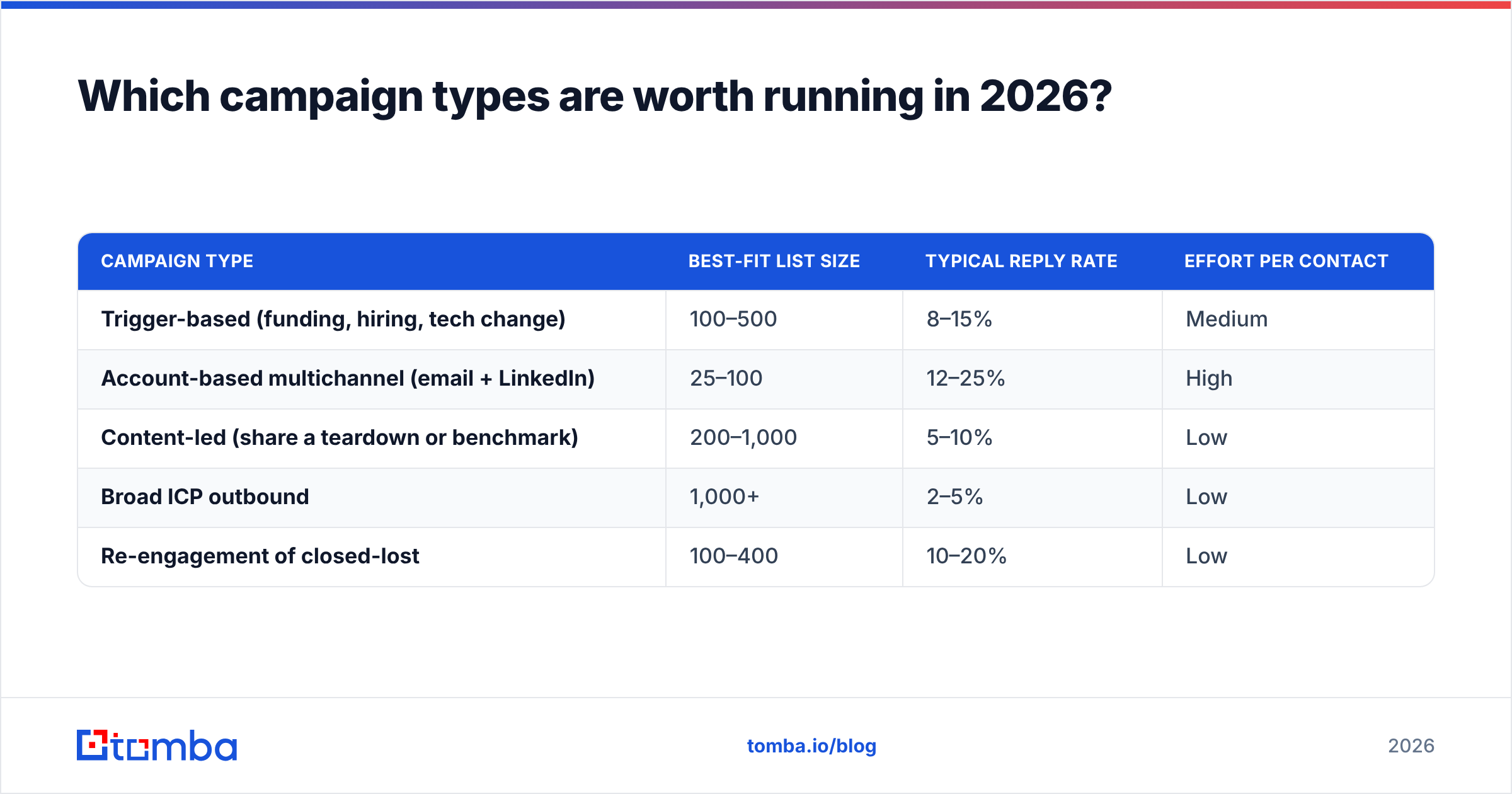
Closed-lost re-engagement is the most consistently underused of these. Those contacts already know your category, already evaluated you, and their circumstances have changed. Enrich the list first — people change jobs constantly, and data enrichment will tell you who moved where before you email a dead address.
Trigger-based campaigns are where the leverage is if you're building from scratch. The trigger writes your first line for you, and relevance is doing the work that personalization tokens pretend to do.
What are the most common mistakes?#
Buying volume instead of accuracy. A 50,000-record list at $0.02 per contact looks cheap until the 20% invalid rate costs you a domain. Cost per deliverable contact is the only number worth comparing.
Writing before segmenting. If the copy has to work for six different personas, it works for none of them.
Measuring at the campaign level only. Roll-ups hide the segments that are working. Break every report down by list source and persona.
Adding touches instead of fixing targeting. A ninth email won't fix a list that shouldn't have been built.
Treating catch-all domains as unknowns. A large share of enterprise domains accept all mail. Discarding them means discarding your best accounts. A catch-all finder resolves them into a usable confidence signal rather than a shrug.
Ignoring CRM state. Emailing an active opportunity as a cold prospect is the fastest way to embarrass your AE. Sync suppression lists from your CRM before every launch — HubSpot and Salesforce both expose this cleanly through their APIs.
Where should you start?#
Start with the list, because everything downstream depends on it. Pick 200 accounts that share a real trigger, find the two right people at each one, verify every address, and run a five-touch sequence over 18 days from a warmed secondary domain. That's a complete campaign, and it will tell you more in three weeks than a 10,000-contact blast tells you in three months.
If the data layer is your bottleneck, Tomba Email Finder covers the part most teams get wrong: turning a name and a domain into a verified, deliverable address, with catch-all handling and verification built into the same workflow instead of bolted on afterward. The free tier gives you 25 searches a month to test accuracy against a list you already know the answers to — which is exactly how you should evaluate any data vendor before you pay one.
Related guides#
Ready to find emails that actually work?
Join 150,000+ professionals who stopped guessing and started sending. Free credits on signup — no credit card required.
Get the Tomba newsletter
Practical outbound tactics and product updates — once every two weeks.
About the author