Email Outreach QA in 2026: The Complete Pre-Send Checklist
Most outbound campaigns don't fail because of the copy. They fail because nobody checked the list, the domain records, the merge tags, or the reply routing. Here's the QA process that catches it.
TL;DR
- Email outreach QA is a repeatable pre-send inspection of your list, your sending infrastructure, your copy, and your reply handling. It takes 20–40 minutes per campaign and prevents the failures that cost you a domain.
- The three checks with the highest payoff: verify every address (bounce rate under 2%), confirm SPF/DKIM/DMARC alignment on the exact sending domain, and render-test every merge tag against a sample of 20 real rows.
- Bad data causes more outbound damage than bad copy. A 12% bounce rate will get your domain throttled no matter how good the first line is.
- Split QA into two gates: a data gate (list quality, dedupe, suppression) and a send gate (auth, warmup, copy, links, reply routing). Never merge them into one rushed review.
- Post-send QA matters too — bounce codes, spam-complaint rate, and reply classification tell you which QA step failed and needs tightening.
What is email outreach QA?#
Email outreach QA is the pre-flight checklist you run before a cold campaign leaves the building. Think of it like a restaurant health inspection: the food might taste great, but if the walk-in cooler is at the wrong temperature, nothing else matters. Your subject line can be excellent and still land in spam because a DKIM record was copied into the wrong DNS zone.
Technically, QA covers four layers:
- Data layer — is every contact real, current, deduplicated, and legally contactable? This is where verification, catch-all handling, and suppression lists live.
- Infrastructure layer — is the sending domain authenticated, warmed, and off blacklists? SPF, DKIM, DMARC, custom tracking domain, mailbox age, daily volume ramp.
- Content layer — do merge tags resolve, do links work, does the plain-text version read cleanly, is the spam score low, is the unsubscribe path present?
- Process layer — where do replies go, who owns them, what's the SLA, and how do bounces get written back to the CRM?
Most teams QA layer three because it's visible in the editor. Layers one, two, and four are the ones that silently destroy campaigns.
Why do outreach campaigns fail QA in 2026?#
Because inbox providers stopped being forgiving. Google and Yahoo's bulk-sender requirements pushed authentication and complaint-rate thresholds from "nice to have" into hard gates, and the practical effect is that a single sloppy campaign now has a much longer tail of consequences.
Here's what actually breaks, ranked by how often we see it in audits of outbound programs:
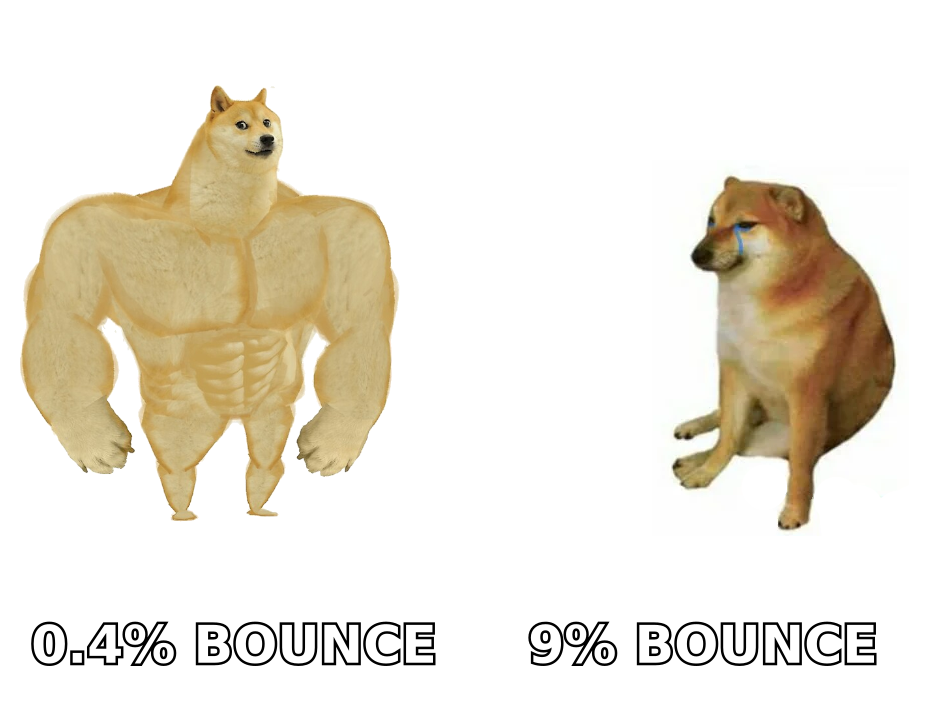
- Unverified imports. Someone exports a list from a scraper or an old CRM segment and pushes it straight into the sequencer. Bounce rate hits 9–15%. Provider throttles the domain within two sends.
- Catch-all domains treated as valid. Catch-all servers accept everything at SMTP time, so naive verifiers mark them "valid." Half of them are unmonitored aliases. You need a dedicated catch-all verifier to separate real mailboxes from black holes.
- Auth records on the wrong domain. SPF and DKIM pass on
company.combut you're sending fromget-company.com. DMARC alignment fails silently. - Merge tag blowouts.
Hi {{first_name}},renders asHi ,for 40 rows because the export had blanks. One screenshot of that on LinkedIn undoes a quarter of brand work. - Reply routing into a void. The campaign sends from an alias nobody monitors. Positive replies rot for six days.
- Suppression drift. Unsubscribes from Campaign A never got written back before Campaign B launched. That's not just a QA miss, it's a compliance one.
None of these are exotic. They're all catchable in half an hour.
What belongs on the pre-send QA checklist?#
Run these in order. The list gate comes first because there's no point QA-ing copy for contacts who don't exist.
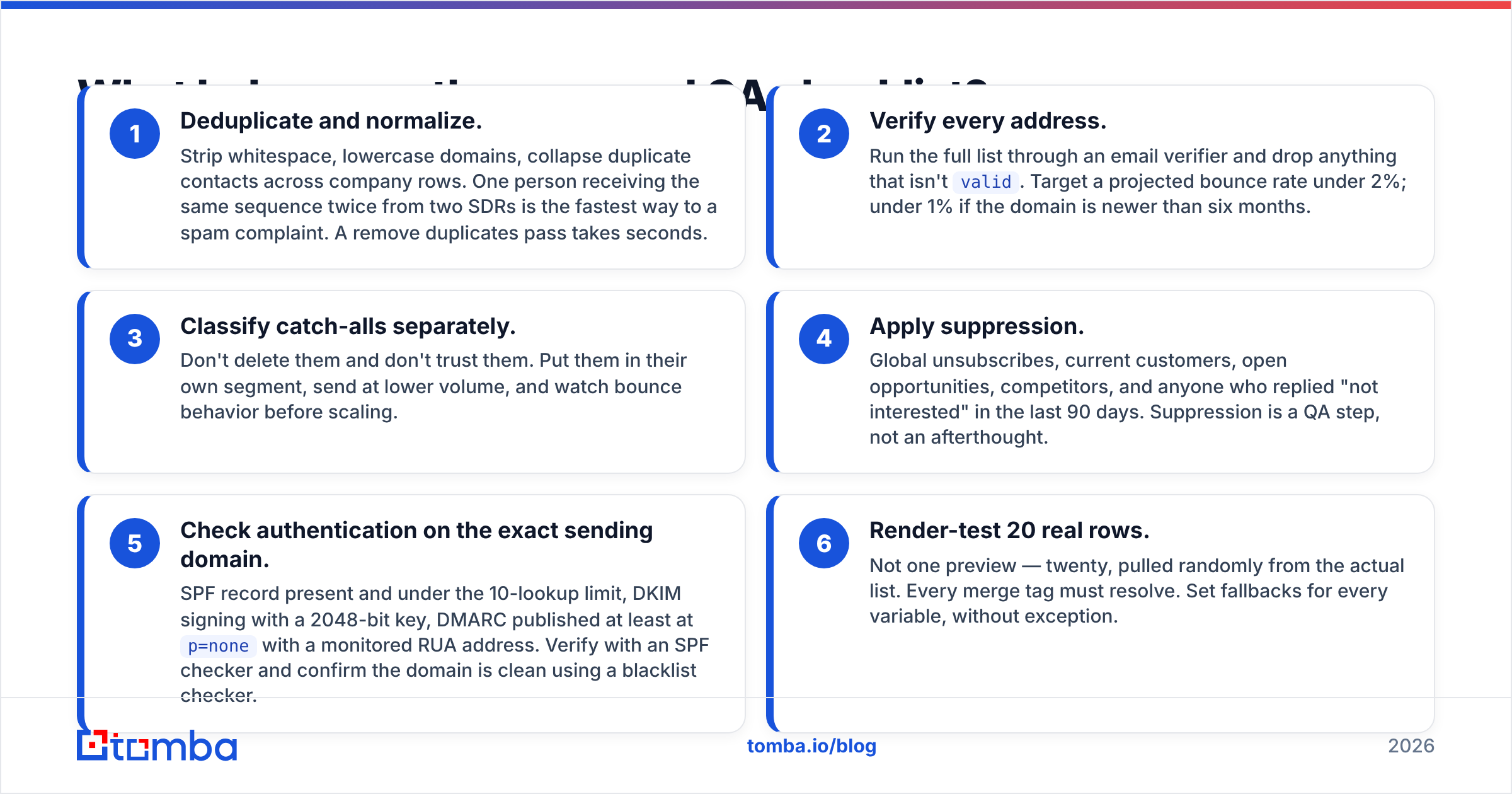
- Deduplicate and normalize. Strip whitespace, lowercase domains, collapse duplicate contacts across company rows. One person receiving the same sequence twice from two SDRs is the fastest way to a spam complaint. A remove duplicates pass takes seconds.
- Verify every address. Run the full list through an email verifier and drop anything that isn't
valid. Target a projected bounce rate under 2%; under 1% if the domain is newer than six months. - Classify catch-alls separately. Don't delete them and don't trust them. Put them in their own segment, send at lower volume, and watch bounce behavior before scaling.
- Apply suppression. Global unsubscribes, current customers, open opportunities, competitors, and anyone who replied "not interested" in the last 90 days. Suppression is a QA step, not an afterthought.
- Check authentication on the exact sending domain. SPF record present and under the 10-lookup limit, DKIM signing with a 2048-bit key, DMARC published at least at
p=nonewith a monitored RUA address. Verify with an SPF checker and confirm the domain is clean using a blacklist checker. - Render-test 20 real rows. Not one preview — twenty, pulled randomly from the actual list. Every merge tag must resolve. Set fallbacks for every variable, without exception.
That's the core. Everything below is refinement.
Which QA checks catch the most damage?#
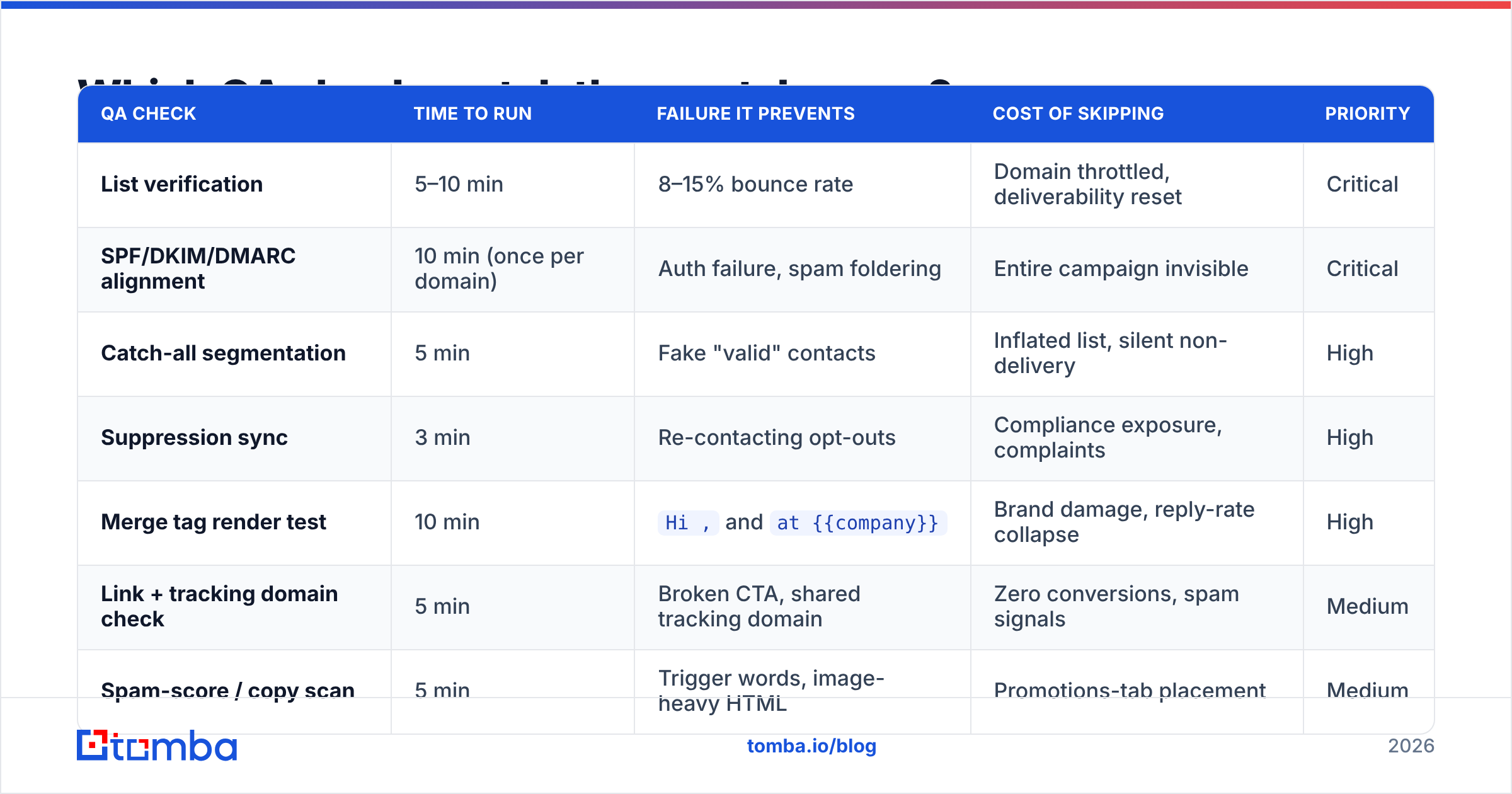
Not all checks are equal. Some prevent a bad quarter; others prevent a bad afternoon. Here's how they rank on effort versus damage prevented.
| QA check | Time to run | Failure it prevents | Cost of skipping | Priority |
|---|---|---|---|---|
| List verification | 5–10 min | 8–15% bounce rate | Domain throttled, deliverability reset | Critical |
| SPF/DKIM/DMARC alignment | 10 min (once per domain) | Auth failure, spam foldering | Entire campaign invisible | Critical |
| Catch-all segmentation | 5 min | Fake "valid" contacts | Inflated list, silent non-delivery | High |
| Suppression sync | 3 min | Re-contacting opt-outs | Compliance exposure, complaints | High |
| Merge tag render test | 10 min | Hi , and at {{company}} |
Brand damage, reply-rate collapse | High |
| Link + tracking domain check | 5 min | Broken CTA, shared tracking domain | Zero conversions, spam signals | Medium |
| Spam-score / copy scan | 5 min | Trigger words, image-heavy HTML | Promotions-tab placement | Medium |
| Reply routing test | 2 min | Unmonitored inbox | Lost pipeline | Medium |
| Plain-text fallback review | 3 min | Broken rendering in text clients | Minor reply-rate drag | Low |
The pattern is obvious: the two cheapest checks — verification and authentication — prevent the two most expensive failures. If you only have ten minutes, spend them there.
What tools cover which part of QA?#
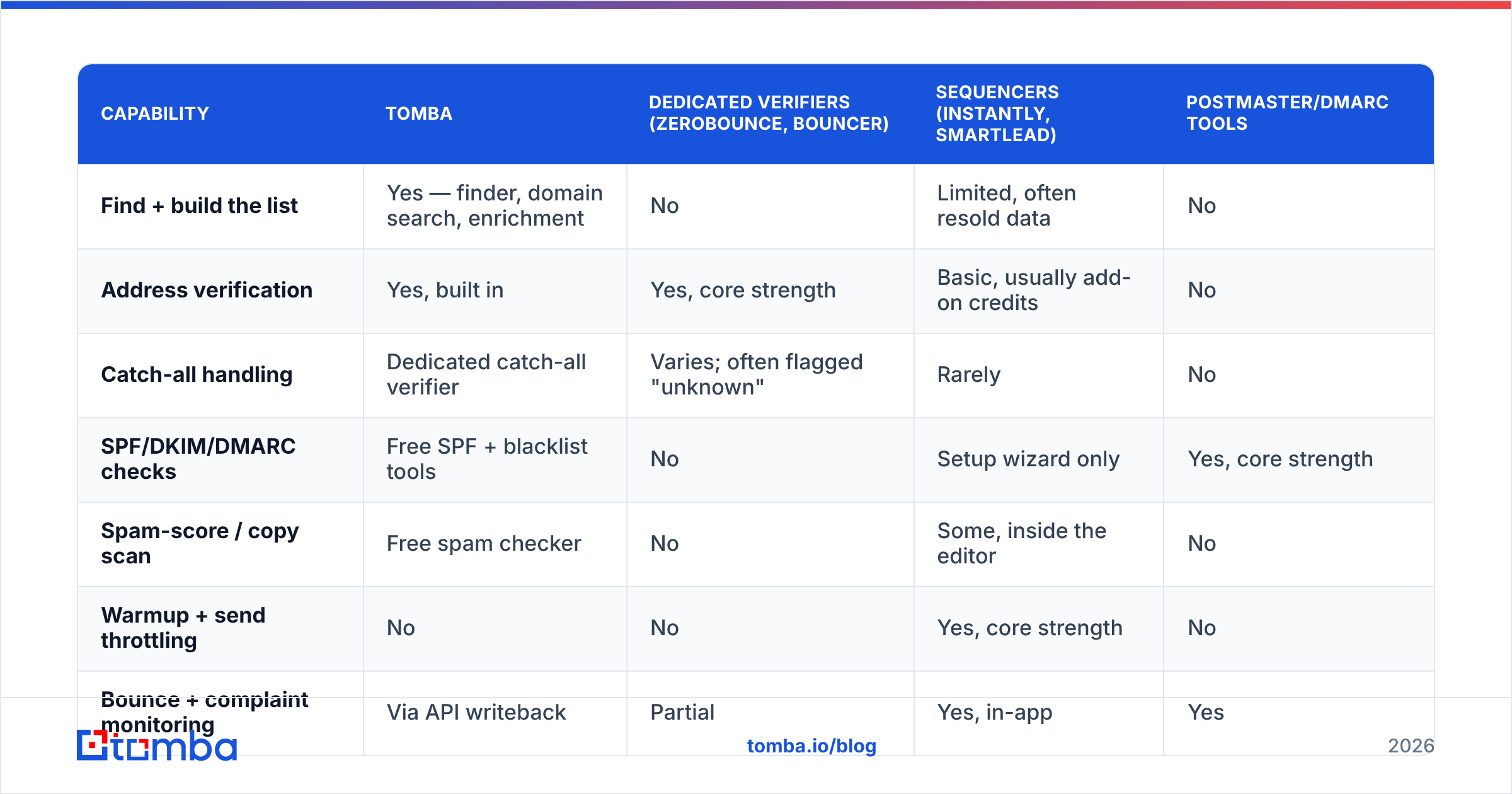
No single tool covers the whole checklist, and vendors who claim otherwise are usually strong in one layer and thin in the rest. Here's an honest split of where the common options fit.
| Capability | Tomba | Dedicated verifiers (ZeroBounce, Bouncer) | Sequencers (Instantly, Smartlead) | Postmaster/DMARC tools |
|---|---|---|---|---|
| Find + build the list | Yes — finder, domain search, enrichment | No | Limited, often resold data | No |
| Address verification | Yes, built in | Yes, core strength | Basic, usually add-on credits | No |
| Catch-all handling | Dedicated catch-all verifier | Varies; often flagged "unknown" | Rarely | No |
| SPF/DKIM/DMARC checks | Free SPF + blacklist tools | No | Setup wizard only | Yes, core strength |
| Spam-score / copy scan | Free spam checker | No | Some, inside the editor | No |
| Warmup + send throttling | No | No | Yes, core strength | No |
| Bounce + complaint monitoring | Via API writeback | Partial | Yes, in-app | Yes |
| Entry price | Free tier (25 searches/mo), Starter $49/mo | $16–$49 per pack | $30–$97/mo | Free |
The practical stack for most teams is three pieces: a data tool for finding and verifying, a sequencer for warmup and sending, and a free postmaster/DMARC monitor for the infrastructure layer. Trying to collapse that into one vendor usually means accepting a weak verification engine, which is exactly the layer you can't afford to be weak in.
If you're building the list and verifying in the same pass, doing it in one place matters more than it sounds — every export/import round trip is a chance for encoding errors, truncated rows, and stale data. The bulk email finder workflow exists for that reason.
How do you QA a campaign in under 30 minutes?#
Here's the timeboxed version. Run it the same way every time and it becomes muscle memory.
Minutes 0–10 — the data gate. Export the target segment. Dedupe. Push through verification. Split the result into three buckets: valid, catch-all, invalid. Delete invalid. Park catch-all in its own sequence at 30% of normal daily volume. Apply suppression lists. Record the final count — if you lost more than 25% of the list to verification, your sourcing method is the real problem, not your QA.
Minutes 10–18 — the infrastructure gate. Confirm the sending mailbox is the one you think it is. Check SPF resolves in under ten DNS lookups. Confirm DKIM signature on a test send to a personal Gmail account (View original → check DKIM: PASS and SPF: PASS). Confirm your custom tracking domain resolves and isn't a shared subdomain used by thousands of other senders. Check Google Postmaster Tools for existing reputation on the domain.
Minutes 18–26 — the content gate. Pull 20 random rows into the preview. Read every one. Check that fallbacks fire. Click every link, including the unsubscribe. Run the body through a spam checker. Read the plain-text version out loud — if it sounds like a template, the personalization is cosmetic, and prospects can tell.
Minutes 26–30 — the process gate. Send one live test to a colleague's real inbox at a real company (not a seed account). Reply to it. Confirm the reply lands where a human will see it within an hour. Confirm bounces write back to the CRM. Then schedule.
How do you QA copy and personalization?#
Separately from deliverability, and with a different question in mind: would a stranger believe a human wrote this specifically for them?
Three tests work well:
- The swap test. Replace the prospect's company name with a competitor's. If the email still makes complete sense, your personalization is decorative. Real personalization breaks when you swap the target.
- The forward test. Would the recipient forward this to a colleague without embarrassment? If not, the tone is off.
- The 8-second test. Read only the first two lines on a phone-width preview. Is the reason for the email clear? Mobile preview panes cut off around 90 characters — everything after that is a bonus.
Then check mechanics: one clear ask, no more than one link in the first email, no attachments, a signature that doesn't include four images, and a subject line under 45 characters. Testing subject variants against a subject line tester before send is cheaper than testing them against 2,000 prospects.
Is manual QA better than automated QA?#
Neither alone. Automate what's deterministic, keep humans on what's judgmental.
Automate: deduplication, verification, suppression matching, DNS record checks, link status checks, merge-tag null detection, blacklist monitoring. These are rule-based, they don't get tired, and they run in seconds against 50,000 rows. Wiring them through the Tomba API or a scheduled job means they run whether or not anyone remembers.
Keep human: does this email sound like a person, is this the right segment for this offer, is the timing appropriate given what's happening at the account, is the ask proportionate to the relationship. No script catches "we're pitching a $60k platform to a 4-person agency."
The failure mode of pure automation is technically perfect emails nobody wants to answer. The failure mode of pure manual QA is a tired SDR at 6pm skipping the verification step because "the list looked fine." Build the automated gate so it's not skippable, then spend your human attention on the parts that need judgment.
What should you monitor after send?#
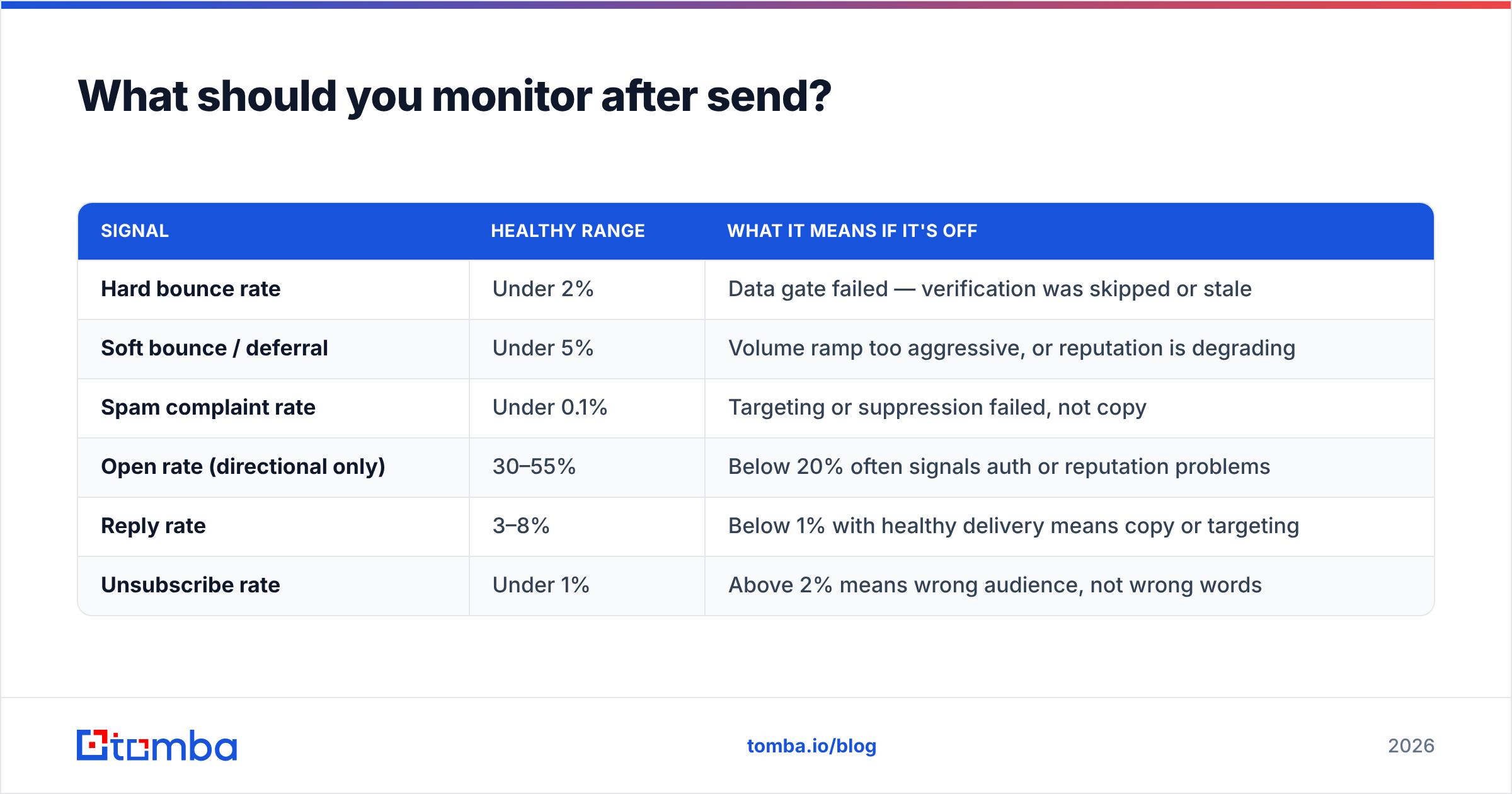
QA doesn't end at the send button. Post-send telemetry tells you which gate leaked.
| Signal | Healthy range | What it means if it's off |
|---|---|---|
| Hard bounce rate | Under 2% | Data gate failed — verification was skipped or stale |
| Soft bounce / deferral | Under 5% | Volume ramp too aggressive, or reputation is degrading |
| Spam complaint rate | Under 0.1% | Targeting or suppression failed, not copy |
| Open rate (directional only) | 30–55% | Below 20% often signals auth or reputation problems |
| Reply rate | 3–8% | Below 1% with healthy delivery means copy or targeting |
| Unsubscribe rate | Under 1% | Above 2% means wrong audience, not wrong words |
Treat bounce codes as diagnostic, not noise. A 550 5.1.1 User unknown is a data problem. A 421 4.7.0 Try again later is a reputation problem. Reading them tells you exactly which part of the checklist to tighten next cycle. Providers like Litmus are useful for rendering diagnostics, and understanding DMARC reporting closes the loop on authentication failures you'd otherwise never see.
Log every campaign's numbers in the same sheet. Over ten campaigns, patterns emerge — you'll find that one data source consistently produces a 6% bounce rate and one SDR consistently ships broken merge tags. That's what QA data is for.
Where should you start?#
Pick the single highest-leverage gate and make it non-optional: no list enters a sequencer without verification. Everything else on this checklist improves your numbers at the margin; that one prevents the failure that resets your domain reputation to zero.
If your current process is "export, import, send," start by moving list-building and verification into one step so there's no gap for stale data to slip through. Tomba Email Finder finds addresses by domain, name, or company and verifies them in the same pass, with a free tier at 25 searches a month to test the workflow before you commit — Starter is $49/mo and Growth $99/mo when you scale. See full Tomba pricing for the credit breakdown. Build the QA gate once, and every campaign after it inherits the discipline.
Related guides#
Ready to find emails that actually work?
Join 150,000+ professionals who stopped guessing and started sending. Free credits on signup — no credit card required.
Get the Tomba newsletter
Practical outbound tactics and product updates — once every two weeks.
About the author