Email Reputation Services in 2026: What They Actually Fix
Email reputation services promise to rescue your inbox placement — but most only measure what's already broken. Here's what each type actually does, what they cost, and where the real fix lives.
TL;DR
- "Email reputation services" is an umbrella covering four different product types: reputation monitors (Postmaster, SNDS), blacklist checkers, seed/placement testers, and list hygiene tools. They solve different problems and are not interchangeable.
- Monitoring tools tell you your reputation is damaged. They cannot repair it. Repair happens upstream — in your list quality, authentication records, and sending volume curve.
- Roughly 60–80% of sender-reputation damage in cold outbound traces back to one thing: sending to addresses that don't exist. Bounce rate is the single strongest lever you control.
- Free tools (Google Postmaster Tools, Microsoft SNDS, MXToolbox, Talos) cover most of what a $99/mo "reputation platform" shows you. Pay for placement testing and hygiene, not for dashboards.
- Budget order that actually works: verification first, authentication second, warmup third, monitoring fourth. Most teams do it backwards.
What Are Email Reputation Services?#
Email reputation services are tools that measure, monitor, or improve how mailbox providers score your sending identity — your domain, your IP, and increasingly your individual sending mailbox.
Think of sender reputation like a credit score for your mail. Gmail, Outlook, and Yahoo each run their own private scoring model. They watch how recipients react to your mail (opens, replies, deletions, spam complaints), how many messages you send to addresses that don't exist, whether your authentication records check out, and whether your volume behaves like a human business or a script. The score decides one thing: inbox, promotions, or spam folder.
Here's the part vendors don't lead with. Most tools sold as "reputation services" are instruments, not treatments. A thermometer tells you that you have a fever. It doesn't lower it. If you're shopping in this category, the first question to answer is which of these four jobs you're actually buying:
- Reputation monitoring — Reads signals from the mailbox provider itself. Google Postmaster Tools and Microsoft SNDS are the canonical (free) examples. They show domain reputation, IP reputation, spam complaint rate, and authentication pass rates.
- Blacklist and RBL checking — Queries public block lists (Spamhaus, SORBS, Barracuda, SpamCop) to see whether your IP or domain has been listed. MXToolbox and Cisco Talos both do this without charge.
- Seed-list / inbox placement testing — Sends your campaign to a panel of real seed mailboxes across providers and reports where each landed. This is the one category where paid tools genuinely earn their price, because you cannot replicate a multi-provider seed panel yourself.
- List hygiene and verification — Removes invalid, role-based, spam-trap-adjacent, and catch-all-risky addresses before you send. This is the only category that changes the inputs rather than reading the outputs.
The mistake I see repeatedly: a team's placement collapses, they buy a $99/month reputation dashboard, and the dashboard confirms in beautiful red gradients exactly what they already knew. Three weeks later nothing has changed, because nobody fixed the 14% bounce rate feeding the problem.
How Does Sender Reputation Actually Get Damaged?#
Five inputs, in rough order of how much damage they do per unit:
1. Hard bounces from invalid addresses. Gmail and Microsoft both treat a high unknown-user rate as a proxy for "this sender scraped or bought a list." The informal industry threshold is 2%; above 5% you're in active throttling territory, and above 10% providers start rejecting at the connection level. This is the biggest lever and the cheapest to fix.
2. Spam complaints. Google's own guidance in its bulk sender requirements puts the target below 0.10% and calls 0.30% a hard failure. Complaints are weighted heavily because they're an explicit human signal.
3. Spam traps. Recycled traps (abandoned addresses reactivated as traps) and pristine traps (addresses never used by a human) sit on scraped lists. One pristine trap hit can get a domain listed on Spamhaus.
4. Broken authentication. Missing or misconfigured SPF, DKIM, and DMARC. Since February 2024, Google and Yahoo require all three for bulk senders. This one is free to fix and takes about an hour — run an SPF checker against your sending domain before you spend a dollar on anything else.
5. Volume shape. A domain that sent 0 emails on Monday and 4,000 on Tuesday looks like a compromised account. Ramp matters more than total.
Notice that four of the five are prevention problems. Only one — complaints — is genuinely reactive.
Which Email Reputation Services Should You Actually Pay For?#
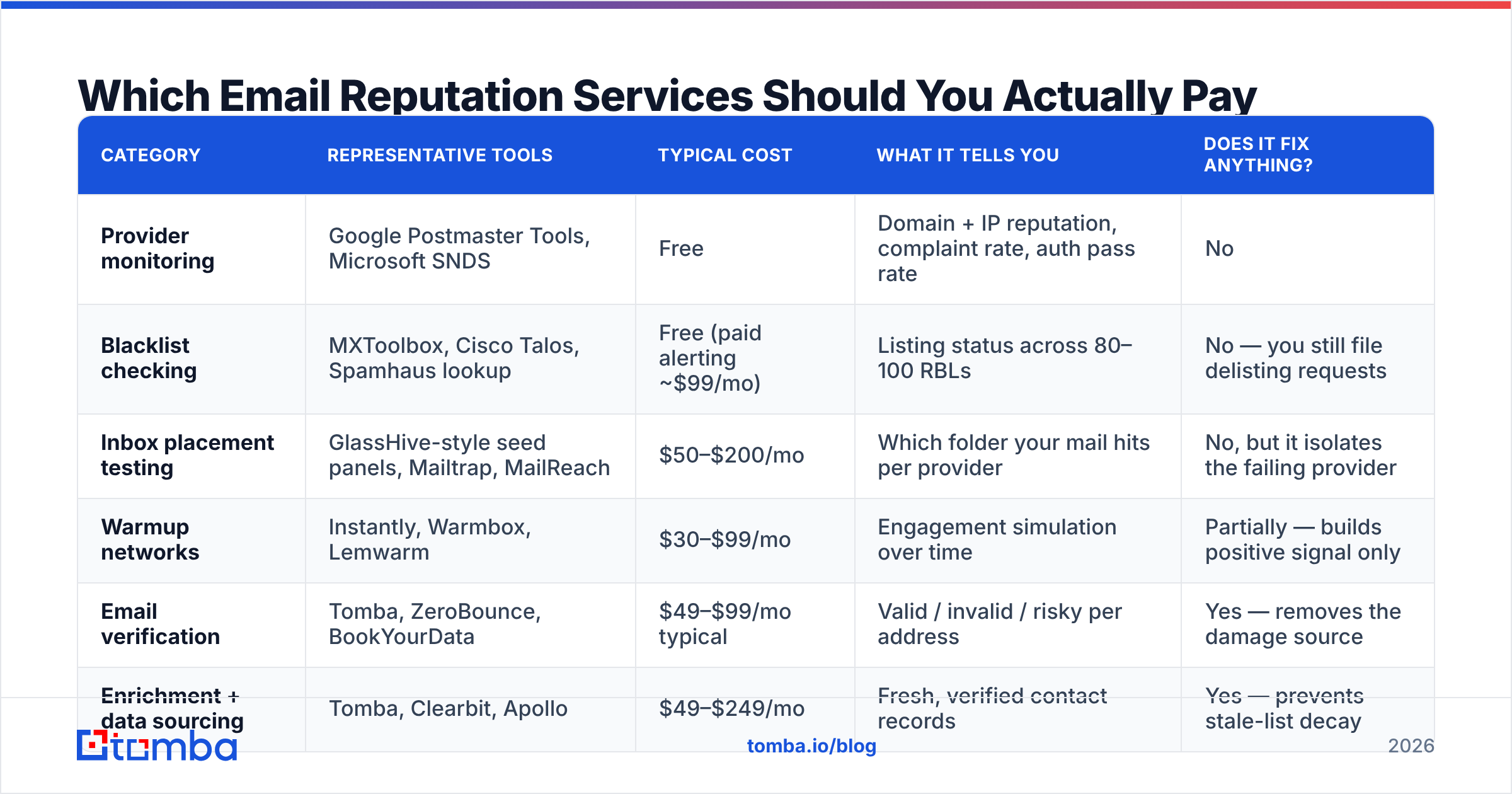
Here's how the main categories compare on the things that decide budget.
| Category | Representative tools | Typical cost | What it tells you | Does it fix anything? |
|---|---|---|---|---|
| Provider monitoring | Google Postmaster Tools, Microsoft SNDS | Free | Domain + IP reputation, complaint rate, auth pass rate | No |
| Blacklist checking | MXToolbox, Cisco Talos, Spamhaus lookup | Free (paid alerting ~$99/mo) | Listing status across 80–100 RBLs | No — you still file delisting requests |
| Inbox placement testing | GlassHive-style seed panels, Mailtrap, MailReach | $50–$200/mo | Which folder your mail hits per provider | No, but it isolates the failing provider |
| Warmup networks | Instantly, Warmbox, Lemwarm | $30–$99/mo | Engagement simulation over time | Partially — builds positive signal only |
| Email verification | Tomba, ZeroBounce, BookYourData | $49–$99/mo typical | Valid / invalid / risky per address | Yes — removes the damage source |
| Enrichment + data sourcing | Tomba, Clearbit, Apollo | $49–$249/mo | Fresh, verified contact records | Yes — prevents stale-list decay |
Read that last column again. Two of six categories change anything.
My honest allocation for a team spending $200/month on deliverability: $99 to verification and data quality, $50 to a warmup network during ramp-up, $50 to placement testing during campaign launches, $0 to monitoring dashboards because Postmaster Tools and SNDS are free and read from the source.
Where paid monitoring does earn its keep#
Three situations justify a paid reputation platform:
- You send from dedicated IPs at volume. IP-level reputation is a real asset you're managing, and per-IP historical trending is worth paying for.
- You run 20+ sending domains. Checking Postmaster manually across 20 properties is a job; automated aggregation and alerting saves real hours.
- You're in a regulated vertical where a blacklist event has compliance consequences and you need an audit trail.
If you send from a handful of Google Workspace mailboxes at 50–200 emails a day each — which describes most B2B outbound teams — free tools cover you.
How Do You Fix a Damaged Sender Reputation?#
Sequence matters. Doing these out of order wastes weeks.
- Stop sending to the affected segment immediately. Every additional bounce deepens the hole. Pause, don't "reduce volume."
- Fix authentication. SPF, DKIM, DMARC — all three, all passing. Free, fast, and non-negotiable since the 2024 Google/Yahoo requirements. Check the SPF record syntax carefully; a single lookup overflow silently fails the whole chain.
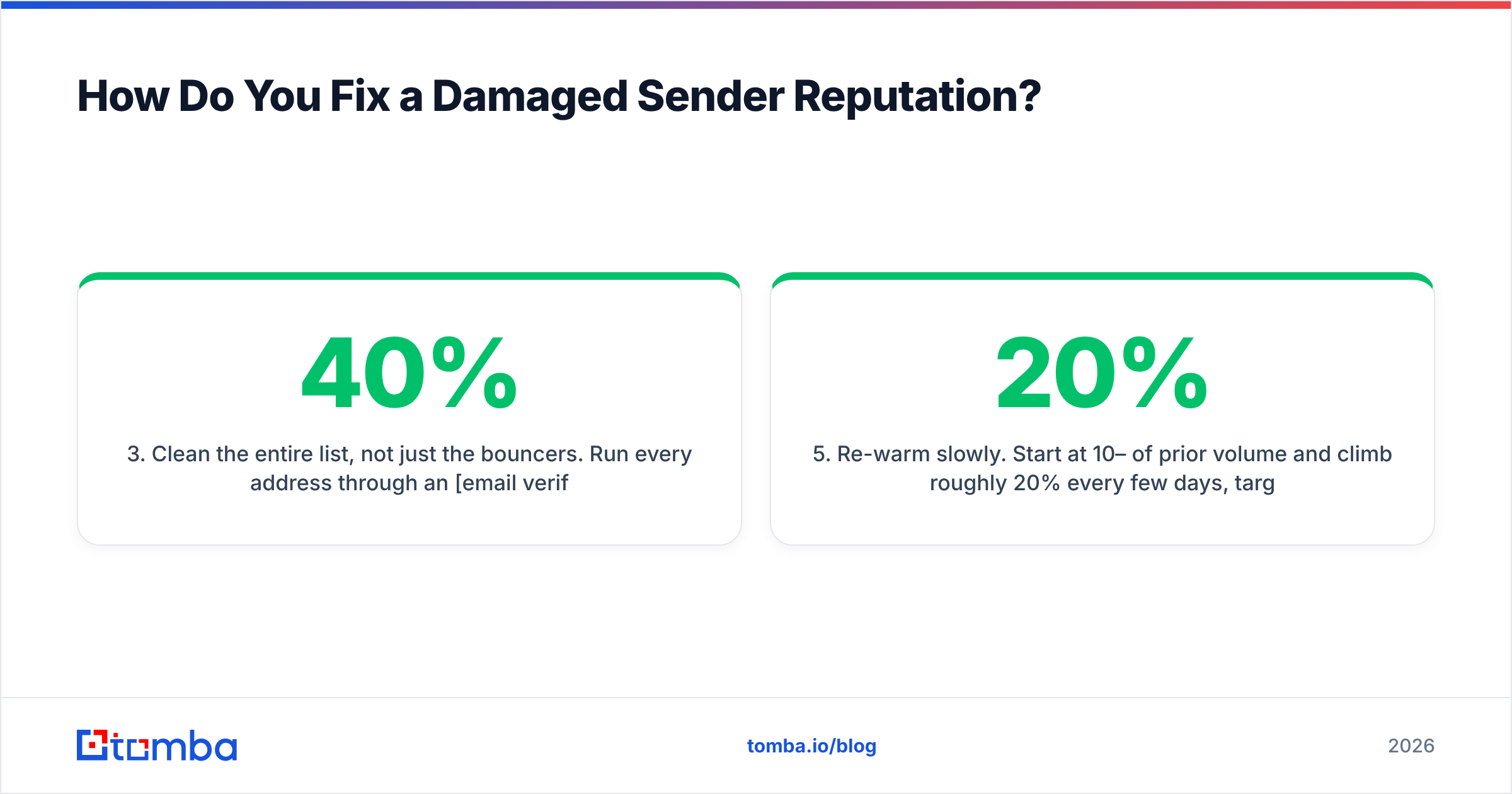
- Clean the entire list, not just the bouncers. Run every address through an email verifier and remove invalids, role accounts (info@, sales@, admin@), and disposables. Handle catch-all domains separately — a catch-all verifier can distinguish a genuinely risky catch-all from one that resolves cleanly, which matters because catch-alls are often 20–40% of a B2B list and blanket-deleting them is expensive.
- Check for blacklistings and file delisting requests. Spamhaus removals are usually automatic within 24–48 hours once the underlying behavior stops. Run a blacklist checker across your sending IPs and domain.
- Re-warm slowly. Start at 10–20% of prior volume and climb roughly 20% every few days, targeting your most engaged contacts first. A warmup calculator gives you a defensible ramp schedule instead of guessing.
- Only now, monitor. With clean inputs, Postmaster Tools becomes genuinely useful — it shows recovery, not just damage.
Realistic recovery timeline: 2–4 weeks for a domain with moderate damage, 6–12 weeks if you hit spam traps or got Spamhaus-listed. Domain reputation recovers slower than IP reputation because Google weights domain history heavily.
Is Verification Really Better Than Monitoring?#
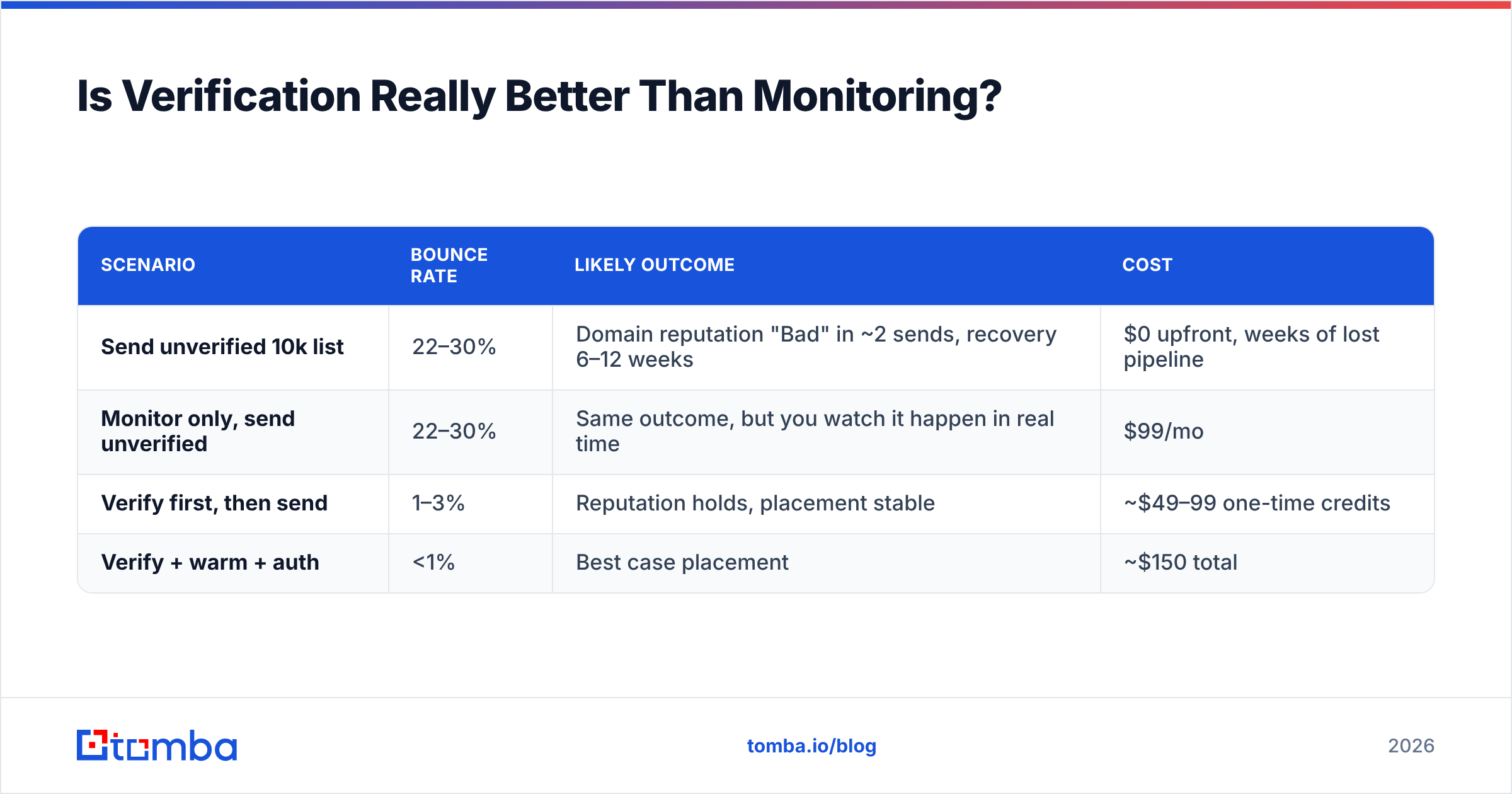
Run the arithmetic on a 10,000-contact list.
An unverified B2B list decays at roughly 22–30% per year — people change jobs, companies rebrand, domains lapse. On a list that's 12 months old, expect 2,000–3,000 dead addresses. Send to all 10,000 and you post a 20–30% bounce rate, which is well past the point where Gmail starts rejecting your mail outright.
| Scenario | Bounce rate | Likely outcome | Cost |
|---|---|---|---|
| Send unverified 10k list | 22–30% | Domain reputation "Bad" in ~2 sends, recovery 6–12 weeks | $0 upfront, weeks of lost pipeline |
| Monitor only, send unverified | 22–30% | Same outcome, but you watch it happen in real time | $99/mo |
| Verify first, then send | 1–3% | Reputation holds, placement stable | ~$49–99 one-time credits |
| Verify + warm + auth | <1% | Best case placement | ~$150 total |
The monitoring-only row is the one that should stop you. You paid $99 to observe a preventable failure.
This is why the strongest deliverability posture starts at the data layer. Sourcing contacts through a verified email finder rather than scraping or buying a static CSV means addresses arrive already validated against live SMTP checks, and you skip the cleanup cycle entirely. If you're working from a list you already have, a bulk verify pass before your first send is the highest-ROI hour in the whole workflow.
What About Warmup Services — Do They Work?#
Partially, and with caveats.
Warmup networks work by having your mailbox exchange automated emails with a pool of other mailboxes, which then open, reply, and mark your messages as important. This generates positive engagement signals.
What warmup genuinely does:
- Establishes a sending history for brand-new domains and mailboxes that would otherwise look suspicious at first volume.
- Builds a positive engagement baseline that offsets some negative signal from real campaigns.
- Recovers moderate reputation damage over 4–8 weeks when combined with clean sending.
What warmup does not do:
- Offset ongoing bounces. Positive signal from warmup pools is weighted less than hard-bounce signal from real sends. You cannot warm your way out of a bad list.
- Fool modern filters indefinitely. Google has gotten measurably better at recognizing warmup network traffic patterns since 2024. Treat it as supporting infrastructure, not a strategy.
- Replace real engagement. The signal that matters most is a genuine human replying to your cold email. Nothing simulates that.
Use warmup during ramp-up and recovery. Don't use it as permanent life support for a broken list. And be honest about the diminishing returns — a mailbox that's been warming for eight months while its campaigns bounce at 15% is not going to be saved by month nine.
How Do You Choose Between Vendors?#
Six criteria, in order of how much they should weigh:
- What it actually changes. Prevention beats observation. Prefer tools that alter your inputs.
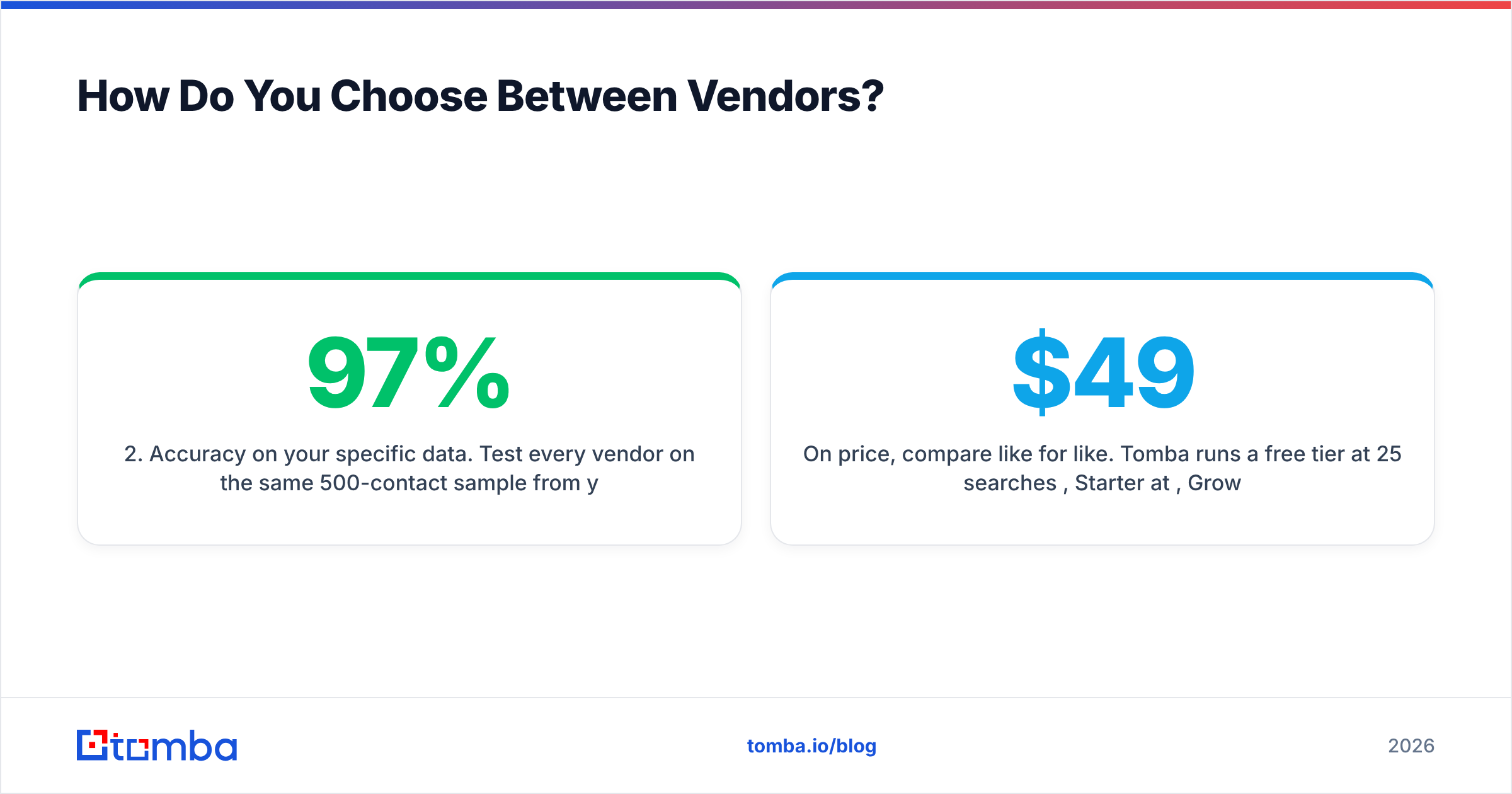
- Accuracy on your specific data. Test every vendor on the same 500-contact sample from your ICP. Verification accuracy varies wildly by region and company size — a tool that's 97% accurate on US SaaS might be 78% on European mid-market manufacturing. Run the test, don't trust the marketing page.
- Catch-all handling. Ask directly: does the tool mark catch-alls "unknown" and charge you anyway, or does it attempt resolution? This is where credit budgets quietly evaporate.
- Credit model and rollover. Monthly-reset credits punish bursty workflows. Check whether unused credits roll over before committing to an annual plan.
- API and workflow fit. If verification isn't in your pipeline automatically, it won't happen consistently. A usable email verification API or a native HubSpot integration matters more than dashboard polish.
- Transparent sourcing. Ask where the data comes from. Vendors that publish their data sources are easier to trust than ones that say "proprietary."
On price, compare like for like. Tomba runs a free tier at 25 searches/month, Starter at $49/mo, Growth at $99/mo, and Pro at $249/mo — see current Tomba pricing for credit allocations. BookYourData takes a different approach with pay-as-you-go database credits and a bounce guarantee, which suits teams buying static lists rather than running continuous discovery. Neither is universally better; they solve adjacent problems. Cross-check both against independent reviews on G2 rather than vendor comparison pages, including this one.
What Should Your Deliverability Stack Look Like in 2026?#
A stack that holds up under scrutiny:
- Data layer — Verified contact discovery at source. Never import an address you haven't validated.
- Authentication layer — SPF, DKIM, DMARC configured and monitored. Free. Do it once, check quarterly.
- Volume layer — Multiple sending domains, each ramped deliberately, none exceeding ~200/day per mailbox.
- Monitoring layer — Google Postmaster Tools plus Microsoft SNDS, checked weekly. Free.
- Testing layer — Seed placement test before every major campaign launch. Paid, but only when launching.
- Hygiene layer — Re-verify any list segment older than 90 days before reuse.
Notice that the two paid line items are testing and data — and data does the heavy lifting. Everything protecting your email deliverability downstream depends on the quality of what you put in upstream.
One more thing worth saying plainly: your sender reputation is increasingly evaluated per-mailbox, not just per-domain or per-IP. Mailbox providers now track individual sending identities. That means one careless SDR blasting an unverified list can drag down a domain shared by twelve colleagues. Verification isn't just a deliverability tactic — it's a shared-infrastructure hygiene requirement.
The Bottom Line#
Buy instruments only after you've fixed the inputs they measure. Free monitoring from Google and Microsoft covers 90% of what a paid reputation dashboard shows you, blacklist checks are free, and the money that actually moves your inbox placement goes into verified data and disciplined warmup — in that order.
If your bounce rate is above 3%, no reputation service on the market will save you. Fix the list.
Start where the leverage is. Tomba Email Finder sources professional email addresses by domain, name, or company with SMTP-level validation built into the lookup, so contacts enter your sequence already verified instead of getting cleaned up after they've damaged your domain. The free tier gives you 25 searches a month to test accuracy against your own ICP before you commit — which is exactly the test you should be running on every vendor in this category.
Related guides#
Ready to find emails that actually work?
Join 150,000+ professionals who stopped guessing and started sending. Free credits on signup — no credit card required.
Get the Tomba newsletter
Practical outbound tactics and product updates — once every two weeks.
About the author