Email Reputation Tools in 2026: A No-Fluff Buyer's Guide
Reputation tools disagree with each other constantly — because they measure different signals. Here's what each category actually tracks, which ones matter for cold outbound, and how to build a monitoring stack that catches problems before your reply rate dies.
TL;DR
- "Email reputation" is not one number. Mailbox providers score your domain, your sending IP, and your content separately, and no third-party tool sees the score that actually decides inbox placement.
- The only reputation data that comes straight from a mailbox provider is Google Postmaster Tools and Microsoft SNDS. Everything else is inference — useful, but secondary.
- Blacklist checkers (MXToolbox, Talos, Spamhaus lookups) tell you when something already went wrong. Seed-list testers (GlockApps, MailReach, Inbox Insight) tell you where mail is landing right now. Neither fixes the cause.
- The single biggest lever on reputation isn't a monitoring tool at all — it's not sending to addresses that bounce. Verification upstream beats diagnostics downstream every time.
- Budget guidance: $0 for provider-native tools + ~$30–$80/mo for placement testing + a verification credit pool. Anything over $200/mo for "reputation monitoring" alone is usually redundant.
What is email reputation, actually?#
Think of sender reputation like a credit score for your mail — except there are five credit bureaus, they use different formulas, none of them will show you the file, and the lender (Gmail, Outlook, Yahoo) keeps a private internal score that overrides all of them.
That analogy matters because it explains why two tools can look at the same domain and hand you a 92 and a "poor" on the same afternoon. They aren't contradicting each other. They're measuring different inputs.
Technically, email deliverability rests on three reputation layers:
- IP reputation — the history of the sending IP address. Shared pools (most ESPs, most cold-email platforms) mean you inherit your neighbors' behavior. Dedicated IPs mean you own every mistake.
- Domain reputation — tied to the domain in your
From:header and your DKIM signing domain. This one follows you across IPs, which is why burning a domain is far more expensive than burning an IP. - Content and engagement reputation — link domains, attachments, HTML weight, and above all the engagement signal: opens that lead to replies, versus deletes-without-reading and spam complaints.
Google made the hierarchy explicit in its 2024 bulk-sender requirements: keep spam complaints under 0.3% (ideally under 0.1%), authenticate with SPF, DKIM, and DMARC, and offer one-click unsubscribe for bulk mail. Those thresholds are now the practical floor everyone builds toward.

What do email reputation tools actually measure?#
Here's where most buying decisions go wrong. People shop for "an email reputation tool" as if it were one product category. It's four categories that happen to share a keyword.
- Provider-native dashboards — Google Postmaster Tools and Microsoft SNDS. These report the actual provider's view of your domain and IP: spam rate, domain reputation buckets, authentication pass rates, delivery errors. This is ground truth. It's also delayed by 24–48 hours and requires volume thresholds before data appears.
- Blacklist and RBL monitors — MXToolbox, Talos Intelligence, Spamhaus lookups, Barracuda. They tell you whether your IP or domain has been listed on one of ~100 public blocklists. Binary, retrospective, and free to check manually.
- Seed-list placement testers — GlockApps, MailReach, Mailtrap, Inbox Insight. You send a campaign to a panel of real seed inboxes across Gmail, Outlook, Yahoo, and corporate hosts, and they report inbox vs. promotions vs. spam. This is the closest proxy to "where will my mail land tomorrow."
- Pre-send list hygiene tools — email verifiers, catch-all detection, role-account filtering. These don't measure reputation at all. They prevent the bounce and complaint events that destroy it.
The mistake is buying category 2 or 3 and skipping category 4. Monitoring a bounce rate you could have prevented is like installing a smoke alarm and then storing gasoline in the kitchen.
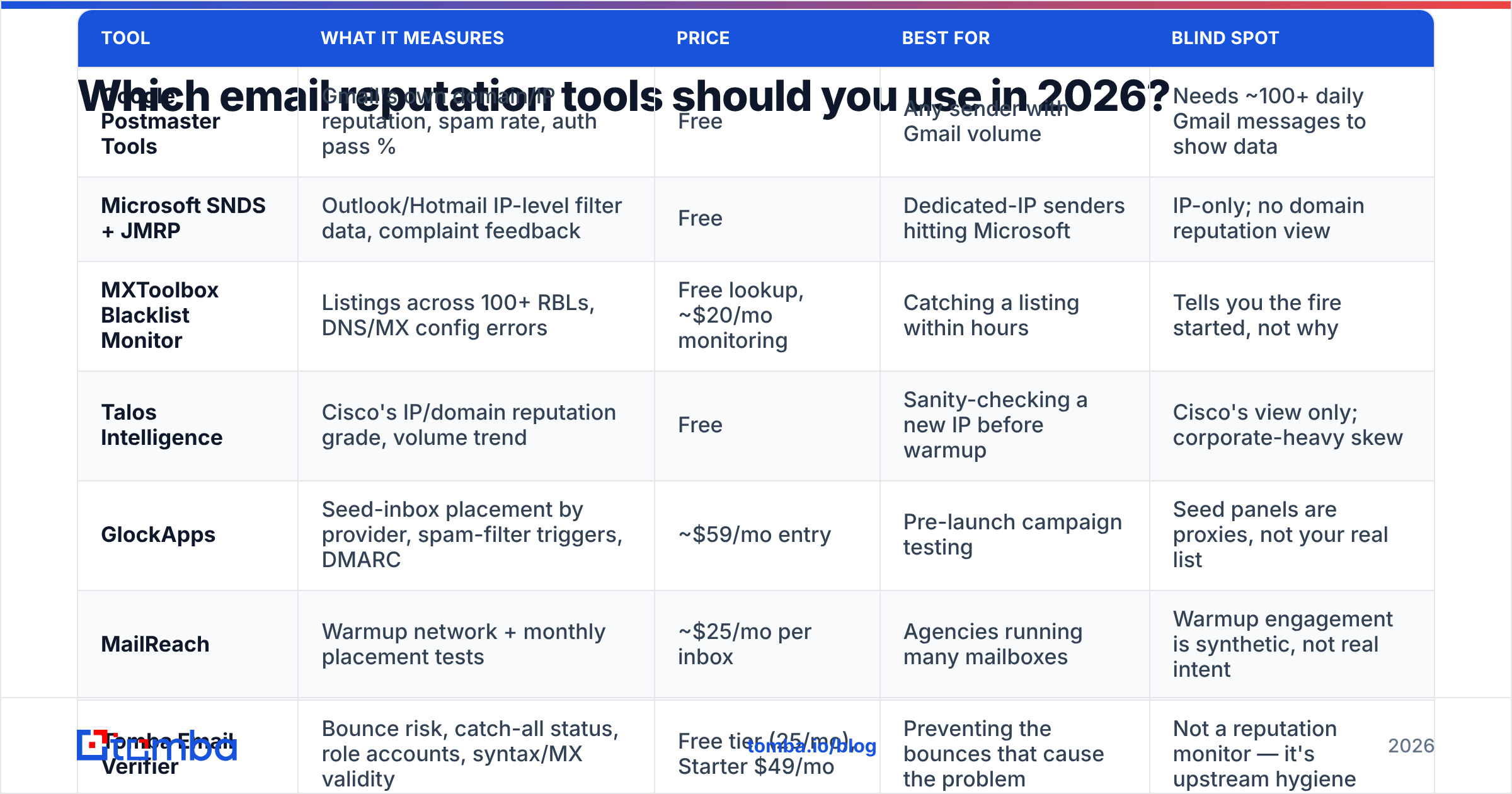
Which email reputation tools should you use in 2026?#
| Tool | What it measures | Price | Best for | Blind spot |
|---|---|---|---|---|
| Google Postmaster Tools | Gmail's own domain/IP reputation, spam rate, auth pass % | Free | Any sender with Gmail volume | Needs ~100+ daily Gmail messages to show data |
| Microsoft SNDS + JMRP | Outlook/Hotmail IP-level filter data, complaint feedback | Free | Dedicated-IP senders hitting Microsoft | IP-only; no domain reputation view |
| MXToolbox Blacklist Monitor | Listings across 100+ RBLs, DNS/MX config errors | Free lookup, ~$20/mo monitoring | Catching a listing within hours | Tells you the fire started, not why |
| Talos Intelligence | Cisco's IP/domain reputation grade, volume trend | Free | Sanity-checking a new IP before warmup | Cisco's view only; corporate-heavy skew |
| GlockApps | Seed-inbox placement by provider, spam-filter triggers, DMARC | ~$59/mo entry | Pre-launch campaign testing | Seed panels are proxies, not your real list |
| MailReach | Warmup network + monthly placement tests | ~$25/mo per inbox | Agencies running many mailboxes | Warmup engagement is synthetic, not real intent |
| Tomba Email Verifier | Bounce risk, catch-all status, role accounts, syntax/MX validity | Free tier (25/mo), Starter $49/mo | Preventing the bounces that cause the problem | Not a reputation monitor — it's upstream hygiene |
| BookYourData | Pre-verified B2B contact records with bounce guarantee | Pay-as-you-go credits | Teams buying data rather than sourcing it | Still verify at send time — data ages |
Two things stand out when you lay it out like this.
First, the free tools carry more weight than the paid ones. Postmaster Tools is the only place you'll see Gmail's actual verdict on your domain. No $99/mo dashboard can beat a direct feed from the provider that decides your fate. Set it up before you buy anything.
Second, the paid tools cluster around testing, not monitoring. GlockApps and MailReach earn their money by showing you placement before a campaign goes wide. That's a genuinely different job from watching a score decay after the fact.
Are free email reputation checkers good enough?#
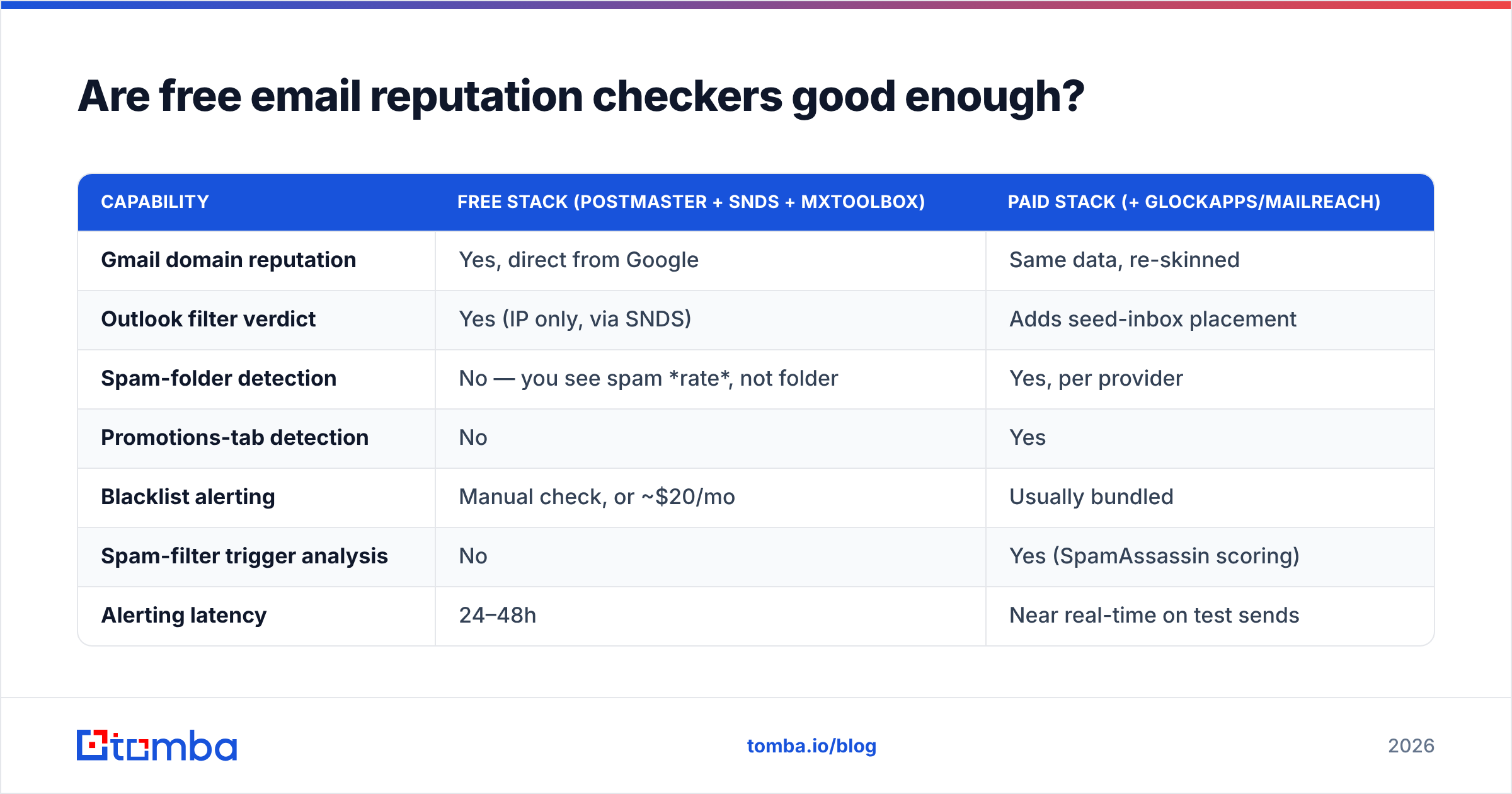
For most teams sending under 50,000 messages a month: yes, with one caveat.
| Capability | Free stack (Postmaster + SNDS + MXToolbox) | Paid stack (+ GlockApps/MailReach) |
|---|---|---|
| Gmail domain reputation | Yes, direct from Google | Same data, re-skinned |
| Outlook filter verdict | Yes (IP only, via SNDS) | Adds seed-inbox placement |
| Spam-folder detection | No — you see spam rate, not folder | Yes, per provider |
| Promotions-tab detection | No | Yes |
| Blacklist alerting | Manual check, or ~$20/mo | Usually bundled |
| Spam-filter trigger analysis | No | Yes (SpamAssassin scoring) |
| Alerting latency | 24–48h | Near real-time on test sends |
| Realistic monthly cost | $0–$20 | $60–$150 |
The caveat: free tools have a volume floor. Google Postmaster Tools shows nothing until you're consistently sending enough Gmail traffic to be statistically meaningful — roughly a few hundred messages a day. If you're a founder sending 40 personalized emails a day from three mailboxes, Postmaster will stay empty forever, and seed testing plus a hard focus on list quality is your only real feedback loop.
That's the honest split. Low volume, high personalization? Skip the monitoring spend, invest in verification and copy. High volume? Postmaster first, then a placement tester.
Run a quick baseline with a free email checker and a sender reputation checker before you commit budget anywhere. If your domain is already clean and your list is dirty, you know where the money goes.
Why does list quality beat every monitoring tool?#
Because reputation is an output, not an input. You cannot monitor your way to a good score any more than you can lose weight by buying a better scale.
Run the arithmetic. Say you send 10,000 cold emails to a list scraped from LinkedIn exports and never verified:
- Typical unverified B2B list decay: 20–30% invalid after 12 months (people change jobs, companies restructure, aliases get retired).
- That's 2,000–3,000 hard bounces.
- Gmail and Outlook both treat sustained bounce rates above ~2% as a strong negative signal. You just hit 25%.
- Your domain reputation drops to "Low" or "Bad" in Postmaster within days. Recovery takes weeks of clean sending — assuming you fixed the list.
Now the same campaign with verification upstream: you drop the 2,500 invalid addresses before sending, land at a 0.4% bounce rate, and your monitoring dashboard stays boring. Boring dashboards are the goal.
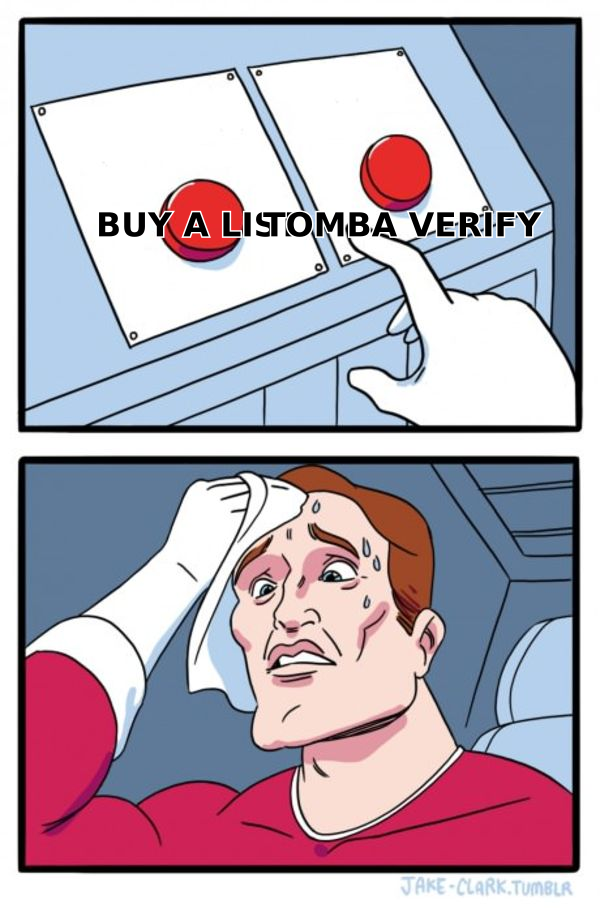
This is why the cheapest reputation "tool" in your stack is a verifier. Tomba's email verifier runs syntax, MX, disposable-domain, role-account, and SMTP-level checks, and its catch-all verifier handles the annoying middle case — domains that accept everything at the gateway and bounce silently later. Catch-alls are where most "but I verified my list" stories fall apart.
How do you build a reputation monitoring stack?#
Six components, in the order you should add them. Skipping ahead is the most common mistake.
- Authentication first. SPF, DKIM, and DMARC on every sending domain, with DMARC at least at
p=noneand a reporting address you actually read. Verify with an SPF checker before you send a single message. Nothing else matters if auth fails — Gmail's 2024 requirements made this non-negotiable for bulk senders. - Pre-send verification. Every list, every time, no exceptions for "this one came from a good source." Bulk-verify through bulk verify or the email verification API so it's an automated step in your pipeline rather than a thing someone remembers to do.
- Provider-native monitoring. Google Postmaster Tools for Gmail, Microsoft SNDS for Outlook if you're on a dedicated IP. Free, authoritative, and the first place you'll see trouble.
- Blacklist alerting. A weekly automated check against the major RBLs. MXToolbox covers the practical list; Talos gives you Cisco's separate view. Use a blacklist checker as your recurring sweep.
- Placement testing before scale. Run a seed test on any new template, new domain, or new sending volume tier. Also run your copy through a spam checker — link-heavy HTML and trigger phrases still cost you placement in 2026.
- Engagement instrumentation. Track replies, not opens. Apple Mail Privacy Protection has made open rates decorative since 2021, and mailbox providers weight genuine interaction — replies, stars, moves out of spam — far more heavily than pixel fires.
Add them in that order and each layer makes the next one cheaper. Add them in reverse and you'll spend $150/mo watching a number you can't move.
What should you do when your reputation drops?#
Diagnose in this sequence. It's ordered by how often each cause is the real one.
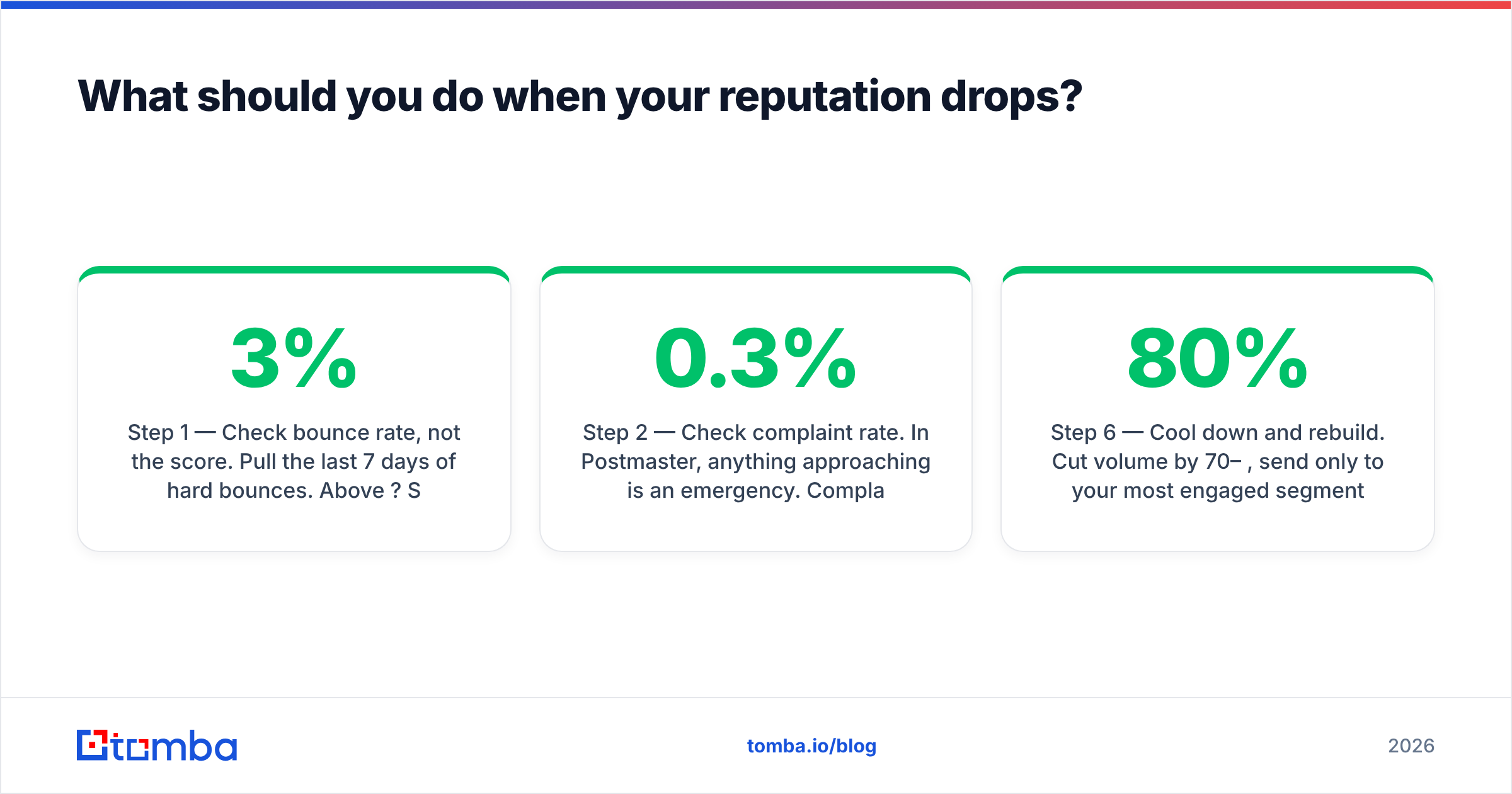
Step 1 — Check bounce rate, not the score. Pull the last 7 days of hard bounces. Above 3%? Stop sending immediately and re-verify the list. This is the cause in roughly two-thirds of sudden drops.
Step 2 — Check complaint rate. In Postmaster, anything approaching 0.3% is an emergency. Complaints usually mean targeting drift — you started emailing people who have no plausible reason to hear from you. That's a list-building problem, not a deliverability problem.
Step 3 — Check authentication. A DNS change, a new sending tool, or an expired DKIM key will silently break alignment. Re-run SPF/DKIM/DMARC validation.
Step 4 — Check blacklists. If you're listed on Spamhaus or a major RBL, follow that specific list's delisting process. Delisting without fixing the cause gets you relisted within days.
Step 5 — Check content and volume ramp. Did you double volume overnight? Add a new link domain? Switch to a heavier HTML template? Each of these can move placement independently of everything above.
Step 6 — Cool down and rebuild. Cut volume by 70–80%, send only to your most engaged segment for 2–3 weeks, and let engagement signals repair the score. There is no shortcut. A warmup calculator helps you plan the ramp back up without re-triggering the drop.
One important note on domain strategy: if you're running cold outbound, use separate sending subdomains or entirely separate domains from your primary brand domain. A reputation hit on outbound.yourcompany.com doesn't touch your transactional or support mail on yourcompany.com. That isolation is worth more than any monitoring subscription.
How do email reputation tools compare on real cost?#
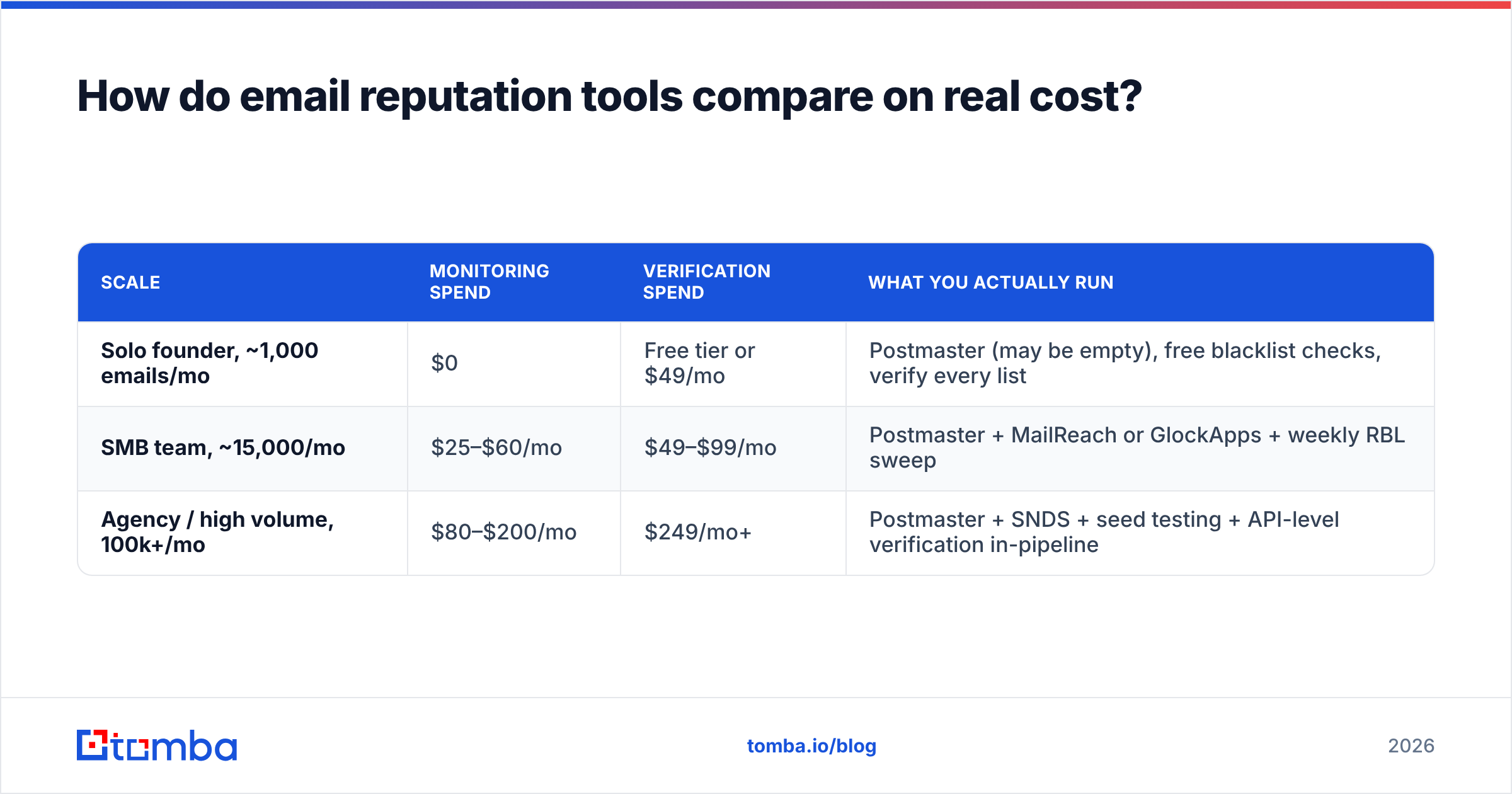
Sticker price is misleading because the categories don't overlap. Here's what a realistic 2026 stack costs at three scales.
| Scale | Monitoring spend | Verification spend | What you actually run |
|---|---|---|---|
| Solo founder, ~1,000 emails/mo | $0 | Free tier or $49/mo | Postmaster (may be empty), free blacklist checks, verify every list |
| SMB team, ~15,000/mo | $25–$60/mo | $49–$99/mo | Postmaster + MailReach or GlockApps + weekly RBL sweep |
| Agency / high volume, 100k+/mo | $80–$200/mo | $249/mo+ | Postmaster + SNDS + seed testing + API-level verification in-pipeline |
Notice that verification spend scales faster than monitoring spend, and that's correct. Monitoring cost is roughly flat regardless of volume — you're paying for a dashboard. Verification cost is per-record, and it's the line item that actually protects the score. Tomba pricing starts at a free tier with 25 searches/month, with Starter at $49/mo, Growth at $99/mo, and Pro at $249/mo, so the verification layer scales in step with your sending.
If you're sourcing contacts rather than importing them, the verification step can collapse into the sourcing step — which is cheaper than doing both separately. Tools like domain search return addresses with confidence scores already attached, so you're not paying twice for the same record.
What do most teams get wrong about email reputation tools?#
Three recurring errors, in descending order of cost:
- Treating a third-party score as authoritative. A vendor "reputation grade" of 87 means the vendor's model likes you. Gmail doesn't consult it. Postmaster's bucket rating is the one that correlates with actual inbox placement.
- Monitoring instead of preventing. Every dollar spent watching bounce rates would return more if spent stopping bounces. Diagnostics are necessary; they're not sufficient.
- Optimizing open rate. Since MPP, opens are inflated and unreliable. Providers weight replies and manual positive actions. Optimize for response rate and your reputation follows automatically.
There's a fourth, subtler one: buying a reputation tool to solve a targeting problem. If you're emailing the wrong people, no amount of technical hygiene saves you. Complaints come from irrelevance, and irrelevance is a list-building decision made weeks before you hit send.
Start where the leverage is#
The honest summary: set up Google Postmaster Tools this afternoon (it's free and takes ten minutes), add a weekly blacklist sweep, run a seed test before any campaign that goes above your normal volume — and then spend the rest of your budget making sure you're only emailing addresses that exist and people who plausibly want to hear from you.
That last part is where Tomba Email Finder fits. It sources professional addresses by domain, name, or company with confidence scoring and verification built into the same call, so the records entering your sequencer are already clean. Start free with 25 searches a month, wire it into your pipeline via the API, and let your reputation dashboard stay as boring as it should be.
Related guides#
Ready to find emails that actually work?
Join 150,000+ professionals who stopped guessing and started sending. Free credits on signup — no credit card required.
Get the Tomba newsletter
Practical outbound tactics and product updates — once every two weeks.
About the author