Email Sending Infrastructure: The Complete 2026 Setup Guide
Domains, mailboxes, authentication, warmup, and list hygiene — the five layers that decide whether your cold email reaches the inbox or dies in spam. Here's how to build each one without torching your main domain.

TL;DR
- Email sending infrastructure is the stack underneath your outbound: sending domains, mailboxes, DNS authentication, warmup, and list hygiene. Copy is the last 10% of deliverability, not the first.
- The safe 2026 shape is boring: 2-5 secondary domains, 2-3 mailboxes per domain, 20-40 sends per mailbox per day, all authenticated with SPF, DKIM, and an enforcing DMARC policy.
- Google and Microsoft now enforce a hard spam-complaint ceiling of 0.30% and require one-click unsubscribe for bulk senders. Both are infrastructure problems, not copywriting problems.
- Bounce rate is the fastest way to burn a new domain. Verify every address before it enters a sequence — a 12% bounce rate on a three-week-old domain is effectively a death sentence.
- Budget roughly $8-15 per mailbox per month all-in (domain + inbox + warmup). Ten mailboxes, properly warmed, outperform fifty cold ones every time.
What is email sending infrastructure?#
Email sending infrastructure is everything that exists between "I wrote a cold email" and "it appeared in someone's primary tab." Think of it like a delivery fleet. Your copy is the package. The infrastructure is the trucks, the license plates, the driver's record, and the route history — and the receiving warehouse (Google, Microsoft) checks all four before it lets the package through the gate.
Most teams get this backwards. They spend three weeks A/B testing subject lines while sending from a single mailbox on their primary domain, unauthenticated, to a list they bought and never verified. Then they blame the copy when reply rates sit at 0.4%.
The stack has five layers, and each one can independently sink you:
- Sending domains — separate, cheap lookalike domains that absorb reputation damage so your primary domain never does.
getacme.comandacme-hq.cominstead ofacme.com. - Mailboxes — the individual inboxes on those domains. Each one is a separate reputation entity with its own daily ceiling. This is the unit you scale, not the domain.
- Authentication — SPF, DKIM, and DMARC DNS records that prove you are who you claim to be. Missing DMARC in 2026 means bulk mail gets rejected outright at Google and Microsoft.
- Warmup and ramp — the 3-4 week process of building send history so a brand-new domain doesn't go from zero to 300 emails in a day, which is the single loudest spam signal that exists.
- List hygiene — verification, suppression, and deduplication. Your infrastructure can be perfect and a 15% bounce rate will still torch it inside a week.
Get all five right and mediocre copy still lands. Get any one badly wrong and world-class copy dies in the spam folder.
Why does sending domain separation matter so much?#
Because reputation is scoped to the domain, and domain reputation is not something you can buy back.
If you send cold outbound from yourcompany.com and complaints spike, everything that domain sends starts getting filtered — invoices, password resets, support replies, your CEO's email to a board member. Companies have taken six months to recover from this. Some never fully do.
The fix is structural. Register secondary domains, point them at your primary with a 301 redirect so they look legitimate to anyone who checks, and send all cold outbound from those. If one gets burned, you retire it and spin up another for $12. Your primary domain never enters the blast radius.
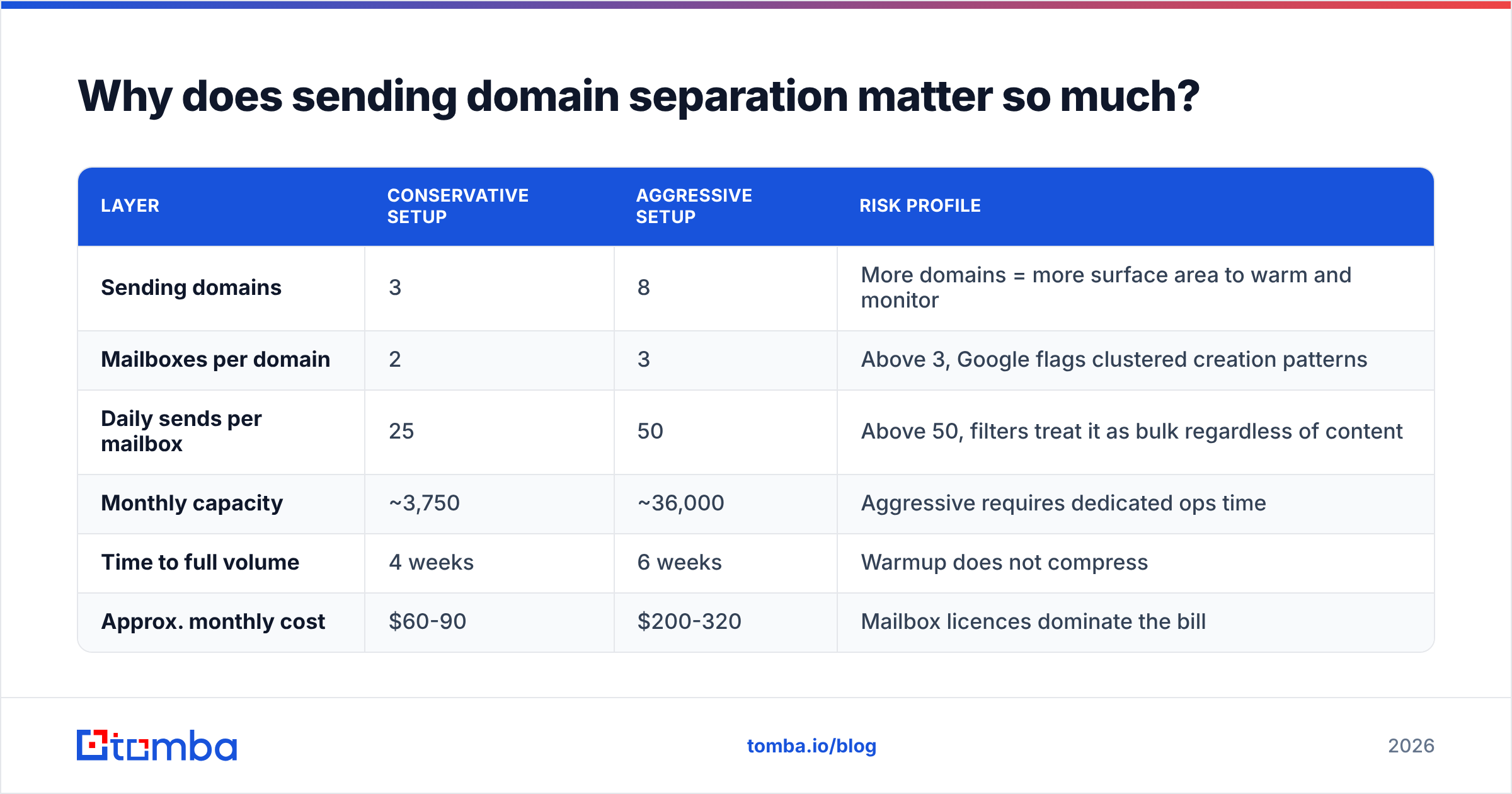
A workable allocation for a team sending 3,000 cold emails a month:
| Layer | Conservative setup | Aggressive setup | Risk profile |
|---|---|---|---|
| Sending domains | 3 | 8 | More domains = more surface area to warm and monitor |
| Mailboxes per domain | 2 | 3 | Above 3, Google flags clustered creation patterns |
| Daily sends per mailbox | 25 | 50 | Above 50, filters treat it as bulk regardless of content |
| Monthly capacity | ~3,750 | ~36,000 | Aggressive requires dedicated ops time |
| Time to full volume | 4 weeks | 6 weeks | Warmup does not compress |
| Approx. monthly cost | $60-90 | $200-320 | Mailbox licences dominate the bill |

The conservative column is right for almost everyone. The failure mode teams keep hitting is buying 40 mailboxes, warming none of them properly, and getting the whole cluster flagged in week two because Google noticed 40 new mailboxes on freshly registered domains all starting to send on the same Tuesday.
Which mailbox provider should you use?#
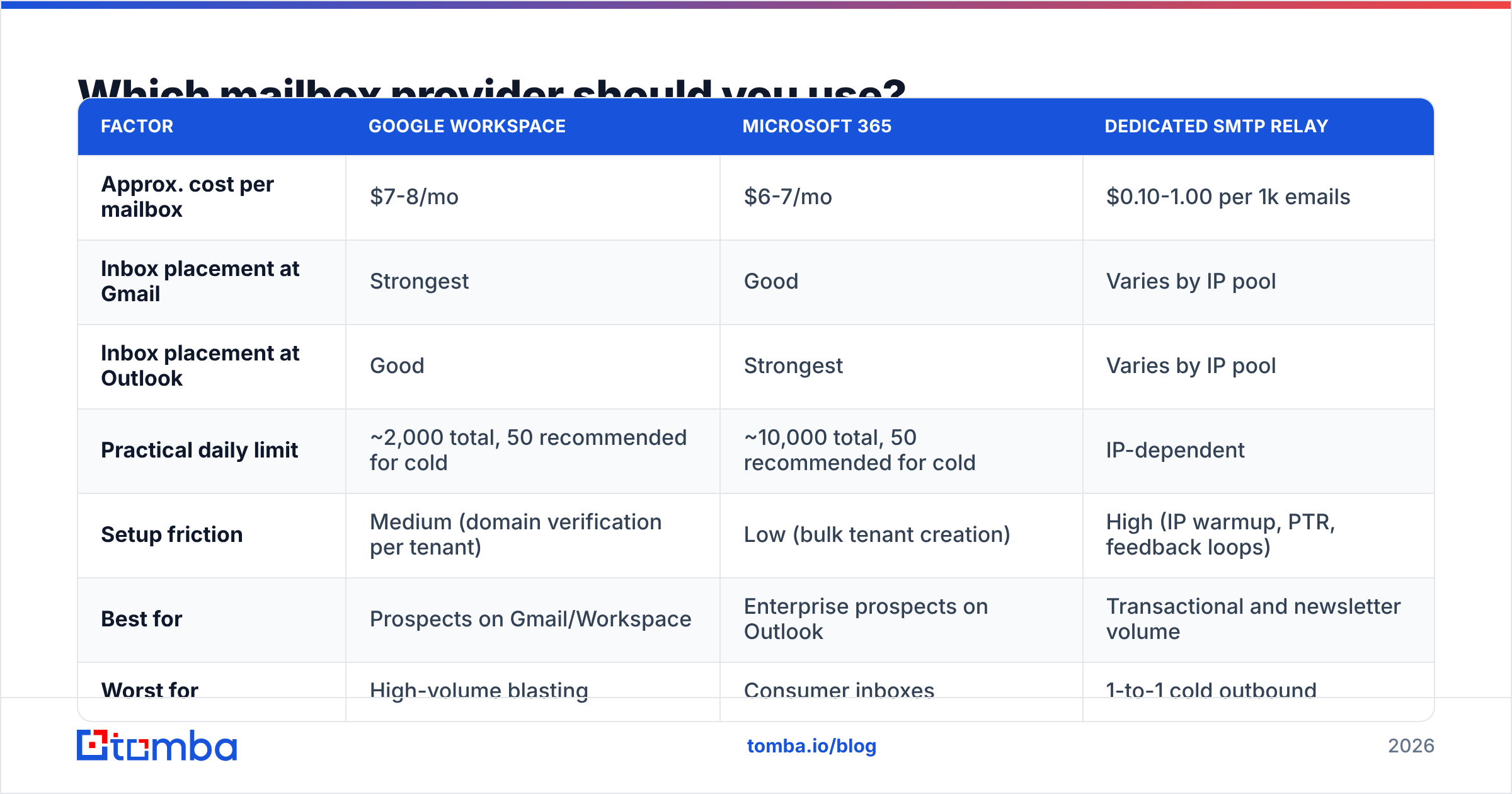
There are three real options, and the choice affects your ceiling more than most people expect.
| Factor | Google Workspace | Microsoft 365 | Dedicated SMTP relay |
|---|---|---|---|
| Approx. cost per mailbox | $7-8/mo | $6-7/mo | $0.10-1.00 per 1k emails |
| Inbox placement at Gmail | Strongest | Good | Varies by IP pool |
| Inbox placement at Outlook | Good | Strongest | Varies by IP pool |
| Practical daily limit | ~2,000 total, 50 recommended for cold | ~10,000 total, 50 recommended for cold | IP-dependent |
| Setup friction | Medium (domain verification per tenant) | Low (bulk tenant creation) | High (IP warmup, PTR, feedback loops) |
| Best for | Prospects on Gmail/Workspace | Enterprise prospects on Outlook | Transactional and newsletter volume |
| Worst for | High-volume blasting | Consumer inboxes | 1-to-1 cold outbound |
The nuance: match your infrastructure to your prospects' infrastructure. If your ICP is US SaaS startups, they're on Google Workspace and Google-to-Google delivery is measurably cleaner. If you sell to manufacturing, finance, or anything with 2,000+ employees, they're on Microsoft 365 and you should weight your mailbox mix accordingly. Running a 50/50 split across both providers is the hedge most experienced teams settle on.
Dedicated SMTP relays (Postmark, SendGrid, Amazon SES) belong to a different job. They're built for transactional and marketing volume where you control the IP reputation directly. Using them for 1-to-1 cold outbound usually hurts, because shared IP pools carry other senders' baggage and dedicated IPs need thousands of emails per month just to hold a stable reputation.
How do you set up SPF, DKIM, and DMARC correctly?#
These three DNS records are the licence plate on your delivery truck. Since Google and Microsoft tightened bulk sender requirements, sending without them isn't "slightly worse deliverability" — it's rejection.
SPF lists which servers are allowed to send on your domain's behalf. One record per domain, no exceptions. The most common break is exceeding the 10-DNS-lookup limit by stacking include: statements for every tool you've ever trialled; past 10 lookups the record silently fails. Run your domain through an SPF checker after any change to your stack.
DKIM cryptographically signs each message so the receiver can verify it wasn't altered in transit. Your mailbox provider generates the key; you publish it as a TXT record. Use 2048-bit keys, and rotate them roughly once a year.
DMARC tells receivers what to do when SPF or DKIM fails, and where to send reports. Start at p=none with a reporting address so you can see what's actually happening, then move to p=quarantine after two weeks of clean reports, then p=reject. Publishing p=none forever is the compliance equivalent of leaving the alarm unarmed — you technically have a DMARC record and it protects nothing. The DMARC specification is worth 20 minutes of reading if you're the one owning DNS.
Two additions that matter more each year: MTA-STS (forces TLS on inbound connections to your domain) and BIMI (displays your verified logo in the inbox, which requires p=quarantine or stricter). BIMI won't fix a bad sender reputation, but for brands with real recognition it lifts open rates a few points.
How long does email warmup actually take?#
Three to four weeks per mailbox before you touch real prospects, and there's no shortcut that isn't a trap.
Warmup works by simulating normal human email behavior: send small volumes, get replies, get marked as important, get moved out of spam. Warmup networks automate this by having your mailboxes exchange traffic with thousands of other pooled mailboxes. Providers detect obvious pool patterns, so quality matters — a warmup service that sends visibly templated garbage between accounts is training filters on the wrong signal.
A ramp schedule that survives scrutiny:
- Week 1: 5-10 warmup emails/day. Zero cold sends. Domain is under 14 days old and everything about it looks new.
- Week 2: 15-20 warmup emails/day. Still zero cold sends.
- Week 3: 25-30 warmup, plus 5-10 real cold sends. Watch bounce and reply rates obsessively.
- Week 4: Reduce warmup to ~15/day, increase cold to 20-25.
- Ongoing: Keep warmup running at 10-15/day forever. It's a background reputation subsidy that costs almost nothing.
Model your own curve with a warmup calculator before you commit to a launch date, because the honest answer is that infrastructure spun up today starts producing pipeline in a month. Teams that plan a campaign for "next week" and buy domains on Monday are already compromised.
Monitor with Google Postmaster Tools once you have volume. It exposes domain reputation, spam rate, and authentication pass rates directly from the receiving side — the only place you'll see Google's actual verdict on your infrastructure instead of guessing from open rates.
What kills good infrastructure fastest?#
Bounces. Not spam complaints, not bad copy — bounces.
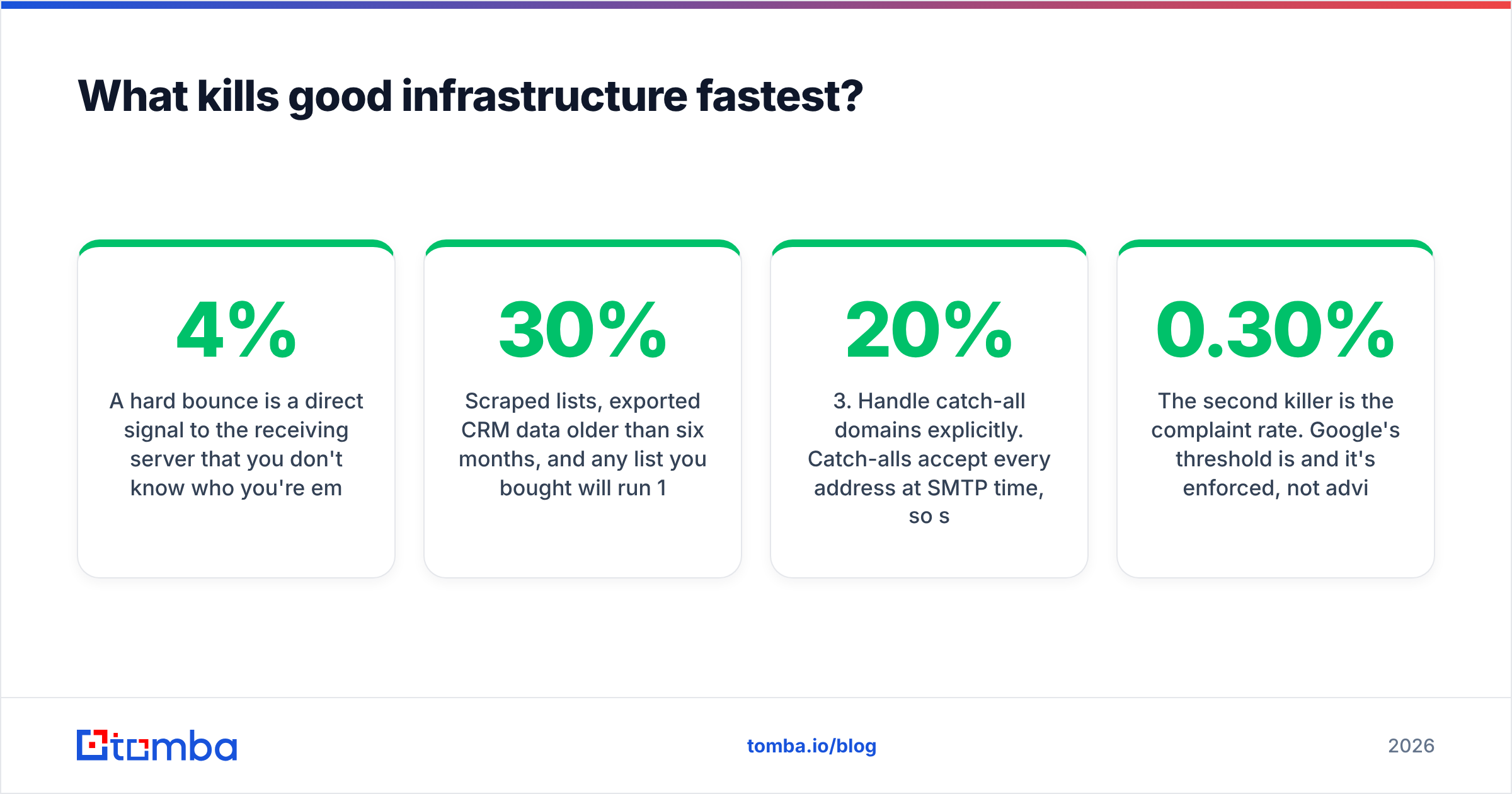
A hard bounce is a direct signal to the receiving server that you don't know who you're emailing, which is the defining behavior of a spammer. Gmail starts throttling around 3-4% hard bounce rate. Above 8% on a domain younger than 60 days and you're usually looking at an unrecoverable reputation.

Scraped lists, exported CRM data older than six months, and any list you bought will run 15-30% invalid. B2B email data decays at roughly 22-30% per year through job changes alone. That decay is not theoretical — it's the difference between a healthy domain and a dead one.
The sequence that prevents this:
- Find addresses from a source that validates at discovery time. An email finder that returns a confidence score is worth more than a scraper that returns a guess formatted as a fact.
- Verify everything before import. Run the full list through an email verifier and drop anything that isn't
valid. For large imports, bulk verify in one pass rather than trickling addresses in. - Handle catch-all domains explicitly. Catch-alls accept every address at SMTP time, so standard verification returns "unknown." Roughly 15-20% of B2B domains are catch-all. A catch-all verifier narrows these down; otherwise segment them into a separate low-volume campaign so an unknown-heavy batch can't spike your bounce rate.
- Suppress aggressively. Every bounce, unsubscribe, and complaint goes into a global suppression list that applies across every mailbox and every sequence. Re-emailing someone who already bounced is the mistake that turns a recoverable problem into a permanent one.
- Re-verify quarterly. Any list sitting untouched for 90+ days should be re-run before reuse.
The second killer is the complaint rate. Google's threshold is 0.30% and it's enforced, not advisory. One-click unsubscribe (the List-Unsubscribe header) is now mandatory for bulk senders — and counterintuitively, making unsubscribing easy protects you, because every unsubscribe is a complaint that didn't happen.
What does a complete setup cost and how do you sequence it?#
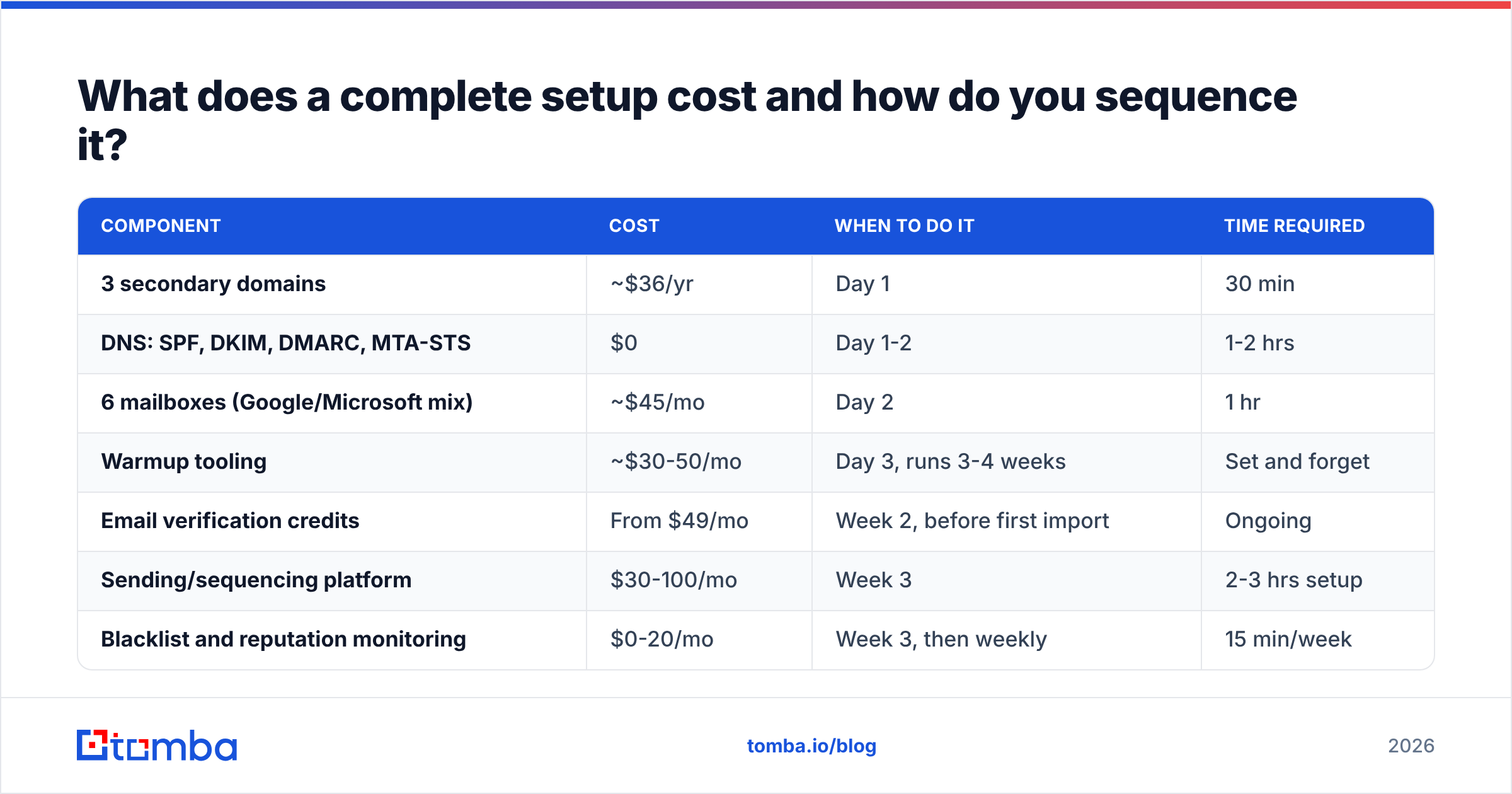
| Component | Cost | When to do it | Time required |
|---|---|---|---|
| 3 secondary domains | ~$36/yr | Day 1 | 30 min |
| DNS: SPF, DKIM, DMARC, MTA-STS | $0 | Day 1-2 | 1-2 hrs |
| 6 mailboxes (Google/Microsoft mix) | ~$45/mo | Day 2 | 1 hr |
| Warmup tooling | ~$30-50/mo | Day 3, runs 3-4 weeks | Set and forget |
| Email verification credits | From $49/mo | Week 2, before first import | Ongoing |
| Sending/sequencing platform | $30-100/mo | Week 3 | 2-3 hrs setup |
| Blacklist and reputation monitoring | $0-20/mo | Week 3, then weekly | 15 min/week |
All-in: roughly $160-250/month for a setup producing 3,000-4,500 well-targeted cold emails per month. Compare that to a single bad month where your primary domain gets flagged and your entire company's email goes to spam, and the infrastructure spend stops looking like overhead.
Check your domains and IPs against a blacklist checker weekly. Listings on Spamhaus or SORBS are usually fixable within 48 hours if you catch them early and fix the underlying cause; catching them a month late, after you've kept sending, is a different story.
Where does data quality fit into the infrastructure stack?#
It's the foundation, not an add-on. Perfect DNS records and a flawless warmup schedule can't compensate for a list where one in five addresses doesn't exist.
The practical implication for how you buy: your verification and discovery budget should scale with sending volume, not be treated as a fixed cost you optimize down. If you're running 4,000 emails a month, you need to find and verify at least that many addresses monthly, plus re-verification on aging segments.
Tomba's plans map to this reasonably cleanly — the free tier (25 searches/month) is for testing patterns, Starter at $49/mo suits a single SDR running one or two mailbox clusters, Growth at $99/mo covers a small team at 3,000-5,000 sends/month, and Pro at $249/mo handles agency-scale volume across multiple client domains. Competitors like BookYourData take a database-first approach with prebuilt verified lists, which suits teams that want volume without building discovery workflows; the API-first model suits teams that want enrichment wired into their own pipeline. Both are legitimate — pick based on whether your bottleneck is list volume or list freshness.
Start with the layer that's actually broken#
Run this audit before you change anything: check your DMARC policy (is it still p=none?), pull your last campaign's bounce rate (is it above 3%?), count mailboxes and divide by daily volume (are you above 50 per mailbox?), and check whether cold outbound is leaving your primary domain. Whichever one fails first is where your deliverability is leaking — and it's almost never the copy.
Once the DNS and warmup layers are solid, the only variable left is data quality, and that's the one you control most directly. The Tomba Email Finder returns verified professional addresses with confidence scores at discovery, so invalid contacts never reach a sequence and never touch a domain you spent a month warming. Start on the free tier, verify your next list before you import it, and watch what a sub-2% bounce rate does to your inbox placement.
Related guides#
Ready to find emails that actually work?
Join 150,000+ professionals who stopped guessing and started sending. Free credits on signup — no credit card required.
Get the Tomba newsletter
Practical outbound tactics and product updates — once every two weeks.
About the author