Email Server Blacklist: How to Check, Fix, and Stay Off
Most blacklist panic is wasted on lists nobody queries. Here's which blocklists actually stop your mail, how to check them in five minutes, and the delisting steps that work.
TL;DR
- An email server blacklist (more accurately, a DNS blocklist or DNSBL) is a published list of IPs or domains that receiving mail servers query before accepting your message. Get listed on one that matters, and your mail bounces or lands in spam at scale.
- Only a handful of lists genuinely move the needle: Spamhaus (SBL/XBL/CSS/DBL), Barracuda, Invaluement, and SpamCop. Lists like UCEProtect Level 2/3 generate loud alerts and near-zero real impact.
- Most listings trace back to three causes: dirty lists producing high bounce rates, a compromised account or script sending through your server, and volume ramps that outrun your sending history.
- Delisting is not the fix — it's the receipt. If you delist without removing the cause, you get relisted within days and the second listing sticks harder.
- The cheapest prevention is upstream: verify addresses before you send, authenticate your domain properly, and keep complaint rates under 0.3%.
You checked MXToolbox, saw a red row, and your stomach dropped. Before you fire off a delisting request, understand that half of what that scanner flags has no bearing on whether Gmail accepts your mail. The other half absolutely does. This guide separates them.
What is an email server blacklist?#
An email server blacklist is a database of IP addresses or domains that a blocklist operator has flagged as sources of spam or abuse. When your server hands a message to a receiving server, that receiver can run a DNS query against one or more of these lists in milliseconds. If your sending IP comes back listed, the receiver decides what to do: hard-reject with a 5xx error, defer with a 4xx, route to spam, or silently apply a reputation penalty.
The everyday analogy: it's a bouncer's clipboard. Your IP is the name at the door. Some clubs check three clipboards and turn you away if any of them has you. Some check one and only use it to decide whether you get the good table. Some don't check at all.
Two important distinctions people get wrong:
- Blacklist vs. blocklist. Same thing. The industry has largely moved to "blocklist" and "DNSBL" (DNS-based blocklist). Search volume still favors "blacklist," so both terms show up in vendor tools.
- IP listing vs. domain listing. An IP listing (Spamhaus SBL, XBL, PBL) targets the machine sending mail. A domain listing (Spamhaus DBL, SURBL) targets a domain that appears in the message body or the From header. Domain listings follow you even if you change IPs, which makes them significantly more painful.
- Public list vs. internal reputation. Microsoft, Google, and Yahoo maintain private reputation systems that no scanner can query. You can be clean on every public list and still be filtered by Gmail because your engagement metrics are poor. Public blocklists are a floor, not a ceiling.

Which blacklists actually matter in 2026?#
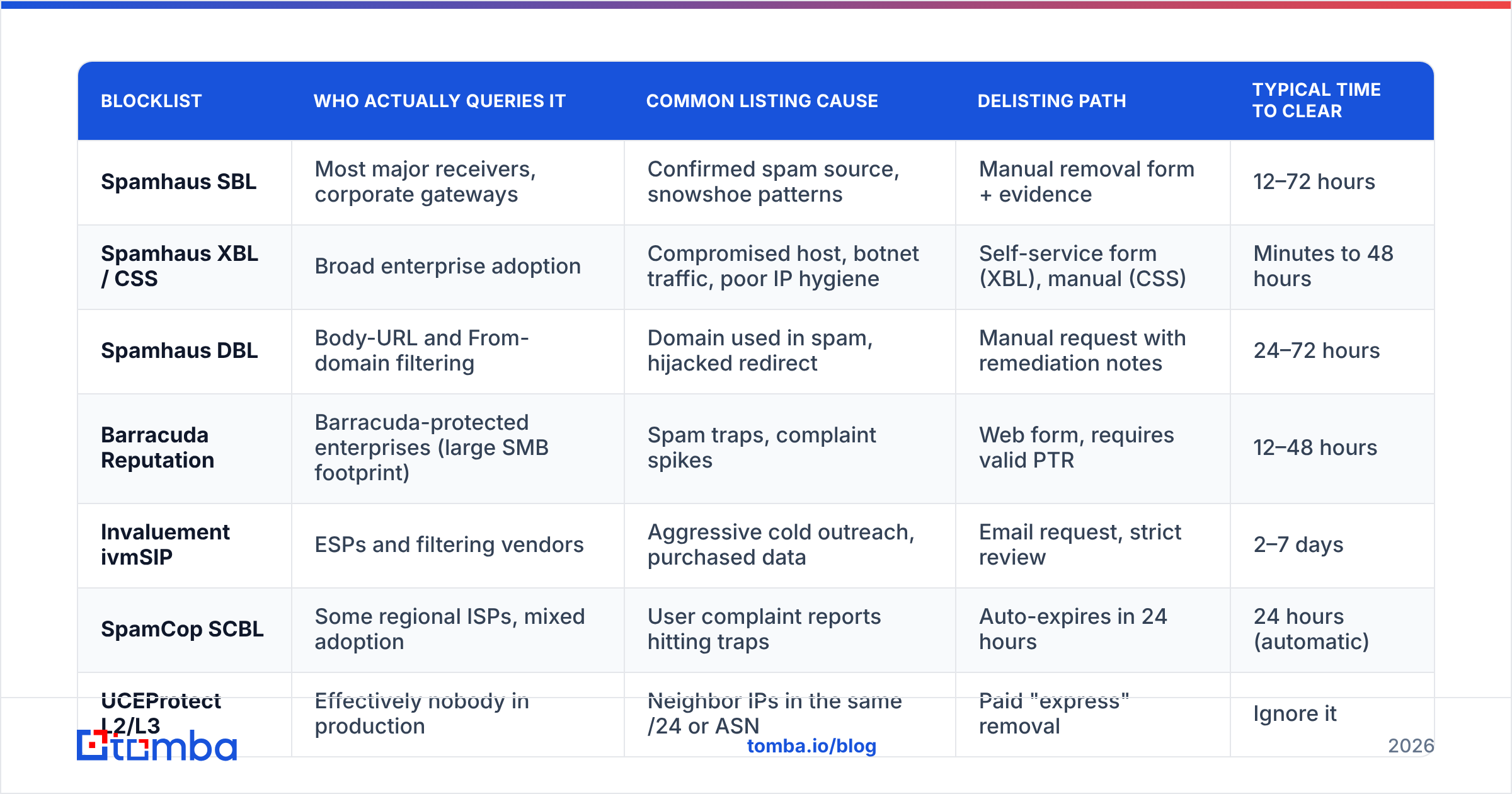
Blocklist scanners check 80 to 100 lists because checking is cheap, not because those lists are used. Here is the honest tiering.
| Blocklist | Who actually queries it | Common listing cause | Delisting path | Typical time to clear |
|---|---|---|---|---|
| Spamhaus SBL | Most major receivers, corporate gateways | Confirmed spam source, snowshoe patterns | Manual removal form + evidence | 12–72 hours |
| Spamhaus XBL / CSS | Broad enterprise adoption | Compromised host, botnet traffic, poor IP hygiene | Self-service form (XBL), manual (CSS) | Minutes to 48 hours |
| Spamhaus DBL | Body-URL and From-domain filtering | Domain used in spam, hijacked redirect | Manual request with remediation notes | 24–72 hours |
| Barracuda Reputation | Barracuda-protected enterprises (large SMB footprint) | Spam traps, complaint spikes | Web form, requires valid PTR | 12–48 hours |
| Invaluement ivmSIP | ESPs and filtering vendors | Aggressive cold outreach, purchased data | Email request, strict review | 2–7 days |
| SpamCop SCBL | Some regional ISPs, mixed adoption | User complaint reports hitting traps | Auto-expires in 24 hours | 24 hours (automatic) |
| UCEProtect L2/L3 | Effectively nobody in production | Neighbor IPs in the same /24 or ASN | Paid "express" removal | Ignore it |
| SORBS | Retired — service went dark in 2024 | N/A | N/A | N/A |
The practical rule: if you are listed on Spamhaus, Barracuda, or Invaluement, treat it as a production incident. If you are listed on UCEProtect Level 3 because a stranger three IPs down the block sent spam, close the tab. Charging for removal is the tell — legitimate operators do not monetize delisting.
Check your current status with the free blacklist checker, and cross-reference anything red against Spamhaus's own lookup rather than trusting an aggregator's label.
How do you check if your email server is blacklisted?#
Run these five checks in order. It takes about ten minutes and tells you whether you have a blocklist problem, a reputation problem, or an authentication problem — three very different fixes.
- Identify your actual sending IP. Not your website's IP. Send a test message to yourself, open raw headers, and read the last
Received:hop your server touched. If you send through an ESP, the IP is theirs — and so is the delisting responsibility. - Query the tier-1 lists directly. Spamhaus, Barracuda, and Invaluement each publish a lookup page. Multi-list scanners like MXToolbox are fine for a first pass, but confirm at the source before you act.
- Check domain reputation, not just IP. Look up your sending domain and any link domains you use in campaigns against Spamhaus DBL and SURBL. A shortener domain in your footer can poison an otherwise clean send.
- Pull Google Postmaster Tools data. Postmaster Tools shows your domain and IP reputation buckets, spam rate, and authentication pass rate for Gmail traffic specifically. If Postmaster shows "Bad" reputation while every public list is clean, your problem is engagement, not blocklisting.
- Read the actual bounce strings. A rejection that says
blocked using zen.spamhaus.orgis a blocklist problem. One that says550 5.7.1 Unfortunately, messages from [IP] weren't sentwith a Microsoft code is an internal reputation problem no delisting form will solve.
Verify your SPF record at the same time. A broken or overly permissive SPF record won't get you listed on its own, but it removes the only signal receivers can use to distinguish you from someone spoofing your domain.
Why did your server get blacklisted?#
Listings are symptoms. There are only a few realistic diseases.
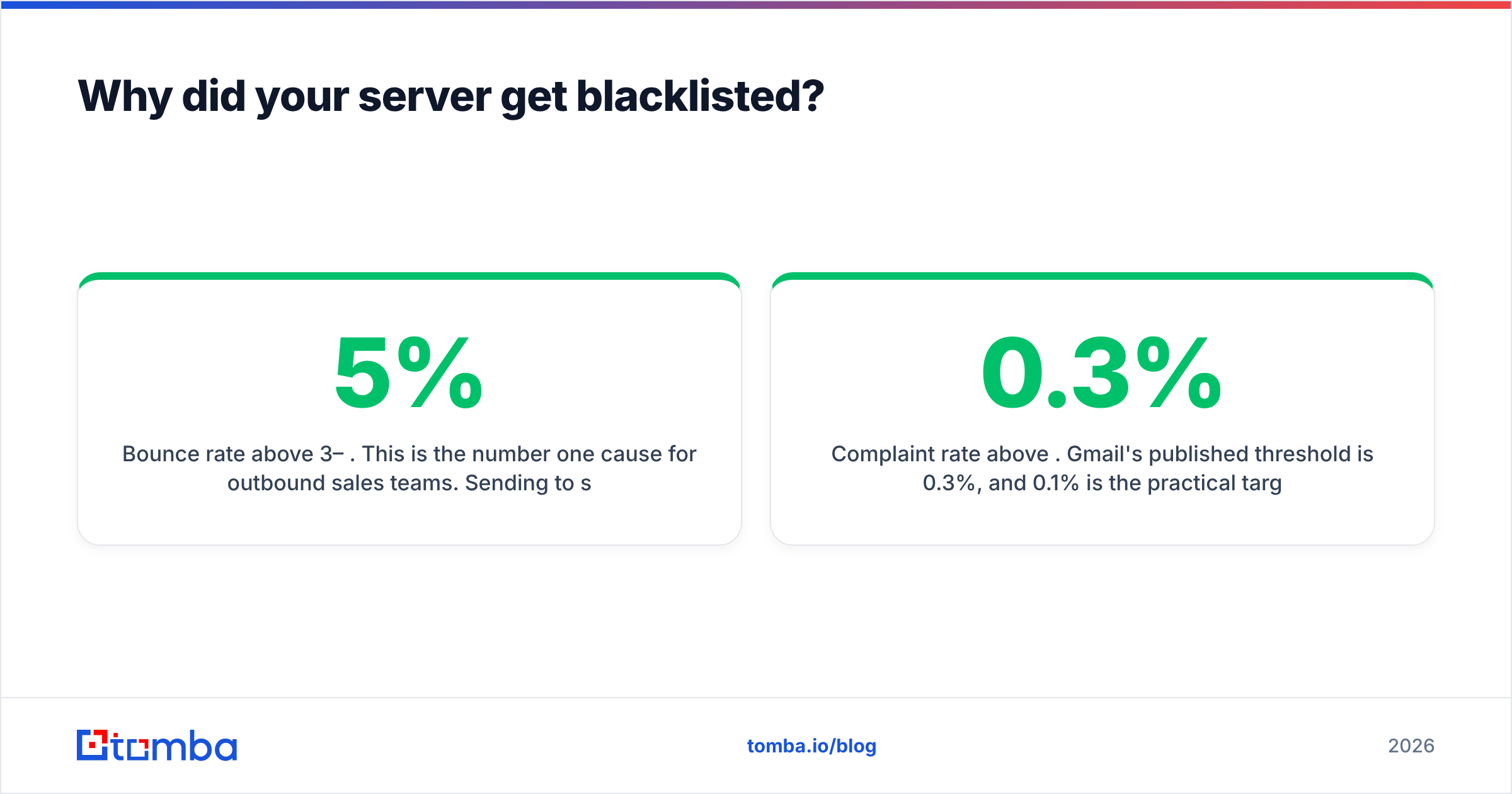
- Bounce rate above 3–5%. This is the number one cause for outbound sales teams. Sending to stale or scraped addresses hits spam traps — recycled addresses that once belonged to real people and now exist purely to catch senders who never clean their lists. Spamhaus and Barracuda both weight trap hits heavily.
- A compromised account or webform. A leaked SMTP credential, an unauthenticated contact form, or a WordPress plugin vulnerability turns your server into a relay. XBL listings almost always mean this. Fix the hole before you request removal or you'll be back within 24 hours.
- Volume that outruns your history. A new IP that sends 50 emails on Monday and 8,000 on Thursday looks exactly like a snowshoe spammer. Receivers cannot tell the difference between a legitimate ramp and an abusive one without engagement history.
- Complaint rate above 0.3%. Gmail's published threshold is 0.3%, and 0.1% is the practical target. Complaints don't directly cause DNSBL listings, but they correlate tightly with the behavior that does.
- Shared IP neighbors. On cheap shared hosting or a low-tier ESP plan, you inherit the reputation of everyone else on that IP. This is the one cause you cannot remediate — you can only migrate.
- Content-level signals. Link domains with bad history, attachments matching malware patterns, or URL shorteners that spammers also use. Domain listings on the DBL frequently come from a single bad link, not from your sending behavior at all.

How do you get delisted, step by step?#
The sequence matters. Requesting removal before fixing the cause is the single most common mistake, and repeat listings are treated with far less patience.
Step 1 — Stop sending from that IP. Pause every campaign on the listed IP immediately. Continued sending while listed compounds the trap hits and complaint volume that got you there.
Step 2 — Find and close the cause. Audit outbound logs for the 72 hours before the listing. Look for a single account sending disproportionate volume, a spike from a webform, or a campaign with an abnormal bounce rate. Rotate SMTP credentials. Patch the CMS. Kill the campaign.
Step 3 — Clean the list that triggered it. Run the entire recipient list through an email verifier and remove everything that isn't a confirmed deliverable. If you send at volume, do it as a bulk verify job rather than address by address. Suppress every hard bounce permanently — reusing a hard-bounced address is how you hit the same trap twice.
Step 4 — Confirm your authentication. SPF, DKIM, and a DMARC policy at minimum p=none with reporting on. Since the 2024 Gmail and Yahoo bulk-sender requirements, missing DMARC is grounds for rejection independent of any blocklist. Set a valid PTR record — Barracuda will not process a removal for an IP without reverse DNS.
Step 5 — Submit the removal request with specifics. Generic requests get generic outcomes. State what was sending, what you found, what you changed, and what prevents recurrence. Example: "A compromised WordPress contact form relayed approximately 40,000 messages between March 2 and March 4. The plugin was updated, the form now requires CAPTCHA, and SMTP auth is enforced. Outbound rate limiting is set to 500/hour."
Step 6 — Wait, then ramp slowly. Do not resume at prior volume. Restart at 10–20% and increase roughly 30% per day while watching bounce and complaint rates. Use an email warmup calculator to build the schedule rather than guessing.
Step 7 — Monitor weekly. Set a recurring blocklist check and a Postmaster Tools review. Catching a listing within hours instead of weeks is the difference between a delay and a quarter of lost pipeline.
How do you stay off a blacklist permanently?#
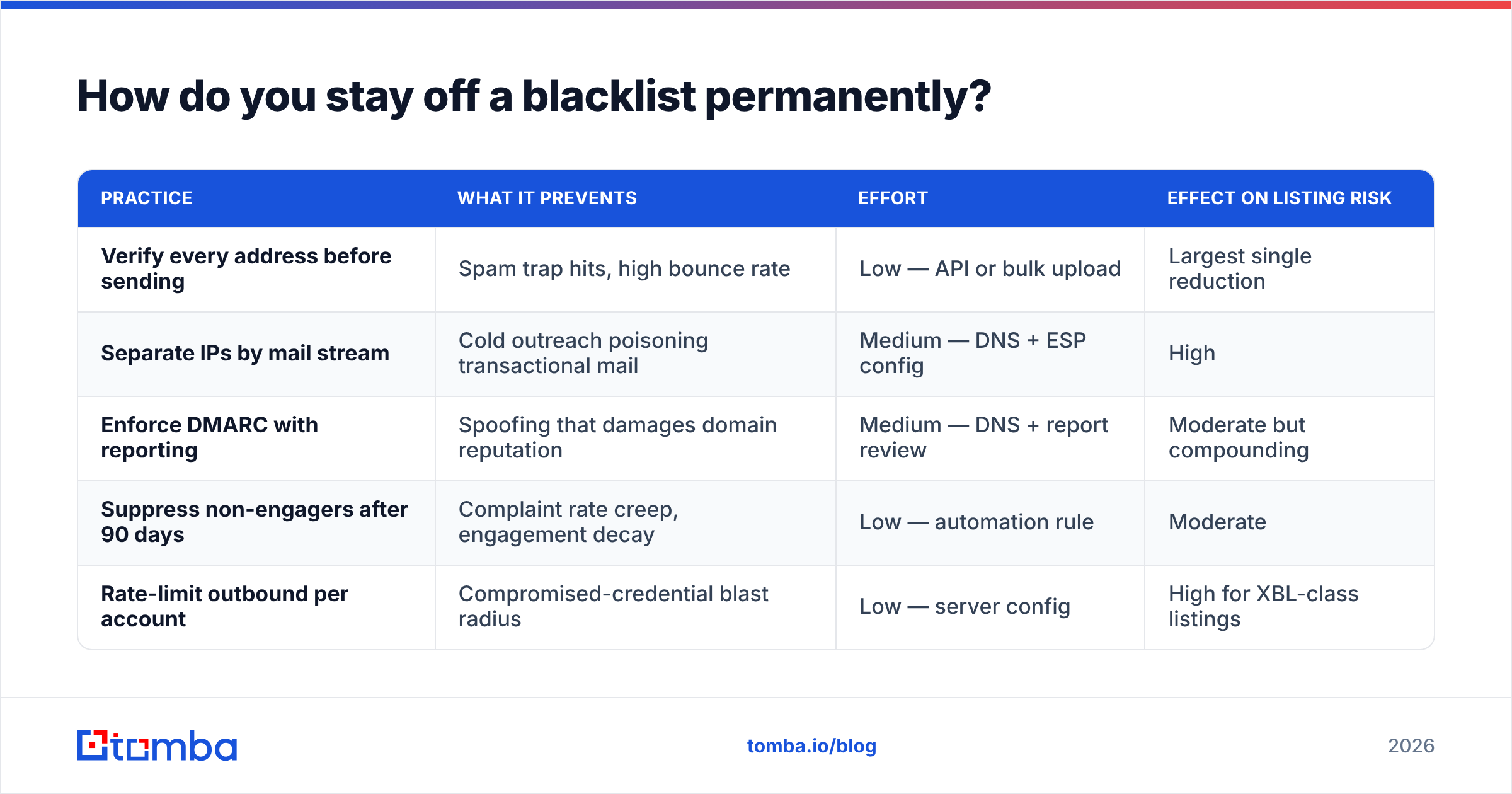
Prevention costs less than remediation by roughly an order of magnitude. Four habits cover most of it.
| Practice | What it prevents | Effort | Effect on listing risk |
|---|---|---|---|
| Verify every address before sending | Spam trap hits, high bounce rate | Low — API or bulk upload | Largest single reduction |
| Separate IPs by mail stream | Cold outreach poisoning transactional mail | Medium — DNS + ESP config | High |
| Enforce DMARC with reporting | Spoofing that damages domain reputation | Medium — DNS + report review | Moderate but compounding |
| Suppress non-engagers after 90 days | Complaint rate creep, engagement decay | Low — automation rule | Moderate |
| Rate-limit outbound per account | Compromised-credential blast radius | Low — server config | High for XBL-class listings |
The stream separation point is underrated. Password resets and invoices should never share an IP with cold outbound. When a prospecting campaign gets your IP listed, you don't want your customers to stop receiving receipts.
On the data side, the quality of the addresses you collect determines almost everything downstream. Pulling verified contacts from a domain search with a confidence score attached produces a fundamentally different bounce profile than scraping a list or buying an unverified CSV. Understanding sender reputation as a compounding asset — one that takes months to build and days to destroy — is the mental model that keeps teams out of trouble.
Is a blacklist listing permanent?#
No, but the damage isn't purely mechanical. Most listings clear within 24 to 72 hours of a legitimate removal request. SpamCop expires automatically after 24 hours if reports stop. Spamhaus SBL removals are usually processed same-day when the request shows real remediation.
What lingers is the reputation history at the receiver. Gmail, Microsoft, and Yahoo record that your IP and domain were listed. Delisting resets the hard block; it does not reset the internal score. Expect three to six weeks of degraded inbox placement after a serious listing, recovering faster if engagement metrics improve during the ramp.
Repeat listings are where it gets expensive. A second listing on the same IP within 90 days signals to operators that the first remediation was cosmetic, and manual review gets slower. A third makes IP migration a more realistic option than continued appeals — and migrating means starting warmup from zero.
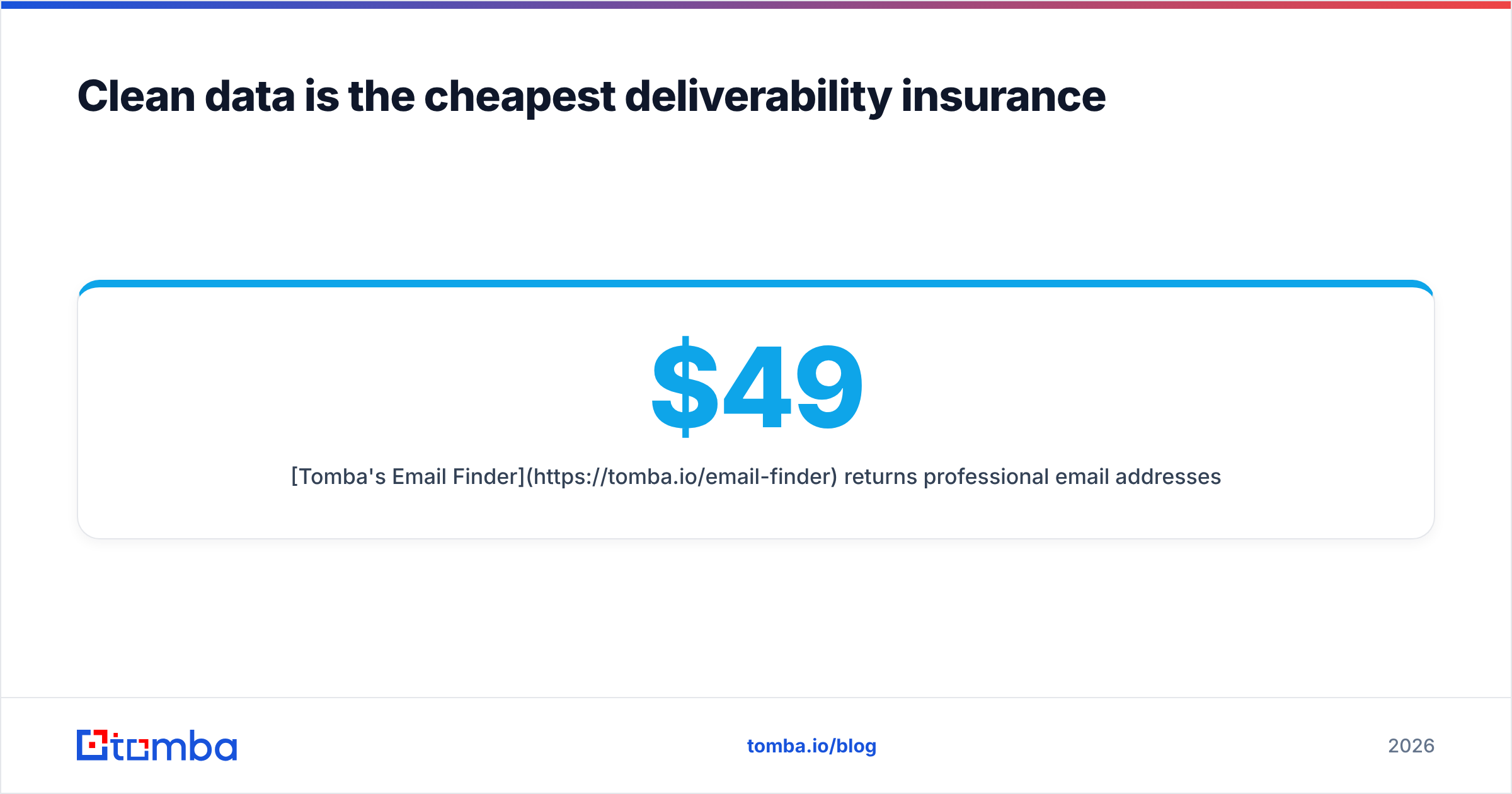
Clean data is the cheapest deliverability insurance#
Nearly every blacklist incident on a cold outreach program starts the same way: a list nobody validated, sent at a volume nobody ramped. Fix the input and the rest of the chain mostly takes care of itself.
Tomba's Email Finder returns professional email addresses with a confidence score and a verification status attached, so you're not guessing which addresses will bounce before you send. Start on the free tier with 25 searches per month, or check Tomba pricing — Starter is $49/mo, Growth $99/mo, Pro $249/mo — and run your next list through verification before it ever touches your sending IP.
Related guides#
Ready to find emails that actually work?
Join 150,000+ professionals who stopped guessing and started sending. Free credits on signup — no credit card required.
Get the Tomba newsletter
Practical outbound tactics and product updates — once every two weeks.
About the author