How Email Spam Filters Work in 2026 (And How to Pass Them)
Spam filters score your message before a human ever sees it. Here is exactly what Gmail, Microsoft 365, and corporate gateways measure in 2026 — and the order you should fix your setup in.
TL;DR
- Email spam filters are ranking systems, not blocklists. Every message gets a score built from authentication, sender reputation, recipient engagement, and content — in roughly that order of weight.
- Authentication (SPF, DKIM, DMARC) is now a hard gate at Gmail and Microsoft, not a bonus. Fail it and nothing else you do matters.
- Reputation is domain-level and IP-level, and it decays. A 0.3% complaint rate is the practical ceiling; bounces above 2–3% start dragging you down within days.
- Content filtering (spam words, link ratios, image-heavy HTML) is real but overrated. It rarely sinks a sender with clean auth and good engagement.
- The cheapest deliverability fix is upstream: verify addresses before they ever enter a sequence. Bounces are the single fastest way to burn a new domain.
What are email spam filters, exactly?#
Think of a spam filter like airport security with a frequent-flyer database. Everyone passes through the same scanner, but the machine already knows whether you've flown this route 400 times without incident or whether you showed up today with a one-way ticket and no bags. The bag scan (your content) matters far less than your travel history (your reputation) and your ID (your authentication).
Technically, an email spam filter is a classifier that sits between the receiving mail server and the inbox. It ingests hundreds of signals per message and outputs a placement decision: inbox, promotions/other tab, junk folder, quarantine, or hard reject at the SMTP layer. Modern filters at Gmail and Microsoft are machine-learned models retrained continuously on user behavior — which is why the same email can land in the inbox for one recipient and in junk for another at the same company.
Three things follow from that:
- There is no universal spam score. Tools like SpamAssassin give you a numeric score, and that score is useful as a smoke test, but Gmail does not use it. Treat third-party scores as directional only.
- Placement is per-recipient. Engagement history between your domain and that specific mailbox is a heavy input. Sending to someone who replied to you last month is materially safer than sending to a stranger.
- Decisions are fast and sticky. Once a filter has learned that your domain produces unread, undeleted, unreplied mail, recovery takes weeks of good behavior, not one good campaign.
How does a spam filter decide in 2026?#
Here is the signal hierarchy that actually drives placement, ordered by how much damage each one can do:
- Authentication pass/fail — SPF alignment, DKIM signature validity, and a published DMARC policy. Since 2024, Google and Yahoo require all three for bulk senders, and Microsoft extended similar requirements to high-volume senders on Outlook.com. This is binary. Fail and you're filtered before any other check runs.
- Domain and IP reputation — a rolling score maintained by each mailbox provider based on your complaint rate, bounce rate, spam-trap hits, and sending consistency. Domain reputation now outweighs IP reputation for most senders, which is why rotating IPs no longer rescues a burned domain.
- Recipient engagement — opens are weak and increasingly unreliable signals, but replies, forwards, "move to inbox," and starred messages are strong positive signals. Deletes without opening and "report spam" clicks are strong negatives.
- List hygiene evidence — hard bounces and unknown-user rejections tell the filter you didn't verify your data. A 5% bounce rate on a cold campaign is a confession that your list was scraped, not sourced.
- Content and structure — link-to-text ratio, tracking-domain reputation, image-only bodies, misleading subject lines, HTML that doesn't match the plain-text part, and URL shorteners with poor reputation.
- Volume pattern — sudden ramps. Going from 20 sends/day to 2,000 overnight looks like a compromised account regardless of how clean your content is.
Notice where "spam trigger words" sits. It's a sub-item inside the fifth priority. Writing "free" in a subject line will not sink a properly authenticated sender with a warm domain. Sending 800 emails from a two-week-old domain to unverified addresses absolutely will.
Which email spam filters actually matter?#
You aren't optimizing for "spam filters" in the abstract. You're optimizing for four or five specific systems that cover the overwhelming majority of B2B mailboxes.
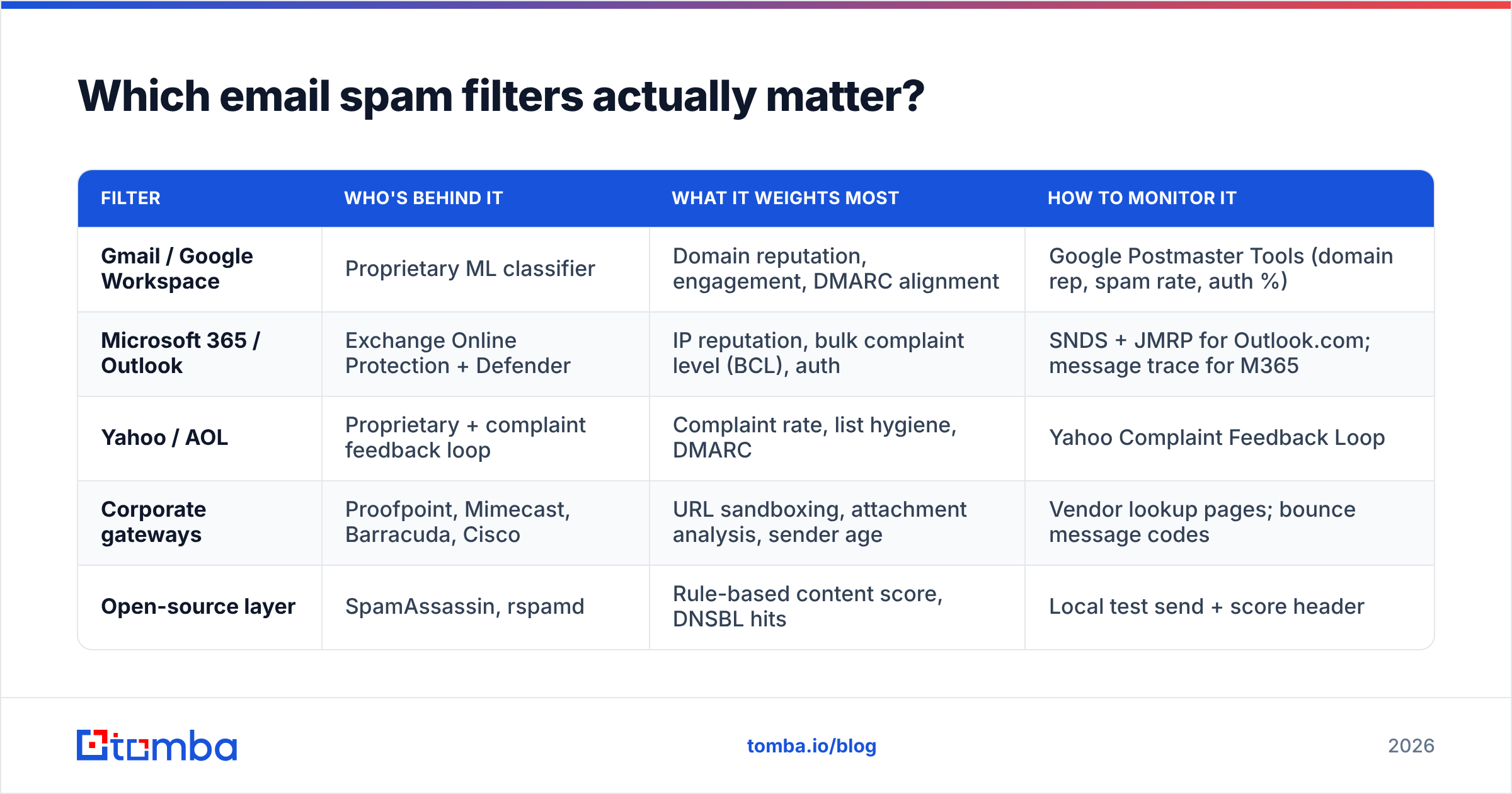
| Filter | Who's behind it | What it weights most | How to monitor it |
|---|---|---|---|
| Gmail / Google Workspace | Proprietary ML classifier | Domain reputation, engagement, DMARC alignment | Google Postmaster Tools (domain rep, spam rate, auth %) |
| Microsoft 365 / Outlook | Exchange Online Protection + Defender | IP reputation, bulk complaint level (BCL), auth | SNDS + JMRP for Outlook.com; message trace for M365 |
| Yahoo / AOL | Proprietary + complaint feedback loop | Complaint rate, list hygiene, DMARC | Yahoo Complaint Feedback Loop |
| Corporate gateways | Proofpoint, Mimecast, Barracuda, Cisco | URL sandboxing, attachment analysis, sender age | Vendor lookup pages; bounce message codes |
| Open-source layer | SpamAssassin, rspamd | Rule-based content score, DNSBL hits | Local test send + score header |
Two practical takeaways. First, Google Postmaster Tools is non-negotiable — it's free, it takes ten minutes to verify, and it's the only place you'll see your actual Gmail domain reputation. Second, corporate gateways behave differently from consumer filters. Proofpoint and Mimecast weight domain age and URL reputation heavily and are far less forgiving of brand-new sending domains. If your ICP is enterprise, your warmup period needs to be longer, not shorter.

Why do legitimate emails still land in spam?#
Because most "legitimate" cold email fails at least one of five checks that have nothing to do with legitimacy.
Broken or partial authentication. SPF passing but not aligned, DKIM signing with the wrong selector after a tool migration, DMARC published as p=none and never revisited. Run an SPF checker against your sending domain and confirm the record resolves in under 10 DNS lookups — exceeding that limit causes a permerror, which most filters treat as a fail.
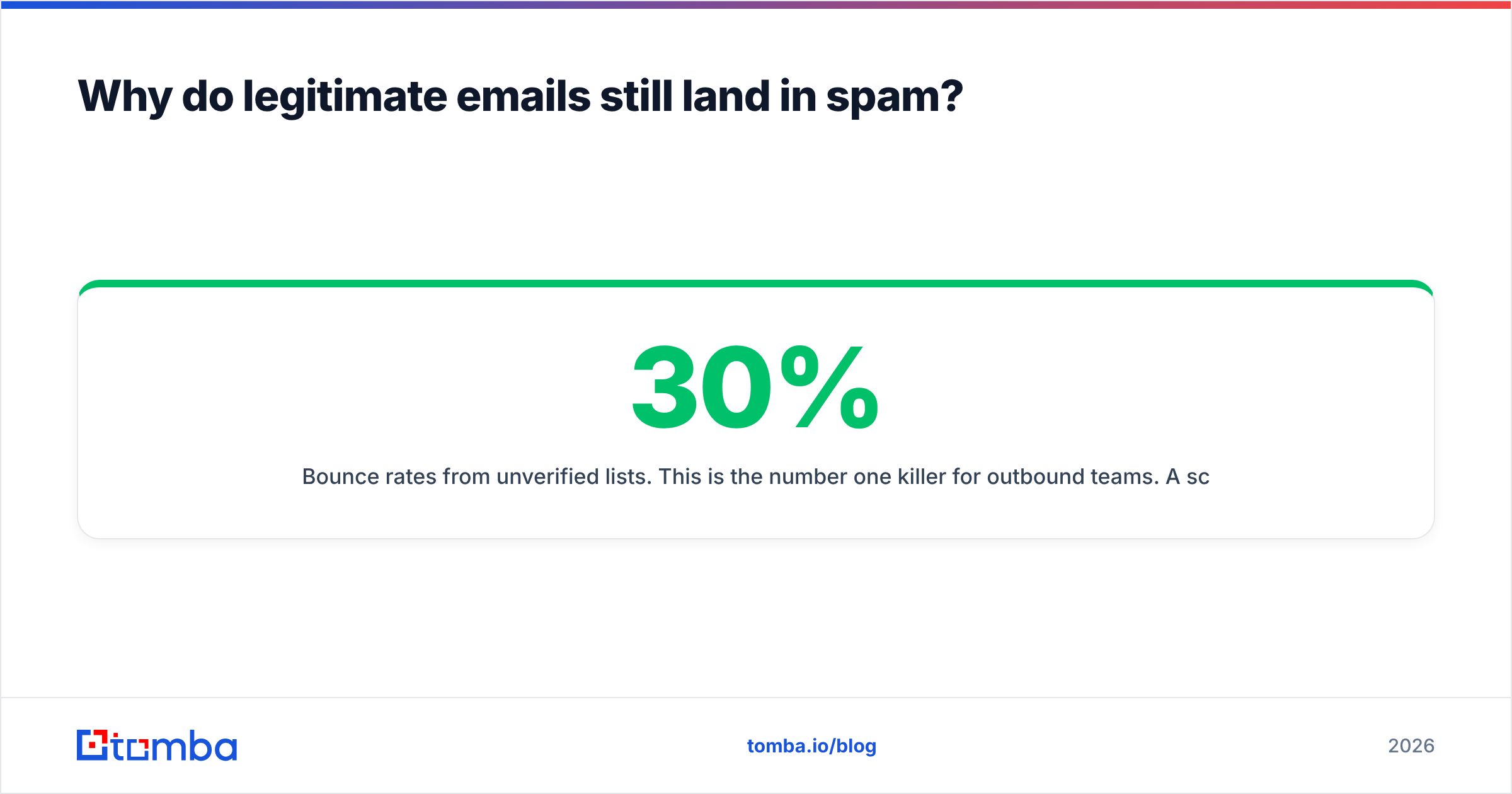
Bounce rates from unverified lists. This is the number one killer for outbound teams. A scraped or exported list from two years ago will bounce 15–30%. Providers read that as spray-and-pray. Running the list through an email verifier before import turns a 20% bounce campaign into a 1–2% one, which is the difference between building reputation and destroying it.
Sending domain equals primary domain. If your company runs on acme.com and you blast cold email from acme.com, one bad campaign puts your invoices, support replies, and contract emails into junk. Use a separate but visually similar domain (getacme.com, acme-hq.com) with its own DNS records.
Tracking domain reputation. Shared tracking domains from sending tools accumulate the reputation of every other user on them. If you use open/click tracking, use a custom tracking subdomain with a valid certificate — or turn tracking off entirely on cold sequences, which many high-deliverability teams now do.
Content that mismatches intent. Five links in a 90-word first-touch email. A <img>-only signature block with no alt text. A subject line that promises something the body doesn't deliver. Run drafts through a spam checker before your first send of a new template — not because the score is authoritative, but because it catches obvious structural mistakes fast.
What's the difference between authentication, reputation, and content filtering?#
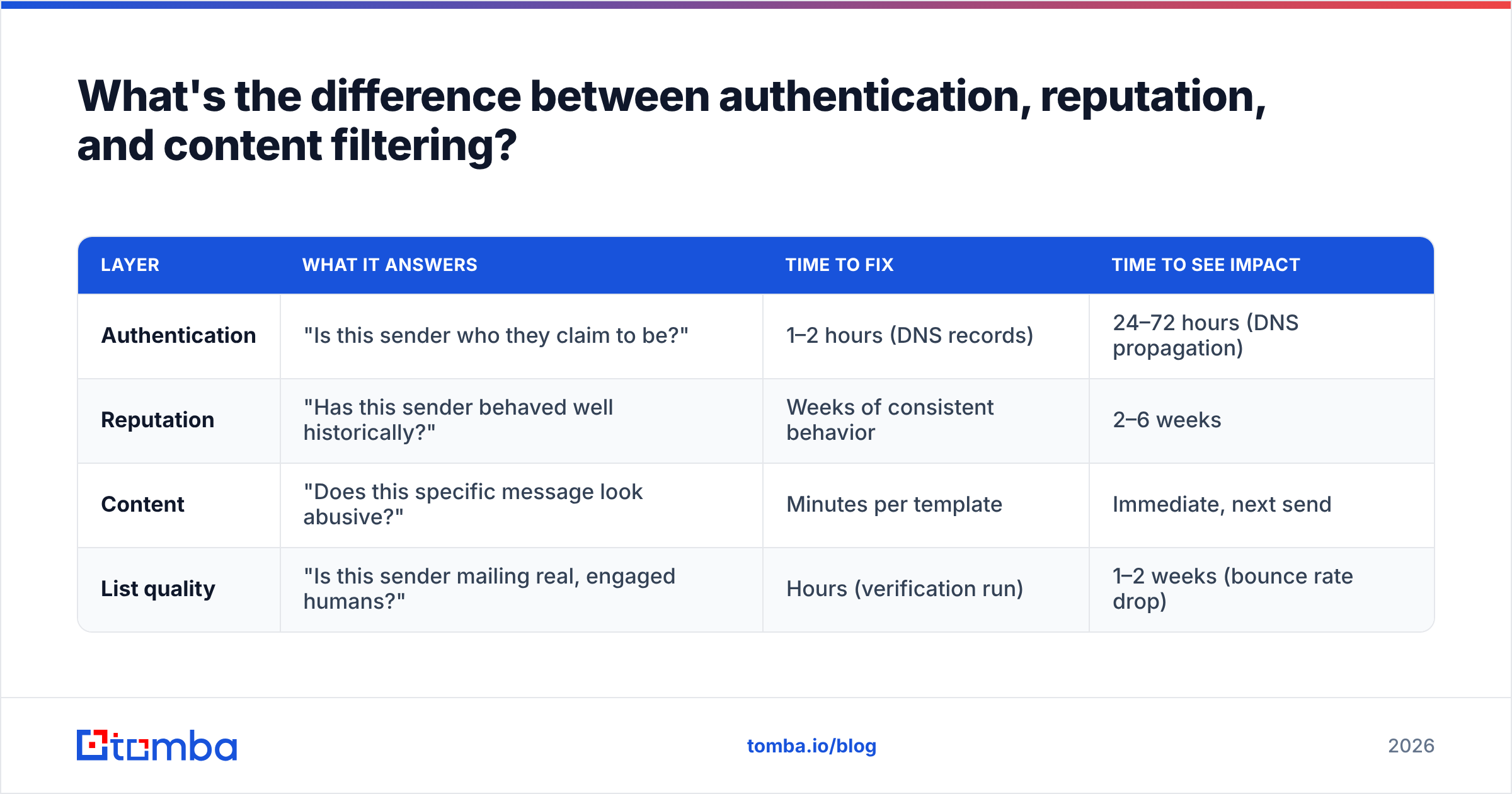
These three get conflated constantly, and the confusion leads teams to fix the wrong thing. Here's the split:
| Layer | What it answers | Time to fix | Time to see impact |
|---|---|---|---|
| Authentication | "Is this sender who they claim to be?" | 1–2 hours (DNS records) | 24–72 hours (DNS propagation) |
| Reputation | "Has this sender behaved well historically?" | Weeks of consistent behavior | 2–6 weeks |
| Content | "Does this specific message look abusive?" | Minutes per template | Immediate, next send |
| List quality | "Is this sender mailing real, engaged humans?" | Hours (verification run) | 1–2 weeks (bounce rate drop) |
Read that table as a sequencing guide. Fix authentication first because it's cheap, fast, and binary. Fix list quality second because it's also cheap and it feeds directly into reputation. Fix content third. Then wait — reputation is the only one you cannot buy your way out of, and it's the layer that determines whether you sit in the inbox six months from now.
A note on email deliverability benchmarks: teams often chase a "95% deliverability" number quoted by a sending platform. That number usually means accepted by the receiving server, not placed in the inbox. Accepted-and-junked counts as delivered in most dashboards. Use seed testing across real Gmail, Outlook, and corporate mailboxes if you want a placement number you can trust.
How do you test before you send?#
Build a pre-flight routine and run it on every new domain, every new template family, and every list over 500 records. Five checks, roughly twenty minutes:
- DNS audit. SPF resolves, DKIM selector returns a key, DMARC is published at minimum
p=quarantinewith anruaaddress you actually read. dmarc.org has the canonical spec if you need to justify the policy choice to IT. - Blocklist check. Query your sending IP and domain against the major DNSBLs. A Spamhaus SBL listing is an emergency; a listing on an obscure list usually isn't. A blacklist checker covers the ones that matter in one pass.
- List verification. Run the full list, not a sample. Segment out catch-all domains and treat them as a separate, lower-volume cohort — catch-all servers accept everything at SMTP time, so they hide bounces until they don't.
- Seed send. Ten to fifteen real mailboxes across Gmail, Outlook.com, Microsoft 365, and at least one gateway-protected corporate domain. Check placement manually. This is the only test that reflects reality.
- Volume plan. Cap per-inbox daily sends and ramp gradually. An email warmup calculator will tell you how many weeks you need before hitting target volume without tripping the ramp detector.
Google's own sender guidelines are the shortest authoritative document on this and worth reading end to end once a year — they're updated more often than most teams realize.

What should you fix in your first 30 days?#
If you're starting from a domain that's already struggling, work in this order.
Days 1–3. Publish or repair SPF, DKIM, and DMARC. Verify the domain in Google Postmaster Tools and enroll in Microsoft SNDS. Stop all sending from the primary business domain immediately — move cold outbound to a dedicated domain.
Days 4–10. Verify every address in your active lists. Remove hard bounces, role accounts (info@, sales@, admin@), and anything flagged risky. Isolate catch-all domains into a low-volume test segment; a dedicated catch-all verifier will tell you which of those domains are worth keeping. Deduplicate across sequences so one prospect never gets two threads.
Days 11–20. Ramp new inboxes from 10–20 sends/day. Prioritize your most engaged segments first — recent site visitors, past repliers, warm referrals. Early replies teach the filter that your domain produces wanted mail. Keep templates plain-text or near-plain-text, one link maximum, no images.
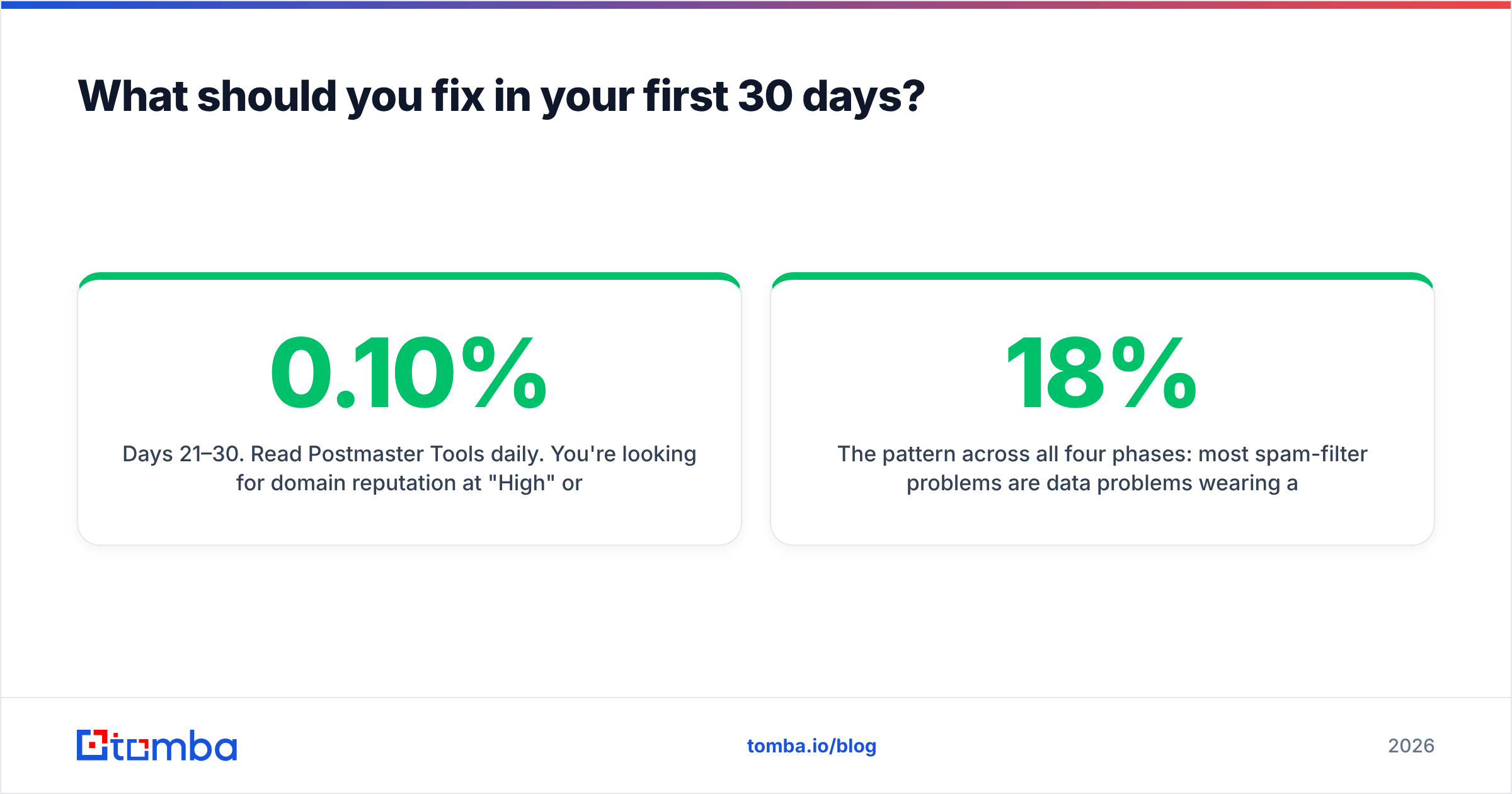
Days 21–30. Read Postmaster Tools daily. You're looking for domain reputation at "High" or "Medium," spam rate under 0.10%, and authentication passing at 100%. If spam rate creeps above 0.30%, cut volume by half and re-segment rather than pushing through.
The pattern across all four phases: most spam-filter problems are data problems wearing a technical costume. Teams spend three weeks A/B testing subject lines when the actual issue is that 18% of their list doesn't exist. Fix the input and the output usually fixes itself.
Do spam filters treat cold email differently from newsletters?#
Yes, but not in the way most people assume. Filters don't have a "cold email" category. What they have is a set of proxies that cold email tends to trip: no prior engagement history with the recipient, high send-to-reply ratios, new domains, and lists with poor hygiene.
Newsletters clear those proxies by default because subscribers opted in and open consistently. Cold outbound has to earn the same signals the hard way — smaller batches, tighter targeting, higher reply rates per send. A 200-person list with a 12% reply rate builds reputation. A 5,000-person list with a 0.8% reply rate destroys it, even at identical total reply counts.
That's the real argument for accuracy over volume in B2B data sourcing. Whether you build lists in-house, buy from a provider like BookYourData, or pull them via API, the metric that matters for deliverability is the percentage of records that are real, current, and correctly matched to a person who might plausibly care. Everything else is noise the filter will punish you for.
Where to start#
Pick the one lever with the shortest path from effort to result: stop putting bad addresses into your sequences. Verified data lowers bounce rate, which protects domain reputation, which is the input every spam filter weights hardest.
Tomba Email Finder finds and validates professional addresses by domain, name, or company, with SMTP-level verification built into the same call — so the addresses that reach your sequencer are ones that actually accept mail. Free tier includes 25 searches/month; paid plans start at $49/mo (Starter), $99/mo (Growth), and $249/mo (Pro). Check the full Tomba pricing breakdown, or run your existing list through verification first and see how much of it was quietly costing you inbox placement.
Related guides#
Ready to find emails that actually work?
Join 150,000+ professionals who stopped guessing and started sending. Free credits on signup — no credit card required.
Get the Tomba newsletter
Practical outbound tactics and product updates — once every two weeks.
About the author