Email to Introduce Your Company to New Clients: 7 Templates
Most company introduction emails get deleted in under three seconds. Here are seven templates, the structure behind them, and the deliverability checks that decide whether anyone sees them at all.
TL;DR
- An email to introduce your company to new clients works when it leads with the client's situation, not your founding story. Company background belongs in sentence three, not sentence one.
- Keep it under 120 words with exactly one ask. Every additional link or question measurably lowers reply rate.
- Use a different template per scenario. A cold intro, a referral intro, and a post-demo intro have almost nothing in common structurally.
- Deliverability decides whether the copy matters at all. Bounce rates above 3% start suppressing your inbox placement across the whole domain.
- Verify addresses before the send, not after the bounce report. Cleaning a list takes minutes; recovering a burned sending domain takes weeks.
What is an email to introduce your company to new clients?#
It's the first commercial message a prospect receives from you, and its only job is to earn a reply — not to explain your company.
That distinction gets ignored constantly. Most introduction emails read like a compressed About page: founded in 2019, serving 400 customers, headquartered in Austin, passionate about innovation. None of that answers the question the recipient is actually asking, which is why is this in my inbox right now.
A working introduction email does four things in order: names a situation the reader recognises, connects your company to that situation in one line, offers a single piece of proof, and asks for one small next step. Everything else is optional.
There are three broad flavours, and mixing them up is the most common failure mode:
- Cold introduction — no prior relationship. The burden of relevance is entirely on you.
- Warm introduction — a referral, a mutual connection, or a prior touchpoint. Lead with the connection.
- Transitional introduction — a new account manager, a rebrand, a merger, or a handover. The relationship exists; you're re-anchoring it.
Why do most company introduction emails get ignored?#
Because they optimise for the sender's comfort rather than the reader's attention budget.
Gartner's research on the B2B buying journey found that buyers spend only about 17% of their total purchase process meeting with potential suppliers — and that time is split across every vendor in consideration. Your introduction email is competing for a sliver of a sliver.
The specific killers, in rough order of damage:
- Subject lines that describe the email instead of the value. "Introduction — [Your Company]" tells the reader nothing they can act on.
- A first sentence about you. "I hope this email finds you well. I'm reaching out from Acme, a leading provider of…" Two clauses in and you've spent the entire attention budget.
- Multiple asks. A meeting request plus a link to a case study plus a newsletter signup means zero conversions, not three.
- No specificity. "Companies like yours" is invisible. "Series B fintechs onboarding their first enterprise accounts" is not.
- Unverified recipients. A hard bounce doesn't just lose one prospect. It signals to mailbox providers that you're sending to a list you don't maintain.

That last point is the one teams underestimate. You can write the best introduction email of your career and still land in spam because 8% of your list bounced on the previous campaign.
What structure should a company introduction email follow?#
Six components, in this order. Each one has a job, and cutting any of them costs you replies.
- Subject line (4–7 words) — Reference the recipient's world, not yours. "Question about your Q3 onboarding" beats "Introducing Acme Solutions" every time.
- Opening hook (1 sentence) — A specific, verifiable observation about their company. A recent hire, a product launch, a job posting, a funding round.
- Bridge (1 sentence) — Connect that observation to what you do. This is where your company gets introduced, and it should be a subordinate clause, not a paragraph.
- Proof (1 sentence) — One number or one named customer in the same category. Not three. Not a case study link.
- Single ask (1 sentence) — Low friction. "Worth a 15-minute call next week?" or even "Is this something your team owns?"
- Signature — Name, role, company, one link. Nothing else. A clean email signature with a phone number outperforms a signature with six social icons and a banner image.
Total: five sentences, roughly 90–120 words. If your draft is longer, you're explaining rather than inviting.
Which introduction email template should you use?#
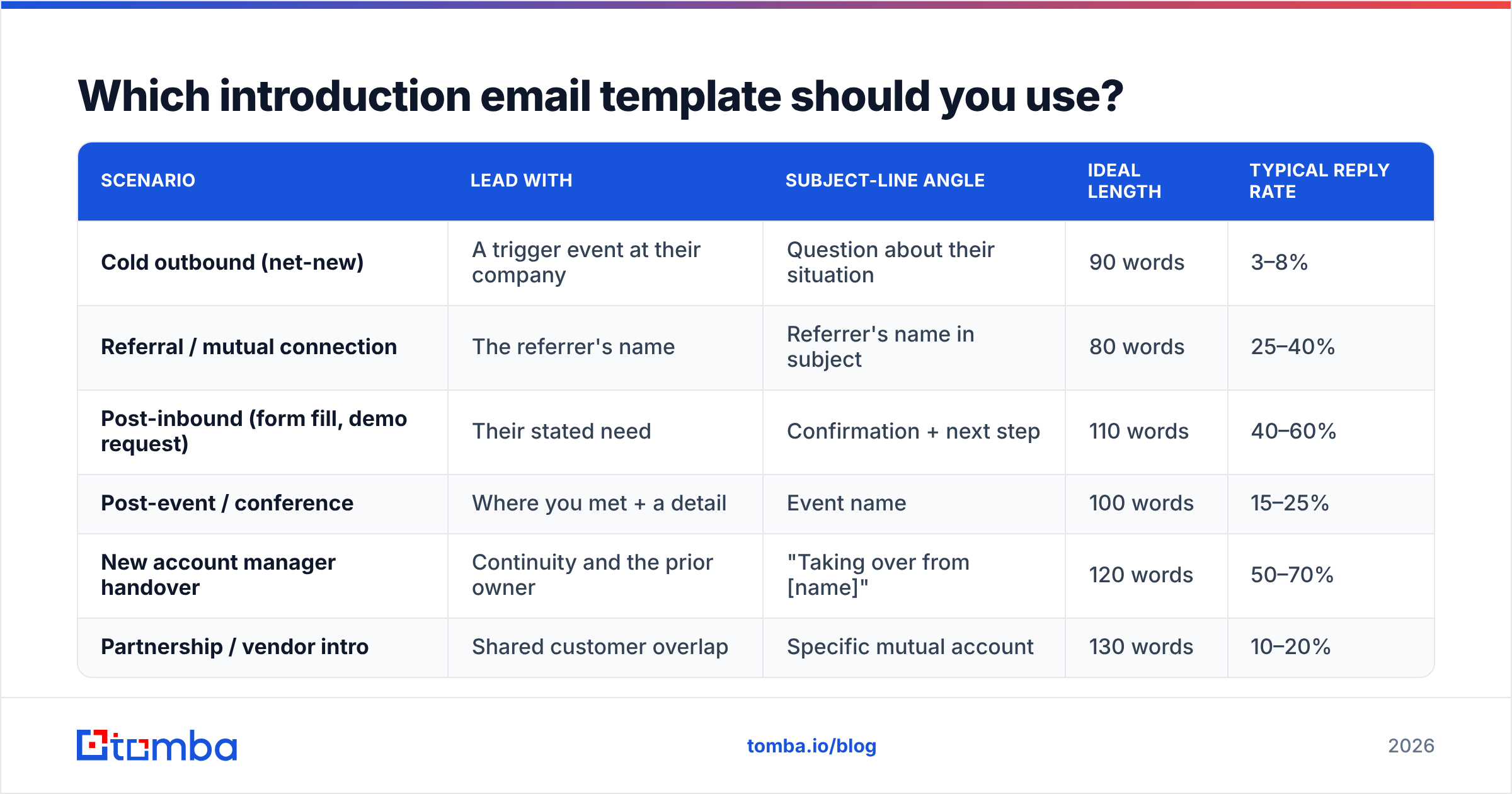
Match the template to the scenario. Sending a cold-outbound structure to a referral wastes the strongest asset you have.
| Scenario | Lead with | Subject-line angle | Ideal length | Typical reply rate |
|---|---|---|---|---|
| Cold outbound (net-new) | A trigger event at their company | Question about their situation | 90 words | 3–8% |
| Referral / mutual connection | The referrer's name | Referrer's name in subject | 80 words | 25–40% |
| Post-inbound (form fill, demo request) | Their stated need | Confirmation + next step | 110 words | 40–60% |
| Post-event / conference | Where you met + a detail | Event name | 100 words | 15–25% |
| New account manager handover | Continuity and the prior owner | "Taking over from [name]" | 120 words | 50–70% |
| Partnership / vendor intro | Shared customer overlap | Specific mutual account | 130 words | 10–20% |
Reply-rate ranges are directional benchmarks from B2B outbound reporting; your numbers will move with list quality and ICP fit more than with copy.
What do the seven templates look like?#
1. Cold intro triggered by a hiring signal
Subject: Your new SDR hires
Hi Maya — saw you're adding three SDRs in Berlin this quarter.
We build the contact data layer that new reps usually spend their first month assembling manually. Two of your peers in payments cut ramp time from six weeks to about three using it.
Is contact sourcing something your team owns, or does ops handle it?
— Sam
2. Referral intro
Subject: Priya suggested I reach out
Hi David — Priya Raman mentioned you're rebuilding the outbound motion at Northwind and thought we should talk.
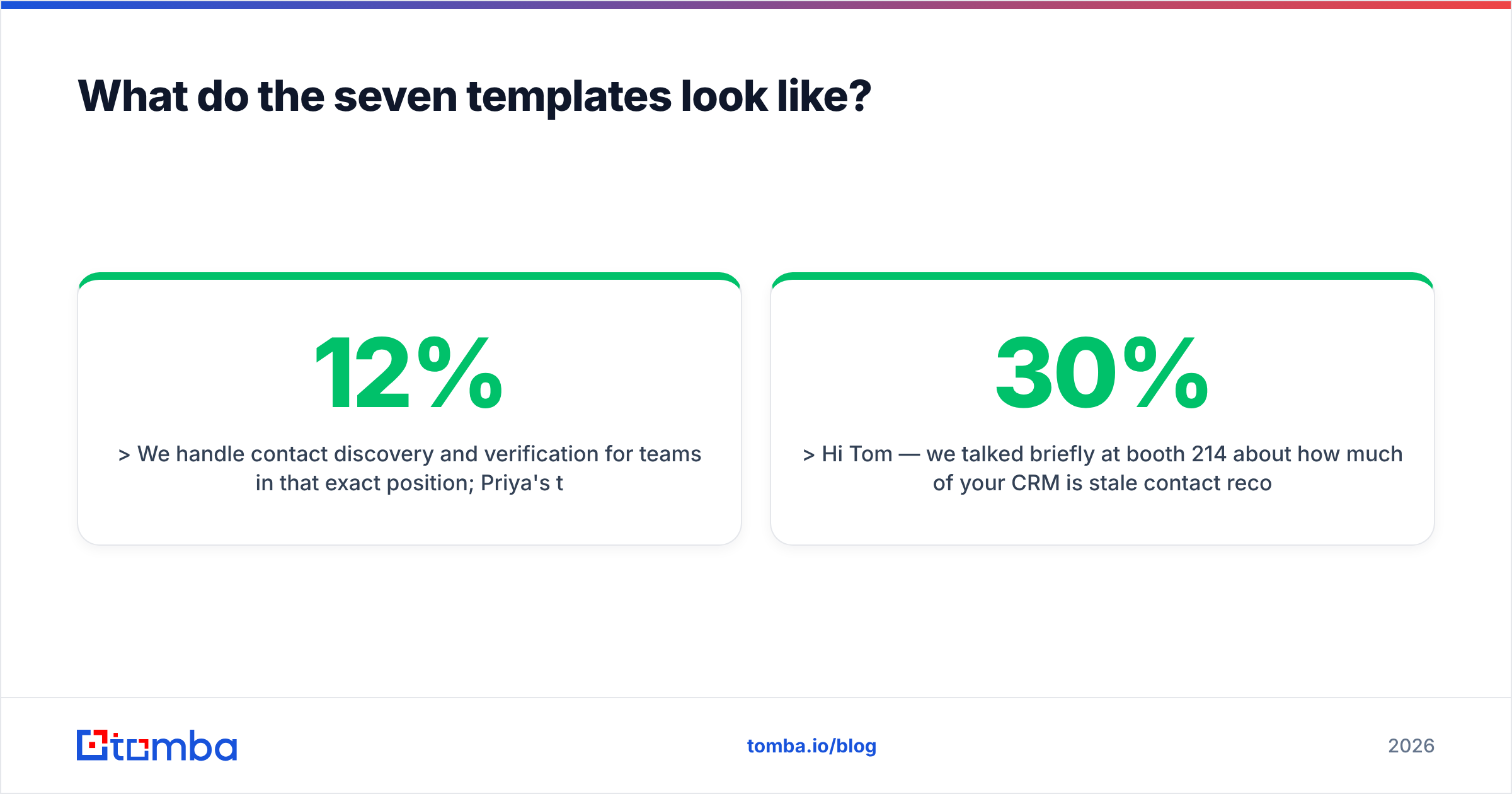
We handle contact discovery and verification for teams in that exact position; Priya's team went from a 12% bounce rate to under 2% after switching.
Free for 15 minutes Thursday or Friday?
— Sam
3. Post-inbound intro
Subject: Your demo request — a few specifics
Hi Ana — thanks for requesting a walkthrough. Before we book time, one question: are you solving for volume (more contacts) or accuracy (fewer bad ones)?
The demo looks different depending on the answer, and I'd rather show you the relevant half than all of it.
Here's my calendar: [link]
— Sam
4. Post-conference intro
Subject: SaaStr — the CRM hygiene conversation
Hi Tom — we talked briefly at booth 214 about how much of your CRM is stale contact records. You said roughly 30%.
That's the problem we work on. One customer in your segment recovered about 4,000 reachable contacts from a database they'd written off.
Want me to run a sample of 100 of your records so you can see the hit rate?
— Sam
5. Account handover intro
Subject: Taking over from Elena
Hi Rachel — Elena has moved to our enterprise team, and I'll be your point of contact from this week.
I've read through your account history: the Q1 integration work, the API rate-limit issue in March, and the expansion conversation Elena parked until after your fiscal year close.
Nothing changes on your side. Do you want a 20-minute intro call, or should I stay out of your way until the expansion discussion?
— Sam
6. Partnership intro
Subject: We share 40+ customers
Hi Jonas — we pulled an overlap analysis and found 43 shared accounts between your platform and ours, including Vertex and Bluewater.
Those teams currently move data between the two products manually. A native integration seems like an obvious win for both sides.
Worth a conversation with whoever owns partnerships at your end?
— Sam
7. Re-introduction after a rebrand
Subject: Same team, new name
Hi Claire — quick note: we've rebranded from Datapoint to Tomba. Same team, same contract, same support inbox.
The practical change for you: invoices will now come from tomba.io, so you may want to update your AP whitelist.
Anything you need on your side, reply here and I'll handle it.
— Sam
Notice what none of them do: describe the company's history, list features, or attach a PDF.

How do you make sure the email actually arrives?#
Copy is downstream of deliverability. If the message doesn't reach the inbox, template quality is irrelevant.
Three checks before any introduction campaign goes out:
Check the address, not just the pattern. Guessing first.last@company.com gets you a plausible-looking string, not a real mailbox. Run every address through an email verifier so hard bounces stay under 2%. Mailbox providers treat a spike in unknown-user bounces as a strong spam signal, and the penalty applies to your whole sending domain.
Handle catch-all domains separately. Roughly a fifth of B2B domains accept mail for any address, which means standard SMTP verification returns "valid" for addresses that don't exist. Segment those into their own low-volume send rather than letting them inflate your apparent list quality. A dedicated catch-all verifier narrows the guesswork considerably.
Confirm authentication. SPF, DKIM, and DMARC must all pass. Google and Yahoo have enforced bulk-sender authentication requirements since 2024, and unauthenticated mail from a new domain is filtered aggressively. Run an SPF checker before the first send, not after the first campaign underperforms.
One more legal note: if you're sending commercial mail into the US, the CAN-SPAM Act requires a real physical address and a working opt-out in every message, including the first one. GDPR adds a legitimate-interest documentation requirement for EU recipients.
How do you measure whether the introduction email worked?#
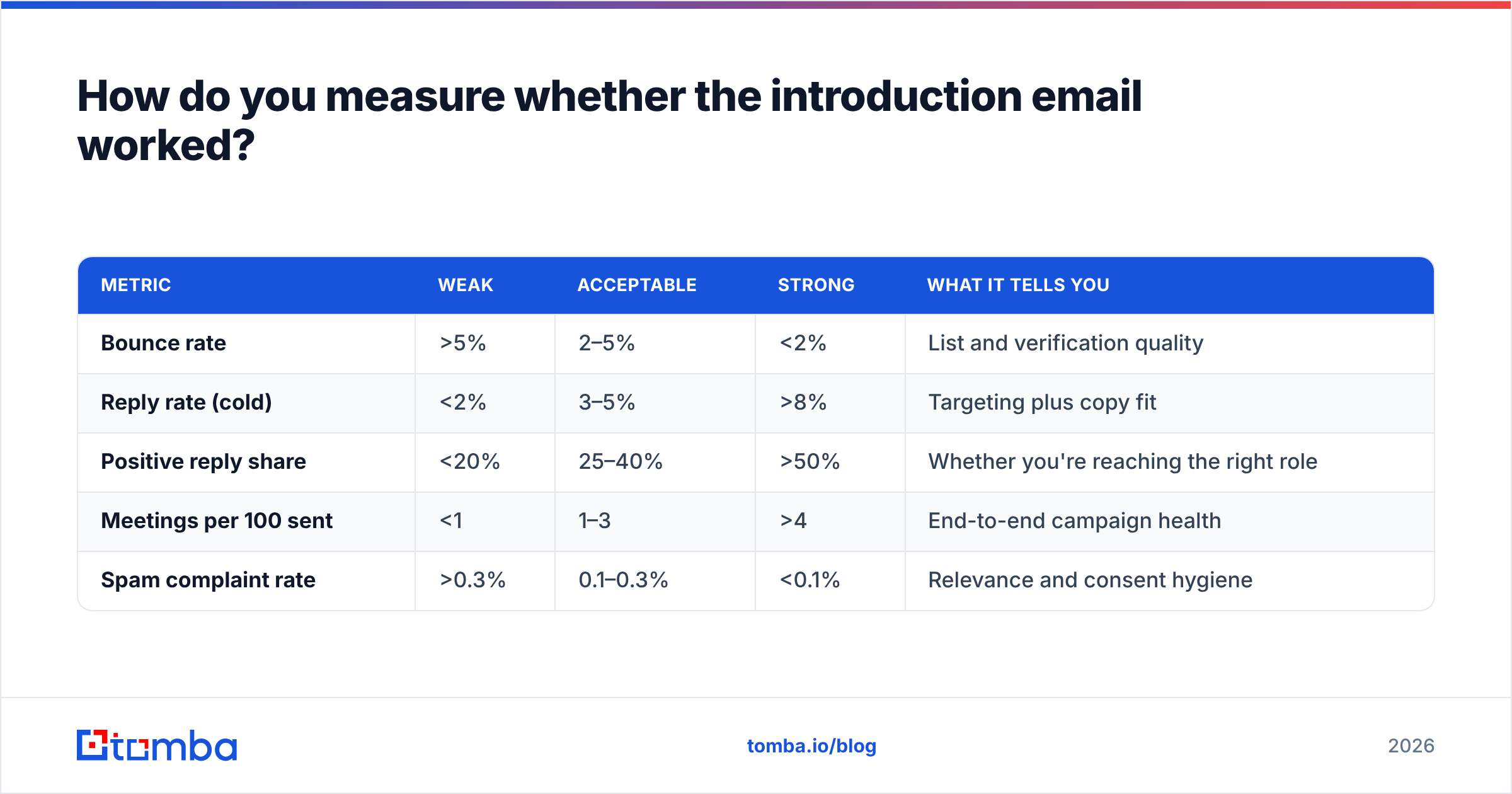
Reply rate, not open rate. Apple's Mail Privacy Protection has made open tracking unreliable enough that optimising for it produces false confidence.
| Metric | Weak | Acceptable | Strong | What it tells you |
|---|---|---|---|---|
| Bounce rate | >5% | 2–5% | <2% | List and verification quality |
| Reply rate (cold) | <2% | 3–5% | >8% | Targeting plus copy fit |
| Positive reply share | <20% | 25–40% | >50% | Whether you're reaching the right role |
| Meetings per 100 sent | <1 | 1–3 | >4 | End-to-end campaign health |
| Spam complaint rate | >0.3% | 0.1–0.3% | <0.1% | Relevance and consent hygiene |
If bounce rate is the number that's off, no amount of copy testing will fix it. Fix the data layer first, then iterate on the message.
For benchmarks across the wider category, HubSpot's sales email research and vendor-reported figures on G2 are reasonable sanity checks — though treat any single published number as directional rather than authoritative.
What mistakes kill company introduction emails?#
- Attachments in the first email. They trigger spam filters and nobody opens them anyway.
- Sending to a role inbox.
info@andcontact@have reply rates near zero. Find the individual. - Follow-up cadence that's too aggressive. Three follow-ups over two weeks is the ceiling for a cold intro. Beyond that, complaint rate climbs faster than reply rate.
- Personalisation tokens that break.
Hi {{first_name}},rendered literally is worse than no personalisation at all. Test the render on a seed list before every send. - Ignoring the reply. A 40% reply rate means nothing if responses sit for three days. Introduction emails have a short half-life.
- One template for every scenario. The table above exists for a reason.
Where should you get the contact data?#
From a source that tells you its confidence level, not just an address string.
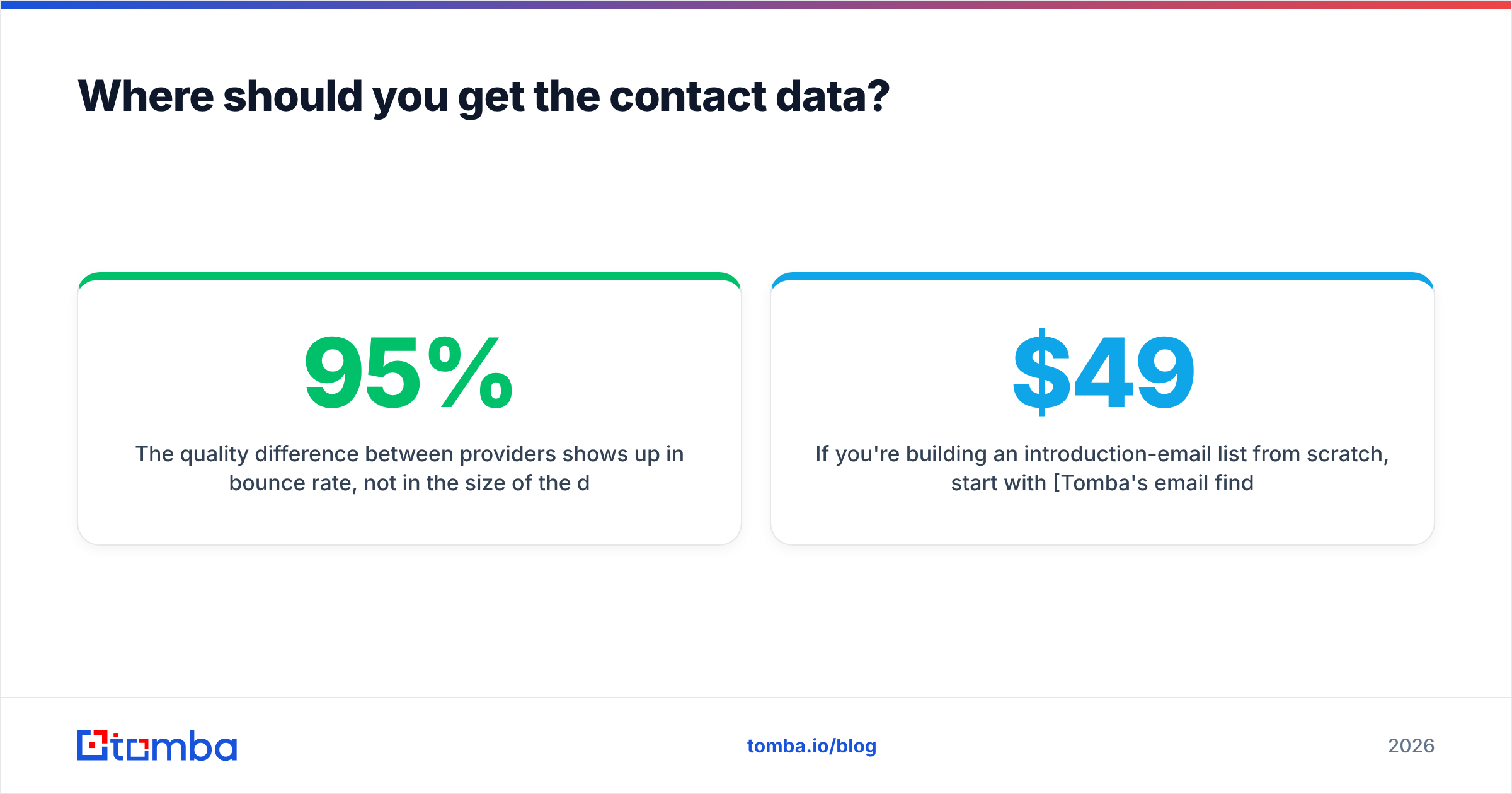
The quality difference between providers shows up in bounce rate, not in the size of the database. A tool returning 500 addresses at 95% accuracy beats one returning 900 at 70% — the second list costs you domain reputation on every send.
If you're building an introduction-email list from scratch, start with Tomba's email finder to source individual contacts, use domain search to map an entire company's addressable team, and run everything through verification before the first send. Pricing starts free at 25 searches per month, with Starter at $49/mo and Growth at $99/mo — full details on the Tomba pricing page. Get the data layer right, and the five-sentence template does the rest.
Related guides#
Ready to find emails that actually work?
Join 150,000+ professionals who stopped guessing and started sending. Free credits on signup — no credit card required.
Get the Tomba newsletter
Practical outbound tactics and product updates — once every two weeks.
About the author