How to Write an Email to Set Up a Meeting That Gets Yes
Most meeting-request emails fail on structure, not charisma. Here is the anatomy that books calls in 2026 — plus templates, timing data, and the mistakes that kill your reply rate.
TL;DR
- A meeting-request email has five jobs: prove relevance, state a reason, name a duration, propose a decision, and make replying take under ten seconds.
- Specific time proposals ("Tuesday 10:00 or Thursday 14:00 ET?") consistently outperform open-ended "let me know what works" asks, because they convert an open question into a binary one.
- Subject lines that name the outcome ("15 min on your Q3 pipeline gaps") beat vague ones ("Quick question") — but only if the body delivers on the promise.
- Two follow-ups spaced 3 and 7 days apart capture most of the replies you would otherwise lose. Beyond four touches, returns collapse.
- None of this matters if the address is wrong. Bounces damage sender reputation before your copy ever gets read — verify before you send.
Why do most meeting request emails get ignored?#
Because they ask the recipient to do work.
Think of a meeting request like handing someone a form at a busy counter. If the form is half-blank and asks them to figure out the date, the duration, the purpose, and whether it's even their job — they put it down. If it's pre-filled with two checkboxes, they tick one and hand it back. Same information, wildly different completion rate.
The technical version: every unresolved decision in your email is a cognitive cost the recipient pays before replying. "Let me know when you're free" pushes calendar arithmetic onto a person who has no reason to do it for you. "Does Tuesday at 10:00 ET work, or is Thursday at 14:00 better?" costs them one word.
The three most common failure modes:
- No stated reason. "I'd love to connect" is not a reason. It's a request for a reason.
- No duration. An unbounded ask reads as an unbounded time commitment. "30 minutes" is a smaller thing to say yes to than "a meeting."
- No decision. If the email ends without a specific next action, the recipient's default is to defer — and deferral is functionally identical to no.
There's a fourth, less obvious one: the email never arrived. A guessed address that bounces, or a message that lands in spam because your domain has a history of bounces, produces the same silence as bad copy. You cannot debug your writing until you've ruled out delivery.
What is the anatomy of an email to set up a meeting?#
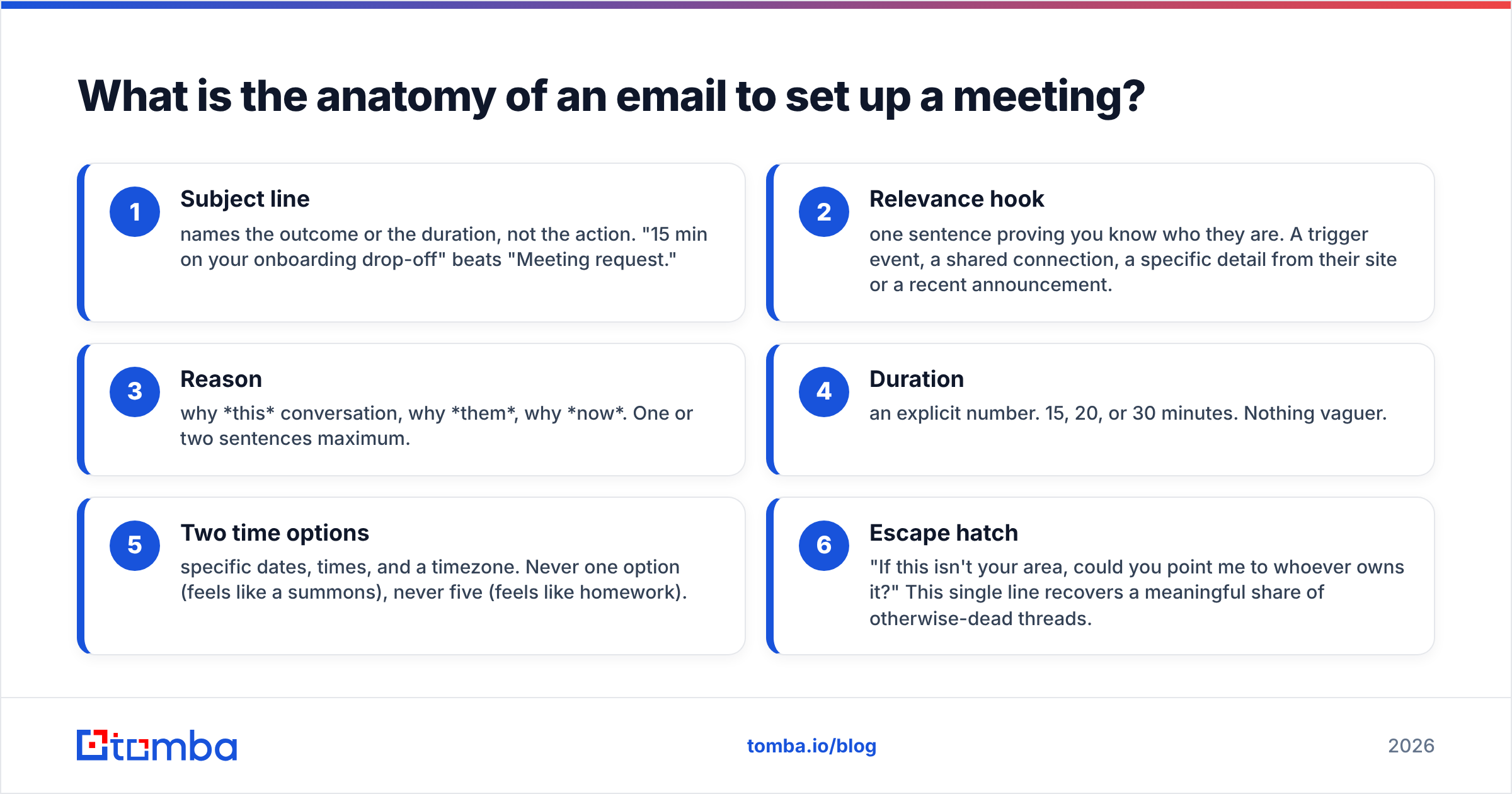
Every effective meeting request contains six components in roughly this order. You can compress them, but you can't skip them.
- Subject line — names the outcome or the duration, not the action. "15 min on your onboarding drop-off" beats "Meeting request."
- Relevance hook — one sentence proving you know who they are. A trigger event, a shared connection, a specific detail from their site or a recent announcement.
- Reason — why this conversation, why them, why now. One or two sentences maximum.
- Duration — an explicit number. 15, 20, or 30 minutes. Nothing vaguer.
- Two time options — specific dates, times, and a timezone. Never one option (feels like a summons), never five (feels like homework).
- Escape hatch — "If this isn't your area, could you point me to whoever owns it?" This single line recovers a meaningful share of otherwise-dead threads.
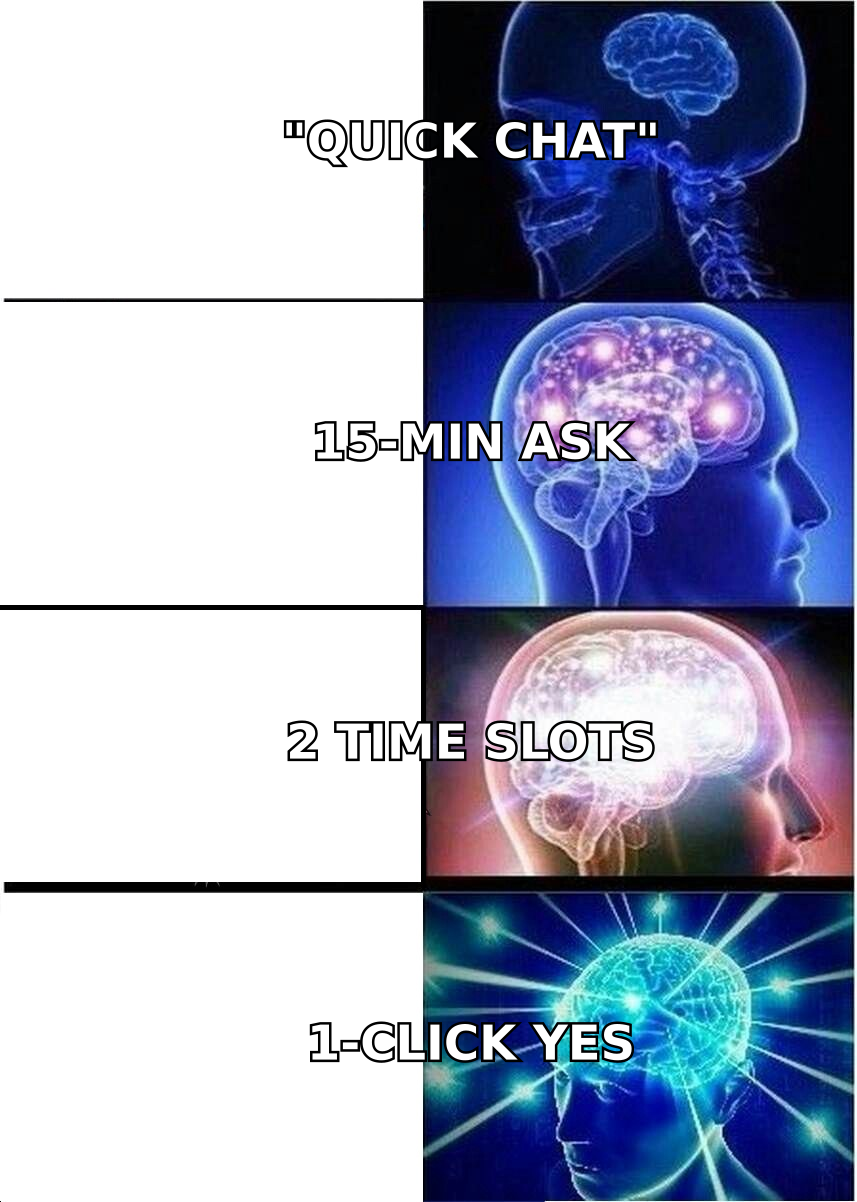
Notice what's absent: your company boilerplate, your funding announcement, your feature list. A meeting request sells the meeting, not the product. The moment you start pitching, you've asked for two yeses instead of one.
How should you structure the subject line and opening line?#
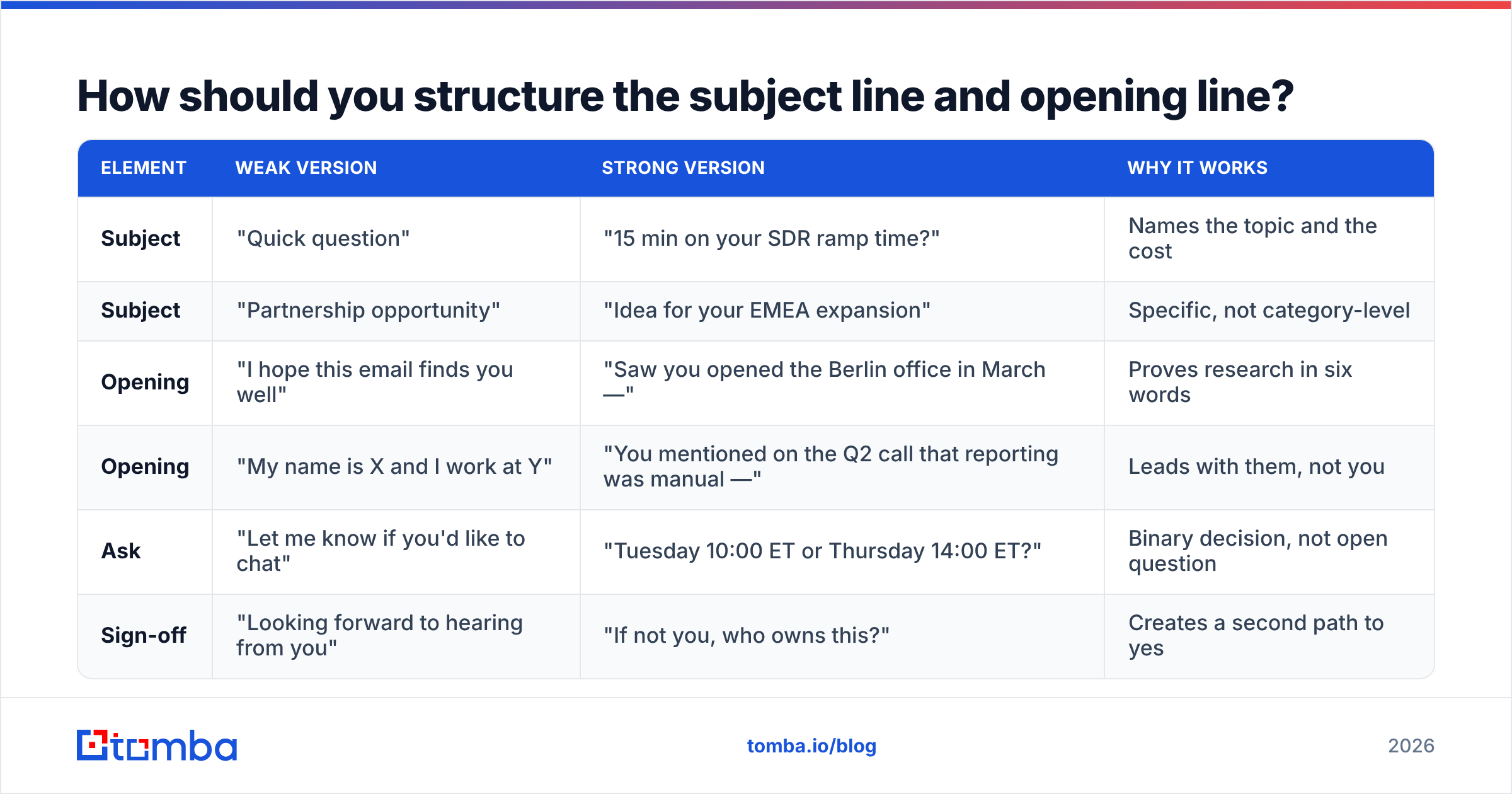
The subject line's only job is to get the first line read. The first line's only job is to get the second line read. Treat them as a unit.
| Element | Weak version | Strong version | Why it works |
|---|---|---|---|
| Subject | "Quick question" | "15 min on your SDR ramp time?" | Names the topic and the cost |
| Subject | "Partnership opportunity" | "Idea for your EMEA expansion" | Specific, not category-level |
| Opening | "I hope this email finds you well" | "Saw you opened the Berlin office in March —" | Proves research in six words |
| Opening | "My name is X and I work at Y" | "You mentioned on the Q2 call that reporting was manual —" | Leads with them, not you |
| Ask | "Let me know if you'd like to chat" | "Tuesday 10:00 ET or Thursday 14:00 ET?" | Binary decision, not open question |
| Sign-off | "Looking forward to hearing from you" | "If not you, who owns this?" | Creates a second path to yes |
A note on subject-line length: mobile clients truncate around 35–45 characters. Front-load the specific noun. "SDR ramp time — 15 min?" survives truncation. "Following up on my previous email regarding SDR ramp time" does not. If you want to pressure-test variants before sending, run them through a subject line tester rather than guessing.
Avoid these in subject lines entirely: "RE:" or "FW:" on a first-touch email (it's a lie, and recipients notice), all caps, exclamation marks, and the word "free." Spam filters weight several of these, and humans discount all of them.
What templates work for different meeting types?#
Templates are scaffolding, not scripts. Replace every bracket or the whole thing reads as automated.
Cold outreach — first touch
Subject: 15 min on [specific problem]?
Hi [Name],
[Trigger event — hiring, funding, product launch, a post they wrote]. Usually when [company type] hits that stage, [specific problem] becomes the bottleneck.
We helped [comparable company] cut [metric] by [number] in [timeframe]. Worth 15 minutes to see if the same approach maps to your setup?
Tuesday 10:00 ET or Thursday 14:00 ET — either work?
[Your name]
Warm follow-up after an event or webinar
Subject: Your question about [topic] at [event]
Hi [Name],
You asked about [specific thing they asked] during [session]. I didn't get a full answer out in the Q&A, so — [one-sentence answer].
There's a longer version that's easier to walk through live. 20 minutes next week? Wednesday 11:00 or Friday 15:00 CET.
[Your name]
Internal meeting request
Subject: 30 min this week — [project] blockers
Hi [Name],
Three decisions are stuck on [project]: [A], [B], [C]. I've written up options for each so we can decide rather than discuss.
Agenda and pre-read attached. 30 minutes Thursday or Friday afternoon?
[Your name]
Re-engaging a stalled deal
Subject: Closing the file on [project]?
Hi [Name],
We spoke in [month] about [problem]. I haven't heard back, which usually means priorities shifted — completely fair.
If it's still live, I have 20 minutes Tuesday or Thursday. If it's not, reply "closed" and I'll stop chasing.
[Your name]
That last one — the explicit permission to say no — reliably outperforms a fifth "just checking in." People answer emails that offer an exit.
If you want more starting points, Tomba's library of cold email templates covers adjacent scenarios, and HubSpot maintains a well-tested public template collection worth borrowing structure from.
When should you send a meeting request email?#
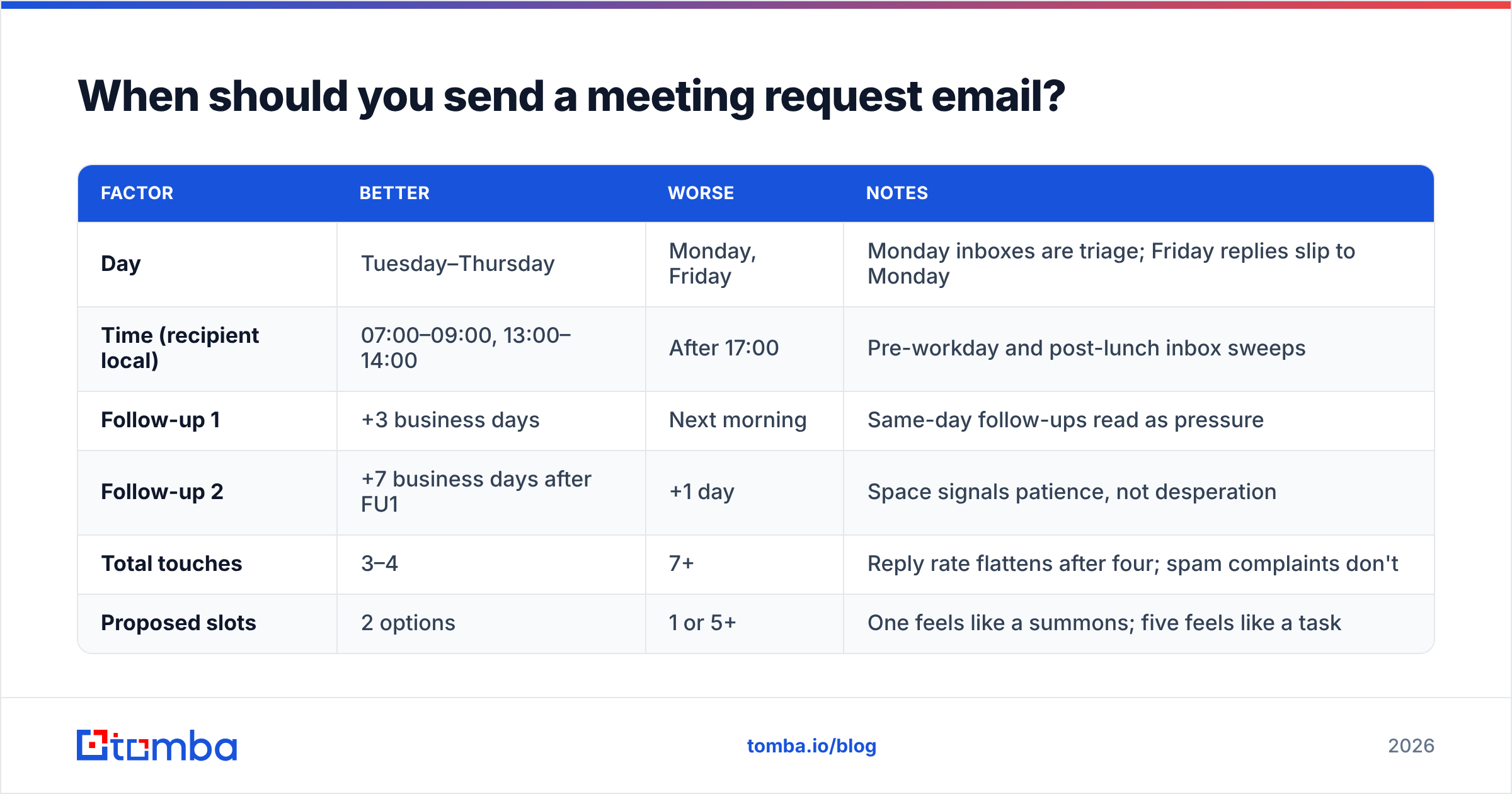
Timing matters less than most blog posts claim, but it is not noise. The pattern that holds across most B2B datasets:
| Factor | Better | Worse | Notes |
|---|---|---|---|
| Day | Tuesday–Thursday | Monday, Friday | Monday inboxes are triage; Friday replies slip to Monday |
| Time (recipient local) | 07:00–09:00, 13:00–14:00 | After 17:00 | Pre-workday and post-lunch inbox sweeps |
| Follow-up 1 | +3 business days | Next morning | Same-day follow-ups read as pressure |
| Follow-up 2 | +7 business days after FU1 | +1 day | Space signals patience, not desperation |
| Total touches | 3–4 | 7+ | Reply rate flattens after four; spam complaints don't |
| Proposed slots | 2 options | 1 or 5+ | One feels like a summons; five feels like a task |
Two caveats. First, timezone accuracy beats time-of-day optimization — sending at "9am" your time to someone eight hours ahead undoes every other choice you made. Second, if you're sending at volume, spreading sends across the day protects your email deliverability more than any single golden hour helps your open rate.
How do you follow up without being annoying?#
Change the value, not the volume.
The annoying follow-up repeats the original ask in a slightly more plaintive tone: "Just bumping this," "Following up on my last email," "Did you see my note below?" Each of these says I want something from you three times with no new information.
The effective follow-up adds a reason to reply that didn't exist before:
- Follow-up 1 (+3 days): New angle. A relevant customer result, a benchmark, a one-line insight about their industry. Re-propose the same two time slots.
- Follow-up 2 (+7 days): New format. Offer async instead of a call — "Happy to just send a two-minute Loom if a call is heavy right now."
- Follow-up 3 (+14 days, optional): The breakup. "Assuming this isn't a priority — I'll close the loop. If that's wrong, one line and I'll reopen."
Keep them all on the same thread. A new thread erases the context that makes follow-up 2 make sense, and it doubles the number of unread items you're responsible for in their inbox.
One thing worth measuring: your response rate per follow-up step. If step 2 outperforms step 1, your first email is the problem, not your persistence.
Does the email even reach them?#
This is the part that gets skipped, and it invalidates everything above.
Three things break silently between "send" and "read":
The address is wrong. Guessed patterns — first.last@, f.last@, firstname@ — are right maybe half the time depending on the company's convention. Every miss is a hard bounce, and hard bounces compound: enough of them and mailbox providers start filtering your domain regardless of what you write. Running addresses through an email verifier before a campaign is the cheapest insurance in outbound.
The domain is catch-all. Catch-all domains accept everything, so a standard verification returns "unknown" rather than valid or invalid. Those addresses are neither safe to send to nor safe to discard wholesale — a dedicated catch-all verifier is the only way to separate real mailboxes from black holes on those domains.
Your authentication is incomplete. Missing or misconfigured SPF, DKIM, and DMARC records send your perfectly written meeting request to spam. Google and Yahoo's bulk-sender requirements made this non-negotiable for anyone sending meaningful volume. A quick SPF check takes seconds; Google's own sender guidelines document the rest.
The order of operations matters: find the address, verify it, check your sending setup, then worry about whether your subject line is clever enough.
How do tools compare for finding and confirming the right contact?#
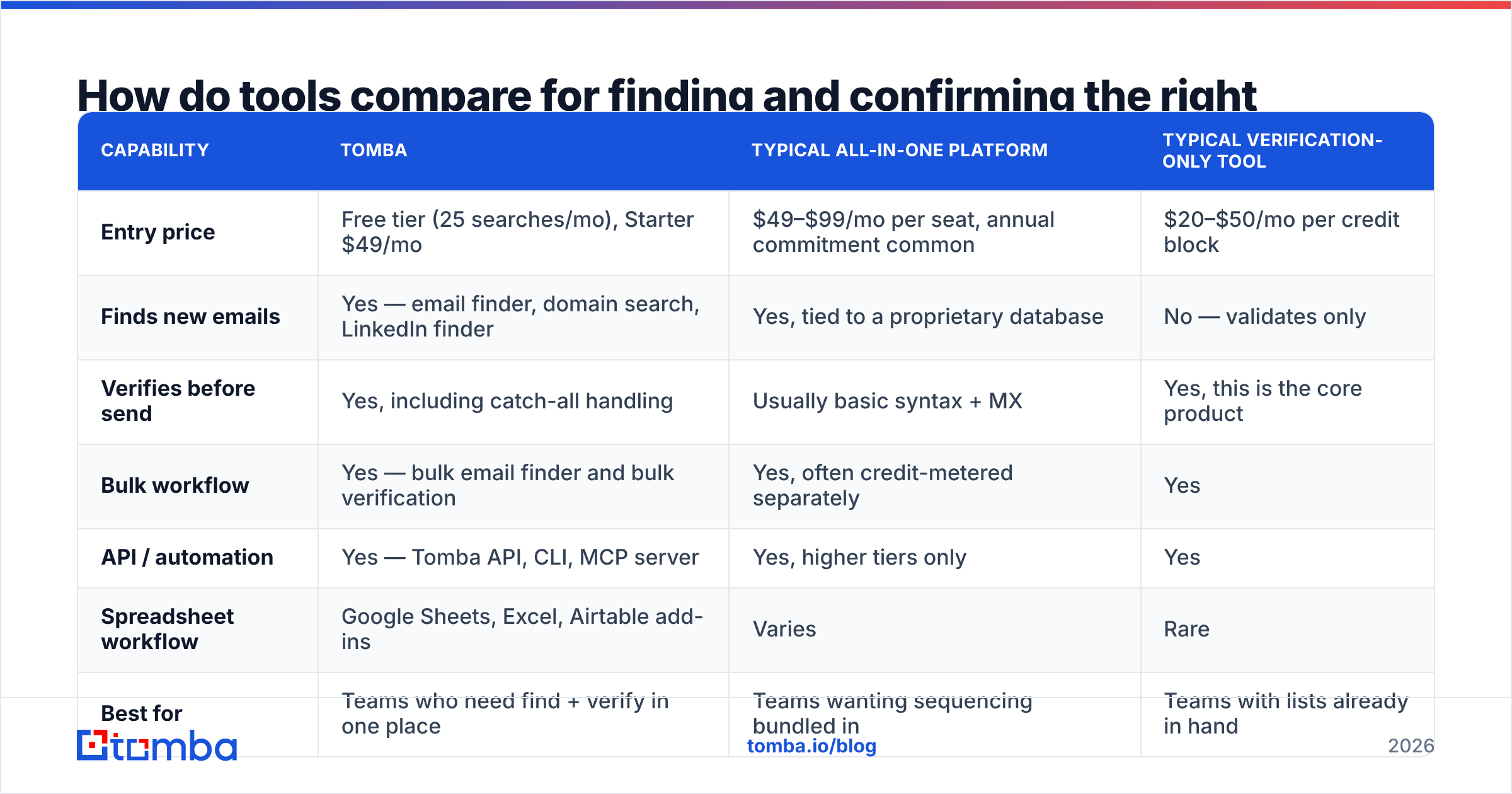
Meeting requests need two data points: a working email and enough context to write a relevant first line. Different tools weight those differently.
| Capability | Tomba | Typical all-in-one platform | Typical verification-only tool |
|---|---|---|---|
| Entry price | Free tier (25 searches/mo), Starter $49/mo | $49–$99/mo per seat, annual commitment common | $20–$50/mo per credit block |
| Finds new emails | Yes — email finder, domain search, LinkedIn finder | Yes, tied to a proprietary database | No — validates only |
| Verifies before send | Yes, including catch-all handling | Usually basic syntax + MX | Yes, this is the core product |
| Bulk workflow | Yes — bulk email finder and bulk verification | Yes, often credit-metered separately | Yes |
| API / automation | Yes — Tomba API, CLI, MCP server | Yes, higher tiers only | Yes |
| Spreadsheet workflow | Google Sheets, Excel, Airtable add-ins | Varies | Rare |
| Best for | Teams who need find + verify in one place | Teams wanting sequencing bundled in | Teams with lists already in hand |
Two honest notes on this table. If you already own a sequencer and just need clean addresses, a find-and-verify tool is the cheaper half of the stack — you don't need to rebuy sequencing. And if your motion depends on prebuilt lists by industry and title rather than domain-by-domain lookup, a database-first vendor like BookYourData solves a different shape of the problem well; the two approaches coexist more often than they compete.
Compare current Tomba pricing against whatever you're running today on a per-verified-contact basis rather than per-seat — that's the number that actually predicts your cost per booked meeting. Independent reviews on G2 are useful for sanity-checking vendor claims about accuracy.
What are the most common mistakes to avoid?#
- Pitching in the meeting request. You're selling 15 minutes, not the product. Every product detail you add is a reason to decline before the call.
- Asking for "a quick call" with no duration. "Quick" is not a unit of time. Name the number.
- Attaching a deck to a first touch. Attachments on cold email hurt deliverability and signal a long meeting.
- Using a calendar link in the first email. Booking links work once someone has agreed to meet. Sent cold, they read as "do my scheduling for me." Propose times first, send the link after the yes.
- Writing more than 120 words. Meeting requests over roughly five short lines get skimmed to the last sentence. If your ask isn't there, it's not read.
- Sending from an unwarmed domain. A brand-new sending domain firing 200 requests on day one will get filtered no matter how good the copy is. Ramp gradually — a warmup calculator will tell you how slowly.
How do you measure whether your meeting emails are working?#
Track four numbers, in this order, because each one gates the next:
- Bounce rate — target under 2%. Above 3% and you have a data problem, not a copy problem. Fix this first.
- Open rate — directional only now that privacy protections inflate it, but a sudden drop signals deliverability trouble.
- Reply rate — the real health metric. Count every reply, including the nos; a rising no-rate still means your emails are being read.
- Meeting-booked rate — replies that convert to a calendar event. If replies are healthy but bookings aren't, the problem is your time proposal or your escape hatch, not your opener.
Test one variable at a time across at least a few hundred sends. Changing subject line, opening hook, and time proposal simultaneously teaches you nothing about which one moved the number.
Ready to send meeting requests that actually land?#
The best-written meeting request in the world fails if it goes to an address that doesn't exist. Start with the contact data, then the copy.
Tomba's Email Finder locates verified professional addresses by name, domain, or company, with catch-all handling and bulk workflows built in — so the emails you spend time writing reach a real inbox. The free tier includes 25 searches a month to test it against your own target list; paid plans start at $49/mo. Find the person, verify the address, then write the two-slot ask.
Related guides#
Ready to find emails that actually work?
Join 150,000+ professionals who stopped guessing and started sending. Free credits on signup — no credit card required.
Get the Tomba newsletter
Practical outbound tactics and product updates — once every two weeks.
About the author