Email Tracking Tools for Recruiters: 2026 Buyer's Guide
Open rates lie, link clicks get eaten by security scanners, and half of recruiting email trackers break your deliverability. Here's what actually works in 2026, and how to pick.
TL;DR
- Open-rate tracking is now mostly noise. Apple Mail Privacy Protection, Gmail image proxying, and corporate link scanners fire your pixel before a human ever sees the message — treat opens as directional at best.
- Reply rate, meeting-booked rate, and time-to-first-response are the only recruiter metrics that survive 2026's privacy stack. Pick tools that report those, not vanity dashboards.
- Tracking tools split into three types: inbox extensions (Mailtrack, Streak), ATS-native tracking (Greenhouse, Lever, Ashby), and sequencer-grade tracking (Gem, HeyReach, Instantly, Reply.io). Mixing all three is how you end up double-counting.
- Link tracking on a shared subdomain is the single biggest silent deliverability killer for recruiting teams. Use your own tracking domain or turn link tracking off.
- Tracking is worthless if the address is wrong. Verify candidate emails before send — a bounce costs you more sender reputation than any open rate is worth.
What are email tracking tools for recruiters, and how do they actually work?#
Email tracking tools for recruiters tell you what happened to an outreach message after you hit send: whether it was opened, whether links were clicked, whether it bounced, and — in better tools — whether it produced a reply or a booked call.
Under the hood there are only three mechanisms, and understanding them tells you exactly where each tool breaks.
- Tracking pixel. A 1×1 transparent image hosted on the vendor's server. When the recipient's client loads images, the server logs a request and calls it an "open." This is the mechanism that privacy features destroyed.
- Link rewriting. Your
careers.company.com/rolebecomest.vendor.io/abc123, which redirects. This logs clicks — and also gets flagged by corporate email security gateways that pre-click every link to scan it. - Reply and thread detection. The tool watches your connected mailbox (via Gmail/Microsoft Graph API) for inbound messages on the same thread. This is the most reliable signal because it requires an actual human action.
A fourth mechanism — SMTP-level delivery events (delivered, bounced, deferred, complained) — only exists if you send through an ESP or sequencer rather than straight from your inbox. It's the most trustworthy data of all, and most recruiters ignore it.
Here's the part nobody puts in the sales deck: recruiter email is harder to track than sales email. Candidates read on mobile, often on personal Gmail or iCloud accounts, frequently forward the message to a spouse or a friend, and reply hours later from a different device. Every one of those behaviors corrupts pixel data.

Why are open rates broken for recruiting outreach in 2026?#
Three things happened, and they compound.
Apple Mail Privacy Protection. Since iOS 15, Apple Mail pre-fetches remote images through a proxy for users who enabled MPP — which is most of them. Every message to an Apple Mail user registers as opened, immediately, from an anonymized IP. Apple's own privacy documentation describes the behavior. For candidate outreach — where personal iCloud and Apple Mail usage is far higher than in B2B sales — this can inflate opens by 40 percentage points or more.
Gmail image proxying. Google caches images through googleusercontent.com. You lose IP, device, and often the second-open signal. You get a boolean at best.
Corporate link scanners. Microsoft Defender for Office 365 Safe Links, Proofpoint URL Defense, and Mimecast all fetch URLs before delivery. If you're emailing an engineer at a company running any of these, your "click" fired in a datacenter, not on their laptop.
The practical consequence: a 78% open rate on a recruiting campaign tells you almost nothing. A 9% reply rate tells you your subject line and first sentence worked.
If you're going to keep one tracking metric, keep response rate. It's the only one that costs the recipient effort to produce, and effort is what makes a metric honest.
What should recruiters actually measure instead?#
Replace the open-rate dashboard with five numbers. Each one is defensible in a hiring-manager review.
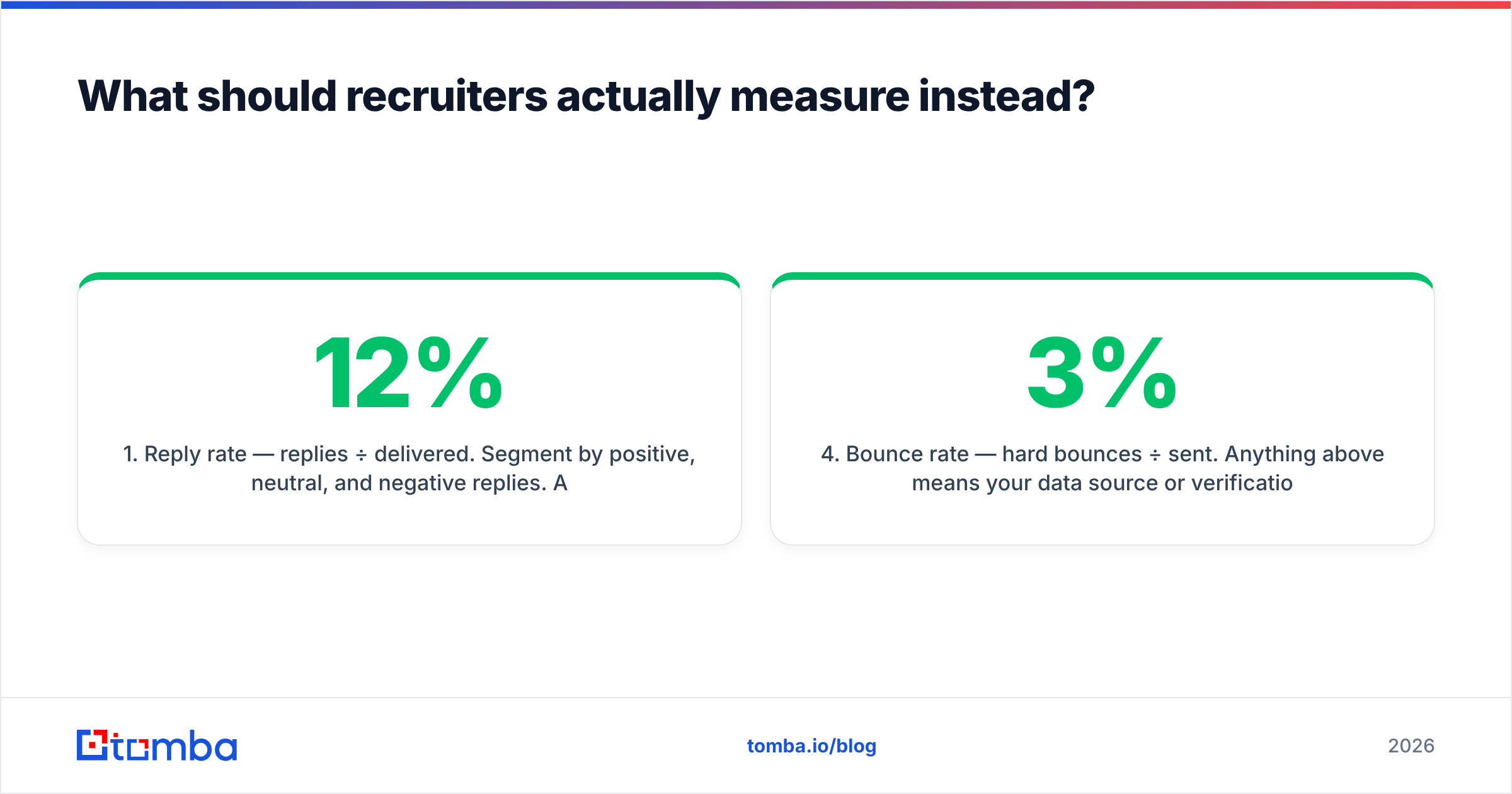
- Reply rate — replies ÷ delivered. Segment by positive, neutral, and negative replies. A 12% total reply rate with 2% positive is a targeting problem, not a copy problem.
- Time to first response — median hours between send and reply. This is your best predictor of whether a sourcing channel is worth scaling.
- Meeting-booked rate — screens scheduled ÷ delivered. The number your VP actually cares about.
- Bounce rate — hard bounces ÷ sent. Anything above 3% means your data source or verification step is broken. Above 5% and Google/Microsoft start throttling you.
- Sequence step contribution — which follow-up produced the reply. Most recruiter replies land on step 2 or 3, which is exactly why single-touch sourcing underperforms.
Track those five and you can drop pixel tracking entirely without losing decision-making power.
Which email tracking tools for recruiters are worth paying for?#
The market splits cleanly by where the tracking lives. Here's an honest side-by-side of the categories and representative tools, with 2026 list pricing where publicly available.
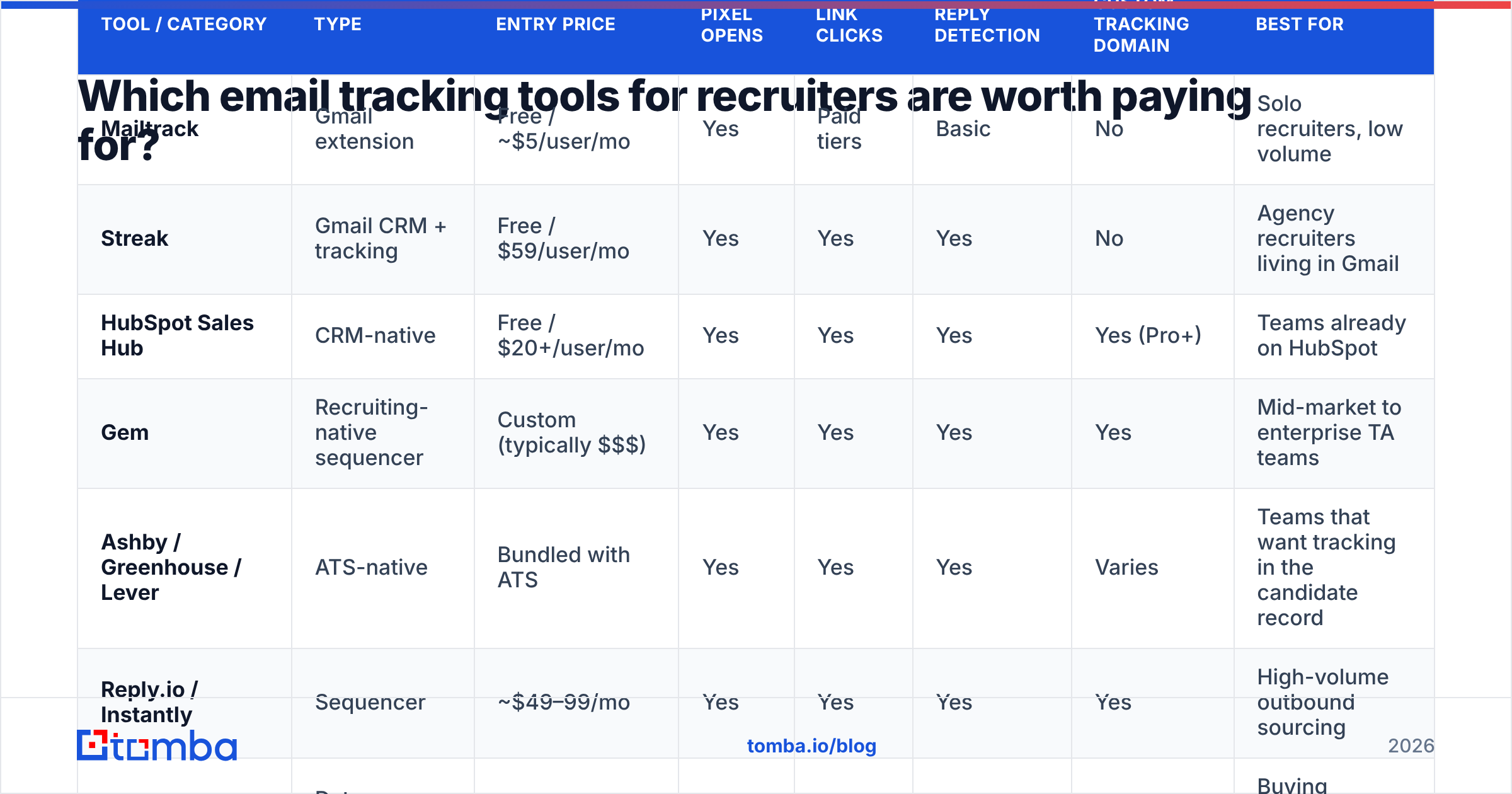
| Tool / Category | Type | Entry price | Pixel opens | Link clicks | Reply detection | Custom tracking domain | Best for |
|---|---|---|---|---|---|---|---|
| Mailtrack | Gmail extension | Free / ~$5/user/mo | Yes | Paid tiers | Basic | No | Solo recruiters, low volume |
| Streak | Gmail CRM + tracking | Free / $59/user/mo | Yes | Yes | Yes | No | Agency recruiters living in Gmail |
| HubSpot Sales Hub | CRM-native | Free / $20+/user/mo | Yes | Yes | Yes | Yes (Pro+) | Teams already on HubSpot |
| Gem | Recruiting-native sequencer | Custom (typically $$$) | Yes | Yes | Yes | Yes | Mid-market to enterprise TA teams |
| Ashby / Greenhouse / Lever | ATS-native | Bundled with ATS | Yes | Yes | Yes | Varies | Teams that want tracking in the candidate record |
| Reply.io / Instantly | Sequencer | ~$49–99/mo | Yes | Yes | Yes | Yes | High-volume outbound sourcing |
| BookYourData | Data + verified contacts | Pay-as-you-go | N/A | N/A | N/A | N/A | Buying verified contact lists to send to |
| Tomba | Find + verify layer | Free (25/mo), $49/mo Starter | N/A | N/A | N/A | N/A | Getting the address right before you track anything |
Two things stand out from that table.
First, the ATS-native option is underrated. If your tracking events don't land on the candidate record, your recruiters will re-source the same person in six weeks. Greenhouse, Lever, and Ashby all log sends, opens, and replies against the candidate profile. That context is worth more than a marginally better open-rate chart.
Second, nothing in the "tracking" column matters if the address bounces. BookYourData and Tomba appear in that table for a different reason than the rest: they operate one step earlier in the chain. A tracking tool cannot report on an email that never got delivered.
Should you use a Gmail extension, a sequencer, or your ATS?#
Pick one primary system. Running two is how you get a hiring manager asking why the dashboard says 61% opens and the ATS says 44%.
Use a Gmail/Outlook extension if: you're a solo recruiter or a two-person agency, you send fewer than 50 candidate emails a week, and every message is genuinely one-to-one. Mailtrack and Streak are cheap, install in two minutes, and don't require DNS changes. Their weakness is that all tracking runs on a shared vendor domain, which is a deliverability liability at scale.
Use a sequencer if: you run multi-step sourcing campaigns, you need per-step analytics, and you send 200+ emails a week per recruiter. Sequencers give you SMTP-level delivery data, sending-window controls, and per-mailbox throttling — the things that keep you out of spam. They also cost more and require setup discipline. If you're evaluating this tier, our comparisons of Instantly alternatives and Reply.io alternatives cover the tradeoffs.
Use your ATS if: compliance and candidate-record completeness matter more than campaign analytics — which is true for most in-house TA teams above 20 recruiters. Bundled tracking is rarely best-in-class, but the data lives where your team already works.
The hybrid that actually works: ATS as system of record, sequencer for high-volume sourcing pushes, and nothing else. No extensions layered on top.

How does email tracking hurt deliverability, and how do you avoid it?#
This is the section most vendor comparisons skip, because the answer is uncomfortable: tracking makes your email more likely to land in spam.
Three concrete mechanisms:
- Shared tracking domains carry other people's reputation. When a free extension rewrites your links to
t.sharedvendor.io, you inherit the spam behavior of every other user on that domain. If someone on the shared domain gets blacklisted, your candidate emails start hitting the Promotions tab or worse. - HTML weight and image-only content trip content filters. A pixel plus a tracked signature image plus a logo turns a plain-text-looking message into something filters treat as bulk marketing. Recruiting outreach should look like a person wrote it in their mail client — because it should have been.
- Domain mismatch between the From domain and the link domain is a phishing heuristic. If you send from
@company.comand every link points at an unrelated tracking domain, you're producing the exact pattern security tools are trained to flag.
The fixes are mechanical:
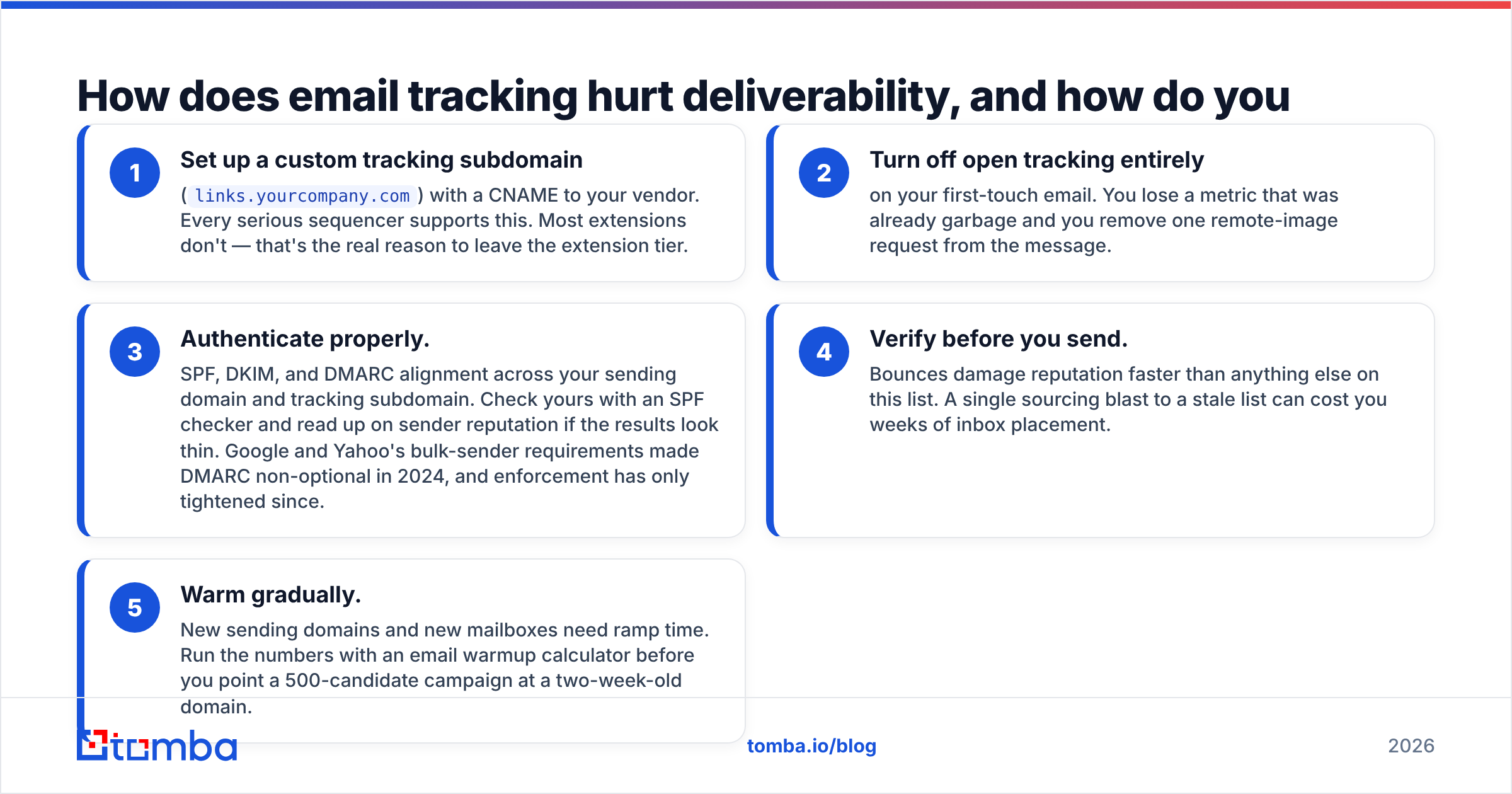
- Set up a custom tracking subdomain (
links.yourcompany.com) with a CNAME to your vendor. Every serious sequencer supports this. Most extensions don't — that's the real reason to leave the extension tier. - Turn off open tracking entirely on your first-touch email. You lose a metric that was already garbage and you remove one remote-image request from the message.
- Authenticate properly. SPF, DKIM, and DMARC alignment across your sending domain and tracking subdomain. Check yours with an SPF checker and read up on sender reputation if the results look thin. Google and Yahoo's bulk-sender requirements made DMARC non-optional in 2024, and enforcement has only tightened since.
- Verify before you send. Bounces damage reputation faster than anything else on this list. A single sourcing blast to a stale list can cost you weeks of inbox placement.
- Warm gradually. New sending domains and new mailboxes need ramp time. Run the numbers with an email warmup calculator before you point a 500-candidate campaign at a two-week-old domain.
That fourth point deserves emphasis. Recruiter contact data decays faster than sales data — engineers change jobs every 2–3 years, and personal-vs-work address preference shifts constantly. Running candidate addresses through an email verifier before a sourcing push routinely removes 8–15% of a list that looked clean.
What does a working recruiter tracking stack look like?#
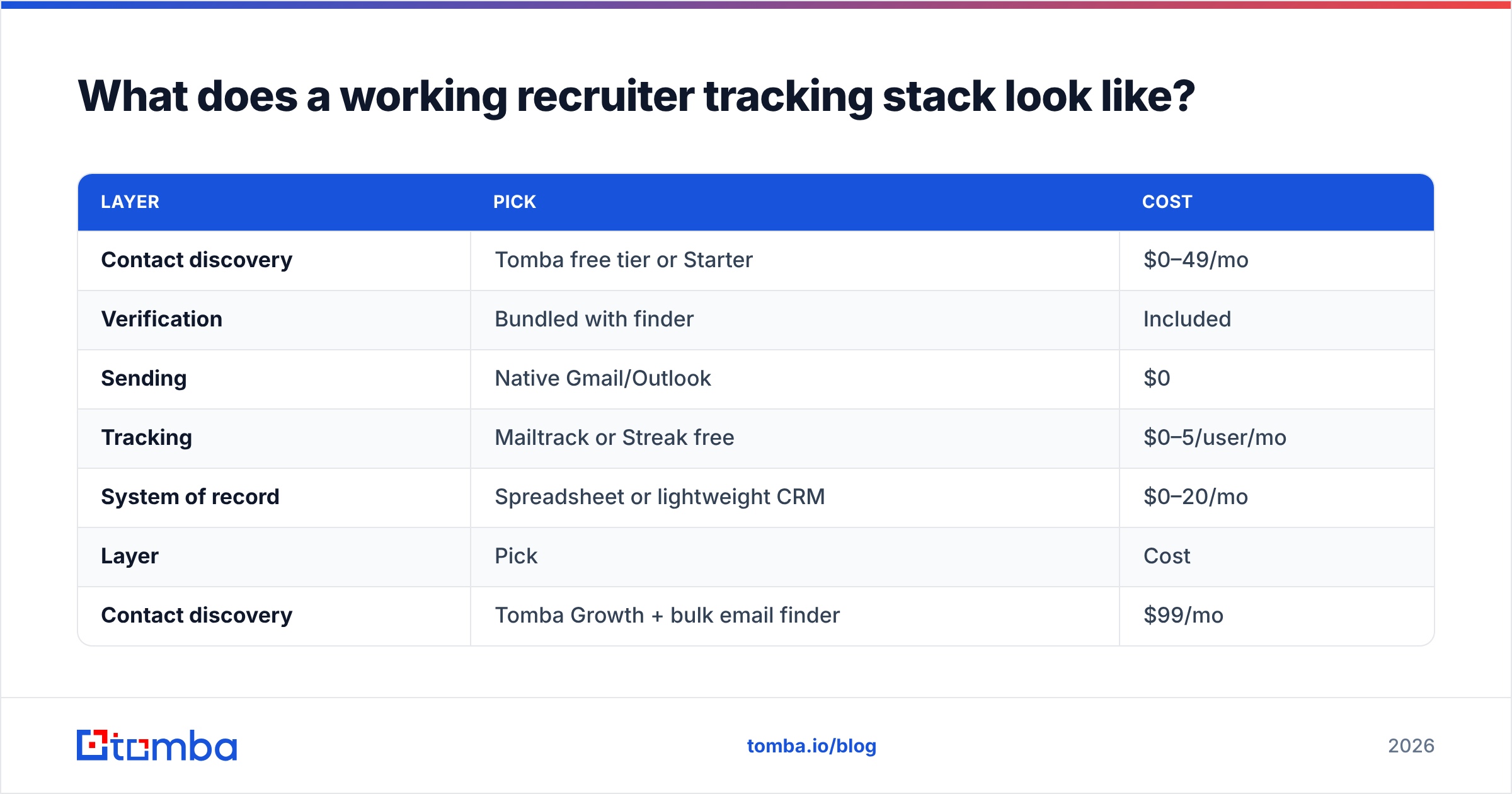
Here's a stack that holds up under scrutiny, at three team sizes.
Solo / boutique agency (1–3 recruiters)
| Layer | Pick | Cost |
|---|---|---|
| Contact discovery | Tomba free tier or Starter | $0–49/mo |
| Verification | Bundled with finder | Included |
| Sending | Native Gmail/Outlook | $0 |
| Tracking | Mailtrack or Streak free | $0–5/user/mo |
| System of record | Spreadsheet or lightweight CRM | $0–20/mo |
Growing in-house team (4–15 recruiters)
| Layer | Pick | Cost |
|---|---|---|
| Contact discovery | Tomba Growth + bulk email finder | $99/mo |
| Verification | Bulk verify pre-campaign | Included |
| Sending | Sequencer with custom tracking domain | $49–99/mo |
| Tracking | Sequencer analytics, opens off | Included |
| System of record | ATS (Greenhouse / Lever / Ashby) | Existing |
Enterprise TA (15+ recruiters)
| Layer | Pick | Cost |
|---|---|---|
| Contact discovery | Tomba Pro or API into your data warehouse | $249/mo+ |
| Verification | Automated pre-send verification via API | Included |
| Sending | Recruiting-native sequencer (Gem or equivalent) | Custom |
| Tracking | Reply + meeting-booked only, piped to BI | Included |
| System of record | ATS with bidirectional sync | Existing |
Notice what's constant across all three: discovery and verification sit before sending, and tracking sophistication scales with volume rather than with budget. A 3-person agency does not need enterprise sequencer analytics. A 40-recruiter team absolutely needs a custom tracking domain.
How do you set up tracking that survives a privacy audit?#
Recruiting touches personal data, which means your tracking choices are a legal question in addition to a technical one. GDPR treats a tracking pixel as processing personal data; the ICO and several EU DPAs have issued guidance treating pixel-based open tracking as requiring a lawful basis. Legitimate interest is defensible for B2B recruiting outreach in most EU jurisdictions, but the documentation burden is real.
Practical guardrails that most legal teams will sign off on:
- Disclose tracking in your privacy notice, and link that notice in your outreach signature.
- Don't track opens on candidates in jurisdictions where you can't establish a lawful basis — most sequencers support per-campaign or per-region tracking toggles.
- Set a data retention window on tracking events. Ninety days covers any operational need; keeping three years of pixel logs is pure liability.
- Honor opt-outs across the stack. If a candidate replies "remove me," that suppression must propagate from the sequencer to the ATS to your data source.
None of this is optional in 2026, and none of it is hard once you've decided which single tool owns tracking.
What's the honest verdict on email tracking for recruiters?#
Buy less tracking than you think you need, and buy more data quality than you think you need.
The recruiter who verifies every address, sends plain-text-looking messages from an authenticated domain, tracks only replies and meetings, and follows up three times will beat the recruiter with a beautiful open-rate dashboard every single quarter. The tracking industry sells certainty; what it can actually deliver in 2026 is a directional signal on clicks and a reliable signal on replies.
If you're choosing today: extensions for solo work, sequencers with a custom tracking domain for volume, ATS-native for compliance-heavy in-house teams. Never all three.
And fix the input before you optimize the output. Every tracking metric you look at is downstream of whether the email reached a real person at a real address. Start with the Tomba Email Finder to source verified candidate and hiring-contact addresses by domain or name — the free tier gives you 25 searches a month to test accuracy on your own target list, and the $49/mo Starter plan covers a working sourcing pipeline. Check Tomba pricing for the tier that fits your volume, and run a bulk verification pass before your next sourcing campaign. Clean data first, tracking second.
Related guides#
Ready to find emails that actually work?
Join 150,000+ professionals who stopped guessing and started sending. Free credits on signup — no credit card required.
Get the Tomba newsletter
Practical outbound tactics and product updates — once every two weeks.
About the author