Email Velocity: How Fast Can You Safely Scale Sending?
Email velocity is the ramp rate that quietly decides whether your cold outbound lands in the inbox or the spam folder. Here are the safe daily increments, provider limits, and the list-hygiene math behind them.

TL;DR
- Email velocity is the rate at which your sending volume changes over time — not your total volume. Mailbox providers watch the slope, not just the number.
- A safe ramp for a fresh domain is roughly +5 to +10 emails per mailbox per day, capped at 30–50/day per mailbox for cold outbound. Doubling week over week is where most domains break.
- Velocity spikes only get punished when they arrive with bad signals: high bounces, low engagement, or a list you never verified. Clean data buys you a steeper ramp.
- Provider limits differ. Google Workspace caps at 2,000 recipients/day per user; Microsoft 365 at 10,000 recipients/day with a 30-message-per-minute rate limit. Neither cap is a target for cold email.
- The cheapest velocity insurance is list hygiene: verify before you send, kill catch-alls you can't confirm, and keep bounce rate under 2%.
What is email velocity, exactly?#
Email velocity is the rate of change in your sending volume across a domain, IP, or mailbox over a given window — usually measured day over day or week over week.
Think of it like merging onto a highway. Total volume is your speed; velocity is your acceleration. A car doing 70 mph is unremarkable. A car going from 0 to 70 in the length of an on-ramp, swerving across three lanes, gets attention. Mailbox providers behave the same way: 50,000 emails a day from an established domain with a decade of history is boring. 5,000 emails on day three from a domain registered last Tuesday is a flag.
Technically, providers like Gmail and Outlook feed velocity into reputation models alongside complaint rate, bounce rate, authentication status, and engagement. Velocity on its own is not a spam signal. Velocity plus a 12% bounce rate is a spam signal. Velocity plus zero replies and zero opens is a spam signal. That distinction matters, because most "we ramped too fast" post-mortems are actually "we ramped fast on a list we never cleaned."

Three velocity metrics worth tracking separately:
- Per-mailbox daily velocity — how many more emails each sending address handles today versus yesterday. This is the one you control directly in your sequencer.
- Per-domain aggregate velocity — the sum across every mailbox on the domain. Ten mailboxes each adding 10/day is +100/day at the domain level, which reads very differently to a filter.
- Per-recipient-provider velocity — how fast your volume into Gmail specifically, or Outlook specifically, is climbing. A list that is 80% Gmail concentrates your entire ramp into one reputation system.
Most teams track only the first and are surprised when the third one bites.
Why does ramping too fast get you filtered?#
Because filters are pattern matchers with memory, and a sudden volume jump from an unknown sender matches the pattern of a compromised account or a burner domain.
Here is the mechanical chain of events when velocity goes wrong:
- Day 1–3: New domain, no sending history. You send 500/day. There is no reputation record, so the provider routes conservatively — most messages land in Promotions or Spam.
- Day 4–7: Because they landed in Spam, engagement is near zero. Zero opens and zero replies on 3,500 messages is a strong negative signal.
- Week 2: Bounces from unverified addresses accumulate. Once hard bounces exceed roughly 2–3%, the provider treats your list as scraped or stale.
- Week 3: Domain reputation drops to "Bad" in Google Postmaster Tools. Now even your legitimate replies and calendar invites get delayed.
- Week 4+: Recovery takes 4–8 weeks of low-volume, high-engagement sending — or a new domain, which restarts the whole problem.
The asymmetry is what makes velocity dangerous. You can destroy a domain's sender reputation in four days and spend two months rebuilding it. Nobody has ever accidentally ramped too slowly and lost a quarter because of it.
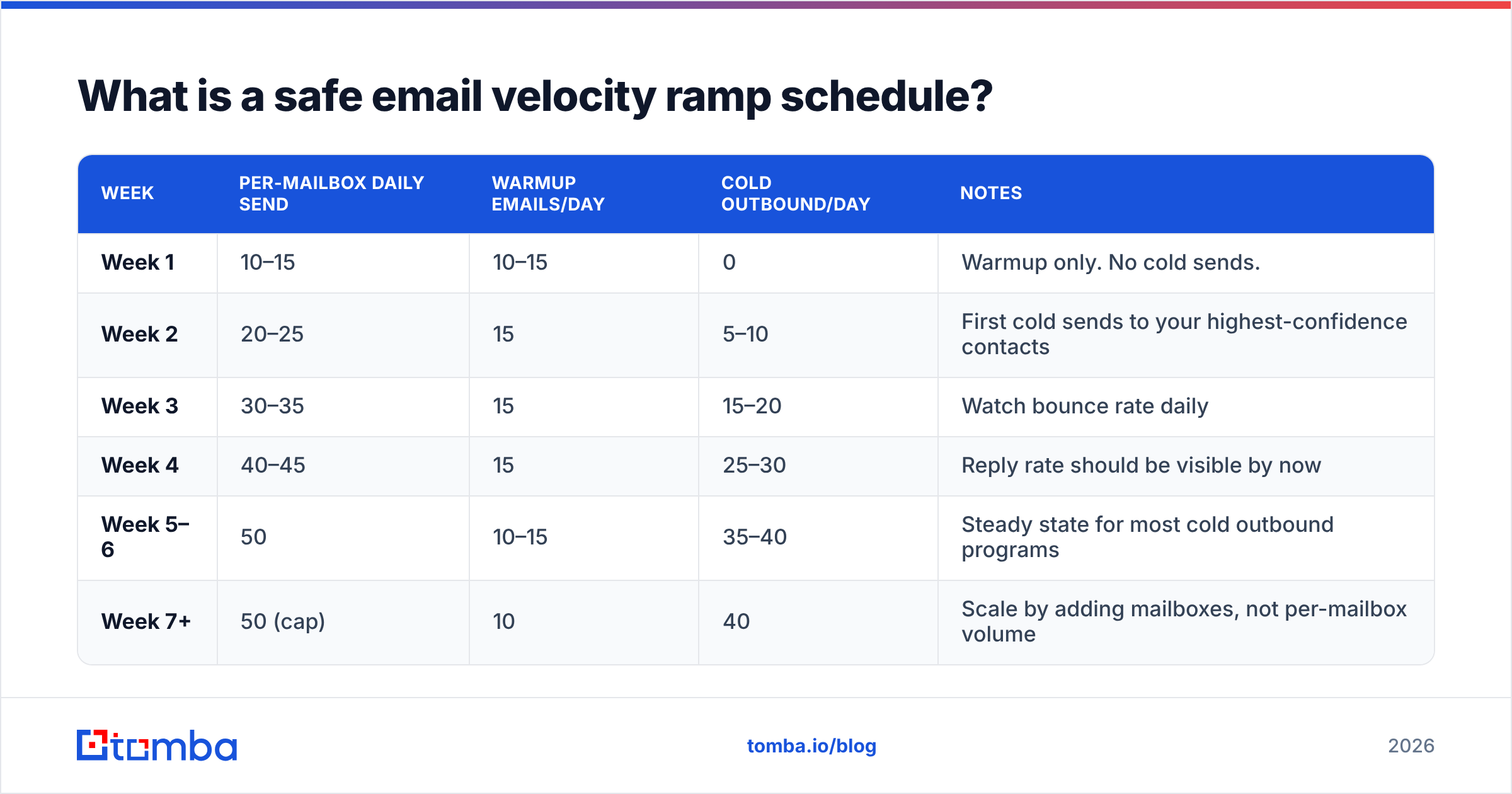
What is a safe email velocity ramp schedule?#
The consensus safe ramp across deliverability practitioners is conservative, and the numbers below assume a properly authenticated domain with SPF, DKIM, and DMARC already passing.
| Week | Per-mailbox daily send | Warmup emails/day | Cold outbound/day | Notes |
|---|---|---|---|---|
| Week 1 | 10–15 | 10–15 | 0 | Warmup only. No cold sends. |
| Week 2 | 20–25 | 15 | 5–10 | First cold sends to your highest-confidence contacts |
| Week 3 | 30–35 | 15 | 15–20 | Watch bounce rate daily |
| Week 4 | 40–45 | 15 | 25–30 | Reply rate should be visible by now |
| Week 5–6 | 50 | 10–15 | 35–40 | Steady state for most cold outbound programs |
| Week 7+ | 50 (cap) | 10 | 40 | Scale by adding mailboxes, not per-mailbox volume |
Two rules do most of the work here:
- Never increase a mailbox's daily volume by more than ~30% in a single day. Going from 20 to 26 is fine. Going from 20 to 60 is not.
- Scale horizontally, not vertically. Once a mailbox is at 40–50 cold sends/day, stop. Need 400/day? Run ten mailboxes across two or three domains, each on its own ramp. This is the single most important structural decision in outbound infrastructure, and it is why serious teams buy secondary domains instead of pushing one mailbox to 200/day.
If you want to model this against your own list size and timeline, run the numbers through a warmup calculator before you commit to a launch date. Most teams discover their "we go live Monday" plan actually needs a three-week head start.
How do provider sending limits interact with velocity?#
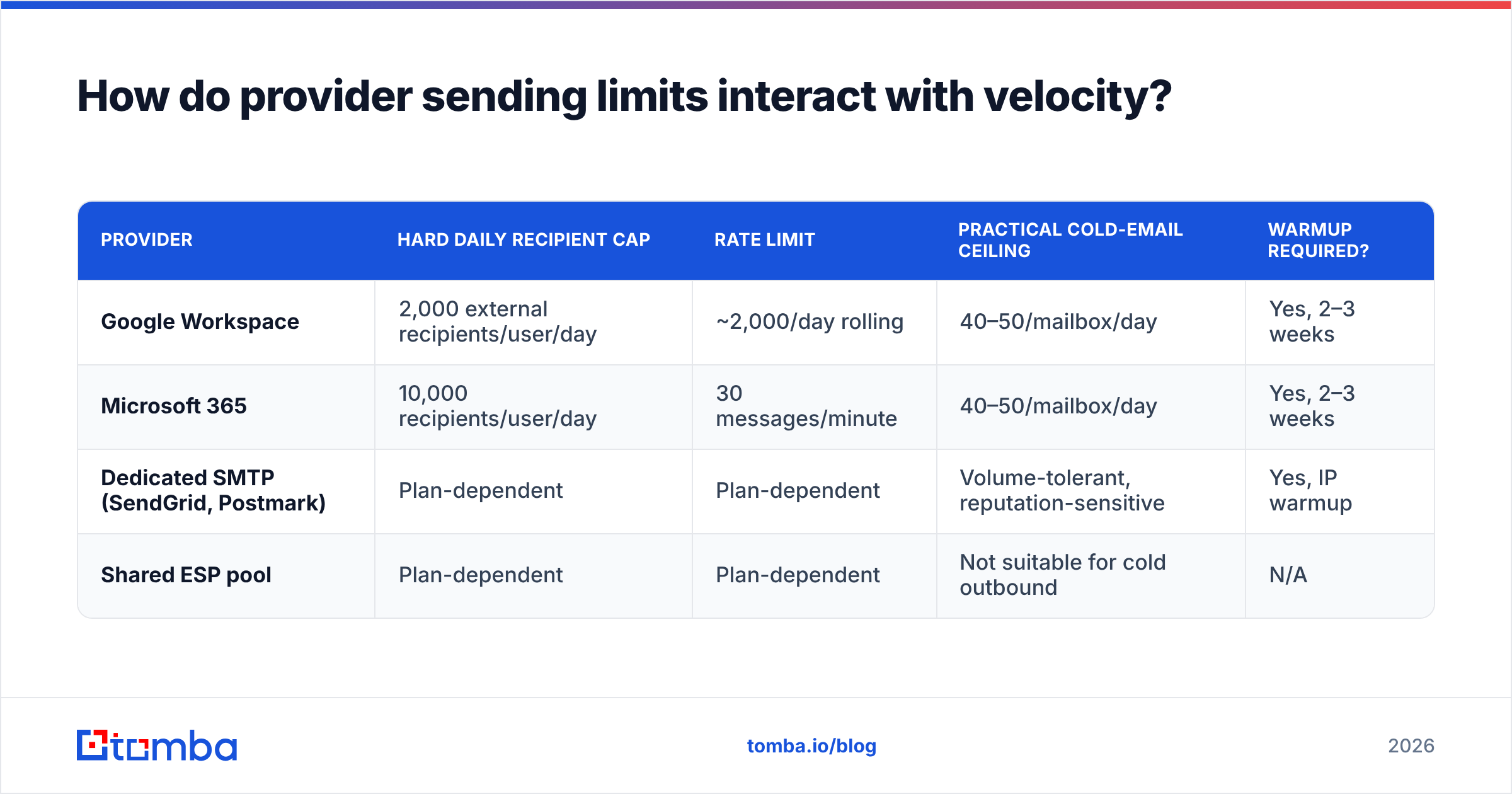
Hard limits and velocity limits are different things, and confusing them is a common failure.
| Provider | Hard daily recipient cap | Rate limit | Practical cold-email ceiling | Warmup required? |
|---|---|---|---|---|
| Google Workspace | 2,000 external recipients/user/day | ~2,000/day rolling | 40–50/mailbox/day | Yes, 2–3 weeks |
| Microsoft 365 | 10,000 recipients/user/day | 30 messages/minute | 40–50/mailbox/day | Yes, 2–3 weeks |
| Dedicated SMTP (SendGrid, Postmark) | Plan-dependent | Plan-dependent | Volume-tolerant, reputation-sensitive | Yes, IP warmup |
| Shared ESP pool | Plan-dependent | Plan-dependent | Not suitable for cold outbound | N/A |
The hard cap is a billing and abuse ceiling. It is not permission. Google's own sending limits documentation lists 2,000 external recipients per day, and a new Workspace tenant that actually attempts 2,000 cold emails on day one will be throttled, spam-foldered, or suspended long before hitting that number.
Treat the provider cap as the wall you never touch, and your velocity schedule as the road you actually drive on.
Does list quality change how fast you can ramp?#
Yes — more than any other variable. List quality is the multiplier on your safe velocity.
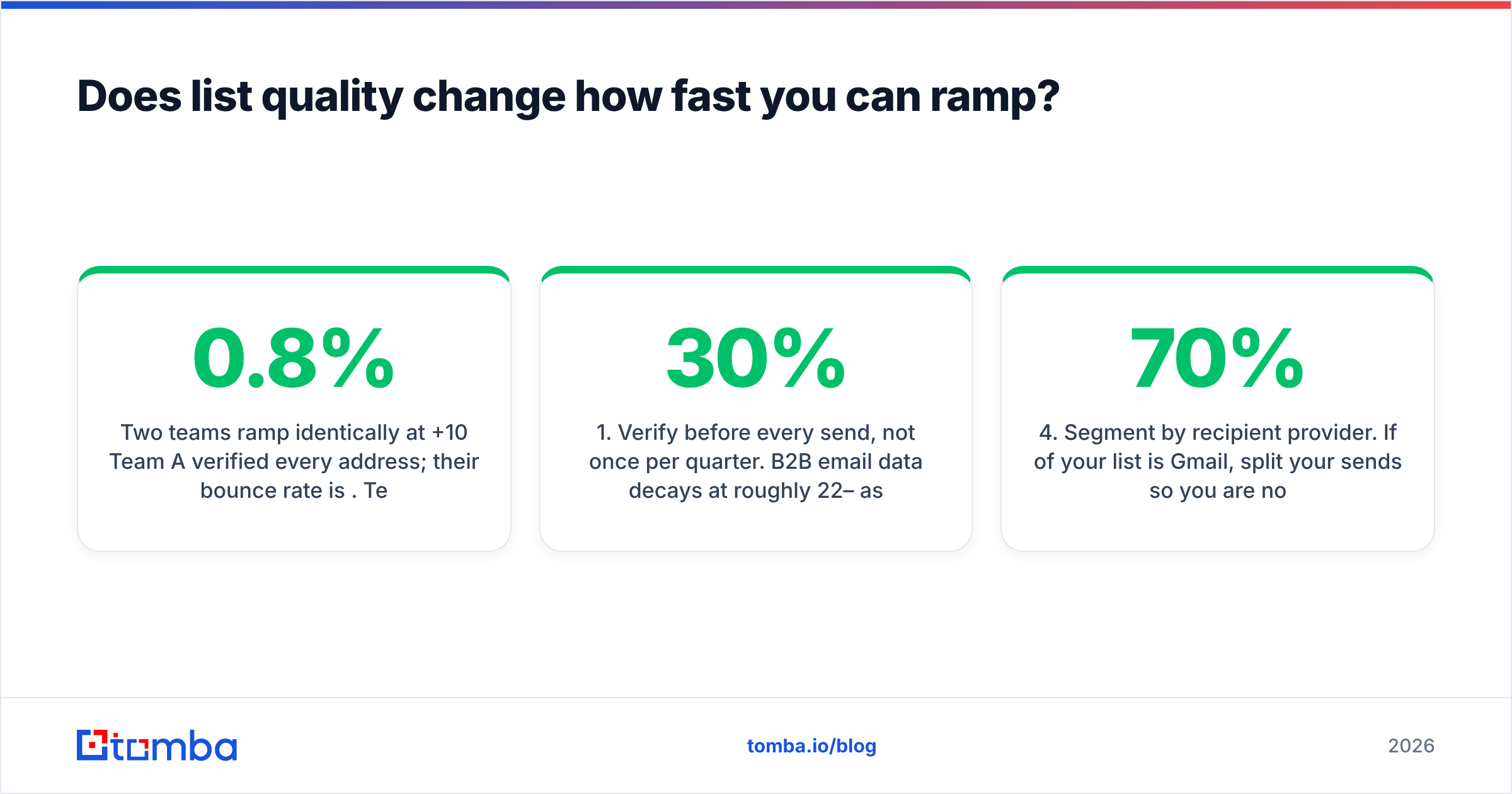
Two teams ramp identically at +10/day. Team A verified every address; their bounce rate is 0.8%. Team B pulled a scraped CSV; their bounce rate is 14%. By day 10, Team A is fine and Team B's domain is toast. Same velocity, opposite outcome. The velocity did not cause the failure — it just delivered the bad data faster.
The concrete levers, in order of impact:
- Verify before every send, not once per quarter. B2B email data decays at roughly 22–30% per year as people change jobs. A list verified in January is meaningfully worse in June. An email verifier run immediately before a campaign catches the addresses that died since you built the list.
- Handle catch-all domains deliberately. Catch-all servers accept everything at SMTP, so a standard verification returns "unknown." Sending blind into catch-alls inflates your apparent deliverability while your actual engagement stays flat. A catch-all verifier resolves a meaningful share of these; the rest belong in a separate, slower-velocity segment.
- Deduplicate across sequences. The same person hit by three campaigns in two weeks is a complaint waiting to happen, and complaints hurt worse than bounces.
- Segment by recipient provider. If 70% of your list is Gmail, split your sends so you are not concentrating a velocity spike into one reputation system on one day.
- Kill role accounts early. info@, sales@, support@, and admin@ have near-zero reply rates and elevated complaint rates. They drag engagement metrics down exactly when you need them highest.
- Suppress hard bounces permanently. Re-sending to a confirmed dead address is the clearest possible signal that you do not maintain your list.

Sourcing matters as much as cleaning. If you build lists with a domain search that returns verified, pattern-confirmed addresses, your starting bounce rate is already low and your ramp can be at the aggressive end of the safe range. If you start from a scraped export, you spend your first two weeks paying down data debt instead of booking meetings.
How do you monitor email velocity in practice?#
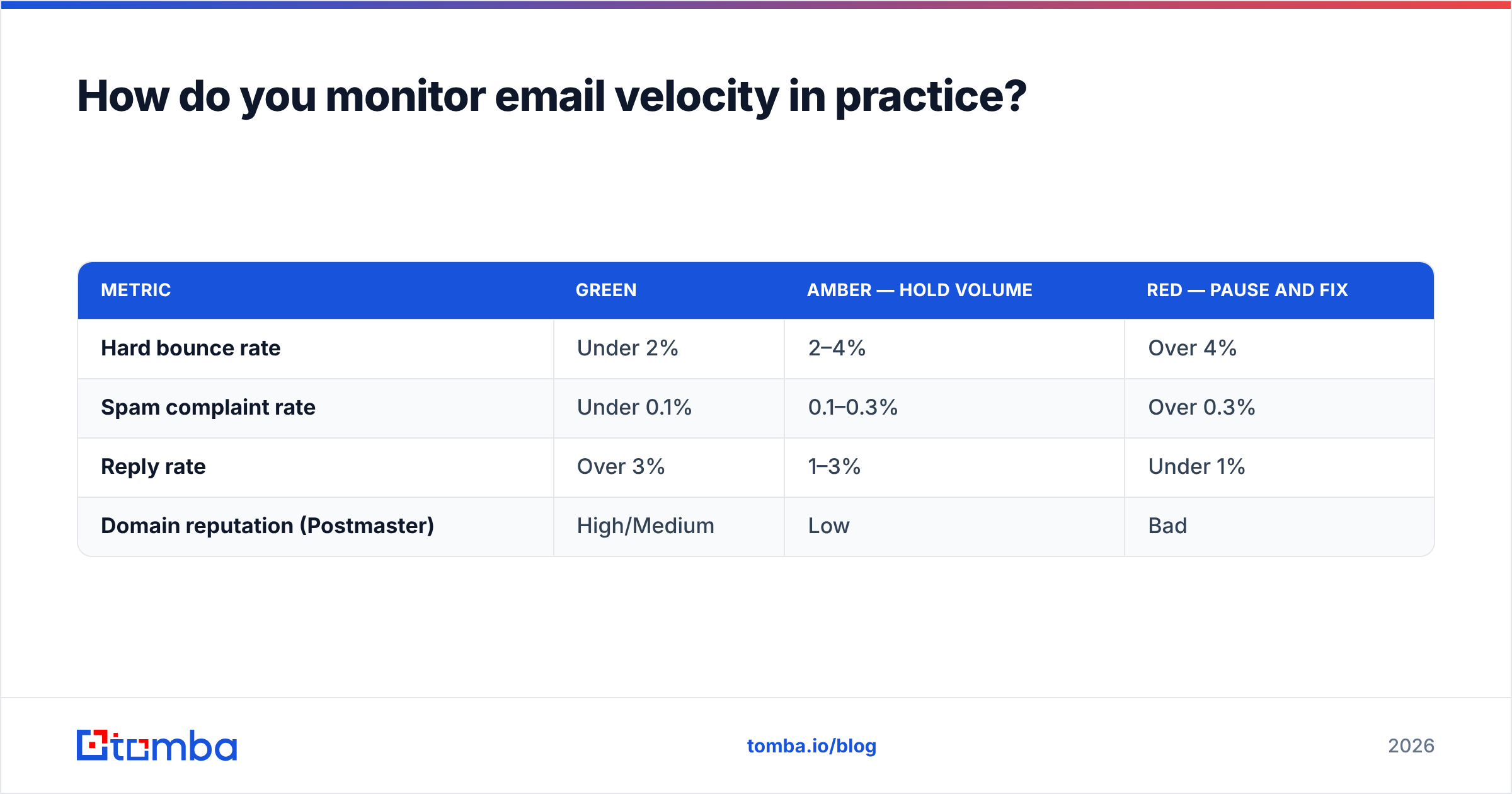
Track four numbers daily during any ramp. If all four are green, you may increase volume. If any one is red, you hold flat — you do not decrease and you do not increase.
| Metric | Green | Amber — hold volume | Red — pause and fix |
|---|---|---|---|
| Hard bounce rate | Under 2% | 2–4% | Over 4% |
| Spam complaint rate | Under 0.1% | 0.1–0.3% | Over 0.3% |
| Reply rate | Over 3% | 1–3% | Under 1% |
| Domain reputation (Postmaster) | High/Medium | Low | Bad |
Instrument this properly:
- Google Postmaster Tools for Gmail domain and IP reputation, spam rate, and authentication pass rates. It only reports once you have meaningful Gmail volume, which is another argument for a gradual ramp — you get data before you get damage.
- Seed testing across Gmail, Outlook, and Yahoo at least weekly. Placement, not just delivery. A 99% "delivered" rate means nothing if 60% of it lands in Promotions.
- Bounce classification. Separate hard bounces (dead mailbox) from soft (full inbox, temporary) from blocks (reputation). Only hard bounces indicate a data problem; blocks indicate a velocity or reputation problem, and they call for different fixes.
- A pre-send gate. Refuse to launch any campaign where the verified-address share is under 95%. Automating this against the Tomba API inside your sequencer means the gate runs on every send, not when someone remembers.
Deliverability practitioners at vendors like HubSpot publish similar thresholds for marketing email; cold outbound should be stricter, because you have no prior opt-in relationship absorbing the risk.
When can you ignore the ramp rules?#
Rarely, and never on a new domain. Three legitimate exceptions:
You are sending from an established domain with years of history. A ten-year-old domain sending transactional and internal mail daily has reputation collateral. You can start cold outbound at 20–25/day rather than 10 — but you are also risking your primary business domain, which is why almost nobody should do this. Use a secondary domain.
Your "cold" list is actually warm. Trial signups, webinar registrants, and inbound leads engage at 10–20x cold rates. High engagement is the strongest positive signal available, and it lets you ramp roughly twice as fast. This is not permission to send to a purchased list you have relabeled as "warm."
You are re-warming a paused domain. A domain with prior good reputation that went quiet for a month does not need a full three-week ramp. Two weeks at half your previous steady-state volume typically restores it. If the domain went quiet because it got burned, you need the full ramp plus fixed root causes.
Everything else — new domain, new mailbox, new list, new market — gets the full schedule.
What does a velocity-safe outbound stack look like?#
Put the pieces in this order, because each one depends on the one before it:
- Domain layer: 2–3 secondary domains, each with SPF, DKIM, and DMARC configured before a single message goes out. Check your records with an SPF checker rather than assuming your DNS provider got it right.
- Mailbox layer: 2–3 mailboxes per domain, each individually warmed. Ten mailboxes at 40/day beats two mailboxes at 200/day, every time.
- Data layer: verified contacts only, refreshed before each campaign, with catch-alls segmented separately.
- Sending layer: randomized intervals, per-mailbox daily caps enforced in the tool, and a hard stop when any monitoring metric goes red.
- Monitoring layer: Postmaster Tools, weekly seed tests, and daily bounce classification.
Skip the data layer and every layer above it becomes expensive theater. You cannot warm your way out of a 15% bounce rate.
Start with data clean enough to ramp fast#
Email velocity is not really about patience. It is about whether your data can survive the acceleration. Teams with verified, current, deduplicated lists ramp at the top of the safe range and hit steady state in four weeks. Teams sending into stale scraped data get filtered no matter how slowly they go — the slow ramp just extends the funeral.
Fix the input first. Build your lists with the Tomba Email Finder, verify every address before it enters a sequence, and let your ramp schedule handle the rest. The free tier gives you 25 searches a month to test accuracy against a list you already know, and paid plans start at $49/mo on Starter, $99/mo on Growth, and $249/mo on Pro — see the full Tomba pricing breakdown for volume tiers. Clean data is the cheapest deliverability insurance you will ever buy.
Related guides#
Ready to find emails that actually work?
Join 150,000+ professionals who stopped guessing and started sending. Free credits on signup — no credit card required.
Get the Tomba newsletter
Practical outbound tactics and product updates — once every two weeks.
About the author