Email Verification List: How to Clean Yours in 2026
An unverified list burns your domain reputation before your copy ever gets read. Here is the full 2026 workflow for verifying a B2B email list, what each status code really means, and how the main tools price it.
TL;DR
- An email verification list workflow is not a one-time cleanup — it is syntax, DNS, MX, SMTP, and risk scoring run on a schedule against every address you own.
- Keep hard bounces under 2%. Above that, Google and Microsoft start throttling you, and recovery takes weeks of warmup you did not budget for.
- Catch-all domains are where most "verified" lists quietly fail. A tool that marks them all as valid is lying to you; a tool that marks them all as invalid is throwing away pipeline.
- Verification pricing in 2026 clusters around $0.001–$0.008 per credit depending on volume and whether verification is bundled with finding.
- Re-verify anything older than 90 days. B2B contact data decays roughly 2–2.5% per month as people change jobs.
What is an email verification list?#
An email verification list is the output of running every address you hold through a battery of deliverability checks and tagging each one with a status — valid, invalid, catch-all, role-based, disposable, or unknown — before a single campaign touches it.
Think of it like a pre-flight checklist. A pilot does not taxi onto the runway and hope the fuel gauge is honest. You should not push 8,000 contacts into a sequencer and hope the CSV your intern exported from a 2023 webinar still resolves.
The distinction that matters: finding an address and verifying it are separate jobs. A email finder predicts or retrieves an address from a name plus domain. An email verifier proves whether that address will accept mail today. Plenty of teams do the first, skip the second, and then wonder why their domain got throttled in week three.

Why does an unverified list cost more than it saves?#
Because bounces are not a neutral event. They are a reputation signal, and mailbox providers weight them heavily.
Google's bulk sender requirements — the ones that tightened in 2024 and have only gotten stricter since — put a hard spam-complaint ceiling on senders and expect you to keep invalid recipients out of your stream entirely. You can read the current thresholds in Google's own sender guidelines. Microsoft applies similar logic through its own filtering stack, just with less public documentation.
Here is the actual cost chain when you skip verification:
- Hard bounces spike. A bounce message from a nonexistent mailbox tells the receiving provider you do not know who you are mailing.
- Sender reputation drops. Your sender reputation is domain-level and IP-level. Both take the hit.
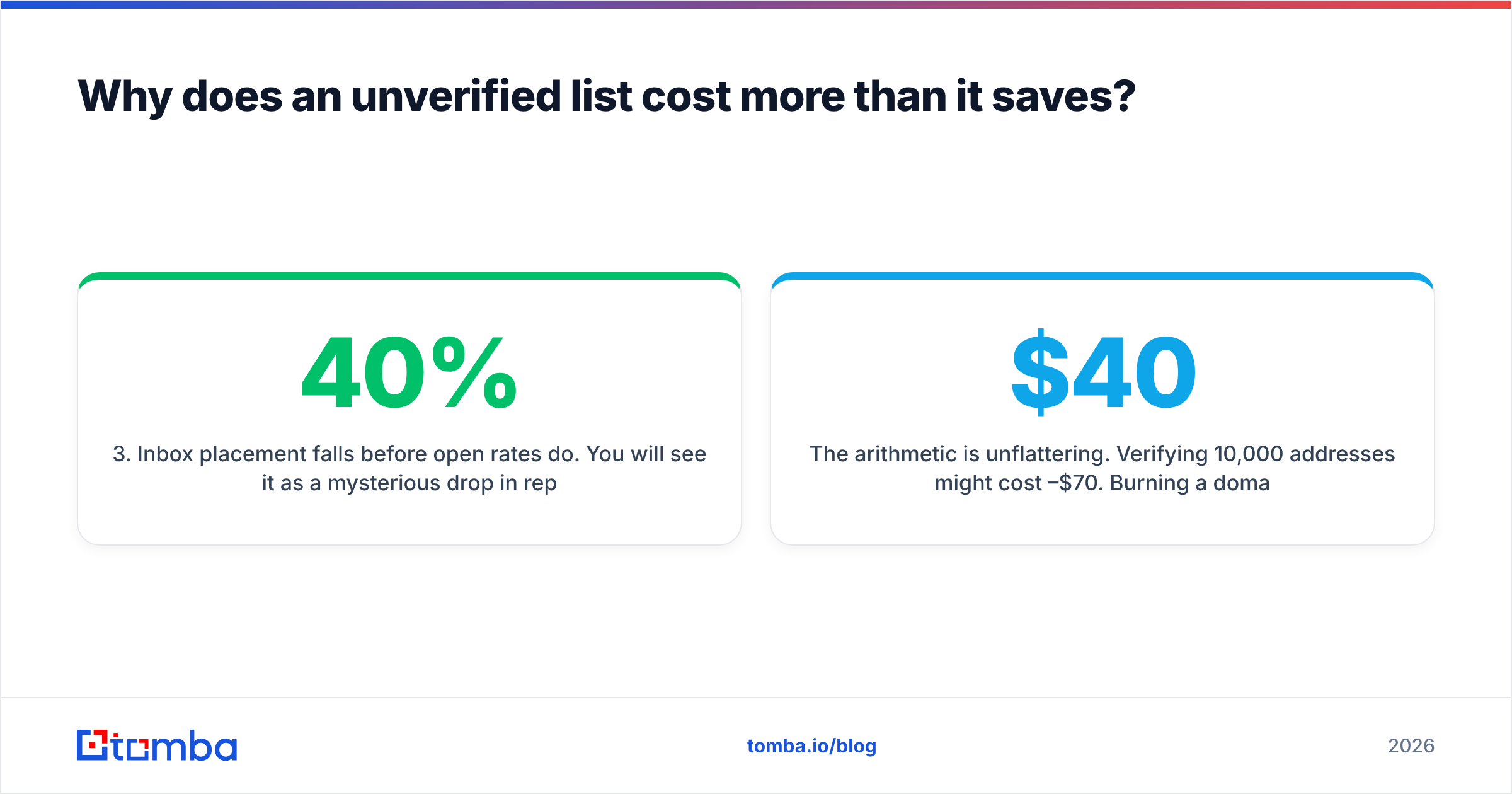
- Inbox placement falls before open rates do. You will see it as a mysterious 40% drop in replies, not as an error.
- Spam traps get hit. Recycled traps live on abandoned domains. They do not bounce. They just poison you silently.
- Recovery is slow. Rebuilding email deliverability after a bad send takes 3–6 weeks of reduced volume and warmup.
The arithmetic is unflattering. Verifying 10,000 addresses might cost $40–$70. Burning a domain costs you a quarter of pipeline plus the price of a new domain, new warmup, and re-authenticated DNS.
How does email list verification actually work?#
Every serious verifier runs the same layered sequence. Understanding the layers tells you which vendor claims to discount.
- Syntax check — RFC 5322 compliance. Catches
john@@acme, trailing spaces, and the Excel-mangled entries that make up a surprising share of any exported list. Free and instant. - Domain and DNS check — Does the domain resolve? Is it registered? Is it parked? A domain with no A record is a dead end regardless of the local part.
- MX record lookup — Does the domain accept mail at all? Plenty of company domains are web-only, with mail on a separate subdomain or a different provider entirely.
- Disposable and role detection — Filters
mailinator.com-style throwaways and role accounts (info@,sales@,support@). Role accounts are not invalid, but they convert badly and complain often, so tag them and decide deliberately. - SMTP handshake — The verifier opens a connection to the receiving mail server and asks whether the mailbox exists, without sending anything. This is the load-bearing step, and it is the one that gets rate-limited, greylisted, and blocked by defensive providers.
- Catch-all and risk scoring — When a server accepts every address by policy, the SMTP step returns "yes" for anything. Good tools apply pattern history and historical engagement to score these rather than guessing.
Steps 1–4 are cheap and nearly every vendor gets them right. Steps 5 and 6 are where accuracy differences show up, and where price differences are justified.
What do the verification statuses actually mean?#
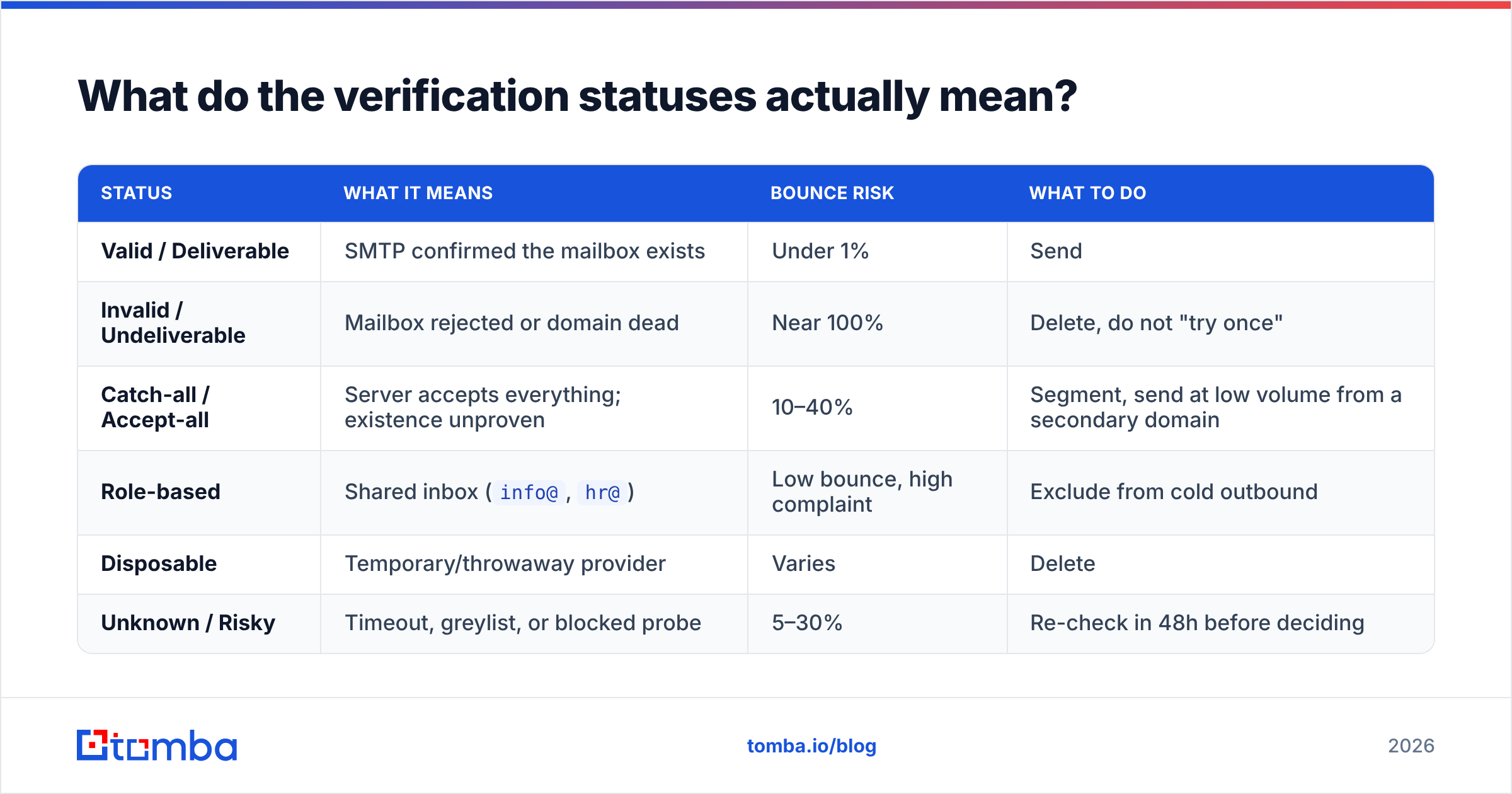
Vendors use slightly different vocabulary for the same underlying states. Here is the translation table plus the action you should take for each.
| Status | What it means | Bounce risk | What to do |
|---|---|---|---|
| Valid / Deliverable | SMTP confirmed the mailbox exists | Under 1% | Send |
| Invalid / Undeliverable | Mailbox rejected or domain dead | Near 100% | Delete, do not "try once" |
| Catch-all / Accept-all | Server accepts everything; existence unproven | 10–40% | Segment, send at low volume from a secondary domain |
| Role-based | Shared inbox (info@, hr@) |
Low bounce, high complaint | Exclude from cold outbound |
| Disposable | Temporary/throwaway provider | Varies | Delete |
| Unknown / Risky | Timeout, greylist, or blocked probe | 5–30% | Re-check in 48h before deciding |
The most expensive mistake teams make is treating "catch-all" as a binary. Roughly a fifth of B2B domains are configured this way, and a large share of enterprise accounts sit inside them. Deleting all of them removes your best-fit accounts. Sending to all of them at full volume torches your domain. The correct move is segmentation — which is exactly what a dedicated catch-all verifier is for.
Which email verification tools compare best in 2026?#
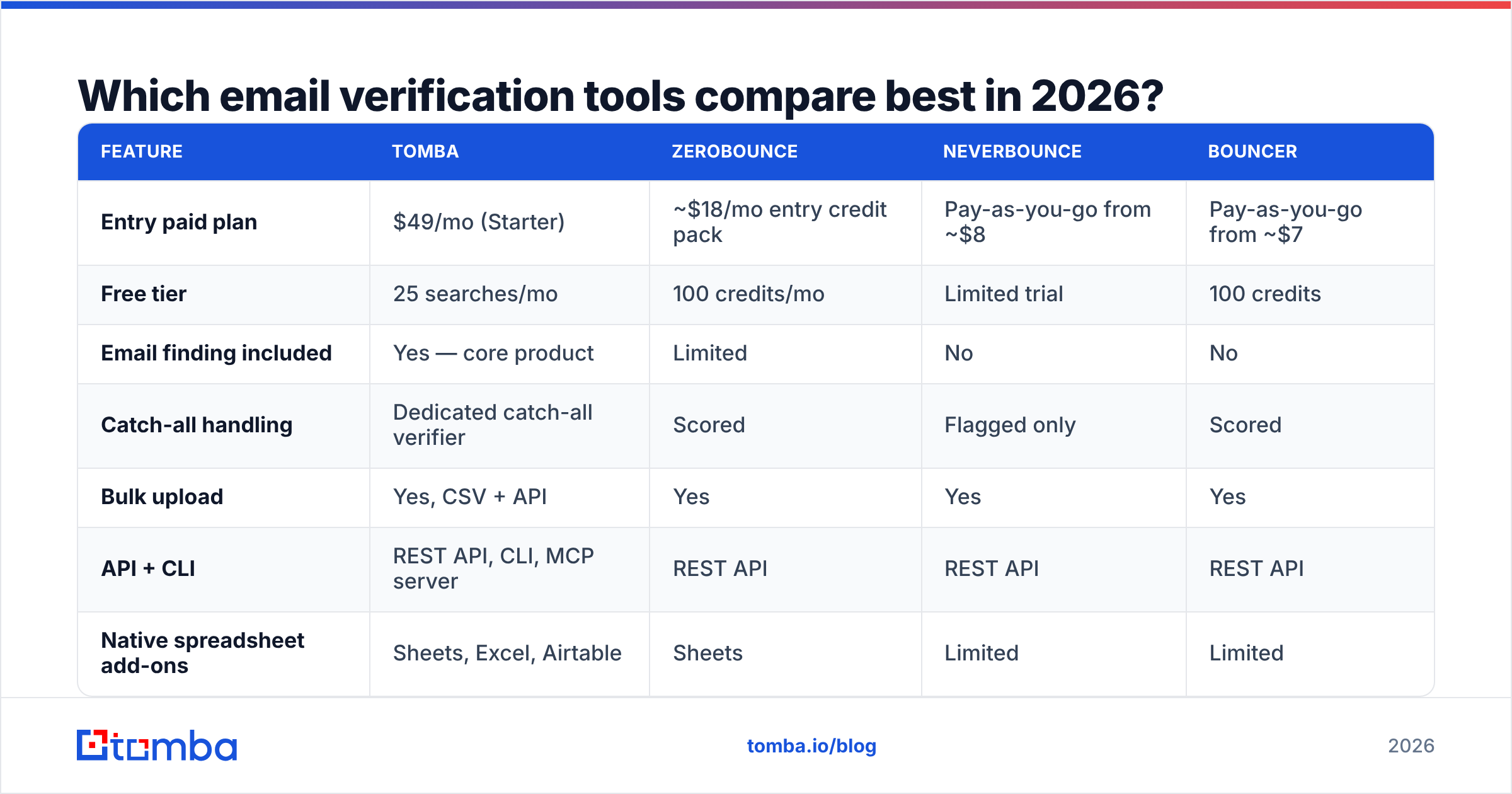
Pricing below reflects publicly listed rates at the time of writing. Verification is credit-based almost everywhere, so compare cost per 10,000 checks rather than headline monthly price. Always confirm current numbers on the vendor's own page — this category re-prices often.
| Feature | Tomba | ZeroBounce | NeverBounce | Bouncer |
|---|---|---|---|---|
| Entry paid plan | $49/mo (Starter) | ~$18/mo entry credit pack | Pay-as-you-go from ~$8 | Pay-as-you-go from ~$7 |
| Free tier | 25 searches/mo | 100 credits/mo | Limited trial | 100 credits |
| Email finding included | Yes — core product | Limited | No | No |
| Catch-all handling | Dedicated catch-all verifier | Scored | Flagged only | Scored |
| Bulk upload | Yes, CSV + API | Yes | Yes | Yes |
| API + CLI | REST API, CLI, MCP server | REST API | REST API | REST API |
| Native spreadsheet add-ons | Sheets, Excel, Airtable | Sheets | Limited | Limited |
| Best fit | Teams who find and verify in one stack | High-volume marketing list hygiene | One-off list scrubs | Privacy-focused EU teams |
The honest read: if all you ever do is scrub purchased marketing lists, a pure-play verifier priced per credit is the cheaper line item. If your team is also sourcing contacts — which describes most B2B outbound orgs — running find and verify through separate vendors means two contracts, two credit pools, and a manual CSV shuttle between them. Consolidating removes a failure point more often than it saves money. Look at your own Tomba pricing math against two standalone subscriptions before deciding.
For third-party sentiment rather than vendor claims, the G2 email verification category is the least-bad public source. Weight recent reviews heavily; accuracy in this category shifts with every provider-side anti-probing change.

How often should you re-verify your list?#
Every 90 days for active outbound lists. Monthly if you are mailing the same segment repeatedly.
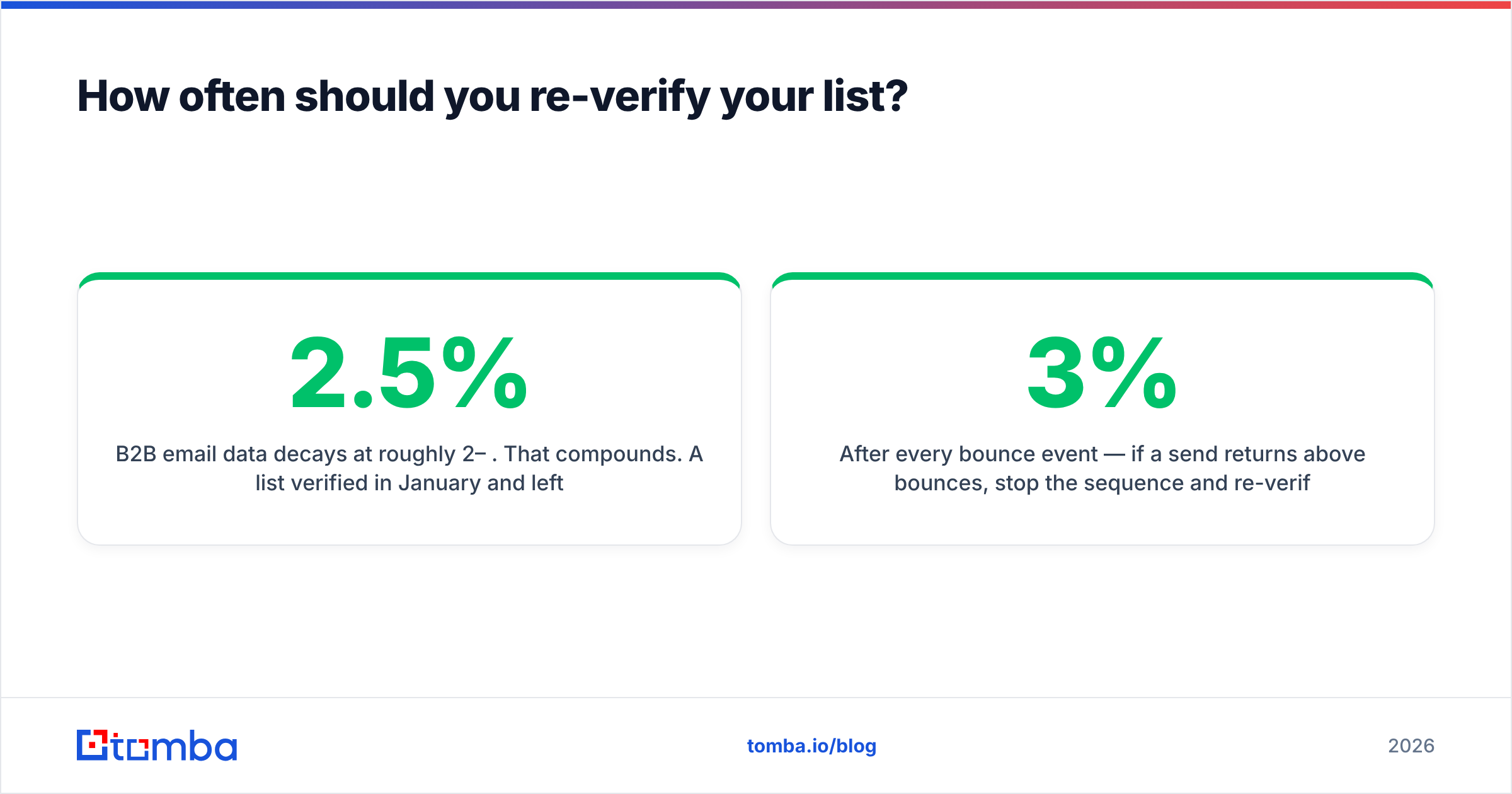
B2B email data decays at roughly 2–2.5% per month. That compounds. A list verified in January and left alone is about 15% rotten by July. The people who left did not update your CRM on their way out.
A practical cadence:
- On import — verify everything, always, no exceptions, including data from a reputable provider.
- Before every campaign — re-verify the specific segment you are about to mail if it has not been checked in 30 days.
- Quarterly sweep — full-database bulk verify of everything you intend to keep.
- After every bounce event — if a send returns above 3% bounces, stop the sequence and re-verify the remainder before resuming.
Sample verification is a false economy here. Checking 500 of 10,000 addresses gives you an error estimate, not a clean list. You still mail the 9,500 you did not check.
What does a clean-list workflow look like end to end?#
Here is the sequence that holds up in production, from raw source to first send.
Step 1 — Deduplicate before you spend a credit. Verifying the same address three times bills you three times. Run a remove duplicates pass first. On messy exports this alone cuts 5–12% of volume.
Step 2 — Normalize the domain layer. Strip www., resolve redirects, and collapse acme.com and acme.io if they are the same company. A domain search against the canonical domain often returns better patterns than guessing per contact.
Step 3 — Fill the gaps. For rows with a name and company but no address, run the finder before verification, not after. Finding produces candidates; verification adjudicates them.
Step 4 — Verify in bulk. Upload the deduplicated file. Expect 5–20 minutes for 10,000 addresses depending on how many domains greylist your probe.
Step 5 — Segment by status, not by score. Valid goes to your primary sending domain. Catch-all goes to a secondary domain at reduced volume. Unknown goes to a re-check queue. Invalid, disposable, and role-based get suppressed.
Step 6 — Suppress permanently. Maintain a suppression list that survives CRM imports. The single most common regression is a fresh import reintroducing addresses you already proved dead.
Step 7 — Monitor the first 200 sends. If bounces exceed 2% on a verified segment, the problem is your verifier or your data source, not bad luck. Pause and diagnose.
Automate steps 1–5 through an email verification API rather than doing them by hand. Manual CSV workflows survive exactly as long as the person who built them stays at the company.
Where do most verified lists still go wrong?#
Four failure modes account for nearly all of it.
Trusting the provider's own "verified" label. Data vendors sell lists marked verified. Verified when, and against what? If the timestamp is not in the file, treat it as unverified.
Ignoring role-based addresses. They pass verification cleanly. They also generate complaints at several times the rate of individual mailboxes because whoever is on rotation that week did not ask to hear from you.
Sending to catch-alls at full volume. They accept your mail, then silently discard it — or worse, route it to a filtering appliance that reports you.
Skipping authentication. A perfectly clean list still lands in spam without correct SPF, DKIM, and DMARC. Run your domain through an SPF checker and confirm alignment before blaming the data. Verification and authentication solve different problems; you need both.
Verify before you send#
If you are running outbound in 2026, list hygiene is not a nice-to-have step you get to after the copy is finished. It is the precondition for the copy mattering at all.
Start by pointing the Tomba Email Finder at the accounts you actually want to reach — it finds addresses by domain, name, or company and hands them off to verification in the same workflow, so you never ship an unchecked address into a sequence. The free tier covers 25 searches a month if you want to test accuracy against a list you already know the answers to, which is exactly how you should evaluate any vendor in this category. Paid plans start at $49/mo, and the API, CLI, and spreadsheet add-ons mean the whole pipeline above can run without anyone touching a CSV.
Related guides#
Ready to find emails that actually work?
Join 150,000+ professionals who stopped guessing and started sending. Free credits on signup — no credit card required.
Get the Tomba newsletter
Practical outbound tactics and product updates — once every two weeks.
About the author