Email Verification Software in 2026: The Complete Buyer's Guide
Bounce rates decide whether your cold email lands or dies. Here's how email verification software actually works, what the accuracy claims hide, and which tool fits your volume and budget.
TL;DR
- Email verification software checks whether an address will accept mail before you send to it — syntax, domain, MX records, and an SMTP handshake, in that order.
- The "98–99% accuracy" number every vendor quotes is measured on clean test lists. On a scraped list with catch-all domains, real-world usable accuracy is closer to 90–95%.
- Catch-all domains are the whole ballgame. Roughly 15–25% of B2B domains accept every address at the SMTP layer, so any tool that marks them "valid" is guessing.
- Price per verification ranges from about $0.0004 to $0.008 depending on volume and vendor. Bundled finder + verifier plans usually beat buying two separate tools.
- Verification is not deliverability. A 100% clean list still lands in spam if your SPF, DKIM, DMARC, and warmup are wrong.
What is email verification software?#
Email verification software is a pre-flight check for your outbound list. Think of it like a bouncer at the door of a mail server: before you send 5,000 cold emails, the verifier walks up to each address, asks the receiving server "would you accept mail for this person?", and records the answer. Addresses that fail get removed before they can hurt you.
Technically, a verifier runs a cascade of checks, each cheaper than the one after it:
- Syntax validation — Does the address conform to RFC 5322? Catches typos like
john@@acme.comandsarah@acme. Free, instant, catches maybe 2% of bad records. - Domain and MX record check — Does
acme.comresolve, and does it publish mail exchange records? A domain with no MX record cannot receive mail, period. This kills dead companies and parked domains. - Disposable and role detection — Flags throwaway domains (mailinator, temp-mail) and role accounts (
info@,sales@,support@) that route to shared inboxes and skew your reply metrics. - SMTP handshake — The verifier opens a connection to the mail server, issues
MAIL FROMandRCPT TO, reads the response code, and disconnects without sending. A 250 means accepted; a 550 means the mailbox does not exist. - Catch-all detection — Sends the same handshake to a random address like
x7q9z@acme.com. If the server accepts that too, the domain is catch-all and the SMTP result tells you nothing. - Risk scoring — Combines the above with historical bounce data, spam-trap lists, and pattern confidence to output a grade rather than a binary yes/no.
The order matters for cost. A good verifier resolves 60–70% of a list on steps 1–3 without ever opening an SMTP connection, which is why bulk pricing can be so low.
Why does list hygiene matter more in 2026 than it did three years ago?#
Because the mailbox providers changed the rules and started enforcing them.
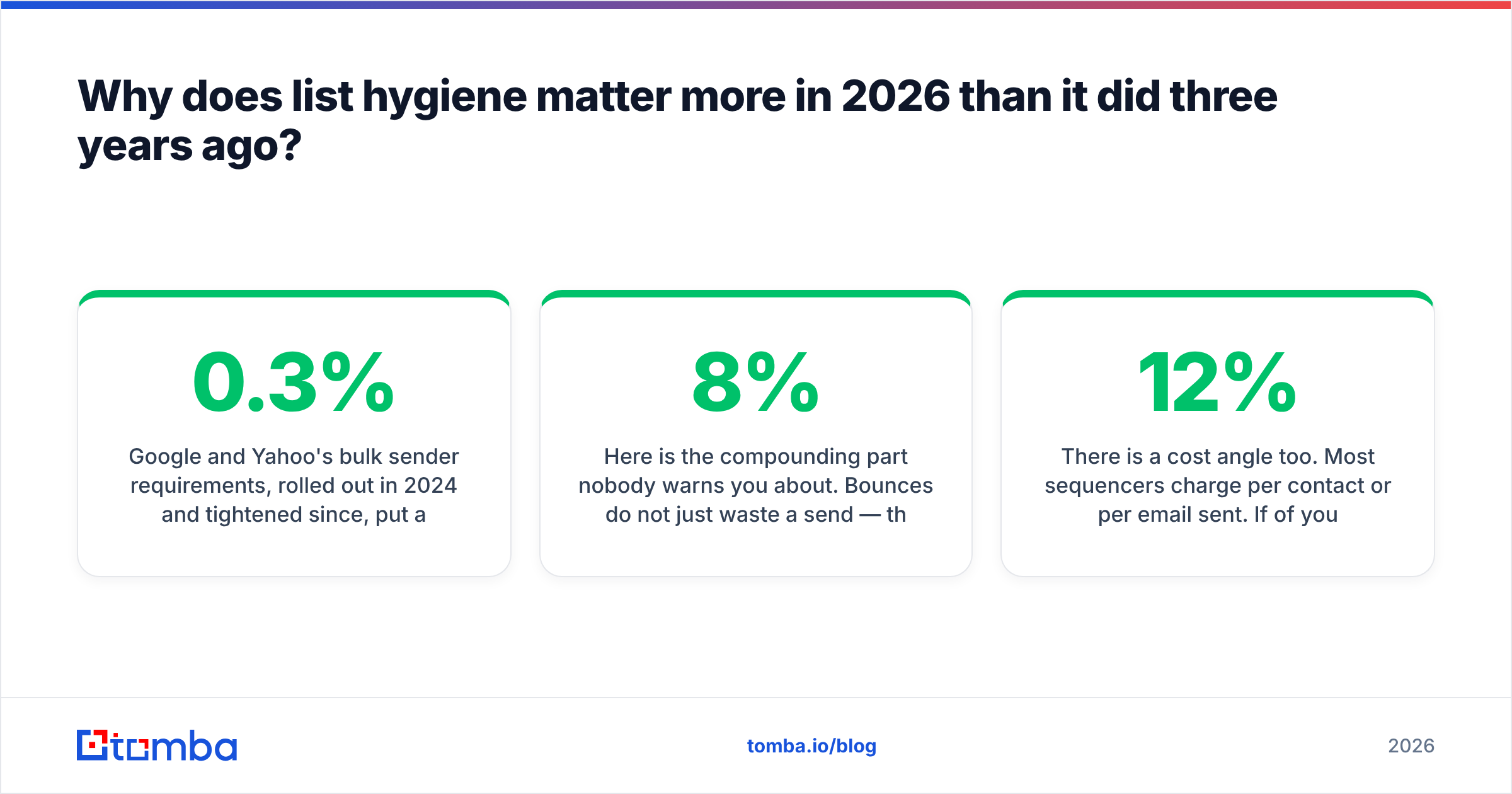
Google and Yahoo's bulk sender requirements, rolled out in 2024 and tightened since, put a hard spam-complaint ceiling of 0.3% on senders and require authenticated domains with one-click unsubscribe. Microsoft followed with similar enforcement on Outlook.com traffic in 2025. The practical consequence: a bounce rate above roughly 3% now triggers reputation damage that takes weeks to unwind, and above 5% you can expect outright filtering.
Here is the compounding part nobody warns you about. Bounces do not just waste a send — they signal to the receiving server that you are working from a stale or purchased list. That signal follows your sending domain. So a single 8%-bounce campaign can suppress deliverability on the next three campaigns that had nothing wrong with them.
There is a cost angle too. Most sequencers charge per contact or per email sent. If 12% of your 20,000-contact list is dead, you are paying to send to 2,400 addresses that will never open anything, and you are paying your SDRs to follow up on ghosts.
The email deliverability picture is broader than bounces, but bounces are the one input you can fully control before you hit send.
How accurate is email verification software, really?#
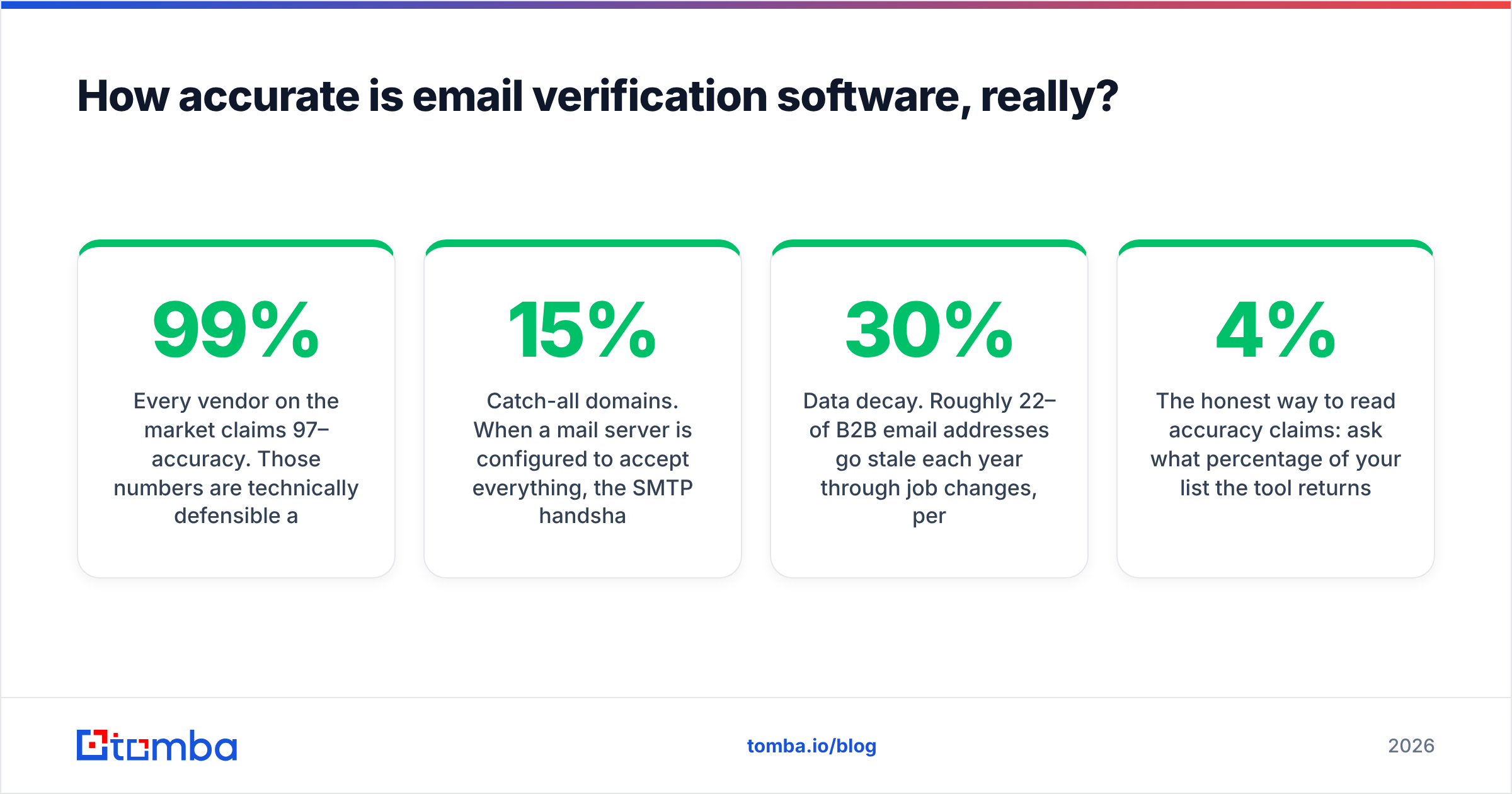
Every vendor on the market claims 97–99% accuracy. Those numbers are technically defensible and practically misleading, because they are measured against a controlled test list of known-good and known-bad addresses on non-catch-all domains.
Three things distort real-world results:
Catch-all domains. When a mail server is configured to accept everything, the SMTP handshake returns 250 for every address including nonsense. Somewhere between 15% and 25% of B2B domains run catch-all — the number skews higher in enterprise and higher still at companies using certain security gateways. A verifier can honestly say "I got a 250" while having learned nothing. Tools that report these as "valid" inflate their pass rate; tools that report them as "unknown" look worse on paper and serve you better. Some vendors, including Tomba's catch-all verifier, layer pattern history and known-contact data on top to produce a confidence score instead of a shrug.
Greylisting and rate limits. Many servers deliberately return a temporary failure to unknown senders on first contact. A verifier that does not retry with backoff will mark valid addresses as risky. This is why the same list run through the same tool twice can yield different results.
Data decay. Roughly 22–30% of B2B email addresses go stale each year through job changes, per aggregated industry churn estimates. A list verified in January is measurably worse by June. Verification is a recurring task, not a one-time cleanup.

The honest way to read accuracy claims: ask what percentage of your list the tool returns as unknown or risky. A tool with a 4% unknown rate on a B2B list is either exceptionally good or quietly guessing on catch-alls. Run a 500-address sample through two vendors and compare where they disagree — the disagreements are always on catch-all domains.
How do the main email verification tools compare in 2026?#
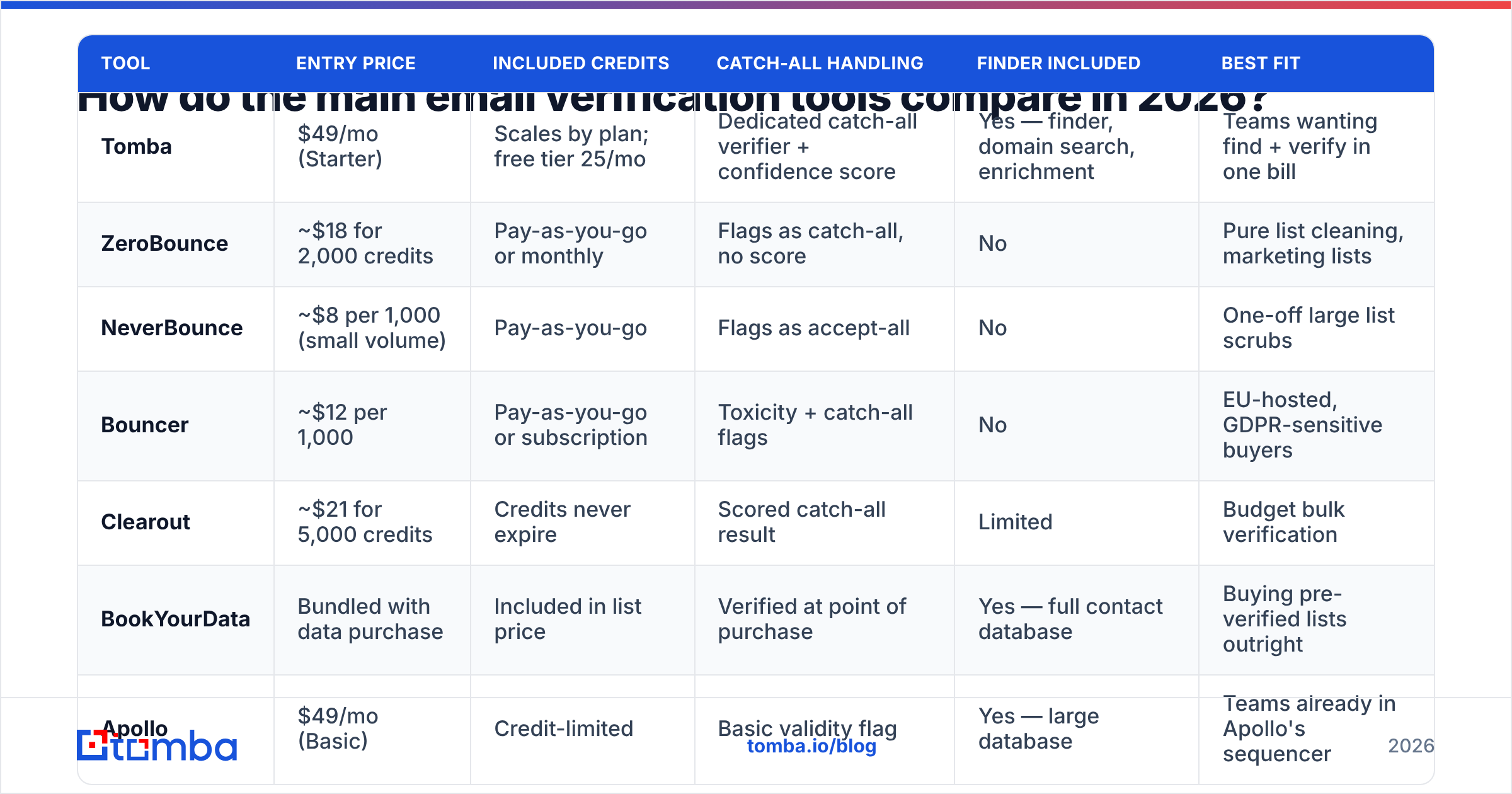
Pricing below reflects published list rates at the time of writing. Verify current numbers on each vendor's own pricing page before you commit, since credit bundles shift often.
| Tool | Entry price | Included credits | Catch-all handling | Finder included | Best fit |
|---|---|---|---|---|---|
| Tomba | $49/mo (Starter) | Scales by plan; free tier 25/mo | Dedicated catch-all verifier + confidence score | Yes — finder, domain search, enrichment | Teams wanting find + verify in one bill |
| ZeroBounce | ~$18 for 2,000 credits | Pay-as-you-go or monthly | Flags as catch-all, no score | No | Pure list cleaning, marketing lists |
| NeverBounce | ~$8 per 1,000 (small volume) | Pay-as-you-go | Flags as accept-all | No | One-off large list scrubs |
| Bouncer | ~$12 per 1,000 | Pay-as-you-go or subscription | Toxicity + catch-all flags | No | EU-hosted, GDPR-sensitive buyers |
| Clearout | ~$21 for 5,000 credits | Credits never expire | Scored catch-all result | Limited | Budget bulk verification |
| BookYourData | Bundled with data purchase | Included in list price | Verified at point of purchase | Yes — full contact database | Buying pre-verified lists outright |
| Apollo | $49/mo (Basic) | Credit-limited | Basic validity flag | Yes — large database | Teams already in Apollo's sequencer |
A few notes on reading that table. Pay-as-you-go pricing looks cheaper at low volume and gets expensive fast — 50,000 verifications at $8/1,000 is $400, which buys four months of a bundled plan that also finds the addresses. Conversely, if you already have a 200,000-record list from an acquisition and never need a finder, a dedicated verifier is the right call.
BookYourData occupies a genuinely different slot: rather than verifying a list you already own, you buy contacts that arrive verified, which suits teams who would rather pay per usable record than run a pipeline. If your bottleneck is sourcing rather than cleaning, that's the comparison to make.

For a broader view of independent user ratings across these categories, G2's email verification grid is the least-gamed public source, though be aware that review volume correlates strongly with marketing spend rather than product quality.
Should you buy a standalone verifier or a bundled finder?#
Depends entirely on where your addresses come from.
Buy standalone verification if: your addresses arrive from inbound forms, event lists, a CRM migration, or a purchased database. You are cleaning, not sourcing. A pay-as-you-go verifier with no monthly commitment is the cheapest path.
Buy a bundled platform if: you are building lists from scratch — targeting companies, finding the right person, then getting their address. Here the find and verify steps are one operation, and splitting them across two vendors means paying twice for the same SMTP check. Most email finder tools verify at discovery time and only return addresses that already passed.
The math generally favors bundling once you exceed about 2,000 new contacts per month. Below that, a free tier plus pay-as-you-go verification is hard to beat on cost.
One underrated middle path: use a bundled tool's API for net-new discovery and a cheap bulk verifier for periodic re-checks of your existing CRM. Re-verification is a high-volume, low-complexity job where per-credit price dominates.

What do the result statuses actually mean?#
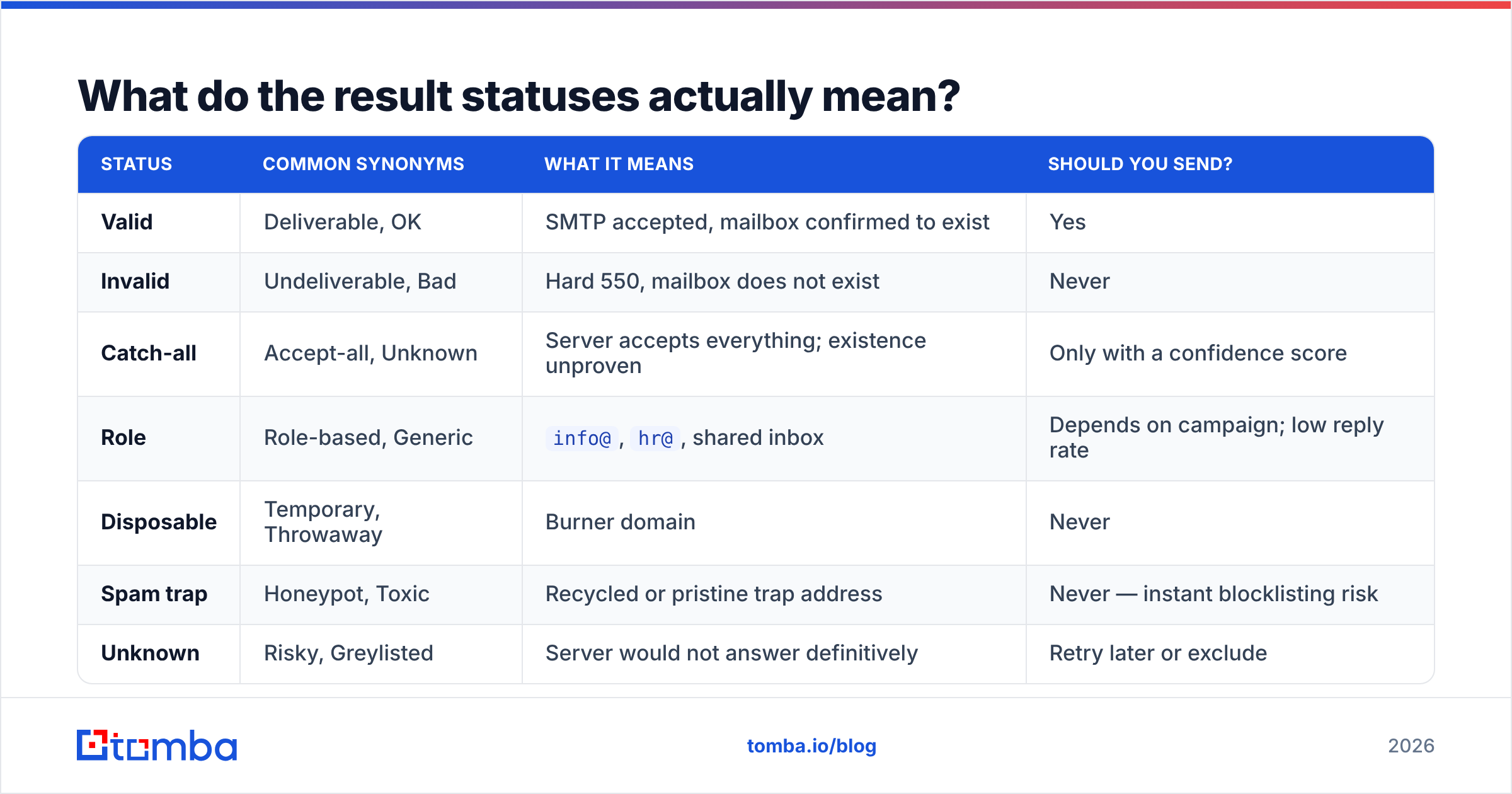
Vendors use different vocabulary for the same underlying states. Here is the translation layer:
| Status | Common synonyms | What it means | Should you send? |
|---|---|---|---|
| Valid | Deliverable, OK | SMTP accepted, mailbox confirmed to exist | Yes |
| Invalid | Undeliverable, Bad | Hard 550, mailbox does not exist | Never |
| Catch-all | Accept-all, Unknown | Server accepts everything; existence unproven | Only with a confidence score |
| Role | Role-based, Generic | info@, hr@, shared inbox |
Depends on campaign; low reply rate |
| Disposable | Temporary, Throwaway | Burner domain | Never |
| Spam trap | Honeypot, Toxic | Recycled or pristine trap address | Never — instant blocklisting risk |
| Unknown | Risky, Greylisted | Server would not answer definitively | Retry later or exclude |
Two practical rules. First, always exclude spam traps and disposables with no exceptions — a single pristine trap hit can land your domain on a blocklist that takes 30 days to clear. Run your sending IP through a blacklist checker after any large send to catch this early.
Second, decide your catch-all policy deliberately rather than by default. If catch-alls are 20% of your list and you drop them all, you have cut your addressable market by a fifth — including most enterprise accounts, which is exactly where your deal sizes are. The better move is sending to catch-alls scored above a confidence threshold, on a separate sending domain, so a bad batch does not contaminate your primary.
How do you build a verification workflow that holds up?#
Five steps, in order:
- Verify at capture, not at send. Add validation to your form and API endpoints so bad addresses never enter the database. Every downstream problem starts with a bad write.
- Dedupe before you verify. Duplicates are pure wasted credit. Strip them first with a remove duplicates pass, normalize casing, and trim whitespace.
- Bulk-verify on import. Any list arriving from an event, a partner, or a scrape goes through verification before it touches your sequencer. No exceptions, no "it's from a trusted source."
- Re-verify on a schedule. Quarterly for active outbound segments, semi-annually for nurture. Automate it through your CRM's workflow engine or a scheduled API job so nobody has to remember.
- Suppress on bounce, permanently. Feed hard bounces back into a global suppression list that all your sending tools read from. Re-sending to a known-dead address is the most avoidable reputation damage there is.
If you are running this at any scale, do it through an API rather than CSV round-trips. The email verification API pattern — verify on write, verify on schedule, suppress on bounce — means your list quality never degrades between manual cleanups.
Does verification fix your deliverability problems?#
No, and treating it as a fix is the most common mistake in outbound.
Verification controls one variable: bounce rate. Your inbox placement also depends on authentication (SPF, DKIM, DMARC alignment), domain age and warmup, sending volume ramp, content and link reputation, engagement signals, and complaint rate. A perfectly clean list sent from a two-day-old domain with no DMARC record will still hit spam.
Sequence your fixes accordingly. Authenticate first — check your records with an SPF checker and confirm DMARC is at least at p=none with reporting on. Warm the domain second. Verify the list third. Then worry about copy.
Microsoft's own sender guidance and Google's Postmaster Tools are the authoritative references for what the filters actually measure — worth reading directly rather than through the fifth-hand version in most blog posts.
Once authentication and warmup are solid, verification is what keeps them solid. Bounce rate is the metric that degrades fastest and recovers slowest, so it deserves a standing process rather than a quarterly panic.
What should you actually do next?#
Start with a sample, not a purchase. Take 500 addresses from your current list, run them through two or three tools' free tiers, and compare three numbers: the invalid rate, the catch-all rate, and where the tools disagree. That 20-minute exercise tells you more than any vendor comparison page, including this one.
Then match the tool to your motion. Cleaning an inherited database? A pay-as-you-go bulk verifier is the cheapest correct answer. Building lists from scratch every month? You want find and verify in the same pipeline, on the same bill, with one API.
If you are in the second camp, Tomba's Email Finder is built for exactly that loop — find addresses by domain, name, or company, with SMTP verification and catch-all confidence scoring applied before the address is ever returned to you. The free tier gives you 25 searches a month to test the accuracy against your own target accounts, and paid plans start at $49/mo with the verifier, domain search, and enrichment included rather than sold separately. Check the full Tomba pricing breakdown, or run a domain through the finder first and see what comes back before you spend anything.
Related guides#
Ready to find emails that actually work?
Join 150,000+ professionals who stopped guessing and started sending. Free credits on signup — no credit card required.
Get the Tomba newsletter
Practical outbound tactics and product updates — once every two weeks.
About the author