Email Warm Up Software in 2026: What Actually Works
Warm-up tools promise inbox placement, but half of what they sell is theater. Here is how email warm up software really works, which tools earn their price, and the ramp schedule that keeps a new domain alive.
TL;DR
- Email warm up software automates a slow volume ramp plus artificial positive engagement (opens, replies, "move to inbox") so a new mailbox looks like a real human account before you send cold volume.
- It works — but only as one input. Authentication, list hygiene, and complaint rate move sender reputation far more than any warm-up pool does.
- Most tools now bundle warm-up free inside a sending platform (Instantly, Smartlead, lemlist). Standalone tools like MailReach and Warmup Inbox win on reporting and on warming mailboxes you send from elsewhere.
- Budget $15–$50 per inbox per month standalone, or roughly $37–$99/mo for a sending platform with unlimited warm-up included.
- Warm-up cannot repair a bad list. A 6% bounce rate will undo 30 days of ramping in a single send.
What is email warm up software?#
Email warm up software is an automated reputation-building service. You connect a mailbox over SMTP/IMAP or OAuth, and the tool starts exchanging low-volume mail between your inbox and a pool of other participating inboxes. Those peer accounts open your messages, reply to some of them, mark them as important, and drag anything that landed in spam back into the primary tab.
The everyday analogy: it is a credit score for your domain. A brand-new mailbox has no history, so mailbox providers have nothing to judge you on and default to suspicion. Warm-up software makes small, boring, on-time "payments" — a handful of messages a day that always get read and replied to — until the score is high enough that a bigger request goes through without a review.
Technically, you are trying to influence four signals that Gmail, Outlook, and Yahoo track per sending domain and per IP:
- Engagement rate — opens, replies, and manual "not spam" actions relative to volume delivered.
- Complaint rate — spam-button hits. Google's bulk sender guidelines want you under 0.3%, and treat 0.1% as the working target.
- Bounce and unknown-user rate — repeated hits to non-existent mailboxes read as list scraping.
- Volume consistency — a domain that sends 12 messages one day and 900 the next looks compromised, not successful.
Warm-up software only touches the first and the fourth. The other two are yours to fix, and they are the ones that actually get accounts suspended.

How does email warm up software actually work?#
Every tool on the market runs the same four-stage loop. The differences are in pool quality and reporting, not in the mechanic.
- Connection — you authorize the mailbox (Google Workspace or Microsoft 365 OAuth is safer than an app password; SMTP/IMAP works for anything else). The tool needs send and read access to complete the reply loop.
- Seeding — it sends short, human-looking messages from your inbox to the peer pool on a randomized schedule, typically starting at 2–6 per day.
- Positive interaction — peer inboxes open, wait a realistic interval, reply, star, and rescue anything from spam. That last action is the highest-value signal in the whole system.
- Ramp and hold — daily volume steps up over 3–6 weeks toward a target (usually 30–50 warm-up messages/day), then holds there permanently as background noise alongside your real sending.
Two mechanics separate serious tools from filler. First, private versus shared pools: a shared pool that any trial user can join gets polluted by low-reputation mailboxes, and interacting with them is a liability. Second, seed-list placement testing: good tools send to real monitored inboxes across Gmail, Outlook, Yahoo, and corporate filters (Proofpoint, Mimecast, Barracuda) and report where you landed, instead of just reporting on their own closed network.
A tool that only tells you "98% inbox rate" inside its own pool is grading its own homework. Ask what percentage of your placement tests hit unaffiliated Gmail and Microsoft tenants.
Which email warm up software should you choose in 2026?#
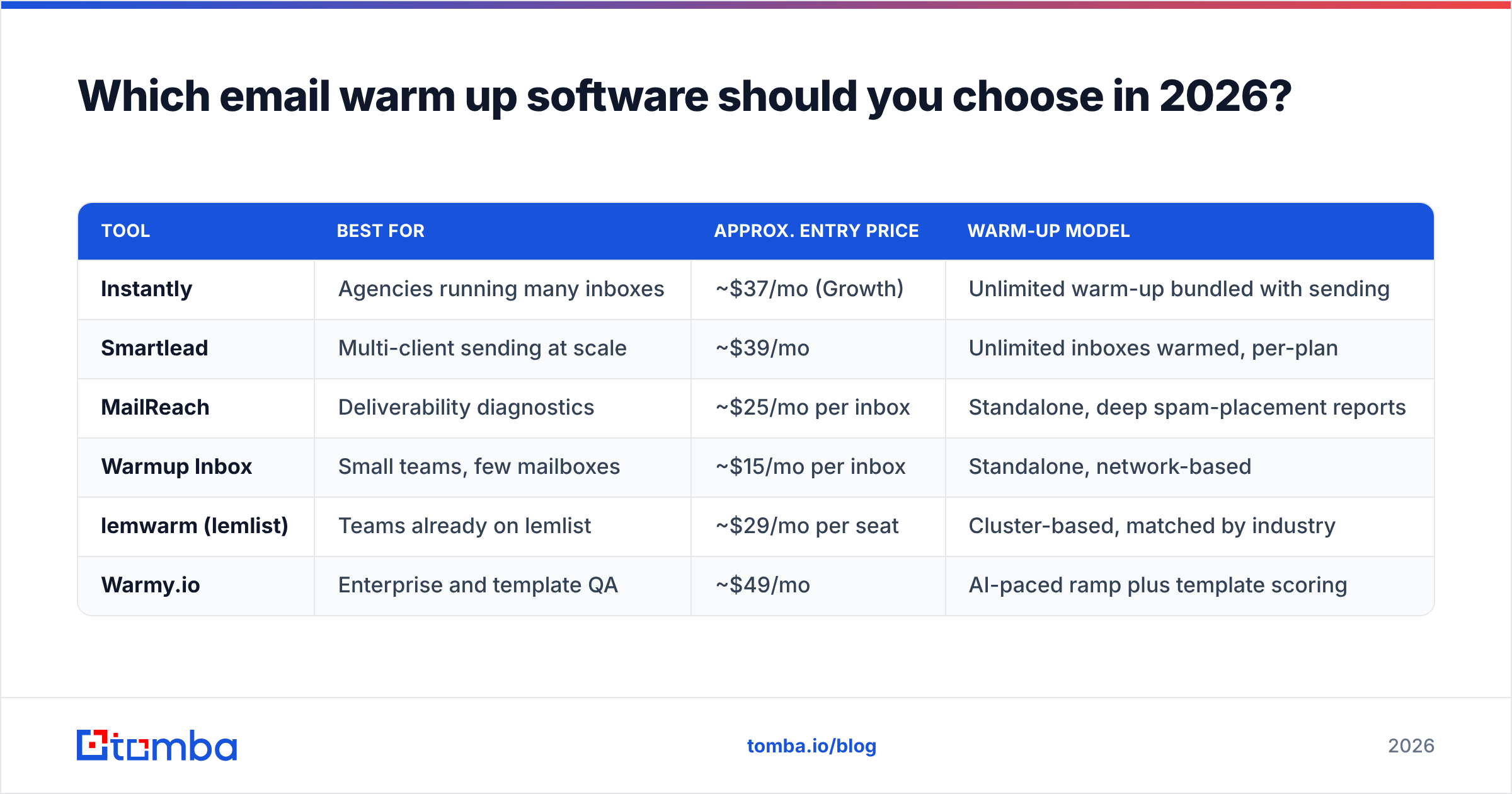
Pick based on where your sending lives. If you already pay for a cold-email platform, its bundled warm-up is usually enough and costs nothing extra. If you send from a CRM, a marketing platform, or plain Google Workspace, you need a standalone tool.
| Tool | Best for | Approx. entry price | Warm-up model |
|---|---|---|---|
| Instantly | Agencies running many inboxes | ~$37/mo (Growth) | Unlimited warm-up bundled with sending |
| Smartlead | Multi-client sending at scale | ~$39/mo | Unlimited inboxes warmed, per-plan |
| MailReach | Deliverability diagnostics | ~$25/mo per inbox | Standalone, deep spam-placement reports |
| Warmup Inbox | Small teams, few mailboxes | ~$15/mo per inbox | Standalone, network-based |
| lemwarm (lemlist) | Teams already on lemlist | ~$29/mo per seat | Cluster-based, matched by industry |
| Warmy.io | Enterprise and template QA | ~$49/mo | AI-paced ramp plus template scoring |
Prices are list rates at the time of writing and move often — check the vendor page before you commit, and read recent reviews on G2's deliverability category rather than trusting a homepage claim.
The practical decision tree:
- You send cold email from a dedicated platform → use the bundled warm-up. Paying $25/inbox on top of it is waste.
- You send from Google Workspace, HubSpot, or a CRM → buy standalone (MailReach or Warmup Inbox).
- You manage 20+ inboxes for clients → the per-inbox pricing model will bankrupt you; go with a platform that charges per workspace.
- You have an existing deliverability problem → you need diagnostics first, not warm-up. Run a blacklist checker and an SPF checker before you spend a dollar on a warm-up pool.
Is email warm up software still effective, or is it 2021 advice?#
It still helps, but its share of the outcome has shrunk. Since the 2024 Gmail and Yahoo bulk-sender requirements went into effect, authentication and complaint rate became hard gates. Warm-up is a soft signal that only matters once you clear the gates.
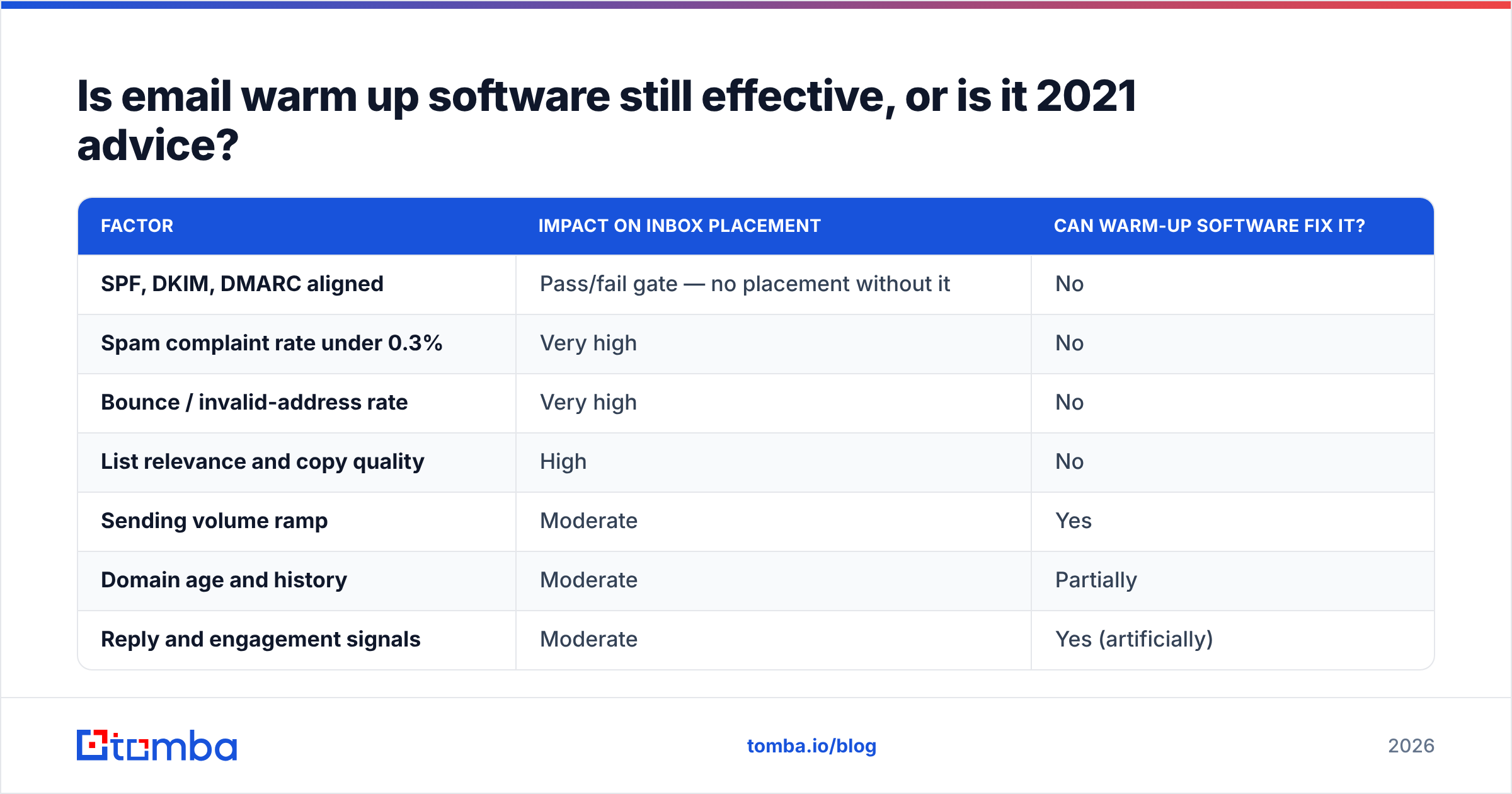
Here is the honest weighting for a new sending domain:
| Factor | Impact on inbox placement | Can warm-up software fix it? |
|---|---|---|
| SPF, DKIM, DMARC aligned | Pass/fail gate — no placement without it | No |
| Spam complaint rate under 0.3% | Very high | No |
| Bounce / invalid-address rate | Very high | No |
| List relevance and copy quality | High | No |
| Sending volume ramp | Moderate | Yes |
| Domain age and history | Moderate | Partially |
| Reply and engagement signals | Moderate | Yes (artificially) |
Mailbox providers have also gotten better at spotting reciprocal warm-up networks — closed loops of accounts that only ever mail each other with generic three-line messages. The tools that survive this run varied templates, randomized timing, human-length replies, and rotating pool membership. The ones that do not are, at best, neutral.
Treat warm-up as insurance for the ramp, not as a growth lever. If someone sells you warm-up as the reason your reply rate will triple, they are selling you the wrong product.

What warm-up schedule should you actually follow?#
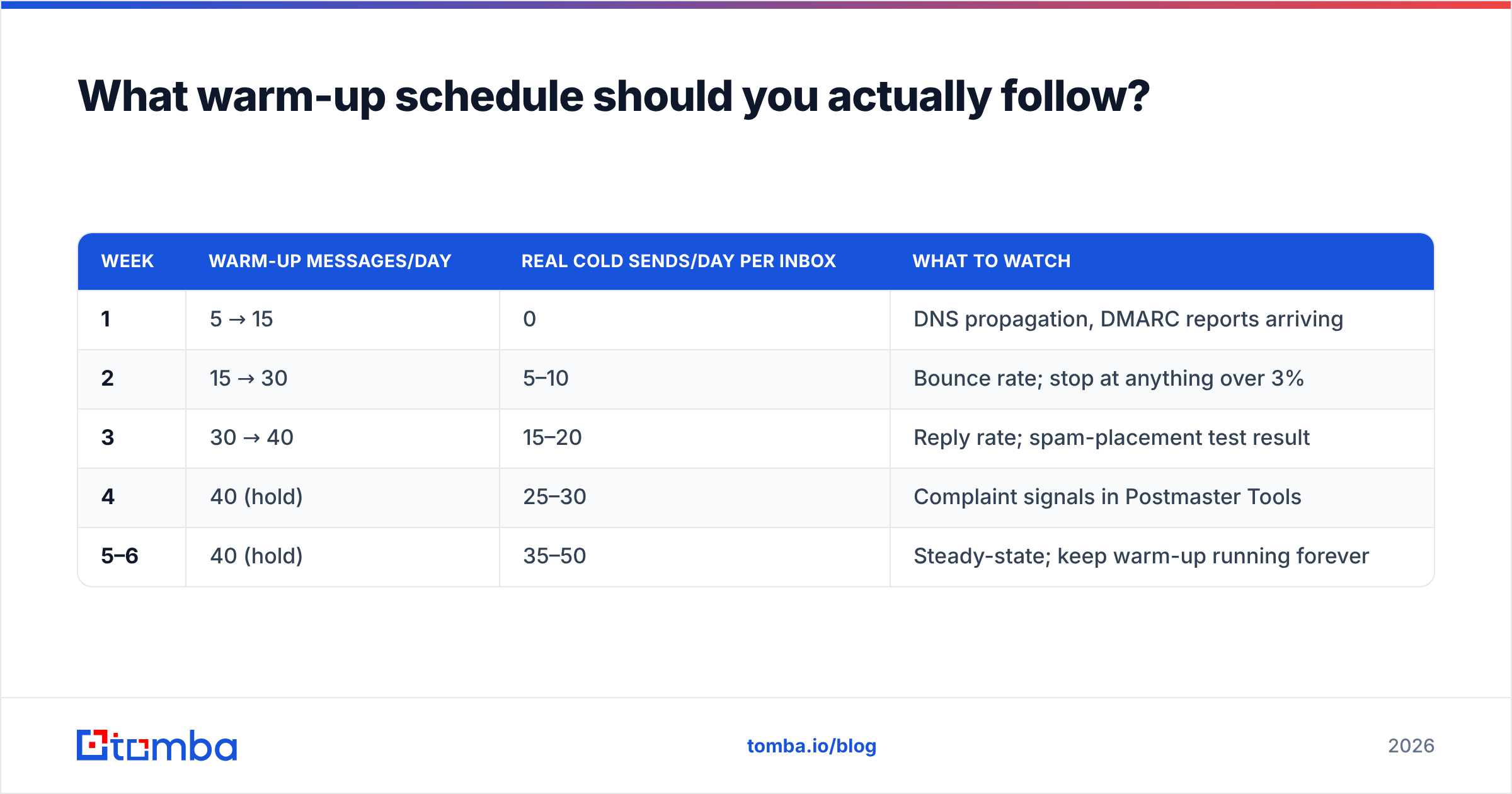
Warm-up software handles its own internal pacing, but your real cold volume needs its own ramp on top. This is the schedule that holds up across Google Workspace and Microsoft 365 for a fresh domain with a fresh mailbox:
| Week | Warm-up messages/day | Real cold sends/day per inbox | What to watch |
|---|---|---|---|
| 1 | 5 → 15 | 0 | DNS propagation, DMARC reports arriving |
| 2 | 15 → 30 | 5–10 | Bounce rate; stop at anything over 3% |
| 3 | 30 → 40 | 15–20 | Reply rate; spam-placement test result |
| 4 | 40 (hold) | 25–30 | Complaint signals in Postmaster Tools |
| 5–6 | 40 (hold) | 35–50 | Steady-state; keep warm-up running forever |
Two rules people break constantly. First, do not turn warm-up off once you go live — the background engagement is what absorbs the reputation hit from a cold list that only replies 3% of the time. Second, 50/day per inbox is the ceiling for cold outreach, not a starting point to beat. If you need 500 sends a day, you need ten mailboxes, not one aggressive one. You can model the ramp against your target volume with a warmup calculator before you buy inboxes.
Also separate your domains. Send cold outreach from a lookalike domain (getacme.io, not acme.com) so a bad campaign never touches the domain your invoices and support replies go out on.
What does warm-up software cost, and what should you spend instead?#
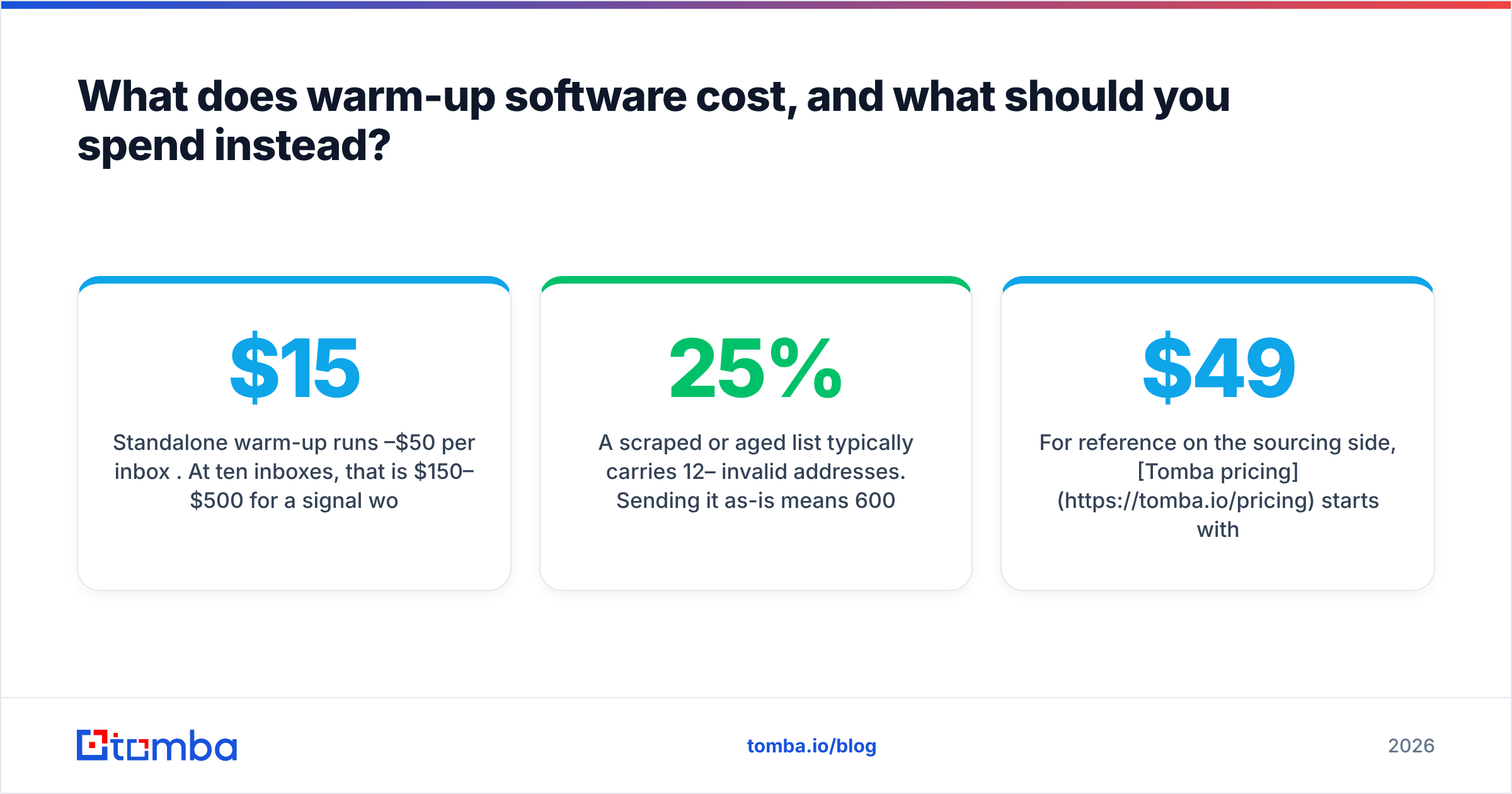
Standalone warm-up runs $15–$50 per inbox per month. At ten inboxes, that is $150–$500/mo for a signal worth maybe 15% of your placement outcome. Meanwhile, the two factors worth most of the outcome — bounce rate and list relevance — cost far less to fix.
Concrete math on a 5,000-contact list:
- A scraped or aged list typically carries 12–25% invalid addresses. Sending it as-is means 600–1,250 hard bounces, which is enough to get a new domain throttled within 48 hours.
- Running the same list through an email verifier before you send costs a fraction of one month of multi-inbox warm-up and removes the single largest reputation risk in the campaign.
- Sourcing addresses through a verified email finder rather than a scraper means most of them never enter the list as invalid in the first place.
For reference on the sourcing side, Tomba pricing starts with a free tier at 25 searches/month, then Starter at $49/mo, Growth at $99/mo, and Pro at $249/mo — so a verified list and a warm-up subscription for a small team land in the same budget bracket. Spend on the list first.
The order of operations that actually protects a domain:
- Authenticate — SPF, DKIM, and a DMARC policy at
p=noneminimum, monitored. - Verify — remove invalids and risky catch-alls before the first send.
- Warm up — 3–4 weeks of software-driven ramp before real volume.
- Monitor — Google Postmaster Tools plus a monthly placement test.
- Segment — kill the segments that generate complaints, do not average them away.
If you skip step 2, steps 3 through 5 are decoration. A strong sender reputation is mostly the absence of negative signals, and invalid addresses are the loudest negative signal you can send.
What are the failure modes nobody warns you about?#
Shared pool contamination. Cheap tools let free-trial accounts into the same pool as paying customers. You end up exchanging engagement with mailboxes that are already blacklisted. Ask vendors whether pools are segmented by plan tier.
OAuth scope creep. Some tools request full mailbox read/write on your production Google Workspace account. Use a dedicated sending account, never your CEO's inbox.
Warm-up mail polluting your metrics. If warm-up messages land in the same mailbox you report on, your open and reply rates become fiction. Good tools tag and filter warm-up threads into a separate label; check that yours does before you trust a dashboard.
Provider policy risk. Automated engagement manipulation sits in a grey area of Google Workspace and Microsoft 365 terms. Nobody has been mass-banned for it, but do not run it on the tenant that hosts your billing and legal mail.
Believing the internal score. A "98% inbox rate" reported by a tool measuring its own network says nothing about placement at a Proofpoint-filtered enterprise. Independent seed testing is the only number worth reading.
Do you need warm-up software at all?#
You need it if you are launching new domains or new mailboxes for outbound, running more than two inboxes, or recovering from a placement drop. You can skip it if you send low volume from an established domain with genuine two-way conversation — real replies already do everything a warm-up pool simulates, and better.
The realistic expectation: warm-up software takes a brand-new mailbox from "unknown and suspicious" to "unremarkable" in about three to four weeks. That is a real, worthwhile outcome. It will not make a mediocre offer land in the primary tab, and it will not save a list full of guessed addresses.
Get the sequencing right and the tooling gets cheap: authenticate, verify, ramp, monitor. Most teams do it in the opposite order and then blame the warm-up vendor.
Start where the leverage is. Warm-up protects a domain you have already stopped damaging — and the fastest way to stop damaging it is to stop sending to addresses that do not exist. Use the Tomba Email Finder to source verified, deliverable contacts by domain, name, or company, so your ramp is measuring real engagement instead of absorbing bounces. Free tier includes 25 searches a month, no card required.
Related guides#
Ready to find emails that actually work?
Join 150,000+ professionals who stopped guessing and started sending. Free credits on signup — no credit card required.
Get the Tomba newsletter
Practical outbound tactics and product updates — once every two weeks.
About the author