Email Warm Up Tools in 2026: Tested Picks, Prices, Verdicts
Warmup tools no longer buy you inbox placement on their own. Here's what actually moves the needle in 2026, which tools are worth paying for, and where warmup quietly hurts you.
TL;DR
- Email warm up tools automate a slow ramp of sends and simulated engagement so a new mailbox or domain builds a sending history before you run real outbound.
- Warmup is necessary but nowhere near sufficient. In 2026, Google and Microsoft weight recipient engagement and complaint rate far more heavily than raw volume ramps, and pool-based reciprocal warmup is increasingly detectable.
- Expect to pay $15–$49 per month for standalone warmup, or get it bundled free with a sending platform. Paying more rarely buys better placement.
- The single highest-ROI deliverability move is not warmup — it is not emailing invalid, stale, or role-based addresses in the first place. Bounce rate above roughly 3% undoes months of ramping.
- Use warmup for the first 4–8 weeks of a mailbox's life, keep it running at low volume afterward, and spend the rest of your budget on list quality and authentication.
What are email warm up tools, and what do they actually do?#
An email warm up tool is a service that sends and receives small volumes of mail from your mailbox on a schedule, gradually increasing daily volume, and generating positive engagement signals — opens, replies, moving messages out of spam, marking as important.
The everyday analogy: it is like establishing credit. A brand-new credit card with no history gets a low limit. You do not fix that by demanding a $50,000 limit on day one — you make small, consistent, on-time payments until the issuer trusts you. Mailbox providers work the same way. A domain that sent zero mail yesterday and 2,000 cold emails today looks exactly like a compromised account.
Technically, most tools work one of two ways:
- Reciprocal pool warmup — Your mailbox joins a network of thousands of other users' mailboxes. The tool sends mail between pool members and auto-engages with it. This is how Instantly, Warmbox, Mailreach, and most others operate.
- Private/seed-list warmup — Your mailbox sends to a controlled set of real, provider-owned inboxes the vendor maintains. Smaller pools, slower, generally more expensive, but the engagement is less synthetic.
A third category worth naming: native platform warmup, bundled into sending tools like Instantly or Smartlead at no extra charge. For most teams this is the correct default, because you are not adding another OAuth connection and another bill for a commodity feature.
Here is what warmup does not do, and this is where most teams lose money:
- It does not fix a bad list. Hard bounces from invalid addresses are the fastest way to torch a domain, and no amount of warmup offsets them.
- It does not fix authentication. If your SPF record, DKIM, and DMARC are misaligned, warmup traffic just fails authentication consistently.
- It does not fix spammy copy. Trigger phrases, link-heavy HTML, and one-image emails get filtered regardless of sender age.
- It does not fix complaint rate. Google Postmaster Tools flags you above 0.3% spam complaints. Warmup engagement is not counted the same way real recipient complaints are.

Do email warm up tools still work in 2026?#
Partially — and less than they did three years ago.
Two things changed. First, the February 2024 Google and Yahoo bulk sender requirements made DMARC, one-click unsubscribe, and a sub-0.3% complaint rate table stakes rather than nice-to-haves. Those are binary gates; warmup does not help you pass them. Google's own bulk sender guidelines spell out the thresholds, and they have only tightened since.
Second, providers got better at spotting reciprocal pools. A mailbox whose entire "engagement" history consists of 40 identical-length replies per day from 40 domains that all warm each other is a recognizable pattern. Several deliverability consultants have reported pool-warmed domains landing in spam despite perfect warmup dashboards — the dashboard measures the pool, not Gmail's actual verdict.
What still works:
- Volume ramping. Going 5 → 10 → 20 → 40 emails/day over six weeks is genuinely safer than starting at 200. This part of warmup is real and unambiguous.
- Reply generation, in moderation. Sustained two-way conversation is a strong positive signal. Faked at scale, it stops being one.
- Spam-folder rescue. Tools that pull messages out of spam in pool inboxes do teach the filter something, particularly on newer domains.
What does not work anymore: treating a 98% "warmup score" as a proxy for inbox placement on your real list. Those are different populations. Run a seed test through a tool like GlockApps or check actual reply rates on a small live batch before you scale.
How do the main email warm up tools compare on price and features?#
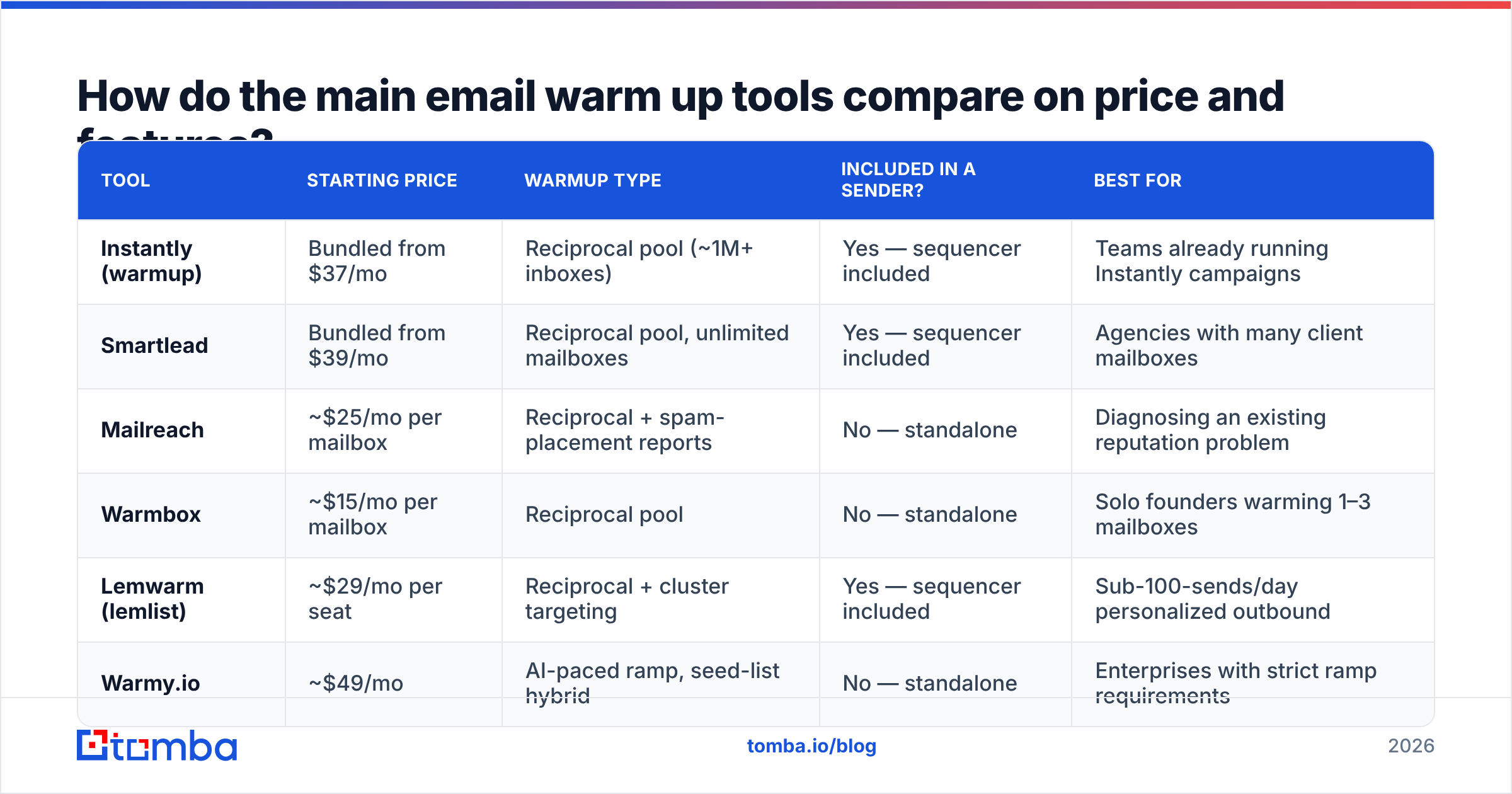
| Tool | Starting price | Warmup type | Included in a sender? | Best for |
|---|---|---|---|---|
| Instantly (warmup) | Bundled from $37/mo | Reciprocal pool (~1M+ inboxes) | Yes — sequencer included | Teams already running Instantly campaigns |
| Smartlead | Bundled from $39/mo | Reciprocal pool, unlimited mailboxes | Yes — sequencer included | Agencies with many client mailboxes |
| Mailreach | ~$25/mo per mailbox | Reciprocal + spam-placement reports | No — standalone | Diagnosing an existing reputation problem |
| Warmbox | ~$15/mo per mailbox | Reciprocal pool | No — standalone | Solo founders warming 1–3 mailboxes |
| Lemwarm (lemlist) | ~$29/mo per seat | Reciprocal + cluster targeting | Yes — sequencer included | Sub-100-sends/day personalized outbound |
| Warmy.io | ~$49/mo | AI-paced ramp, seed-list hybrid | No — standalone | Enterprises with strict ramp requirements |
Prices move; check each vendor's page before you commit. The pattern that matters is the one in the third column: standalone warmup is a shrinking category because every serious sending platform now includes it. If you are paying separately for warmup and for a sequencer, you are likely paying twice for the same feature.
One nuance on per-mailbox pricing. Agencies running 30 mailboxes across 10 clients hit a cliff fast — $25/mailbox/month is $750/month for a commodity. Smartlead's unlimited-mailbox model exists precisely because of that math, and it is why agencies migrated there in bulk.
What should you actually spend your deliverability budget on?#
Rank-ordered, by measured impact on inbox placement:
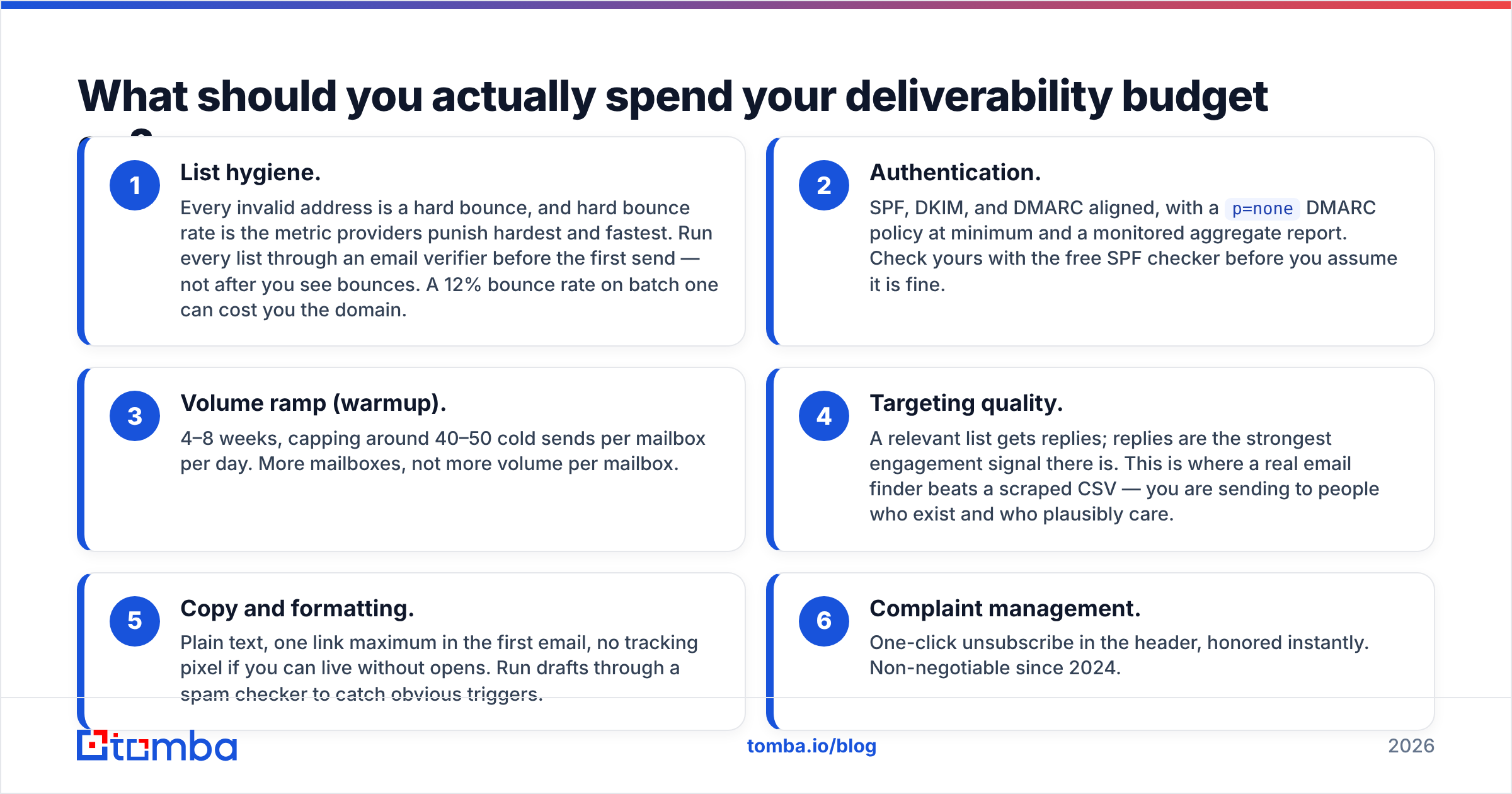
- List hygiene. Every invalid address is a hard bounce, and hard bounce rate is the metric providers punish hardest and fastest. Run every list through an email verifier before the first send — not after you see bounces. A 12% bounce rate on batch one can cost you the domain.
- Authentication. SPF, DKIM, and DMARC aligned, with a
p=noneDMARC policy at minimum and a monitored aggregate report. Check yours with the free SPF checker before you assume it is fine. - Volume ramp (warmup). 4–8 weeks, capping around 40–50 cold sends per mailbox per day. More mailboxes, not more volume per mailbox.
- Targeting quality. A relevant list gets replies; replies are the strongest engagement signal there is. This is where a real email finder beats a scraped CSV — you are sending to people who exist and who plausibly care.
- Copy and formatting. Plain text, one link maximum in the first email, no tracking pixel if you can live without opens. Run drafts through a spam checker to catch obvious triggers.
- Complaint management. One-click unsubscribe in the header, honored instantly. Non-negotiable since 2024.
Notice that warmup sits third, not first. Teams reliably invert this list — they buy a warmup subscription, keep the same dirty list, and are surprised when placement does not improve. Warmup fixes the sender age problem. It does nothing about the sender behavior problem, and behavior is what gets scored.

How long should you warm up a new mailbox?#
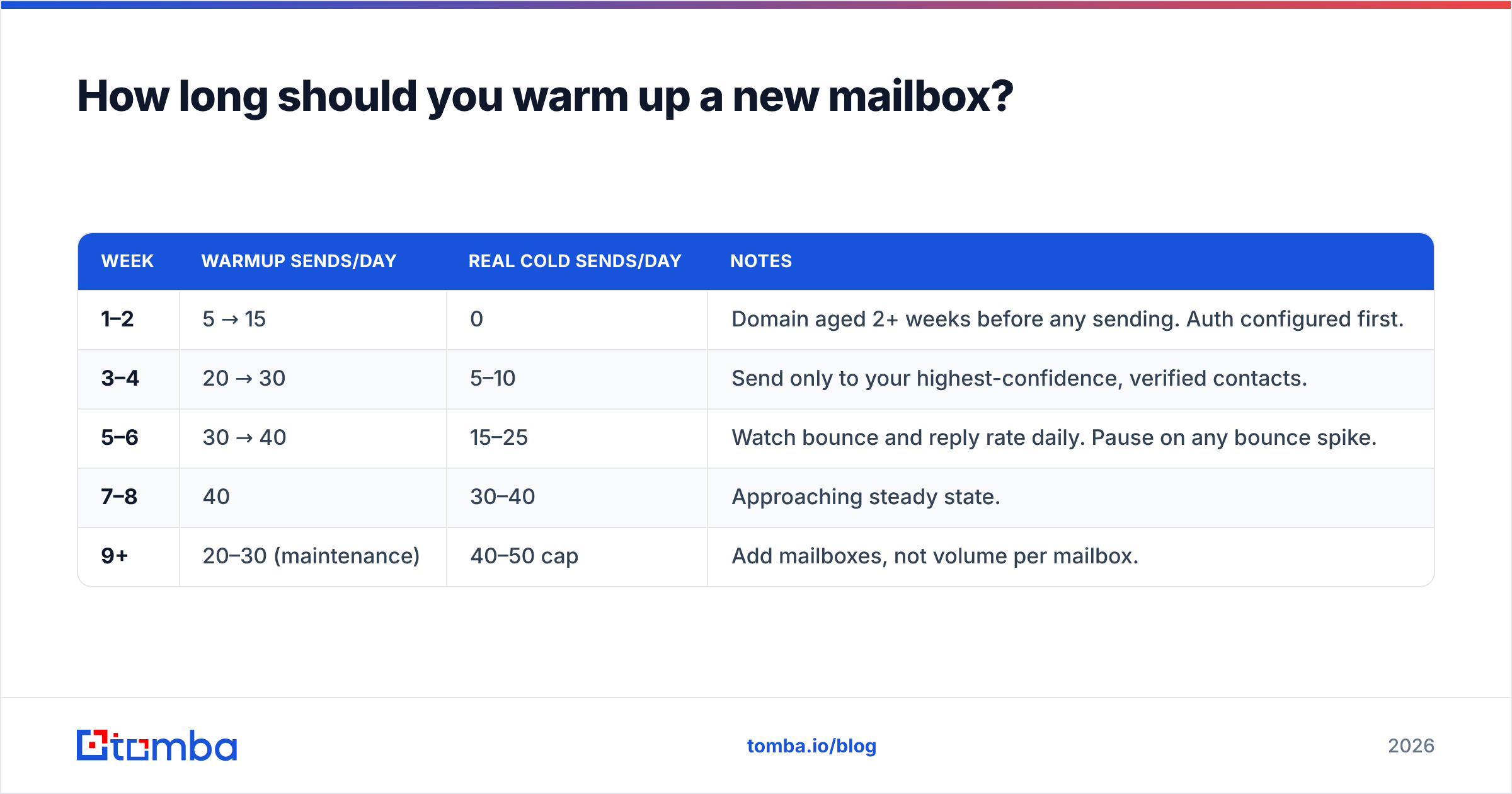
Four to eight weeks before meaningful cold volume, then keep warmup running indefinitely at reduced intensity.
A workable ramp for a fresh Google Workspace or Microsoft 365 mailbox on a new domain:
| Week | Warmup sends/day | Real cold sends/day | Notes |
|---|---|---|---|
| 1–2 | 5 → 15 | 0 | Domain aged 2+ weeks before any sending. Auth configured first. |
| 3–4 | 20 → 30 | 5–10 | Send only to your highest-confidence, verified contacts. |
| 5–6 | 30 → 40 | 15–25 | Watch bounce and reply rate daily. Pause on any bounce spike. |
| 7–8 | 40 | 30–40 | Approaching steady state. |
| 9+ | 20–30 (maintenance) | 40–50 cap | Add mailboxes, not volume per mailbox. |
Two rules that override the table. Buy the domain and let it age two to four weeks before sending anything — brand-new domain registrations are heavily penalized, and no warmup tool compensates for a domain registered yesterday. And use a separate domain for cold outbound, never your primary corporate domain. If a cold sending domain burns, you replace it; if your primary burns, your invoices and support replies stop arriving.
If you are scaling past a handful of mailboxes, plan the arithmetic ahead of time with a warmup calculator rather than guessing at how many mailboxes 3,000 monthly sends actually needs.
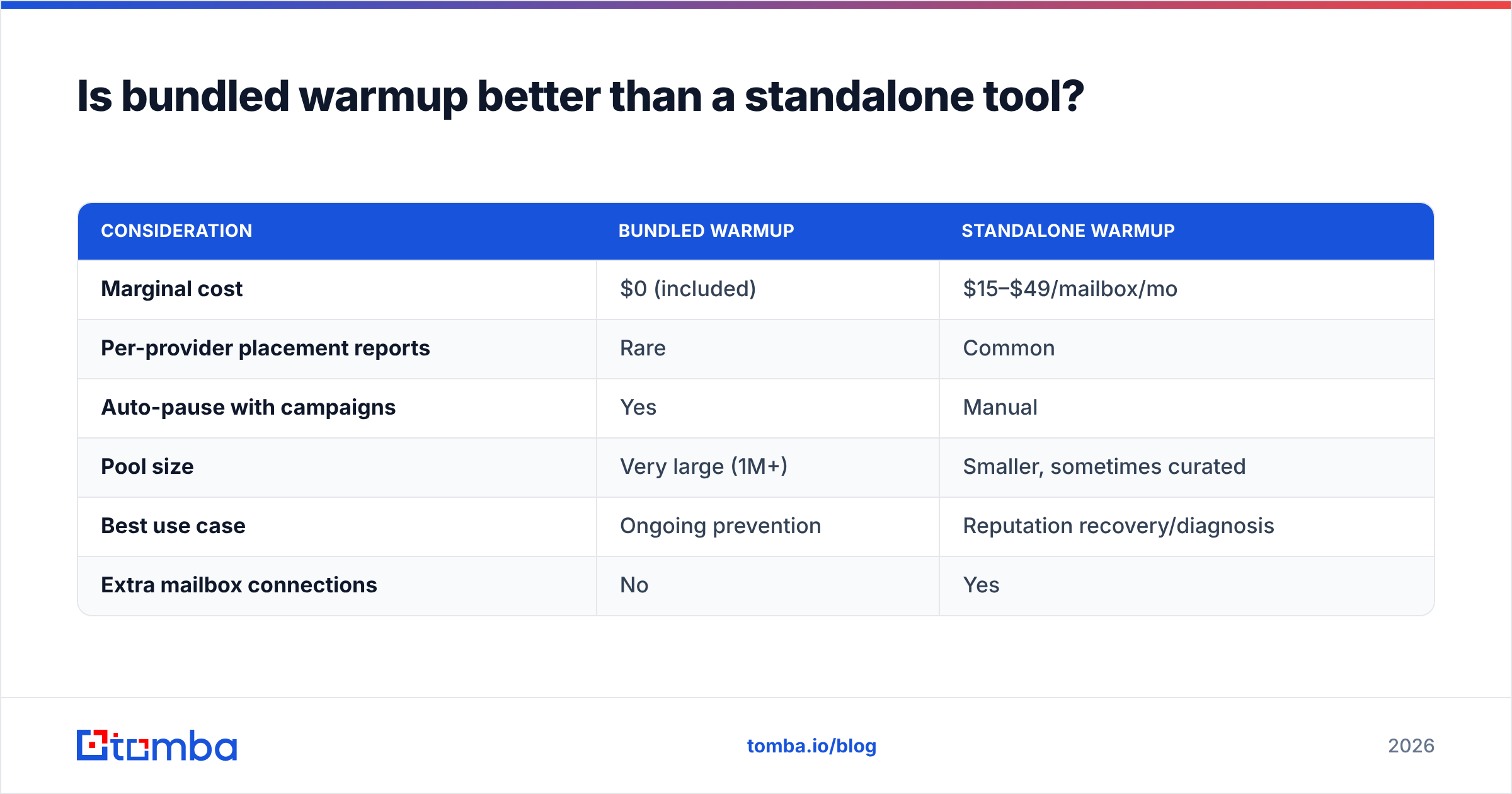
Is bundled warmup better than a standalone tool?#
For most teams, yes — with one clear exception.
Bundled wins when you are already committed to a sending platform. Instantly, Smartlead, and lemlist all include warmup at no incremental cost, the mailbox connection is shared with the sequencer, and pausing campaigns pauses warmup automatically. Fewer OAuth grants on your Workspace tenant is a security win too.
Standalone wins when you are diagnosing a problem rather than preventing one. Mailreach and Warmy publish per-provider spam placement reports (Gmail vs Outlook vs Yahoo) that most bundled tools do not surface. If your reputation has already degraded and you need to know where mail is landing, a standalone diagnostic tool earns its fee for the two or three months it takes to recover — then you can drop it.
The exception: you should never run two warmup tools on the same mailbox. Doubled synthetic traffic on one address is a strong anomaly signal, and it makes attribution impossible when placement changes.
| Consideration | Bundled warmup | Standalone warmup |
|---|---|---|
| Marginal cost | $0 (included) | $15–$49/mailbox/mo |
| Per-provider placement reports | Rare | Common |
| Auto-pause with campaigns | Yes | Manual |
| Pool size | Very large (1M+) | Smaller, sometimes curated |
| Best use case | Ongoing prevention | Reputation recovery/diagnosis |
| Extra mailbox connections | No | Yes |
What do you check before blaming your warm up tool?#
Work this list top to bottom before you switch vendors. Most "warmup isn't working" tickets resolve in the first three items.
- Bounce rate on your last batch. Above 3% and nothing else matters. Verify the list. Catch-all domains need a dedicated catch-all verifier — standard verification returns "unknown" on them and people ship those anyway.
- Google Postmaster Tools. Check domain reputation, spam rate, and authentication pass rate for the sending domain. If spam rate is above 0.3%, your copy or targeting is the problem, not sender age.
- DMARC aggregate reports. Confirm your sending platform is actually aligned. Misalignment shows up here and nowhere else.
- Blacklists. Check the domain and IP against Spamhaus and the common RBLs with a blacklist checker. Shared-IP senders inherit other people's sins.
- Reply rate on live sends. If a genuinely relevant 200-contact batch produces zero replies and zero bounces, you are in spam. That is a placement problem, and warmup score will not tell you.
- Volume per mailbox. Anything over ~50/day per mailbox on a cold domain is asking for trouble regardless of how long you warmed.
For a broader picture of how sending behavior compounds into a score, the concepts under email deliverability and sender reputation are worth reading once properly rather than absorbing piecemeal from vendor blogs. G2's email deliverability software category is also a reasonable place to sanity-check whether a vendor has real reviews or just an affiliate program.
Which email warm up tool should you pick?#
Decide by situation, not by feature list:
- You already use a sending platform — use its bundled warmup. Do not add a second tool. Save the $25/month.
- You run one or two mailboxes, no platform yet — Warmbox or Mailreach for a few months, then reassess once you pick a sequencer.
- You are an agency with 20+ mailboxes — unlimited-mailbox pricing (Smartlead-style) is the only model that survives contact with the math.
- Your reputation is already damaged — Mailreach or Warmy for the per-provider placement reporting, plus a full list purge. Warmup alone will not dig you out.
- You are pre-launch, no sending yet — skip warmup shopping entirely for two weeks. Buy the domain, set up authentication, build a verified list. Then warm.
The uncomfortable summary: warmup tools have become a commodity, they are bundled free almost everywhere, and their marginal impact on placement is smaller than the impact of not sending to dead addresses. Treat the warmup subscription as insurance on the ramp, and put the real effort into list quality.
Get the list right before you warm anything#
Warmup only pays off if the addresses you eventually send to are real. Bounces from invalid contacts erase weeks of careful ramping in a single batch, and they are entirely preventable.
Start with verified, source-attributed contacts. The Tomba Email Finder returns professional addresses with a confidence score and the public sources behind each one, so you know what you are sending to before the first email goes out. The free tier covers 25 searches per month, Starter is $49/mo, and Growth is $99/mo — see Tomba pricing for the full breakdown. Pair it with bulk verification, warm your mailboxes properly, and the ramp actually holds.
Related guides#
Ready to find emails that actually work?
Join 150,000+ professionals who stopped guessing and started sending. Free credits on signup — no credit card required.
Get the Tomba newsletter
Practical outbound tactics and product updates — once every two weeks.
About the author