Email Warm Up Tools for Agencies: The 2026 Buyer's Guide
Warming 5 inboxes is easy. Warming 200 across 30 client domains is a different business. Here is how agency-grade warm-up tools compare on per-inbox cost, pool quality, sub-accounts and reporting in 2026.
TL;DR
- Agency warm-up is a different product than solo warm-up: you are managing dozens of domains, per-client reputation, and a bill that scales linearly with mailbox count.
- The three variables that actually matter are pool quality, per-inbox marginal cost, and whether you can hand a client a report without exporting screenshots by hand.
- Bundled warm-up (Instantly, Smartlead) is nearly free at scale but is tied to their sending platform. Standalone warm-up (MailReach, Warmy, Mailivery) costs more per inbox but works with whatever you already send from.
- Warm-up in 2026 does not rescue a bad list. Google and Microsoft weight complaint rate and unknown-user bounces far more heavily than "engagement" you manufacture.
- Budget for warm-up as a per-inbox line item in the retainer, not as agency overhead — otherwise a 40-mailbox client quietly eats your margin.
What is email warm-up, and why is it different for agencies?#
Email warm-up is the practice of sending low-volume, high-engagement mail from a new or cold mailbox so that mailbox providers build a positive history for that address, domain and IP before you start real outreach. Most tools do it by connecting your inbox to a private network of other inboxes that send each other short messages, open them, reply, and drag anything that lands in spam back to the primary tab.
Think of it like a new driver building an insurance record. Nobody gives a 17-year-old with zero history the good rate. Six months of clean, boring driving does. Warm-up manufactures those six boring months in three to six weeks.
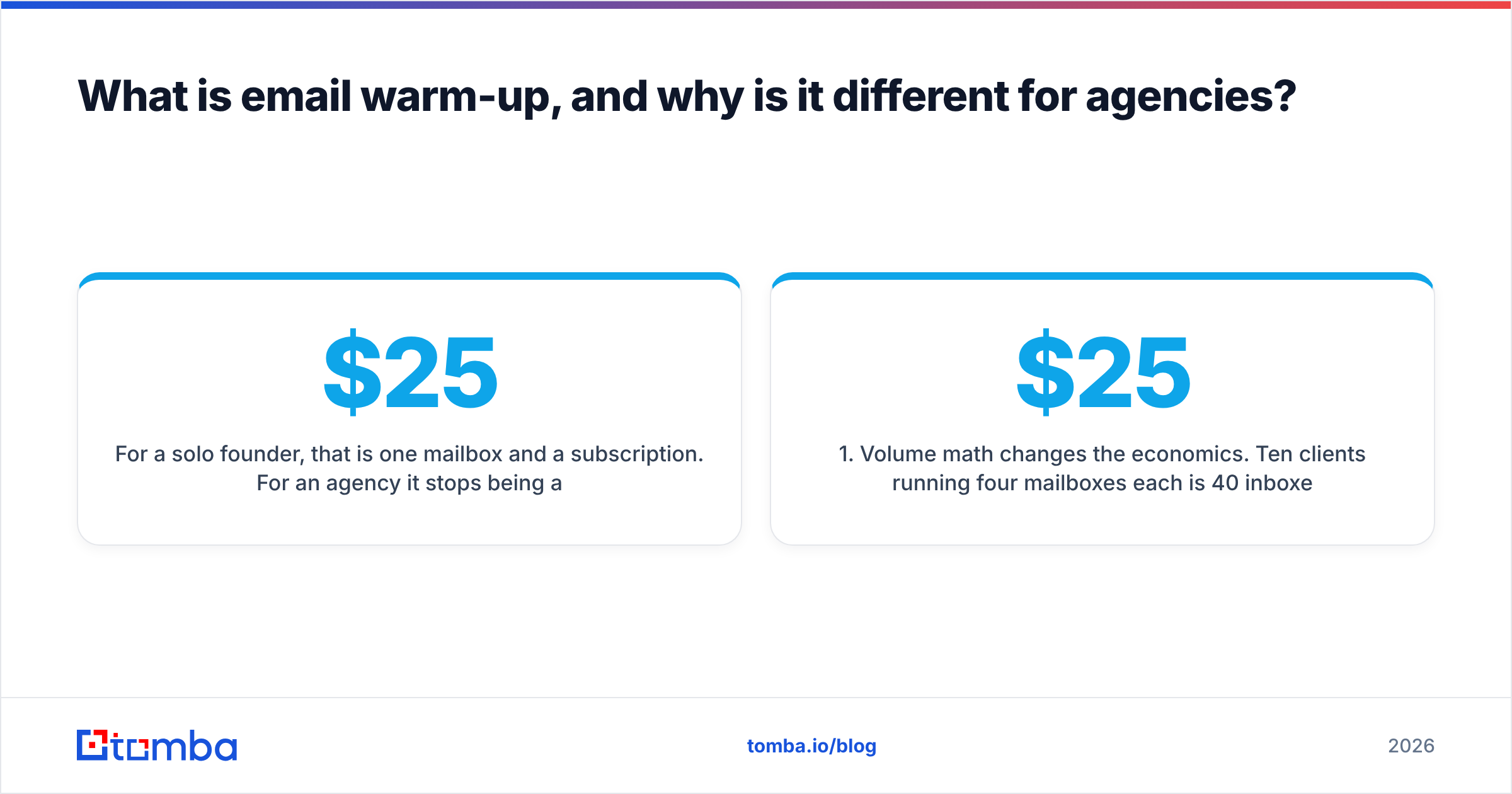
For a solo founder, that is one mailbox and a $25 subscription. For an agency it stops being a tool question and becomes an operations question:
- Volume math changes the economics. Ten clients running four mailboxes each is 40 inboxes. At $25 per inbox per month that is $1,000/mo before you have sent a single prospecting email.
- Reputation is per-client, not per-agency. One client's aggressive list poisons only their domain — unless you are sending everything from your own domain, which you should not be.
- Churn creates orphaned inboxes. Clients leave. Their mailboxes keep billing until someone remembers to disconnect them.
- You have to prove it. Clients ask "why are we still in spam?" and you need a chart, not a vibe.
- Onboarding must be repeatable. DNS, SPF, DKIM, DMARC, custom tracking domain, warm-up connection — the same twelve steps, thirty times a year.
Any tool that solves 1 and 4 well is worth more to an agency than a tool with a marginally better algorithm.

What breaks first when agencies scale warm-up?#
In rough order of how often it happens:
- Bulk mailbox provisioning outruns DNS hygiene. Someone spins up 20 Google Workspace seats on a fresh domain and connects them to warm-up the same afternoon. Google throttles new tenants regardless of what your warm-up dashboard says. Check your records with an SPF checker before you connect anything.
- The warm-up pool is shared with spammers. Cheap tools recycle the same low-trust inboxes across thousands of users. Your "97% inbox rate" is measured against a network that no real recipient resembles.
- Warm-up volume never tapers. Tools that ramp to 40 warm-up emails/day and stay there forever burn sending quota you needed for actual outreach, and skew your engagement metrics so badly you can't read them.
- Nobody reconciles the seat list. Three months in, you are paying for inboxes belonging to two churned clients and one domain you burned and abandoned.
- The list was the problem all along. Warm-up cannot fix a 12% bounce rate. Unknown-user bounces are the single fastest way to tank a new domain, and no amount of synthetic replies offsets them.
That last one matters more than the tool choice. Run every list through an email verifier before the first send. A clean list with mediocre warm-up beats a dirty list with premium warm-up every single time.
Which email warm up tools for agencies are worth comparing in 2026?#
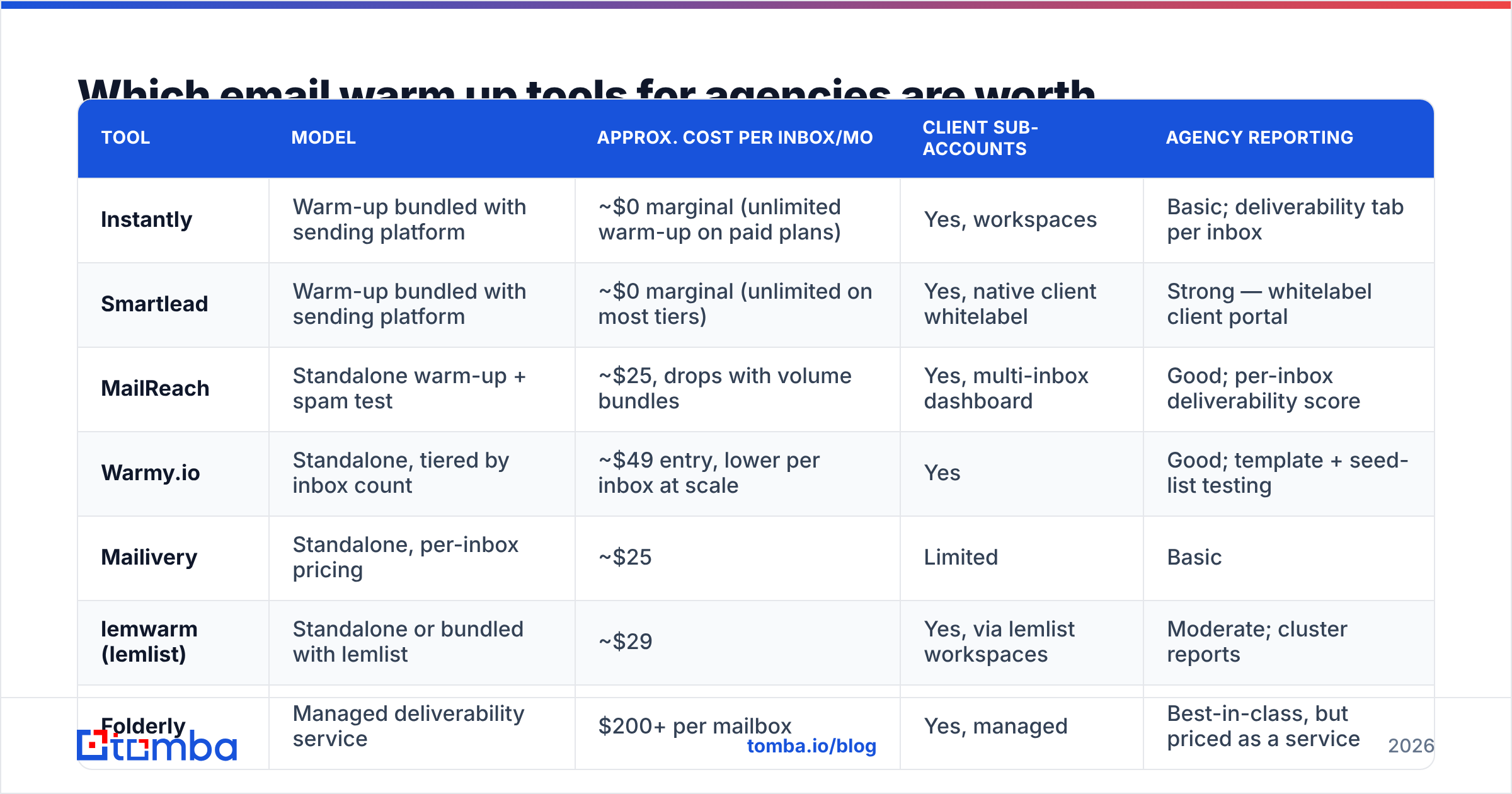
Below is the practical shortlist. Prices are list prices at the time of writing and change often — verify on each vendor's page before you build a retainer around them.
| Tool | Model | Approx. cost per inbox/mo | Client sub-accounts | Agency reporting |
|---|---|---|---|---|
| Instantly | Warm-up bundled with sending platform | ~$0 marginal (unlimited warm-up on paid plans) | Yes, workspaces | Basic; deliverability tab per inbox |
| Smartlead | Warm-up bundled with sending platform | ~$0 marginal (unlimited on most tiers) | Yes, native client whitelabel | Strong — whitelabel client portal |
| MailReach | Standalone warm-up + spam test | ~$25, drops with volume bundles | Yes, multi-inbox dashboard | Good; per-inbox deliverability score |
| Warmy.io | Standalone, tiered by inbox count | ~$49 entry, lower per inbox at scale | Yes | Good; template + seed-list testing |
| Mailivery | Standalone, per-inbox pricing | ~$25 | Limited | Basic |
| lemwarm (lemlist) | Standalone or bundled with lemlist | ~$29 | Yes, via lemlist workspaces | Moderate; cluster reports |
| Folderly | Managed deliverability service | $200+ per mailbox | Yes, managed | Best-in-class, but priced as a service |
Two honest observations from this table.
First, bundled warm-up wins on price so decisively that it changes the buying decision. If your agency already sends through Smartlead or Instantly, warm-up is effectively a free feature and paying an extra $1,000/mo for a standalone tool needs a specific justification — usually that you send from a client's own platform (HubSpot, Outreach, Salesloft) and cannot route through a cold-email sender.
Second, standalone tools earn their price on measurement, not on warming. MailReach and Warmy both run seed-list placement tests that tell you where a specific message lands across Gmail, Outlook, and corporate filters. That is a diagnostic your sending platform mostly does not give you, and it is what you show a client when they ask why replies dropped.
How should you price warm-up into a client retainer?#
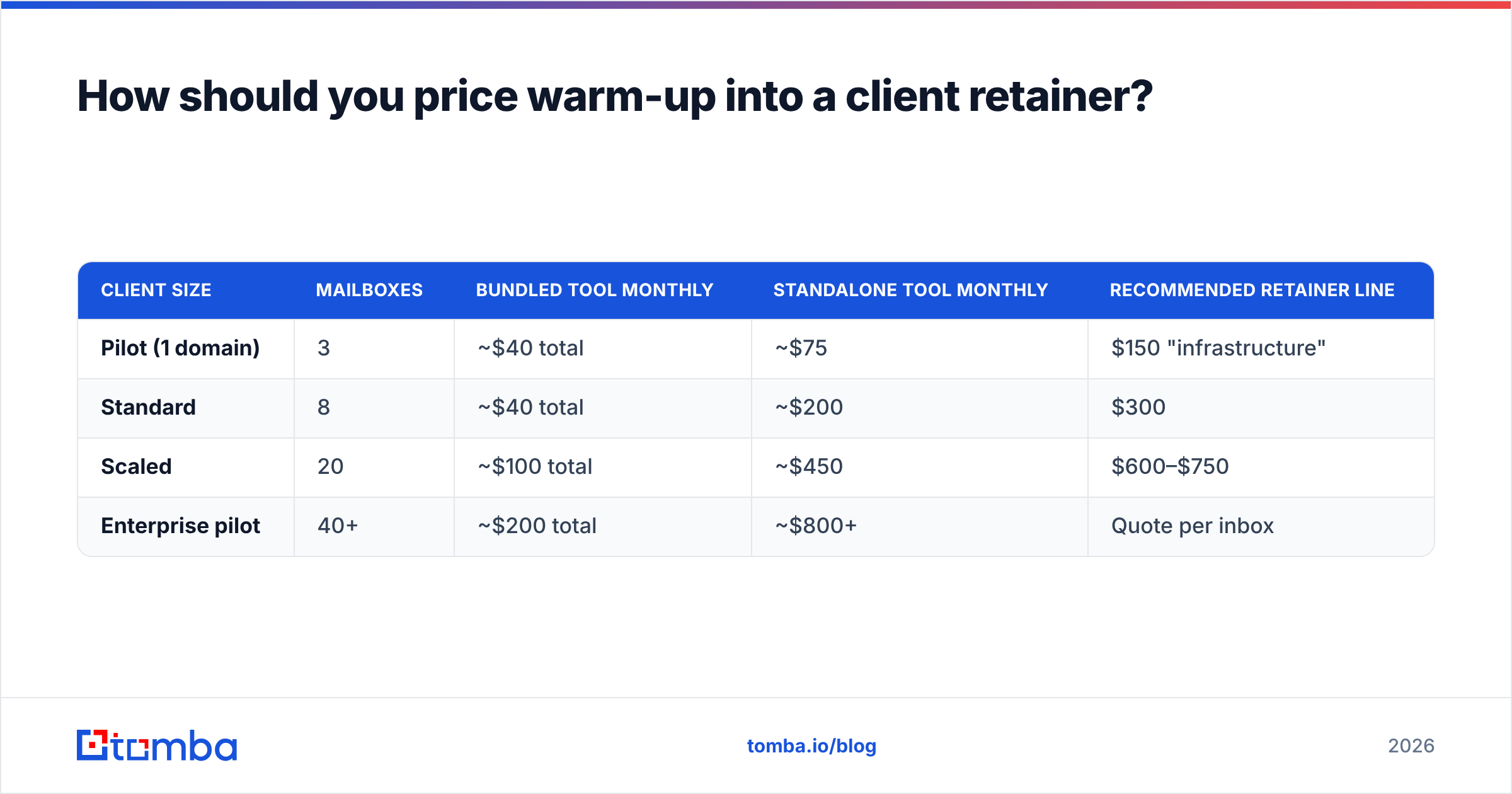
Treat it like ad spend: a pass-through line item that scales with mailbox count, not a fixed cost you absorb.
| Client size | Mailboxes | Bundled tool monthly | Standalone tool monthly | Recommended retainer line |
|---|---|---|---|---|
| Pilot (1 domain) | 3 | ~$40 total | ~$75 | $150 "infrastructure" |
| Standard | 8 | ~$40 total | ~$200 | $300 |
| Scaled | 20 | ~$100 total | ~$450 | $600–$750 |
| Enterprise pilot | 40+ | ~$200 total | ~$800+ | Quote per inbox |
The gap between column three and column five is not padding. It covers domain registration, Workspace or Outlook seats, DNS setup time, and the hour a month someone spends reading placement reports. Agencies that bury infrastructure inside a flat $3,000 retainer discover the problem when a client asks to triple sending volume.
Does email warm-up still work in 2026?#
Partially — and less than vendors imply.
What still works: building a baseline sending history so a brand-new mailbox is not sending its first-ever message to 200 strangers. Providers do treat "zero history, sudden volume" as a strong negative signal, and gradual ramping demonstrably reduces early throttling.
What works less than it used to: manufactured engagement. Since Google and Yahoo tightened bulk-sender requirements, the dominant signals are complaint rate (the hard ceiling is 0.3%, and you want to stay under 0.1%), authentication (SPF, DKIM, and DMARC alignment), and one-click unsubscribe support. Google publishes those requirements openly, and you can watch your own domain's numbers in Google Postmaster Tools — which is free, real recipient data, and more trustworthy than any warm-up dashboard.
The practical reading: warm-up is necessary but no longer sufficient. It gets you to the starting line. Complaint rate, bounce rate and reply rate decide whether you stay there. If you want the full picture of what providers weigh, this email deliverability primer covers the signal hierarchy.
How do you run warm-up across 50+ client mailboxes without getting burned?#
A repeatable runbook beats a better algorithm. This is the sequence that holds up at scale:
- Buy the sending domain 2–4 weeks before you need it. Domain age is a weak signal on its own, but a domain registered yesterday and blasting today is a strong negative one. Use variants of the client's brand, never their primary domain.
- Set DNS before the mailbox exists. SPF, DKIM, DMARC at
p=noneto start, custom tracking domain, MX. Verify each record independently rather than trusting the provider's green checkmark. - Cap at three sending mailboxes per domain. More than that and one bad campaign takes out the whole domain. Spread across domains, not across seats.
- Ramp on a schedule, not on a feeling. Days 1–7: 5–10 warm-up sends/day. Weeks 2–3: 15–25. Week 4: begin real sending at 10–20/day per mailbox while warm-up tapers. A warmup calculator makes the ramp concrete instead of guessed.
- Never fully switch warm-up off. Keep 5–10 warm-up sends/day running underneath live campaigns as a floor of positive engagement.
- Run a placement test before every new campaign, not every new mailbox. Copy changes placement more often than infrastructure does. A link-heavy template can spam-folder a perfectly warmed inbox.
Then audit monthly: seat list versus active client list, bounce rate per domain, complaint rate in Postmaster Tools, and any domain that has crossed into "medium" reputation.

What should agencies measure instead of "warm-up score"?#
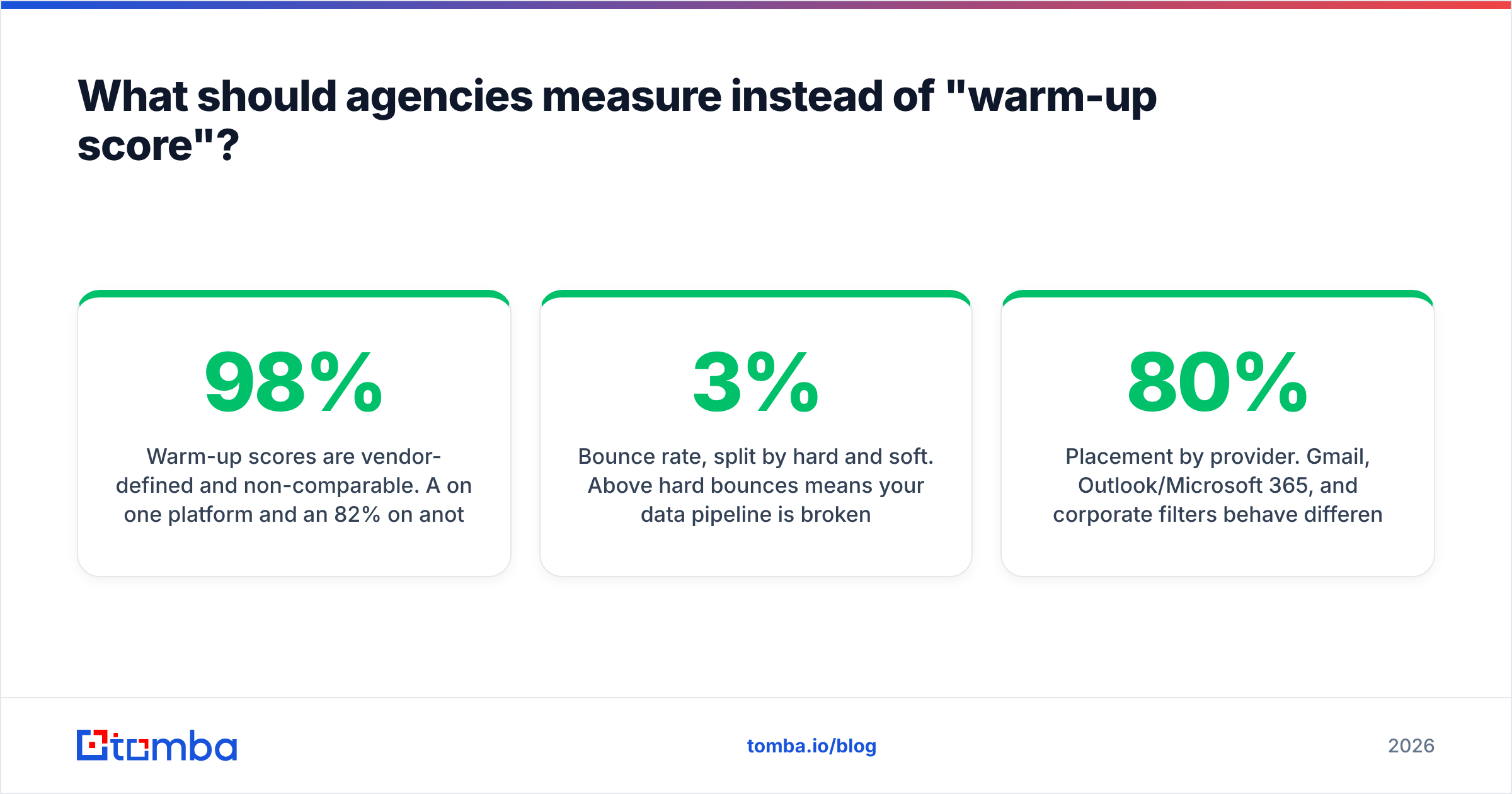
Warm-up scores are vendor-defined and non-comparable. A 98% on one platform and an 82% on another may describe identical mailboxes. Report these instead:
- Bounce rate, split by hard and soft. Above 3% hard bounces means your data pipeline is broken, not your warm-up. Above 5% and providers start throttling within days.
- Complaint rate from Postmaster Tools. The only number that comes from actual recipients. Trend it weekly per domain.
- Reply rate on live campaigns. The signal warm-up is trying to fake. When the real number is healthy, you can taper synthetic engagement.
- Placement by provider. Gmail, Outlook/Microsoft 365, and corporate filters behave differently. An 80% Gmail inbox rate with 20% Outlook is a copy or authentication issue, not a warming issue.
- Days-to-first-reply per new domain. The clearest operational metric for whether your ramp is too slow or too aggressive.
If you want third-party sanity checks on any vendor before committing, the deliverability categories on G2 carry enough recent agency reviews to spot the tools that fall over past 20 inboxes.
Which email warm up tool should your agency actually pick?#
Short version, by situation:
- You send through a cold-email platform already. Use its bundled warm-up. Add one standalone seat purely for placement testing. Total cost stays near $50/mo regardless of inbox count.
- You send through the client's own CRM or sequencer. You need a standalone tool. MailReach for measurement quality, Warmy if you want template-level testing built in.
- You manage a small number of very high-value domains. A managed deliverability service is defensible at $200+/mailbox, because one blocked enterprise domain costs more than a year of the subscription.
- You are under 10 mailboxes total. Do not overthink it. Any reputable tool plus disciplined ramping is fine, and your money is better spent on list quality.
That last point deserves the closing emphasis. In audits of underperforming agency campaigns, the failure is almost never the warm-up vendor. It is a list assembled from scraped pages and stale exports, sent at volume into a domain that had no history — which produces exactly the bounce and complaint pattern warm-up cannot survive.
Where does data quality fit into all of this?#
Warm-up protects the sender. Verification protects the send. You need both, and they fail in different ways: bad warm-up means slow ramping and occasional spam placement, while bad data means hard bounces that permanently mark your domain.
The sequence that works is boring and effective. Source contacts from a provider that returns a confidence score rather than a guess. Verify every address before import. Suppress catch-all domains you cannot confirm, or route them to a lower-volume, separate domain. Then let warm-up do the narrow job it is good at.
If your contact-sourcing step is the weak link — patterns guessed from LinkedIn, exports nobody has checked in six months — fix that before you shop for another warm-up subscription. Start with the Tomba Email Finder to pull verified, source-attributed business addresses by domain or name, run them through verification, and hand your warm-up tool a list that will not bounce. Free tier covers 25 searches a month so you can test the difference on one client before rolling it out; paid Tomba plans start at $49/mo when you are ready to scale it across the book.
Related guides#
Ready to find emails that actually work?
Join 150,000+ professionals who stopped guessing and started sending. Free credits on signup — no credit card required.
Get the Tomba newsletter
Practical outbound tactics and product updates — once every two weeks.
About the author