Email Warm Up Tools for B2B Campaigns: 2026 Buyer's Guide
Warm-up tools are cheap, noisy, and easy to misuse. Here's how the main platforms actually differ, what a warm-up can and cannot fix, and the ramp schedule that keeps new B2B domains out of spam.
TL;DR
- Warm-up tools solve one narrow problem: they generate positive engagement signals on a new or cold sending mailbox so mailbox providers stop treating it as an unknown.
- The tools are mostly commoditized. Network size, reply realism, DNS diagnostics, and per-inbox pricing are the only differences that matter at scale.
- Expect $10–$30 per inbox per month standalone, or "free with the plan" if you already pay for a sending platform like Instantly, Smartlead, or lemlist.
- Warm-up cannot fix a bad list. Bounces and spam traps from unverified data will sink a perfectly warmed domain in one send.
- Budget three to six weeks of ramp on a fresh domain, and keep warm-up running at low volume permanently once campaigns start.
What is email warm-up, and does it still work in 2026?#
Email warm-up is the practice of sending a slowly increasing volume of mail from a new mailbox and generating positive interactions — opens, replies, moves out of spam — so that Gmail, Outlook, and corporate filters build a positive reputation profile for that address and domain.
The analogy: a new sending domain is a stranger who just moved into the building. Nobody knows them. If they immediately knock on 3,000 doors in one afternoon, security gets called. If they say hello to twenty neighbours a day for a month and people wave back, nobody blinks when they eventually host a party.
Does it still work? Partly, and less than vendors imply. Mailbox providers have gotten better at spotting reciprocal warm-up networks — pools of accounts that email each other in circles, mark everything important, and reply with filler text. Google's bulk sender requirements pushed authentication and complaint rates to the front, and those are things a warm-up tool cannot fake for you.
What warm-up reliably still does:
- Establishes a sending history so your first real campaign isn't your first message ever.
- Creates a volume ramp that avoids the sudden-spike pattern filters penalize.
- Gives you an early-warning signal — if warm-up mail is landing in spam at 30%, your DNS or domain history is broken and you found out before burning a list.
What it does not do: rescue a spammy offer, repair a blacklisted IP, or compensate for a 12% bounce rate.

How do email warm-up tools actually work?#
Every tool in this category runs roughly the same loop:
- You connect a mailbox over OAuth (Google Workspace, Microsoft 365) or SMTP/IMAP for anything else.
- The tool joins your inbox to a peer network of other users' mailboxes — thousands to hundreds of thousands of accounts depending on the vendor.
- It sends and receives conversational mail on your behalf at a rising daily cap, starting at two to five messages a day.
- Recipients in the network perform positive actions: open, reply, rescue from spam, mark as important, remove from Promotions.
- It reports placement — what percentage of your warm-up mail hit Inbox vs Spam vs Promotions, split by provider.
The differences between vendors sit in steps 2, 4, and 5. A large network with real business domains beats a small one full of throwaway Gmail accounts. Reply content that reads like actual conversation beats lorem-ipsum. And per-provider placement reporting is the only part of the product that tells you something actionable.
One thing almost nobody advertises: warm-up mail counts against your daily sending limit. If Google Workspace caps you at 2,000 external recipients per day and warm-up eats 40, plan accordingly.
Which email warm up tools for B2B campaigns are worth paying for?#
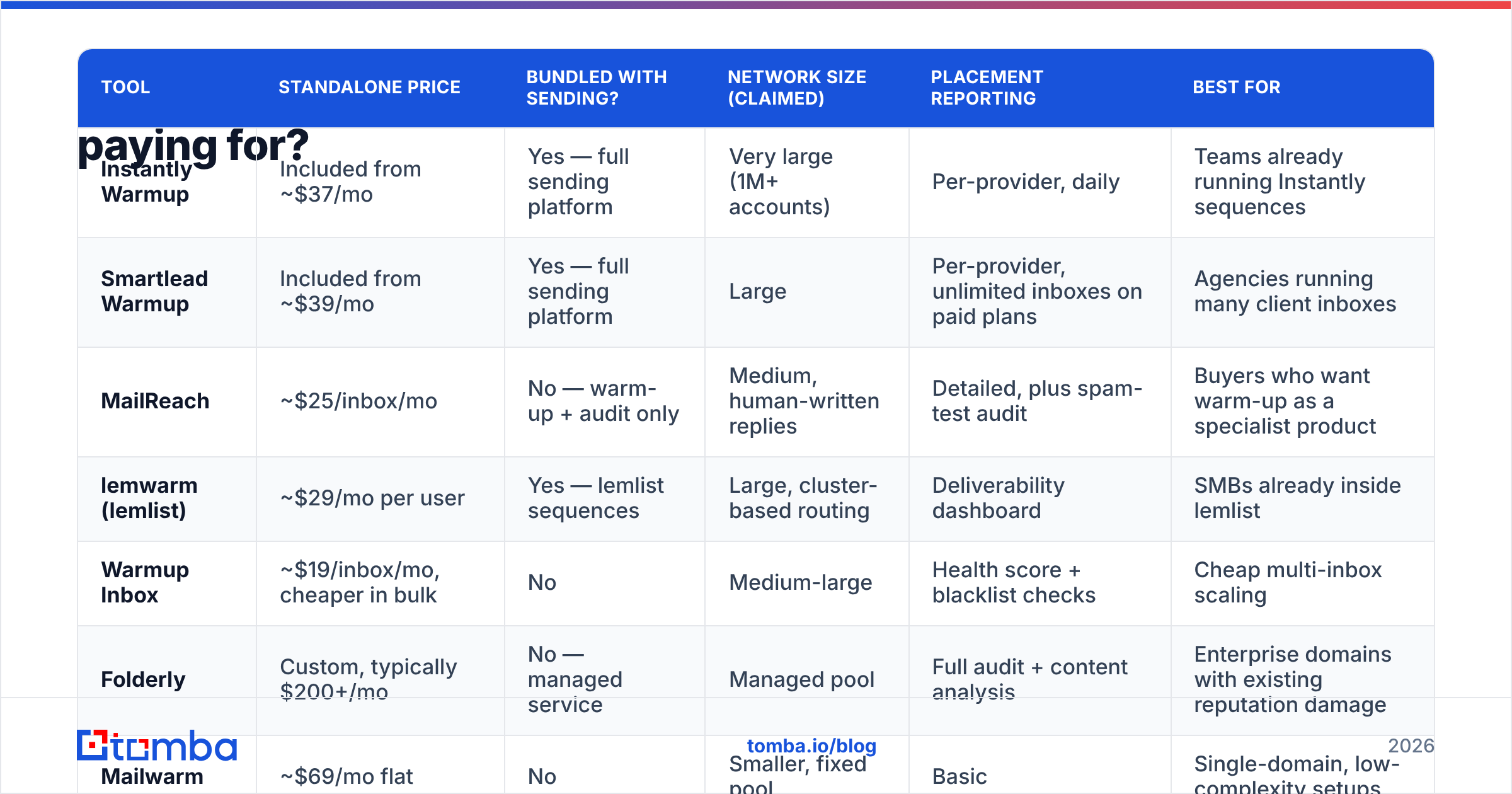
Here is how the main options compare. Prices are list prices at time of writing and vendors change them often — check the vendor page before you commit.
| Tool | Standalone price | Bundled with sending? | Network size (claimed) | Placement reporting | Best for |
|---|---|---|---|---|---|
| Instantly Warmup | Included from ~$37/mo | Yes — full sending platform | Very large (1M+ accounts) | Per-provider, daily | Teams already running Instantly sequences |
| Smartlead Warmup | Included from ~$39/mo | Yes — full sending platform | Large | Per-provider, unlimited inboxes on paid plans | Agencies running many client inboxes |
| MailReach | ~$25/inbox/mo | No — warm-up + audit only | Medium, human-written replies | Detailed, plus spam-test audit | Buyers who want warm-up as a specialist product |
| lemwarm (lemlist) | ~$29/mo per user | Yes — lemlist sequences | Large, cluster-based routing | Deliverability dashboard | SMBs already inside lemlist |
| Warmup Inbox | ~$19/inbox/mo, cheaper in bulk | No | Medium-large | Health score + blacklist checks | Cheap multi-inbox scaling |
| Folderly | Custom, typically $200+/mo | No — managed service | Managed pool | Full audit + content analysis | Enterprise domains with existing reputation damage |
| Mailwarm | ~$69/mo flat | No | Smaller, fixed pool | Basic | Single-domain, low-complexity setups |
The practical read: if you already pay for a sending platform, use its bundled warm-up and spend the saved money on data quality instead. Standalone warm-up is worth paying for in exactly two situations — you send from a CRM or marketing platform that has no warm-up of its own, or you have an existing reputation problem and want a specialist tool with real diagnostics.
Cross-check the current state of any vendor on G2 before buying. This category churns; a tool that was excellent eighteen months ago may have gutted its network or been acquired.
What should you look for in a warm-up tool?#
Six criteria, in order of how much they actually change outcomes:
- Network composition, not network size. A million Gmail accounts on free domains teach filters very little about how business recipients treat your mail. Ask the vendor what share of the pool is on custom business domains. Most will dodge; the ones that answer are usually the ones with a good answer.
- Per-provider placement data. "92% inbox rate" is a vanity number. You need Gmail vs Outlook vs corporate-filter breakdowns, because Outlook and Microsoft Defender behave nothing like Gmail and a domain can be fine on one and dead on the other.
- Automatic ramp with a manual ceiling. The tool should escalate volume on its own but let you cap it. Fixed 40-per-day schedules are too aggressive for a week-old domain and too slow for a domain you're rehabilitating.
- DNS and blacklist checks built in. SPF, DKIM, DMARC, rDNS, and RBL status should be surfaced in the dashboard. If they're not, run them yourself with an SPF checker and a blacklist checker before you start warming.
- Per-inbox pricing that scales down. Agencies running 50 mailboxes should be paying single-digit dollars per inbox. If the vendor's pricing is linear at $25 each, look elsewhere.
- Ability to keep running at low volume forever. Warm-up is not a phase you finish. Reputation decays. The tool should support a permanent maintenance trickle alongside live campaigns.
Notably absent from that list: AI-written warm-up replies, gamified health scores, and Chrome extensions. They're fine. They don't move placement.
How long should you warm up before sending real campaigns?#
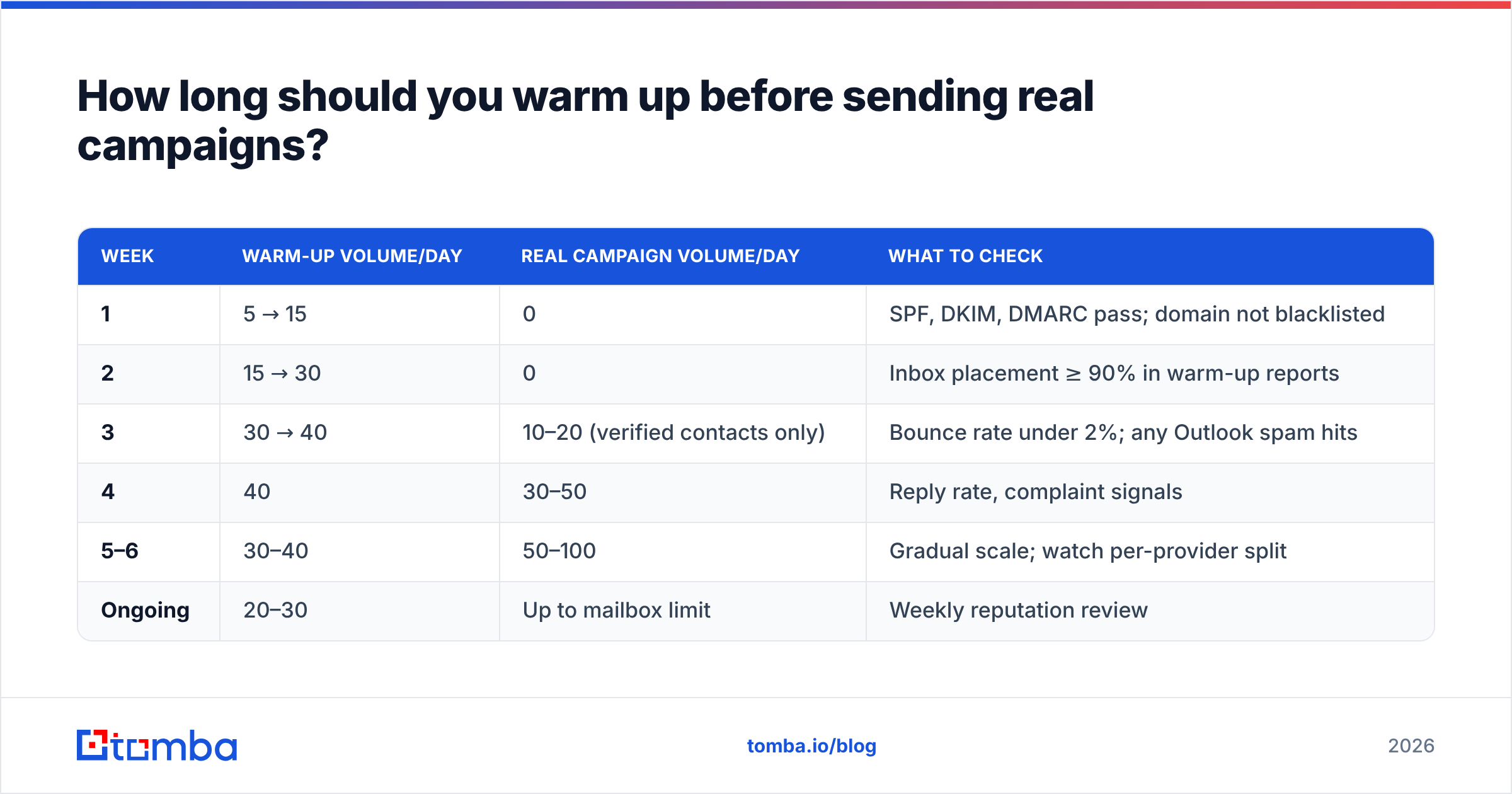
Here's a ramp that works for a fresh Google Workspace or Microsoft 365 mailbox on a new domain. Adjust down if placement reporting shows spam hits.
| Week | Warm-up volume/day | Real campaign volume/day | What to check |
|---|---|---|---|
| 1 | 5 → 15 | 0 | SPF, DKIM, DMARC pass; domain not blacklisted |
| 2 | 15 → 30 | 0 | Inbox placement ≥ 90% in warm-up reports |
| 3 | 30 → 40 | 10–20 (verified contacts only) | Bounce rate under 2%; any Outlook spam hits |
| 4 | 40 | 30–50 | Reply rate, complaint signals |
| 5–6 | 30–40 | 50–100 | Gradual scale; watch per-provider split |
| Ongoing | 20–30 | Up to mailbox limit | Weekly reputation review |
Two rules that override the table. First, if warm-up placement dips below 85% in any given week, freeze volume — do not scale into a problem. Second, never exceed roughly 50 cold emails per mailbox per day regardless of how good the numbers look; buy more mailboxes instead. That's the whole reason agencies run dozens of inboxes across several domains.
If you want to model this against your own target volume and inbox count, run the numbers through an email warmup calculator rather than guessing.
What can warm-up tools not fix?#
This is where most B2B teams lose money. They buy the warm-up subscription, run it for a month, launch, and land in spam anyway — because the failure was never reputation. It was data.

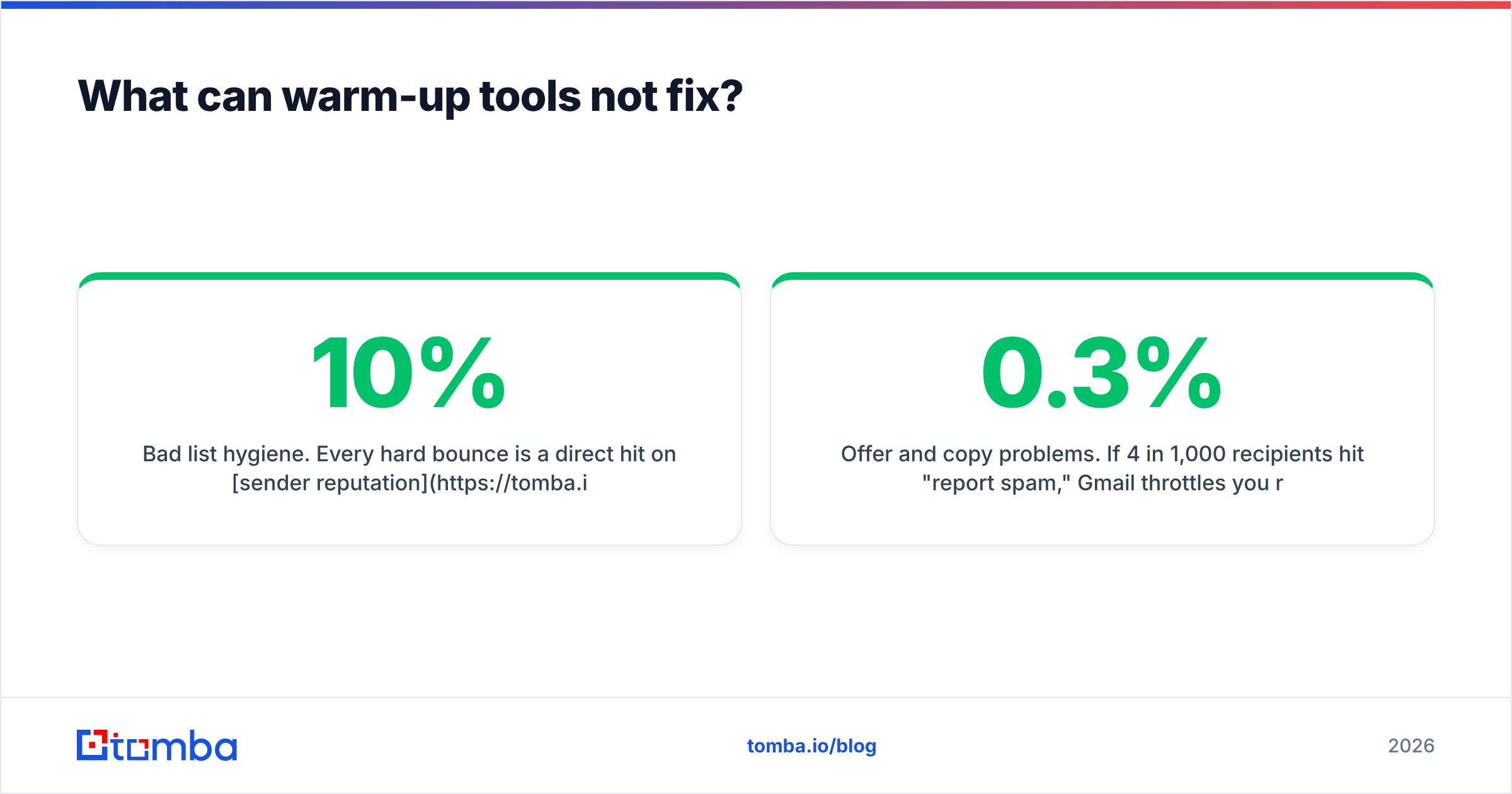
Bad list hygiene. Every hard bounce is a direct hit on sender reputation. A 10% bounce rate on a 2,000-contact send is 200 rejections in a few hours — a signal no amount of prior warm-up survives. Run every list through an email verifier before it touches a sequence, and treat anything above 3% bounce as a broken list, not a bad day.
Spam traps. Recycled and pristine traps sit in scraped lists and in old CRM exports. One pristine trap hit can blacklist a domain outright. Verification catches many but not all; the real defence is not buying or scraping junk data in the first place.
Catch-all domains you guessed at. Catch-all servers accept everything, so a "valid" result means nothing. Either use a catch-all verifier that probes further, or segment catch-alls into a separate low-volume campaign so they can't poison your main sending stream.
Offer and copy problems. If 4 in 1,000 recipients hit "report spam," Gmail throttles you regardless of warm-up history. Google's own guidance treats a 0.3% complaint rate as the danger line. That's a copy and targeting problem, not a technical one.
Shared IP damage. On Google Workspace and Microsoft 365 you share outbound IPs with thousands of other tenants. Domain reputation is what you control; IP reputation is largely not yours to fix. Warm-up helps on the former only.
How do you build a stack around warm-up?#
Warm-up is one layer of four. A working B2B sending stack looks like this:
- Infrastructure layer — secondary sending domains (not your primary), each with 2–3 mailboxes, correct SPF/DKIM/DMARC, and forwarding to the main site.
- Reputation layer — the warm-up tool, running permanently, plus weekly monitoring via Google Postmaster Tools and Microsoft SNDS.
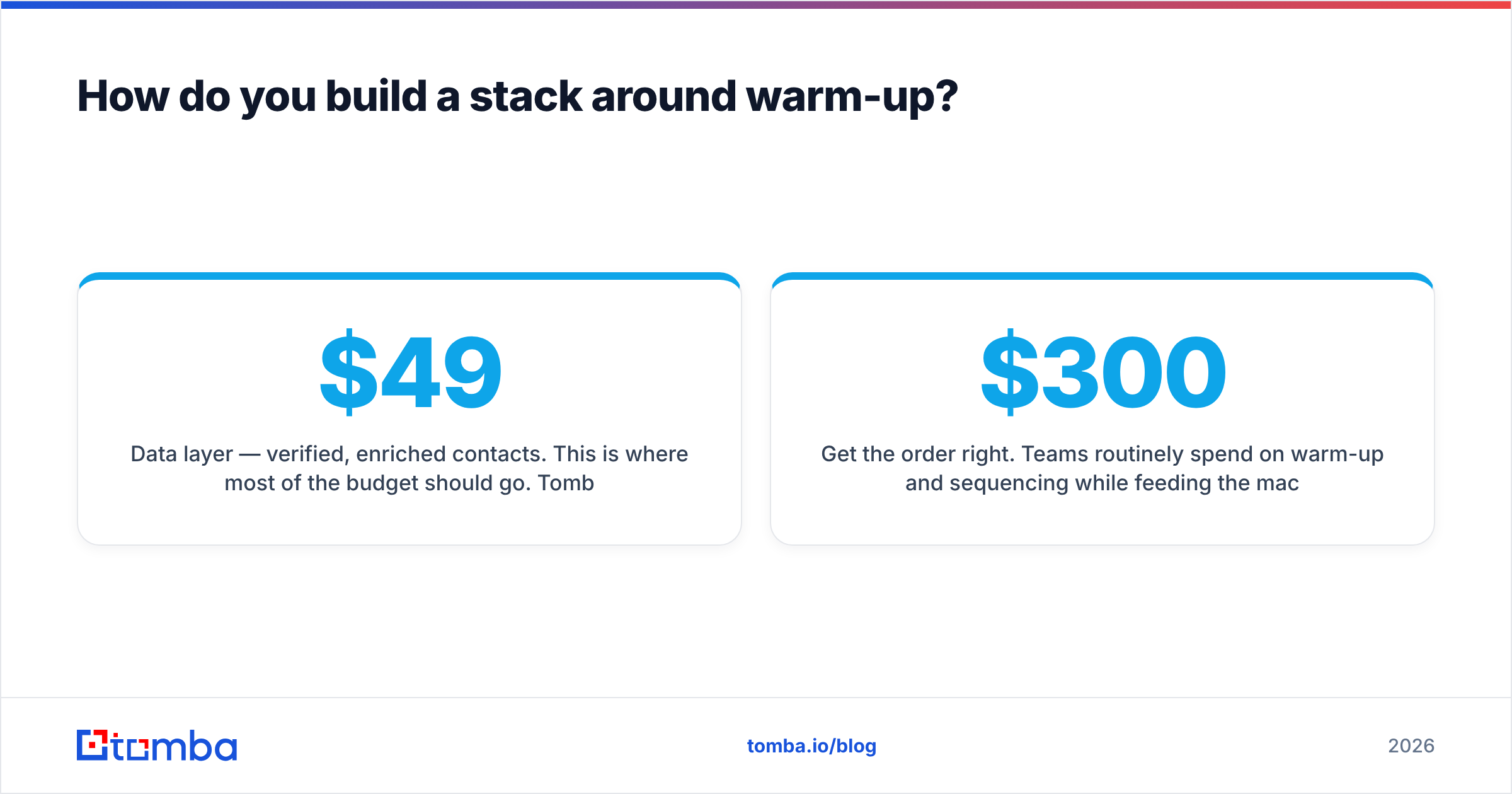
- Data layer — verified, enriched contacts. This is where most of the budget should go. Tomba's email finder covers discovery by domain, name, or company, and pricing runs from a free tier at 25 searches a month to Starter at $49/mo and Growth at $99/mo — see Tomba pricing for the full breakdown.
- Sending layer — the sequencer (Instantly, Smartlead, lemlist, Salesloft, or your CRM) with sensible daily caps and inbox rotation.
Get the order right. Teams routinely spend $300/month on warm-up and sequencing while feeding the machine a scraped list with a 15% bounce rate. Flip that ratio. A cheap bundled warm-up plus a genuinely clean list beats a premium warm-up plus garbage data, every time.
How do you know warm-up is actually working?#
Four signals, checked weekly:
- Warm-up inbox placement by provider — should be 90%+ on Gmail within two weeks, Outlook is often slower and noisier.
- Google Postmaster domain reputation — should read High or Medium and be stable, not oscillating.
- Real campaign bounce rate — under 2% consistently. Above 3% means the list, not the warm-up.
- Spam complaint rate — under 0.1% is healthy, 0.3% is the ceiling before throttling.
If all four look good and reply rates are still flat, the problem is your targeting or your offer. No deliverability tool fixes that, and any vendor implying otherwise is selling you something.
Where should you start?#
If you already pay for Instantly, Smartlead, or lemlist, turn on the bundled warm-up today and stop shopping — the marginal gain from a standalone tool is small. If you send from a CRM with no warm-up, MailReach or Warmup Inbox at $19–$25 per inbox is the straightforward buy. If you're rehabilitating a damaged primary domain, pay for a managed audit rather than a self-serve subscription.
Then spend the rest of the budget where it actually moves reply rates: on contacts that exist. Start with the Tomba Email Finder to build a verified list by domain, role, or company, run it through verification before it ever hits a sequence, and let your warmed inboxes do what they were warmed for.
Related guides#
Ready to find emails that actually work?
Join 150,000+ professionals who stopped guessing and started sending. Free credits on signup — no credit card required.
Get the Tomba newsletter
Practical outbound tactics and product updates — once every two weeks.
About the author