Email Warmup in 2026: How to Warm Up a Domain Properly
Most email warmup advice is recycled from 2019. Here is what warmup actually does, how long it takes, which tools still work in 2026, and the four problems warmup will never solve for you.
TL;DR
- Email warmup is the process of building a sending reputation on a new domain, IP, or mailbox by starting small and increasing volume gradually while keeping engagement high.
- A realistic warmup for a cold outreach domain takes 4 to 8 weeks, not the 14 days most tools advertise. Rushing it is the single most common cause of a burned domain.
- Automated warmup networks still help, but their impact has shrunk since mailbox providers started weighting real recipient behavior more heavily than raw open rates.
- Warmup cannot fix a bad list, a broken authentication setup, or spam-triggering copy. Roughly half of "warmup failed" cases are actually list-quality failures.
- Measure warmup with Google Postmaster Tools, seed-inbox placement, and bounce rate — not with the green dashboard inside your warmup tool.
What is email warmup, exactly?#
Email warmup is the practice of gradually increasing sending volume from a new domain, IP address, or mailbox so that mailbox providers learn to trust you before you send at full scale.
Think of it like getting a credit limit. A bank does not hand a stranger a $50,000 line of credit on day one. It gives you $500, watches whether you pay it back, and raises the limit as evidence accumulates. Gmail, Outlook, and Yahoo do the same thing with sending volume: a domain with no history has no reputation, and no reputation is treated as suspicious by default.
Technically, warmup builds three separate reputation signals:
- Domain reputation — tied to the sending domain (and increasingly the root domain). This travels with you across IPs and is the hardest to repair once damaged.
- IP reputation — tied to the sending IP. On shared infrastructure like Google Workspace you inherit a pool reputation; on dedicated IPs you build it from zero.
- Mailbox-level reputation — per-sender history the provider keeps on how recipients treat mail from that specific address.
- Engagement history — replies, stars, folder moves, and "not spam" actions. This is the signal that carries the most weight in 2026 and the one warmup networks simulate least convincingly.
That fourth item is why warmup has gotten harder. Providers have moved from "does this look like spam?" to "do real humans want this mail?" — a question that is much harder to fake.
Why does a new domain need warmup at all?#
Because a domain registered last Tuesday that sends 400 cold emails on Wednesday looks exactly like a throwaway spam domain, which is what most of them are.
Mailbox providers evaluate new senders on a curve. Volume growth that would be normal for an established sender is a red flag for an unknown one. The specific patterns that trigger filtering on a cold domain:
- Volume spikes — going from 0 to 50+ sends per mailbox per day in the first week.
- Zero reply rate — outbound with no inbound is a strong negative signal.
- High bounce rate — anything above 3% tells the provider you bought or scraped a list without verification.
- Uniform content — hundreds of near-identical messages with a single tracked link.
- No authentication — missing or misconfigured SPF, DKIM, and DMARC records. Since Google and Yahoo's 2024 bulk sender rules, DMARC is effectively mandatory. Check yours with a free SPF checker before you send anything.
Google's own sender guidelines spell out the authentication and spam-rate requirements. They are the floor, not the target — clearing them gets you evaluated, it does not get you inboxed.

How long does email warmup actually take?#
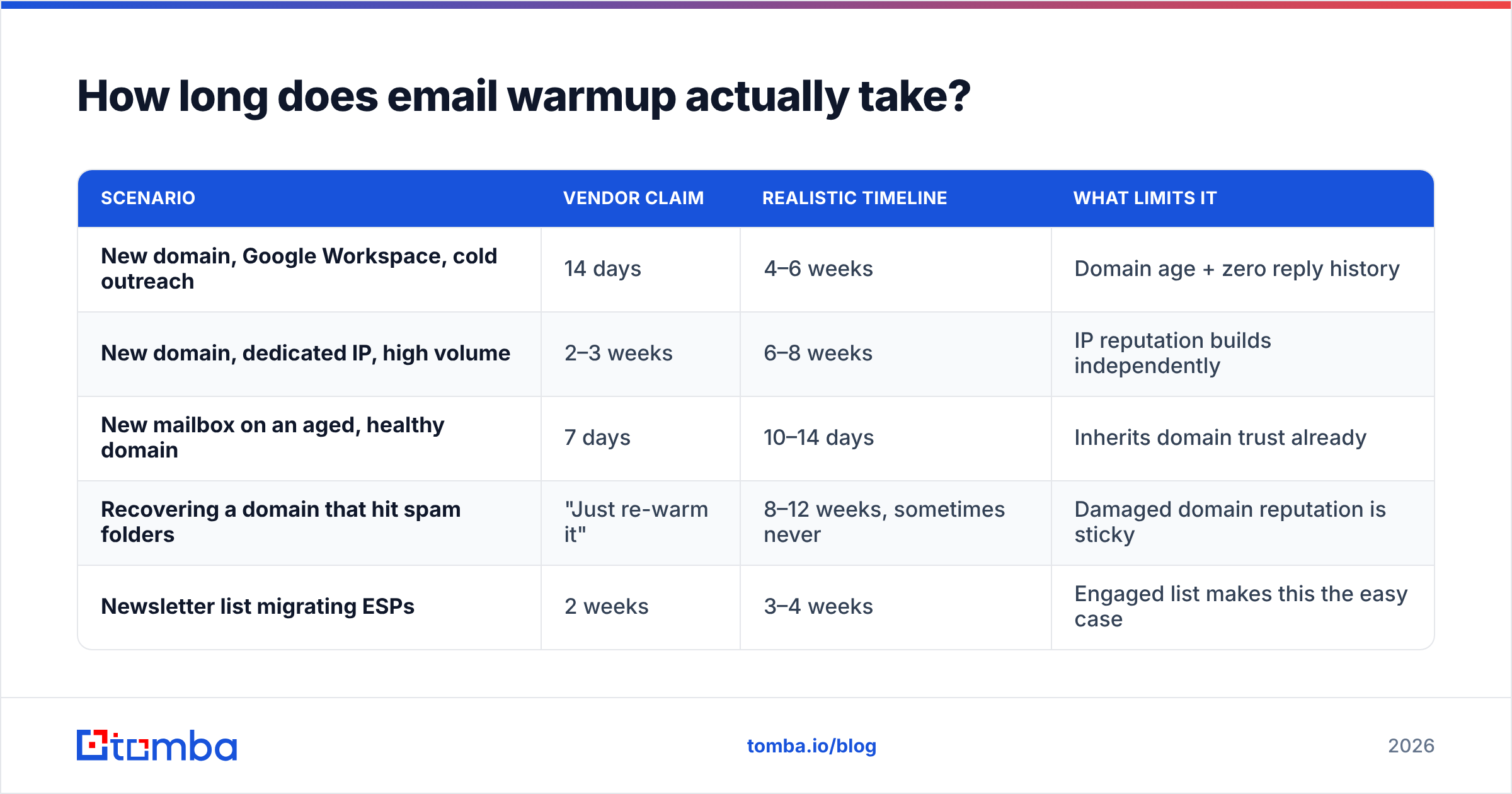
Longer than your tool's onboarding flow claims. Here is what the timeline looks like against the marketing promise:
| Scenario | Vendor claim | Realistic timeline | What limits it |
|---|---|---|---|
| New domain, Google Workspace, cold outreach | 14 days | 4–6 weeks | Domain age + zero reply history |
| New domain, dedicated IP, high volume | 2–3 weeks | 6–8 weeks | IP reputation builds independently |
| New mailbox on an aged, healthy domain | 7 days | 10–14 days | Inherits domain trust already |
| Recovering a domain that hit spam folders | "Just re-warm it" | 8–12 weeks, sometimes never | Damaged domain reputation is sticky |
| Newsletter list migrating ESPs | 2 weeks | 3–4 weeks | Engaged list makes this the easy case |
The recovery row deserves emphasis. A domain that has been flagged does not reset on a schedule. In practice, teams that burn a primary domain end up buying a new one, which is why serious outbound programs never send cold mail from their root domain — they use dedicated sending domains that are expendable.
What does a warmup schedule look like week by week?#
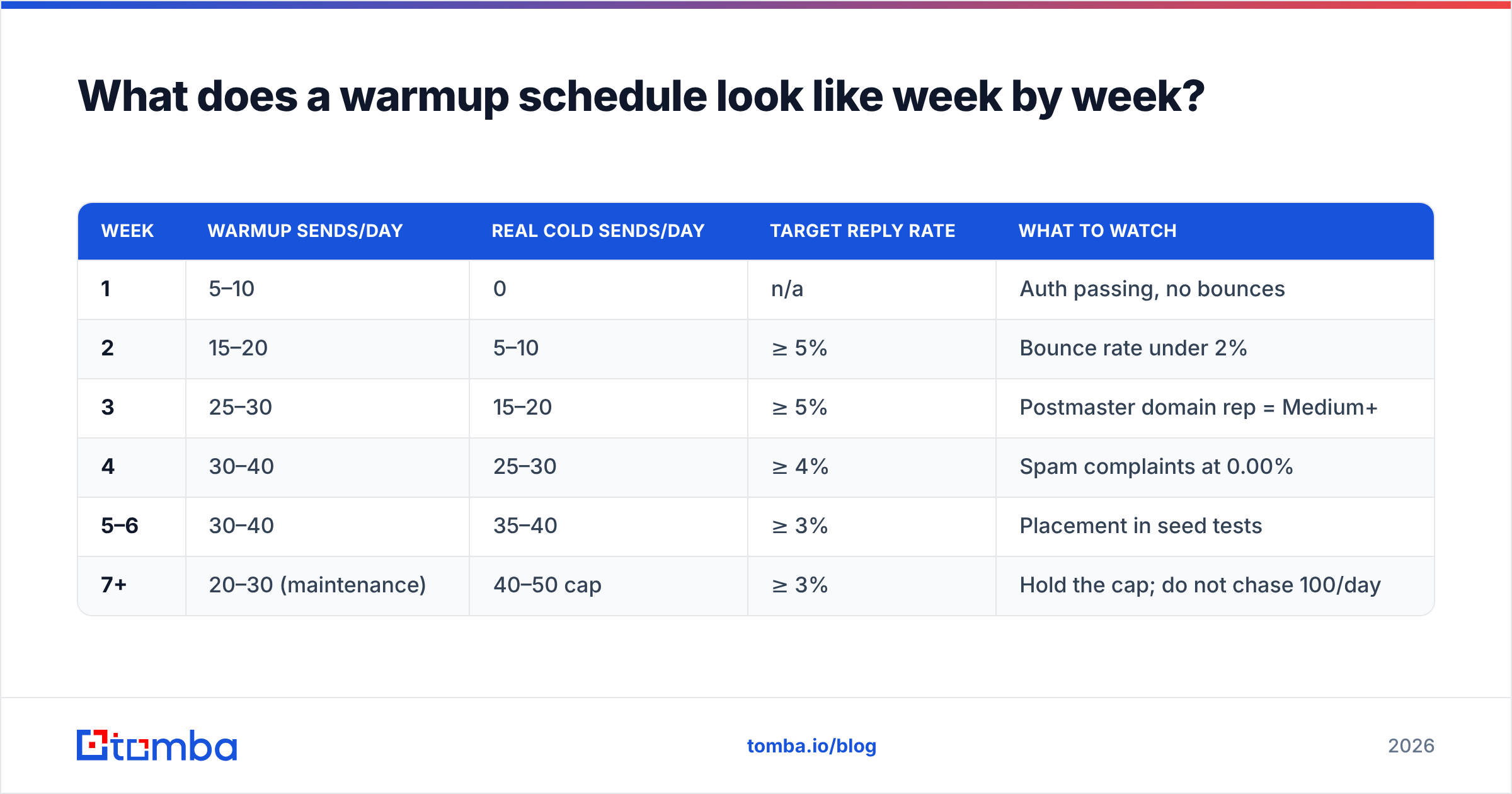
A defensible ramp for a single Google Workspace mailbox running cold outreach:
| Week | Warmup sends/day | Real cold sends/day | Target reply rate | What to watch |
|---|---|---|---|---|
| 1 | 5–10 | 0 | n/a | Auth passing, no bounces |
| 2 | 15–20 | 5–10 | ≥ 5% | Bounce rate under 2% |
| 3 | 25–30 | 15–20 | ≥ 5% | Postmaster domain rep = Medium+ |
| 4 | 30–40 | 25–30 | ≥ 4% | Spam complaints at 0.00% |
| 5–6 | 30–40 | 35–40 | ≥ 3% | Placement in seed tests |
| 7+ | 20–30 (maintenance) | 40–50 cap | ≥ 3% | Hold the cap; do not chase 100/day |
Two rules that matter more than the exact numbers:
- Never exceed ~50 cold sends per mailbox per day. Scale by adding mailboxes and domains, not by pushing a single inbox harder. Three mailboxes at 40/day is far safer than one at 120/day, and it costs the same in seat licenses.
- Keep warmup running at reduced volume forever. Reputation decays. Teams that shut warmup off the day a campaign launches usually see placement slip within three weeks.
If you want a starting ramp calibrated to your mailbox count and target volume, run the numbers through a warmup calculator instead of copying a schedule from a blog post — including this one.
Do automated warmup tools still work in 2026?#
They help, with diminishing returns. Warmup networks work by having thousands of connected mailboxes send each other mail, open it, reply, and rescue anything that lands in spam. That produces genuine positive signals — but providers have gotten better at spotting reciprocal networks where every message is opened within 90 seconds and replied to with three words.
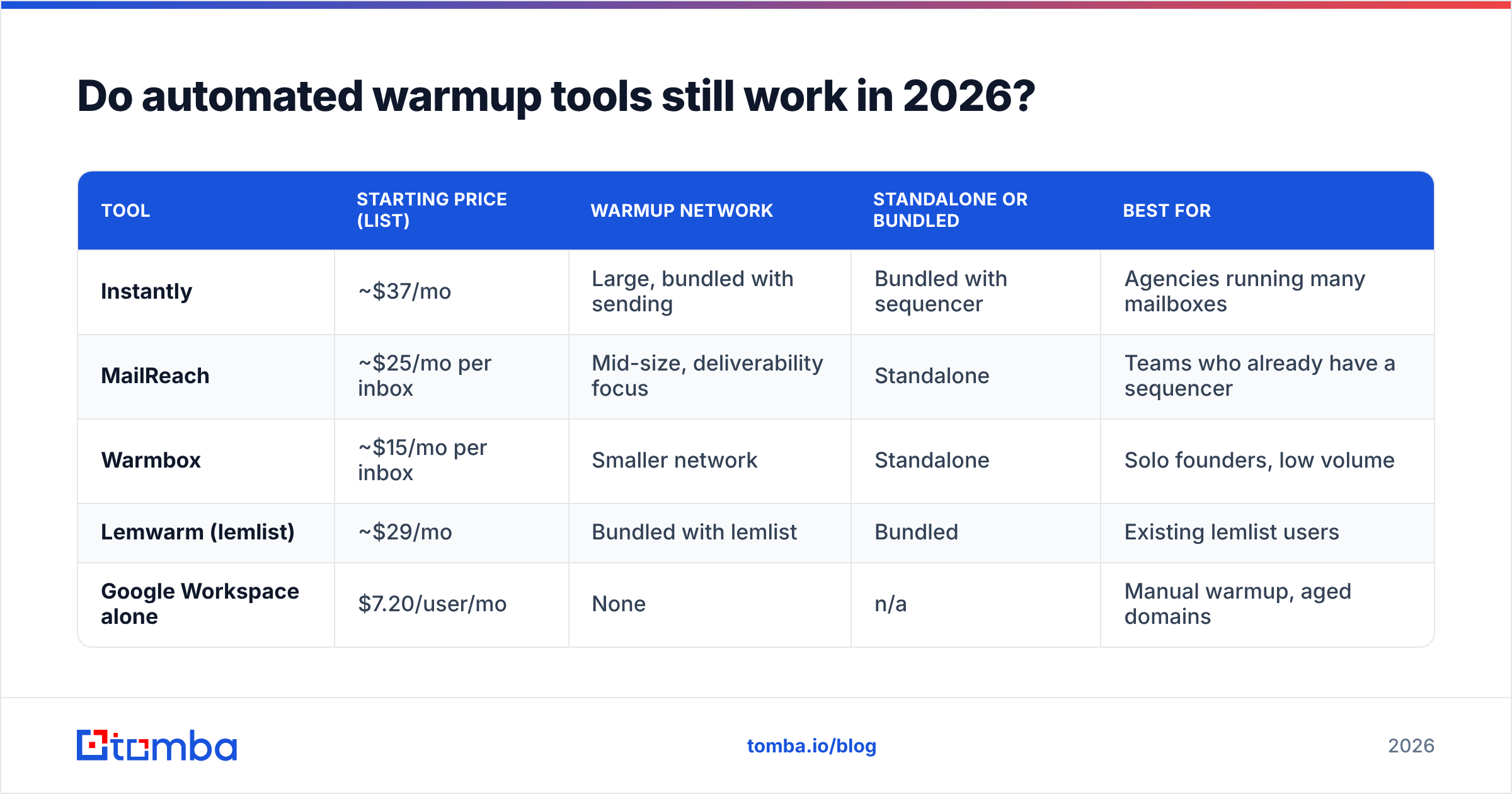
The honest read: automated warmup is now table stakes that prevents obvious failure, not a competitive advantage that guarantees the inbox.
| Tool | Starting price (list) | Warmup network | Standalone or bundled | Best for |
|---|---|---|---|---|
| Instantly | ~$37/mo | Large, bundled with sending | Bundled with sequencer | Agencies running many mailboxes |
| MailReach | ~$25/mo per inbox | Mid-size, deliverability focus | Standalone | Teams who already have a sequencer |
| Warmbox | ~$15/mo per inbox | Smaller network | Standalone | Solo founders, low volume |
| Lemwarm (lemlist) | ~$29/mo | Bundled with lemlist | Bundled | Existing lemlist users |
| Google Workspace alone | $7.20/user/mo | None | n/a | Manual warmup, aged domains |
Prices are list rates at time of writing and change often — check the vendor page before you budget. Instantly publishes its current tiers publicly, which is more than several competitors do.
What none of these tools do: fix your list, fix your copy, or fix your targeting. Which brings us to the part most warmup content skips.

What can't email warmup fix?#
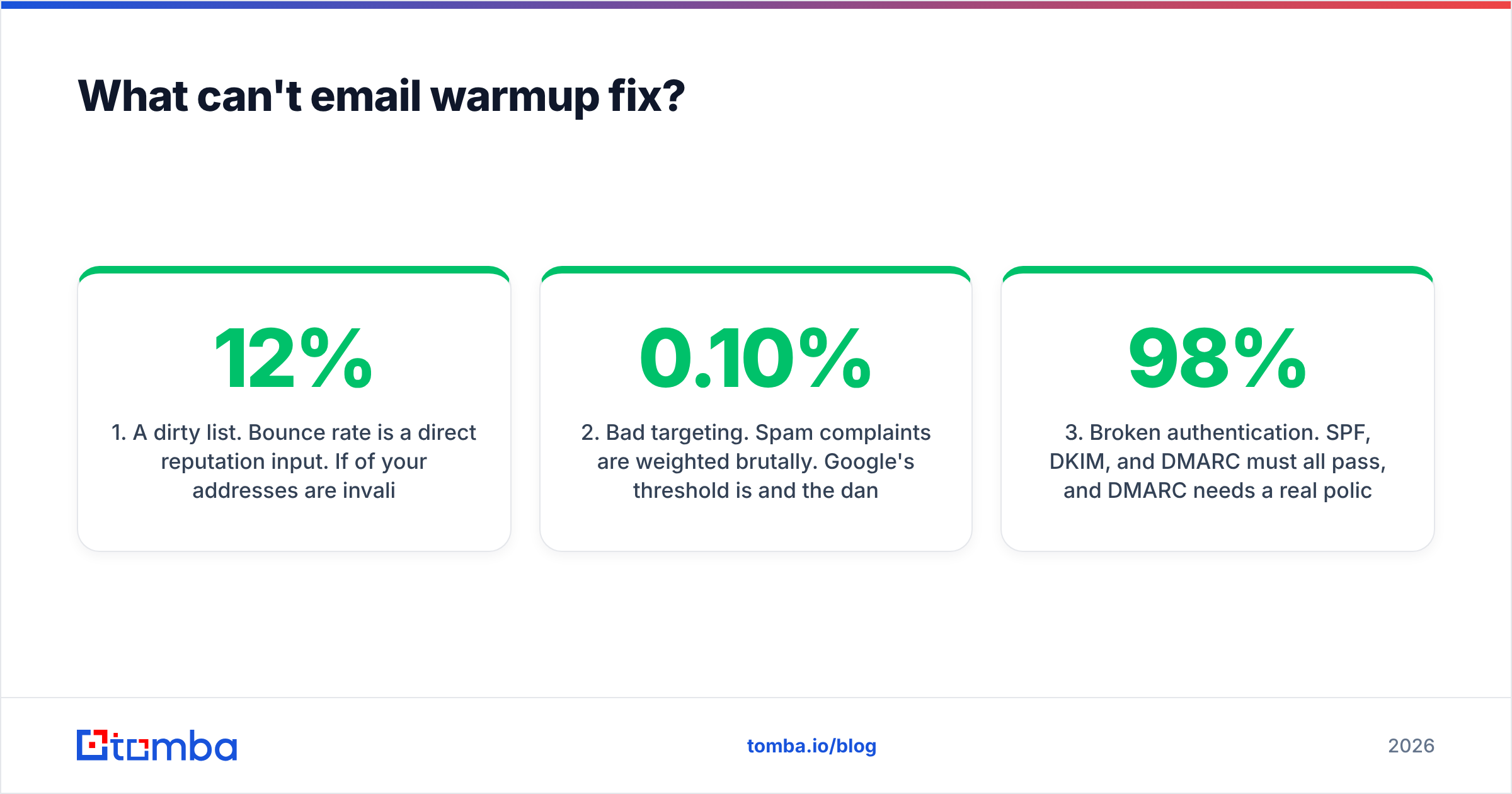
Four things, and they account for the majority of "we warmed up for six weeks and still went to spam" complaints.
1. A dirty list. Bounce rate is a direct reputation input. If 12% of your addresses are invalid, no warmup schedule saves you — you are telling Gmail you do not know who your recipients are. Run every list through an email verifier before it touches a sequencer, and treat anything above a 3% bounce rate as a stop-the-campaign event. This is the highest-leverage deliverability fix available and it costs less than most warmup subscriptions.
2. Bad targeting. Spam complaints are weighted brutally. Google's threshold is 0.10% and the danger zone starts around 0.30%. Sending relevant offers to a tight, well-researched list produces fewer complaints than sending a generic pitch to 10,000 scraped contacts — no tooling substitutes for that.
3. Broken authentication. SPF, DKIM, and DMARC must all pass, and DMARC needs a real policy, not p=none left over from setup. A warmup tool showing 98% inbox placement inside its own network means nothing if your DMARC alignment fails at the recipient's gateway.
4. Copy that reads like spam. Heavy HTML, multiple tracked links, image-only messages, and open-tracking pixels all add filtering risk. Many high-performing outbound teams have turned tracking off entirely on cold sequences and measure by replies instead.
The pattern here: warmup is a reputation amplifier. It amplifies whatever your fundamentals are. Good fundamentals plus warmup gets you to the inbox. Bad fundamentals plus warmup gets you to the spam folder faster and more confidently.
How do you measure whether warmup is working?#
Not from your warmup tool's dashboard. That dashboard measures placement inside a network of cooperating mailboxes, which is a closed loop. Use external signals instead:
- Google Postmaster Tools — the only first-party view of domain reputation, spam rate, and authentication pass rates for Gmail recipients. Requires DNS verification and a minimum daily volume before data appears. Target: domain reputation "High," spam rate under 0.10%.
- Seed inbox testing — send to a set of real accounts you control across Gmail, Outlook, Yahoo, and a corporate Microsoft 365 tenant. Check Primary vs Promotions vs Spam manually. Do this weekly during warmup.
- Bounce rate by segment — if one data source produces 8% bounces and another produces 1%, you have a sourcing problem, not a warmup problem.
- Reply rate trend — the single best proxy for real engagement. A cold campaign holding 3–5% replies is generating the signal that actually moves sender reputation.
- Blacklist status — check monthly. Being listed on a major RBL will tank delivery regardless of how careful your ramp was.
If Postmaster shows "Low" or "Bad" domain reputation after four weeks of disciplined warmup, stop sending cold mail from that domain entirely for two weeks and diagnose. Continuing to send into a bad reputation reading deepens the hole.
What's the right warmup setup for cold outreach at scale?#
The architecture that most experienced outbound teams converge on:
- Keep the root domain clean. Never send cold mail from
yourcompany.com. Register 2–5 lookalike sending domains (get-yourcompany.com,yourcompany-hq.com) and point cold volume there. - Age domains before you use them. Buy them, set up authentication, and let them sit for 3–4 weeks with light warmup traffic before any real campaign. Domain age is a real input; you cannot buy it back later.
- Run 2–3 mailboxes per domain, capped at ~40 sends/day each. More mailboxes, not more volume per mailbox.
- Verify before every send, not once per quarter. B2B data decays roughly 2–3% per month as people change jobs. A list verified in January is measurably worse in April.
- Rotate and rest. Pull any mailbox showing rising bounce or complaint rates out of rotation for a week rather than pushing through it.
- Keep maintenance warmup on permanently at 20–30 messages/day per mailbox.
That setup costs more in domains and seats than a single-inbox blast, and it is the difference between a program that compounds for two years and one that burns out in two months.
Is email warmup worth it?#
Yes — but as one line item in a deliverability system, not as the system itself. Ranked by impact per dollar: list verification first, authentication second, targeting and copy third, warmup fourth. Teams routinely invert that order, spend $200/month on warmup subscriptions, and keep mailing lists with double-digit bounce rates.
The uncomfortable version of the advice: if you can only fix one thing this quarter, fix your data, not your warmup schedule. A verified list sent from a modestly warmed domain will outperform a scraped list sent from a perfectly warmed one, every time.
Start with contacts that are real. Tomba Email Finder returns verified professional addresses with a confidence score and source attribution, so your bounce rate stays where warmup can actually help — under 2%. The free tier covers 25 searches a month to test accuracy against your own known-good list, and paid plans start at $49/mo on Tomba pricing. Verify first, then warm up. In that order.
Related guides#
Ready to find emails that actually work?
Join 150,000+ professionals who stopped guessing and started sending. Free credits on signup — no credit card required.
Get the Tomba newsletter
Practical outbound tactics and product updates — once every two weeks.
About the author