EmailBison Pricing 2026: Reviews, Pros and Cons Explained
A neutral breakdown of EmailBison pricing in 2026: what each tier actually includes, the costs nobody quotes you up front, what reviewers praise, and when a cheaper stack wins.
TL;DR
- EmailBison is a cold email sending and infrastructure platform — it does not find or verify your leads, which is the cost line most buyers forget to budget for.
- Pricing is tiered by sending volume ("power levels") rather than by seat, so a two-person agency and a ten-person SDR team can pay the same list price.
- The published subscription is rarely your real bill: mailboxes, domains, warmup, and data enrichment are separate line items that often exceed the platform fee.
- Reviewers consistently praise unlimited email accounts, white-label options, and speed of setup; the common complaints are a steep first week, uneven documentation, and support latency on lower tiers.
- If your reply rate is bad, the sending tool is almost never the problem. Fix list quality first with a proper email verifier, then pick your sender.
What is EmailBison, and who actually buys it?#
EmailBison is a cold email sending platform. You connect your own mailboxes and domains, it handles sequencing, rotation, warmup, inbox placement mechanics, and reply detection. Think of it as the delivery truck fleet, not the warehouse: it moves what you load onto it, and it has no opinion about whether the boxes are addressed correctly.
The buyer profile is fairly narrow and worth naming honestly, because it explains the pricing model:
- Lead-gen agencies running outbound on behalf of 5–50 clients, who need white-labelling and per-client workspaces.
- High-volume outbound teams sending 50k+ emails a month across dozens of rotating domains.
- SaaS founders doing founder-led outbound who outgrew a single Gmail account and got tired of manual follow-up.
- Resellers who want to package sending infrastructure under their own brand and charge a margin.
- Recruiters and B2B service sellers with long, multi-touch sequences and a small addressable market.
If you send 500 emails a month to a curated list, this category is overkill — you're buying a fleet to deliver one parcel. If you send 50,000, the per-email economics start mattering more than the sticker price. Check the current tiers on the official EmailBison site before you commit to any number you read in a blog post, including this one.
How does EmailBison pricing work in 2026?#
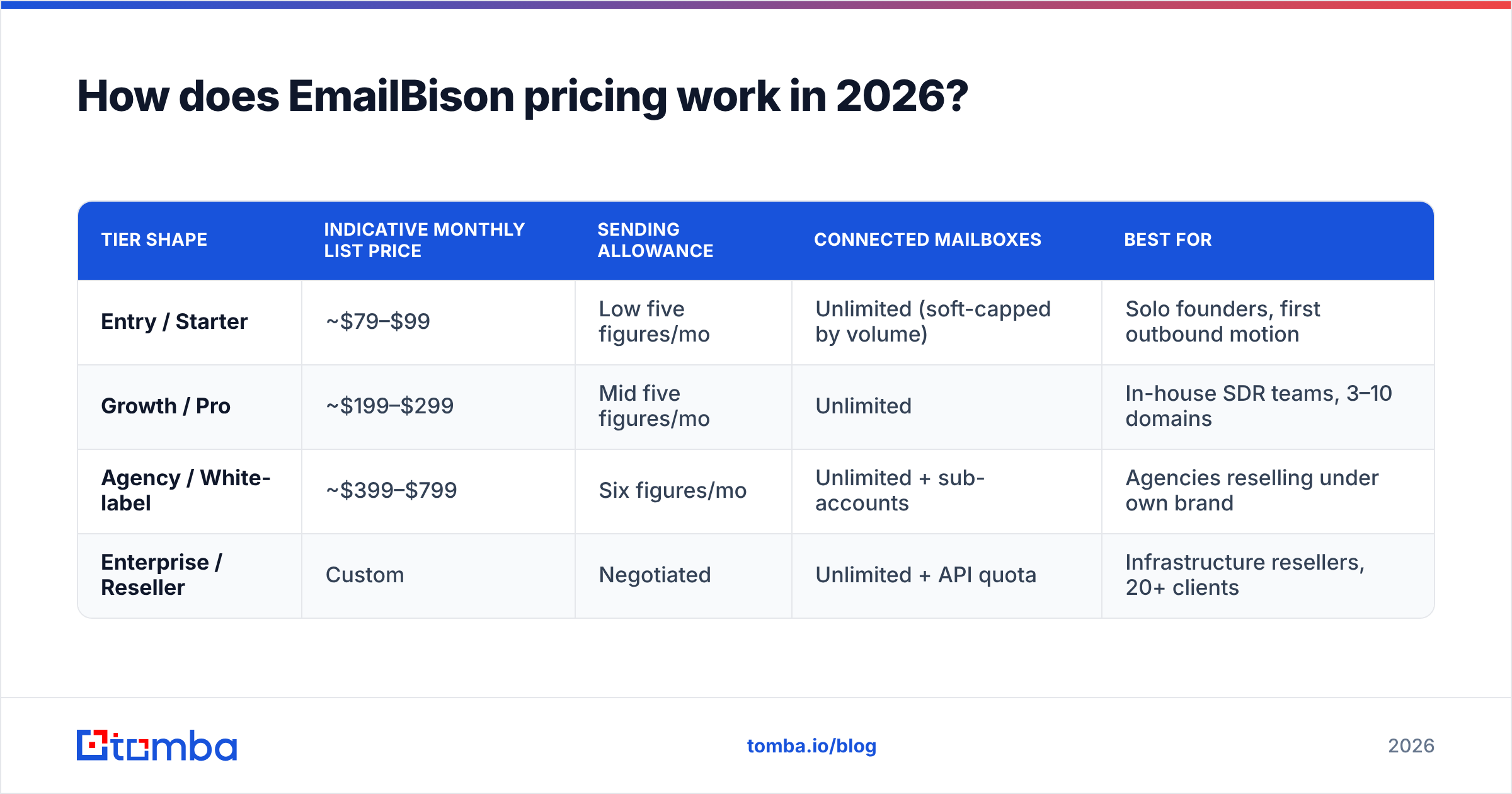
The model is volume-based, not seat-based. You are buying a monthly sending allowance and a feature tier, and you can usually add users without the bill changing. That's genuinely unusual in outbound tooling, where most vendors tax you per seat.
Here's the shape of the market as of mid-2026. Treat the figures as indicative — vendors reprice quarterly, and annual billing typically shaves 15–25% off monthly rates.
| Tier shape | Indicative monthly list price | Sending allowance | Connected mailboxes | Best for |
|---|---|---|---|---|
| Entry / Starter | ~$79–$99 | Low five figures/mo | Unlimited (soft-capped by volume) | Solo founders, first outbound motion |
| Growth / Pro | ~$199–$299 | Mid five figures/mo | Unlimited | In-house SDR teams, 3–10 domains |
| Agency / White-label | ~$399–$799 | Six figures/mo | Unlimited + sub-accounts | Agencies reselling under own brand |
| Enterprise / Reseller | Custom | Negotiated | Unlimited + API quota | Infrastructure resellers, 20+ clients |
Two structural points matter more than the exact dollars:
Volume pricing punishes bad lists. If you pay per email sent rather than per contact stored, every invalid address is money burned twice — once on the send, once on the deliverability damage. A 22% bounce list on a 100k/month plan is roughly 22,000 wasted sends plus a reputation hit that suppresses the other 78,000.
Unlimited mailboxes is not unlimited capacity. Every provider throttles per-mailbox daily sends to protect their own IP reputation. "Unlimited accounts" means you can connect as many as you want; it does not mean you can blast from them on day one. Warmup schedules still apply, and you can model that ramp with a warmup calculator before you buy capacity you can't legally use for six weeks.
What do you actually get at each tier?#
The feature ladder across cold email platforms has converged, so the differences are narrower than the marketing suggests. What genuinely separates tiers:
- Sub-accounts and white-labelling — almost always gated to agency tiers. If you resell, this is the only line item that matters, and it's why agencies pay 4x entry price.
- Sending volume and concurrency — the actual metered resource. Everything else is packaging.
- API access and webhook depth — entry tiers often expose read-only endpoints; automation-heavy teams need the higher tier or they'll rebuild the platform in Zapier.
- Support SLA — the quiet differentiator. Community Slack on entry, named contact at agency level. When a domain gets blacklisted at 2am, this is what you're actually paying for.
- Custom tracking domains and DNS tooling — bundled almost everywhere now, but verify SPF/DKIM/DMARC handling is automated rather than a support ticket.
Before you evaluate any of this, confirm your own DNS is clean. A misconfigured SPF record will sink placement on any platform, at any price. Run a free SPF checker first — it costs nothing and eliminates the single most common cause of "the tool doesn't work."
What do reviews say — the pros?#
Pulling from user reviews across G2's email deliverability category and practitioner communities, the praise clusters into four repeatable themes.
Unlimited mailboxes changes agency economics. Competitors that charge per connected inbox make multi-domain rotation expensive at exactly the point where you need it most. Removing that tax is the most-cited reason teams switch.
Setup is genuinely fast for the category. Most reviewers report a first live campaign inside a day, assuming domains were already purchased and aged. That's competitive; some enterprise sequencers take a week of onboarding calls.
White-label is real, not cosmetic. Agencies report being able to hand clients a branded login without the underlying vendor being visible, which is a meaningful margin lever when you're charging $3k/mo for managed outbound.
Deliverability tooling is opinionated. Built-in rotation, throttling, and warmup mean fewer decisions for teams without a deliverability specialist. Pair it with Google Postmaster Tools to see whether the opinions are working — the platform's own dashboard will always look more optimistic than Google's.
What are the cons and hidden costs?#
This is where a neutral review earns its keep. Four honest criticisms:
The learning curve is front-loaded. The concepts — power levels, mailbox pools, rotation logic, per-domain caps — are unfamiliar if you're coming from a simple sequencer. Budget a week, not an afternoon. Reviewers who churned in month one almost always cite this rather than a product defect.
Documentation lags the product. Fast shipping cadence means guides go stale. Expect to ask in community channels for anything beyond the happy path.
Support latency scales inversely with your plan. Entry-tier users report multi-day turnarounds. If outbound is your revenue engine, price the higher tier as insurance, not as features.
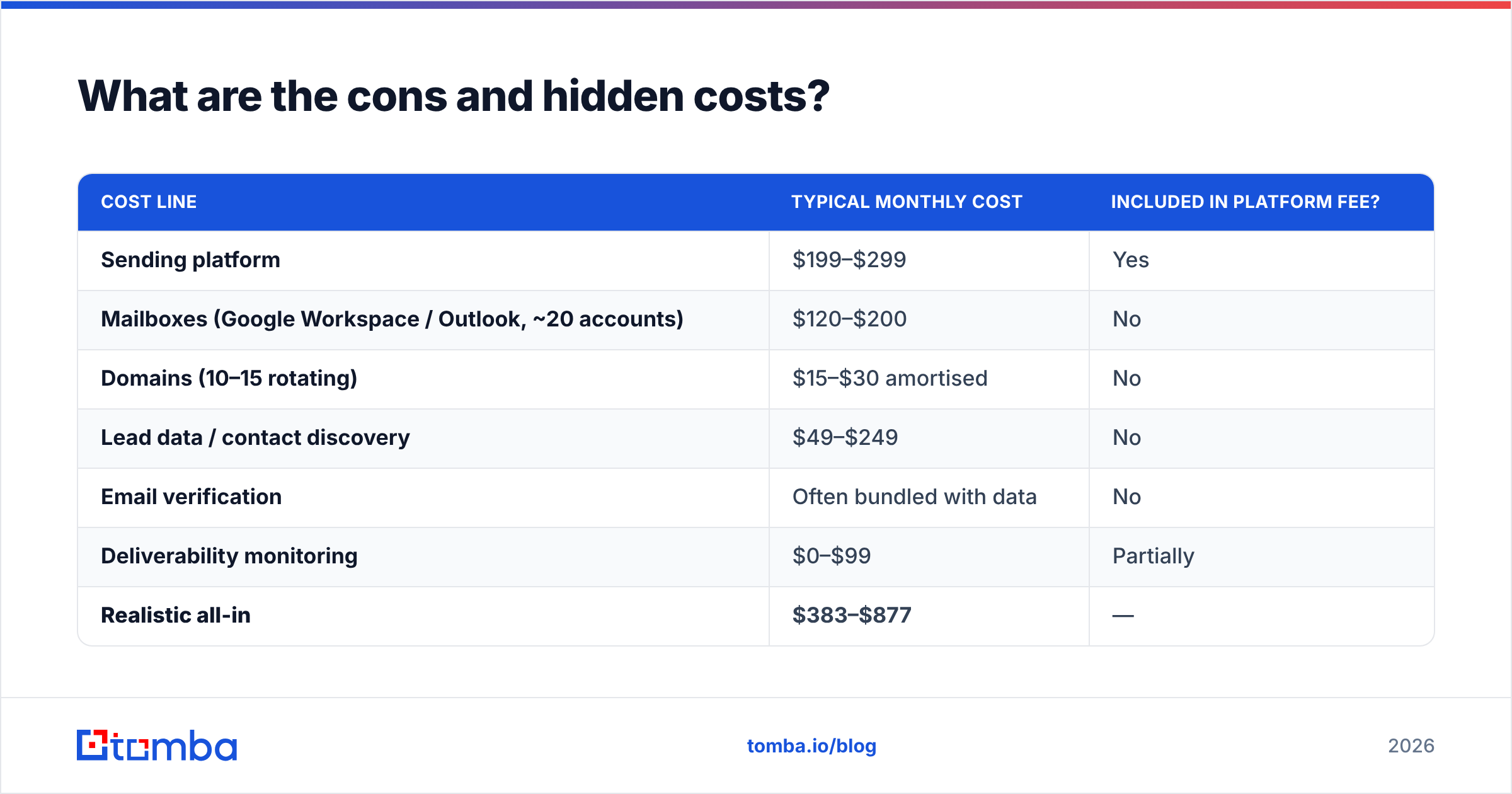
The subscription is maybe 40% of your real cost. This is the big one, and it's true of every platform in this category — not an EmailBison-specific flaw. Here's the honest arithmetic for a mid-size outbound program:
| Cost line | Typical monthly cost | Included in platform fee? |
|---|---|---|
| Sending platform | $199–$299 | Yes |
| Mailboxes (Google Workspace / Outlook, ~20 accounts) | $120–$200 | No |
| Domains (10–15 rotating) | $15–$30 amortised | No |
| Lead data / contact discovery | $49–$249 | No |
| Email verification | Often bundled with data | No |
| Deliverability monitoring | $0–$99 | Partially |
| Realistic all-in | $383–$877 | — |
The platform fee is the smallest controllable line in several of those rows. The largest swing factor is data quality, because bad data multiplies every other cost.

How does EmailBison compare to the alternatives?#
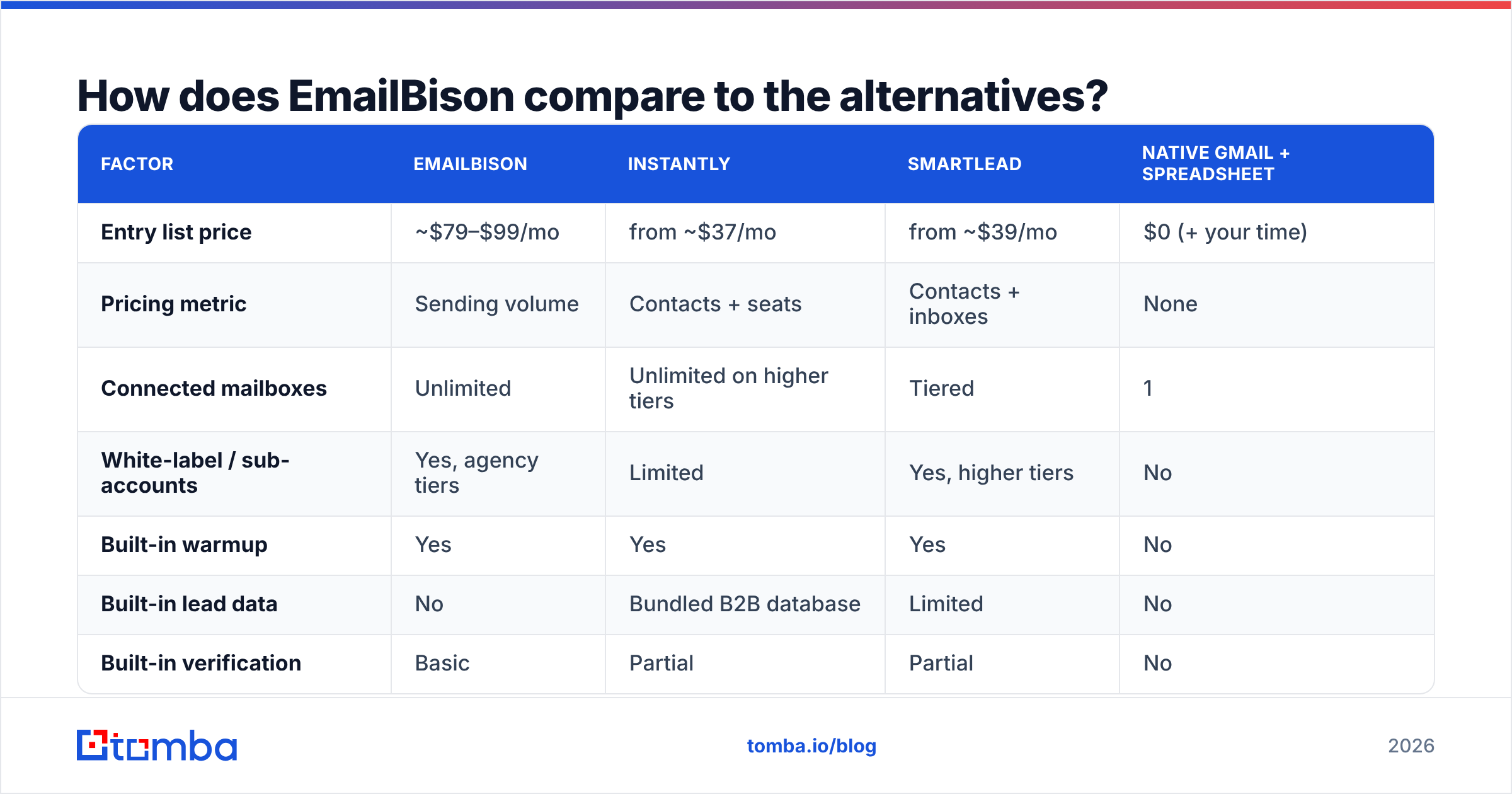
The sending-platform market is crowded and the feature sets rhyme. What differs is pricing shape and who the product is built for.
| Factor | EmailBison | Instantly | Smartlead | Native Gmail + spreadsheet |
|---|---|---|---|---|
| Entry list price | ~$79–$99/mo | from ~$37/mo | from ~$39/mo | $0 (+ your time) |
| Pricing metric | Sending volume | Contacts + seats | Contacts + inboxes | None |
| Connected mailboxes | Unlimited | Unlimited on higher tiers | Tiered | 1 |
| White-label / sub-accounts | Yes, agency tiers | Limited | Yes, higher tiers | No |
| Built-in warmup | Yes | Yes | Yes | No |
| Built-in lead data | No | Bundled B2B database | Limited | No |
| Built-in verification | Basic | Partial | Partial | No |
| Best fit | Agencies, high volume | Solo to mid-market | Mid-market SaaS | Under 100 sends/mo |
Two takeaways. First, if you need bundled lead data inside the sending tool, platforms with an attached database will feel cheaper — until you audit the data and discover you're paying for stale records. Second, if you already own a data layer, a pure sending platform like EmailBison is the cleaner architecture: one tool that sends well, one tool that finds and verifies well, connected by an API.
Teams sourcing purchased lists also commonly pair a sender with a dedicated data vendor such as BookYourData for verified contact records, then run their own verification pass on top. That layered approach — source, verify, send — outperforms any single all-in-one in bounce rate, which is the metric that actually gates your sender reputation.
Is EmailBison worth it for your team?#
Straight verdict: it's worth it if you're an agency or a high-volume team, and it's overpriced if you're not.
Buy it if you run outbound for multiple clients, need white-label, send more than 30k emails a month, and already have a reliable source of contact data. The unlimited-mailbox model gets cheaper the more you scale, which is the correct direction for a volume business.
Skip it if you send under 5,000 emails a month, have one domain, or — most importantly — haven't fixed your list quality yet. Buying a bigger truck doesn't help when the addresses are wrong.
Test it if you're between those poles. Run one 500-contact campaign on a verified list, measure bounce rate and reply rate, and compare against your current tool with the same list. Changing two variables at once teaches you nothing.
Where should your budget actually go?#
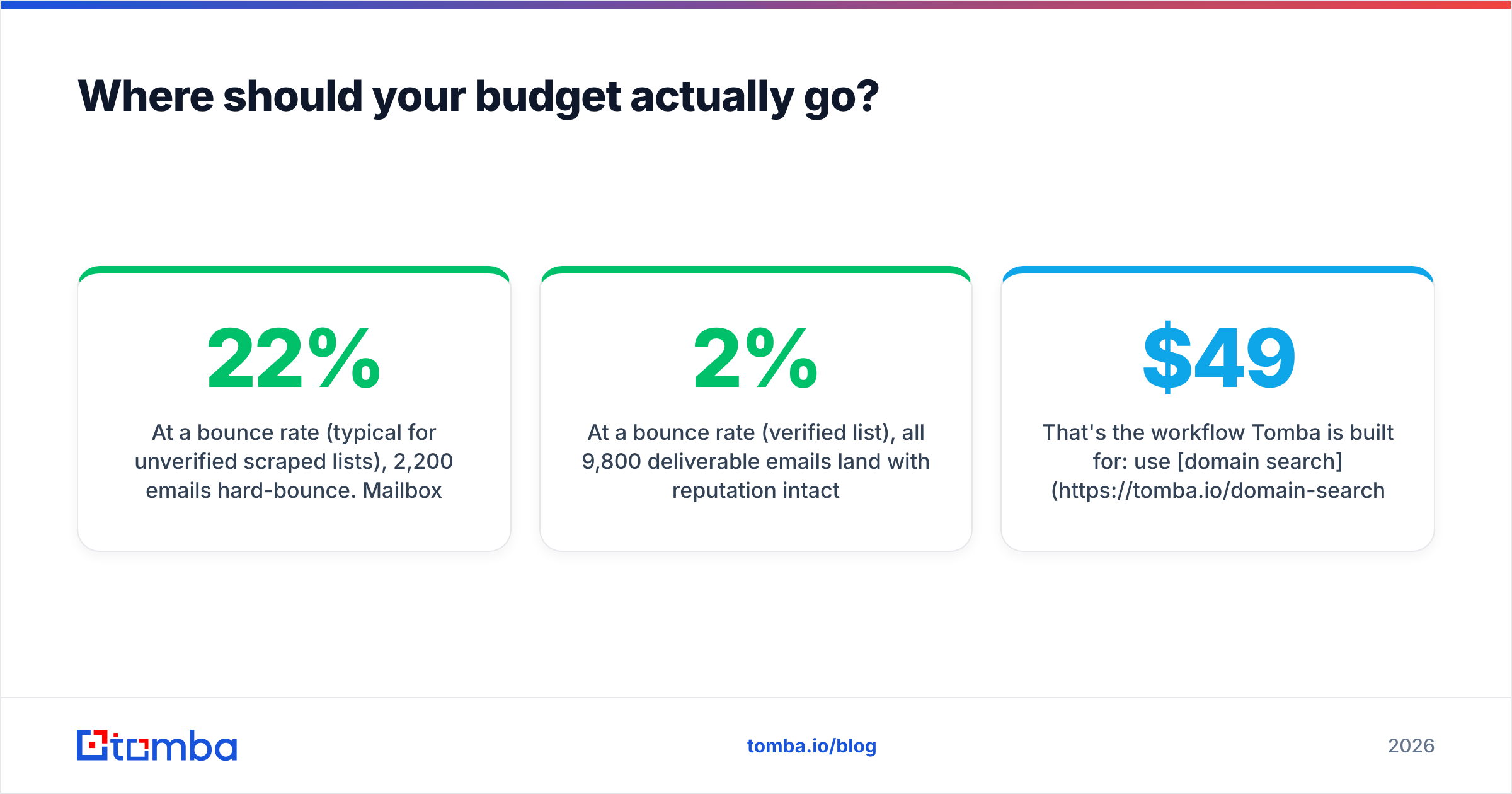
Here's the uncomfortable math most pricing reviews skip. Take a 10,000-email campaign:
- At a 22% bounce rate (typical for unverified scraped lists), 2,200 emails hard-bounce. Mailbox providers read that as spam signal, and placement for the remaining 7,800 degrades — often for weeks.
- At a 2% bounce rate (verified list), all 9,800 deliverable emails land with reputation intact.
The difference between those two outcomes costs less than one tier upgrade on any sending platform. That's why the highest-ROI line in an outbound budget is usually data, not delivery. Find the addresses with a domain-level sweep, confirm them, then send.
That's the workflow Tomba is built for: use domain search to pull every public contact at a target company, run the results through verification, catch the risky catch-all domains with the catch-all verifier, and push the clean list into whichever sender you chose. Tomba's own pricing is deliberately simple — a free tier with 25 searches/month, Starter at $49/mo, Growth at $99/mo, and Pro at $249/mo — with full details on the Tomba pricing page, and an email finder API if you'd rather wire it directly into your sequencer.
What should you ask before signing?#
Five questions that surface the real cost of any cold email platform, EmailBison included:
- What happens at overage? Hard stop, throttle, or automatic upgrade? Overage policy is where volume pricing bites.
- Is the annual discount refundable? Many aren't. A 20% saving on a tool you abandon in month three is a 100% loss.
- Do sub-accounts share the sending pool? If yes, one client's bad list can damage another client's placement.
- What's the actual support SLA in writing? Not the marketing page — the contract.
- Can I export sequences and reply data? Lock-in is a cost even when it's not a line item.
The bottom line#
EmailBison prices sensibly for who it's built for: agencies and high-volume senders who want unlimited mailboxes without a per-inbox tax. The published tiers are competitive; the pros reviewers cite are real; the cons are mostly about onboarding friction and support depth rather than product capability.
What no sending platform can fix is the list you feed it. Before you compare another pricing page, run a sample of your current contacts through verification and see what percentage survives. If more than 5% fail, your bottleneck isn't the sender — it's the data, and no tier upgrade will change that.
Start there. Use the Tomba Email Finder to build verified, deliverable lists by domain, name, or company — free for your first 25 searches, no card required — then let whichever sending platform you pick do the one job it's actually good at.
Related guides#
Ready to find emails that actually work?
Join 150,000+ professionals who stopped guessing and started sending. Free credits on signup — no credit card required.
Get the Tomba newsletter
Practical outbound tactics and product updates — once every two weeks.
About the author