EmailBison vs SalesBot (2026): Which Cold Email Tool Wins?
EmailBison and SalesBot both promise unlimited-ish cold email at a flat rate. They solve different problems. Here's the honest breakdown of pricing, deliverability, data, and who should pick which.
TL;DR
- EmailBison is a white-label-friendly sending platform built around unlimited-ish email volume at a flat monthly rate. It's optimized for agencies and high-volume senders who already have lists.
- SalesBot leans on AI-driven sequence generation and reply handling. It's aimed at small teams that want the tool to write and route more of the conversation for them.
- Neither one is a data provider. Both assume you arrive with verified contacts — and that assumption is where most cold email programs quietly fail.
- Pick EmailBison if volume, inbox rotation, and reselling matter. Pick SalesBot if you have 1–3 reps and want AI to carry the drafting load.
- Whichever you pick, the bottleneck is list quality. A 12% bounce rate kills a domain faster than any sequence copy fixes it.
What are EmailBison and SalesBot, actually?#
Both tools sit in the sending and sequencing layer of the outbound stack. They connect your mailboxes, throttle sends, run multi-step sequences, and report on opens, replies, and bounces. Neither finds contacts for you.
Think of the outbound stack like a restaurant. Data providers are the suppliers, verification is the health inspection, and tools like EmailBison and SalesBot are the kitchen — they cook what you bring them. A great kitchen cannot rescue spoiled ingredients.
EmailBison positions itself as an infrastructure play. Flat pricing, generous or effectively unlimited sending volume, unlimited mailbox connections on higher tiers, and — the part agencies care about — white-labeling, so you can run it under your own brand for clients. Its feature set skews toward operators managing dozens of domains and hundreds of inboxes.
SalesBot goes the other direction. Instead of "give me more volume," it asks "how much of the work can the software do?" That means AI sequence drafting, AI reply classification (interested / not now / not the right person), and automated follow-up branching. The pitch is fewer humans per sequence, not more inboxes per account.
That difference decides most of the buying decision. You're not really choosing between two competing products — you're choosing between two theories of what's slowing your pipeline down.

How do EmailBison and SalesBot compare on features and price?#
Pricing for both moves frequently, and both run promotional and lifetime-style offers, so treat the numbers below as directional and confirm on the vendor's own site before you commit. What matters more is the shape of the pricing model.
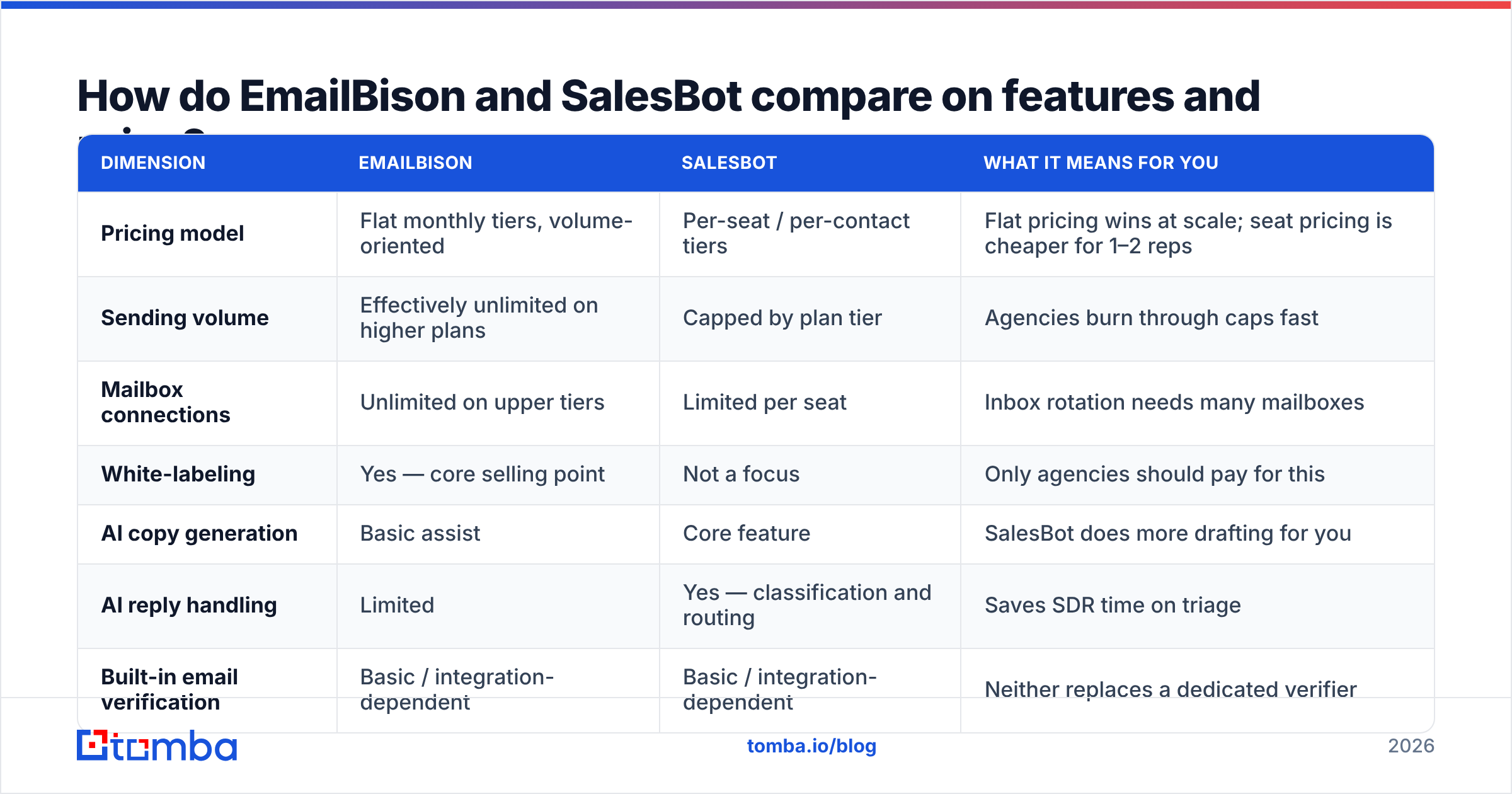
| Dimension | EmailBison | SalesBot | What it means for you |
|---|---|---|---|
| Pricing model | Flat monthly tiers, volume-oriented | Per-seat / per-contact tiers | Flat pricing wins at scale; seat pricing is cheaper for 1–2 reps |
| Sending volume | Effectively unlimited on higher plans | Capped by plan tier | Agencies burn through caps fast |
| Mailbox connections | Unlimited on upper tiers | Limited per seat | Inbox rotation needs many mailboxes |
| White-labeling | Yes — core selling point | Not a focus | Only agencies should pay for this |
| AI copy generation | Basic assist | Core feature | SalesBot does more drafting for you |
| AI reply handling | Limited | Yes — classification and routing | Saves SDR time on triage |
| Built-in email verification | Basic / integration-dependent | Basic / integration-dependent | Neither replaces a dedicated verifier |
| Built-in contact data | No | No | You supply the list either way |
| Best fit | Agencies, 10k+ sends/mo | Small teams, 1–3 reps |
Two things jump out of that table.
First, neither tool provides contacts. Both are sending layers. If your CSV is 30% stale, both tools will faithfully deliver 30% of your emails into the void and hand you a bounce rate that gets your domain flagged. That's not a knock on either product — it's just the boundary of what they do.
Second, the "unlimited sending" framing is easy to misread. Unlimited in the software does not mean unlimited at the mailbox provider. Google and Microsoft enforce their own per-mailbox limits regardless of what your sequencer allows. Unlimited software volume is only useful if you also run enough warmed mailboxes to spread the load — which is exactly why EmailBison's unlimited-mailbox tiers and its unlimited-sending claim are the same feature wearing two hats.
Which one has better deliverability?#
Honest answer: the tool contributes maybe 20% of your deliverability outcome. The other 80% is domain setup, list hygiene, and sending behavior.
Both platforms offer the standard deliverability toolkit — inbox rotation, send throttling, custom tracking domains, and warmup (native or via integration). Neither has a proprietary advantage that survives a bad list.
Here's what actually moves the needle, ranked by impact:
- Bounce rate under 3%. This is the single biggest lever. Mailbox providers read hard bounces as a spam signal. Run every address through an email verifier before it enters a sequence — not after you notice the damage.
- Correct authentication. SPF, DKIM, and DMARC on every sending domain. Google and Yahoo's 2024 bulk-sender requirements made DMARC effectively mandatory, and enforcement has only tightened since. Check your records with a free SPF checker before your first send.
- Mailbox volume discipline. 20–40 sends per mailbox per day on a warmed domain. More mailboxes, not more sends per mailbox. Use an email warmup calculator to figure out how many you actually need for your target volume.
- Catch-all handling. Roughly one in five B2B domains is catch-all, meaning the server accepts everything and tells you nothing. Guessing on those is how "verified" lists still bounce. A dedicated catch-all verifier resolves a meaningful share of them instead of leaving you to gamble.
- Reply rate and engagement. Providers weight positive engagement. This is where SalesBot's AI reply handling has an indirect deliverability benefit — faster, more consistent replies to interested prospects feed a healthier sender reputation.
If you're comparing the two on deliverability alone, EmailBison's edge is structural (more mailboxes, better rotation at scale) and SalesBot's is behavioral (better engagement per send). Neither fixes a list problem.
Who should choose EmailBison?#
Choose EmailBison if two or more of these are true:
- You run an agency or a lead-gen service. White-labeling is the whole reason EmailBison exists in its current form. If you're billing clients for outbound and want your own logo on the dashboard, this is a genuine differentiator that per-seat tools don't offer.
- You send more than 10,000 emails a month. Flat pricing beats metered pricing past a volume threshold. Below it, you're paying for headroom you don't use.
- You manage many domains and mailboxes. Fifty inboxes across ten domains is an operations problem before it's a copy problem. EmailBison's connection limits and rotation logic are built for that shape.
- Your copy process is already solid. If your reps or your copywriter already produce sequences you're happy with, AI drafting is a nice-to-have, not a reason to switch.
Where EmailBison disappoints: solo founders and two-person teams. You'll pay flat-rate pricing designed for volume you'll never reach, and the operational complexity (domain management, mailbox provisioning, DNS) is real work that agencies staff for and small teams don't.
Who should choose SalesBot?#
Choose SalesBot if:
- You have 1–3 people doing outbound. Per-seat pricing is cheaper here, and the AI features substitute for headcount you don't have.
- Writing sequences is your bottleneck. If sequences sit half-finished in drafts for two weeks, a tool that produces a credible first draft in thirty seconds changes your throughput more than extra sending capacity would.
- Reply triage eats your day. AI classification of replies into interested / objection / wrong-person / unsubscribe genuinely saves time once volume passes a few hundred sends a week.
- You want fewer moving parts. One tool doing copy, sending, and triage beats three tools when nobody on the team owns ops.
Where SalesBot disappoints: scale. Seat-based and contact-based pricing compounds fast. At 20,000 sends a month across five reps, you'll likely pay more than EmailBison's flat tier while hitting caps. And AI-generated copy has a sameness problem — if your prospects receive four AI-drafted sequences a week, yours needs a human edit pass to stand out.
What do both tools leave you to solve?#
The list. Both platforms assume verified, enriched contacts already exist in your CRM or CSV. In practice that's the expensive part.
Here's what the data layer actually needs to produce before either tool is worth its subscription:
- Correct addresses at the right people. Not
info@, not a former employee, not a guessed permutation. Tomba's email finder resolves name + domain into a verified professional address, and domain search pulls every discoverable address at a company so you can pick the actual decision-maker instead of spraying the org. - Verification before the first send. Syntax, MX record, SMTP handshake, and catch-all detection — run in that order. Anything that fails goes to a suppression list, not a sequence.
- Enrichment for personalization. Title, seniority, company size, and tech stack are what make the first line of a cold email land. Data enrichment fills those gaps so your merge fields aren't blank.
- Deduplication. The same person appearing three times under three domains is how a prospect receives three copies of your sequence and reports you as spam.
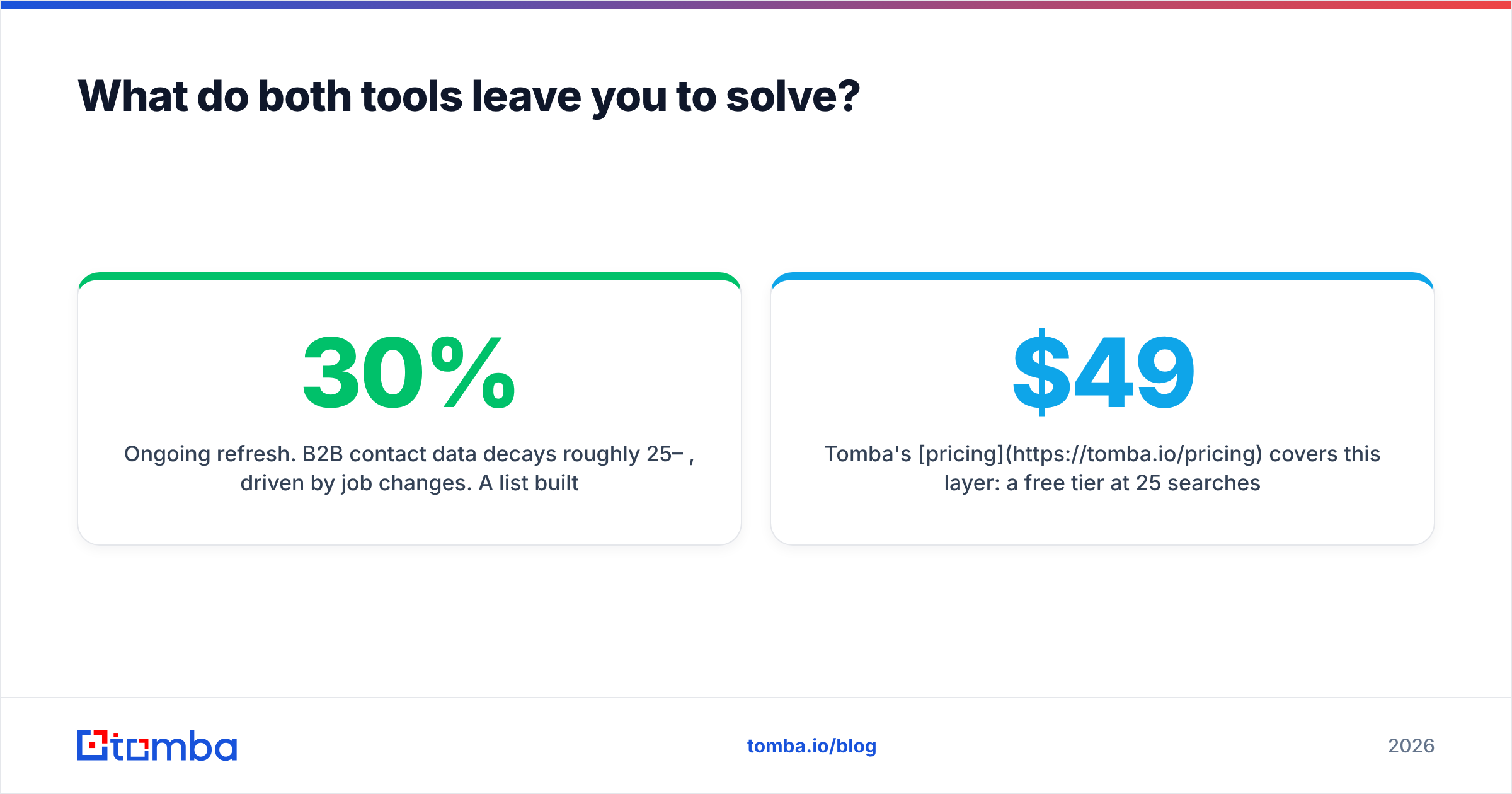
- Ongoing refresh. B2B contact data decays roughly 25–30% per year, driven by job changes. A list built in January is measurably worse by July.
Tomba's pricing covers this layer: a free tier at 25 searches a month for testing, Starter at $49/mo, Growth at $99/mo, Pro at $249/mo, and Enterprise for custom volume. That sits alongside — not instead of — your sending tool. You'll run both.
If you're evaluating data providers rather than sending tools, the honest comparison set includes Apollo, Hunter, and BookYourData, which takes a different approach with pay-as-you-go verified B2B lists and is a solid fit if you prefer buying lists outright to running searches. Check third-party review data on G2 before committing to any of them — vendor accuracy claims and user-reported accuracy tend to diverge.
How should you actually run the evaluation?#
Don't trial on marketing pages. Run a controlled test.
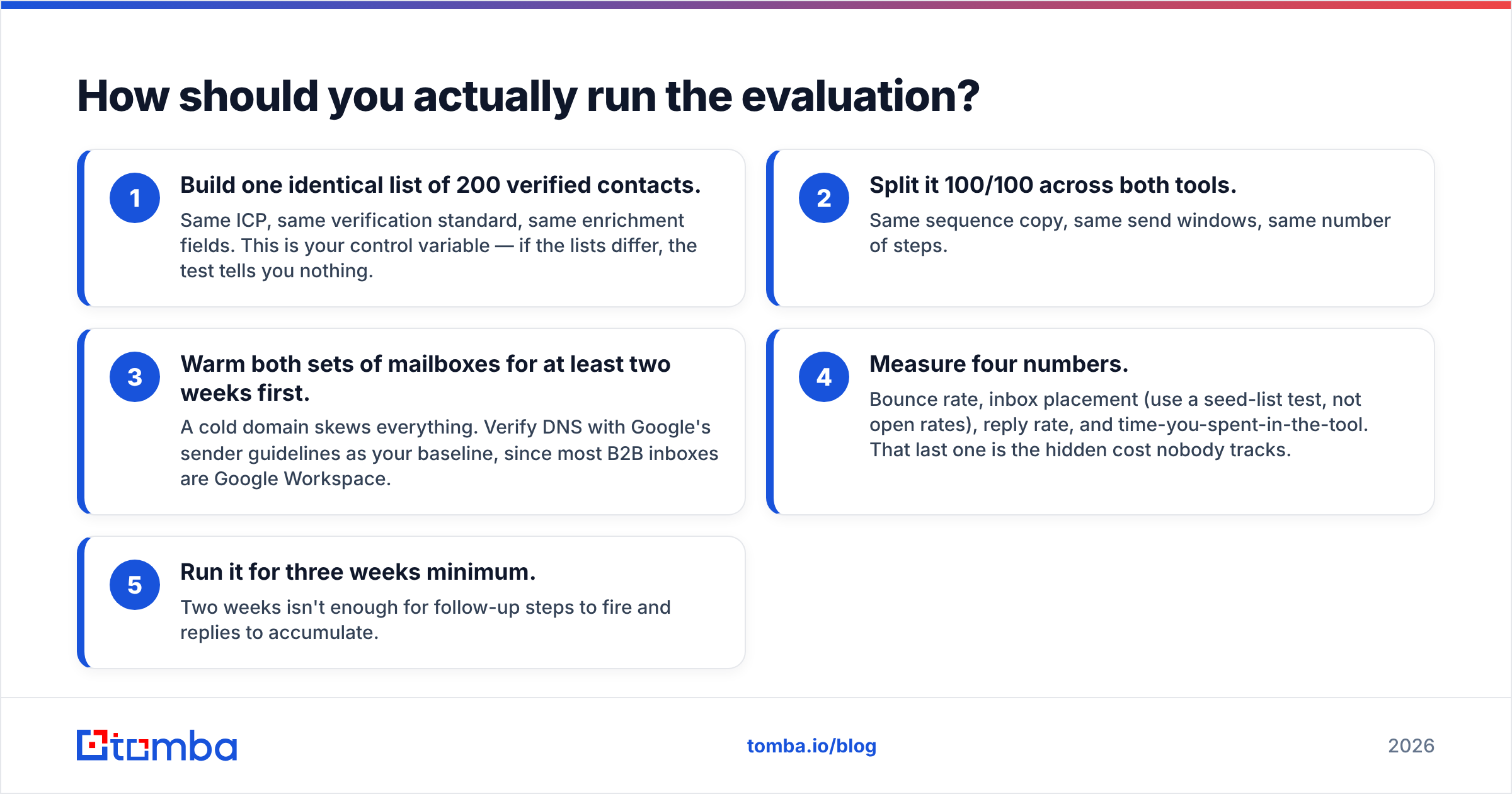
- Build one identical list of 200 verified contacts. Same ICP, same verification standard, same enrichment fields. This is your control variable — if the lists differ, the test tells you nothing.
- Split it 100/100 across both tools. Same sequence copy, same send windows, same number of steps.
- Warm both sets of mailboxes for at least two weeks first. A cold domain skews everything. Verify DNS with Google's sender guidelines as your baseline, since most B2B inboxes are Google Workspace.
- Measure four numbers. Bounce rate, inbox placement (use a seed-list test, not open rates), reply rate, and time-you-spent-in-the-tool. That last one is the hidden cost nobody tracks.
- Run it for three weeks minimum. Two weeks isn't enough for follow-up steps to fire and replies to accumulate.
If bounce rates differ meaningfully between the two on an identical list, that's a real deliverability signal. If they're within a point of each other — which is the likely outcome — then your decision comes down to pricing shape and workflow fit, not deliverability.
Which one wins?#
There's no single winner, and any post that declares one is selling something.
EmailBison wins on economics at scale and on agency use cases. Flat pricing, unlimited mailboxes, and white-labeling are a coherent package for anyone running outbound as a service or sending five figures of email a month.
SalesBot wins on time-to-first-sequence for small teams. If you have two reps and no copywriter, the AI layer is worth more than sending headroom you won't use.
Both lose to a bad list. That's the finding that matters. Across the outbound programs that fail, the cause is almost never the sequencer — it's contacts that were stale, unverified, or aimed at the wrong role. Fixing the sending tool when the data layer is broken is like buying a faster oven because the ingredients are spoiled.
Start with the list. Verify it. Enrich it. Then pick whichever sending tool matches your team size and budget shape — and revisit that choice in six months when your volume has changed.
Ready to fix the input side? Tomba's Email Finder turns a name and a domain into a verified professional email, with catch-all detection and SMTP-level verification built in — so whichever sequencer you pick is sending to people who actually exist. Start free with 25 searches a month, no card required, and scale to Starter at $49/mo when your outbound volume justifies it.
Related guides#
Ready to find emails that actually work?
Join 150,000+ professionals who stopped guessing and started sending. Free credits on signup — no credit card required.
Get the Tomba newsletter
Practical outbound tactics and product updates — once every two weeks.
About the author