Emailchaser Pros and Cons: An Honest 2026 Review Guide
Emailchaser bundles cold email sending, a light contact finder, and unlimited-style pricing into one cheap plan. Here's where that trade actually pays off in 2026 — and where it quietly costs you replies.
TL;DR
- Emailchaser is a low-cost cold email sending platform with a built-in contact finder, aimed at agencies, recruiters, and small sales teams who want one flat bill instead of a stack.
- The biggest pro is price-to-capability: unlimited-style sending across connected mailboxes for roughly what one seat of an enterprise sequencer costs.
- The biggest con is the data layer. Bundled email finding is convenience-grade, not accuracy-grade — and a cold email tool is only as good as the list you feed it.
- Deliverability tooling is functional but basic. You still own SPF, DKIM, DMARC, warmup, and inbox rotation hygiene yourself.
- Best-fit verdict: use Emailchaser as the sending layer, and pair it with a dedicated email finder and verifier so bounce rates stay under 2%.
What is Emailchaser?#
Emailchaser is a cold outreach platform that sends sequenced emails from your own mailboxes (Google Workspace, Microsoft 365, or SMTP), tracks replies, and stops follow-ups automatically when someone responds. It bolts on a contact-finding feature so you can go from "company name" to "email in a sequence" without leaving the app.
Think of it like a food truck versus a full restaurant kitchen. The truck does one thing well, fast, and cheap — but you don't ask it to cater a wedding. Emailchaser is deliberately narrower than Outreach, Salesloft, or Apollo, and it prices accordingly. You can see the current plan structure on the official Emailchaser site.
The positioning matters because most "pros and cons" arguments about this category are actually arguments about scope. Emailchaser is not trying to be a revenue platform. It's trying to be the cheapest reliable way to run multi-mailbox cold sequences.
What does Emailchaser actually include?#
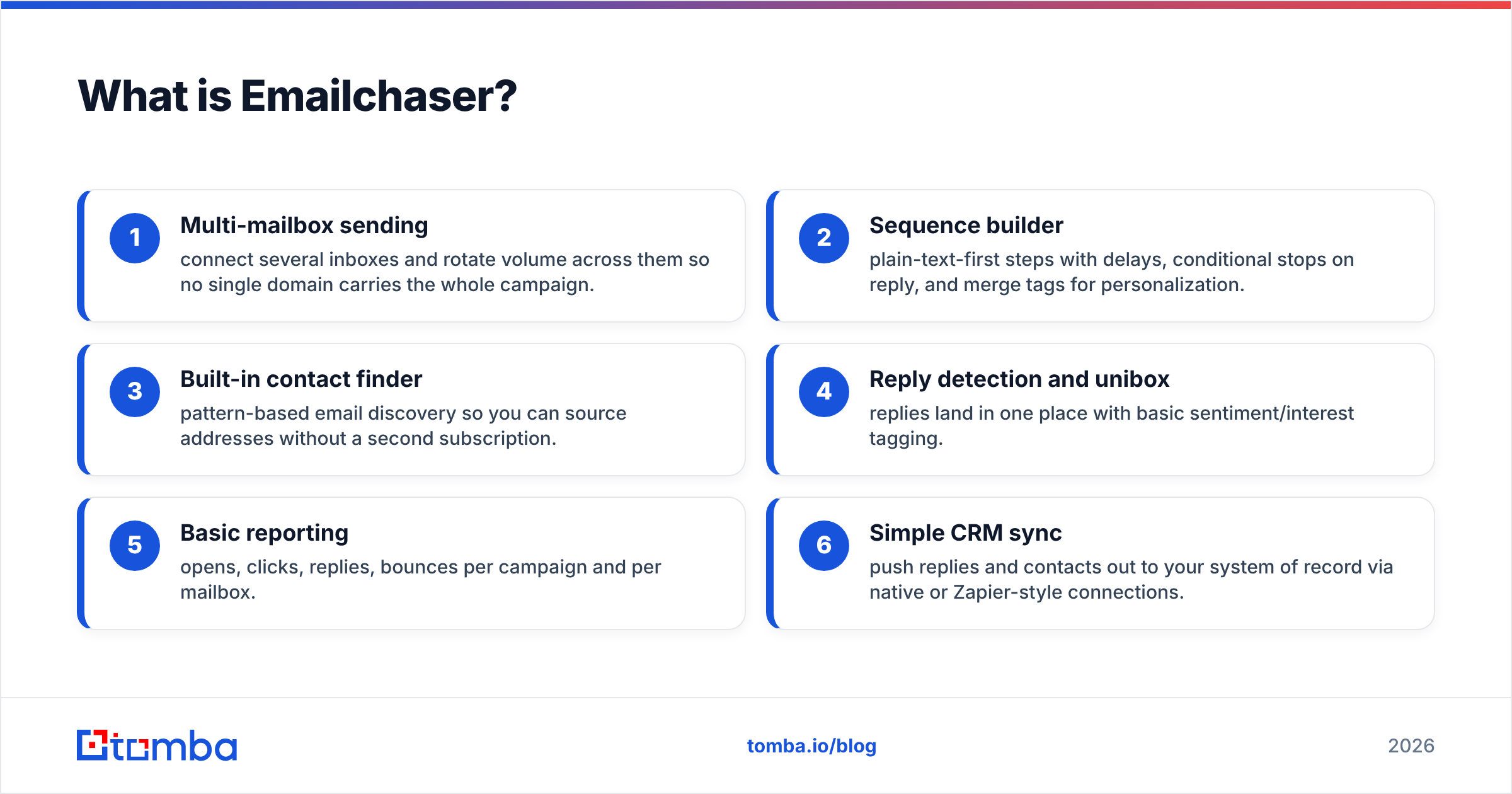
- Multi-mailbox sending — connect several inboxes and rotate volume across them so no single domain carries the whole campaign.
- Sequence builder — plain-text-first steps with delays, conditional stops on reply, and merge tags for personalization.
- Built-in contact finder — pattern-based email discovery so you can source addresses without a second subscription.
- Reply detection and unibox — replies land in one place with basic sentiment/interest tagging.
- Basic reporting — opens, clicks, replies, bounces per campaign and per mailbox.
- Simple CRM sync — push replies and contacts out to your system of record via native or Zapier-style connections.
That list is honest about what's there. What's not there is what shapes most of the cons below: no deep intent data, no dialer, no advanced multichannel orchestration, and no enterprise-grade data warehouse behind the contact finder.
How does Emailchaser pricing compare?#
Emailchaser's whole pitch is cost per sent email. Verify current numbers before you buy — cold email vendors reprice often — but the structural comparison holds.
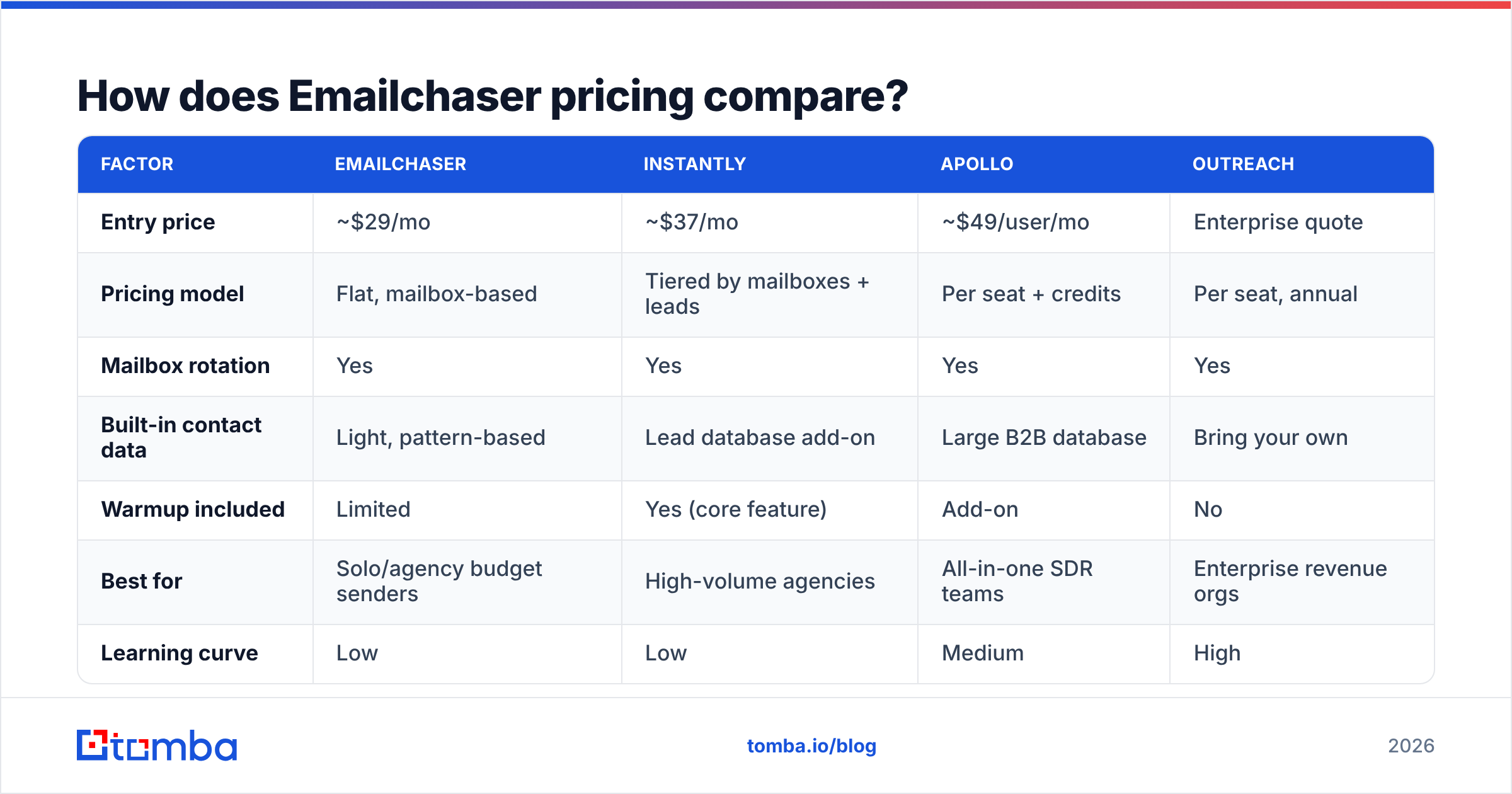
| Factor | Emailchaser | Instantly | Apollo | Outreach |
|---|---|---|---|---|
| Entry price | ~$29/mo | ~$37/mo | ~$49/user/mo | Enterprise quote |
| Pricing model | Flat, mailbox-based | Tiered by mailboxes + leads | Per seat + credits | Per seat, annual |
| Mailbox rotation | Yes | Yes | Yes | Yes |
| Built-in contact data | Light, pattern-based | Lead database add-on | Large B2B database | Bring your own |
| Warmup included | Limited | Yes (core feature) | Add-on | No |
| Best for | Solo/agency budget senders | High-volume agencies | All-in-one SDR teams | Enterprise revenue orgs |
| Learning curve | Low | Low | Medium | High |
The takeaway: Emailchaser wins on entry cost and loses on data depth. If you already have a reliable source of verified contacts, that trade is excellent. If you don't, the savings evaporate the first time you burn a sending domain on a bad list.
What are the pros of Emailchaser?#
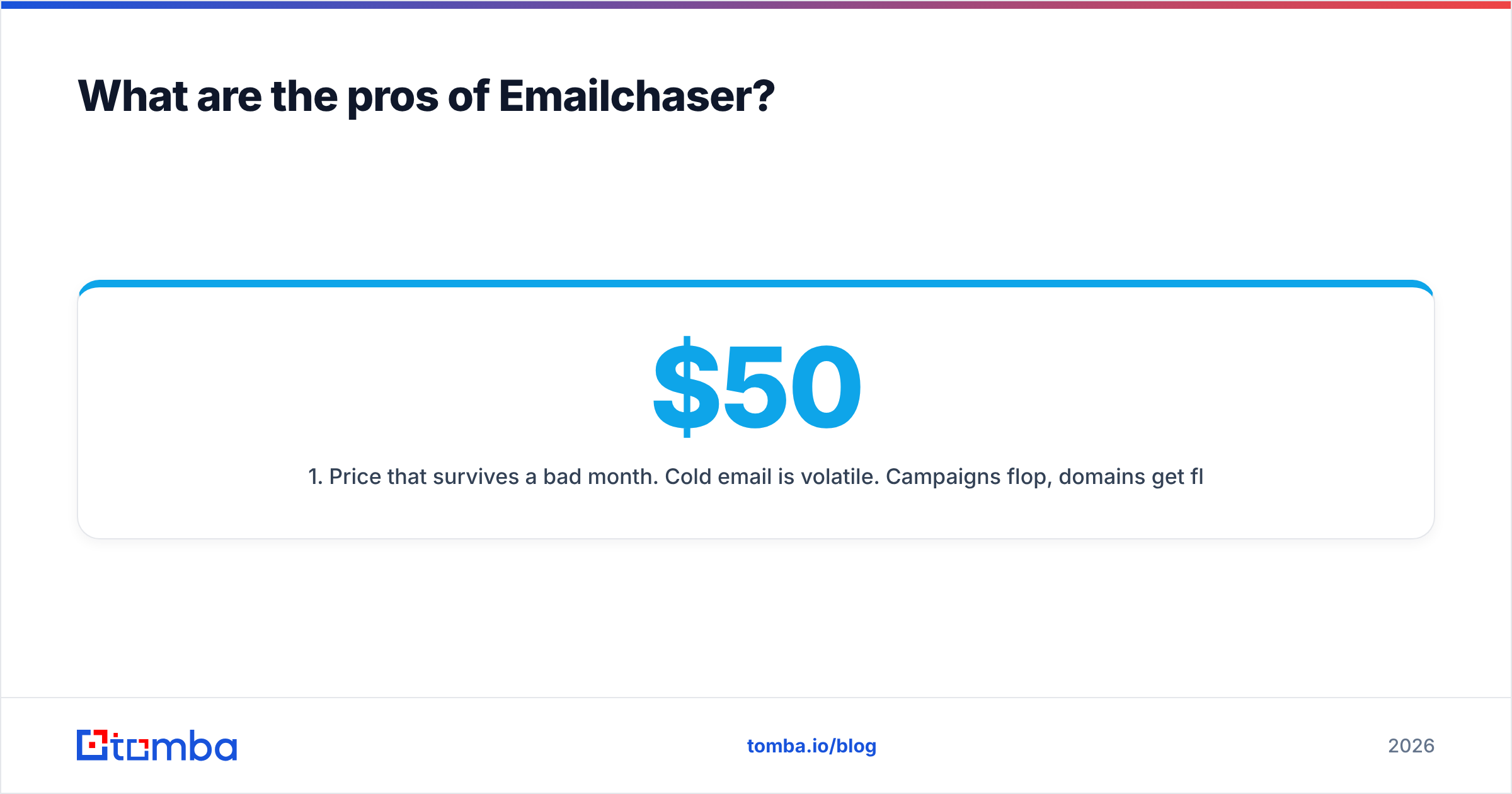
1. Price that survives a bad month. Cold email is volatile. Campaigns flop, domains get flagged, quarters go quiet. A flat sub-$50 bill means a slow month doesn't force a cancellation conversation. Per-seat platforms charging $100–$150 punish exactly the teams still experimenting.
2. Unlimited-style sending across mailboxes. Instead of buying credits per send, you buy capacity per mailbox. For agencies running five clients across fifteen inboxes, that math is dramatically better than credit-metered tools.
3. Genuinely fast setup. Connect a mailbox, paste a list, write three steps, launch. Most users are sending within an hour. Compare that to a proper Outreach or Salesloft implementation, which is a project with a kickoff call.
4. Plain-text-first templates. The editor nudges you toward simple, text-only emails — no image headers, no tracking-pixel-heavy HTML. That's the correct default. Google's own bulk sender guidelines reward simple, authenticated, low-complaint mail, and tools that push flashy templates quietly hurt you.
5. Reply-first reporting. Open rates are increasingly noise thanks to privacy proxies. Emailchaser's dashboards keep replies and bounces central, which is the honest metric set for cold outreach in 2026.
6. Low support friction. Small vendor, responsive humans. Users on review sites like G2 consistently rate small outreach tools higher on support responsiveness than the enterprise incumbents — being a rounding error in an enterprise vendor's ARR is its own kind of cost.
What are the cons of Emailchaser?#
1. The bundled contact finder is convenience-grade. This is the most important con, so it gets the most space. Pattern-based finders guess first.last@domain.com, check whether the mailserver accepts it, and hand you a result. That works for mid-size companies with predictable formats and fails on catch-all domains, aliases, role accounts, and anyone who left the company eight months ago.
A dedicated data provider runs multiple discovery methods, cross-references sources, and separates "deliverable," "risky," and "catch-all" into distinct verdicts. If you can't tell those apart, you can't protect your sending reputation. Running a catch-all verifier against those uncertain results before they enter a sequence is the difference between a 1% bounce rate and a 12% one.
2. Deliverability tooling is thin. You get mailbox rotation and sending limits. You don't get a full warmup network, seed-list inbox placement testing, or automated reputation monitoring. That means you're on the hook for SPF, DKIM, DMARC, custom tracking domains, and gradual ramp-ups. Use an SPF checker and a warmup calculator before your first send, not after your first bounce spike.
3. Limited multichannel. Cold email alone converts worse than email plus LinkedIn plus a call. If your motion depends on coordinated touches across channels, you'll be stitching tools together manually.
4. Reporting depth is basic. You get campaign-level and mailbox-level numbers. You don't get cohort analysis, A/B significance testing, or attribution back to closed revenue. Teams that manage outbound as a forecastable channel will outgrow this fast.
5. Ecosystem risk. Small vendors ship fast and also get acquired, reprice, or sunset features. That's not a reason to avoid them — it is a reason to keep your contact data in a system you control rather than only inside the sending tool.
6. No meaningful intent or firmographic layer. You can send to a list. You cannot easily ask "which of these accounts hired three SDRs last quarter." That research happens elsewhere.

Is the built-in email finder good enough?#
Short answer: for warm, well-known, mid-market domains — usually. For everything else — no, and the failure is expensive.
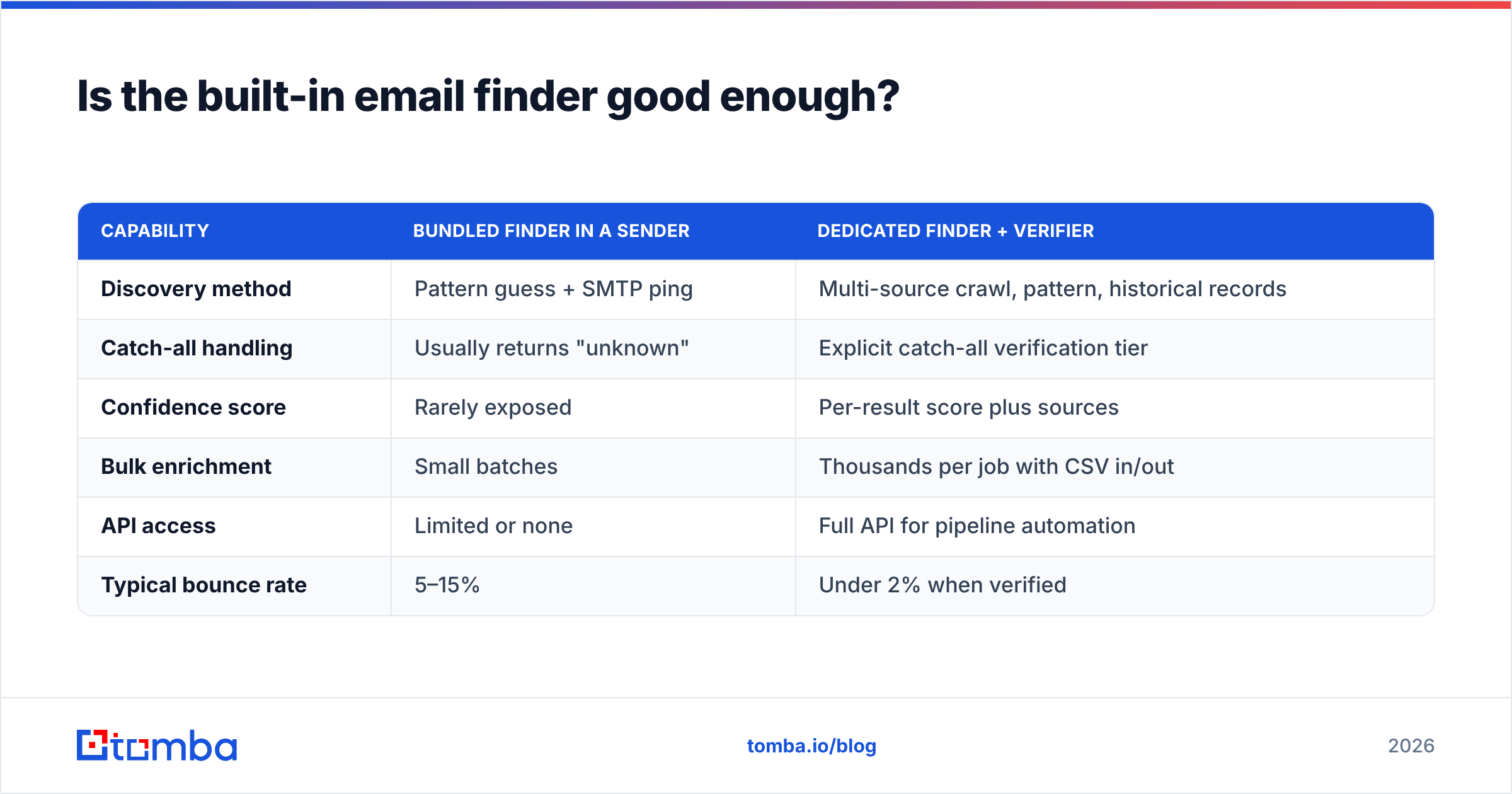
Here's the mechanic that catches people out. A bundled finder returns a plausible address, the sequence sends, and the mailserver rejects it. Every hard bounce is a signal to Gmail and Outlook that you're mailing a list you didn't clean. Cross roughly 2% bounce rate and placement degrades. Cross 5% and you're rebuilding domains.
| Capability | Bundled finder in a sender | Dedicated finder + verifier |
|---|---|---|
| Discovery method | Pattern guess + SMTP ping | Multi-source crawl, pattern, historical records |
| Catch-all handling | Usually returns "unknown" | Explicit catch-all verification tier |
| Confidence score | Rarely exposed | Per-result score plus sources |
| Bulk enrichment | Small batches | Thousands per job with CSV in/out |
| API access | Limited or none | Full API for pipeline automation |
| Typical bounce rate | 5–15% | Under 2% when verified |
The practical fix costs less than most people assume. Source and verify outside the sender, then import a clean list. A bulk email finder run against your target account list, followed by an email verifier pass, gives you a file where every row is safe to mail. Tomba's own tiers start free at 25 searches per month and move to $49/mo Starter, $99/mo Growth, and $249/mo Pro — see full Tomba pricing for the credit breakdown. Adding $49/mo to a $29/mo sender still lands you well under a single Apollo or Outreach seat, with a materially better data layer.
Who should actually use Emailchaser?#
Good fit:
- Agencies running many client mailboxes. Flat pricing scales beautifully when you're managing volume, not seats.
- Solo founders doing founder-led sales. You need to send 200 good emails a week, not run a revenue platform.
- Recruiters with a sourced list. You already have candidate data from a job board or ATS; you just need sequencing.
- Teams testing outbound for the first time. Cheapest way to learn whether the channel works for your ICP before committing budget.
Poor fit:
- Teams with no data source. If Emailchaser's finder is your only list-building method, your bounce rate will decide your fate.
- Multichannel SDR orgs. You need LinkedIn tasks, dialers, and call recording in one workflow.
- Enterprises with compliance review. SOC 2 posture, SSO, granular permissions, and audit logs are where small tools thin out.
- Anyone forecasting outbound revenue. The reporting won't support the conversation your CFO wants to have.
How do you build a stack around Emailchaser?#
The cleanest architecture separates three jobs: find, verify, send. Bundling all three into one cheap tool is where most cold email programs break.
- Find — build your target account list, then resolve contacts by domain and role. A domain search returns every discoverable address at a company with department and seniority context, which is faster than guessing names one at a time.
- Verify — run every address through verification, and treat catch-all results as a separate bucket you either verify deeper or exclude entirely.
- Enrich — add job title, company size, and location so your merge tags say something real. Generic personalization reads worse than no personalization.
- Send — import the clean file into Emailchaser, rotate across warmed mailboxes, keep daily volume per inbox conservative (30–50 is a sane ceiling), and cap sequences at three to four steps.
- Measure — track reply rate and positive reply rate. Ignore open rate as a primary metric. Track bounce rate per campaign as your early-warning system.
- Sync — push replies into your CRM the same day so nothing dies in a shared unibox.
If you want to automate steps one through three, the Tomba API plugs straight into whatever orchestration layer you're using, so the list arriving in Emailchaser is already clean.
What are the alternatives worth comparing?#
If Emailchaser's cons land too hard for your use case, three directions make sense. Move up-market to Instantly or Smartlead if deliverability infrastructure and warmup networks are your bottleneck. Move to Apollo if you want data and sending in one bill and can absorb per-seat pricing. Or stay lean and just fix the data half — which is usually the cheapest fix, since sending was never the expensive part.
For a structured look at that middle option, the Instantly alternative breakdown covers where sender-first tools help and where a separate data provider still earns its keep.
Final verdict: is Emailchaser worth it in 2026?#
Yes — as a sending layer, for budget-conscious teams, with one condition attached.
Emailchaser does the unglamorous part of cold email well and cheaply. Mailbox rotation, reply detection, plain-text sequences, one flat bill. Those are real advantages, and the tools charging four times more don't do that part four times better.
What it does not do is give you a defensible data layer. That's not a scandal — it's a scope decision, and the price reflects it. The mistake is assuming the bundled finder replaces a real one. It doesn't, and the cost of finding out shows up as bounces, spam placement, and a domain you have to retire.
Fix the input, keep the cheap sender, and you've built a genuinely good stack for under $150 a month.
Start with the list, not the sequence. Run your target domains through the Tomba Email Finder to pull verified, role-mapped contacts with confidence scores attached, then export a clean CSV straight into Emailchaser. The free tier gives you 25 searches a month to test the accuracy difference against your current list before you commit to anything — and if the bounce rate drops, you already have your answer.
Related guides#
Ready to find emails that actually work?
Join 150,000+ professionals who stopped guessing and started sending. Free credits on signup — no credit card required.
Get the Tomba newsletter
Practical outbound tactics and product updates — once every two weeks.
About the author