EmailListVerify vs SalesQL: Which Tool Wins in 2026?
EmailListVerify cleans lists. SalesQL scrapes LinkedIn contacts. They solve opposite halves of the same problem — here's which one you actually need, and what it costs to run both.
EmailListVerify vs SalesQL is the wrong fight to pick. One tool cleans email lists. The other finds contacts on LinkedIn. This guide covers what each one does, what it costs in 2026, and which one you need first.
TL;DR
- These are not rivals. EmailListVerify is a bulk email verifier. SalesQL is a LinkedIn contact finder. Judging EmailListVerify vs SalesQL head-to-head is like judging a water filter against a well.
- EmailListVerify wins on price per check. Credits start near $4 per 1,000 emails. There is no monthly lock-in.
- SalesQL wins on LinkedIn. It pulls emails and phone numbers from profiles and Sales Navigator lists, right inside your browser.
- Buy both and you pay twice for the same data. One platform that finds and verifies — like Tomba at $49/mo — often costs less than the two-tool stack.
- Pick EmailListVerify if you have lists and just need them clean. Pick SalesQL if LinkedIn is your only channel. Pick neither if you want one API for both jobs.
EmailListVerify vs SalesQL: what does each tool solve?#
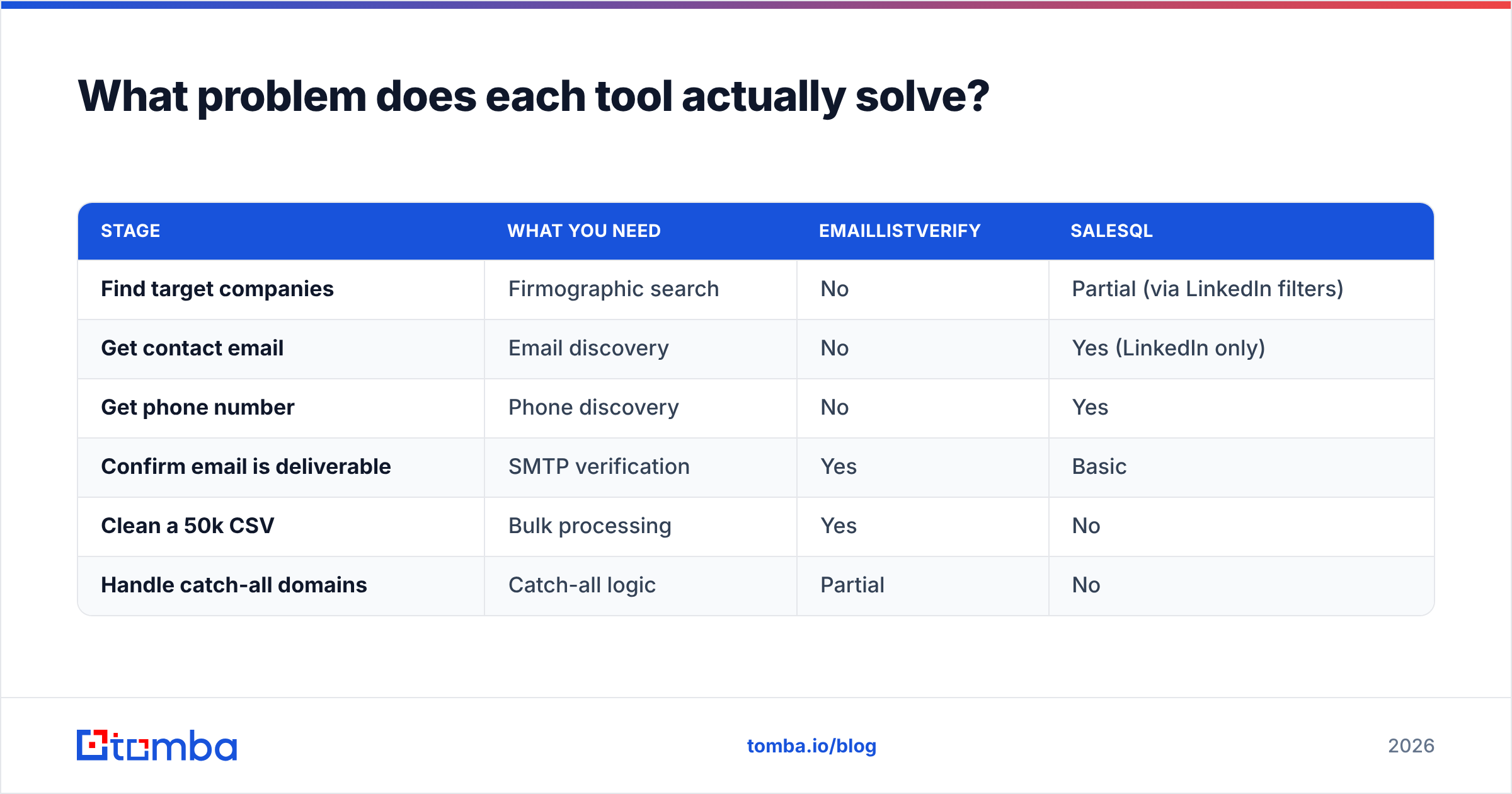
Start here. Most EmailListVerify vs SalesQL comparisons skip this part. The two products sit at different stages of the same pipeline.
EmailListVerify takes a list you already have. It tells you which addresses will bounce. It checks syntax, looks up MX records, runs an SMTP handshake, spots throwaway domains, flags role accounts, and marks catch-all servers. Input: a CSV. Output: the same CSV with a status column.
SalesQL is a Chrome add-on for LinkedIn. Open a profile, a search page, or a Sales Navigator list, and it reveals work and personal emails plus phone numbers. Input: a LinkedIn URL. Output: contact records you can export or push to a CRM.
Both products promise "accurate B2B emails." That word means two different things here. One tool is accurate at telling you an address is dead. The other is accurate at guessing an address exists at all. Two claims, two ways to fail.
| Stage | What you need | EmailListVerify | SalesQL |
|---|---|---|---|
| Find target companies | Company search | No | Partial (via LinkedIn filters) |
| Get contact email | Email discovery | No | Yes (LinkedIn only) |
| Get phone number | Phone discovery | No | Yes |
| Confirm email is deliverable | SMTP verification | Yes | Basic |
| Clean a 50k CSV | Bulk processing | Yes | No |
| Handle catch-all domains | Catch-all logic | Partial | No |
If your pipeline breaks at the sourcing stage, EmailListVerify cannot help. If it breaks at the bounce stage, SalesQL cannot help either.

EmailListVerify vs SalesQL pricing: what does each one cost?#
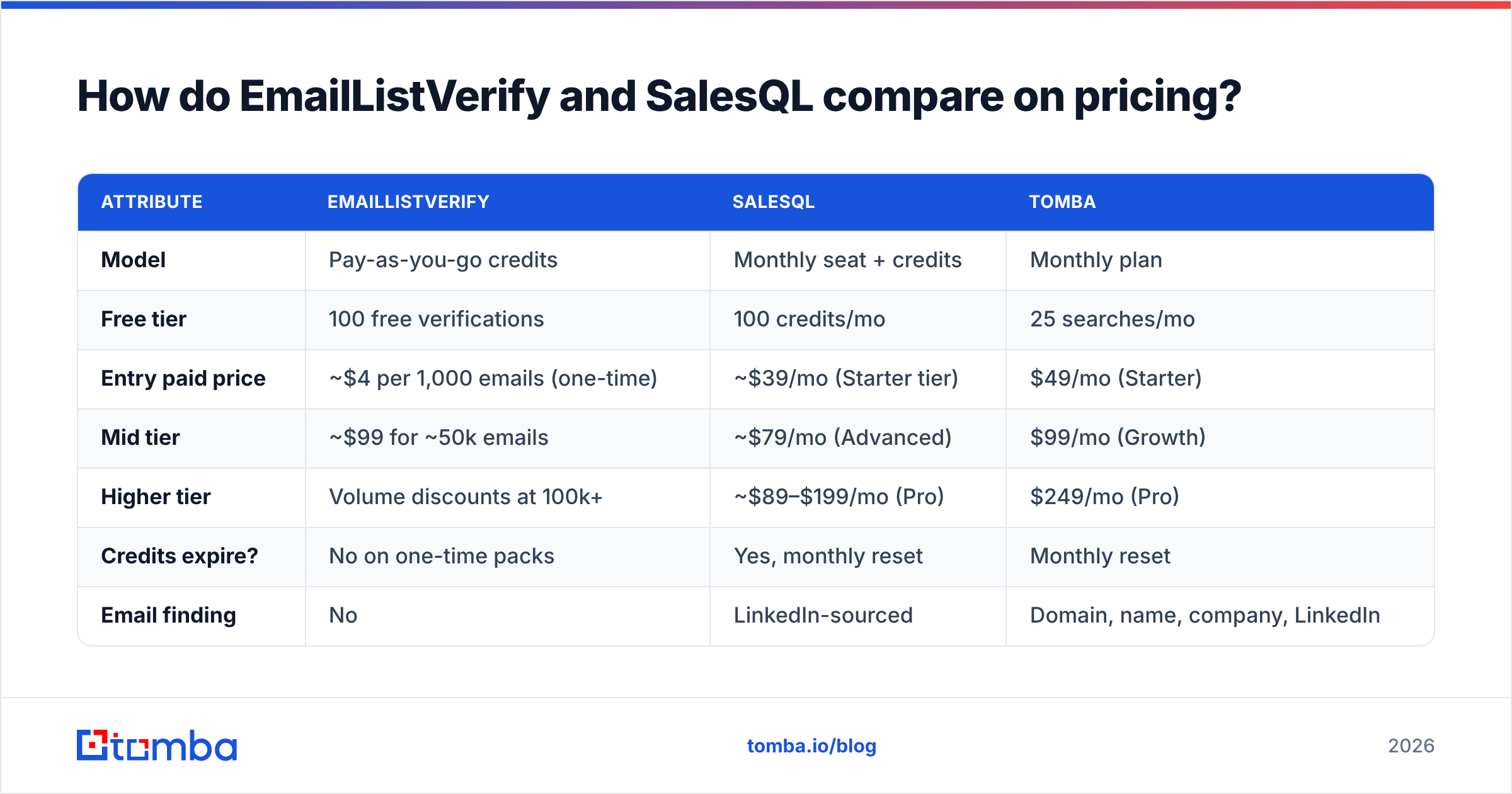
Here the head-to-head gets useful. The two pricing models differ. One charges for use. The other charges per seat.
EmailListVerify sells credits. You buy a block, you burn it, you buy another. One-time packs do not expire. That suits agencies who clean a big list twice a year and stay quiet in between.
SalesQL sells monthly seats with credits attached. Credits reset each month. On most plans they do not roll over. So a slow month is money lost.
| Attribute | EmailListVerify | SalesQL | Tomba |
|---|---|---|---|
| Model | Pay-as-you-go credits | Monthly seat + credits | Monthly plan |
| Free tier | 100 free verifications | 100 credits/mo | 25 searches/mo |
| Entry paid price | ~$4 per 1,000 emails (one-time) | ~$39/mo (Starter tier) | $49/mo (Starter) |
| Mid tier | ~$99 for ~50k emails | ~$79/mo (Advanced) | $99/mo (Growth) |
| Higher tier | Volume discounts at 100k+ | ~$89–$199/mo (Pro) | $249/mo (Pro) |
| Credits expire? | No on one-time packs | Yes, monthly reset | Monthly reset |
| Email finding | No | LinkedIn-sourced | Domain, name, company, LinkedIn |
| Email verification | Core product | Light | Included |
| Phone numbers | No | Yes | Yes |
| API access | Yes | Yes (higher tiers) | Yes, all paid plans |
| Bulk CSV upload | Yes | Limited | Yes |
Prices reflect publicly listed rates as of early 2026 and change often — check EmailListVerify and SalesQL directly before you commit. Tomba's current numbers are on the Tomba pricing page.
Now the honest math. A two-person sales team pays about $79/mo for SalesQL. Then it pays for EmailListVerify credits to clean what SalesQL returns. That lands near $100–$130 a month for half a workflow. Compare that total to an all-in-one tool, not either sticker price on its own.
EmailListVerify vs SalesQL: which one is more accurate?#
Accuracy means something different for each tool. So answer it twice.
EmailListVerify is judged on the bounces it stops. Most verifiers land between 95% and 99% on normal mailboxes. EmailListVerify sits inside that band on G2 reviews. Every SMTP checker hits the same wall: catch-all domains. A catch-all server accepts mail for any address. So asdkjh@company.com comes back "valid," just like sarah@company.com does. No SMTP ping can tell them apart. You need pattern logic layered on top. That is why a dedicated catch-all verifier behaves differently from a plain SMTP check.
SalesQL is judged on match rate and correctness. Match rate is how many profiles return any contact at all. Correctness is whether that contact is the right one. SalesQL does well on tech and startup profiles, where email patterns are public and easy to guess. It does worse on enterprise, government, and non-English regions. Personal Gmail addresses turn up often. Great for reach. Risky for B2B rules in the EU.

Here is the failure mode nobody flags: SalesQL's built-in check is not a real verifier. Browser tools are built for speed, so the checks stay shallow. Export 2,000 SalesQL contacts and mail them with no second pass, and your bounce rate will climb fast. Two weeks of that can wreck your sender reputation.
Is SalesQL better than EmailListVerify for cold outreach?#
Only for the first half of the job. Five things decide the answer:
- Where your leads come from. Does your buyer live on LinkedIn? Then SalesQL fits how you already work. Do your leads arrive as spreadsheets from events, webinars, or partners? Then SalesQL has nothing to grab, and EmailListVerify is the only tool of the two that helps.
- List hygiene. Mailing a list older than 90 days without a fresh check is the top cause of deliverability crashes. EmailListVerify exists for this. SalesQL does not fix it.
- Volume shape. Big, rare cleans suit EmailListVerify credits, since they do not expire. Steady daily prospecting suits a monthly seat.
- Team size. SalesQL charges per user. Five reps means five seats. Verification credits are pooled and shared, so they scale better.
- Compliance. SalesQL surfaces personal emails pulled from profiles. Sell into the EU or UK and your legal team will push back. Business emails built from a domain search sit on safer ground.
There is no clean winner here, and that is the point. Most teams that run SalesQL end up buying a verifier too. The EmailListVerify vs SalesQL choice turns into a stack. Then the real question changes. It stops being "which is better" and becomes "why am I paying two vendors and merging two exports?"
EmailListVerify vs SalesQL together: what does the workflow look like?#
If you run both, here is the order that works. Each handoff costs you time.
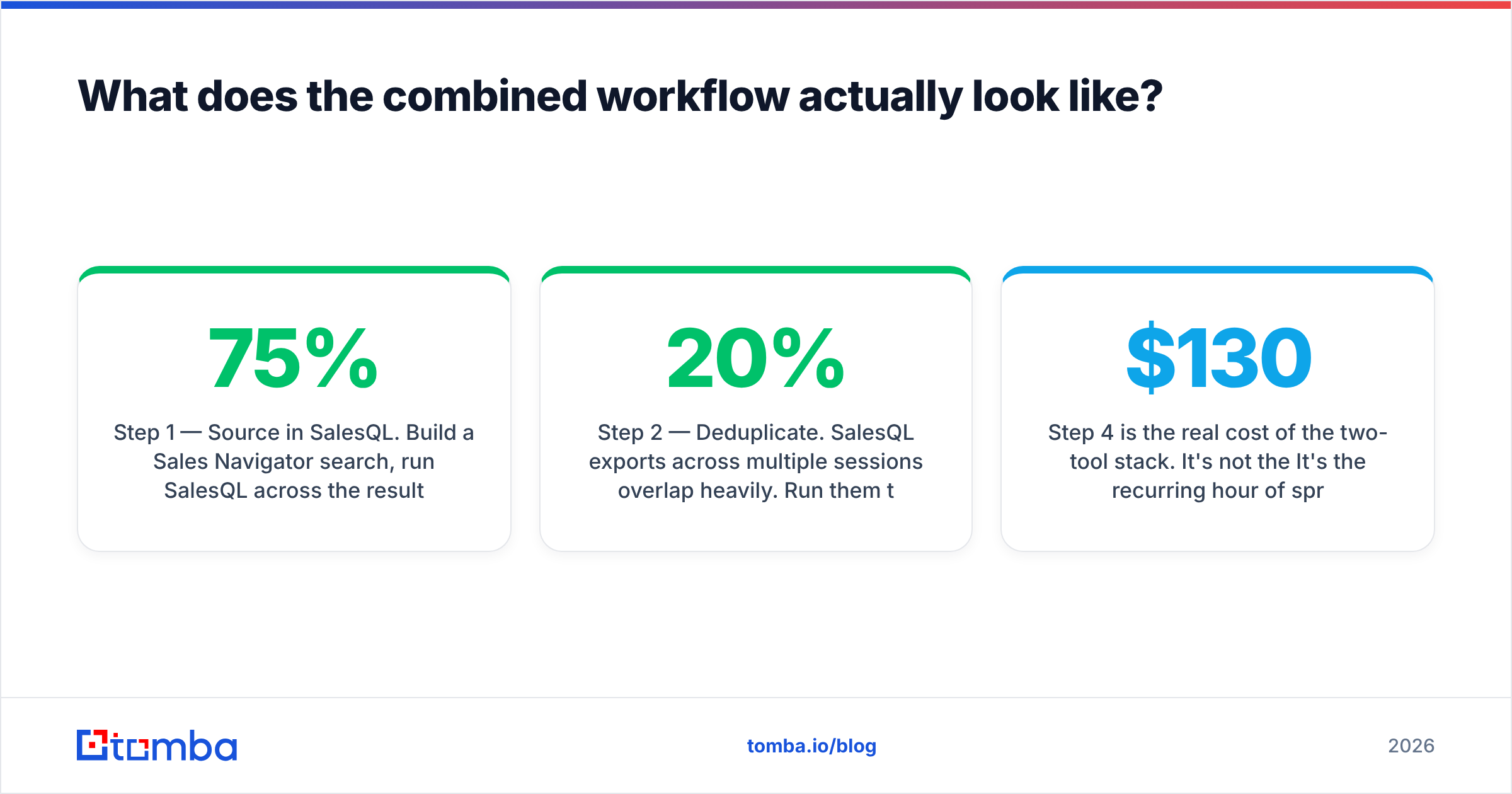
Step 1 — Source in SalesQL. Build a Sales Navigator search. Run SalesQL across the result pages. Export to CSV. Expect a match rate of 55–75%, depending on your market. Plan for the gap: about a third of your list returns nothing.
Step 2 — Remove duplicates. SalesQL exports overlap a lot across sessions. Run a deduplicate email list pass before you pay to check the same address twice. This step alone often cuts verification spend by 15–20%.
Step 3 — Verify in EmailListVerify. Upload the clean CSV, wait for it to process, then download. Keep only valid. Set a rule for catch-all results. Most teams drop them, which is safe but wasteful. A better option is a separate low-volume sending domain, though that takes more work.
Step 4 — Merge it back. Match the verified output to your original SalesQL fields. Some export formats strip every column except the email. So this is manual spreadsheet work, every single time, unless you build against both APIs.
Step 4 is the real cost of the two-tool stack. It is not the $130 a month. It is the hour of spreadsheet cleanup each week that never shows up on an invoice.
One platform folds steps 1–4 into a single API call, or one bulk email finder job. Find, verify, enrich, export — with your source fields intact. That is a workflow argument more than a price argument.
What are the best alternatives to both?#
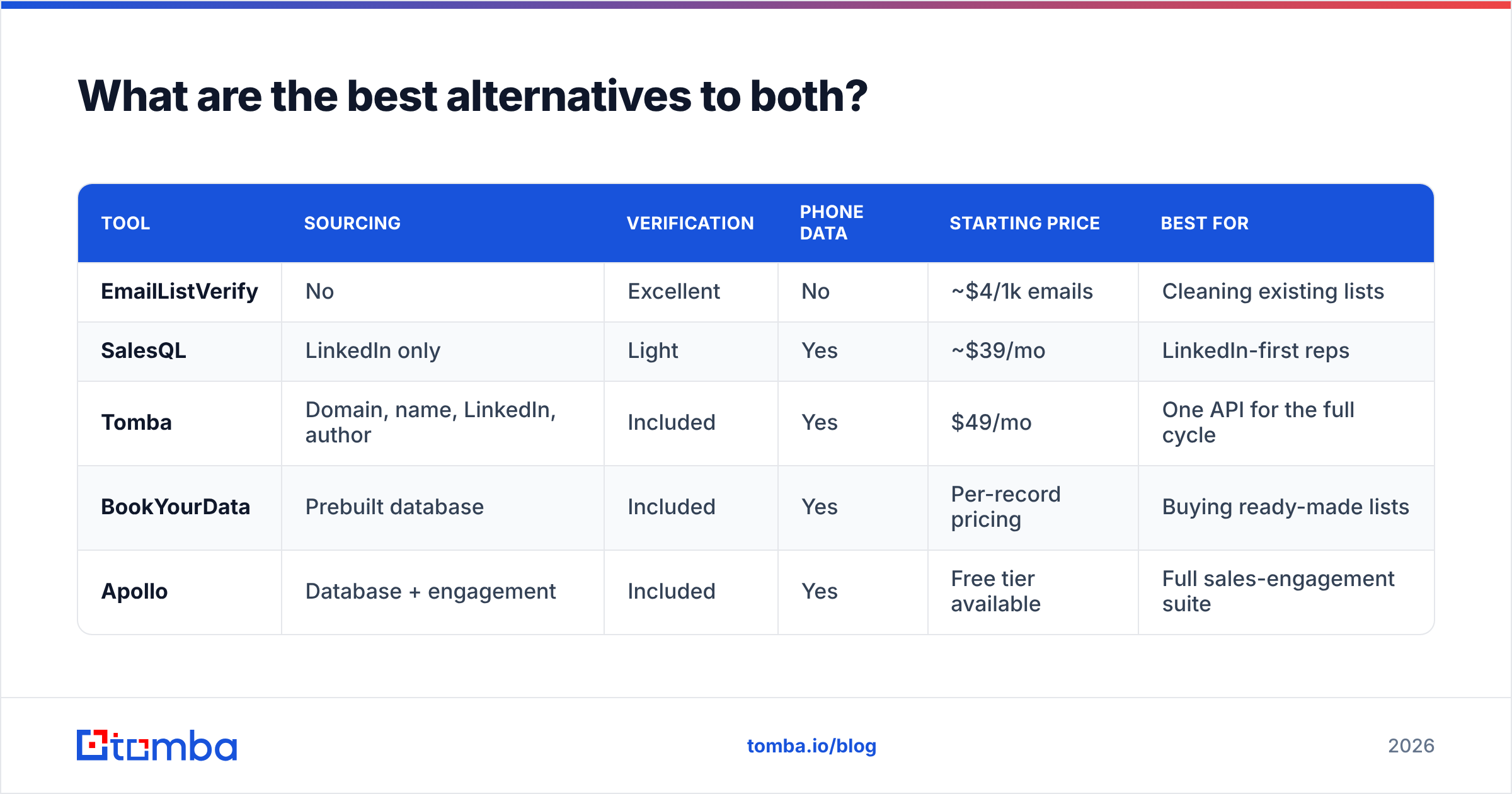
Neither tool is bad. But if you are comparing them side by side, you are really asking one thing: can a single vendor cover both jobs? Several can.
| Tool | Sourcing | Verification | Phone data | Starting price | Best for |
|---|---|---|---|---|---|
| EmailListVerify | No | Excellent | No | ~$4/1k emails | Cleaning existing lists |
| SalesQL | LinkedIn only | Light | Yes | ~$39/mo | LinkedIn-first reps |
| Tomba | Domain, name, LinkedIn, author | Included | Yes | $49/mo | One API for the full cycle |
| BookYourData | Prebuilt database | Included | Yes | Per-record pricing | Buying ready-made lists |
| Apollo | Database + engagement | Included | Yes | Free tier available | Full sales-engagement suite |
A few notes on fit rather than rankings:
- BookYourData takes another route. You buy from a curated database instead of scraping or guessing, and accuracy comes with a guarantee. If SalesQL's match gaps bother you, and EmailListVerify's lack of search bothers you too, a ready-made database skips both problems. It suits teams that want volume without building a sourcing habit.
- Apollo bundles sourcing, sequencing, and a light CRM layer. It is heavier than you need if you only wanted verification. The free tier makes it easy to test. The Apollo alternative breakdown covers the trade-offs.
- Tomba is the direct all-in-one answer to this pairing. Email finder, email verifier, LinkedIn finder, and phone data all sit behind one key. The free tier gives you 25 searches to test match rate on your own list first.

Not ready to switch anything? The cheapest win is to test your current list with a free email checker before your next send. It costs nothing. It also tells you whether you have a sourcing problem or a hygiene problem — the real question underneath "EmailListVerify vs SalesQL."
How should you decide in the next 20 minutes?#
Run this test instead of reading more comparisons.
Take 100 real prospects from your target market. Not a demo list. The accounts you are chasing this quarter.
- Run them through the SalesQL free tier. Note the match rate: how many gave you a work email, not a personal one.
- Run those results through EmailListVerify's 100 free checks. Note how many came back
valid, and how many werecatch-allorinvalid. - Do the math. If SalesQL matched 60%, and 80% of those verified clean, you have 48 usable contacts out of 100. That is your number.
- Run the same 100 through one all-in-one free tier. Compare usable yield, not headline accuracy.
Whichever gives you more usable contacts per dollar wins for your data. Vendors measure accuracy on samples they choose. Your list is not their sample.
Two rules, whatever you pick. Never mail an unverified list. And check any list older than 90 days again. Contact data decays by 25–30% a year as people change jobs, and HubSpot's research on database decay has held that line for years. A verifier is not extra overhead. It is what keeps your sending domain alive.
EmailListVerify vs SalesQL: the verdict#
EmailListVerify wins if you already have lists. It is cheap, credits do not expire, and it does one job well. Buy it and stop reading.
SalesQL wins if LinkedIn is your whole prospecting motion. It is fast, it lives where you work, and it returns phone numbers. Just do not treat its built-in checks as real verification.
Neither wins if you need both jobs done. That is most teams. It is also where the two-tool stack quietly costs you a second bill, a pile of orphaned CSV columns, and an hour a week of cleanup.
If that is you, test the all-in-one path before you renew either plan. The Tomba Email Finder finds contacts by domain, name, company, or LinkedIn profile. It verifies every result before export. It returns phone numbers on the same record. One API, one CSV, no merge step. Start free with 25 searches, run your own 100-prospect test, and let the usable-yield number decide. Paid plans start at $49/mo, and the full breakdown is on the Tomba pricing page.
Related guides#
Ready to find emails that actually work?
Join 150,000+ professionals who stopped guessing and started sending. Free credits on signup — no credit card required.
Get the Tomba newsletter
Practical outbound tactics and product updates — once every two weeks.
About the author