Why Your Emails Are Going to Spam (And How to Fix It in 2026)
Emails are going to spam? It is almost never a mystery — it is authentication, list quality, or send behavior. Here is how to diagnose which one is hurting you, in the right order, and what recovery actually takes.
Your emails are going to spam because a mailbox provider stopped trusting your sending profile. It is rarely the copy. It is almost always authentication, list quality, or send volume — and you can check all three today.
TL;DR
- If your emails are going to spam, the cause is almost always one of three things: broken or incomplete authentication, a dirty recipient list, or send behavior that looks automated and unwanted. Everything else is downstream.
- Diagnose in order: authentication → list hygiene → content and volume. Fixing content first is the most common wasted week in deliverability.
- Gmail and Yahoo's bulk-sender rules (in force since 2024, tightened since) make SPF, DKIM, DMARC, one-click unsubscribe, and a spam-complaint rate under 0.3% non-negotiable at 5,000+ daily recipients.
- Bounce rate above 3% and complaint rate above 0.3% are the two numbers that reliably predict spam placement. Verify lists before sending, not after.
- Recovery is slow on purpose. Expect 2–6 weeks of disciplined sending to rebuild a damaged sending domain — and treat a burned domain as a real asset loss.
Why your emails are going to spam all of a sudden#
Because something in your sending profile changed, and the mailbox provider noticed before you did.
Mailbox providers — Gmail, Outlook, Yahoo, and the corporate filters like Proofpoint and Mimecast in front of enterprise inboxes — don't score emails one at a time. They score you: your domain, your sending IP, your historical engagement, and how recipients react. So when your emails are going to spam, it is because the sender profile behind them already looked risky.
The "all of a sudden" part is usually one of these:
- You scaled volume too fast. Going from 40 emails a day to 400 on the same domain is the most common trigger. Filters read volume spikes as compromise or list purchase.
- You imported a list you didn't verify. Dead addresses produce hard bounces, and a bounce rate above roughly 3% flips you from unknown sender to suspicious sender.
- Someone marked you as spam. Complaint rate is weighted heavily. At Gmail's published threshold, 0.3% is where trouble starts and 0.1% is where you want to live.
- An authentication record broke. You changed DNS providers, switched ESPs, or added a new sending tool and forgot to update SPF. SPF has a hard 10-lookup limit, and blowing past it silently invalidates the record.
- You got listed. A shared IP neighbor, a spam trap hit, or a compromised account can put you on Spamhaus or a similar blocklist.
The uncomfortable truth: filters rarely tell you which one it was. You have to work the list.

What actually decides whether your email lands in the inbox?#
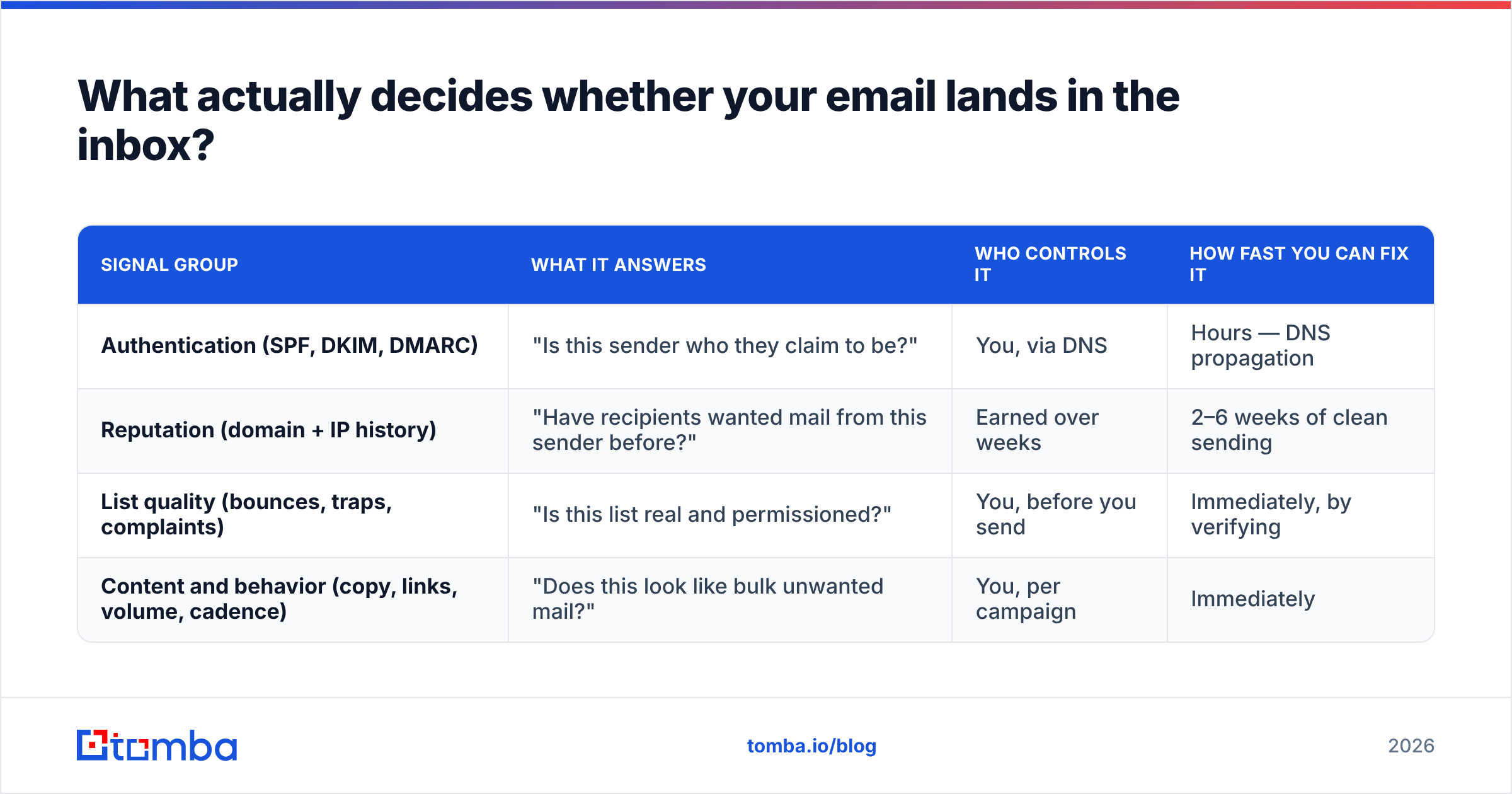
Four signal groups, roughly in the order the receiving server evaluates them.
| Signal group | What it answers | Who controls it | How fast you can fix it |
|---|---|---|---|
| Authentication (SPF, DKIM, DMARC) | "Is this sender who they claim to be?" | You, via DNS | Hours — DNS propagation |
| Reputation (domain + IP history) | "Have recipients wanted mail from this sender before?" | Earned over weeks | 2–6 weeks of clean sending |
| List quality (bounces, traps, complaints) | "Is this list real and permissioned?" | You, before you send | Immediately, by verifying |
| Content and behavior (copy, links, volume, cadence) | "Does this look like bulk unwanted mail?" | You, per campaign | Immediately |
Notice the ordering. Content is last. Most people rewrite subject lines for a week before checking whether their DKIM signature is valid — which is like repainting a car with no engine. Get the first two rows right and mediocre copy still reaches the inbox. Get them wrong and perfect copy lands in spam every time.
For a plain-language primer on the underlying concepts, Tomba's glossary entries on email deliverability and sender reputation are a decent five-minute read.
How do you diagnose it in the right order?#
If your emails are going to spam, run these five checks in sequence. Stop at the first one that fails, fix it, and send a small test batch before moving on. Diagnosing everything at once means you never learn which fix worked.
Verify authentication end to end. Send a message to a seed address you control and inspect the raw headers. You want
spf=pass,dkim=pass, anddmarc=pass. All three. A DKIM pass with a DMARC fail means your alignment is wrong — the signing domain doesn't match the From domain. Use an SPF checker to confirm you're under the 10-lookup limit and that every sending service you use is included.Check whether you're blocklisted. A domain or IP on Spamhaus SBL, Barracuda, or SORBS will produce hard rejections and spam placement simultaneously. Run a blacklist checker against both your sending domain and your IP. Delisting is usually a form submission plus a fix for the root cause.
Pull your bounce and complaint numbers. Anything above 3% bounces or 0.3% complaints over the last 30 days is your problem, full stop. Do not proceed to content. This is a list problem.
Look at your reputation dashboards. Google Postmaster Tools shows domain reputation, spam rate, and authentication pass rates for Gmail traffic. Microsoft's SNDS covers Outlook and Hotmail. If Google shows "Low" or "Bad" domain reputation, you're in a recovery project, not a quick fix.
Then, and only then, audit content. Link-to-text ratio, tracking domains, image-heavy templates, spam-trigger phrasing, missing plaintext version. Run drafts through a spam checker to catch the obvious ones. This step matters — it's just fifth, not first.
Does list quality really matter that much?#
Yes, and it's the most under-priced fix in the entire stack. Bad list data is the single most common reason emails are going to spam.
Here's the mechanic. When you send to an address that doesn't exist, the receiving server returns a hard bounce. Mailbox providers track your hard-bounce ratio as a proxy for "did this sender obtain these addresses legitimately?" Legitimate opt-in lists bounce at under 1%. Scraped or purchased lists bounce at 8–20%. The filter doesn't need to know how you got the list; the bounce rate tells it.
Worse, aged lists collect spam traps — addresses that were once real, went dormant, and were recycled by providers specifically to catch senders who never clean their data. A single pristine trap hit can get a domain blocklisted outright.
This is where verification earns its keep. Running a list through an email verifier before a campaign removes syntax errors, dead mailboxes, role accounts, disposable domains, and known trap patterns. On a 10,000-record list with a typical 12% decay, that's 1,200 bounces you didn't generate — the difference between a 12% bounce rate and a sub-1% one.
Catch-all domains are the awkward middle case. A catch-all server accepts mail for any address at the domain, so a standard SMTP check can't confirm the mailbox exists. Roughly 15–20% of B2B domains are configured this way. A dedicated catch-all verifier uses pattern confidence and secondary sources to score these rather than guessing, which keeps you from either sending blind or throwing away a fifth of your addressable market.

What do Gmail and Yahoo require from bulk senders now?#
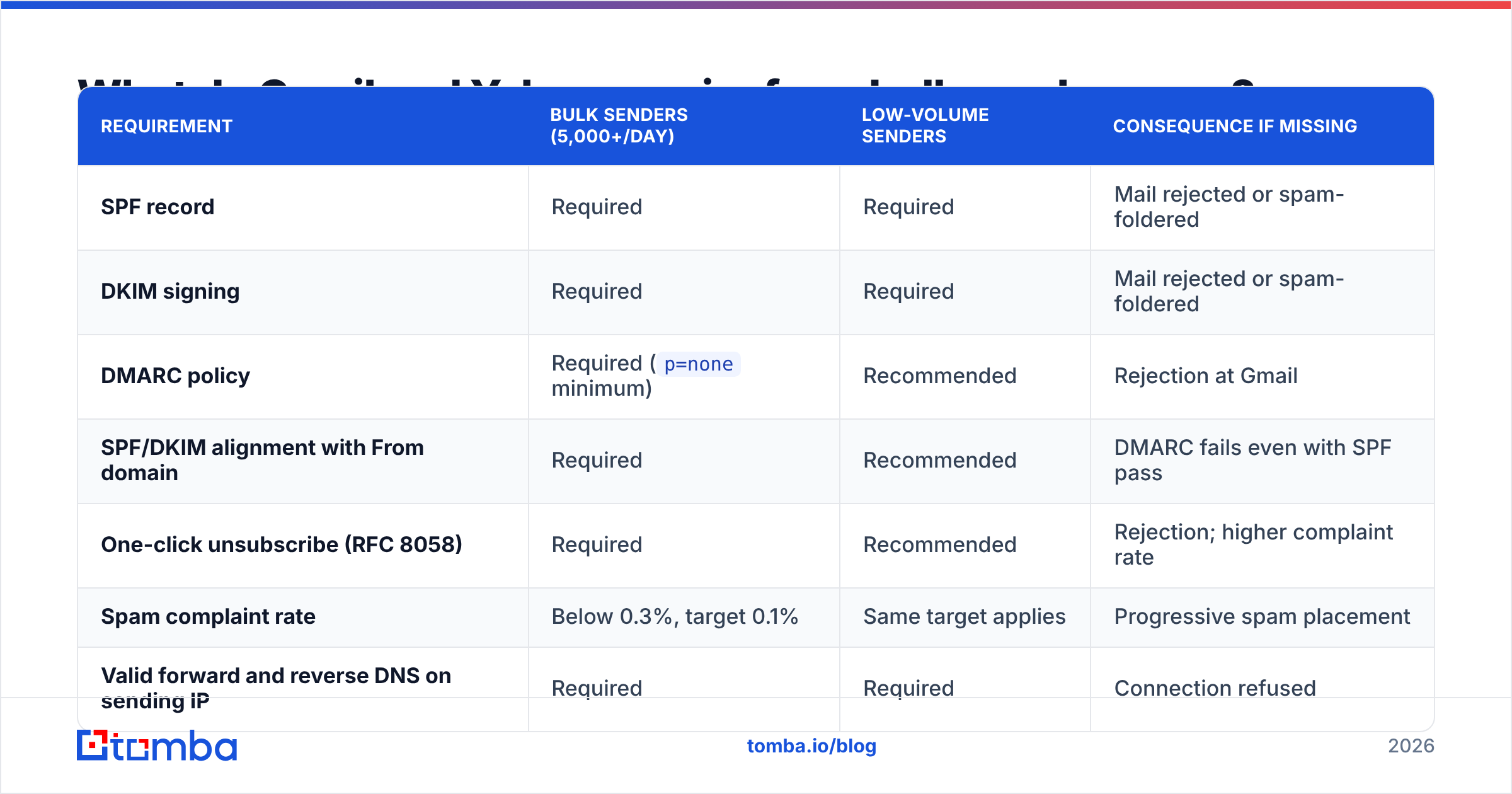
The 2024 bulk-sender requirements from Google and Yahoo drew a hard line, and enforcement has only tightened since. If you send more than 5,000 messages a day to Gmail addresses, you must have all of the following. Miss one and your emails are going to spam at Gmail scale.
| Requirement | Bulk senders (5,000+/day) | Low-volume senders | Consequence if missing |
|---|---|---|---|
| SPF record | Required | Required | Mail rejected or spam-foldered |
| DKIM signing | Required | Required | Mail rejected or spam-foldered |
| DMARC policy | Required (p=none minimum) |
Recommended | Rejection at Gmail |
| SPF/DKIM alignment with From domain | Required | Recommended | DMARC fails even with SPF pass |
| One-click unsubscribe (RFC 8058) | Required | Recommended | Rejection; higher complaint rate |
| Spam complaint rate | Below 0.3%, target 0.1% | Same target applies | Progressive spam placement |
| Valid forward and reverse DNS on sending IP | Required | Required | Connection refused |
| TLS for transmission | Required | Required | Connection refused |
Two notes people get wrong. First, "5,000 a day" counts Gmail recipients specifically, and it's a rolling measure — hit it once and you're treated as a bulk sender going forward. Second, p=none is the floor, not the goal. It publishes a policy and gives you reporting, but it instructs nothing. Moving to p=quarantine and eventually p=reject is what actually stops spoofers from burning your domain reputation on your behalf. The DMARC overview on Wikipedia is a solid neutral explainer if you're new to the policy ladder.
What's the 30-day fix plan?#
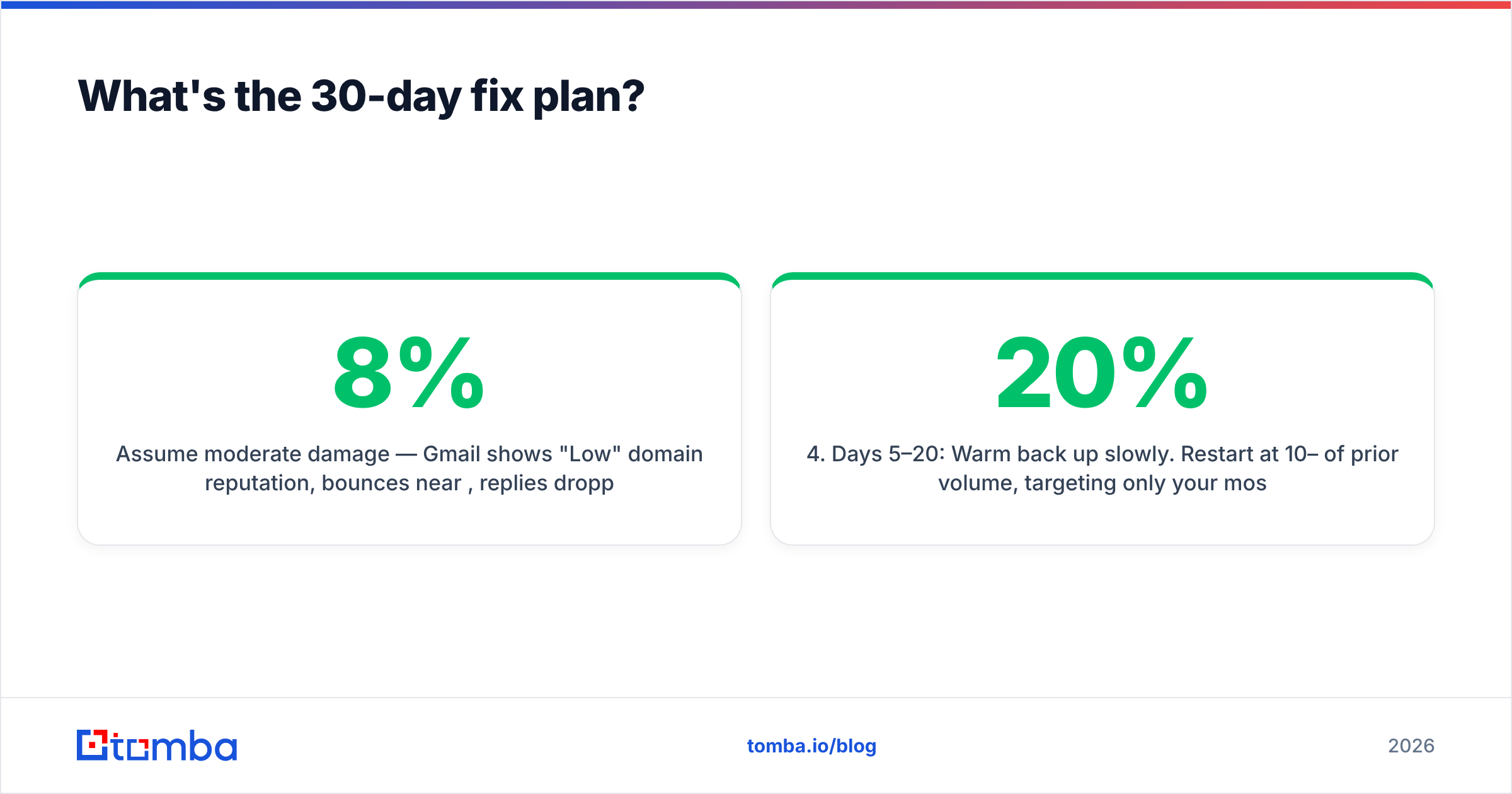
Assume moderate damage: Gmail shows "Low" domain reputation, bounces sit near 8%, replies are dropping. Here's the sequence that works when your emails are going to spam and the damage is already done.
Days 1–2: Stop sending from the damaged domain. Not a pause on marketing — a full stop on cold volume. Every additional bad send deepens the hole. Transactional mail can continue if it's on a separate subdomain.
Days 2–3: Fix authentication and DNS. Publish or repair SPF (under 10 lookups), enable DKIM with 2048-bit keys, publish DMARC at
p=nonewith anruareporting address. Confirm with header inspection, not with a vendor's checkmark.Days 3–5: Clean the entire database. Not just the next campaign's segment — everything. Remove hard bounces, role accounts (
info@,sales@,admin@), disposables, and anything that hasn't engaged in 12 months. Bulk verification makes this a one-afternoon job rather than a quarter-long project.Days 5–20: Warm back up slowly. Restart at 10–20% of prior volume, targeting only your most engaged segment — people who opened or replied in the last 90 days. Increase roughly 20% every two days as long as complaints stay under 0.1%. A warmup calculator gives you a sane ramp schedule instead of a guess.
Days 10–30: Rework content and cadence. Now the copy work pays off. Cut link count to one or two, drop tracking pixels on cold sequences, write a plaintext-first version, and make the unsubscribe obvious. Shorter sequences with wider gaps outperform aggressive five-touch cadences on deliverability, even when they underperform on raw touch count.
Ongoing: Monitor weekly. Google Postmaster Tools, bounce rate per campaign, complaint rate per segment. The point of monitoring is to catch a slide at week two rather than at week ten.
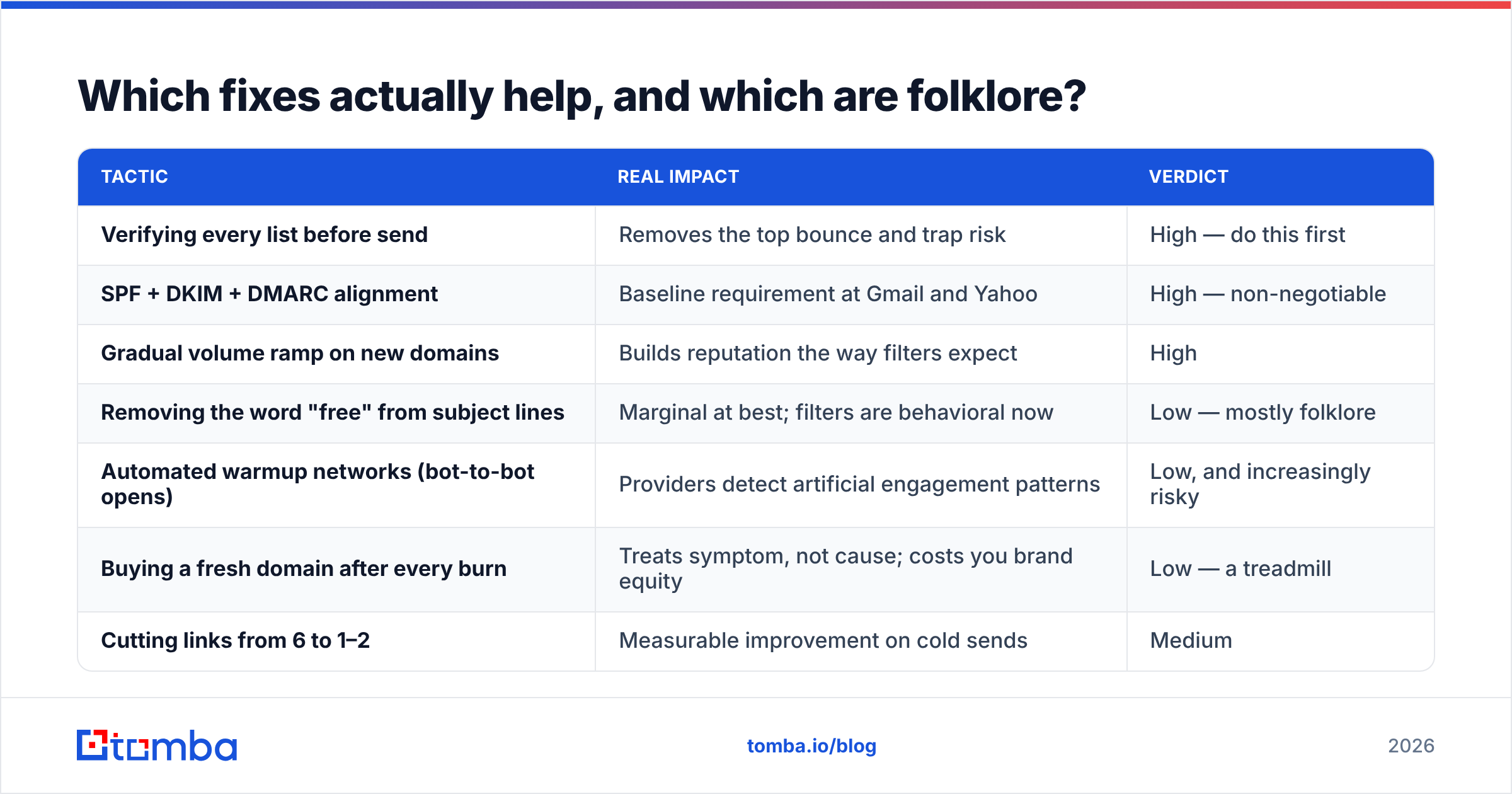
Which fixes actually help, and which are folklore?#
Deliverability advice has a lot of cargo cult in it. Here's a blunt sort.
| Tactic | Real impact | Verdict |
|---|---|---|
| Verifying every list before send | Removes the top bounce and trap risk | High — do this first |
| SPF + DKIM + DMARC alignment | Baseline requirement at Gmail and Yahoo | High — non-negotiable |
| Gradual volume ramp on new domains | Builds reputation the way filters expect | High |
| Removing the word "free" from subject lines | Marginal at best; filters are behavioral now | Low — mostly folklore |
| Automated warmup networks (bot-to-bot opens) | Providers detect artificial engagement patterns | Low, and increasingly risky |
| Buying a fresh domain after every burn | Treats symptom, not cause; costs you brand equity | Low — a treadmill |
| Cutting links from 6 to 1–2 | Measurable improvement on cold sends | Medium |
| Segmenting by engagement recency | Sends only to people likely to open, lifting reputation | High |
| Dedicated IP for a small sender | Under ~50k/month you can't warm it properly | Low — shared is usually better |
The pattern: what helps is data hygiene and identity proof. What doesn't is keyword superstition and shortcuts around reputation.
How do you keep it from happening again?#
Prevention is a process, not a project.
Verify at collection time, not at send time. If your forms and enrichment jobs check addresses on entry — via an email verification API hooked into your signup flow or CRM — your database never accumulates decay in the first place. That's a permanent fix versus a recurring cleanup.
Source data you can defend. Where contacts come from determines both bounce rate and complaint rate. Addresses derived from published, verifiable sources behave very differently from bulk-scraped exports. If you're comparing providers, look at how each one documents its data sources and what accuracy guarantee it puts in writing. Vendors like BookYourData and Tomba both publish verification methodology; plenty of cheaper list sellers don't, and that gap shows up in your bounce report.
Separate your sending streams. Transactional mail on one subdomain, marketing on another, cold outbound on a third domain entirely. One bad cold campaign then can't take your password-reset emails down with it. This is standard practice at every company that sends seriously, and it's documented in most ESP setup guides — HubSpot's deliverability documentation covers the subdomain pattern well.
Set thresholds and honor them. Pick your numbers — bounce under 2%, complaints under 0.1%, reply rate above whatever your benchmark is — and pause any campaign that breaches them. Automated, not discretionary. The failure mode is always a campaign that someone let run "just one more day."
Re-verify quarterly. B2B contact data decays at roughly 2–3% per month from job changes alone. A list verified in January is meaningfully worse by April whether or not you touched it.
Where should you start today?#
If your emails are going to spam today, start with authentication headers. It takes twenty minutes and rules out a third of all spam-placement causes. Then pull your bounce and complaint rates. If bounces are above 3%, your next step isn't copywriting — it's cleaning the list.
If you'd rather not fix a broken list at all, build a clean one from the start. Tomba's Email Finder returns verified professional addresses with a confidence score attached, sourced from public and verified records rather than scraped dumps, so the addresses you add to a sequence have already passed the checks that would otherwise show up as bounces. The free tier covers 25 searches a month, and paid plans start at $49/mo — full Tomba pricing is public if you want to compare it against what a single burned sending domain costs you in lost pipeline.
Clean data in, inbox placement out. It really is that unglamorous.
Related guides#
Ready to find emails that actually work?
Join 150,000+ professionals who stopped guessing and started sending. Free credits on signup — no credit card required.
Get the Tomba newsletter
Practical outbound tactics and product updates — once every two weeks.
About the author