EmailVerify.io vs Kaspr (2026): Which Tool Actually Wins?
EmailVerify.io cleans lists. Kaspr finds contacts on LinkedIn. They solve opposite halves of the same problem — here's which one your pipeline actually needs, and what each really costs.
EmailVerify.io vs Kaspr is an odd match-up. One tool cleans the list you already have. The other builds a new list from LinkedIn. Here is how to tell which job you are actually buying.
TL;DR
- EmailVerify.io and Kaspr are not really rivals. EmailVerify.io verifies addresses you already own. Kaspr finds new ones on LinkedIn, plus direct mobile numbers.
- Pick Kaspr if you prospect inside LinkedIn Sales Navigator and cold call. Pick EmailVerify.io if you own a list and need bounces under 2%.
- Kaspr bills per seat plus credits, so it scales badly for teams. Verifiers bill per email checked and cost far less per record.
- Neither tool covers the full loop: find → verify → enrich → push to CRM. You end up with two vendors and two data schemas.
- Want one system? An email finder with built-in verification (Tomba: free 25-search tier, then $49/mo) removes the seam.
EmailVerify.io vs Kaspr: what does each tool do?#
They sit at opposite ends of the same workflow. That is why so many teams end up owning both without realising it.
EmailVerify.io is a bulk email validation service. You upload a CSV or hit the API with an address. It then runs syntax checks, MX record lookups, SMTP handshakes, disposable-domain detection, role-account flagging (info@, sales@, hello@), and catch-all identification. The output is a status label — valid, invalid, catch-all, unknown — plus a confidence signal. It does not find you a single new contact. It only grades the ones you bring.
Kaspr is the other half. It is a Chrome extension plus web app that sits on top of LinkedIn. You open a profile or a Sales Navigator list and click the widget. Kaspr then surfaces business emails and, its real differentiator, direct mobile numbers. It also does light sequencing, lead lists, and CRM sync to HubSpot, Pipedrive, and Salesforce. Cognism acquired Kaspr, which is why its European phone data is so strong next to US-centric tools.
So the honest framing of "EmailVerify.io vs Kaspr" is this: one is a quality gate, the other is a supply source. A head-to-head only makes sense if you are deciding where your next $100 a month goes. That is a real decision, so let us make it properly.
EmailVerify.io vs Kaspr: a feature-by-feature comparison#
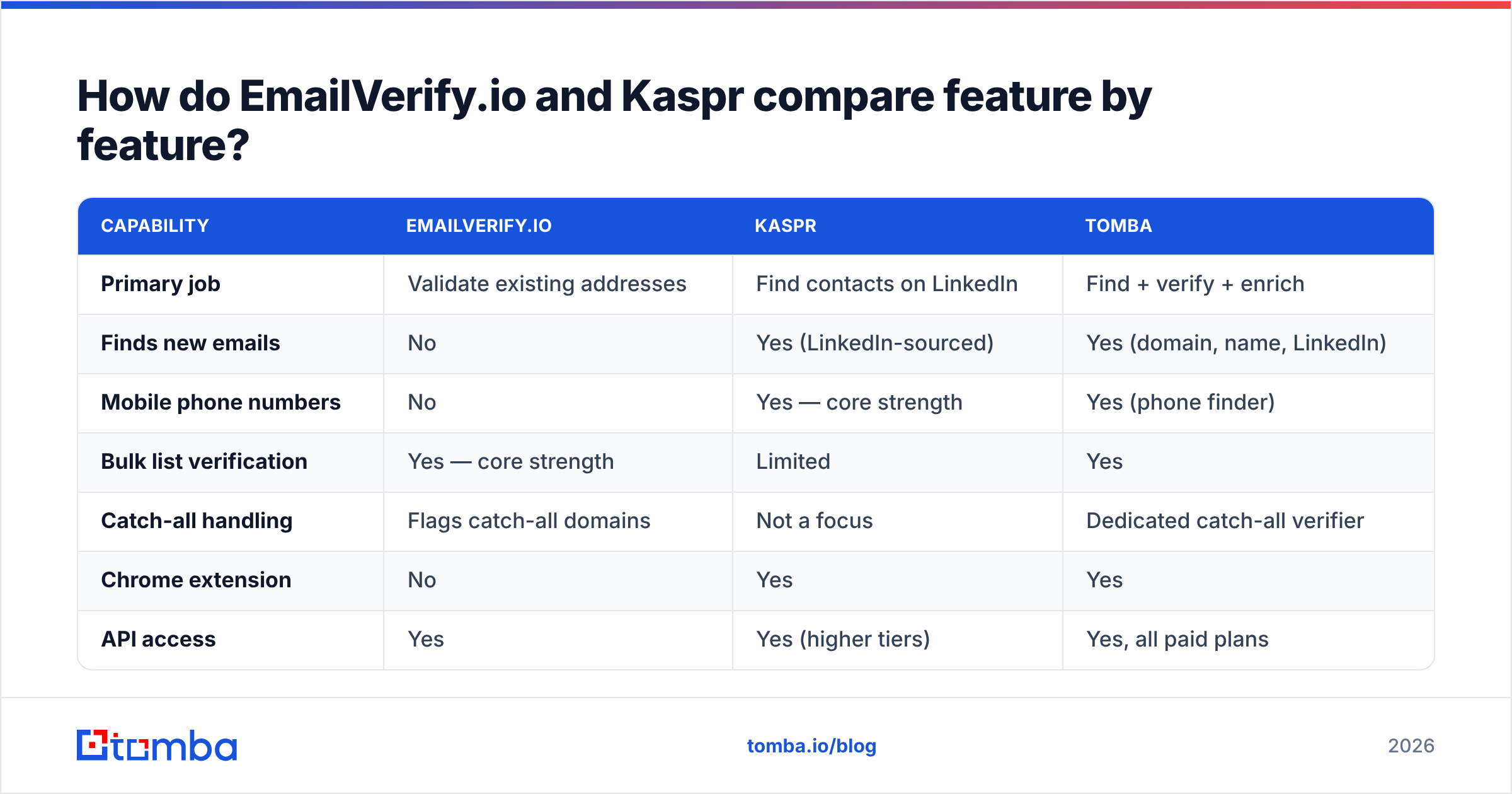
| Capability | EmailVerify.io | Kaspr | Tomba |
|---|---|---|---|
| Primary job | Validate existing addresses | Find contacts on LinkedIn | Find + verify + enrich |
| Finds new emails | No | Yes (LinkedIn-sourced) | Yes (domain, name, LinkedIn) |
| Mobile phone numbers | No | Yes — core strength | Yes (phone finder) |
| Bulk list verification | Yes — core strength | Limited | Yes |
| Catch-all handling | Flags catch-all domains | Not a focus | Dedicated catch-all verifier |
| Chrome extension | No | Yes | Yes |
| API access | Yes | Yes (higher tiers) | Yes, all paid plans |
| CRM sync | Via integrations/Zapier | Native HubSpot, Pipedrive, Salesforce | Native + Zapier/Make |
| Pricing model | Per email verified | Per seat + credits | Per search credit, no seat tax |
| Best for | Deliverability teams, ESP hygiene | SDRs living in LinkedIn | Full-cycle outbound + RevOps |
| Free tier | Trial credits | Limited free plan | 25 searches/mo |
The table makes the overlap obvious: it is thin. Kaspr does some email validation before it hands you an address, and EmailVerify.io does zero discovery. Buying one does not make the other redundant.

Which one is more accurate — and how would you even know?#
Accuracy means two different things here. Vendors exploit that ambiguity.
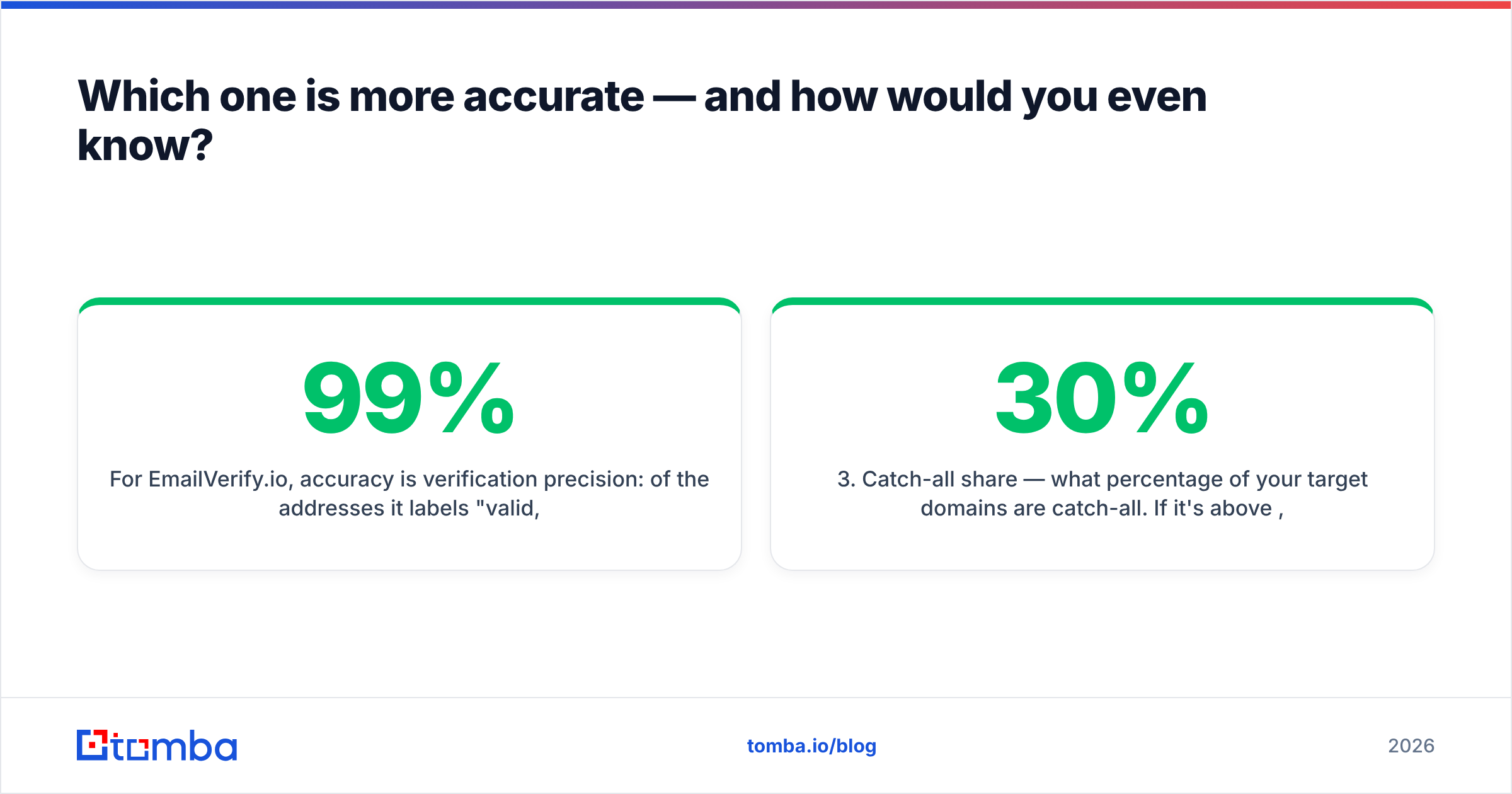
For EmailVerify.io, accuracy is verification precision. Of the addresses it labels "valid," what share actually deliver? Good verifiers land in the 96–99% range on clean B2B lists. That number collapses on catch-all domains, where SMTP always says yes. No verifier can be sure without extra signals. Any vendor claiming 99%+ across catch-alls is measuring something other than deliverability.
For Kaspr, accuracy is match rate plus correctness. On a given LinkedIn profile, does it return a contact at all, and is that contact current? Kaspr's mobile coverage in Western Europe is genuinely strong. That is the Cognism data lineage showing. US coverage is decent but not category-leading. And like every LinkedIn-derived source, it fades when someone changed jobs three months ago and never updated the profile.

The practical takeaway: run your own bake-off. Take 100 contacts you can confirm yourself, such as customers, partners, or people who have replied to you. Push them through each tool. Measure four things:
- Match rate — how many records came back with any contact data. A low match rate on a discovery tool is a coverage problem, not an accuracy problem.
- Precision — of the emails marked deliverable, how many actually landed. This is the only number that protects your sender reputation.
- Catch-all share — what percentage of your target domains are catch-all. Above 30%, a plain verifier leaves you guessing on a third of your list. You then need a catch-all verifier that goes beyond an SMTP ping.
- Freshness — spot-check 20 records against the person's current employer. Stale data stays invisible until your reply rate craters.
Vendor benchmarks are marketing. Your own 100-row test costs an afternoon and settles the argument for good. Review sites like G2 help you spot recurring complaints. They will not tell you how a tool performs on your ICP's domains.
What does each one actually cost?#
Pricing pages move, so treat these as shapes rather than quotes. Check each vendor before you sign.
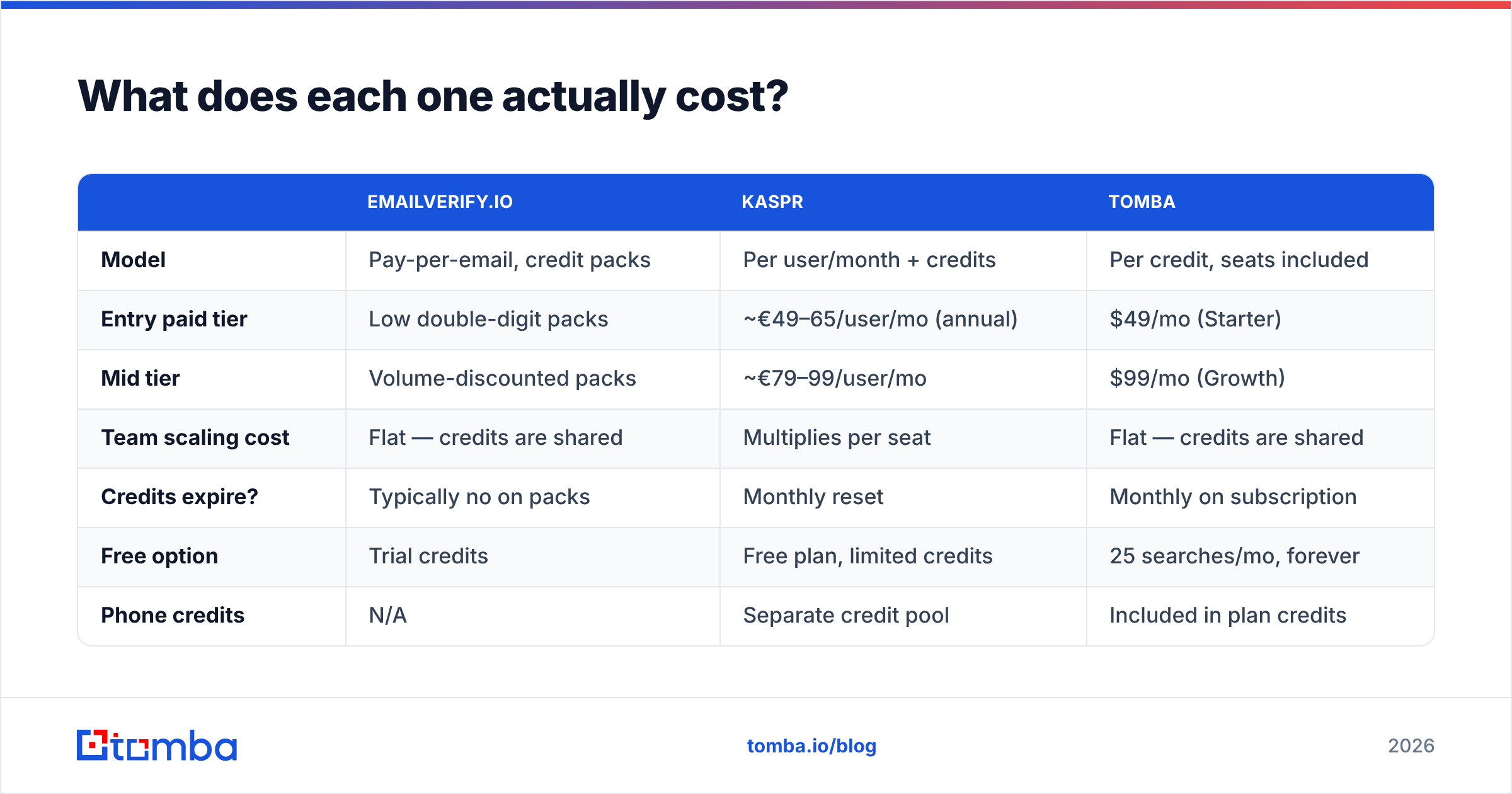
| EmailVerify.io | Kaspr | Tomba | |
|---|---|---|---|
| Model | Pay-per-email, credit packs | Per user/month + credits | Per credit, seats included |
| Entry paid tier | Low double-digit packs | ~€49–65/user/mo (annual) | $49/mo (Starter) |
| Mid tier | Volume-discounted packs | ~€79–99/user/mo | $99/mo (Growth) |
| Team scaling cost | Flat — credits are shared | Multiplies per seat | Flat — credits are shared |
| Credits expire? | Typically no on packs | Monthly reset | Monthly on subscription |
| Free option | Trial credits | Free plan, limited credits | 25 searches/mo, forever |
| Phone credits | N/A | Separate credit pool | Included in plan credits |
Two cost traps are worth flagging.
The seat tax. Kaspr charges per user. A five-person SDR team on a mid tier runs roughly €400–500 a month before you find a single extra contact. Verifiers and credit-pooled finders do not care how many people log in. If your team is growing, seat pricing compounds against you.
The double-spend. If you buy Kaspr for discovery, you will still push its output through a verifier before a big send. Most teams do, because no discovery tool validates as strictly as a dedicated one. So your true cost per usable contact is Kaspr's credit cost plus verification. Model that number, not the sticker price. Then compare it against Tomba pricing, where finding and verifying happen inside the same credit.
Who should choose EmailVerify.io?#
Buy a dedicated verifier when list hygiene is the thing holding your program back. Concrete signals:
- Your bounce rate is above 3%. Mailbox providers read hard bounces as a spam signal. One bad send can suppress a domain you spent a year warming.
- You inherited a database. Lists older than six months decay by roughly 2–2.5% a month as people change jobs. A 20,000-row list from last year is badly rotten.
- You are migrating ESPs. Most platforms suspend an account that imports a dirty list. Clean before you migrate, not after.
- You buy data from several sources. Merged lists always hide role accounts, spam traps, and duplicates. Deduplicate, then verify.
- You send at volume. Above ~10,000 emails a month the math is clear. Verification costs a fraction of a cent per record and prevents damage that takes months to repair.
Do not expect new contacts, phone numbers, firmographics, or intent signals. It is a filter, not a faucet. If you also want to know what is broken in your sending setup, pair it with an SPF checker and a spam-score test.
Who should choose Kaspr?#
Kaspr earns its price when your motion is LinkedIn-first and phone-heavy:
- Your reps prospect inside Sales Navigator. The extension removes the copy-paste tax between finding a profile and getting a contact.
- You cold call. This is the strongest argument for Kaspr. Direct dials are hard to source, and its European mobile coverage is a real asset.
- You target EMEA. The Cognism-lineage data skews European. If your ICP is French, German, Dutch, or Nordic mid-market, coverage beats most US-built tools.
- Your team is small. Three seats is manageable. Fifteen seats is a budget conversation with your CFO.
Where it strains: bulk work. Kaspr works profile by profile. If you need 5,000 contacts across 400 companies by Friday, an extension is the wrong instrument. Use a domain search that returns every addressable contact at a company in one call.
Is there a tool that does both jobs?#
Yes. Most comparison posts skip this part, because it is inconvenient for the two-vendor status quo.
The workflow you want is: identify the company, find the right people, get verified emails and phones, enrich with role and seniority, then push to CRM. EmailVerify.io covers the verification half of step three. Kaspr covers steps two and three for LinkedIn-sourced contacts. Neither covers the loop.

Unified platforms close the seam. Tomba's email finder resolves addresses from a name and domain, from a company domain in bulk, or from a LinkedIn finder when you work profile-first. Every result passes through the same verification engine before it reaches you, so there is no second vendor and no second export.
Catch-all domains get routed to a dedicated checker instead of an "unknown" bucket you have to guess about. Phone numbers, enrichment, and a Chrome extension sit on the same credit pool. The commercial difference matters more than the feature list: there is no per-seat charge. Credits are shared across the team, so a fifth SDR does not mean a fifth subscription.
How do you build a stack that doesn't waste credits?#
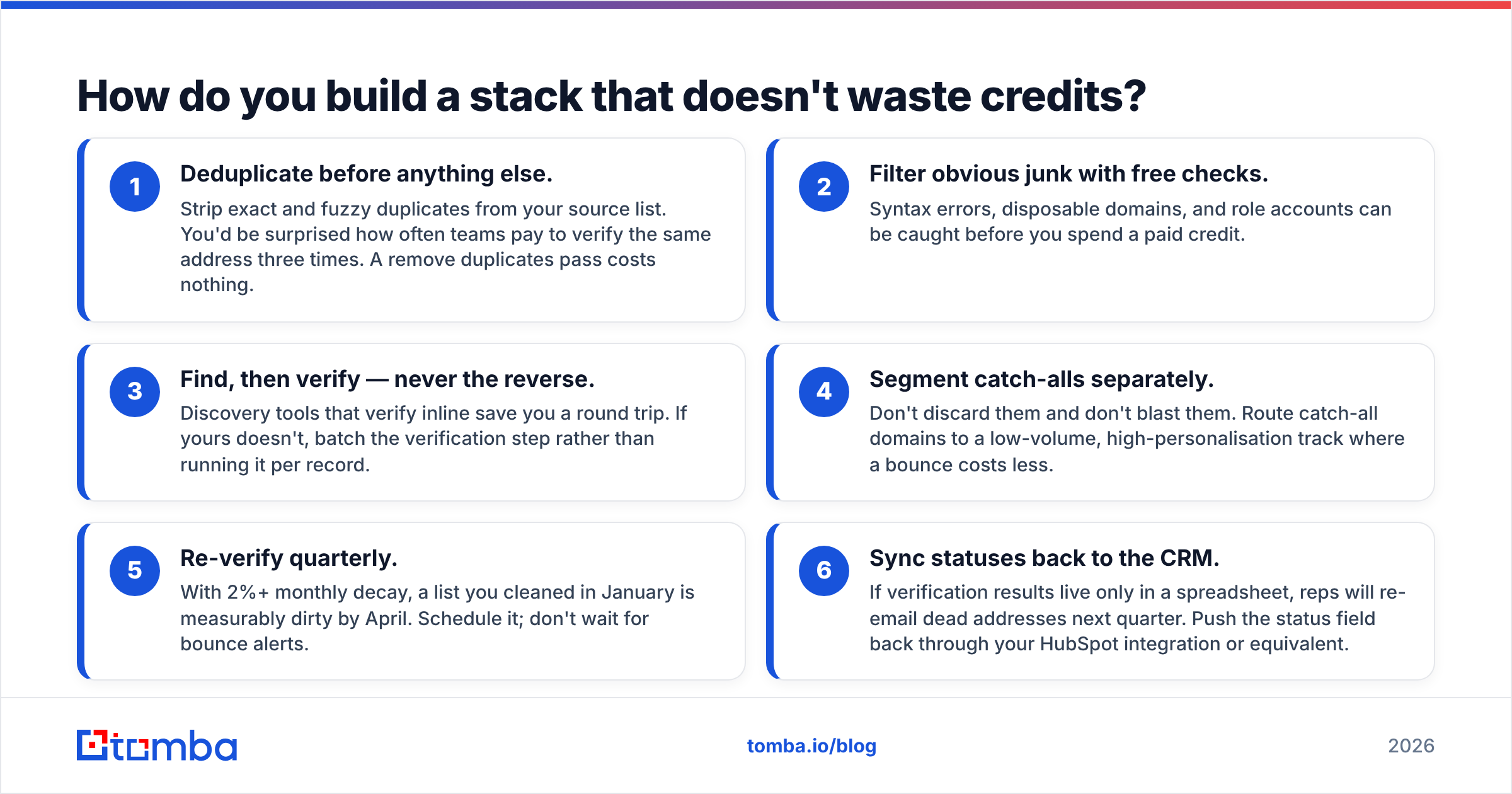
Whatever you buy, sequence it correctly. Most credit waste comes from doing these steps out of order.
- Deduplicate first. Strip exact and fuzzy duplicates from your source list. Teams often pay to verify the same address three times. A remove duplicates pass costs nothing.
- Filter junk with free checks. Catch syntax errors, disposable domains, and role accounts before you spend a paid credit.
- Find, then verify. Never the reverse. Tools that verify inline save you a round trip. If yours does not, batch the verification step.
- Segment catch-alls. Do not discard them and do not blast them. Route them to a low-volume, high-personalisation track where a bounce costs less.
- Re-verify quarterly. At 2%+ monthly decay, a list you cleaned in January is dirty by April. Schedule it.
- Sync statuses back to the CRM. If results live only in a spreadsheet, reps will re-email dead addresses next quarter. Push the status field through your HubSpot integration.
Teams that follow this order usually cut verification spend by a third. Bounce rates settle under 2% within one cycle.
What's the final verdict?#
If you must pick one: Kaspr if you have no contacts, EmailVerify.io if you have too many bad ones. Discovery beats hygiene when your pipeline is empty. Hygiene beats discovery when your domain reputation is at risk.
But the framing is the trap. EmailVerify.io vs Kaspr compares a supply source to a quality gate and calls it a choice. Most teams end up paying both vendors, exporting between them, and reconciling two schemas by hand. That is the most expensive outcome of all.
Run the 100-contact bake-off. Include a unified platform as a third column. If one tool matches Kaspr's discovery and your verifier's precision within a few points, the two-vendor stack stops being defensible on cost or workflow.
Start with the free tier. Tomba's email finder gives you 25 searches a month at no cost. That is enough to run a real accuracy test against your own known-good contacts before you commit budget. Every result is verified in the same call, catch-alls get a dedicated checker, and paid plans start at $49/mo with no per-seat charge. Test it on your own ICP's domains. That is the only benchmark that matters.
Related guides#
Ready to find emails that actually work?
Join 150,000+ professionals who stopped guessing and started sending. Free credits on signup — no credit card required.
Get the Tomba newsletter
Practical outbound tactics and product updates — once every two weeks.
About the author