EmailVerify.io vs LeadsForge: Which Tool Wins in 2026?
One tool cleans lists, the other builds them — and buying the wrong one costs you a quarter of pipeline. Here's an honest head-to-head on accuracy, pricing, and workflow fit, plus when neither is the right answer.
EmailVerify.io vs LeadsForge is a fair question with an odd answer: the two tools do different jobs. One cleans the list you already have. The other builds the list you lack. This guide breaks the EmailVerify.io vs LeadsForge choice down by price, accuracy and workflow fit — and names the cases where neither one is the right buy.
TL;DR
- They are not the same category. EmailVerify.io cleans lists. You feed it addresses you already own. LeadsForge finds leads. It hands you contacts you did not have. So EmailVerify.io vs LeadsForge is really a question about which problem to solve first.
- If your bounce rate is above 3%, buy verification. Nothing else in your stack matters until your mail reaches the inbox.
- If you reach the inbox but have no volume, buy sourcing. A clean list of 200 contacts does not build pipeline.
- Credit math beats sticker price. A $29 plan can burn credits on unknowns and catch-alls. A $49 plan that returns a usable result the first time costs you less.
- Most teams need both jobs done. That is why single-vendor stacks that find and verify (Tomba, Hunter, Findymail) tend to win on total cost.
EmailVerify.io vs LeadsForge: what does each tool do?#
EmailVerify.io is an email verification tool. You upload a CSV, or call an API, with addresses you scraped, imported from an old CRM, or collected on a form. It returns a status for each address: valid, invalid, catch-all, role-based, disposable, or unknown. That is the whole job. It does not tell you who to email. It tells you whether the person you picked can receive mail.
LeadsForge is a lead-sourcing tool. You describe your ideal customer — industry, headcount, region, job title, sometimes a tech signal. It returns matching companies and contacts with work emails attached. Sourcing is the product. Verification, where it exists, is a bundled extra rather than the core engine.
That gap matters more than any feature bullet. In head-to-head searches like "emailverifyio vs leadsforge," most people are really asking something else: which failure costs me more right now — bad data, or not enough data? Answer that, and the EmailVerify.io vs LeadsForge choice mostly makes itself.
One note before the tables. Both vendors change pricing and credit rules often. Neither one publishes a standard accuracy benchmark. Everything below reflects public positioning at the time of writing. Check each vendor's own pricing page before you sign an annual plan, and test any accuracy claim on your own list.

EmailVerify.io vs LeadsForge: how do the products differ?#
Here is the structural comparison. Not features for their own sake — the four things that change how you work day to day.
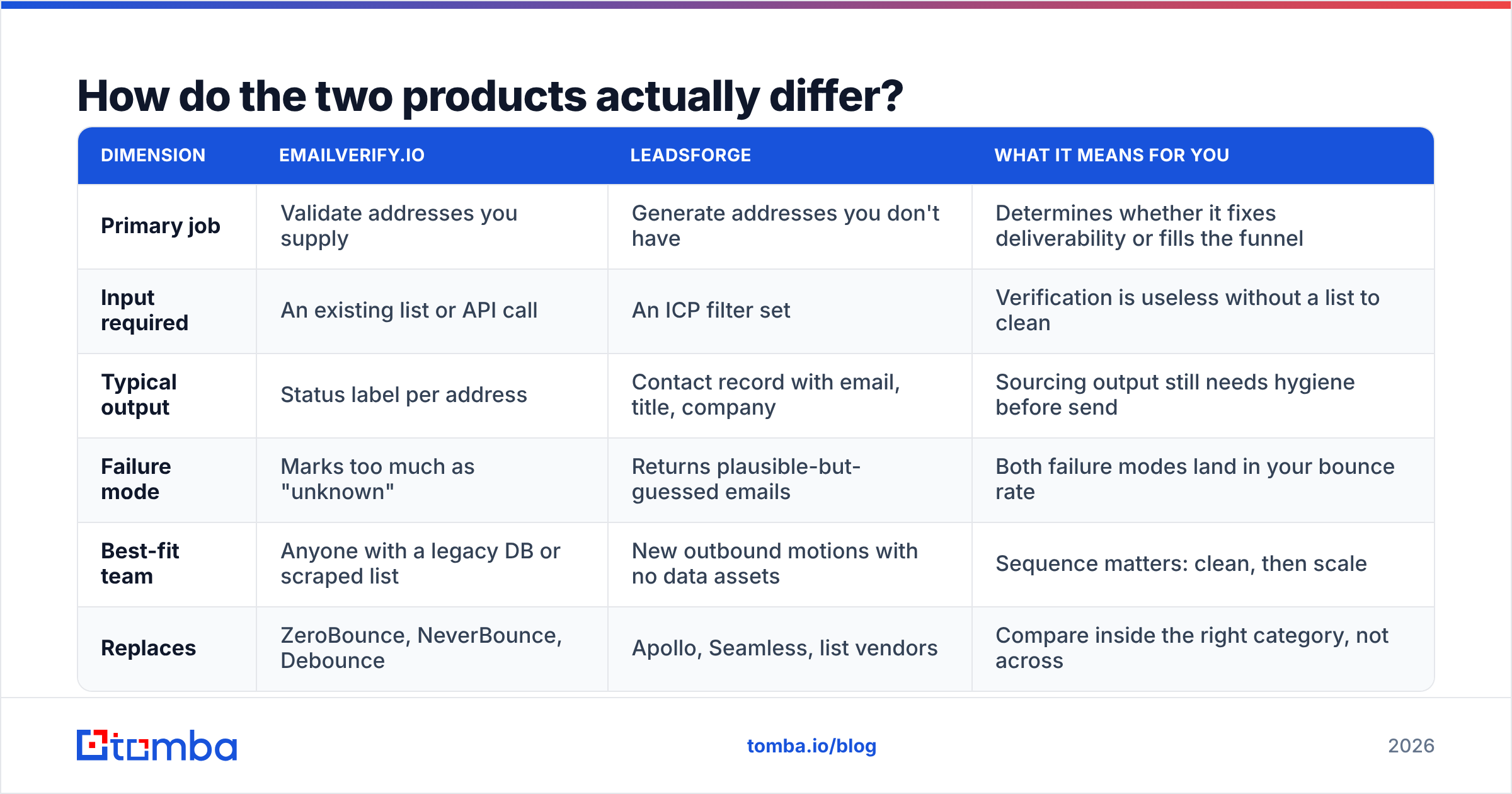
| Dimension | EmailVerify.io | LeadsForge | What it means for you |
|---|---|---|---|
| Primary job | Validate addresses you supply | Generate addresses you don't have | Determines whether it fixes deliverability or fills the funnel |
| Input required | An existing list or API call | An ICP filter set | Verification is useless without a list to clean |
| Typical output | Status label per address | Contact record with email, title, company | Sourcing output still needs hygiene before send |
| Failure mode | Marks too much as "unknown" | Returns plausible-but-guessed emails | Both failure modes land in your bounce rate |
| Best-fit team | Anyone with a legacy DB or scraped list | New outbound motions with no data assets | Sequence matters: clean, then scale |
| Replaces | ZeroBounce, NeverBounce, Debounce | Apollo, Seamless, list vendors | Compare inside the right category, not across |
The practical result: if you buy LeadsForge and skip verification, you pay for verification later anyway. You pay in credits, or you pay in domain reputation. If you buy EmailVerify.io with no sourcing engine, you get a spotless list of 400 contacts — and a rep with nothing to do by Wednesday.
Which one is more accurate?#
Accuracy means two different things here, and vendors use that to their advantage.
For a verifier, accuracy asks two questions. Of the addresses you marked "valid," how many actually landed? And how much of the list did you refuse to judge? A verifier that returns 30% "unknown" can claim near-perfect precision on the rest. You are still stuck with a third of your list. Judge a verifier on both numbers at once — precision and coverage.
For a finder, accuracy asks: of the emails returned, how many bounce? Some finders guess patterns like first.last@domain.com with no SMTP check. They return something for every query, so their hit rate looks great. A finder that returns nothing 20% of the time is often the more honest product.

Here is the 2026 reality: catch-all domains are where accuracy claims go to die. About a third of business domains accept all mail at the SMTP layer. A standard ping tells you nothing. Some vendors label those addresses "valid." The dashboard looks great; the bounce report does not. Others label them "unknown" and hand the problem back to you. The right answer is a separate catch-all step. That is why a catch-all verifier is its own line item in serious stacks, not a checkbox.
Run this test before you sign with either vendor.
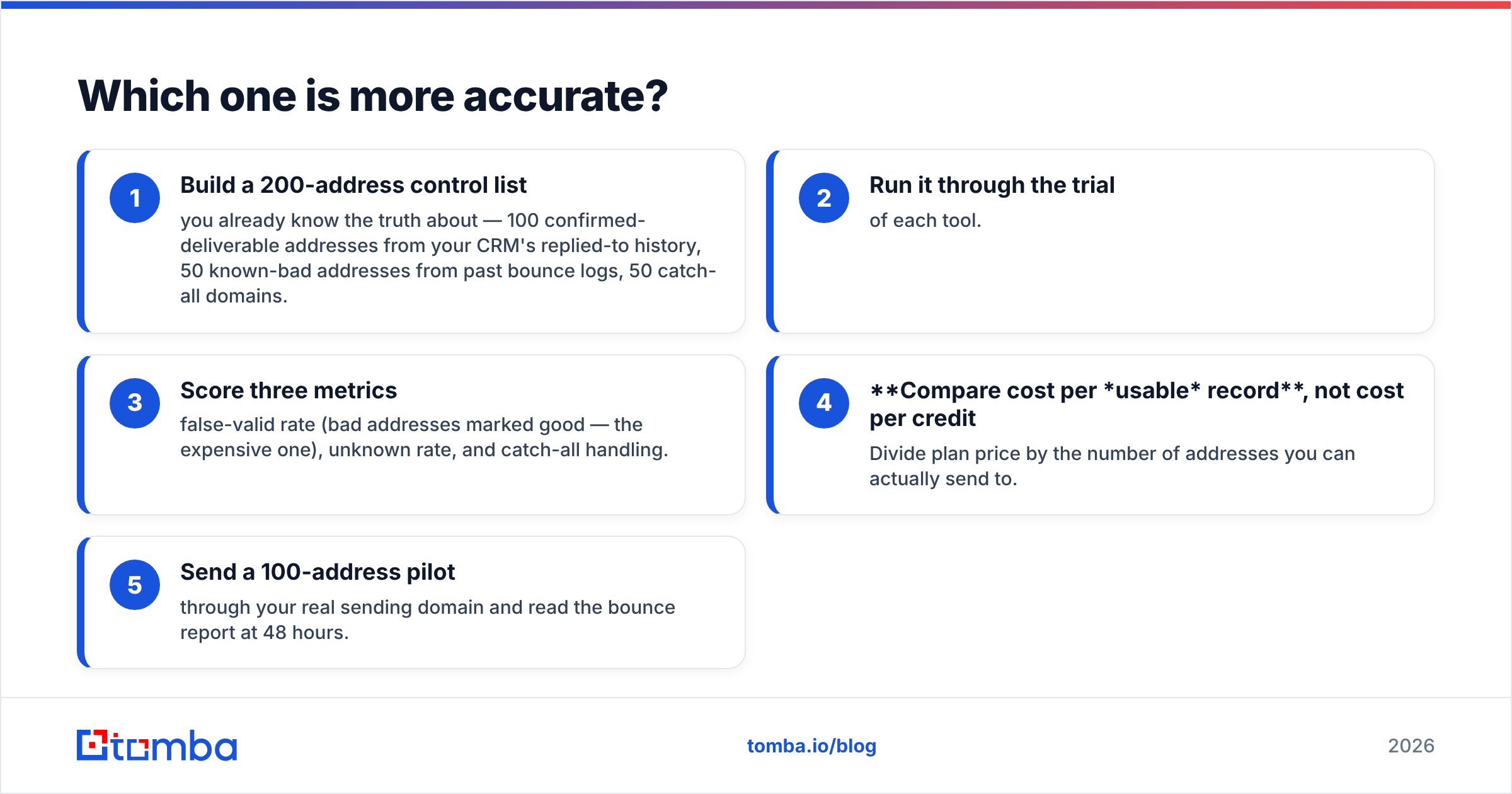
- Build a 200-address control list you know the truth about. Use 100 addresses that have replied to you, 50 known-bad ones from old bounce logs, and 50 catch-all domains.
- Run it through each free trial.
- Score three numbers: false-valid rate (bad marked good — the costly one), unknown rate, and catch-all handling.
- Compare cost per usable record, not cost per credit. Divide the plan price by the addresses you can really send to.
- Send a 100-address pilot from your real sending domain. Read the bounce report after 48 hours.
That takes an afternoon. It beats every comparison article on the internet, including this one.
What do the plans actually cost?#
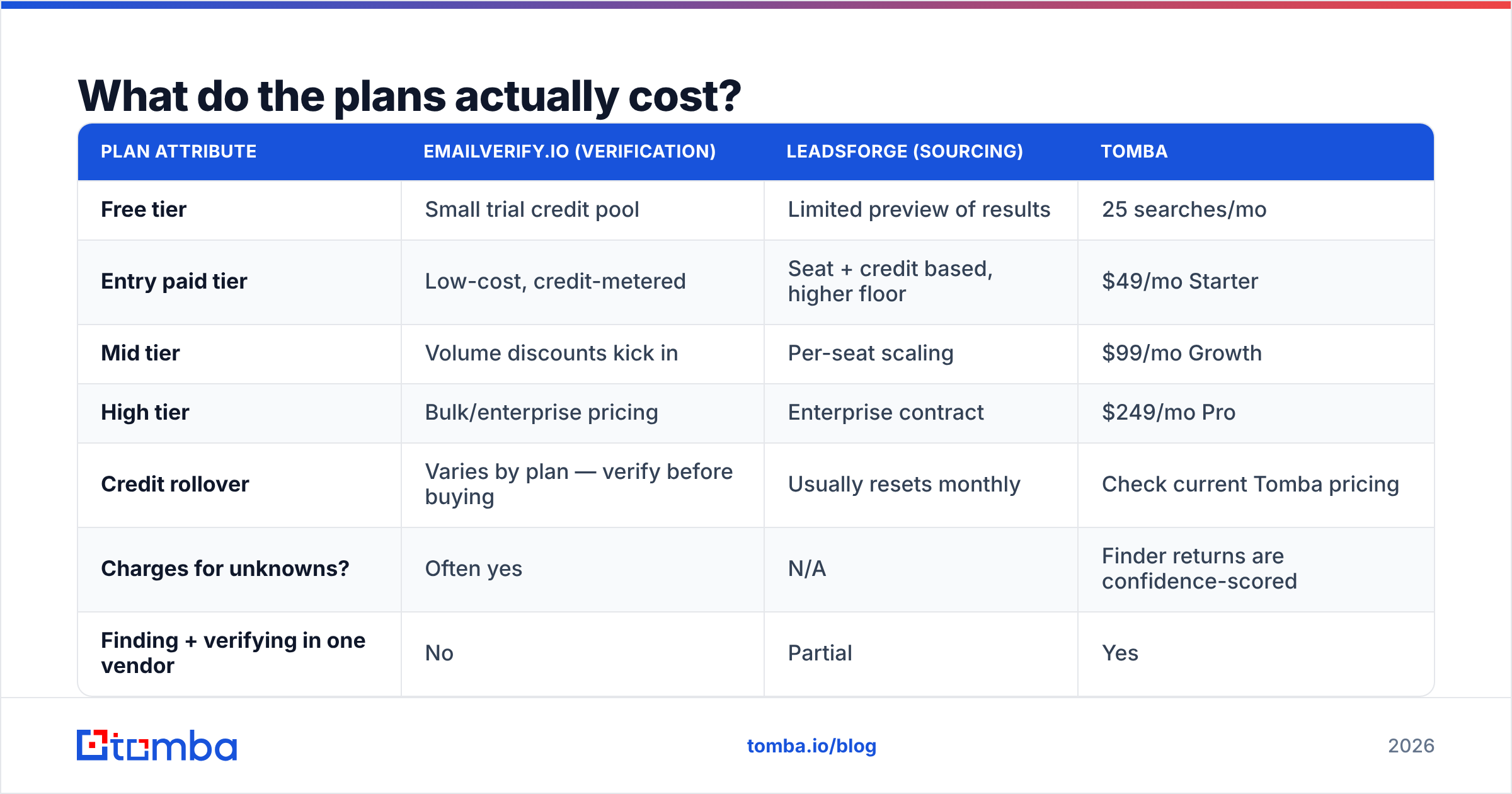
Verification and sourcing are priced in different units, so raw price comparison misleads. Verification is cheap per record, often a fraction of a cent at volume, because it is a lookup. Sourcing costs more per record because you are buying a dataset. Here is the shape of the market in EmailVerify.io vs LeadsForge terms, with Tomba as a same-category reference point.
| Plan attribute | EmailVerify.io (verification) | LeadsForge (sourcing) | Tomba |
|---|---|---|---|
| Free tier | Small trial credit pool | Limited preview of results | 25 searches/mo |
| Entry paid tier | Low-cost, credit-metered | Seat + credit based, higher floor | $49/mo Starter |
| Mid tier | Volume discounts kick in | Per-seat scaling | $99/mo Growth |
| High tier | Bulk/enterprise pricing | Enterprise contract | $249/mo Pro |
| Credit rollover | Varies by plan — verify before buying | Usually resets monthly | Check current Tomba pricing |
| Charges for unknowns? | Often yes | N/A | Finder returns are confidence-scored |
| Finding + verifying in one vendor | No | Partial | Yes |
Two pricing traps are worth naming.
Trap one: credits burned on non-answers. Say a verifier charges a credit for every address it processes, then returns "unknown" on 25% of them. Your real price is 33% above the sticker. Ask about this in writing during the trial.
Trap two: seat minimums on sourcing tools. Sourcing platforms often price per seat, with a two- or three-seat floor. A two-person SDR team can pay an enterprise-sized invoice for a dataset they open twice a week. Credit-metered tools with one admin seat are usually cheaper for small teams.
For a broader view of how buyers rate each category, the G2 email verification category is a fair neutral start. Filter the reviews by company size. Life at 10 employees and life at 1,000 employees are not the same.
Which fits your workflow better?#
Forget features for a moment. Match the tool to the motion you actually run.
- Inherited CRM cleanup. You joined a company with 80,000 contacts of unknown age. This is a pure verification job: bulk upload, dedupe, suppress. Run a remove duplicates pass first. Deduping can cut the bill by 10–20%.
- Cold outbound from zero. No data assets, and a big pipeline target. You need sourcing first, then a verification pass on whatever comes back.
- Account-based, narrow list. Fifty named accounts, five people each. Database filters are overkill here. A domain search on your target domains plus a little manual work gets you a better list, faster.
The next three cases all lean the same way: both jobs, one workflow.
- High-volume, always-on sequences. You send 5,000+ emails a month. You need both functions and an API. Manual CSV round-trips between two vendors break the week someone takes a holiday.
- Recycling old leads. Leads from 18 months ago decay at roughly 25–30% a year as people change jobs. That is verification plus fresh data, not new sourcing.
- Inbound follow-up. Form fills carry typos and role-based addresses. Verify with a real-time API at the point of capture, not in a batch later.
Notice how many rows need both jobs. That is the honest case for one vendor. It is not that any single feature is best in class. It is that CSV hand-offs between two tools are where data quality dies.

Does verification alone fix deliverability?#
No, and this is where a lot of buyers get burned. Verification protects you from bounce-driven reputation damage. It does nothing about the other three failure modes.
- Authentication. If SPF, DKIM and DMARC do not line up, mailbox providers push you down no matter how clean your list is. Google's bulk sender requirements have been enforced since 2024 and are the practical baseline. Check yours with an SPF checker before you blame your data vendor.
- Volume ramp. A brand-new domain that sends 2,000 emails on day one gets filtered, even with a flawless list.
- Content and engagement. Spammy phrasing and near-zero reply rates hurt sender reputation on their own, with no bounces involved.
So when a vendor hints that verification will "fix deliverability," read it as "verification removes one of four causes." Necessary, but not enough.
Where does Tomba fit in this comparison?#
Honestly: Tomba competes with both, and beats neither on every axis.
Against a dedicated verifier, a pure-play tool may offer finer status codes and slightly cheaper bulk rates at seven-figure volumes. If list hygiene is the only job you will ever have, a specialist is a fair choice.
Against a sourcing platform, a large database vendor will have wider company filters, intent signals and org-chart data. If your motion runs on intent scoring, buy an intent product.
Tomba wins in the middle. It suits teams that need to find an address and confirm it in one pass, with no CSVs moving between vendors:
- The email finder returns a confidence score instead of a flat guess. You set your own risk threshold rather than accept the vendor's.
- The email verifier and catch-all handling run on the same records. There is no export step.
- Pricing starts at $49/mo Starter, with a free tier of 25 searches. Both functions draw from one credit pool, so you never pay two vendors to process the same record twice.
- The Tomba API exposes find and verify on the same endpoints. That matters when you wire this into a CRM instead of clicking through a dashboard.
If you want the wider landscape rather than a two-way fight, the table below is the version most buyers need.

So which should you buy?#
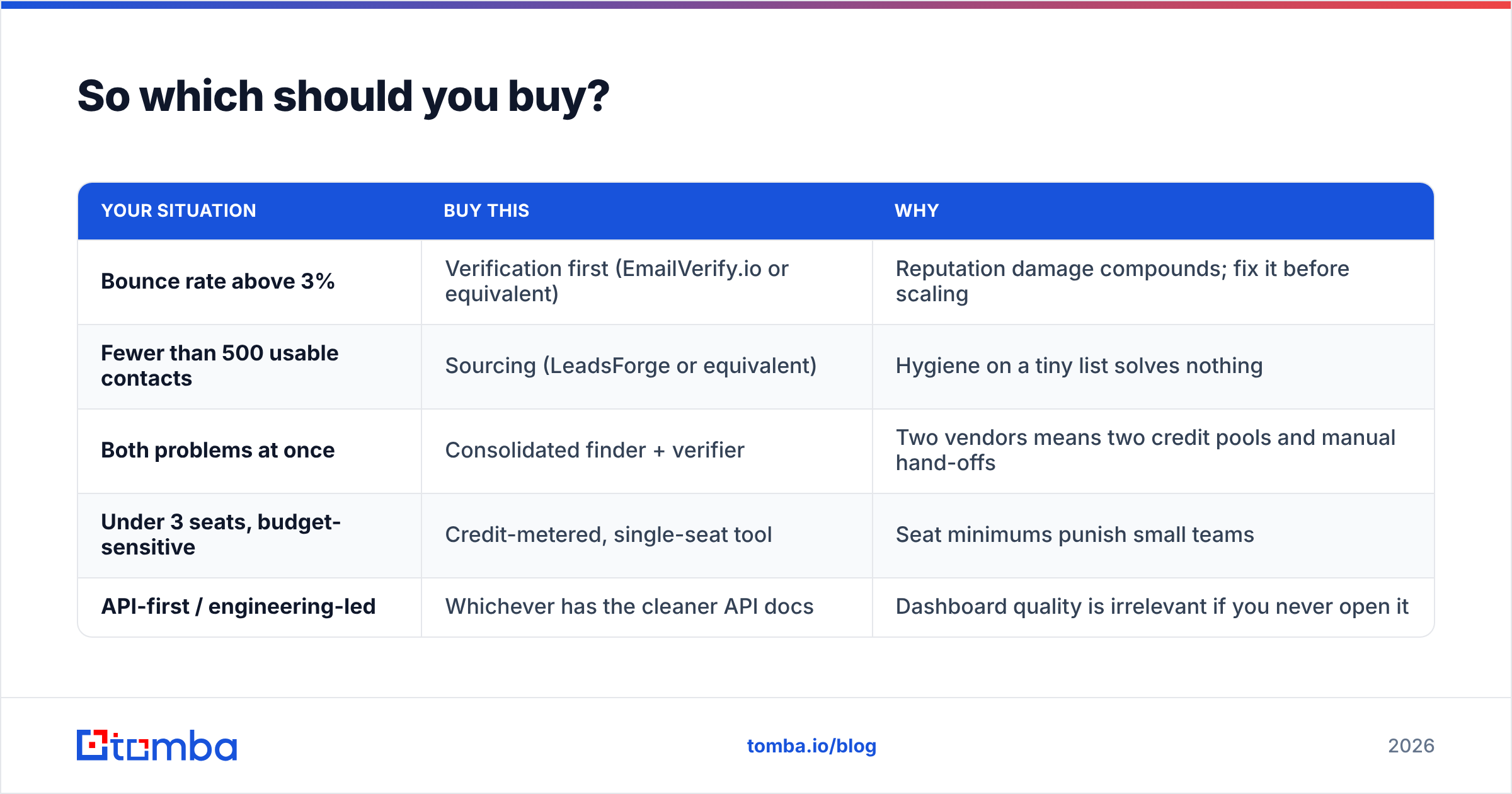
Decide by symptom, not by feature list. That is the fastest way to settle EmailVerify.io vs LeadsForge for your own team.
| Your situation | Buy this | Why |
|---|---|---|
| Bounce rate above 3% | Verification first (EmailVerify.io or equivalent) | Reputation damage compounds; fix it before scaling |
| Fewer than 500 usable contacts | Sourcing (LeadsForge or equivalent) | Hygiene on a tiny list solves nothing |
| Both problems at once | Consolidated finder + verifier | Two vendors means two credit pools and manual hand-offs |
| Under 3 seats, budget-sensitive | Credit-metered, single-seat tool | Seat minimums punish small teams |
| API-first / engineering-led | Whichever has the cleaner API docs | Dashboard quality is irrelevant if you never open it |
One last piece of advice. Run both trials on the same 200-address control list, in the same week. Vendor benchmarks are marketing. Your list is the only benchmark that predicts your bounce rate. Teams that skip this step almost always overpay, because they buy on feature count instead of cost per usable record. Vendor-neutral resources on B2B data decay explain why that number moves every quarter.
Ready to test the middle path?#
Maybe your honest diagnosis is "I need more contacts and I need them to land." Then running two vendors is the expensive way to get there. Skip the EmailVerify.io vs LeadsForge standoff and start with the Tomba Email Finder. The free tier gives you 25 searches a month — enough to run the 200-address control test above on your own accounts. Find the addresses, verify them in the same pass, then compare the bounce report against your current tool. If a specialist beats it on your data, buy the specialist. That is the only comparison that counts.
Related guides#
Ready to find emails that actually work?
Join 150,000+ professionals who stopped guessing and started sending. Free credits on signup — no credit card required.
Get the Tomba newsletter
Practical outbound tactics and product updates — once every two weeks.
About the author