Enrichley vs FindThatLead: Which Email Finder Wins in 2026?
Enrichley and FindThatLead both promise verified B2B emails, but they solve different problems. Here's how they compare on accuracy, credit models, real cost per usable contact, and which one belongs in your outbound stack.
TL;DR
- FindThatLead is the older, broader tool: domain-based prospecting, a Chrome extension, lead search by role and location, and a built-in cold-email sender. It's a prospecting suite with a finder attached.
- Enrichley positions itself as an enrichment-first layer — you bring a list of names, domains, or CRM records and it fills in the missing contact data. It's a pipe, not a workspace.
- The real decision is not "which finds more emails" but which one wastes fewer credits on contacts you can't email. Both charge on attempts or results in ways that make the sticker price misleading.
- Neither publishes an independently audited accuracy figure. Run a 200-contact bake-off on your own ICP before you commit to an annual plan — vendor-reported match rates are marketing numbers, not benchmarks.
- If you mostly need clean, verified emails at a predictable per-credit cost with an API you can wire into anything, a dedicated finder like Tomba Email Finder usually beats both on cost per usable contact.
What are Enrichley and FindThatLead?#
They sit at opposite ends of the same workflow.
FindThatLead launched in 2015 out of Barcelona and grew up during the first wave of growth-hacking tools. Its core loop: type a domain, get the people who work there, export or push them straight into a cold-email campaign. It bundles a lead search by job title and geography, a Chrome extension for scraping profiles, an email verifier, and Scrab.in for LinkedIn automation. The pitch is "prospect and send in one place."
Enrichley approaches from the data side. Instead of a discovery UI you live in all day, it's built to take a list you already have — company names, domains, first/last names, or half-complete CRM rows — and return enriched records with work emails and firmographics. Think of FindThatLead as a fishing rod and Enrichley as a filter you pour muddy water through. One finds new prospects; the other cleans up the ones you already collected.
That distinction matters more than any feature checklist. If you don't already have a list, an enrichment-first tool has nothing to chew on. If you already have 40,000 CRM records with missing emails, a prospecting suite makes you do the work twice.
How do Enrichley and FindThatLead compare head-to-head?#
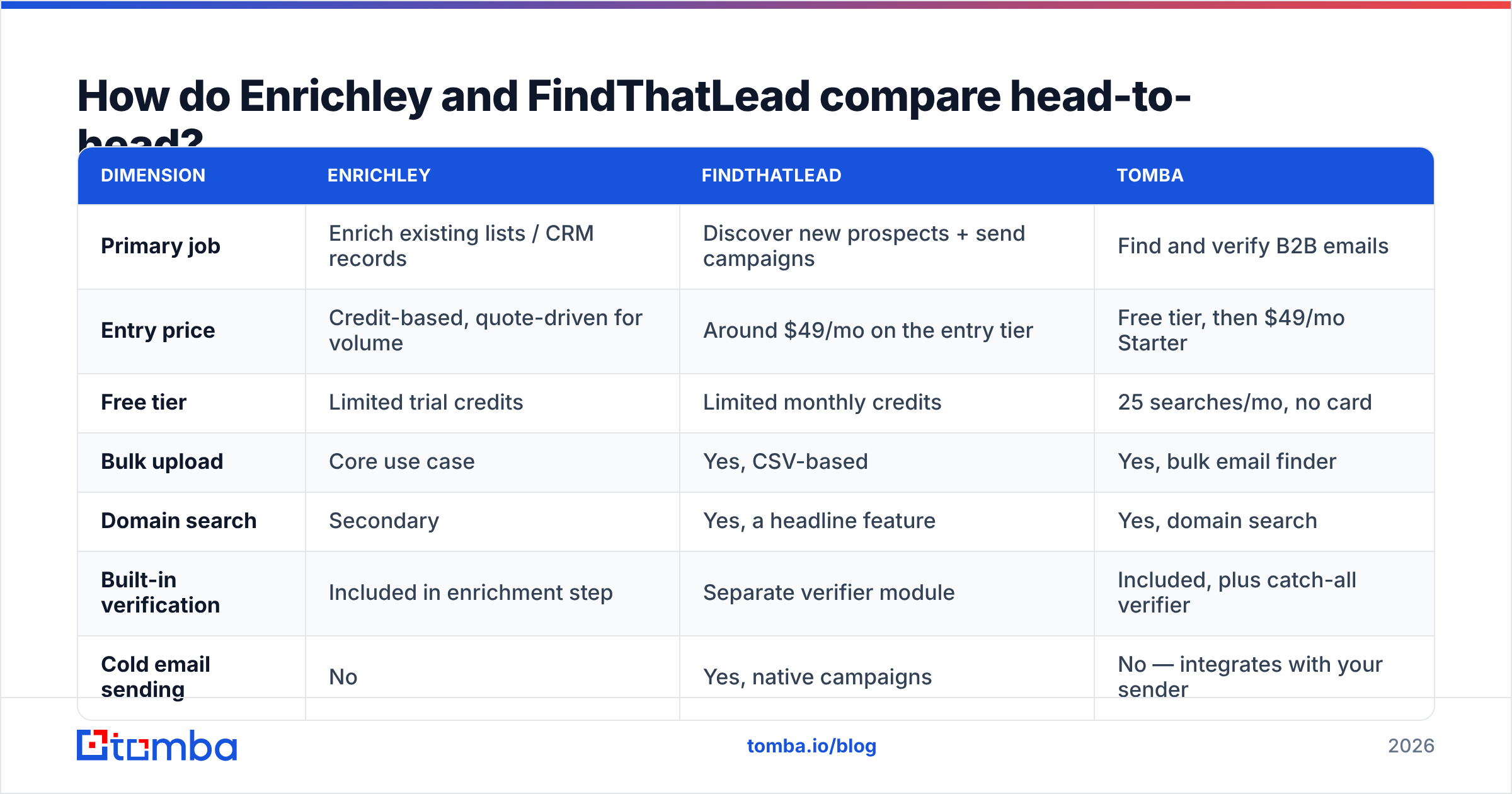
Here's the honest comparison. Note the pricing caveat below the table — both vendors have changed tiers more than once, so treat these as directional and verify on their live pricing pages before you buy.
| Dimension | Enrichley | FindThatLead | Tomba |
|---|---|---|---|
| Primary job | Enrich existing lists / CRM records | Discover new prospects + send campaigns | Find and verify B2B emails |
| Entry price | Credit-based, quote-driven for volume | Around $49/mo on the entry tier | Free tier, then $49/mo Starter |
| Free tier | Limited trial credits | Limited monthly credits | 25 searches/mo, no card |
| Bulk upload | Core use case | Yes, CSV-based | Yes, bulk email finder |
| Domain search | Secondary | Yes, a headline feature | Yes, domain search |
| Built-in verification | Included in enrichment step | Separate verifier module | Included, plus catch-all verifier |
| Cold email sending | No | Yes, native campaigns | No — integrates with your sender |
| Chrome extension | Limited | Yes | Yes |
| Public API | Yes | Yes | Yes, documented at Tomba API |
| Phone numbers | Some plans | Limited | Yes, phone finder |
| Best for | RevOps cleaning a database | Solo founders and small growth teams | Teams that want accuracy per credit |
Pricing caveat: neither Enrichley nor FindThatLead is a fixed-price product in practice. Both use credit systems where a "credit" can mean an attempt, a result, or a row processed depending on the plan. Two vendors quoting the same $/credit can differ 3x in real cost. Always ask, in writing: do I pay for failed lookups?
How accurate are they, really?#
Nobody publishes a number you should trust at face value, including tools you like.

Here's why vendor-quoted accuracy is close to meaningless without context:
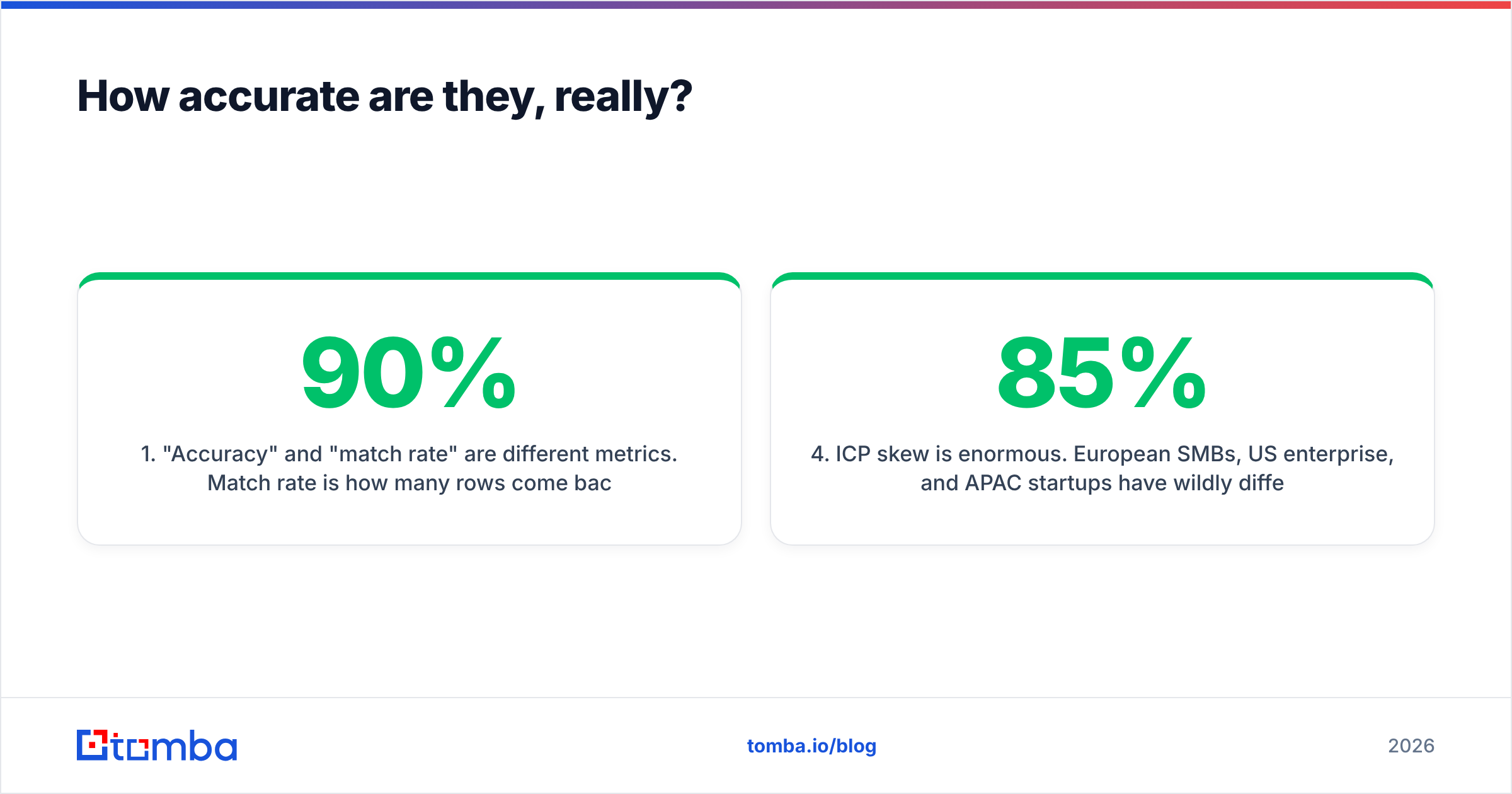
- "Accuracy" and "match rate" are different metrics. Match rate is how many rows come back with something. Accuracy is how many of those actually deliver. A tool can hit a 90% match rate and a 60% accuracy rate at the same time, and the marketing page will show you the 90%.
- Guessed patterns inflate both numbers. If a tool sees
first.last@acme.comused by three employees, it can emit that pattern for every other Acme employee it knows about. Some of those people exist. Some left in 2023. Some never had a mailbox. - Catch-all domains break SMTP checks. Roughly a third of mid-market domains accept mail for any address, so a verifier can't confirm or deny. Tools handle this three ways: mark it risky, mark it valid (dangerous), or run a deeper heuristic pass. Ask which one you're getting — this is where a catch-all finder earns its keep.
- ICP skew is enormous. European SMBs, US enterprise, and APAC startups have wildly different coverage. A tool that scores 85% on SaaS in the US may score 45% on German manufacturing.
- Freshness beats size. A 700M-record database refreshed every 18 months is worse than a 200M-record one refreshed monthly. Ask about refresh cadence, not row count. Tomba documents where the data comes from for exactly this reason.
The only accuracy test that counts is yours. Take 200 contacts from your actual target segment, run them through each tool, then send a real (small, warmed) campaign and measure hard bounces. That number is the truth. Everything else is a slide.
What does each one actually cost per verified email?#
Sticker price per credit is the wrong denominator. The right one is cost per contact you can safely email.
Work it out like this: take your monthly plan cost, divide by the number of results that survive verification. If a $99 plan returns 2,000 emails and 30% are risky or catch-all with no confidence score, you paid $99 for roughly 1,400 usable contacts — about 7 cents each, not the 5 cents advertised.
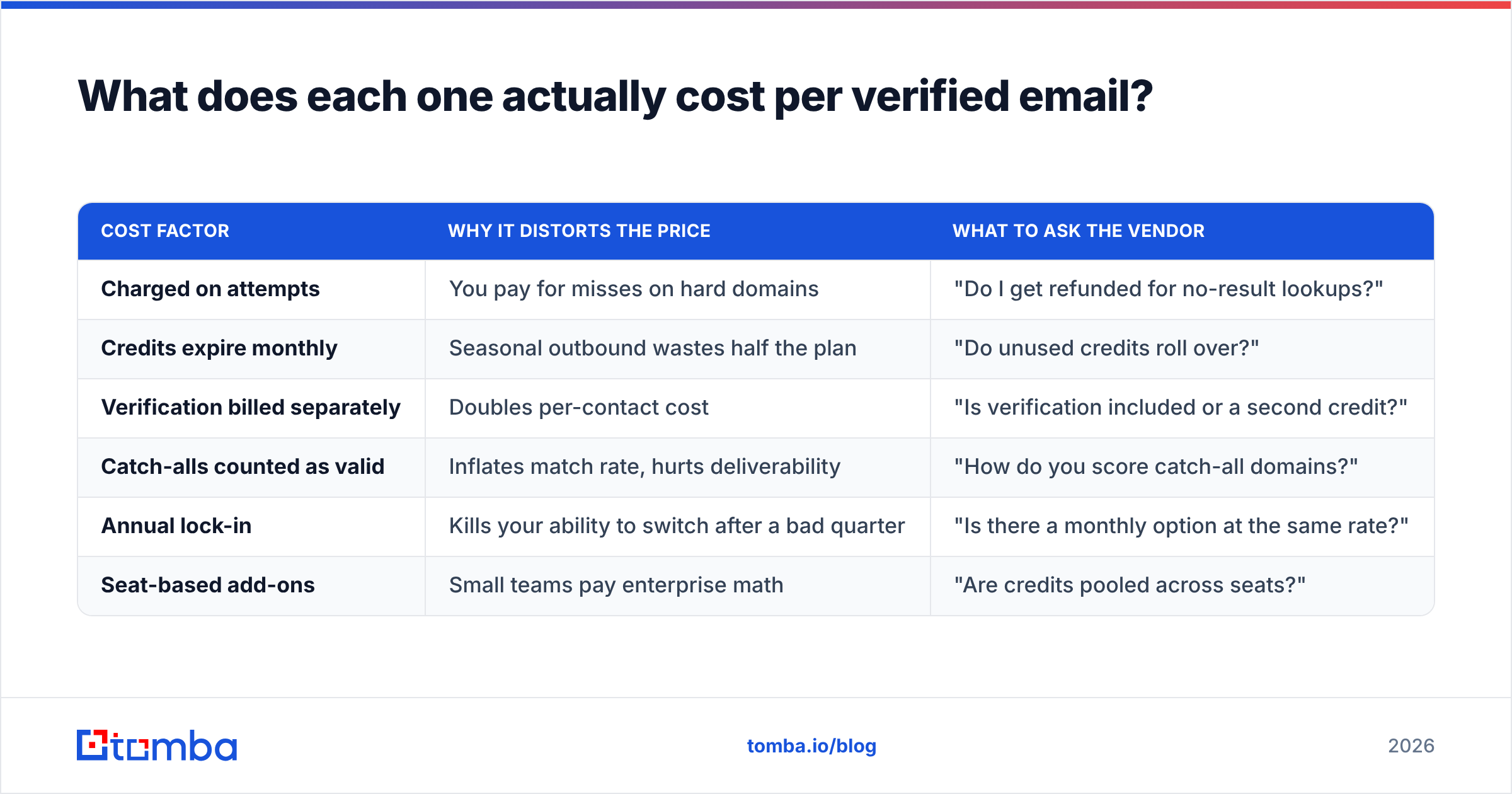
| Cost factor | Why it distorts the price | What to ask the vendor |
|---|---|---|
| Charged on attempts | You pay for misses on hard domains | "Do I get refunded for no-result lookups?" |
| Credits expire monthly | Seasonal outbound wastes half the plan | "Do unused credits roll over?" |
| Verification billed separately | Doubles per-contact cost | "Is verification included or a second credit?" |
| Catch-alls counted as valid | Inflates match rate, hurts deliverability | "How do you score catch-all domains?" |
| Annual lock-in | Kills your ability to switch after a bad quarter | "Is there a monthly option at the same rate?" |
| Seat-based add-ons | Small teams pay enterprise math | "Are credits pooled across seats?" |
FindThatLead's advantage on this math is bundling: if you'd otherwise pay separately for a sender, the campaign tool absorbs part of the cost. Its disadvantage is that bundled senders are rarely as good as a dedicated one, and you end up paying for a feature you replace within a year.
Enrichley's advantage is that enrichment-first pricing tends to be closer to pay-for-results, which suits large one-off cleanups. Its disadvantage is that it's not a discovery tool — you still need a source of names.
Tomba's pricing sits in the middle deliberately: a free tier at 25 searches/mo to test, $49/mo Starter, $99/mo Growth, $249/mo Pro, and custom Enterprise, with verification built into the same flow rather than sold as a second product.
Which tool should you pick for your team?#
Pick by workflow shape, not feature count.
- Solo founder doing 50 outbound emails a week. FindThatLead is defensible — one login, one bill, campaigns included. You'll outgrow the sender before the finder.
- RevOps cleaning a 50,000-row CRM. Enrichley's model fits. You have the list; you need fill rate and a sane per-row cost. Ask hard about refunds on no-results.
- SDR team of 5–15 running structured sequences. You want a finder that feeds an existing sequencer (Instantly, Smartlead, Salesloft) via API and doesn't try to be the sequencer. That's where a focused tool wins.
- Engineering-led growth teams. The deciding factor is the API and the SDK surface — rate limits, batch endpoints, webhook support, and whether there's a CLI or MCP server so agents can call it directly.
- Agencies running multiple client ICPs. Credit pooling and per-client segmentation matter more than raw match rate. Ask whether credits are shared across sub-accounts.
- Anyone in a regulated or EU-heavy market. Check the data-sourcing documentation and GDPR posture before match rate. A high-coverage tool you can't legally use in Germany is worth zero.
Where do both tools fall short?#
Every comparison post that only lists strengths is an ad. Here are the honest gaps.
FindThatLead's weak points. The interface shows its age in places, and the bundled cold-email sender is adequate rather than competitive — most teams that scale past a few hundred sends a day migrate to a dedicated platform and end up paying for two tools. Its lead search skews toward domains and roles that were well indexed years ago, which means coverage on newer companies and non-English markets can be patchy. Support responsiveness is a recurring theme in G2 reviews across the category, so read recent ones, not the 2021 batch.
Enrichley's weak points. Enrichment-only means you're dependent on another tool for discovery, so it's rarely a complete answer for a team starting from zero. Documentation and public benchmarks are thinner than more established vendors, and quote-driven pricing makes it harder to model cost before you're in a sales conversation. If you're a two-person team that wants to swipe a credit card and start today, that friction is real.
Both. Neither is a substitute for deliverability hygiene. A perfect list still bounces if your SPF, DKIM, and DMARC are wrong or your domain isn't warmed. Run your domain through an SPF checker and a spam checker before you blame the data vendor. The mechanics of how mailbox providers evaluate a sending domain are worth understanding at a basic level — the email address and authentication standards behind it aren't optional trivia when you're sending at volume.
What are the alternatives worth testing?#
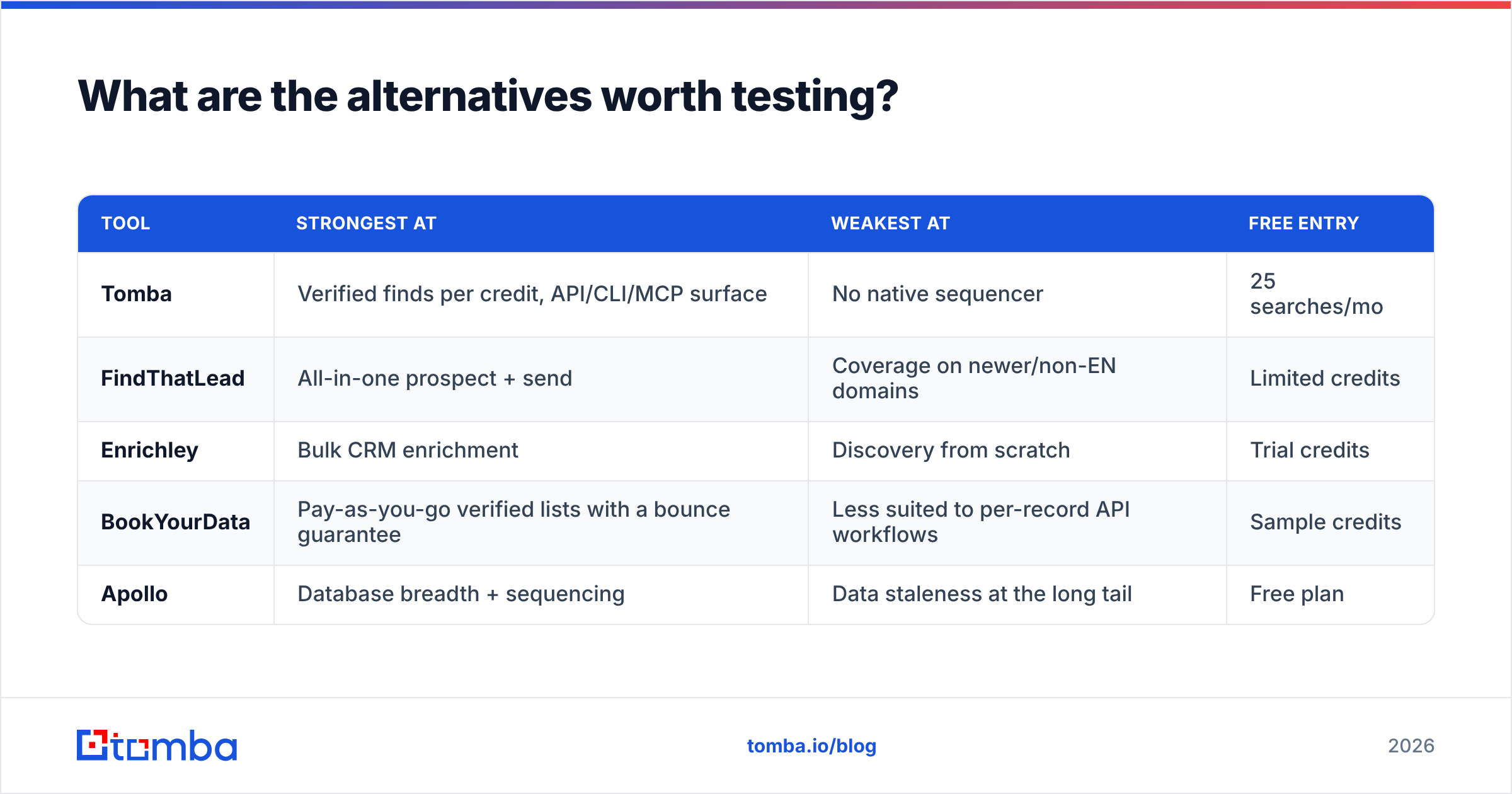
Run a three-way bake-off rather than a two-way one. The category has enough overlap that the third option often wins.

| Tool | Strongest at | Weakest at | Free entry |
|---|---|---|---|
| Tomba | Verified finds per credit, API/CLI/MCP surface | No native sequencer | 25 searches/mo |
| FindThatLead | All-in-one prospect + send | Coverage on newer/non-EN domains | Limited credits |
| Enrichley | Bulk CRM enrichment | Discovery from scratch | Trial credits |
| BookYourData | Pay-as-you-go verified lists with a bounce guarantee | Less suited to per-record API workflows | Sample credits |
| Apollo | Database breadth + sequencing | Data staleness at the long tail | Free plan |
Two practical notes. First, BookYourData is a genuinely strong option if you'd rather buy a pre-verified list than run lookups — different model, same outcome, and its bounce guarantee removes a lot of the credit-math anxiety described above. Second, if you're evaluating Apollo mainly for its database, read a focused Apollo alternative breakdown first; teams frequently pay for the whole platform when they only needed the finder.
For a structured way to run the bake-off, HubSpot's sales resources have decent templates for scoring vendors against weighted criteria — useful if you need to justify the pick to a finance team.
How should you run the test?#
Keep it small and measurable.
- Pull 200 contacts from your real ICP — same segment, same seniority, same geography. Not a mixed sample.
- Run the identical list through each tool. Record match rate, verified rate, and credits consumed separately.
- Push the survivors into a warmed inbox and send a low-volume real campaign. Measure hard bounces after 72 hours.
- Compute cost per non-bouncing contact. That single number decides it.
- Repeat on a second segment if you sell into more than one market. Coverage rarely transfers.
Most teams find the winner flips depending on segment — which is why "which is better" has no universal answer, and why anyone who gives you one without asking about your ICP is selling something.
Which one wins?#
If you need discovery plus sending in one bill and you're under a few hundred emails a week, FindThatLead is a reasonable pick. If you have a big list and need it filled in, Enrichley's model fits better. If what you actually need is the highest number of deliverable emails per dollar, with verification in the same call and an API clean enough to automate, neither is the obvious answer — and that's the gap most teams end up filling with a dedicated finder.
Start with the free tier of Tomba Email Finder — 25 searches a month, no card, verification included in the same lookup. Run it as the third leg of your bake-off against Enrichley and FindThatLead on the same 200 contacts. If it doesn't win on cost per non-bouncing contact for your ICP, you'll have learned that in an afternoon for free, which is a better outcome than learning it twelve months into an annual contract.
Related guides#
Ready to find emails that actually work?
Join 150,000+ professionals who stopped guessing and started sending. Free credits on signup — no credit card required.
Get the Tomba newsletter
Practical outbound tactics and product updates — once every two weeks.
About the author