Event Lead Generation in 2026: Turn Booths Into Pipeline
Most event leads die in a spreadsheet within 72 hours. Here's the full 2026 playbook for capturing, enriching, and converting event lead generation into real pipeline — with tools, costs, and timing benchmarks.
TL;DR
- Event lead generation fails at the handoff, not the booth. The average B2B team scans hundreds of badges and follows up on a fraction of them, usually after the buying moment has passed.
- The 72-hour window is real: outreach sent within three days of an event consistently outperforms week-later follow-up, because the attendee still remembers the conversation.
- Badge scan data is dirty by default — misspelled emails, personal Gmail addresses, and job titles typed by a temp at registration. Enrichment is not optional.
- Cost per event lead runs $150–$900 all-in once you count booth, travel, swag, and staff time. That is 10–50x the cost of a cold outbound lead, which is why wasting them is expensive.
- The winning stack is boring: capture tool → enrichment/verification → CRM with an event-specific field → a sequence written by someone who was actually there.
What is event lead generation, really?#
Event lead generation is the process of turning in-person or virtual event attendance into qualified, contactable, revenue-producing pipeline. That includes trade shows, conferences, your own field dinners, webinars, sponsored side events, and the hallway conversations nobody logged.
The definition matters because most teams silently redefine it as "collecting badge scans." Those are two different things. A badge scan is a raw record. A lead is a record you can reach, qualify, and route. The gap between them is where six-figure event budgets evaporate.
Think of it like fishing with a net versus fishing with a cooler. The net gets you volume — 800 scans in three days feels like a win on the flight home. But if you have no cooler, no ice, and no plan for the drive back, you land with a truck full of spoiled inventory. Event data spoils fast. Attendees change roles, forget your name, and get hit by twelve competitor emails from the same show.
Here's what separates a scan from a lead:
- Contact validity — the email on the badge resolves to a real, deliverable inbox, not
jsmith@gmial.comor a personal address the attendee never checks for work. - Firmographic context — you know company size, industry, and tech stack well enough to segment, not just a company name typed into a registration form.
- Conversation memory — a note from the person who talked to them, in their words, that survives past the flight home.
- Qualification signal — some evidence of fit or intent beyond "walked past the booth and wanted a t-shirt."
- Routing decision — an owner, a sequence, and a next step assigned before the badge scanner is returned to the show organizer.
- Speed — all of the above completed inside 72 hours, not queued behind the post-event expense report.
Miss any one of those six and the record decays into a name in a spreadsheet somebody exports once and never opens again.
Why do most event leads never convert?#
Three failure modes account for the overwhelming majority of wasted event spend, and none of them are about lead quality at the booth.
Failure one: the data arrives broken. Show organizers hand you a CSV days after the event. The badge data came from registration forms filled out on a phone in a taxi. Typos, abbreviations, personal addresses, and stale titles are the norm. If you push that file straight into your CRM and start sending, you generate bounces — and bounces damage your sender reputation right when you need deliverability most. A hard bounce rate above 2% is enough to get flagged by major mailbox providers.
Failure two: nobody owns the follow-up. Marketing ran the booth. Sales was supposed to follow up. The list sits in a shared drive while both teams assume the other has it. By the time somebody notices, it's three weeks post-show and the attendee has already taken a meeting with the vendor who emailed on Tuesday morning.
Failure three: the follow-up is generic. "It was great meeting you at SaaStr!" sent to 800 people, 600 of whom never spoke to you, is not follow-up — it's a newsletter with worse targeting. The attendee sees the template, remembers nothing specific, and archives it.
The fix for all three is structural, not motivational. You need a capture process that produces clean data, an enrichment step that fills the gaps, and a routing rule that assigns ownership before anyone boards a plane home.
How do you capture event leads without losing half of them?#
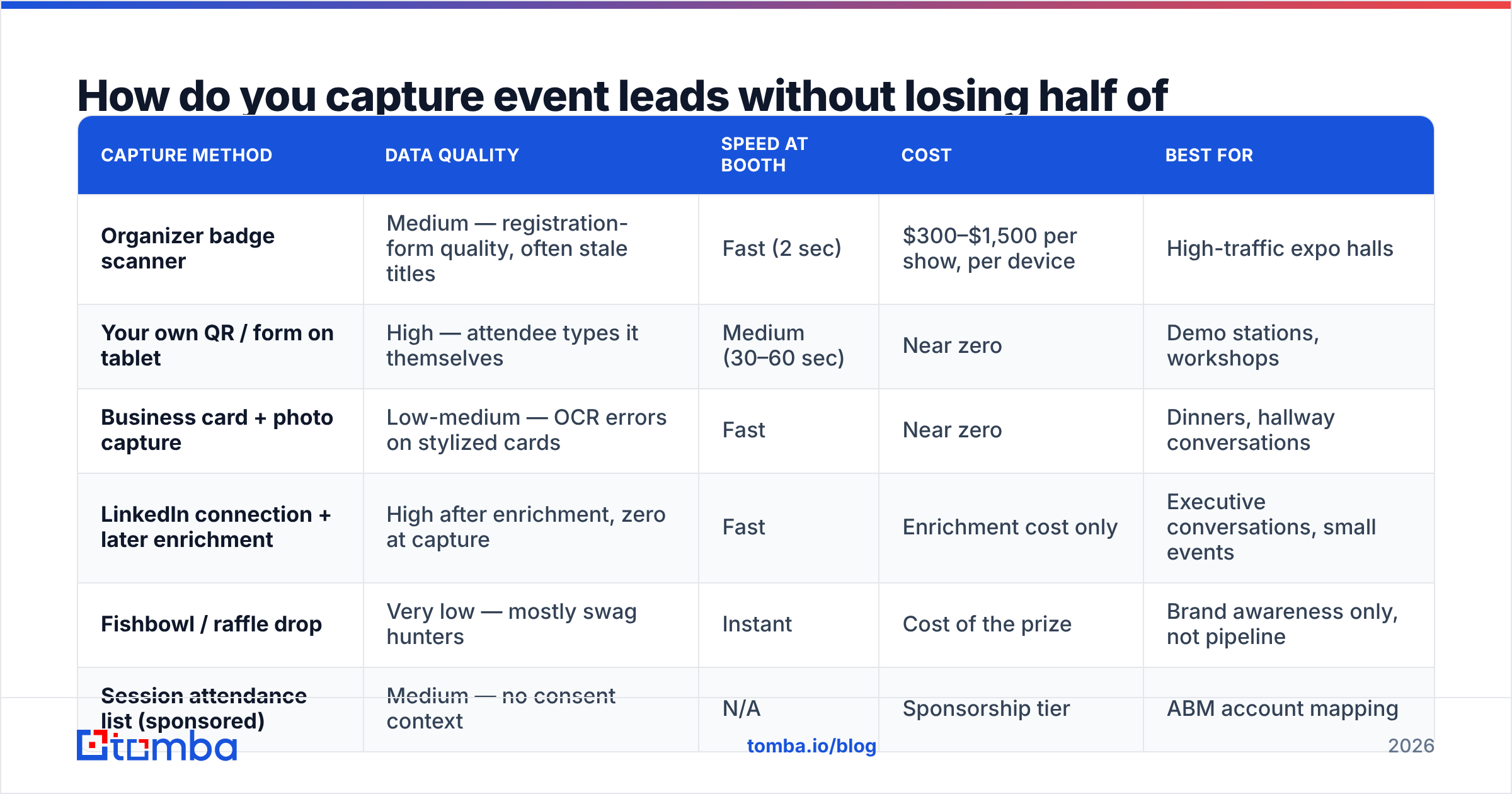
Capture method determines data quality more than any downstream tool can compensate for. Here's how the common options actually compare in the field.
| Capture method | Data quality | Speed at booth | Cost | Best for |
|---|---|---|---|---|
| Organizer badge scanner | Medium — registration-form quality, often stale titles | Fast (2 sec) | $300–$1,500 per show, per device | High-traffic expo halls |
| Your own QR / form on tablet | High — attendee types it themselves | Medium (30–60 sec) | Near zero | Demo stations, workshops |
| Business card + photo capture | Low-medium — OCR errors on stylized cards | Fast | Near zero | Dinners, hallway conversations |
| LinkedIn connection + later enrichment | High after enrichment, zero at capture | Fast | Enrichment cost only | Executive conversations, small events |
| Fishbowl / raffle drop | Very low — mostly swag hunters | Instant | Cost of the prize | Brand awareness only, not pipeline |
| Session attendance list (sponsored) | Medium — no consent context | N/A | Sponsorship tier | ABM account mapping |
The practical answer for most teams is a hybrid: use the organizer's scanner for volume, use your own tablet form for anyone who gets a real demo, and use LinkedIn for the conversations that matter most. Then reconcile all three into one list within 24 hours.
One tactical note on the LinkedIn path — it's the highest-signal capture method and the one most teams under-use because the contact record is incomplete at the moment of capture. That's a solvable problem. A LinkedIn finder resolves a profile into a work email so a hallway connection becomes a sequenceable contact instead of a connection request sitting in someone's feed.
How do you clean and enrich event data before you send?#
This is the step teams skip, and it's the step that determines whether your follow-up lands in the inbox or the spam folder.
Run every event list through this order of operations:
- Deduplicate against itself and against your existing CRM. Trade show lists routinely contain 5–15% duplicates, and emailing an existing customer as a cold lead is an avoidable embarrassment. A remove duplicates pass takes minutes.
- Verify deliverability on every address before the first send. Badge-scan lists commonly show 8–20% invalid rates. An email verifier catches syntax errors, dead mailboxes, and role addresses before they become bounces.
- Replace personal addresses with work addresses. A meaningful share of attendees register with Gmail. Those addresses are technically deliverable but commercially useless — nobody evaluates vendors from their personal inbox. Run the name plus company domain through an email finder to recover the work address.
- Fill missing fields. Title, company size, industry, and location drive segmentation. Data enrichment turns a name-and-company row into something you can actually route.
- Flag catch-all domains separately. Catch-all servers accept everything, so verification returns "unknown" rather than valid. Segment these into a lower-volume, higher-caution sequence rather than deleting them — a catch-all verifier gets you closer to a confident call.
Budget one working day for this. It is the highest-ROI day in the entire event cycle, because it protects the deliverability you need for every campaign after this one.
What does event lead generation actually cost?#
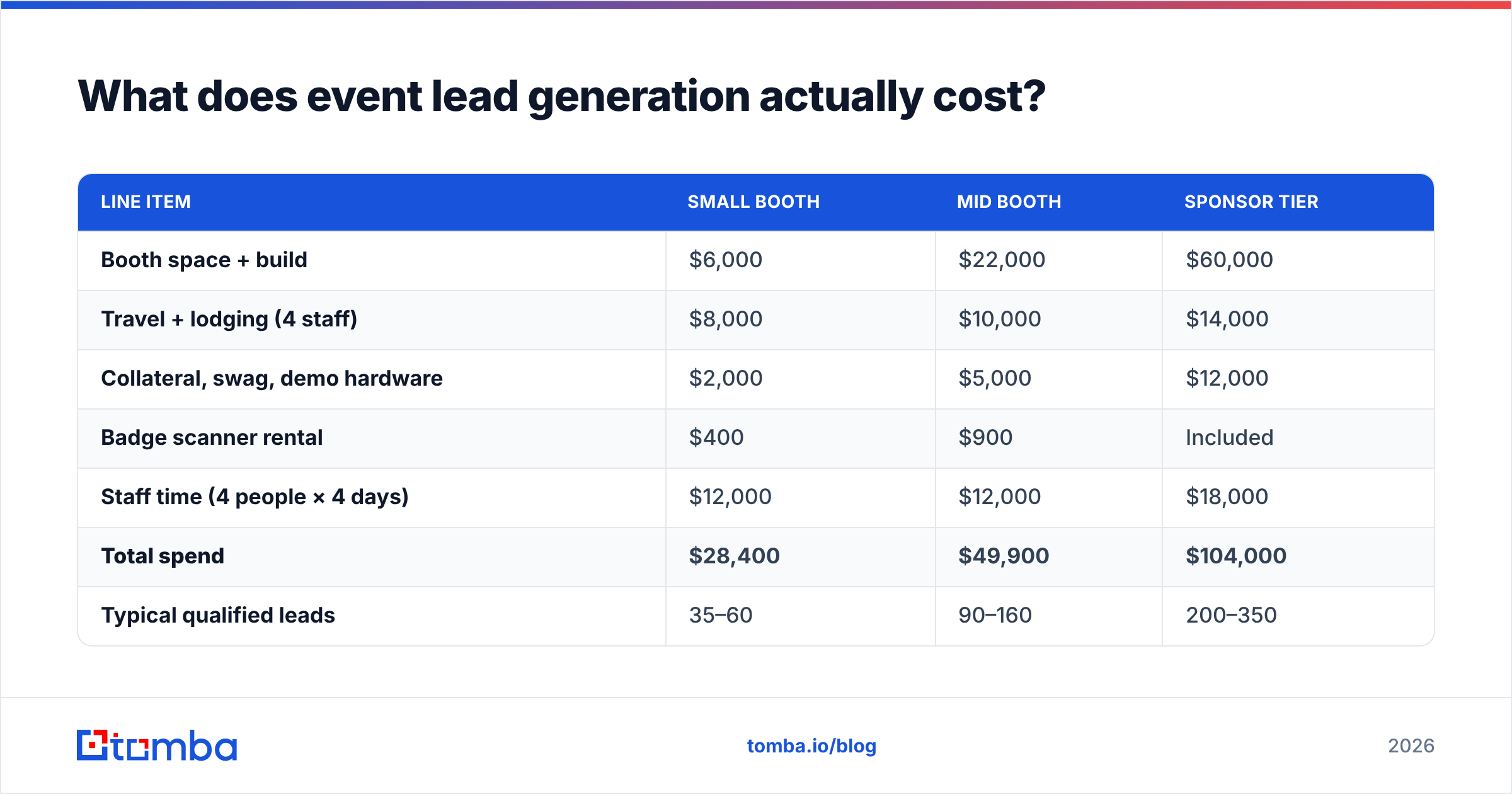
Real numbers, because "events are expensive" is not a plan. Here's a typical mid-size B2B software company at a 3,000-attendee industry conference.
| Line item | Small booth | Mid booth | Sponsor tier |
|---|---|---|---|
| Booth space + build | $6,000 | $22,000 | $60,000 |
| Travel + lodging (4 staff) | $8,000 | $10,000 | $14,000 |
| Collateral, swag, demo hardware | $2,000 | $5,000 | $12,000 |
| Badge scanner rental | $400 | $900 | Included |
| Staff time (4 people × 4 days) | $12,000 | $12,000 | $18,000 |
| Total spend | $28,400 | $49,900 | $104,000 |
| Typical qualified leads | 35–60 | 90–160 | 200–350 |
| Cost per qualified lead | $470–$810 | $310–$550 | $300–$520 |
Two things jump out. First, cost per qualified lead is high enough that a 10% improvement in follow-up conversion pays for your entire data tooling budget several times over. Second, staff time is a bigger line than most CFOs realize — the people cost of a show routinely rivals the booth cost.
Compare that to the marginal cost of enriching and verifying the list: at Tomba pricing, the Starter plan is $49/mo and Growth is $99/mo, which covers a typical event list comfortably. Spending $99 to protect a $50,000 investment is not a difficult decision, yet it's the one teams most often defer.
Is virtual event lead generation different from in-person?#
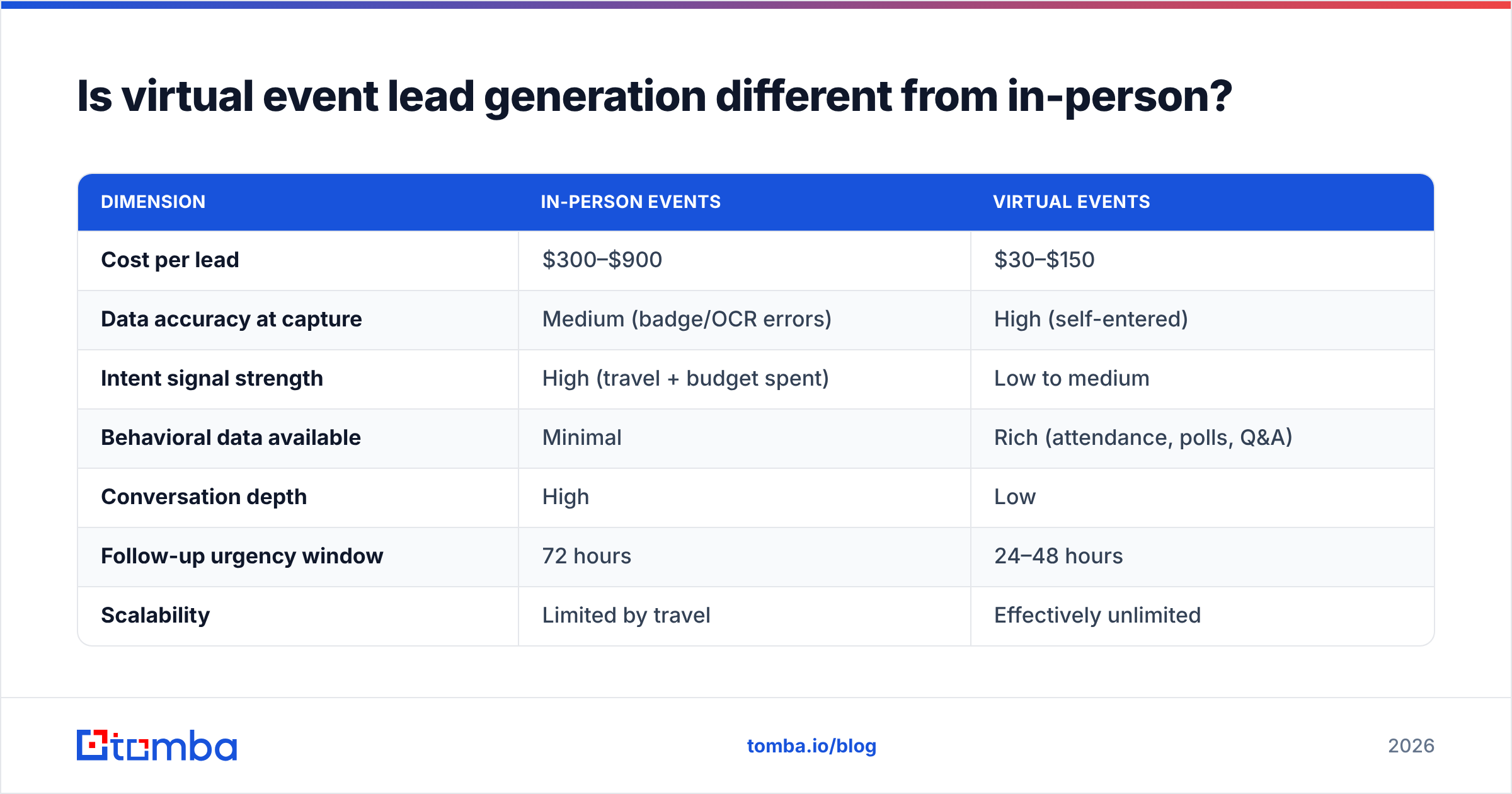
Yes, in ways that cut both directions.
Virtual events give you better raw data — attendees type their own information into a registration form, and you get behavior signals like session attendance, poll responses, and chat participation that no expo hall provides. You also get volume at a fraction of the cost.
Virtual events give you worse intent. Registration is free or cheap, so the barrier that filters serious buyers at a $2,000 conference doesn't exist. A meaningful share of webinar registrants never attend, and many who do are researching for a class project or a competitor.
| Dimension | In-person events | Virtual events |
|---|---|---|
| Cost per lead | $300–$900 | $30–$150 |
| Data accuracy at capture | Medium (badge/OCR errors) | High (self-entered) |
| Intent signal strength | High (travel + budget spent) | Low to medium |
| Behavioral data available | Minimal | Rich (attendance, polls, Q&A) |
| Conversation depth | High | Low |
| Follow-up urgency window | 72 hours | 24–48 hours |
| Scalability | Limited by travel | Effectively unlimited |
The tactical takeaway: for in-person events, prioritize speed and personalization. For virtual events, prioritize scoring and filtering — you have more records and less signal per record, so let engagement data do the qualifying. Research from HubSpot and vendor benchmarks on G2 consistently show the gap in downstream conversion between the two channels is smaller than the cost gap, which is why hybrid programs keep winning budget.
What does a 72-hour follow-up sequence look like?#
Structure beats cleverness here. The goal is to be first, be specific, and be easy to reply to.
Hour 0–24 (still at the event or same day): Send only to people who had a real conversation. Reference something concrete — the demo they asked about, the objection they raised, the competitor they mentioned. Two sentences, one question, no attachments. This is your highest-conversion segment and it deserves hand-written email, not automation.
Hour 24–48: Send to booth visitors who scanned but didn't get a full conversation. Segment by title. A VP of Engineering and a procurement analyst who both scanned deserve different emails. Reference the event by name and something specific about it — a keynote, an announcement, a theme — so it doesn't read like a template.
Hour 48–72: Send to the broad attendee list you legitimately have permission to contact, including sponsored session attendees. This is the lowest-conversion tier, so keep volume moderate and make the value proposition content-led rather than meeting-led.
Day 7 and Day 14: Two follow-ups on the non-responders in tiers one and two. Change the angle each time — new information, not "just bumping this."
A few mechanics that matter more than copy:
- Send from a real person's address, not
events@. Reply rates on a named sender consistently beat a shared alias. - Warm the sending domain before the event, not after. If you plan to send 800 emails in a week from a domain that normally sends 50, you have a deliverability problem waiting. Use an email warmup calculator to plan ramp volume weeks ahead.
- Check spam triggers before you send at volume. Event follow-ups love the words "exclusive," "free," and "limited time," which is exactly the combination filters watch. A quick pass through a spam checker is cheap insurance.
- Log the event in a dedicated CRM field, not a tag on the campaign. You want to run cohort analysis six months later and answer "did SaaStr close?" without archaeology.
Which tools do you actually need for event lead generation?#
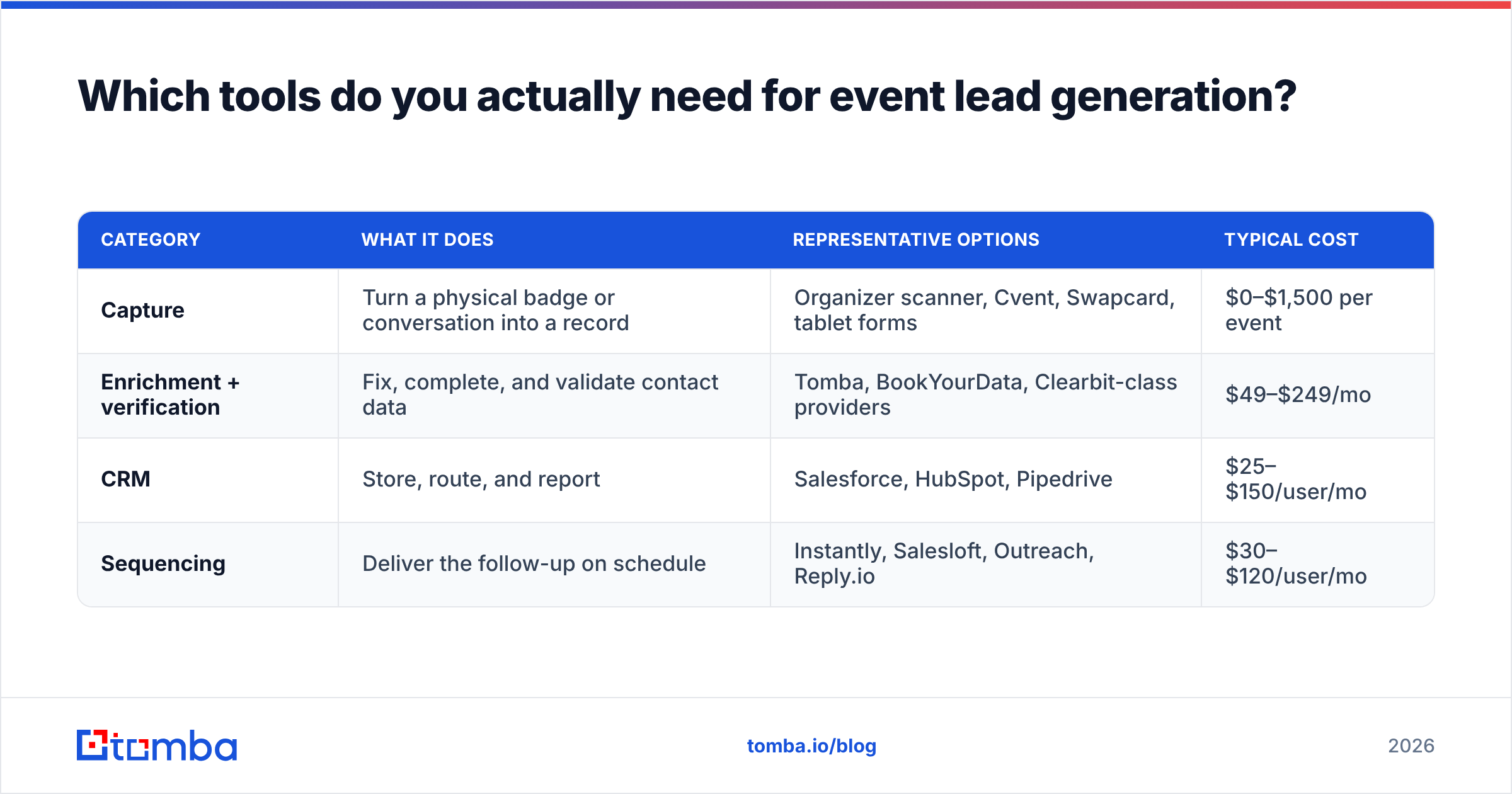
You need four categories, and you probably already own two of them.
| Category | What it does | Representative options | Typical cost |
|---|---|---|---|
| Capture | Turn a physical badge or conversation into a record | Organizer scanner, Cvent, Swapcard, tablet forms | $0–$1,500 per event |
| Enrichment + verification | Fix, complete, and validate contact data | Tomba, BookYourData, Clearbit-class providers | $49–$249/mo |
| CRM | Store, route, and report | Salesforce, HubSpot, Pipedrive | $25–$150/user/mo |
| Sequencing | Deliver the follow-up on schedule | Instantly, Salesloft, Outreach, Reply.io | $30–$120/user/mo |
On the enrichment layer specifically: Tomba's Free tier gives you 25 searches a month, which is enough to test the workflow on a small dinner list before you commit. Starter at $49/mo and Growth at $99/mo cover most single-event volumes, and the Tomba API or bulk email finder handles the "I have a 900-row CSV and 48 hours" scenario without manual lookups. BookYourData is a solid peer in this space if your priority is buying pre-built lists alongside enrichment rather than resolving contacts you already met — plenty of teams run both.
If you're operating in Google Sheets — and most event teams are, because the organizer's CSV lands there first — running enrichment directly in the sheet removes the export/import round trip that eats an afternoon.
How do you measure whether an event was worth it?#
Stop measuring leads. Measure the chain.
- Scan-to-lead rate — what percentage of raw scans survived dedup, verification, and qualification? Below 40% means your capture method or your booth traffic strategy needs work.
- Lead-to-meeting rate within 30 days — the honest test of follow-up quality. Under 5% means your sequence is generic.
- Meeting-to-opportunity rate — tells you whether the event audience matches your ICP at all. If this is low across two consecutive years at the same show, stop attending it.
- Cost per opportunity, not cost per lead — the only number that survives contact with a CFO.
- Influenced pipeline at 180 days — events seed deals that close much later. A 30-day-only view systematically undervalues them, which is how good shows get cut from budgets.
Track these per event, per year, in the same place. Three data points across three years tells you which shows to renew and which to drop, and that decision is worth more than any single follow-up campaign.
What's the fastest way to fix your next event?#
Do these five things and you'll outperform most of the exhibit hall:
- Two weeks out: warm your sending domain and confirm your SPF record and DMARC are configured. Deliverability problems discovered on day one of follow-up are unfixable in time.
- At the booth: every scan gets a one-line note. No note, no sequence. Enforce it.
- Night one and night two: upload the day's scans, don't wait for the show to end. Enrichment runs overnight while you sleep.
- Flight home: the day-zero personal emails go out from the people who had the conversations. Not marketing. Them.
- Day three: the segmented sequences launch, with the event in a dedicated CRM field and an owner on every record.
None of that requires new headcount. It requires deciding, before the event, that the data work happens during the event rather than after it.
Get your event list contactable before the follow-up window closes#
The single highest-leverage change you can make is turning your raw badge-scan file into verified, work-address, fully-enriched records within 24 hours of the show floor closing. That's the difference between a follow-up campaign that books meetings and one that generates bounces.
Tomba's Email Finder recovers work emails from names and company domains, so the Gmail addresses and typos in your organizer CSV become sequenceable contacts instead of dead rows. Pair it with the email verifier to clear bounces before your first send, and run the whole list in bulk or through the API when you're working against a 72-hour clock. Start on the free tier with 25 searches to test it against a small list, then scale to Starter at $49/mo when you're ready for a full show.
Your booth already cost you $50,000. Spend one more evening making the data usable.
Related guides#
Ready to find emails that actually work?
Join 150,000+ professionals who stopped guessing and started sending. Free credits on signup — no credit card required.
Get the Tomba newsletter
Practical outbound tactics and product updates — once every two weeks.
About the author