How to Find Emails for People: The 2026 Working Guide
Most email-finding advice is a decade old and quietly broken. Here is what still works in 2026 — pattern logic, verification, tool costs, and the compliance line you should not cross.
TL;DR
- Finding a person's email is a two-step job: generate a likely address, then verify it. Skipping step two is what causes 30-40% bounce rates and burned sending domains.
- Roughly 80% of B2B companies use one of six predictable email formats. Once you know a company's pattern, every employee's address is a template fill-in.
- Free methods (Google operators, GitHub commits, WHOIS, newsletter footers) still work — they're just slow. Budget 3-8 minutes per contact versus 5 seconds with a tool.
- Paid finders cluster around $49-$99/month for 1,000-5,000 lookups. The real differentiator is not price, it's what happens on catch-all domains.
- Never send to an unverified list. Verify, segment risky addresses, and warm your domain before volume — or your deliverability dies before your copy ever gets read.
What does "find emails for people" actually mean in 2026?#
It means one of two very different tasks, and confusing them wastes hours.
Task A: you know the person. You have a name and a company. You need their work address. This is a solved problem — pattern inference plus verification gets you there with 85-95% confidence in seconds.
Task B: you know the profile, not the person. You need "heads of RevOps at Series B fintechs in Germany." That's a database and filtering problem, not a lookup problem. You search, build a list, then verify.
Most people searching for how to find emails for people are trying to do Task A and reaching for Task B tools, which is why they end up paying $1,000/month for a seat license they use twice a week.
A useful analogy: Task A is looking up one phone number in a directory. Task B is asking the directory for everyone in a postcode who owns a dog. Same data, completely different machinery.
The 2026 wrinkle is that both tasks got harder in one specific way — LinkedIn, Twitter/X, and most professional networks aggressively rate-limit scrapers, and GDPR enforcement in the EU has made "scrape everything and sort later" a genuine legal risk rather than a theoretical one. What survived is inference from public patterns plus SMTP-level verification.
How do professional email patterns actually work?#
Companies don't invent an address per employee. They configure one rule in their mail server and apply it to everyone. That rule is the whole game.
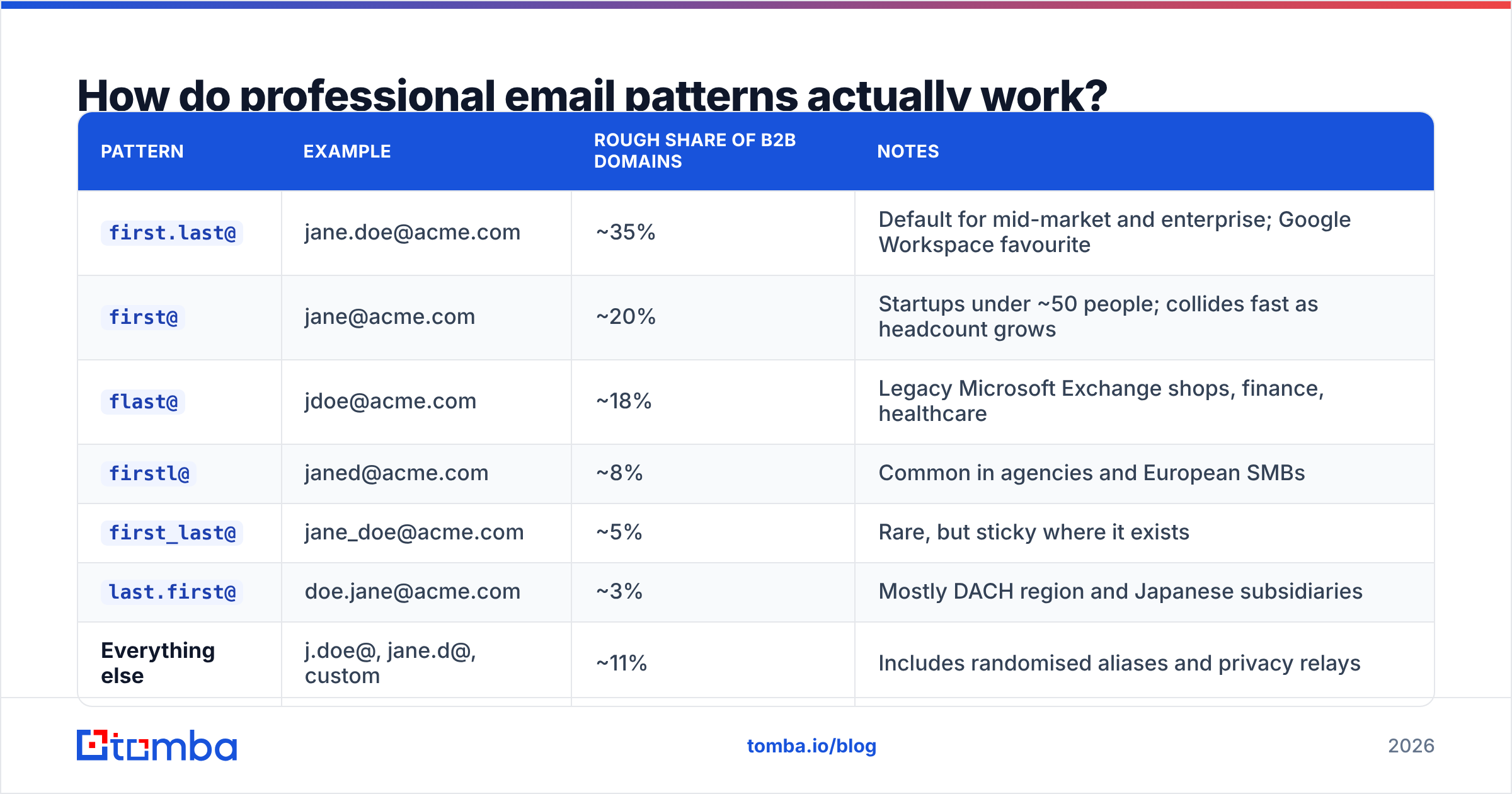
Here are the formats that cover the overwhelming majority of B2B domains, using Jane Doe at acme.com:
| Pattern | Example | Rough share of B2B domains | Notes |
|---|---|---|---|
first.last@ |
jane.doe@acme.com | ~35% | Default for mid-market and enterprise; Google Workspace favourite |
first@ |
jane@acme.com | ~20% | Startups under ~50 people; collides fast as headcount grows |
flast@ |
jdoe@acme.com | ~18% | Legacy Microsoft Exchange shops, finance, healthcare |
firstl@ |
janed@acme.com | ~8% | Common in agencies and European SMBs |
first_last@ |
jane_doe@acme.com | ~5% | Rare, but sticky where it exists |
last.first@ |
doe.jane@acme.com | ~3% | Mostly DACH region and Japanese subsidiaries |
| Everything else | j.doe@, jane.d@, custom | ~11% | Includes randomised aliases and privacy relays |
Two practical consequences.
First, if you can confirm one address at a company, you can generate the rest. Find the CEO's email in a press release, and you've unlocked the pattern for the whole org. That's why company email pattern lookups are the highest-leverage first move — a company email pattern check on the domain tells you the format before you guess a single address.
Second, guessing without verification is a trap. If you generate all six variants and blast them, five bounce. Five bounces per contact across a 500-person campaign is 2,500 hard bounces, and your domain reputation is gone by Tuesday.

Sorry — that renders as intended below:
What free methods still work?#
More than people assume. They're slow, not dead.
Google search operators.
site:acme.com "@acme.com"surfaces addresses published on the company's own site — usually press contacts, support, and careers."jane doe" "@acme.com"sometimes hits a conference bio or a PDF. Addfiletype:pdffor investor decks and whitepapers, which leak addresses constantly.GitHub commit history. If your target is technical, this is close to a cheat code. Every git commit carries the author's email. Visit
github.com/<username>, open any repo they've contributed to, and append.patchto a commit URL. Engineers, CTOs, and technical founders are frequently findable this way even when nothing else is.Personal sites and newsletter footers. A surprising number of operators publish a real address in the footer of their Substack or on an
/aboutpage. Check the RSS feed too — some publishing tools expose the sender address in the feed metadata.WHOIS records. Mostly redacted since GDPR, but small-business and older domains often still show a registrant contact. Worth 20 seconds on domains registered before 2018.
Conference and podcast pages. Speaker bios, sponsor decks, and podcast show notes routinely include a booking or direct address.
The company's own pattern, applied manually. Find any published address, infer the format, apply it to your target's name, then check it with a free email checker before sending.
Realistic throughput: 3-8 minutes per contact if you're good at it. That's fine for 10 high-value accounts. It's untenable for 500.
When should you pay for a tool instead?#
Run the arithmetic rather than the vibe.
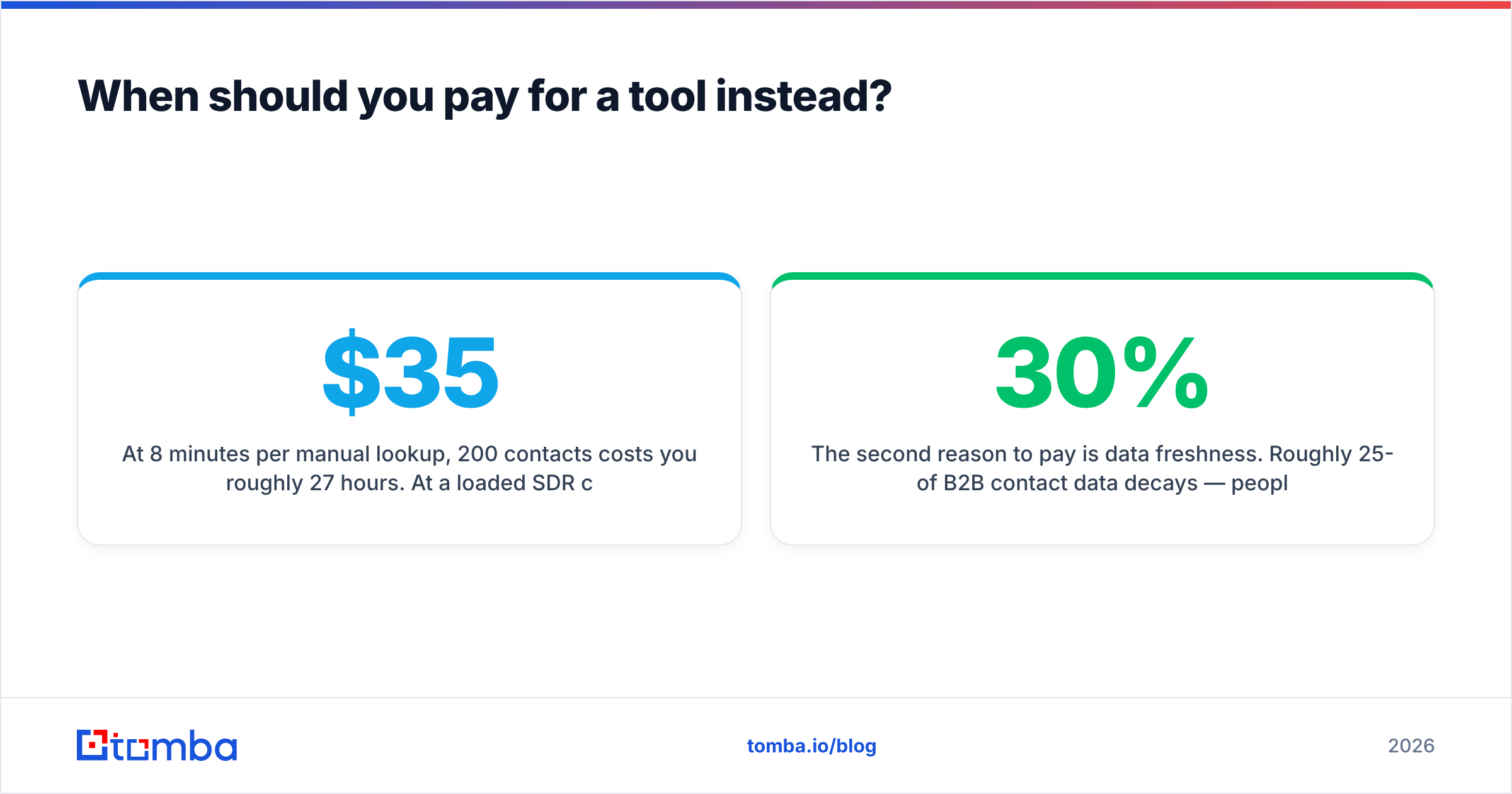
At 8 minutes per manual lookup, 200 contacts costs you roughly 27 hours. At a loaded SDR cost of $35/hour that's $945 of labour — to build one list, once, with no verification layer and no guarantee the addresses are current. A $49/month tool that does the same 200 lookups in under a minute is not a close call.
The break-even sits somewhere around 25-40 contacts per month. Below that, free methods are genuinely fine. Above it, you're paying a hidden salary tax to avoid a visible subscription line.
The second reason to pay is data freshness. Roughly 25-30% of B2B contact data decays per year — people change jobs, companies rebrand domains, aliases get retired. A manually built list from January is meaningfully wrong by September. Commercial providers re-crawl and re-verify continuously; your spreadsheet does not.
Which email finder should you actually use?#
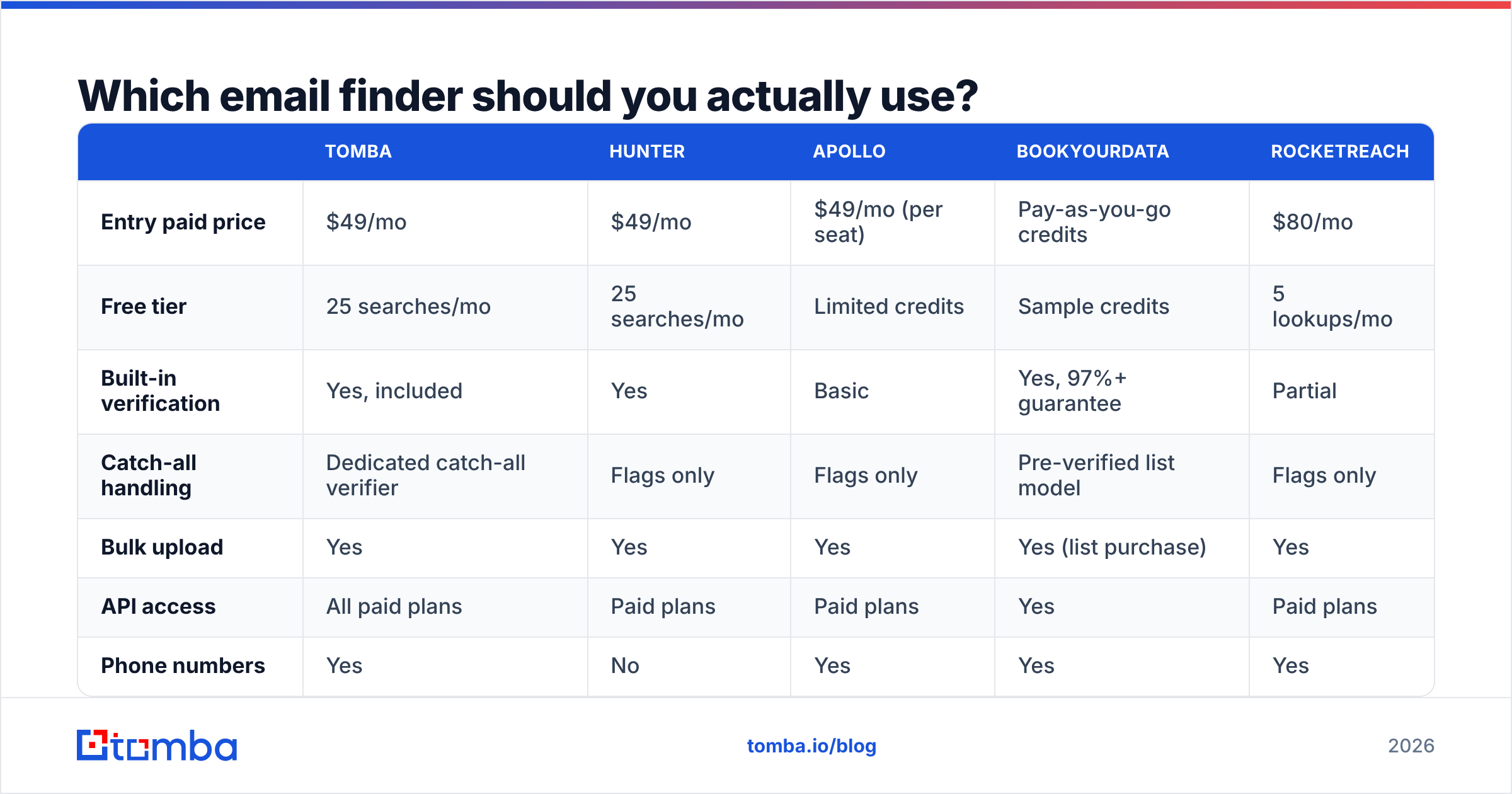
Here's how the main options compare on the dimensions that matter for finding emails for people specifically — not on feature-count marketing.
| Tomba | Hunter | Apollo | BookYourData | RocketReach | |
|---|---|---|---|---|---|
| Entry paid price | $49/mo | $49/mo | $49/mo (per seat) | Pay-as-you-go credits | $80/mo |
| Free tier | 25 searches/mo | 25 searches/mo | Limited credits | Sample credits | 5 lookups/mo |
| Built-in verification | Yes, included | Yes | Basic | Yes, 97%+ guarantee | Partial |
| Catch-all handling | Dedicated catch-all verifier | Flags only | Flags only | Pre-verified list model | Flags only |
| Bulk upload | Yes | Yes | Yes | Yes (list purchase) | Yes |
| API access | All paid plans | Paid plans | Paid plans | Yes | Paid plans |
| Phone numbers | Yes | No | Yes | Yes | Yes |
| Best for | Domain-first lookup + verification in one place | Simple domain search | All-in-one sequencing | Buying pre-built verified lists | Recruiter-style people search |
A few honest notes on this table.
Apollo bundles a sequencer, a dialer, and a CRM-lite layer. If you want one tool to do everything, that's the pitch — but you pay per seat, and its email data leans heavily on user-contributed contributions, which vary in quality by region. If you're evaluating it purely as a finder, look at an Apollo alternative comparison before committing to seats.
BookYourData solves a different problem well: instead of looking people up one at a time, you filter and buy a pre-verified list with an accuracy guarantee attached. If your workflow is "give me 2,000 verified CFOs in manufacturing," that model is cleaner than 2,000 individual lookups. Credits don't expire, which suits spiky campaign schedules.
Hunter is the reference point most people know. Clean domain search, straightforward UI, similar entry pricing.
Tomba sits closest to Hunter in shape but splits the work into discrete tools — email finder, domain search, email verifier, and a separate catch-all path — rather than one blended endpoint. That matters most on catch-all domains, covered next. Tomba pricing runs Free (25 searches), Starter $49, Growth $99, Pro $249, Enterprise custom.
RocketReach indexes people rather than domains, which makes it stronger for recruiting-style searches where you know the person but not their current employer.


Why do catch-all domains break most email finders?#
Because a catch-all server says "yes" to everything, and most tools treat "yes" as "valid."
A catch-all (or accept-all) domain is configured to accept mail addressed to any local part — jane.doe@, asdkjh@, notarealperson@ all return the same positive SMTP response. Roughly 20-25% of B2B domains are configured this way, and the share is higher in enterprise and in regions with aggressive spam filtering upstream.
The failure mode is subtle. A standard verifier pings the server, gets a 250 OK, and marks the address "valid." You send. The message hits the catch-all bucket, gets silently discarded or routed to an unmonitored mailbox, and you record it as delivered-but-unanswered. Your bounce rate looks healthy. Your reply rate is mysteriously zero on a quarter of your list.
Handling catch-alls properly requires a different approach: pattern-confidence scoring, cross-referencing the address against other public sources, and historical engagement signals rather than a single SMTP handshake. Tools that offer a dedicated catch-all verifier are doing that extra work; tools that just flag the domain and hand it back to you are not.
Practical rule: segment catch-all addresses into their own campaign. Send to them, but on a separate subdomain or at lower volume, and judge them on reply rate rather than bounce rate. Never mix them into the same send as your verified list.

Again, properly:
What is the actual step-by-step workflow?#
Here's the sequence that holds up at both 10 contacts and 10,000.
- Define the target precisely. Name plus company domain, or a firmographic filter. Vague inputs produce vague lists.
- Resolve the domain, not the brand name. "Acme Corp" is ambiguous;
acme.comis not. Watch for acquired companies still using a legacy domain for mail, and for.coversus.comtraps. - Detect the company pattern. Run a domain lookup to see confirmed addresses at that company. One confirmed address gives you the template.
- Generate the candidate. Apply the pattern to your target's name. Handle the edge cases: hyphenated surnames, accented characters (usually stripped:
müller→muellerormuller, and both exist), middle initials, and nicknames —Bobisrobert@about half the time. - Verify before you trust. Syntax check, domain MX check, then SMTP-level mailbox check. Anything that comes back risky or catch-all goes into a separate bucket.
- Enrich for personalisation. Title, seniority, and company signals turn a valid address into a message worth replying to. Data enrichment at this stage is what separates a list from a campaign.
- Warm and send. New domain or new mailbox? Ramp volume over 2-4 weeks. Verified addresses on a cold domain still bounce into spam folders.
Steps 3-5 are where every tool differentiates. Steps 1, 2, 6, and 7 are on you regardless of what you buy.
Is it legal to find someone's email address?#
Short answer: finding is generally legal, sending is regulated, and the rules differ by jurisdiction.
Under GDPR, a work email tied to a named person is personal data. You can process it under legitimate interest for B2B outreach, but you need to document that assessment, offer a clear opt-out in every message, honour deletion requests, and be able to say where the data came from. "We bought a list and don't know" is not a defence. The ICO's guidance on direct marketing is the practical reference here.
Under CAN-SPAM in the US, cold B2B email is legal with fewer strings: accurate headers, no deceptive subject lines, a physical postal address, and a working unsubscribe honoured within 10 business days. There is no opt-in requirement for B2B.
CASL in Canada is the strictest of the three — it requires consent (express or implied) before you send, with implied consent covering things like a published business address relevant to the recipient's role.
Three things that are never fine anywhere: harvesting personal (non-work) addresses for commercial mail, ignoring unsubscribes, and forging sender identity. Check any provider's data sources documentation before you build a process on top of it — if a vendor won't say where the data comes from, that becomes your compliance problem, not theirs.
What mistakes kill campaigns before they start?#
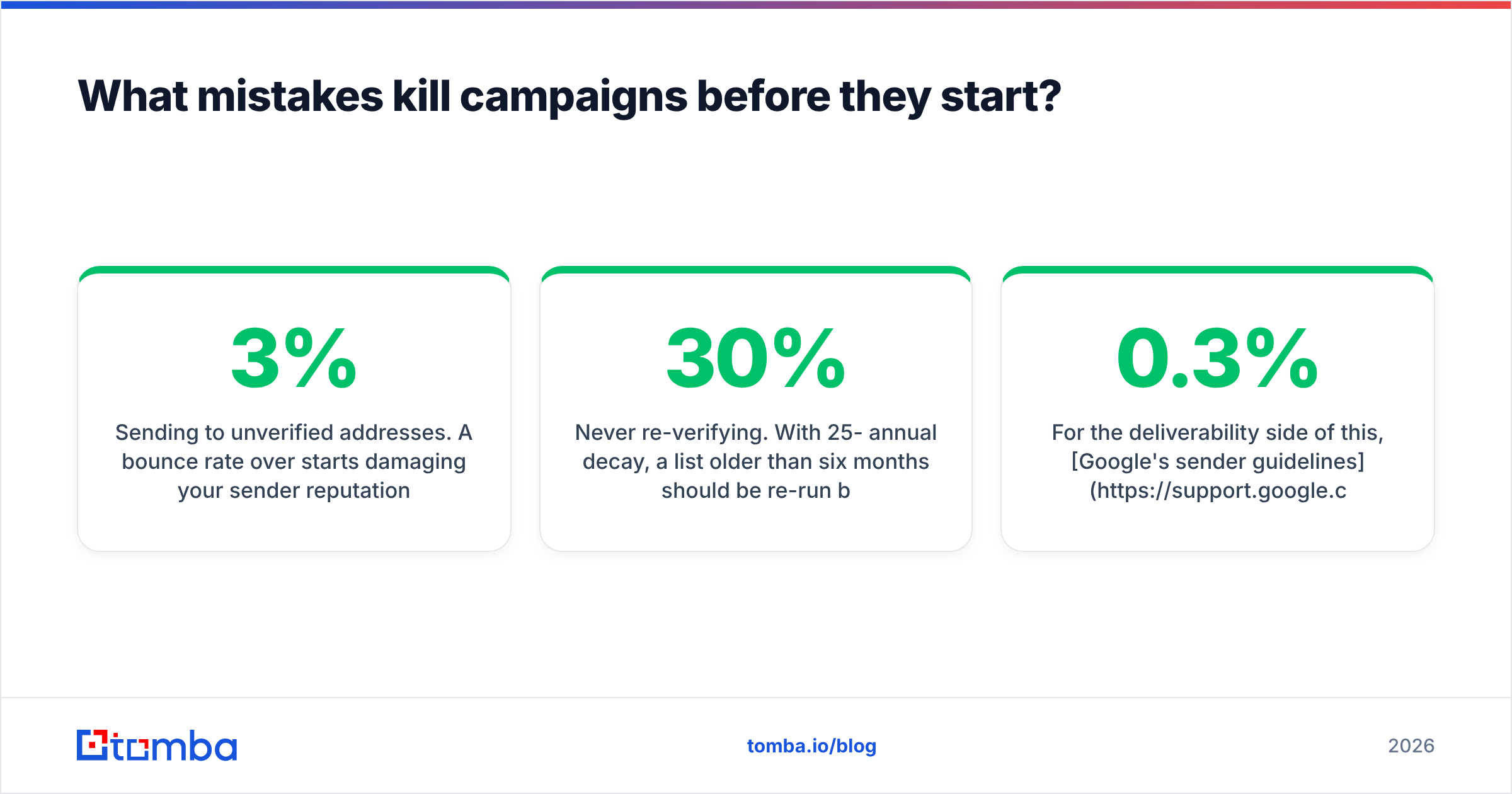
- Sending to unverified addresses. A bounce rate over 3% starts damaging your sender reputation; over 5% and mailbox providers begin routing you to spam by default. Verification is the cheapest insurance in outbound.
- Blasting all six pattern variants. Five guaranteed bounces per contact. This single mistake has killed more domains than bad copy ever has.
- Ignoring the catch-all bucket. You look successful and get zero replies. Segment them.
- Using your primary domain for cold outreach. Buy a separate sending domain. If it burns, your company mail still works.
- Skipping warmup. A brand-new domain sending 200 messages on day one is indistinguishable from a spammer to Google's filters. Model the ramp with an email warmup calculator first.
- Never re-verifying. With 25-30% annual decay, a list older than six months should be re-run before reuse. Bulk re-verification costs a fraction of a burned domain.
For the deliverability side of this, Google's sender guidelines are the authoritative source — SPF, DKIM, DMARC, and the sub-0.3% spam-complaint threshold are all specified there, and they're enforced, not advisory.
How do you scale this past a few hundred contacts?#
Switch from lookups to pipelines.
At volume, you stop thinking about individual addresses and start thinking about throughput. Upload a CSV of names and domains, run bulk verify against it, and route the output into three lanes: verified (send now), catch-all (send separately, lower volume), and invalid (discard or research manually). Anything that can be expressed as a rule should be automated.
If your list lives in a CRM, connect the finder directly rather than exporting and re-importing — a HubSpot integration or equivalent keeps enrichment current without a human in the loop. For engineering-led teams, an email finder API call inside your own onboarding or lead-routing flow beats any UI.
One measurement discipline worth adopting: track deliverability and reply rate by data source, not just by campaign. If addresses from one provider reply at 4% and another at 1.2%, that's the number that should drive your renewal decision — not the price per credit.
Ready to stop guessing?#
Guessing costs more than it looks like it does. Every unverified send is a small withdrawal from your sender reputation, and that account has no overdraft.
If you're doing Task A — you know the person, you need the address — start with the Tomba Email Finder. The free tier gives you 25 searches a month with no card, which is enough to test it against a handful of contacts you already know the answers for. That's the only benchmark that matters: run 20 addresses you can verify independently, and see what the tool gets right. If the hit rate holds, Starter at $49/month covers most single-rep workflows; scale to Growth or Pro when your volume justifies it.
Find the pattern, verify the address, segment the catch-alls, warm the domain. Everything else is copy.
Related guides#
Ready to find emails that actually work?
Join 150,000+ professionals who stopped guessing and started sending. Free credits on signup — no credit card required.
Get the Tomba newsletter
Practical outbound tactics and product updates — once every two weeks.
About the author