FindThatLead vs Leadzenai: Which Email Finder Wins in 2026?
FindThatLead vs Leadzenai: both promise verified B2B contacts, but they win in different regions and workflows. Here is the honest breakdown of accuracy, credits, pricing, and who should pick which.
FindThatLead vs Leadzenai comes down to one question: where do your prospects live? One tool owns Europe. The other owns India. Pick the wrong one and half your list comes back empty.
TL;DR
- FindThatLead is a Spain-based prospecting suite. You get an email finder, a domain prospector, a list scraper, and a built-in cold email sender. Best for EU and LATAM small-business lists.
- Leadzen.ai is an India-based lead intelligence tool. It runs real-time search, LinkedIn extraction, and mobile numbers. Best for APAC coverage and phone-first outbound.
- Neither wins on raw email accuracy at scale. Both are hit-or-miss outside their home region. Both charge you for results you still have to check.
- Is your list global? A dedicated finder plus verifier stack (Tomba starts at $49/mo) returns more usable contacts per dollar.
- Rule of thumb: FindThatLead for European volume. Leadzen.ai for Indian mid-market and phone calls. A specialist finder when bounce rate is the real problem.
What are FindThatLead and Leadzen.ai?#
They solve the same problem from opposite ends of the world. That shows up in the data.
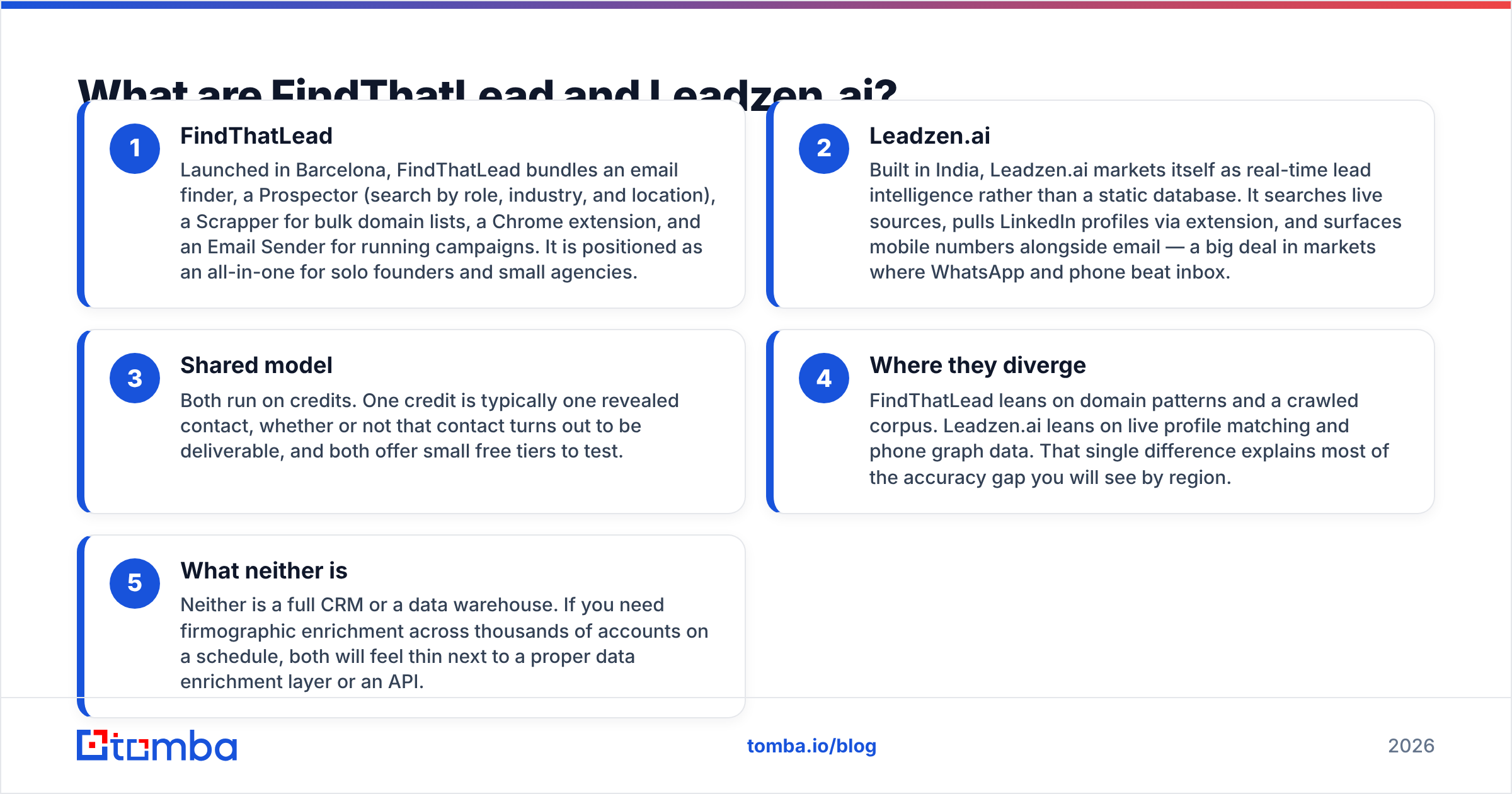
- FindThatLead — FindThatLead launched in Barcelona. It bundles an email finder, a Prospector (search by role, industry, and location), a Scrapper for bulk domain lists, a Chrome extension, and an Email Sender. It aims to be the one tool for solo founders and small agencies.
- Leadzen.ai — Leadzen.ai was built in India. It sells real-time lead intelligence rather than a static database. It searches live sources, pulls LinkedIn profiles through an extension, and shows mobile numbers next to email. That matters in markets where WhatsApp and phone beat the inbox.
Both tools run on credits. One credit usually buys one revealed contact, deliverable or not. Both offer a small free tier, so you can test before you pay.
- Where they diverge — FindThatLead leans on domain patterns and a crawled corpus. Leadzen.ai leans on live profile matching and phone data. That one difference explains most of the accuracy gap you will see by region.
- What neither is — Neither tool is a CRM or a data warehouse. Do you need company data across thousands of accounts on a schedule? Both feel thin next to a proper data enrichment layer or an API.

FindThatLead vs Leadzenai: how do they compare head-to-head?#
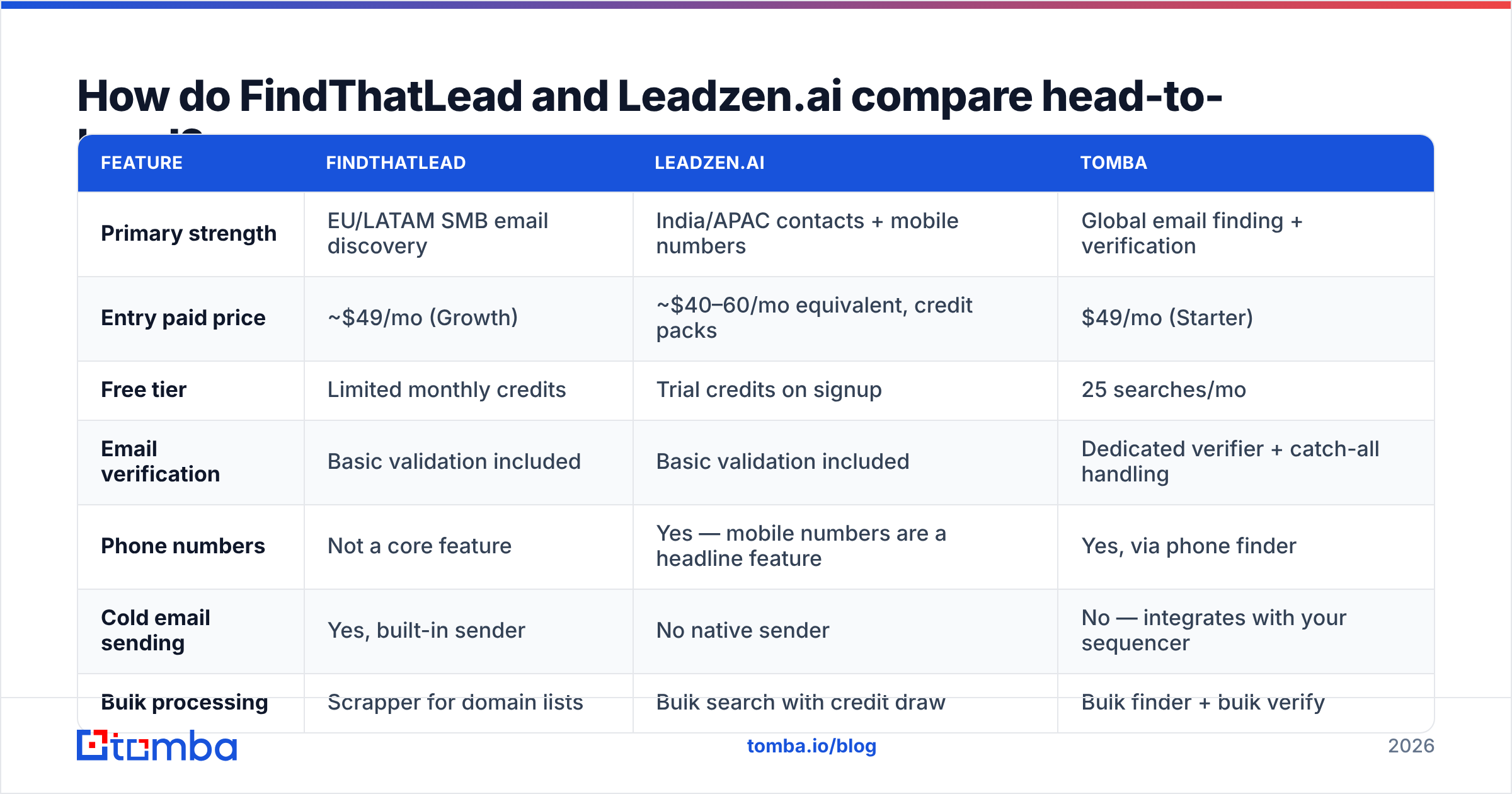
Here is the practical comparison, feature by feature. Treat pricing as directional. Both vendors change tiers, so check their pricing pages before you buy.
| Feature | FindThatLead | Leadzen.ai | Tomba |
|---|---|---|---|
| Primary strength | EU/LATAM SMB email discovery | India/APAC contacts + mobile numbers | Global email finding + verification |
| Entry paid price | ~$49/mo (Growth) | ~$40–60/mo equivalent, credit packs | $49/mo (Starter) |
| Free tier | Limited monthly credits | Trial credits on signup | 25 searches/mo |
| Email verification | Basic validation included | Basic validation included | Dedicated verifier + catch-all handling |
| Phone numbers | Not a core feature | Yes — mobile numbers are a headline feature | Yes, via phone finder |
| Cold email sending | Yes, built-in sender | No native sender | No — integrates with your sequencer |
| Bulk processing | Scrapper for domain lists | Bulk search with credit draw | Bulk finder + bulk verify |
| API access | Available on higher tiers | Available, enterprise-oriented | Available on all paid plans |
| Chrome extension | Yes | Yes (LinkedIn focused) | Yes |
| Best fit | Solo founders wanting finding + sending | India-focused sales teams | Teams optimizing for low bounce rate |

The table hides one thing worth saying plainly. FindThatLead is a workflow product. Leadzen.ai is a data product. FindThatLead wants to be the place you find, filter, and send. Leadzen.ai wants to be the place you look someone up and get a phone number in seconds. Buying the wrong shape for your team costs far more than a $20/mo price gap.
Which one finds more valid emails?#
It depends on where your prospects are. Both tools underperform outside their home turf.
On raw accuracy, FindThatLead vs Leadzenai is a regional split. Run the same 200-contact test list through both, and you will usually see this:
- European and LATAM small businesses: FindThatLead returns more hits. Its crawled corpus and pattern guessing skew to that region. Expect a good share of guessed addresses that need a second check.
- Indian and Southeast Asian companies: Leadzen.ai pulls ahead, sometimes by a lot. It often adds a mobile number when the email is missing.
- US enterprise: Both are mediocre. Large US firms use odd formats, catch-all settings, and heavy privacy filters. Here a specialist finder with a dedicated email verifier earns its keep.

Then there is the catch-all problem, which most reviews skip. A catch-all domain accepts mail sent to any address. So a simple SMTP check returns "valid" for everything, even addresses that hard-bounce or vanish. Neither tool gives you a solid catch-all verdict. Does a big slice of your list sit on catch-all domains? That is common in mid-market SaaS and agencies. Then you need a real catch-all verifier before you send. Skip it and your bounce rate will quietly wreck your sender reputation.
How to test this yourself in an afternoon:
- Pull 100 contacts whose emails you know work. This is your ground truth.
- Delete the email column. Keep name and company domain.
- Run both tools. Score match rate (did it return anything?) and accuracy rate (was it the right address?).
- Send a small real campaign to the unknowns. Record the true bounce rate.
Vendor claims of "98% accurate" are marketing. Your bounce log is data. Match rate and accuracy rate are not the same number, and vendors love to quote the first one.
How does the pricing actually work?#
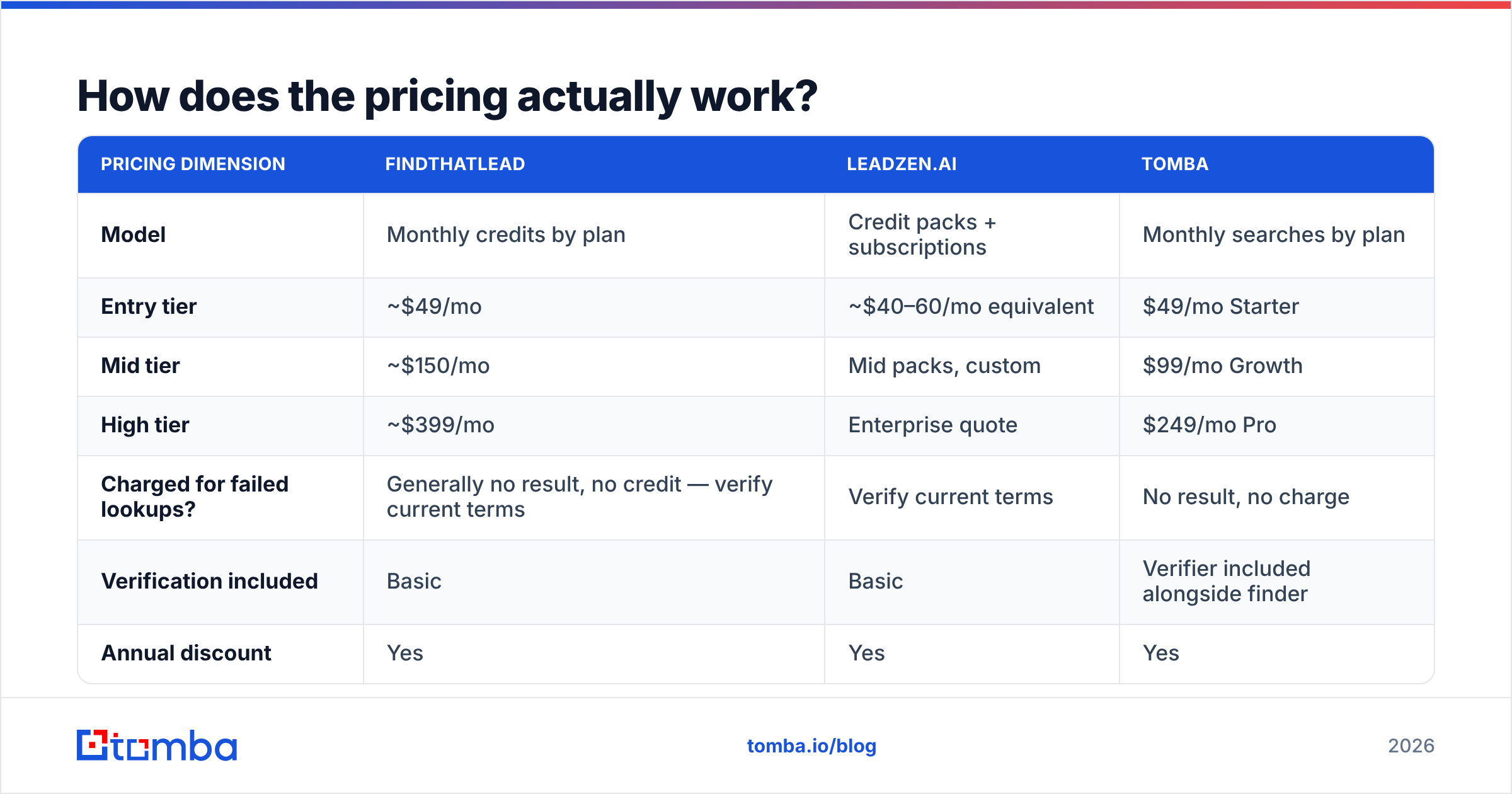
Both tools sell credits. So the sticker price tells you little until you know what burns a credit.
| Pricing dimension | FindThatLead | Leadzen.ai | Tomba |
|---|---|---|---|
| Model | Monthly credits by plan | Credit packs + subscriptions | Monthly searches by plan |
| Entry tier | ~$49/mo | ~$40–60/mo equivalent | $49/mo Starter |
| Mid tier | ~$150/mo | Mid packs, custom | $99/mo Growth |
| High tier | ~$399/mo | Enterprise quote | $249/mo Pro |
| Charged for failed lookups? | Generally no result, no credit — verify current terms | Verify current terms | No result, no charge |
| Verification included | Basic | Basic | Verifier included alongside finder |
| Annual discount | Yes | Yes | Yes |
Three things to check before you commit to either:
- Does a failed search cost a credit? This drives your real cost per usable contact. A cheaper tool that charges for misses can cost more.
- Are verification credits separate? If you must buy checks elsewhere, add that line to the budget now, not in month three.
- Do credits roll over? Prospecting comes in bursts. Non-rolling credits punish teams that work in campaign cycles.
Run the math as cost per verified, deliverable contact. Not cost per credit. On a 5,000-contact quarter, a 15-point accuracy gap beats a small monthly fee every time. Compare Tomba pricing on that basis and the picture usually changes.

Which is better for LinkedIn prospecting?#
Leadzen.ai, if LinkedIn is your main source. One caveat comes with it.
Leadzen.ai's extension is built for profile-to-contact lookup. You open a profile, and it returns an email and often a mobile number. For teams doing LinkedIn outreach and then calling, that pairing is genuinely useful. It is the clearest reason to pick it over FindThatLead.
FindThatLead's extension works too, but it leans on domain and name. Its real strength is the Prospector. Give it a role, an industry, and a place, and it builds a list. That is a different motion: list building, not one-at-a-time lookup.
The caveat hits both tools. Scraping LinkedIn at volume breaks the platform's terms and gets accounts restricted. Any tool that rides your logged-in session carries that risk. Want the LinkedIn-sourced contact without the session risk? A server-side LinkedIn finder turns a profile URL into a business email. That is the safer setup.
What about phone numbers and data enrichment?#
This is the cleanest split in the whole comparison.
Leadzen.ai treats mobile numbers as a core field. In markets where cold calls and WhatsApp still convert, that changes what outbound looks like. India is the clearest case. FindThatLead barely competes here. Phone was never its job.
But phone data ages faster than email data. Numbers get recycled, ported, and dropped. A wrong number costs rep time, not just a bounce. Run numbers through a phone validator before you hand them to a caller. Check them against local do-not-call rules too. A phone finder that returns line type and status beats one that returns raw digits.
On enrichment, both tools return the basics: name, title, company, domain, sometimes size and industry. Neither is a Clearbit-class data layer. Do you need tech stack, funding signals, or buying intent? You are buying a second product either way.
Is FindThatLead's built-in sender worth it?#
Sometimes. Just be clear about the trade-off.
The appeal is obvious. You find leads and email them without a CSV export or a second subscription. For a founder sending 200 emails a week, that saves real money and friction.
The catch is quality. Bundled senders rarely match dedicated ones. You get less control over inbox rotation, warmup, sending schedules, reply detection, and delivery reports. And one vendor now owns both jobs. A bad data day becomes a bad reputation day, because bounces hit the same domain you send from.
If you go the bundled route, protect yourself:
- Verify before you send, even when the finder says the address is fine.
- Warm up new domains slowly. A warmup calculator sets a realistic ramp instead of a guess.
- Check your sending records with an SPF checker before the first campaign, not after the first spam complaint.
- Send from a subdomain, never your main company domain.
Most teams past 10 reps split the two layers anyway. A data provider with an API feeds a dedicated sequencer. It costs a bit more and fails far less often.
Where does each tool fall short?#
FindThatLead's weak points:
- Accuracy drops outside Europe and LATAM.
- Guessed emails lift the match rate, not the delivery rate.
- The UI has piled up features over the years and feels dated.
- Support replies are uneven, according to review sites like G2.
Leadzen.ai's weak points:
- Coverage outside India and APAC is thin. US and EU lists come back sparse.
- Pricing is less clear than most Western rivals. Expect a sales call.
- Real-time search can be slow on bulk jobs.
- Smaller ecosystem. Fewer native integrations, so more work to move data into your CRM.
What both share:
- Credit models that hide the true cost per usable contact.
- Checks that pass a smoke test but not a 10,000-address send.
- Weak catch-all handling, which is where most bounce surprises start.
Which one should you choose in 2026?#
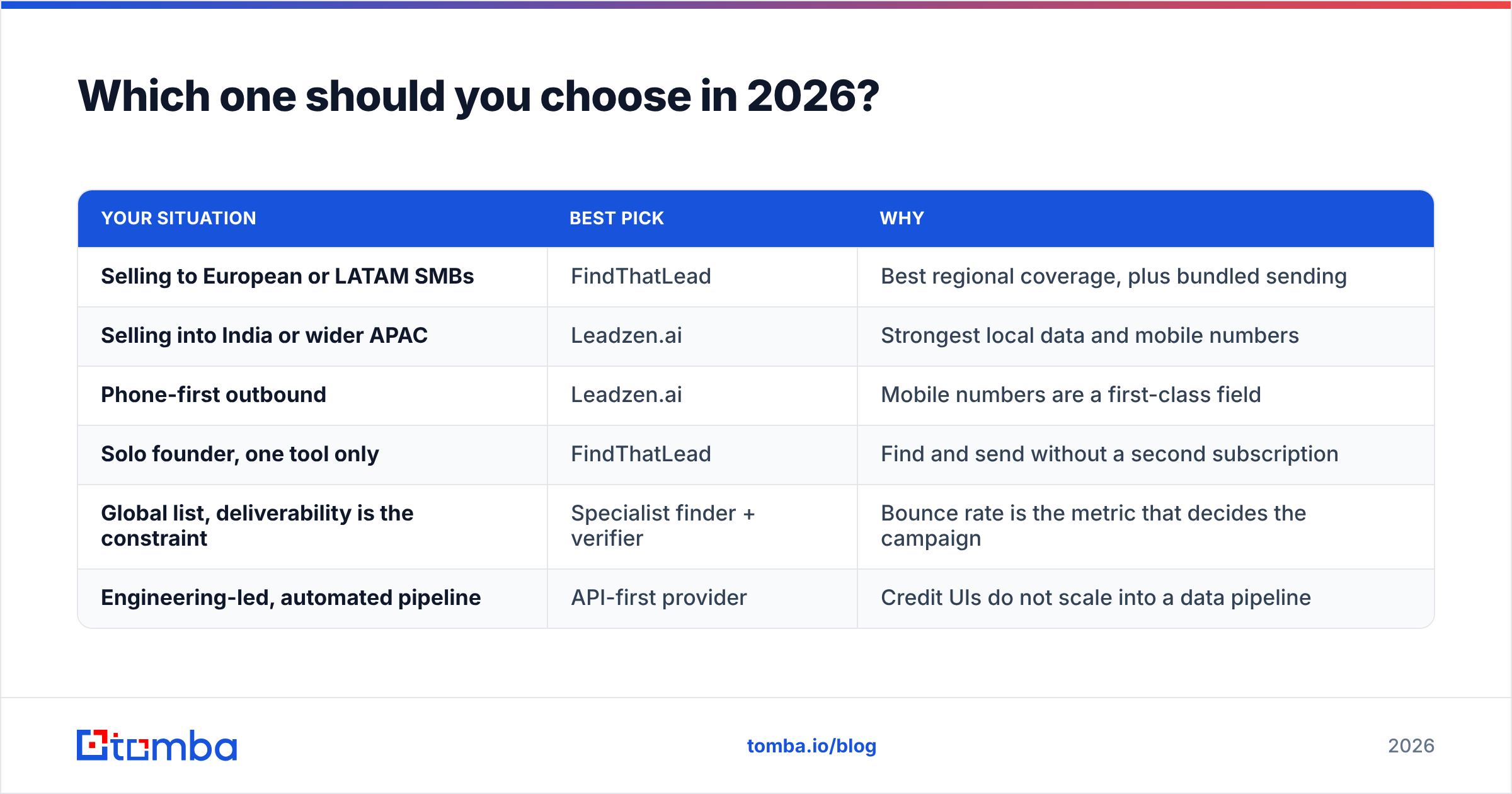
The FindThatLead vs Leadzenai choice comes down to geography and motion, not feature count.
| Your situation | Best pick | Why |
|---|---|---|
| Selling to European or LATAM SMBs | FindThatLead | Best regional coverage, plus bundled sending |
| Selling into India or wider APAC | Leadzen.ai | Strongest local data and mobile numbers |
| Phone-first outbound | Leadzen.ai | Mobile numbers are a first-class field |
| Solo founder, one tool only | FindThatLead | Find and send without a second subscription |
| Global list, deliverability is the constraint | Specialist finder + verifier | Bounce rate is the metric that decides the campaign |
| Engineering-led, automated pipeline | API-first provider | Credit UIs do not scale into a data pipeline |
Does your list cross more than two continents? Then neither tool is your main one. Regional specialists shine inside their region and fade outside it. That is a business model, not a bug.
Maybe your real problem is simpler: how many of these addresses accept mail? Then the stack that works has three parts. A finder with global coverage. A verifier that gives an honest catch-all verdict. An API, so nothing depends on someone clicking through a dashboard. Start with a domain search to map a company's contacts, verify the batch, and push it into your sequencer.
Try Tomba's Email Finder on your own list#
The only comparison that counts is the one you run on your own accounts. Take 100 target companies. Run them through FindThatLead, Leadzen.ai, and the Tomba Email Finder. Score each one on verified contacts, not raw matches. Tomba's free tier gives you 25 searches a month, with no card. Starter is $49/mo. Every paid plan includes the Tomba API and catch-all verification, so the addresses you export are the addresses that land.
Related guides#
Ready to find emails that actually work?
Join 150,000+ professionals who stopped guessing and started sending. Free credits on signup — no credit card required.
Get the Tomba newsletter
Practical outbound tactics and product updates — once every two weeks.
About the author