FindThatLead vs PursueApp (2026): Which Tool Actually Wins?
FindThatLead finds the leads. PursueApp sends the sequences. They solve different halves of the same problem — and picking wrong costs you a quarter of pipeline. Here's the honest breakdown.
TL;DR
- FindThatLead and PursueApp are not really competitors. FindThatLead is a prospecting and email-finding tool; PursueApp is a cold-email sending and sequencing platform sold mostly as a lifetime deal.
- If you need contact data, FindThatLead is the relevant side of the comparison — but its verification depth and per-credit economics lag behind dedicated finders like Tomba.
- If you need sending, PursueApp's one-time pricing is genuinely attractive for solo operators; it's weaker on inbox rotation, warmup, and deliverability tooling than Instantly or Smartlead.
- The realistic 2026 stack is find + verify with one vendor, send with another. Trying to make either tool do both jobs is where campaigns quietly die.
- Budget check: FindThatLead starts around $49/mo, PursueApp sells lifetime tiers in the $59–$300 range. Neither number tells you the cost per booked meeting, which is the only one that matters.
What are FindThatLead and PursueApp, actually?#
Short answer: they sit on opposite ends of the outbound pipeline, and most "vs" articles about them are written by people who never opened both.
FindThatLead is a Spanish-built B2B prospecting suite. Its core is an email finder — feed it a name plus a domain, or a domain alone, and it returns likely business addresses. Around that core sit a Chrome extension, a lead search by criteria, a light verifier, and a basic sending module called Scrab.in-adjacent tooling. Think of it as a Swiss Army knife where the email-finding blade is the sharpest one.
PursueApp is a cold email sequencing platform. You connect your own SMTP or Gmail/Outlook accounts, upload a list, build a multi-step drip, and it handles scheduling, follow-ups, reply detection, and personalization tokens. It does not find emails. It assumes you already have them. It is sold predominantly through lifetime-deal marketplaces, which shapes both its price and its buyer.
The analogy: FindThatLead is the supplier that sources your ingredients. PursueApp is the kitchen that cooks them. Asking "which is better" is like asking whether a fishmonger beats a frying pan.
That framing matters because the failure mode is predictable. Buyers pick one, discover it only solves half the workflow, then bolt on a second tool anyway — usually in a hurry, usually at a worse price than if they'd planned for two line items from the start.
How do FindThatLead and PursueApp compare head to head?#
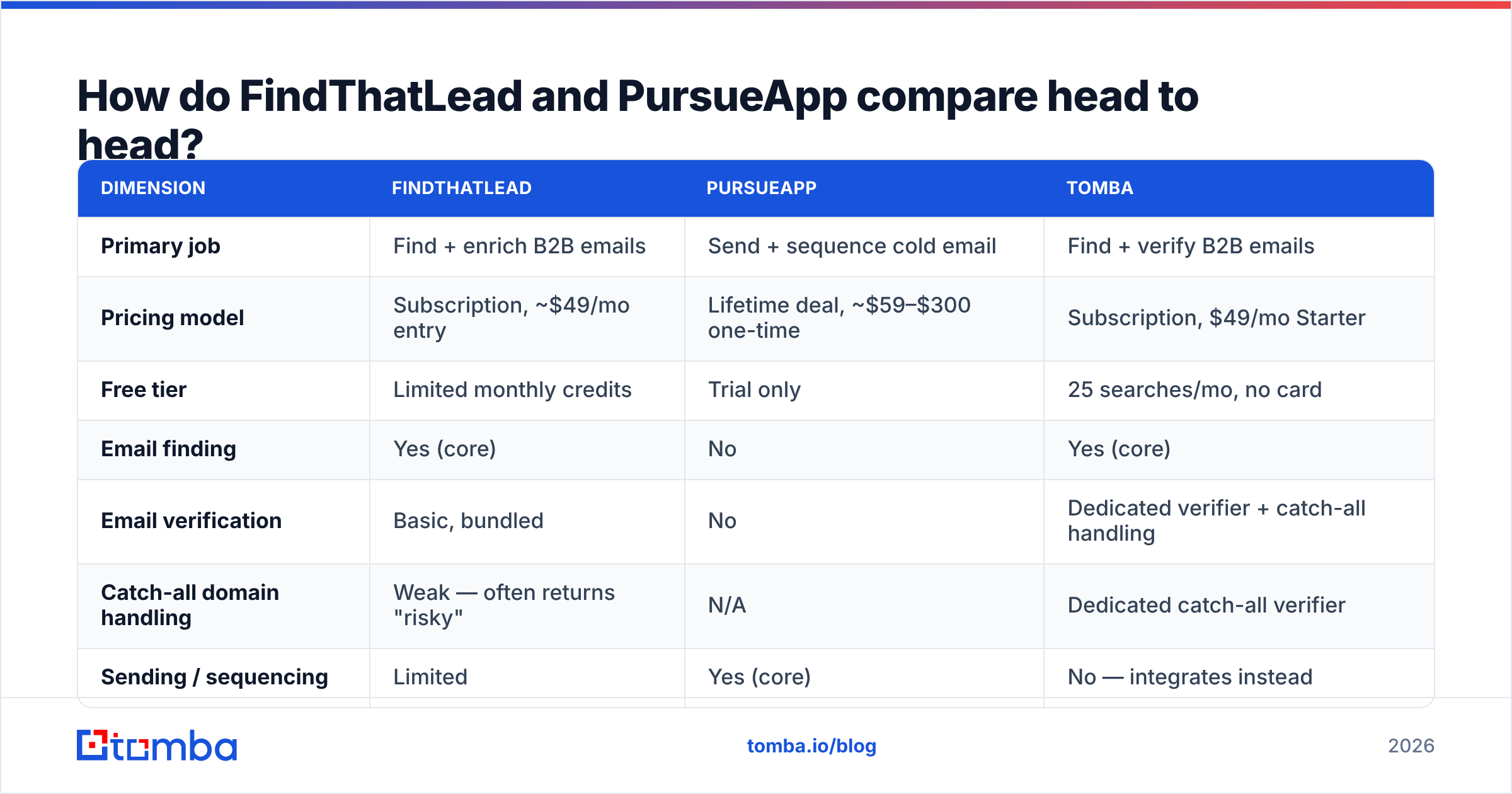
Here's the spec sheet, with the caveat that half these rows are "not applicable" precisely because the products don't overlap.
| Dimension | FindThatLead | PursueApp | Tomba |
|---|---|---|---|
| Primary job | Find + enrich B2B emails | Send + sequence cold email | Find + verify B2B emails |
| Pricing model | Subscription, ~$49/mo entry | Lifetime deal, ~$59–$300 one-time | Subscription, $49/mo Starter |
| Free tier | Limited monthly credits | Trial only | 25 searches/mo, no card |
| Email finding | Yes (core) | No | Yes (core) |
| Email verification | Basic, bundled | No | Dedicated verifier + catch-all handling |
| Catch-all domain handling | Weak — often returns "risky" | N/A | Dedicated catch-all verifier |
| Sending / sequencing | Limited | Yes (core) | No — integrates instead |
| Inbox rotation | No | Limited | N/A |
| API access | Yes, capped | Limited | Full REST API, CLI, MCP server |
| Bulk processing | Yes | Import only | Bulk finder + bulk verify |
| Native CRM sync | HubSpot, Zapier | Zapier | HubSpot, Salesforce, Pipedrive, Zapier, Make |
| Best for | SMB prospecting on a budget | Solo senders who hate MRR | Teams that need accurate data at volume |
Two things jump out.
First, the only genuine head-to-head row is pricing philosophy. FindThatLead charges monthly; PursueApp charges once. For a freelancer sending 200 emails a week, a $99 lifetime license is objectively cheaper than $49/month forever. That's a real advantage and it's why PursueApp has the audience it does.
Second, neither tool covers the workflow end to end. FindThatLead's sending features are thin. PursueApp has no data layer at all. Whichever you buy, you're buying a second tool within a quarter.

Is FindThatLead accurate enough for 2026 outbound?#
Direct answer: adequate for SMB volume, shaky at scale — and the weak spot is verification, not discovery.
Finding a candidate address is the easy part. Every finder on the market runs the same broad playbook: crawl public sources, learn the company's email pattern, permute the name against it, then score confidence. Where tools diverge sharply is what happens next — the verification step that decides whether that candidate actually accepts mail.
FindThatLead bundles a verifier, but it's a light one. In practice you'll see three recurring problems:
- Catch-all domains get flagged "risky" and dumped. A huge share of mid-market B2B domains are catch-all — the server accepts everything at SMTP time, so a naive check can't distinguish a real mailbox from a black hole. Tools without dedicated catch-all logic either discard those leads (you lose pipeline) or pass them through unlabeled (you burn domain reputation). A catch-all verifier that scores these separately is the difference between a usable list and a bounce grenade.
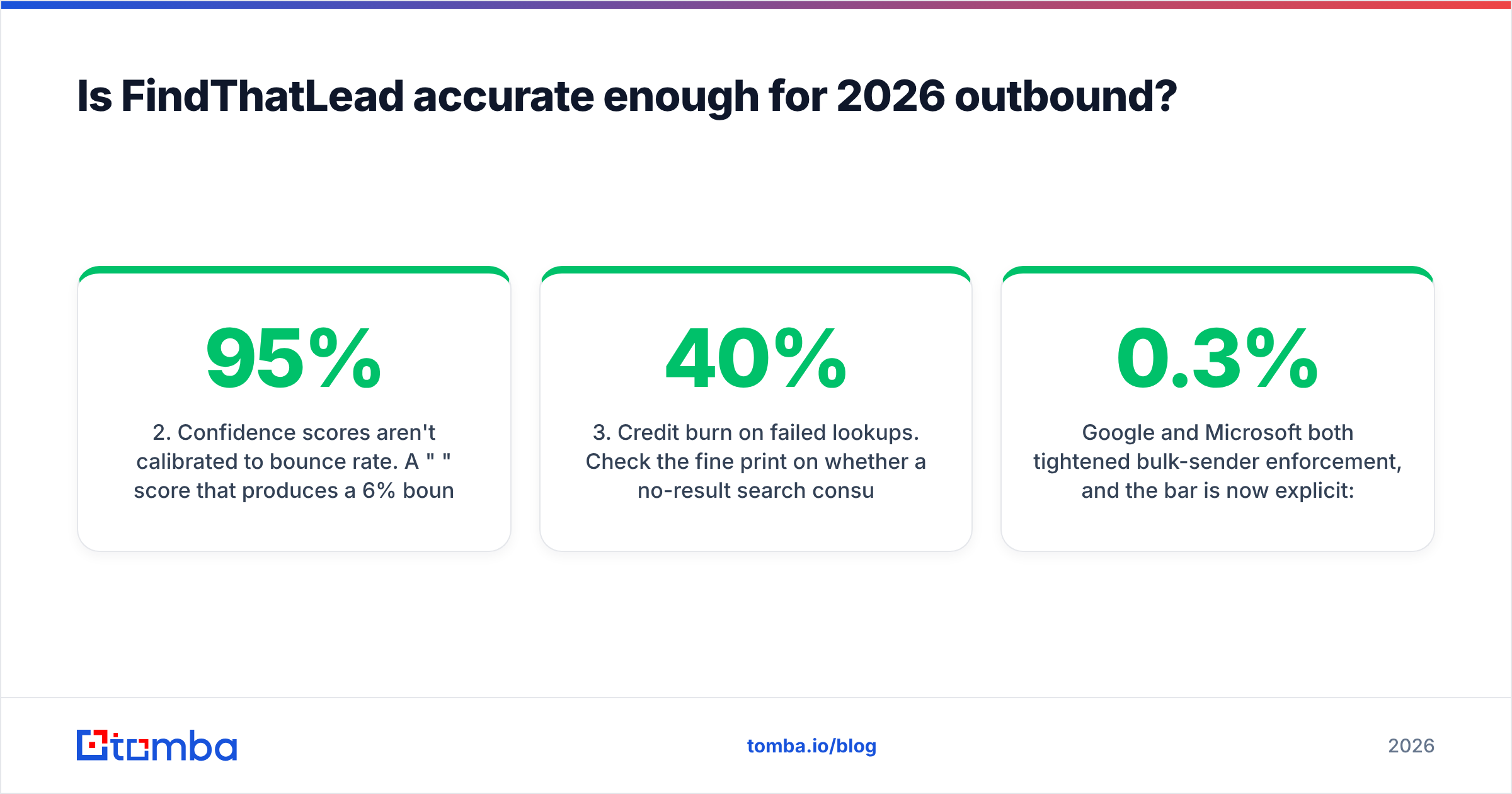
- Confidence scores aren't calibrated to bounce rate. A "95%" score that produces a 6% bounce rate is worse than a "70%" score that produces 1%, because you'll trust the wrong one.
- Credit burn on failed lookups. Check the fine print on whether a no-result search consumes a credit. It changes your effective cost per valid contact by 20–40%.

The practical test is simple and takes an afternoon. Pull 100 contacts you already have confirmed addresses for — past customers, webinar registrants, anyone whose email you've successfully mailed. Run those names and domains through each finder's free tier. Measure three numbers: hit rate (how many it found at all), match rate (how many matched the address you already knew), and false-confident rate (how many it returned with high confidence that were wrong). That third number is the one vendors never publish and the one that predicts your bounce rate.
Google and Microsoft both tightened bulk-sender enforcement, and the bar is now explicit: keep spam complaints under 0.3% and authenticate properly or get throttled. Google's own bulk sender guidelines spell out the thresholds. Bounces from bad data feed directly into that reputation math, which means data quality is now a deliverability problem, not just a productivity one.
Is PursueApp good enough as a sending platform?#
Honest verdict: yes for low-volume solo sending, no for anything resembling a modern outbound program.
The lifetime-deal model is the whole pitch, and it's a legitimate one. You pay once. You own it. There's no monthly anxiety about whether the tool earned its keep this cycle. For a consultant sending 500 emails a month from one or two inboxes, that math is hard to beat.
What you give up:
- Inbox rotation at scale. Modern outbound spreads volume across many sending accounts to keep per-inbox volume low. Platforms like Instantly and Smartlead built their businesses on this. PursueApp's multi-account handling is thinner.
- Built-in warmup. New domains need weeks of ramped, reciprocal sending before they can carry campaign volume. If your tool doesn't do it, you're paying for a separate warmup service — which erodes the lifetime-deal savings. Run your ramp through a warmup calculator before you send a single cold email.
- Deliverability telemetry. Placement testing, per-inbox reputation tracking, and spam-folder detection are standard on subscription platforms because they cost money to run. Lifetime-deal economics rarely support that.
- Roadmap risk. LTD-funded products have no recurring revenue to fund development against changing provider rules. When Gmail changes its enforcement, subscription vendors ship a fix in weeks. LTD vendors ship it when they can.
None of that makes PursueApp a bad purchase. It makes it a specific purchase: right for one person with modest volume, wrong for a five-rep team pushing 10,000 sends a month.
Which one should you pick for your situation?#
Match the tool to the constraint that's actually binding you.
- You have a list, you need to send it. PursueApp, or a subscription sender if volume is above ~2,000/month. FindThatLead solves nothing for you here.
- You have target accounts, you need contacts. FindThatLead works — but benchmark it against a dedicated email finder before committing, because per-credit economics and catch-all handling vary more than the marketing pages suggest.
- You need both, budget is tight. Buy data on a monthly plan sized to actual usage, and a lifetime sender. This is the highest-value combination for solo operators and the one most people arrive at eventually.
- You're a team of 3+ with revenue targets. Neither tool is your center of gravity. You want a data layer with a real API, a sender with inbox rotation and warmup, and a CRM that ties them together. Buy for the seat count you'll have in six months, not today.
- You're API-first / building automation. FindThatLead's API is capped and PursueApp's is thin. If you're piping leads through Make or a custom service, check rate limits and response schemas before you architect around either.
One more filter worth applying: read the recent reviews, not the aggregate score. Vendor listings on G2 are useful mainly for the one- and two-star reviews from the last six months, which is where you'll find the support-response and billing complaints that never appear in a feature matrix.

What does the full stack actually cost?#
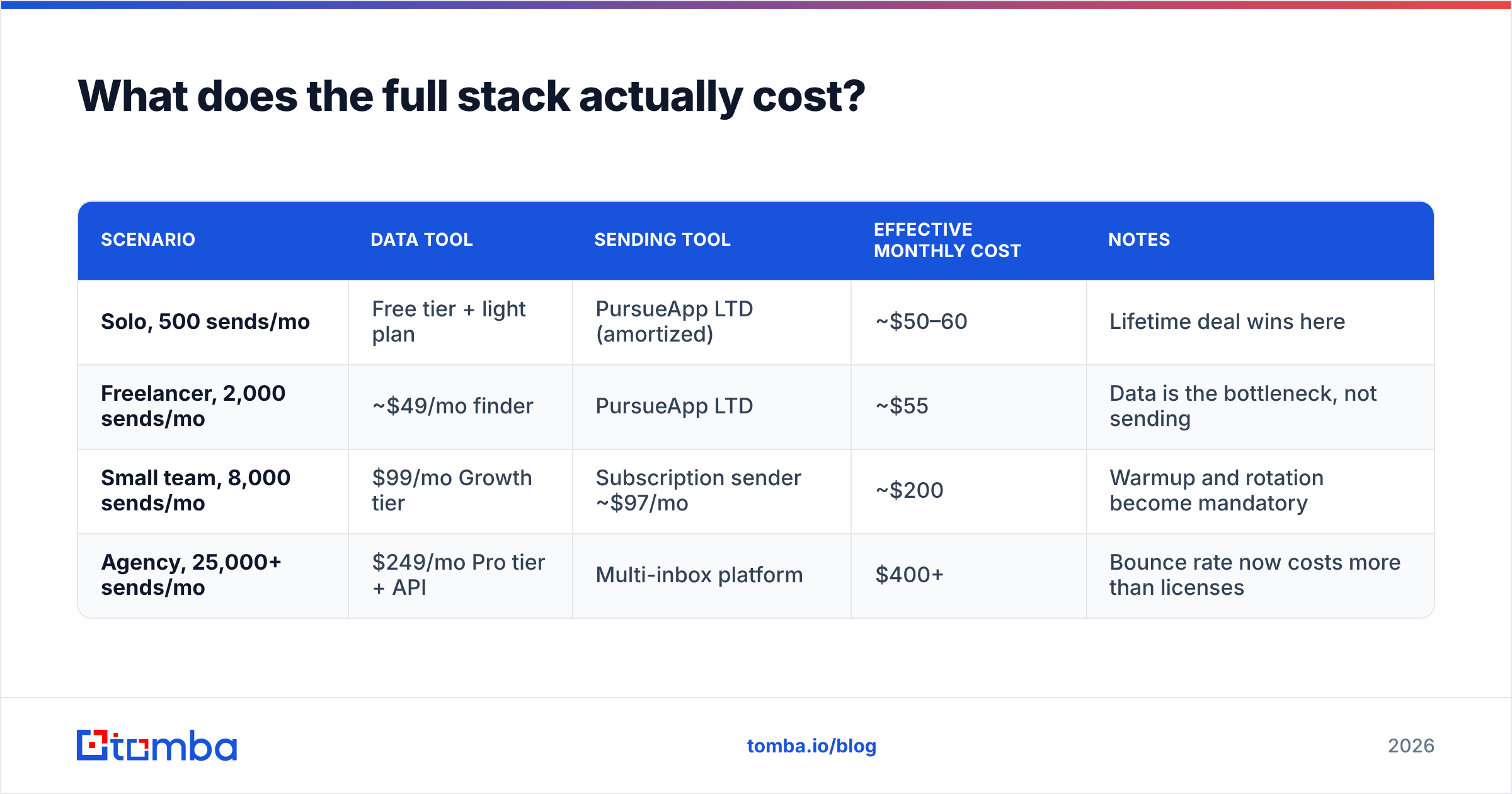
Run the arithmetic on cost per valid contact, not cost per month. That reframe changes most decisions.
| Scenario | Data tool | Sending tool | Effective monthly cost | Notes |
|---|---|---|---|---|
| Solo, 500 sends/mo | Free tier + light plan | PursueApp LTD (amortized) | ~$50–60 | Lifetime deal wins here |
| Freelancer, 2,000 sends/mo | ~$49/mo finder | PursueApp LTD | ~$55 | Data is the bottleneck, not sending |
| Small team, 8,000 sends/mo | $99/mo Growth tier | Subscription sender ~$97/mo | ~$200 | Warmup and rotation become mandatory |
| Agency, 25,000+ sends/mo | $249/mo Pro tier + API | Multi-inbox platform | $400+ | Bounce rate now costs more than licenses |
Notice what changes as volume climbs. At 500 sends a month, tool price dominates. At 25,000, data quality dominates — a 5% bounce rate on 25,000 sends is 1,250 hard bounces, enough to damage domain reputation across every campaign you're running. At that scale, paying more for verified data is cheaper than the recovery cost of a burned domain.
This is also where the "free tools are fine" argument breaks. A free finder that returns unverified guesses isn't free; it's deferred cost, paid in reputation. Run everything through a proper email verifier before it touches a sending platform, regardless of which vendor found it.
If you're stress-testing your own setup, the fastest diagnostic sequence is: check your SPF record, confirm you're not on a blacklist, then sample-verify 200 rows of your existing list. Most "PursueApp isn't delivering" complaints turn out to be list-quality problems wearing a platform costume.
What are the strongest alternatives to both?#
If neither tool fits, the market splits cleanly along the same fault line.
For data: Tomba, Hunter, Apollo, and Findymail all compete on find-plus-verify. Tomba's differentiators are the dedicated catch-all handling, a full REST API with CLI and MCP server access, and transparent per-credit pricing — Free (25 searches/mo), Starter $49, Growth $99, Pro $249. If you're evaluating against a broader field, the Apollo alternative and Findymail alternative breakdowns cover the trade-offs in detail. For pre-built lists rather than lookups, BookYourData is a solid option with a different model — you buy verified records outright instead of burning search credits, which suits teams that want a list in hand today.
For sending: Instantly, Smartlead, Lemlist, and Saleshandy dominate. All are subscription-priced, all handle inbox rotation and warmup natively, and all publish deliverability telemetry. You pay monthly for the privilege of someone else tracking Google's enforcement changes for you.

The 2026 default stack, if you want one recommendation instead of a menu:
- Data layer — a finder with real verification and an API, sized to your monthly contact volume
- Verification gate — every list verified immediately before import, no exceptions
- Sending layer — multi-inbox platform with native warmup, volume-priced
- CRM — the system of record; both layers write into it, neither replaces it
- Measurement — bounce rate, reply rate, and meetings booked, tracked per data source so you can fire the source that's underperforming
That fifth item is the one almost nobody implements and the one that pays for itself fastest. Tag every contact with where it came from. Within two months you'll know which vendor's data actually converts, and the vendor-comparison question answers itself with your own numbers instead of someone else's blog post.
The bottom line#
FindThatLead vs PursueApp is a comparison between a data tool and a sending tool, and the correct answer for most teams is "one of each, and probably not these two." FindThatLead is a reasonable budget finder with soft verification. PursueApp is a reasonable budget sender with soft deliverability tooling. Both are defensible at small scale. Both become the constraint the moment you grow.
If the half you actually need is data — accurate, verified, catch-all-aware contacts that don't torch your domain reputation — start with the Tomba Email Finder. The free tier gives you 25 searches a month with no card, which is enough to run the 100-contact benchmark test described above against whatever you're using now. Paid plans start at $49/mo with the verifier, domain search, and full API included, and you can see the full breakdown on the Tomba pricing page. Run the benchmark, compare the false-confident rate, and let your own data pick the winner.
Related guides#
Ready to find emails that actually work?
Join 150,000+ professionals who stopped guessing and started sending. Free credits on signup — no credit card required.
Get the Tomba newsletter
Practical outbound tactics and product updates — once every two weeks.
About the author