FindThatLead vs Salesbot (2026): Which One Do You Need?
FindThatLead finds the leads. Salesbot writes and sends the emails. They are sold together, priced together, and confused constantly. Here is what each one actually does, what it costs, and which half of the stack is worth paying for in 2026.
TL;DR
- FindThatLead and Salesbot are not really competitors. FindThatLead is a lead-sourcing suite (email finder, domain scraper, lead search); Salesbot is its AI cold-email writer and sender. Same company, same login, same credit pool.
- If you are searching "FindThatLead vs Salesbot," the real question is usually: do I pay for the data layer, the sending layer, or both?
- Salesbot's AI copy is a decent first draft engine. It is not a replacement for a real sequencer like Instantly, Smartlead, or Salesloft once you pass ~2,000 sends a month.
- The weak link in the bundle is data accuracy. Bundled finders optimise for volume; standalone finders optimise for verified deliverability. That gap shows up in your bounce rate, not your dashboard.
- Best 2026 setup for most teams: a dedicated finder + verifier (Tomba at $49/mo Starter) feeding a dedicated sender. Buy the bundle only if you value one login above everything else.
What are FindThatLead and Salesbot?#
FindThatLead is a Spanish B2B prospecting platform that has been around since 2015. Its core products are an email finder (name + domain to email), a domain search that pulls every address it has for a company, a lead search that filters a database by role and industry, and a Chrome extension that scrapes LinkedIn profiles.
Salesbot is FindThatLead's outreach module. You feed it a list, it generates cold email copy with AI based on the prospect's profile and your value proposition, and it sends the campaign from your connected mailbox with follow-up steps. It launched as a bolt-on and is now marketed as a headline feature of the paid plans on findthatlead.com.
One disambiguation before you go further: "Salesbot" is also the name of the CRM chatbot inside Kommo, and a handful of unrelated chat widgets use the same word. If you landed here looking for a website chat agent, this is not that post. Everything below is about FindThatLead's Salesbot.
So the honest framing is: this is not a head-to-head between two rival vendors. It is a build-vs-bundle decision inside one vendor's stack.
Is Salesbot a separate tool or part of FindThatLead?#
Part of it. You cannot meaningfully buy Salesbot without FindThatLead — it shares the same account, the same billing, and in practice the same credit system that governs how many searches and sends you get per month.
That matters more than it sounds. Bundled credits create a quiet tax: every search you burn is a send you cannot make, and every unverified email you send burns twice — once on the credit, once on your sender reputation.
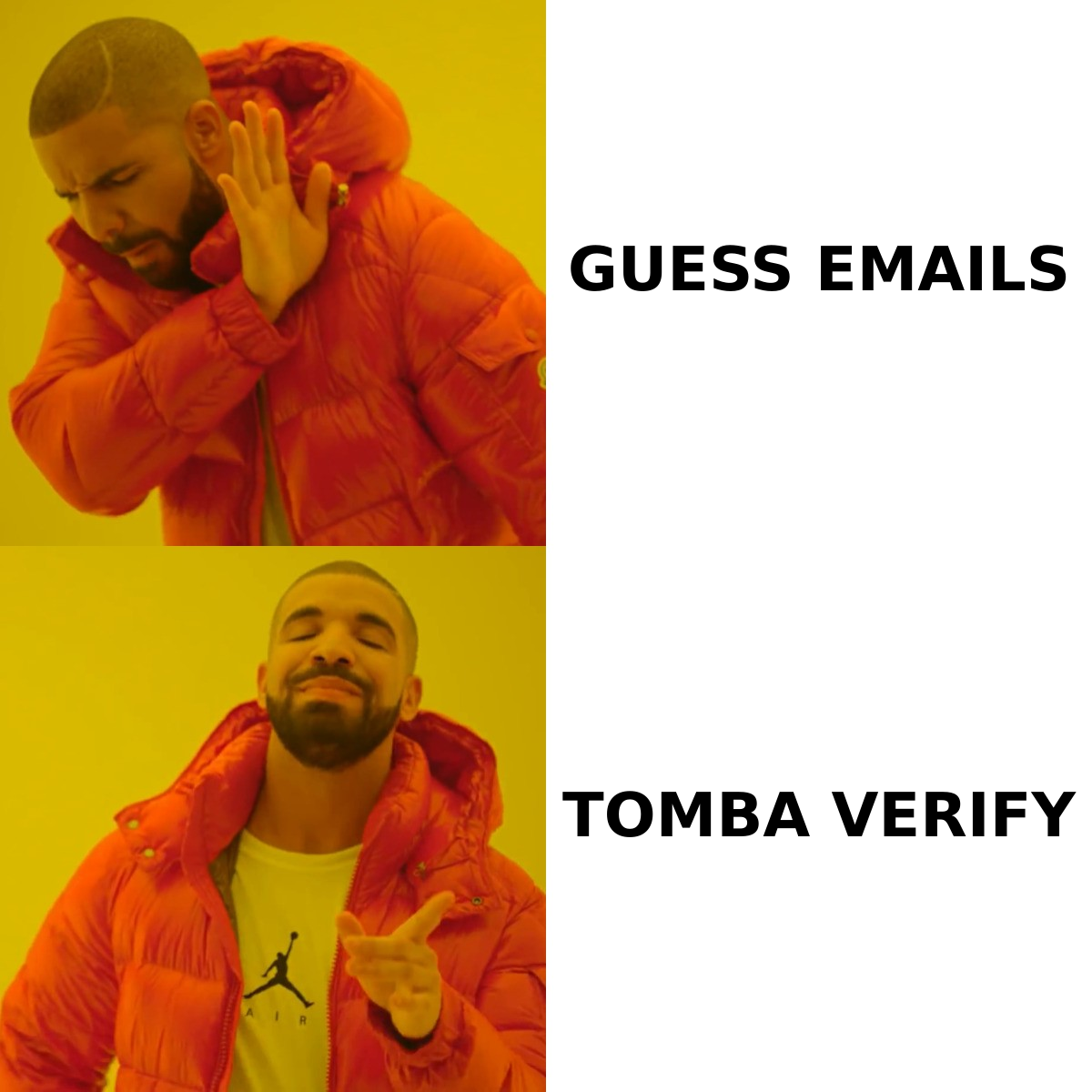
Here is how the two halves split:
| Layer | FindThatLead (data) | Salesbot (outreach) | What you'd use instead |
|---|---|---|---|
| Primary job | Find and export B2B emails | Write + send cold sequences | — |
| Core inputs | Name, domain, LinkedIn URL, job filters | Lead list, ICP description, offer | — |
| Output quality driver | Source freshness, SMTP verification | Prompt quality, mailbox warmup | — |
| Typical failure mode | Bounces, catch-all guesses | Generic AI copy, spam folder | — |
| Standalone alternative | Tomba, Hunter, Findymail | Instantly, Smartlead, Lemlist | — |
| Sold separately? | No | No | Yes, both |
The pattern in that table is the whole argument. Every column that FindThatLead's bundle covers has a specialist tool that does the same job with more depth — and in the data column, more accuracy.
How do FindThatLead and Salesbot compare on features and pricing?#
FindThatLead's public plans have historically run roughly: a free trial tier with a small credit allowance, a Growth plan around $49/mo, a Startup plan around $150/mo, and a Suite plan around $399/mo, with credits scaling from a few thousand to tens of thousands. Salesbot access and sending limits are attached to those tiers rather than priced independently. Check the vendor's pricing page before you commit — prices and credit ratios in this category change every few quarters.
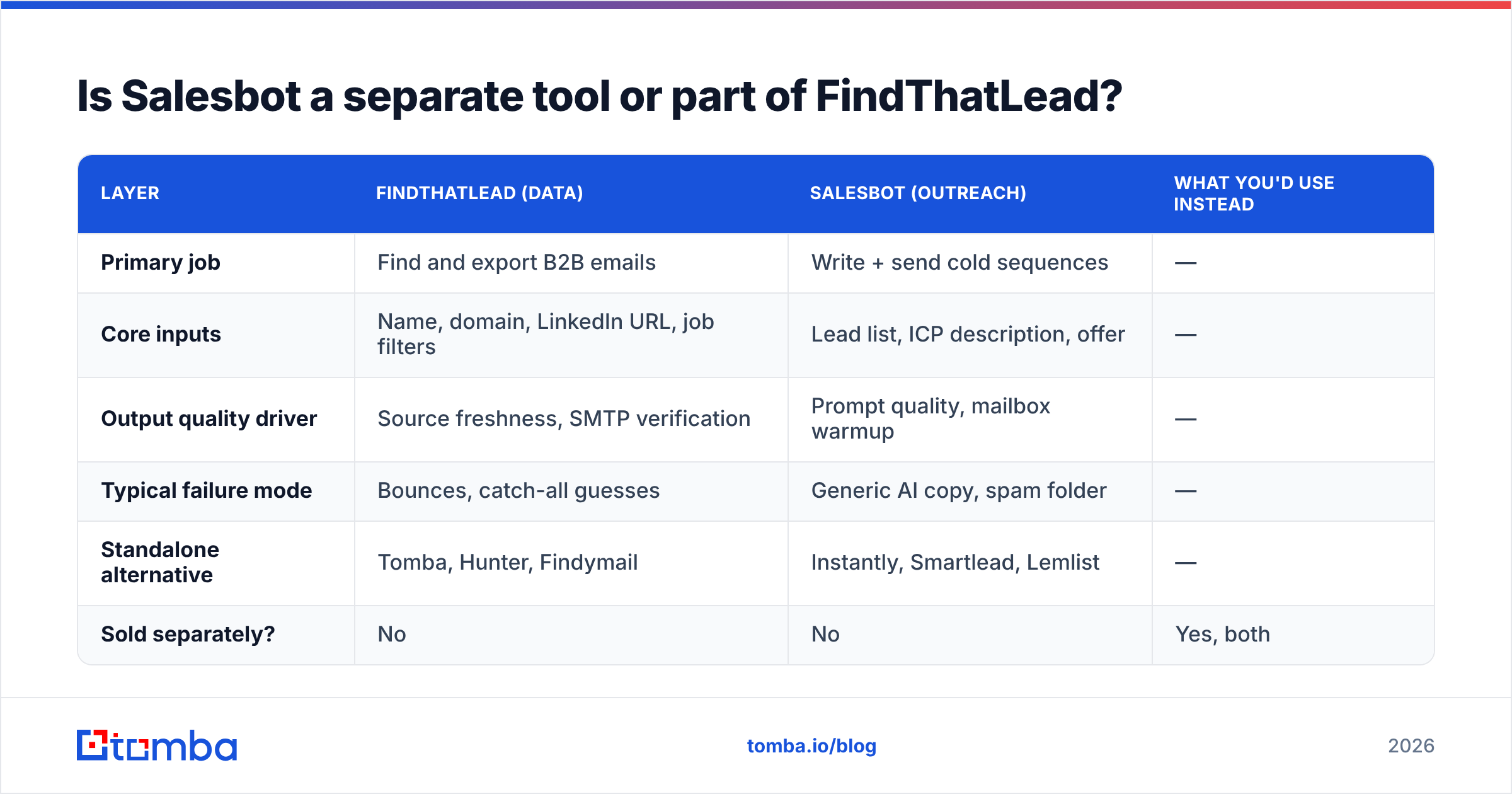
Here is how the bundle stacks up against buying the data layer on its own:
| Feature | FindThatLead + Salesbot | Tomba | Dedicated sender (e.g. Instantly) |
|---|---|---|---|
| Entry paid price | ~$49/mo (Growth) | $49/mo Starter | ~$37–$97/mo |
| Free tier | Limited trial credits | 25 searches/mo, no card | Usually trial only |
| Email finder | Yes | Yes (core product) | No |
| Email verification | Basic, bundled | Dedicated email verifier | No |
| Catch-all handling | Marked, limited resolution | Catch-all verifier | No |
| Bulk enrichment | Yes, credit-metered | Bulk email finder + CSV | No |
| AI copy generation | Yes (Salesbot) | No | Yes, in most tools |
| Multi-mailbox rotation | Limited | N/A | Yes, unlimited on most plans |
| Inbox warmup | No | No | Yes, built in |
| API access | Yes | Tomba API, CLI, MCP | Yes |
| Best for | Solo founders wanting one login | Teams that need clean data at scale | Teams sending 5k+/mo |
Read it this way: the bundle wins on convenience and loses on depth. If your outbound is 300 emails a month, convenience genuinely wins. If it is 5,000, every weakness in the table becomes a line item on your bounce report.
Which one gives you better data accuracy?#
Neither Salesbot nor any AI writer improves your data. Copy quality is downstream of contact quality — a perfect email to a dead address is a bounce with better grammar.
This is where bundled finders consistently underperform. Vendors that sell a suite have a structural incentive to return an email rather than the email, because a returned result feels like value delivered. Specialist finders have the opposite incentive: their entire reputation sits on the accuracy number.
Three things to check on any tool before you trust its output:
- Does it separate "verified" from "guessed"? Pattern-generated addresses (first.last@domain.com) are a hypothesis, not a contact. Tools that blur the two inflate their hit rate and deflate your deliverability.
- How does it treat catch-all domains? Roughly a fifth of B2B domains accept everything at the MX layer. A finder that returns those as "valid" is passing you a coin flip. A catch-all finder that flags and separately resolves them is doing the actual work.
- Is verification a separate step you can re-run? Data decays at 25–30% per year as people change jobs. A list you verified in January is measurably worse in June. Re-verification has to be cheap and re-runnable, not a one-shot at export.
Independent user reviews on G2 tell the same story across the category: suite tools score well on ease of use and noticeably lower on data quality and accuracy. That is the trade you are making.
If you want to keep the sending stack you already have and just fix the input, the cleanest fix is to replace the sourcing half. Tomba's email finder and domain search do exactly that job, and the results land in the same CSV your sender already ingests.
Where does Salesbot's AI copy actually help?#
Credit where it is due. Salesbot is genuinely useful in three narrow situations:
- You have never written a cold email. A structurally correct first draft — short subject, one-line relevance hook, single ask — beats a blank page, and Salesbot reliably produces one.
- You need volume variants for testing. Generating twelve subject-line variants in a minute is a real time saver when you are A/B testing.
- You are in a non-native language market. The AI output is cleaner than most non-native drafts, which matters more than reps admit.
Where it does not help: personalisation that requires knowing something the model cannot see. An AI that reads a LinkedIn headline writes a first line about the headline. Every competitor's AI does the same, so your prospect has now received four emails that all open with a comment about their job title. The differentiation collapses.
HubSpot's own sales research has been consistent on this for years: reply rates track relevance and timing, not adjective density. If your trigger is real (funding round, new hire, tech stack change), a plain-text three-liner beats an AI-polished paragraph. If your trigger is fake, no amount of generation fixes it.
What are the real limitations before you buy?#
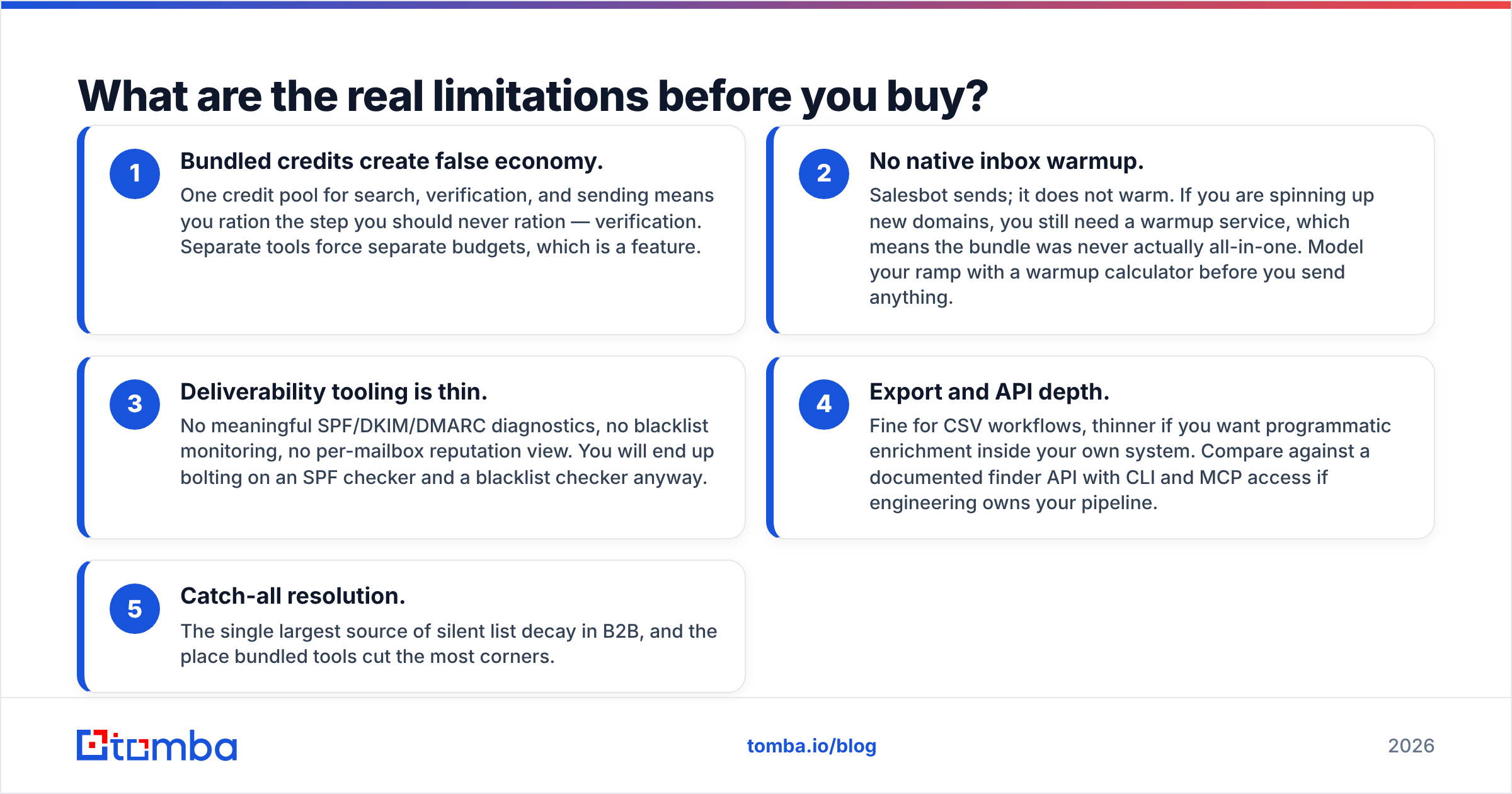
Five things buyers report after the first billing cycle, in rough order of how much they cost you:
- Bundled credits create false economy. One credit pool for search, verification, and sending means you ration the step you should never ration — verification. Separate tools force separate budgets, which is a feature.
- No native inbox warmup. Salesbot sends; it does not warm. If you are spinning up new domains, you still need a warmup service, which means the bundle was never actually all-in-one. Model your ramp with a warmup calculator before you send anything.
- Deliverability tooling is thin. No meaningful SPF/DKIM/DMARC diagnostics, no blacklist monitoring, no per-mailbox reputation view. You will end up bolting on an SPF checker and a blacklist checker anyway.
- Export and API depth. Fine for CSV workflows, thinner if you want programmatic enrichment inside your own system. Compare against a documented finder API with CLI and MCP access if engineering owns your pipeline.
- Catch-all resolution. The single largest source of silent list decay in B2B, and the place bundled tools cut the most corners.
None of these are disqualifying for a solo founder doing 200 sends a month. All of them compound at team scale.
Which should you choose in 2026?#
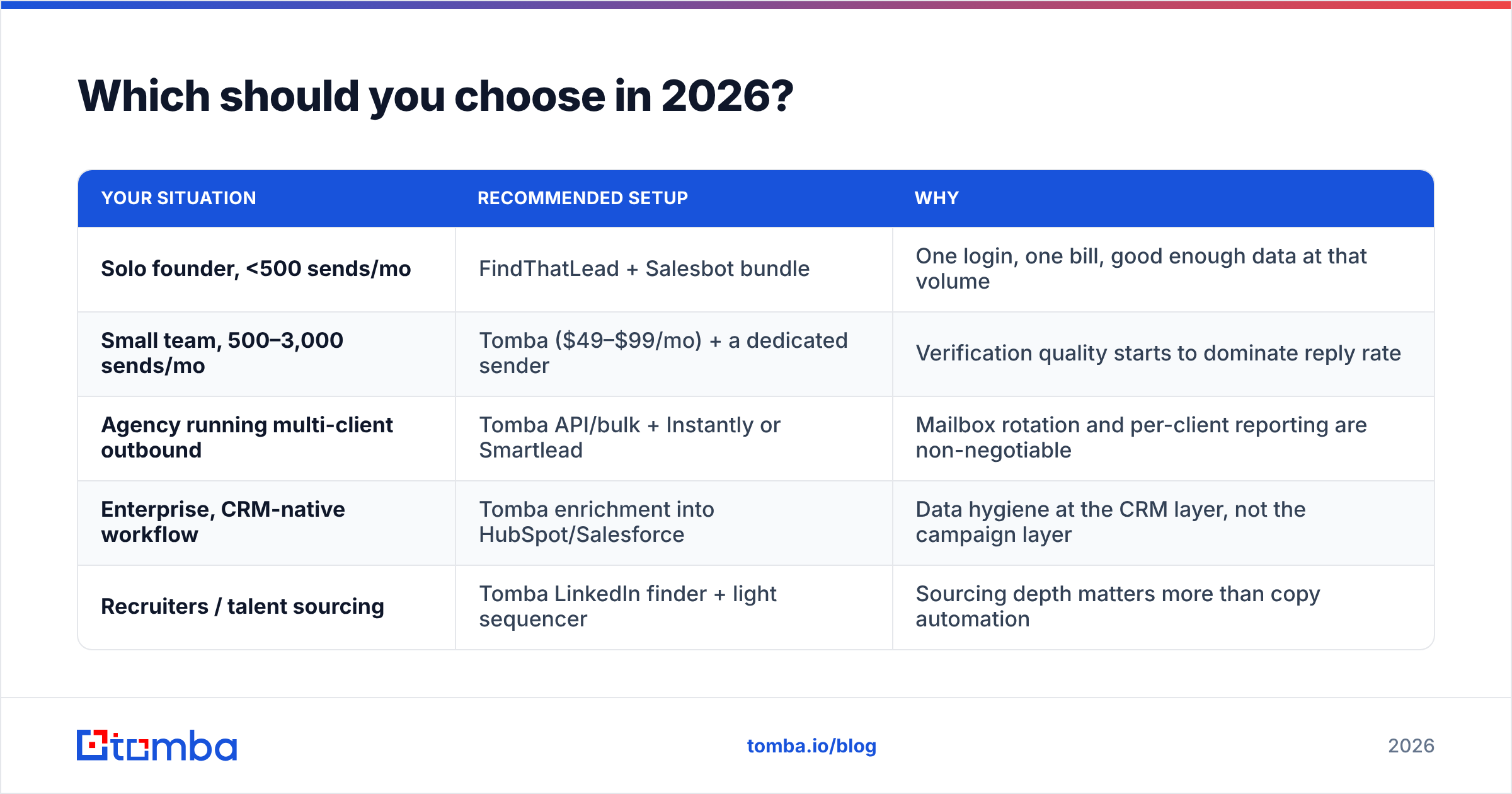
Match the tool to the volume, not the marketing page.
| Your situation | Recommended setup | Why |
|---|---|---|
| Solo founder, <500 sends/mo | FindThatLead + Salesbot bundle | One login, one bill, good enough data at that volume |
| Small team, 500–3,000 sends/mo | Tomba ($49–$99/mo) + a dedicated sender | Verification quality starts to dominate reply rate |
| Agency running multi-client outbound | Tomba API/bulk + Instantly or Smartlead | Mailbox rotation and per-client reporting are non-negotiable |
| Enterprise, CRM-native workflow | Tomba enrichment into HubSpot/Salesforce | Data hygiene at the CRM layer, not the campaign layer |
| Recruiters / talent sourcing | Tomba LinkedIn finder + light sequencer | Sourcing depth matters more than copy automation |
The dividing line is roughly 1,000 sends a month. Below it, the convenience of a bundle is worth the accuracy tax. Above it, the tax is bigger than the convenience — a 12% bounce rate on 5,000 sends is 600 hard bounces, which is enough to visibly damage domain reputation in a single campaign.
If you want to keep FindThatLead for its LinkedIn scraping and lead search while fixing the accuracy problem, that is a perfectly reasonable hybrid. Export from FindThatLead, run the list through a proper verifier, and only then load it into Salesbot or whatever sender you prefer. That single step is usually worth more than switching vendors entirely. Tomba's pricing starts at Free (25 searches/mo), then $49/mo Starter, $99/mo Growth, and $249/mo Pro — so the verification layer costs less than the bounces it prevents.
What about the alternatives to both?#
Two shortlists, depending on which half you are replacing.
Replacing the data half: Tomba, Hunter, Findymail, and Apollo all compete here. Tomba and Findymail lean accuracy-first; Apollo leans database-first with a huge but noisier contact set; Hunter sits between. Note that BookYourData takes a different approach entirely — pay-as-you-go verified list purchase rather than per-lookup search — which is a genuinely better fit if you want a bought, guaranteed-accuracy list rather than a search tool. Different model, valid choice.
Replacing the outreach half: Instantly and Smartlead dominate at the high-volume end with unlimited mailbox rotation and built-in warmup. Lemlist wins on personalisation depth (dynamic images, LinkedIn steps). Salesloft and Outreach are the enterprise answer once you need forecasting and manager coaching layers rather than raw send volume.
The uncomfortable conclusion for the bundle: in both columns, the specialists are better, and running one from each column costs about the same as the mid-tier suite plan.
The bottom line#
FindThatLead vs Salesbot is a false comparison sold as a real one. You are choosing between a bundled data-plus-sending suite and a two-tool stack of specialists — and past a few hundred emails a month, the specialists win on the metric that decides everything: how many of your emails reach a real human inbox.
Start by fixing the input. Run your next list through the Tomba Email Finder and its verification layer before it touches any sequencer — Salesbot included. The free tier gives you 25 searches a month with no card, which is enough to benchmark your current list's bounce rate against a verified one. If the gap is what it usually is, the decision makes itself.
Related guides#
Ready to find emails that actually work?
Join 150,000+ professionals who stopped guessing and started sending. Free credits on signup — no credit card required.
Get the Tomba newsletter
Practical outbound tactics and product updates — once every two weeks.
About the author