Folderly Pricing 2026: Reviews, Pros and Cons Explained
Folderly sells deliverability as a managed service, and it prices like one. Here is what Folderly actually costs per mailbox, what reviewers praise and complain about, and when a cheaper stack does the same job.
Folderly pricing starts at about $120 per mailbox per month, and it is usually billed a year at a time. Here is what that buys, what reviewers say, and when a cheaper stack does the same job.
TL;DR
- Folderly pricing is per mailbox, per month. Plan on roughly $120 a mailbox, on an annual deal. There is no real free tier and no $19 self-serve plan.
- Folderly is a managed deliverability platform. It tests spam placement, warms up mailboxes, fixes DNS records, and watches inbox rates. It comes from the team behind the Belkins agency.
- Reviewers praise the hands-on onboarding and the depth of the reports. The common gripes are cost at scale, rigid contracts, and slow results.
A quick buying rule:
- Folderly is worth it when your domain is truly burned and you have budget for a done-for-you fix.
- It is overkill when your real problem is a dirty list.
- The cheapest honest path: clean the list, fix SPF, DKIM and DMARC yourself, then ramp slowly. Buy software only if the numbers still refuse to move.
What is Folderly and who is it actually for?#
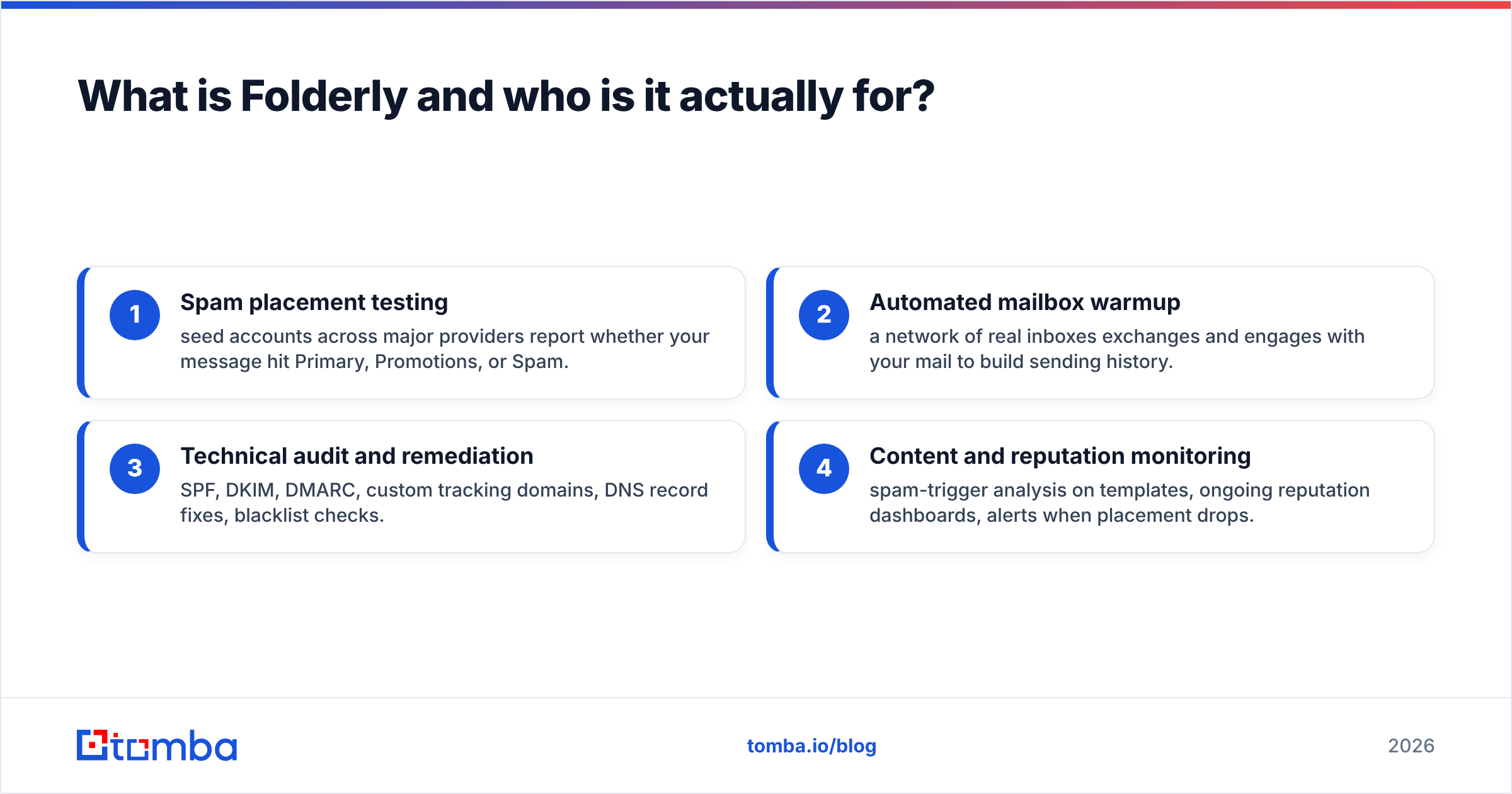
Folderly is a deliverability tool, not a sending tool. You keep sending from Google Workspace, Microsoft 365, or your sequencer. Folderly sits next to it and answers one question: why do your emails land in spam, and what has to change?
The product bundles four things that usually live in four tools:
- Spam placement testing — seed accounts at the big providers report whether your message hit Primary, Promotions, or Spam.
- Mailbox warmup — a network of real inboxes reads and replies to your mail, so you build a sending history.
- Technical audit and fixes — SPF, DKIM, DMARC, custom tracking domains, DNS records, and blacklist checks.
- Content and reputation checks — spam-trigger analysis on your templates, live dashboards, and alerts when placement drops.
The company aims upmarket. Its ideal buyer is an outbound team with 10 to 100+ sending mailboxes, where a placement drop costs real pipeline. Agencies fit too, because one blacklisted client domain can mean churn. Are you a solo founder sending 50 emails a day from one Gmail account? Then you are not the target buyer, and Folderly pricing makes that obvious.
You can check current packaging on Folderly's own site. That is the only source that stays accurate as plans change.
Folderly pricing in 2026: what does it actually cost?#
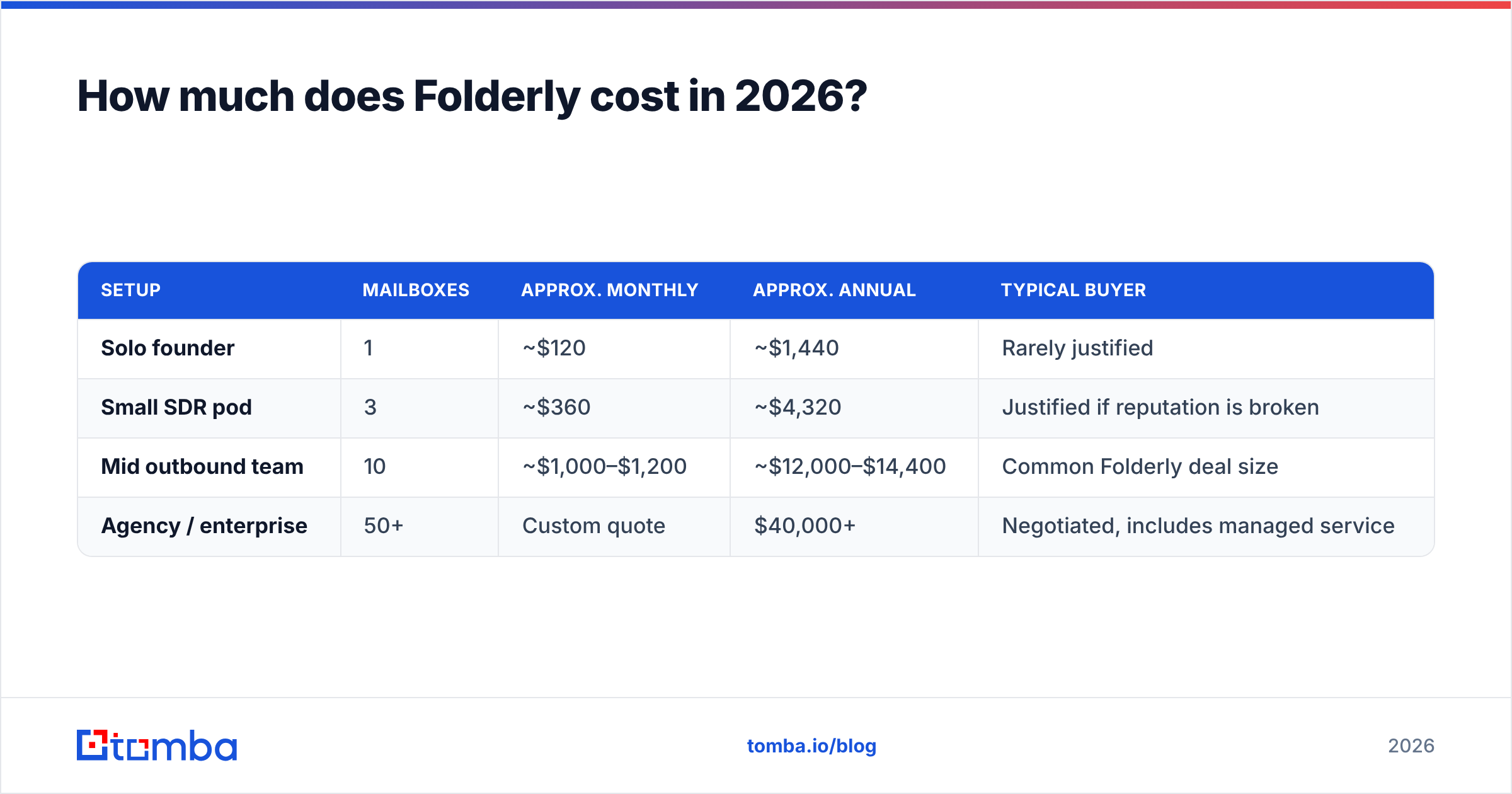
Folderly does not publish a simple price list. You get a quote after a call. The price scales with mailbox count, and it normally comes as an annual deal. Public figures and user reviews cluster around $120 per mailbox per month at entry. Volume discounts kick in as counts rise, and pricing goes custom above roughly 50 mailboxes.
Here is what that means for a real outbound team:
| Setup | Mailboxes | Approx. monthly | Approx. annual | Typical buyer |
|---|---|---|---|---|
| Solo founder | 1 | ~$120 | ~$1,440 | Rarely justified |
| Small SDR pod | 3 | ~$360 | ~$4,320 | Justified if reputation is broken |
| Mid outbound team | 10 | ~$1,000–$1,200 | ~$12,000–$14,400 | Common Folderly deal size |
| Agency / enterprise | 50+ | Custom quote | $40,000+ | Negotiated, includes managed service |
Two traits of Folderly pricing matter more than the headline number:
- The unit is the mailbox, not the seat. Modern cold outbound spreads volume across many low-volume mailboxes. Folderly's model punishes that play. Every inbox you add to protect deliverability raises your bill.
- Annual terms are the norm. Several reviewers mention 12-month contracts and little month-to-month room. Fixing a burned domain takes weeks, so the vendor has a fair case for it. Still, you cannot test for 30 days and walk away cheaply.
For comparison, Tomba plans run $49/mo (Starter), $99/mo (Growth), and $249/mo (Pro) for the whole account. There is also a free tier at 25 searches a month. It is a different category, of course. It is still a useful yardstick for what "expensive" means in an outbound stack.
What do Folderly reviews actually say?#
Scores on G2 and Capterra are strong. Folderly usually sits in the high 4s out of 5. That is a real signal. Even so, read the review bodies rather than the star average. The praise and the criticism are unusually consistent.
What reviewers praise:
- Onboarding. Reviewers describe a named specialist who audits DNS, rewrites your records, and explains what broke. This part reads more like consulting than software. It is the most cited reason people renew.
- Diagnostic depth. Placement reports break results down by provider and by template. That beats "your open rate dropped."
- Real recovery stories. Several reviews describe going from mostly spam to mostly inbox in 4 to 8 weeks on burned domains.
What reviewers criticize:
- Price. This is the top complaint by a wide margin. Small teams say the cost is hard to justify against results they could partly get by hand.
- Time to result. Repair is slow by nature. Buyers who expect a 7-day fix report frustration. Budget 30 to 60 days.
- Contract terms. Annual deals, plus friction on downgrades or on pausing mailboxes in slow seasons.
- Overlap with tools they own. Teams that already pay for a sequencer with warmup feel they buy warmup twice.
None of that makes Folderly a bad product. It makes it a specific product. It is a premium, service-heavy fix for a problem that gets expensive when nobody solves it.
What are Folderly's biggest pros?#
- It treats deliverability as a system. Warmup alone does not fix your DNS records. Records alone do not fix your copy. Folderly covers the full chain, so it wins on domains where single-purpose tools stalled.
- The human layer is real. You get a specialist, not a help-center article. For teams with no in-house RevOps, that expertise is the actual product.
- Provider-level visibility. You may inbox at Google and land in spam at Outlook. Knowing that changes your next move. Cheap tools rarely tell you.
- Multi-domain handling. If you send for clients, one dashboard across domains is worth paying for.
- Fewer panic cycles. Alerts on placement drops turn a silent revenue leak into a ticket.
What are the cons and hidden costs?#
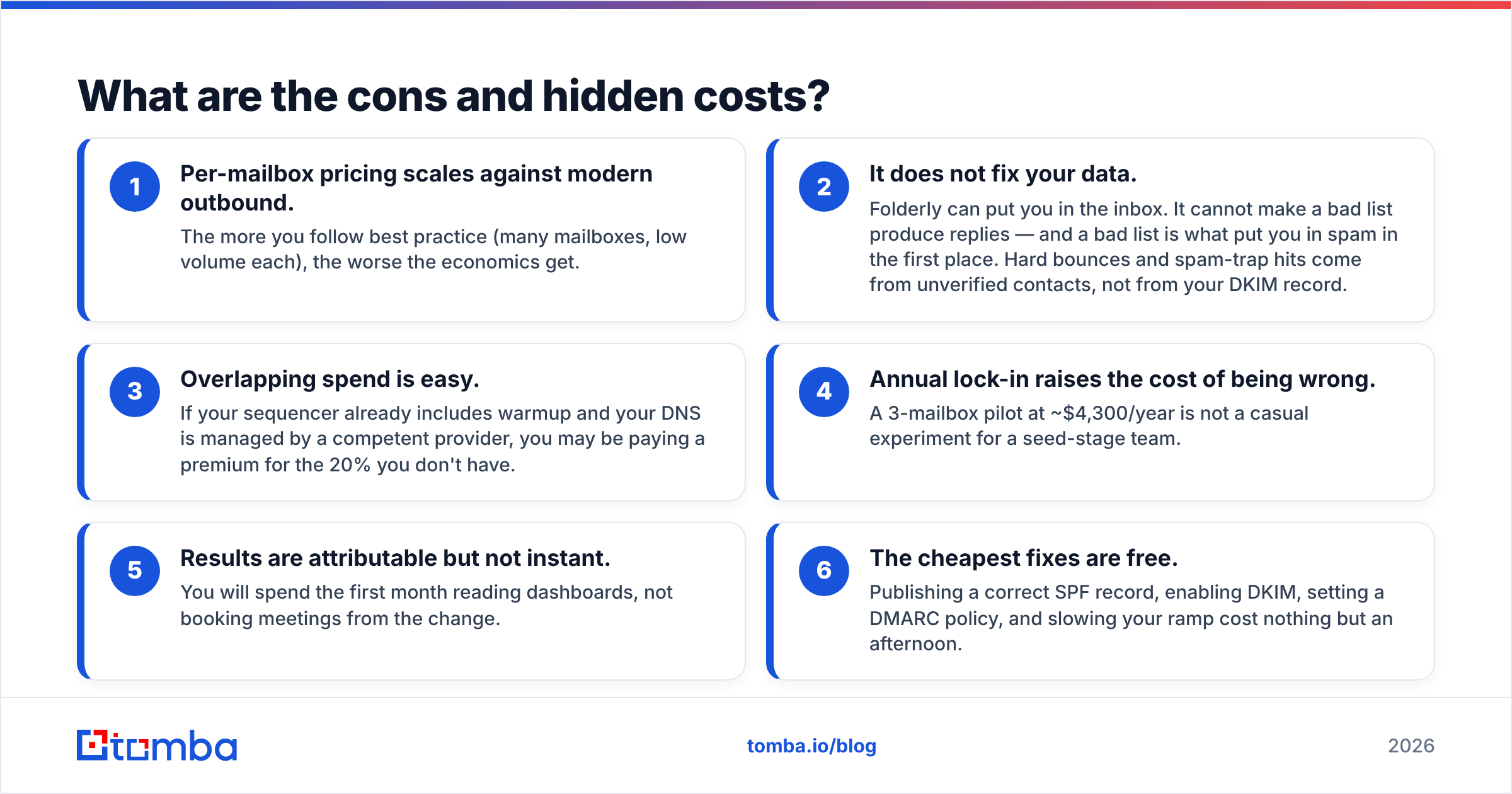
- Per-mailbox pricing scales against modern outbound. The closer you follow best practice, the worse the math gets. More mailboxes means a bigger bill.
- It does not fix your data. Folderly can put you in the inbox. It cannot make a bad list reply. Hard bounces and spam traps come from unverified contacts, not from your DKIM record.
- Double spend is easy. Your sequencer may already include warmup. Your DNS may already be in good hands. Then you pay a premium for the last 20%.
The contract adds three more costs that rarely show up in the quote:
- Annual lock-in raises the cost of being wrong. A 3-mailbox pilot at ~$4,300 a year is not a casual test for a seed-stage team.
- Results are slow. You will spend month one reading dashboards, not booking meetings.
- The best first fixes are free. A correct SPF record, DKIM, a DMARC policy, and a slower ramp cost an afternoon.

Is Folderly worth it, or should you fix the cheap things first?#
Run this order of work before you sign. Most spam problems die in the first few steps.
- Clean the list. Bounces are the fastest way to torch a domain. Run every import through an email verifier and drop risky rows. Importing thousands of contacts? Then bulk verify before the first send.
- Fix your records. SPF, DKIM, and DMARC are free and take under an hour. Confirm what is live with an SPF checker instead of trusting your DNS panel.
- Slow the ramp. A new mailbox should not send 200 emails on day three. Model a sane schedule with an email warmup calculator before you buy warmup software.
If placement is still bad, keep going:
- Audit the copy. Link-heavy, image-heavy, "guaranteed ROI" emails get filtered no matter how clean your domain is. Run drafts through a spam checker.
- Check the blacklists. A listed IP or domain has a specific fix with a specific process. It is not a subscription.
- Then buy the platform. At that point you have a genuine reputation problem, and Folderly pricing starts to make sense.
Here is the uncomfortable truth in most audits. Teams buy a $12,000-a-year platform to solve a problem created by a $99-a-month data gap. Verified addresses go to people who might actually reply. That fixes more inbox placement than any warmup network, because engagement is the strongest signal providers weigh. That is the mechanism behind email deliverability. Providers watch whether humans want your mail.
How does Folderly compare to the alternatives?#
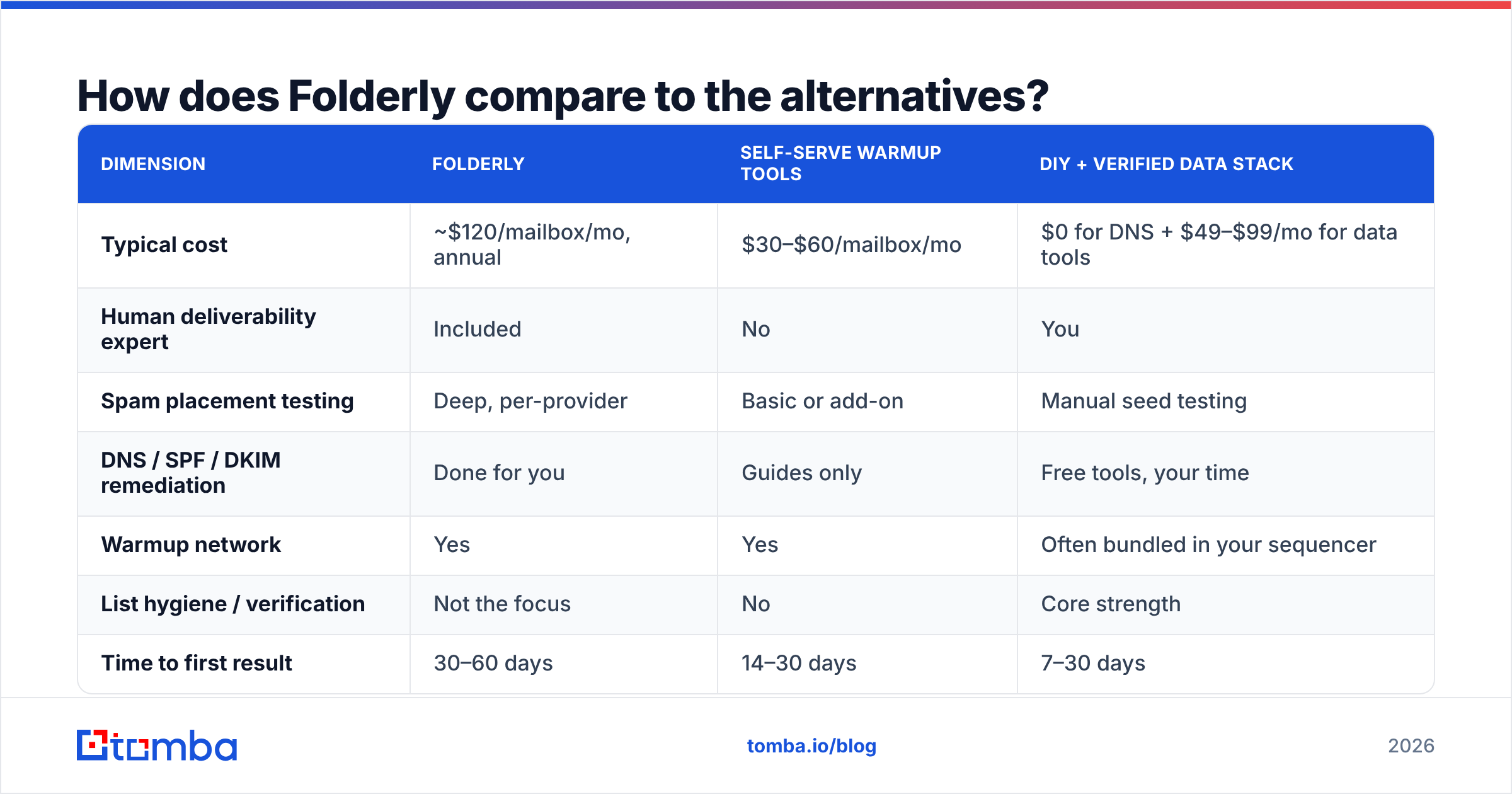
The market splits into three shapes: managed platforms, self-serve warmup tools, and the free DIY stack. They are not interchangeable.
| Dimension | Folderly | Self-serve warmup tools | DIY + verified data stack |
|---|---|---|---|
| Typical cost | ~$120/mailbox/mo, annual | $30–$60/mailbox/mo | $0 for DNS + $49–$99/mo for data tools |
| Human deliverability expert | Included | No | You |
| Spam placement testing | Deep, per-provider | Basic or add-on | Manual seed testing |
| DNS / SPF / DKIM fixes | Done for you | Guides only | Free tools, your time |
| Warmup network | Yes | Yes | Often bundled in your sequencer |
| List hygiene / verification | Not the focus | No | Core strength |
| Time to first result | 30–60 days | 14–30 days | 7–30 days |
| Contract | Usually annual | Monthly | Monthly or free |
| Best for | Burned domains, agencies, 10+ mailboxes | Healthy domains needing upkeep | Teams whose real problem is data quality |
Read that table against your own numbers. Is your placement fine but your reply rate bad? Then deliverability software is the wrong buy, and you have a targeting or data problem. Is your placement broken across providers after the free fixes? Then Folderly's managed model is one of the more credible options, and the reviews back that up.
Many teams land on a middle path. Keep warmup inside the sequencer you already pay for. Handle your DNS records once. Spend the difference on data accuracy. Save a managed engagement for the quarter when something actually breaks.
What questions should you ask before signing?#
- What is the per-mailbox price at my volume, and what happens at 2x mailboxes?
- Is the term monthly or annual? Can I pause or cut mailboxes mid-term?
- What is included in onboarding, and what is billed on top?
- What placement benchmark do you commit to, and by when?
- How does this overlap with the warmup in my sequencer?
- What happens to my reputation data if I leave?
Get the answers in writing. These vendors sell an outcome that is hard to measure casually. That makes the contract language matter more than the demo.
Where to spend your first $100 instead#
Are you early and torn between a platform and better data? Choose data. Bad addresses create the bounces and spam-trap hits that build the problem Folderly later charges you to repair. Fixing the input costs less than repairing the output.
Start with the Tomba Email Finder. It builds lists from verified, source-backed work addresses instead of guessed patterns. The free tier covers 25 searches a month, and Starter is $49/mo when you outgrow it. Verify before every send, keep the ramp slow, and publish correct SPF, DKIM, and DMARC records. Do those three things and most teams never price a managed contract at all. If you still do, you will at least buy it for the right reason.
Worth checking before you buy: folderly.com for current packaging, G2 for review volume and recency, and Capterra for smaller-team views that rarely show up in enterprise case studies.
Related guides#
Ready to find emails that actually work?
Join 150,000+ professionals who stopped guessing and started sending. Free credits on signup — no credit card required.
Get the Tomba newsletter
Practical outbound tactics and product updates — once every two weeks.
About the author